How to Connect Slack with Botpress (With or Without an AI Agent)
Connect Slack to Botpress conversations so escalations reach your team in-channel, with an orchestrating agent that drafts the customer reply and pauses for a human before Send Chat Message delivers it into the live conversation.
How do you connect Slack to Botpress?
You connect Slack to Botpress by having Slack’s On Channel Message trigger drive Botpress Chat API actions: the workflow picks up a conversation reference from your escalations channel, pulls the transcript with Get Chat Conversation and List Chat Messages, and delivers your team’s answer back into the live conversation with Send Chat Message. FlowRunner is a visual AI-agent orchestration platform where automations run autonomously and pause for human judgment on the steps that carry real consequence. The same connection can run as an orchestrating AI agent that reads the escalated transcript, gathers the account context itself, drafts the reply, and pauses for a named human before a single word reaches the customer.
The problem it solves
If you have deployed Botpress assistants in front of customers, you already know the failure point is not the ninety percent of conversations they handle. It is the handoff. A conversation hits something the assistant cannot resolve, a billing dispute, an angry customer, an edge case outside its knowledge, and the escalation path today is a webhook into a queue nobody watches, or an email that says “a user needs help” with no transcript attached. An engineer opens the Botpress dashboard, hunts for the conversation, scrolls the history, tabs over to the customer database for context, and finally types a reply. The customer has been staring at “let me connect you with someone” for twenty minutes.
The edges compound. Two engineers pick up the same escalation and send conflicting answers. Context gathered for one conversation evaporates instead of being written back, so the same customer re-explains everything next week. And the most dangerous version: someone under time pressure pastes a reply into the wrong conversation. A message delivered into a live customer chat is not a draft. It shipped.
How it works: the connection
The connection bridges your escalations channel and the Botpress Chat API. Here is the plain version, grounded in the real connector actions.
- Trigger: Slack fires On Channel Message when an escalation lands in the channel with a conversation reference.
- Read: The workflow calls Get Chat Conversation to load the conversation, then List Chat Messages for the full transcript.
- Enrich: It calls Find Table Rows against your Botpress Tables to pull the account, order, or ticket context the assistant collected.
- Present: It calls Send Message To Channel to post one card into the thread: transcript summary, context, and what the assistant got stuck on.
- Reply: When an engineer writes the answer in the thread, the workflow picks it up and calls Send Chat Message to deliver it into the live conversation.
- Record: It calls Create Table Rows to log the resolution, so the assistant has the outcome on record the next time this user shows up.
- Close: Update Message In Channel marks the escalation resolved, with the responder’s name on it.
That is the “just connect them” answer. Escalations arrive with the transcript attached, engineers answer from Slack without touching the Botpress dashboard, and resolutions get written back instead of evaporating. On Mention gives you the on-demand version: mention the workflow with a conversation ID anywhere and it assembles the same card.
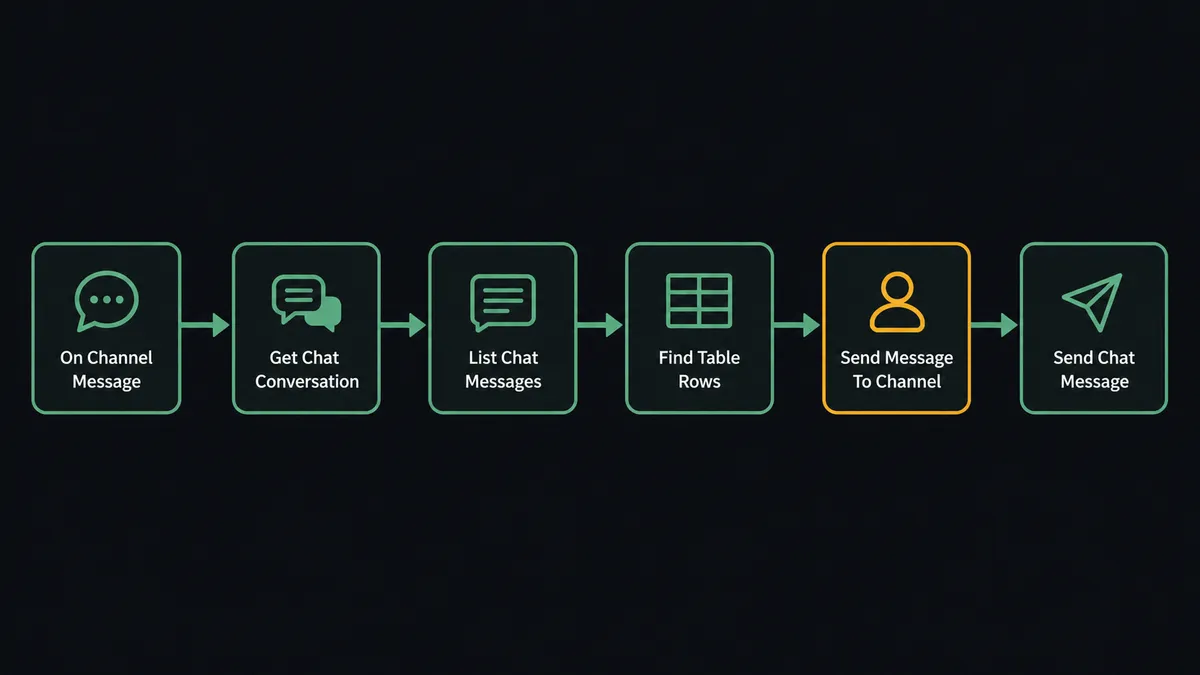
Can an AI agent run it? (and why a human stays in the loop)
Yes, and this is where the two layers of AI stop being confusing and start being useful. Botpress runs the conversation with the customer. The FlowRunner agent runs the operation around it. When an escalation fires, the orchestrating agent does the work your engineer used to do before they can even think: it reads the whole transcript from List Chat Messages, figures out what actually went wrong, pulls the relevant rows with Find Table Rows, checks prior conversations with List Chat Conversations, and writes a draft reply that cites the specific facts it found. Its toolbox is the real action set, and it chooses which tools each escalation needs.
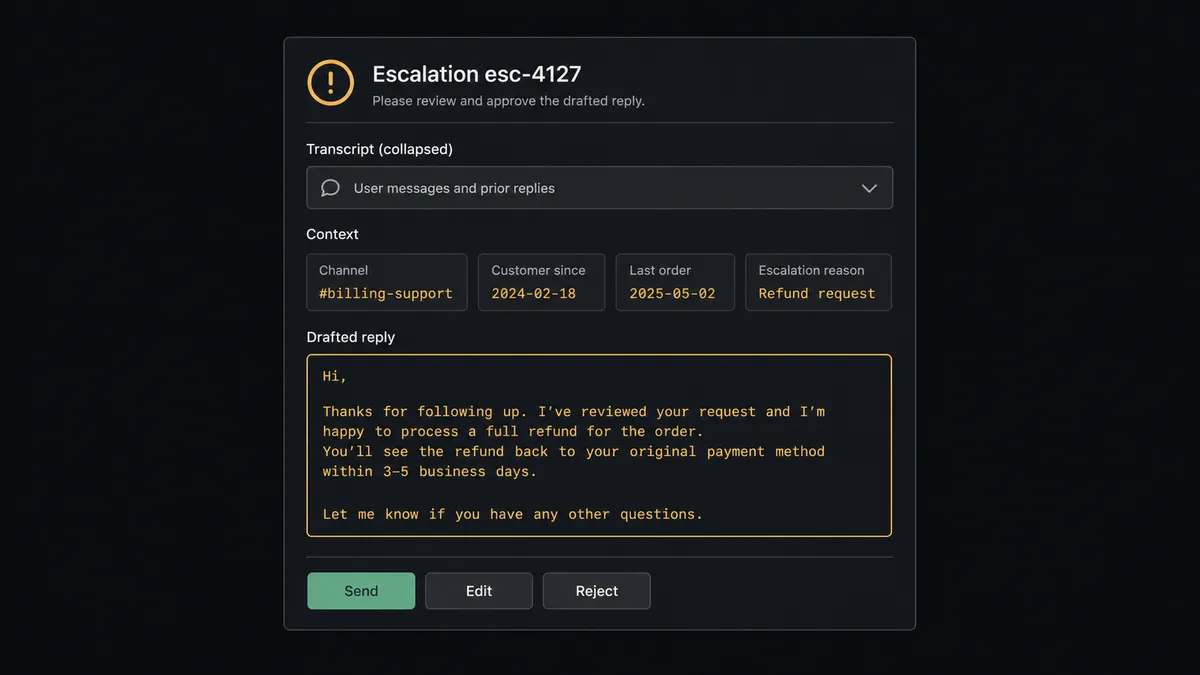
The consequential step is Send Chat Message. That action delivers text into a live conversation with a real customer, and there is no unsending it. So the agent holds it behind a human-in-loop flow it invokes as a callable tool. The workflow pauses and posts to the channel: “Conversation esc-4127: customer disputes a duplicate charge. Assistant could not verify the second transaction. Draft reply attached, refund policy cited from Tables. Approve, edit, or reject before I send.” The engineer edits one sentence, clicks approve, and only then does Send Chat Message fire. The transcript, the draft, the edit, the approver, and the timestamp all land in the audit trail.
This is the digital andon cord, the framing our own prospects gave us: like the pull cord on a Toyota line, the workflow stops the line the moment the next step reaches a customer. Reading transcripts, gathering context, drafting: full speed. Speaking in your company’s voice to a person who is already frustrated: a human signs that.
FlowRunner vs LangChain
Builders comparing this to LangChain are asking a fair question, and LangChain’s strengths are real: it is code, so every behavior is yours to define, the ecosystem of integrations and patterns is huge, and nothing about this flow is impossible to write with it. If you want to own every line between Slack’s events API and the Botpress Chat API, LangChain will not stop you.
The difference is what you maintain versus what you get as infrastructure. Here is the honest side-by-side.
| What matters for this pair | FlowRunner | LangChain |
|---|---|---|
| Human-in-the-loop before Send Chat Message | Native. The agent invokes an approval flow as a callable tool and waits | A pattern you implement: interrupt state, approval UI, resume logic, all yours to build and keep working |
| Who runs the flow | An AI agent reads, reasons, picks actions as tools, visually inspectable | Your code; powerful, and every retry, timeout, and state store is your code too |
| Users included | Unlimited users on every tier; ops teammates see and run the same flow | Whoever can read the codebase |
| Bring your own AI keys | Yes, BYOK | Yes, BYOK by nature |
| Self-hosted option | Yes, cloud-hosted or self-hosted | Self-hosted by definition; you own the infrastructure either way |
| Pricing model | Transparent workflow-based tiers | Free framework, paid in engineering time and the observability stack around it |
If this escalation loop is core product for you and you want it in your own codebase with custom everything, LangChain is a defensible build. If it is operations, something that should work this week, be visible to the support team, and not page you when a dependency changes, this pairing is the better fit.
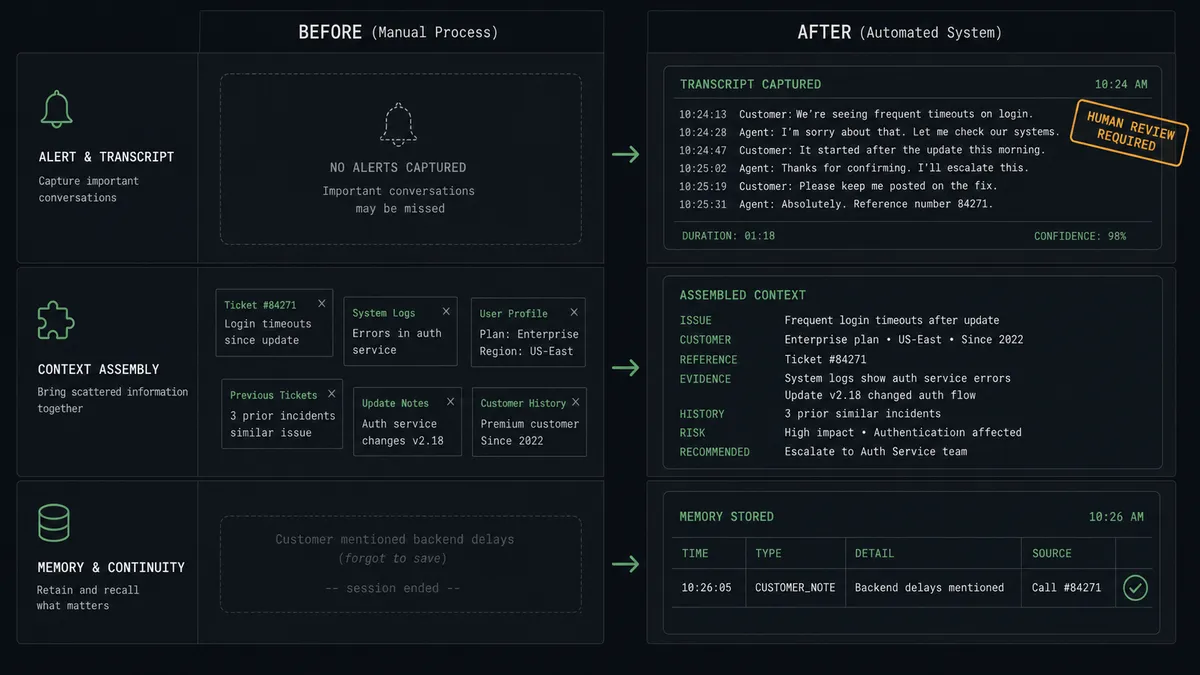
Before and after
| Category | Before | After |
|---|---|---|
| Escalation arrival | A webhook or email says a user needs help, with no transcript | The full transcript and Table context arrive in Slack as one card |
| Context gathering | Engineer tabs between the Botpress dashboard and the customer database | Find Table Rows and List Chat Conversations run before the card is even posted |
| Reply drafting | Written from scratch under time pressure | Drafted by the agent with cited context, edited by a person |
| Delivery risk | Replies pasted by hand into the right conversation, usually | Send Chat Message targets the exact conversation ID, after named approval |
| Institutional memory | Resolutions live in engineers’ heads | Create Table Rows writes every outcome back where the assistant can use it |
What you can build
Escalation desk in Slack. On Channel Message picks up escalations, the agent assembles transcript plus Find Table Rows context, and the approved reply ships via Send Chat Message. Engineers never open the Botpress dashboard for routine handoffs.
Conversation lookup on demand. On Mention with a conversation ID, the agent runs Get Chat Conversation and List Chat Messages and posts a summary with the raw transcript threaded underneath. Debugging a reported conversation takes one message.
Daily conversation review. On a schedule, the agent runs List Conversations and List Events, clusters where conversations stalled or ended unresolved, and posts a digest to Slack with the five transcripts most worth a human read.
Gated knowledge writes. When a resolution reveals a gap, the agent proposes the exact rows to add with Create Table Rows or fix with Update Table Rows, and posts the change for approval. The data your assistant relies on never mutates silently.
File-backed handoffs. When an escalated customer shares a document, the agent stores it with Upload File and links it in the Slack card, so the person approving the reply is looking at the same attachment the customer sent.
Getting started
Start on the free plan: 100 executions a month, every integration included, no credit card required, plus 14 days of Professional for new accounts. Both connectors are available on every tier, and every tier includes unlimited users and unlimited workflows.
Explore the integration details:
- Slack integration (8 triggers and 16 actions covering messages, channels, members, and interactive approvals)
- Botpress integration (40 actions covering the Chat API, conversations, users, Tables, and Files)
Start building free at flowrunner.ai or book a demo to see a live Slack to Botpress workflow, reply approval and all.
Frequently asked questions
Is it free to connect Slack and Botpress on FlowRunner?
You can build and run the connection on FlowRunner's free plan, which includes 100 executions a month and every integration with no credit card required, and new accounts also get 14 days of Professional. Both connectors are available on every FlowRunner tier, and every tier includes unlimited users and unlimited workflows.
Can I self-host the Slack to Botpress workflow?
Yes. FlowRunner offers a cloud-hosted option and a self-hosted option, so the connection can run inside your own environment.
Does the AI agent need my own OpenAI or Claude key?
FlowRunner uses a bring-your-own-keys model, so you connect the AI provider key you already have. You are not locked to one model.
What happens when the orchestrating agent is unsure how to answer an escalated conversation?
It says so instead of guessing. The agent posts the transcript to Slack with what it knows, what it could not verify, and a draft marked as uncertain. Send Chat Message never fires into the live conversation until a person edits or approves the text.
Which Slack triggers and Botpress actions does this connection use?
Slack's On Channel Message and On Mention triggers start the flow, and On Block Action captures the approval click. On the Botpress side the workflow uses Get Chat Conversation, List Chat Messages, Send Chat Message, Find Table Rows, and Create Table Rows.
Can the workflow read and write Botpress Tables?
Yes. Find Table Rows pulls account or order context the assistant stored during the conversation, and Create Table Rows or Update Table Rows writes the resolution back, so the next conversation with the same user starts warmer. Table writes that change live assistant behavior are gated the same way replies are.