How to Connect Slack with Chatbase (With or Without an AI Agent)
Connect Slack to Chatbase so docs changes retrain your customer-facing assistant and captured leads reach your team, with an orchestrating agent that pauses for a human before Update Chatbot Data changes what the live assistant tells customers.
How do you connect Slack to Chatbase?
You connect Slack to Chatbase by having Slack’s On Channel Message trigger drive Chatbase’s training and data actions: a docs or policy update posted in the watched channel is drafted into training text, applied with Update Chatbot Data, and verified with Send Chat Message, while Get Leads and Get Conversations carry what the assistant captured back into Slack. FlowRunner is a visual AI-agent orchestration platform where automations run autonomously and pause for human judgment on the steps that carry real consequence. The same connection can run as an orchestrating AI agent that drafts the retrain, tests what the assistant currently says, and pauses for a named human before the knowledge behind a live customer-facing assistant changes.
The problem it solves
A Chatbase assistant is only as current as the last time someone retrained it, and “someone” is usually you. The pricing page changes, the refund window moves from 30 to 14 days, a feature ships, and the assistant keeps answering from the old world until a builder remembers to paste new text into the dashboard. Every support team running a docs-grounded assistant knows the gap: the docs channel in Slack announces the change on Tuesday, and the assistant tells customers the old policy through Friday. The other direction leaks too: the assistant captures leads and revealing conversations all day, and they sit in the Chatbase dashboard where sales never looks.
The edges are what make retraining scary enough to procrastinate on. Training text pasted with an ambiguity that flips an answer’s meaning. An update that fixes one question and quietly breaks the two adjacent ones nobody thought to retest. There is no staging environment between the paste and the customer: the moment the data updates, the live assistant says the new thing to real people. So retrains get batched, delayed, and done nervously at 6pm, which is exactly how mistakes get made.
How it works: the connection
The connection bridges the docs channel and the assistant’s knowledge. Here is the plain version, grounded in the real connector actions.
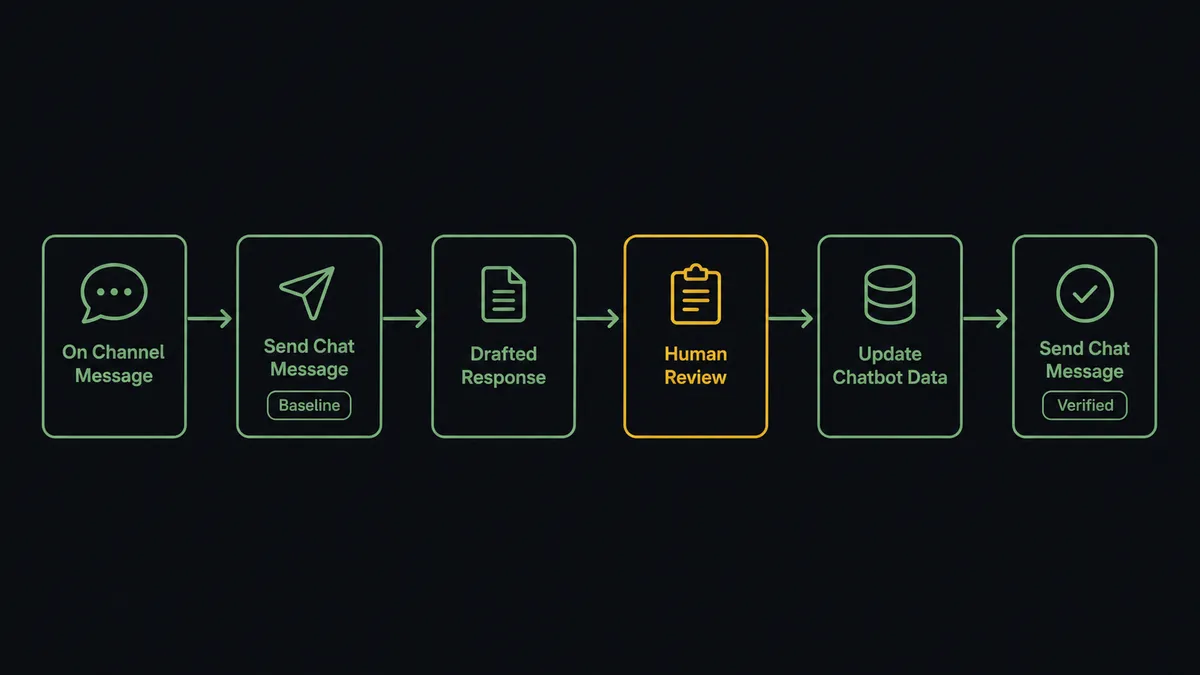
- Trigger: Slack fires On Channel Message when an update lands in the docs channel: “Refund window is now 14 days, docs updated.”
- Read: The workflow calls Get Message to pull the announcement and any thread discussion.
- Baseline: It calls Send Chat Message to ask the assistant the affected questions now, capturing what customers currently hear.
- Draft: The agent writes the replacement training text and pairs it with the baseline as a before-and-after.
- Review: Send Message To Channel posts the review card; Send Direct Message nudges the docs owner if it sits unanswered.
- Retrain: After the approval click, Update Chatbot Data applies the new text to the assistant.
- Verify: The workflow calls Send Chat Message again with the same test questions and posts the new answers to the thread, closing the loop with evidence.
That is the “just connect them” answer. The docs channel becomes the retraining pipeline, with a before-and-after and a verification pass built in. The reverse lane runs on a schedule: Get Leads and Get Conversations feed a digest into Slack, so what the assistant learns about your prospects stops dying in a dashboard.
Can an AI agent run it? (and why a human stays in the loop)
Yes, and there are two AI layers doing different jobs, which is the point. Chatbase runs the conversation with customers. The FlowRunner agent runs the operation around it: reading the docs change, deciding which of the assistant’s answers it touches, drafting training text that says the new policy without contradicting the rest of the knowledge, and probing the live assistant with Send Chat Message the way a careful builder would before and after any change. Its toolbox is the real action set: Send Chat Message, Update Chatbot Data, Get Conversations, Get Leads, List Chatbots.
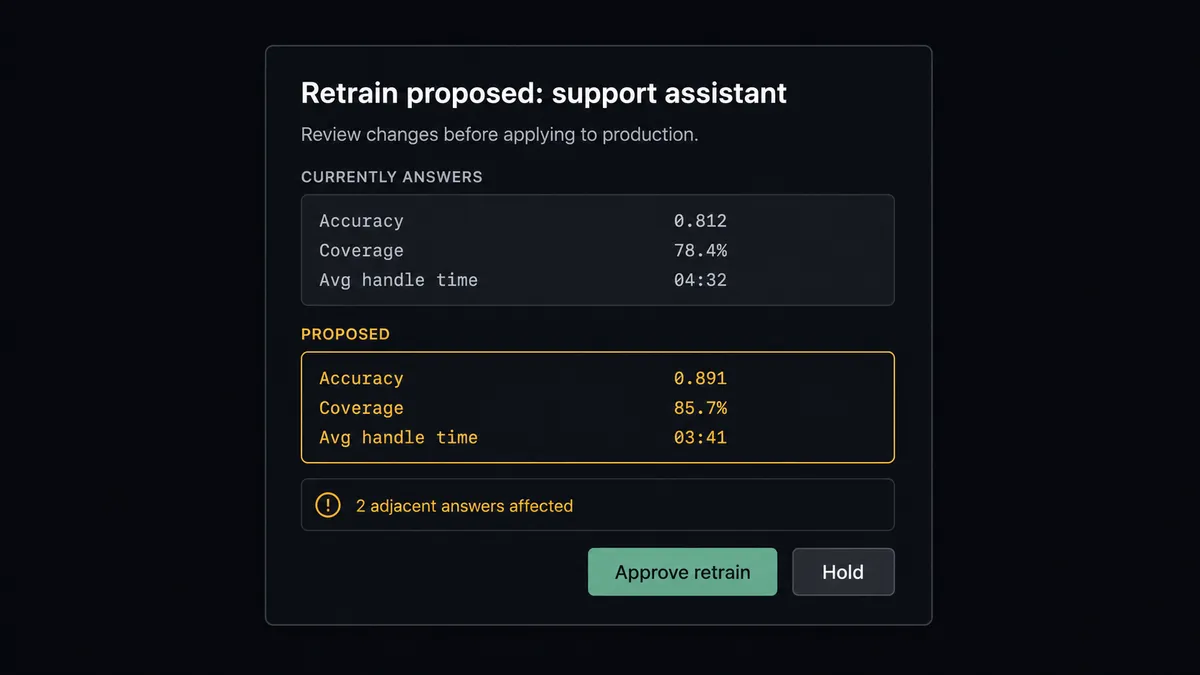
The consequential step is the retrain itself. Update Chatbot Data does not stage anything; it changes what a production assistant tells real customers from that moment on. So the agent holds it behind a human-in-loop flow it invokes as a callable tool. The workflow pauses and posts: “Retrain proposed for the support assistant. Currently answers ‘refunds within 30 days’. Proposed text sets 14 days, effective for purchases after Aug 1. Two adjacent answers reference the old window; drafts for both attached. Approve retrain?” A named approver reads the before-and-after, clicks once, and only then does the knowledge change. The verification pass runs immediately, and the new answers land in the thread as proof. Delete Chatbot and settings changes via Update Chatbot Settings sit behind the same gate, no exceptions.
This is the digital andon cord, the framing our own prospects gave us: like the pull cord on a Toyota line, the workflow stops the line the moment the next step changes what your company says to customers at scale. Drafting and testing run free. The knowledge of a live assistant changes only with a name attached.
FlowRunner vs LangChain
Builders weighing this against LangChain are weighing build against orchestrate, and the build case is real: LangChain gives you code-level control, a massive ecosystem, and the freedom to implement this exact loop, Slack events in, Chatbase API calls out, any way you want. Nothing here is beyond a competent engineer with a few weeks.
The question is whether this loop is your product or your operations. Here is the honest side-by-side.
| What matters for this pair | FlowRunner | LangChain |
|---|---|---|
| Human-in-the-loop before Update Chatbot Data | Native. The agent invokes an approval flow as a callable tool, before-and-after attached | A pattern you implement: interrupt state, review UI, resume logic, all maintained by you |
| Who runs the flow | An AI agent drafts, baselines, verifies, picks actions as tools, visible on a canvas | Your code; every retry, webhook, and state store is also your code |
| Users included | Unlimited users on every tier; docs owners approve without touching code | Whoever can read the repository |
| Bring your own AI keys | Yes, BYOK | Yes, BYOK by nature |
| Self-hosted option | Yes, cloud-hosted or self-hosted | Self-hosted by definition; the infrastructure is yours either way |
| Pricing model | Transparent workflow-based tiers | Free framework, paid in engineering time and the observability you build around it |
If retraining pipelines are core product and you want them in your codebase, LangChain is a defensible build. If keeping a support assistant current should be a governed operational loop your docs team can run this week, this pairing is the better fit.
Before and after
| Category | Before | After |
|---|---|---|
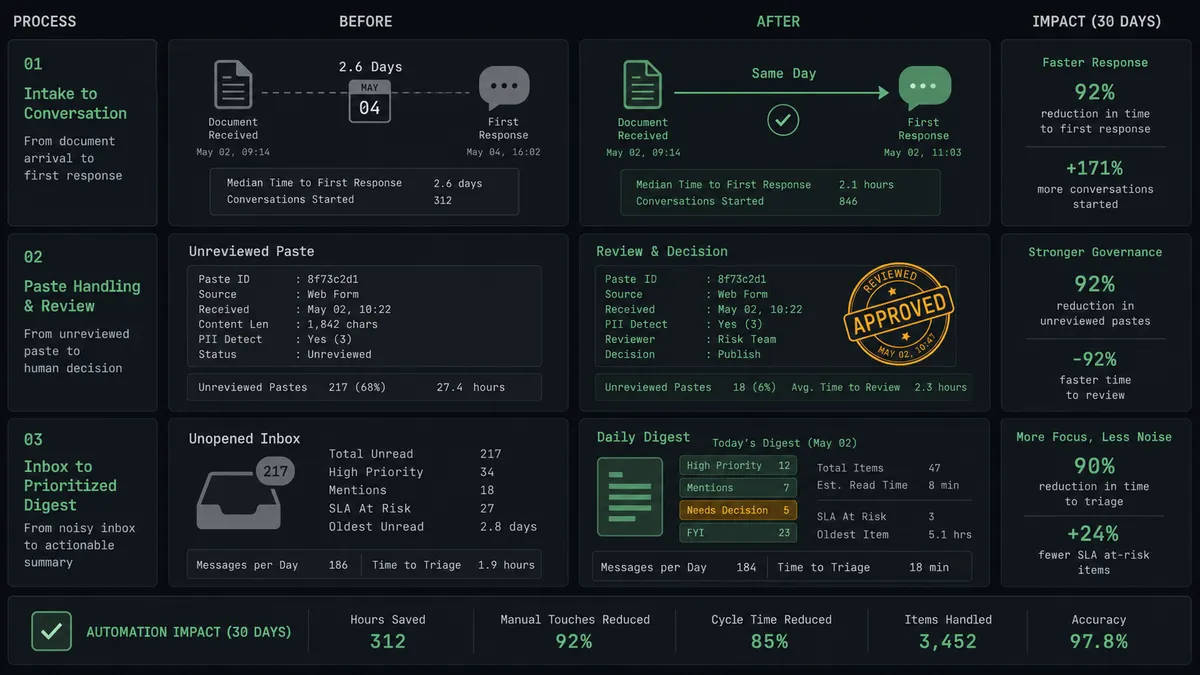
| Docs-to-assistant lag | The assistant answers from the old policy until someone remembers to retrain | The docs channel announcement becomes a drafted, reviewed retrain the same day |
| Retrain safety | Text pasted into the dashboard, effects discovered by customers | Before-and-after review, named approval, adjacent answers checked |
| Verification | Nobody retests after a retrain | Send Chat Message probes run automatically, answers posted as proof |
| Captured leads | Sitting in the Chatbase dashboard unseen | Get Leads digests them into the sales channel with the question that captured them |
| Conversation insight | Reviewed never, or in quarterly cleanups | Get Conversations feeds a recurring digest of what customers actually ask |
What you can build
Docs-to-retrain pipeline. On Channel Message catches the announcement, the agent baselines with Send Chat Message, drafts the text, and Update Chatbot Data runs after a named approval, with verification posted in-thread. The assistant stops lagging the docs.
Lead flow into sales. On a schedule, Get Leads pulls what the assistant captured, and the agent posts each lead with the conversation context that produced it, so sales follows up on a question, not just an email address.
Conversation quality digest. Get Conversations feeds the agent a periodic sample; it clusters what customers ask, flags answers that read as stale or thin, and proposes the next retrain, turning the assistant’s own traffic into its maintenance schedule.
On-demand assistant testing. On Mention, “ask the assistant what our refund policy is”, the agent runs Send Chat Message and posts the live answer, so anyone can spot-check what customers are being told without leaving Slack.
Multi-assistant fleet checks. For teams running several assistants, List Chatbots enumerates them and the agent runs the same test questions across the fleet, reporting which ones drifted after a shared policy change.
Getting started
Start on the free plan: 100 executions a month, every integration included, no credit card required, plus 14 days of Professional for new accounts. Both connectors are available on every tier, and every tier includes unlimited users and unlimited workflows.
Explore the integration details:
- Slack integration (8 triggers and 16 actions covering messages, channels, members, and interactive approvals)
- Chatbase integration (8 actions covering chat, training data, conversations, and leads)
Start building free at flowrunner.ai or book a demo to see a live Slack to Chatbase workflow, retrain approval and all.
Frequently asked questions
Is it free to connect Slack and Chatbase on FlowRunner?
You can build and run the connection on FlowRunner's free plan, which includes 100 executions a month and every integration with no credit card required, and new accounts also get 14 days of Professional. Both connectors are available on every FlowRunner tier, and every tier includes unlimited users and unlimited workflows.
Can I self-host the Slack to Chatbase workflow?
Yes. FlowRunner offers a cloud-hosted option and a self-hosted option, so the connection can run inside your own environment.
Does the AI agent need my own OpenAI or Claude key?
FlowRunner uses a bring-your-own-keys model, so you connect the AI provider key you already have. You are not locked to one model.
What happens when the agent is unsure whether a docs change should retrain the assistant?
It holds the retrain. The agent posts the proposed training text with what it is unsure about, an ambiguous policy wording, a conflict with existing answers it found by testing with Send Chat Message, and waits. Update Chatbot Data never runs on the agent's own judgment.
Which Slack triggers and Chatbase actions does this connection use?
Slack's On Channel Message and On Mention triggers start the flows, with On Block Action capturing approvals. On the Chatbase side the workflow uses Send Chat Message, Update Chatbot Data, Get Conversations, Get Leads, and List Chatbots.
How does the workflow verify a retrain actually worked?
After Update Chatbot Data runs, the agent asks the assistant the questions the change should affect using Send Chat Message, and posts the new answers to the Slack thread. If an answer still reflects the old policy, the team sees it immediately instead of hearing it from a customer.