How to Connect Outlook with Botpress (With or Without an AI Agent)
Route a shared Outlook inbox through your deployed Botpress chatbot, with an AI agent that judges whether the answer actually resolves the question and holds every outbound reply as a draft until a person approves the send.
How do you connect Outlook to Botpress?
Neither service exposes a trigger, so you connect Outlook to Botpress with a polling workflow: Get Emails reads the shared inbox on a schedule, each new question opens a session with your deployed chatbot via Create Chat User, Create Chat Conversation, and Send Chat Message, and the answer comes back through List Chat Messages to become an email reply. FlowRunner is a visual AI-agent orchestration platform where automations run autonomously and pause for human judgment on the steps that carry real consequence. Run as an AI agent, the same connection adds the missing layer: an agent that judges whether the chatbot’s answer actually resolves the question, and stages every customer-facing reply as a draft a person releases.
The problem it solves
You built and trained a Botpress assistant, and it answers well on the site widget. But a large share of your support volume never touches the widget. It lands in a shared Outlook inbox, where a person reads each message, recognizes that the chatbot could have answered most of them, and types the answer anyway. The knowledge you invested in the assistant sits unused for the channel where customers actually show up, and the inbox gets triaged only when someone has time.
The edges are where trust erodes. A pipe that fires chatbot answers straight back as emails works until the first confidently wrong reply goes out under your domain from a real mailbox, unrecallable. And the misses are invisible: nobody logs which questions the assistant fumbled, so the same gap produces the same wrong answer next week. The email channel needs a quality judgment between the generated answer and the send button, and a feedback path from misses back into the assistant’s data.
How it works: the connection
The connection reads from Outlook, converses with Botpress, and writes back to Outlook. Here is the plain version, grounded in the real connector actions.
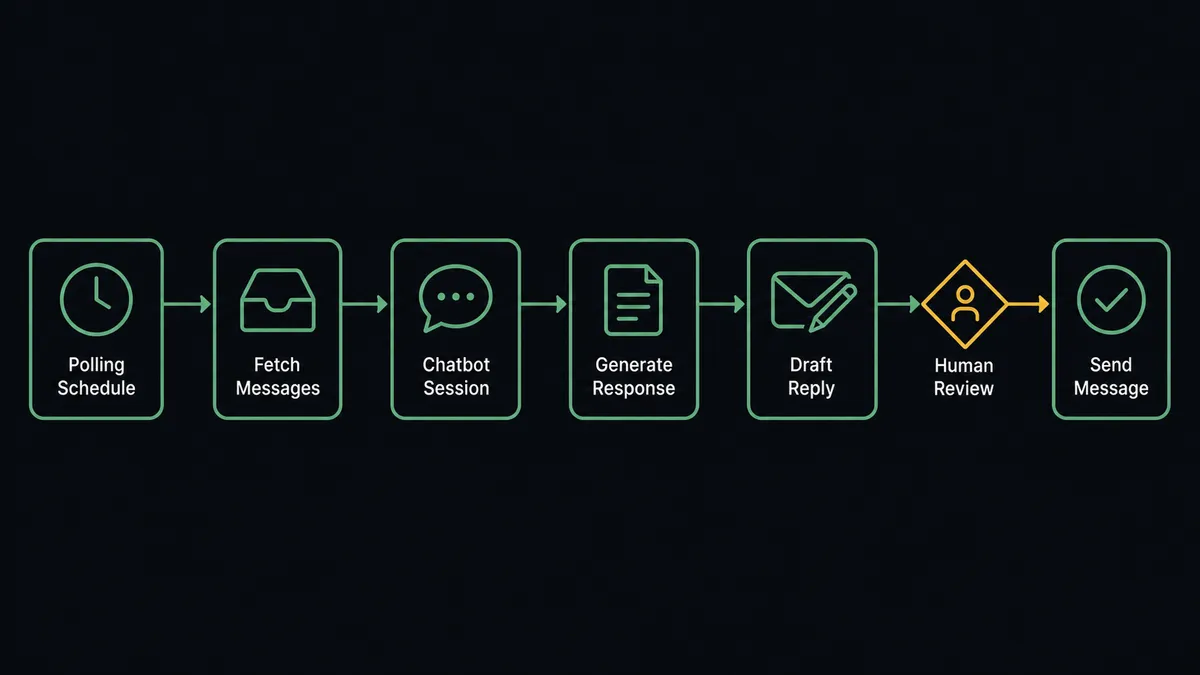
- Trigger: On a schedule, Get Emails polls the shared inbox every 15 minutes for new messages.
- Read: The workflow calls Get Email for each new message and classifies it: a question, a follow-up on an open thread, or noise to archive.
- Open the session: For each question, it calls Create Chat User and Create Chat Conversation so the exchange has a persistent identity in Botpress.
- Ask: It submits the question with Send Chat Message, passing the email subject and body as the message text.
- Read the answer: It calls List Chat Messages to pull the chatbot’s reply back into the workflow.
- Respond: It stages the reply with Create Draft Email in the original thread, so the response reads as a normal email from the shared mailbox, then releases it with Send Draft Email.
- File: Handled messages move out of the active queue via Get Email Folders routing, keeping the inbox a work queue instead of an archive.
That is the “just connect them” answer. The assistant you already trained starts answering the channel that carries most of your real volume, on the same 15-minute rhythm all day.
Can an AI agent run it? (and why a human stays in the loop)
Yes, and for a builder this is the interesting part: the agent is not a pipe, it is a judge with tools. It holds the real actions on both sides: Get Emails, Create Draft Email, Send Draft Email, Reply to Email, Forward Email on the Outlook side; Send Chat Message, List Chat Messages, Create Table Rows, Upsert Table Rows, Find Table Rows on the Botpress side. For each inbound message it reasons about routing: a question the deployed assistant covers, a billing dispute that goes straight to a person via Forward Email, or a thread continuation that needs prior context before anything is asked.
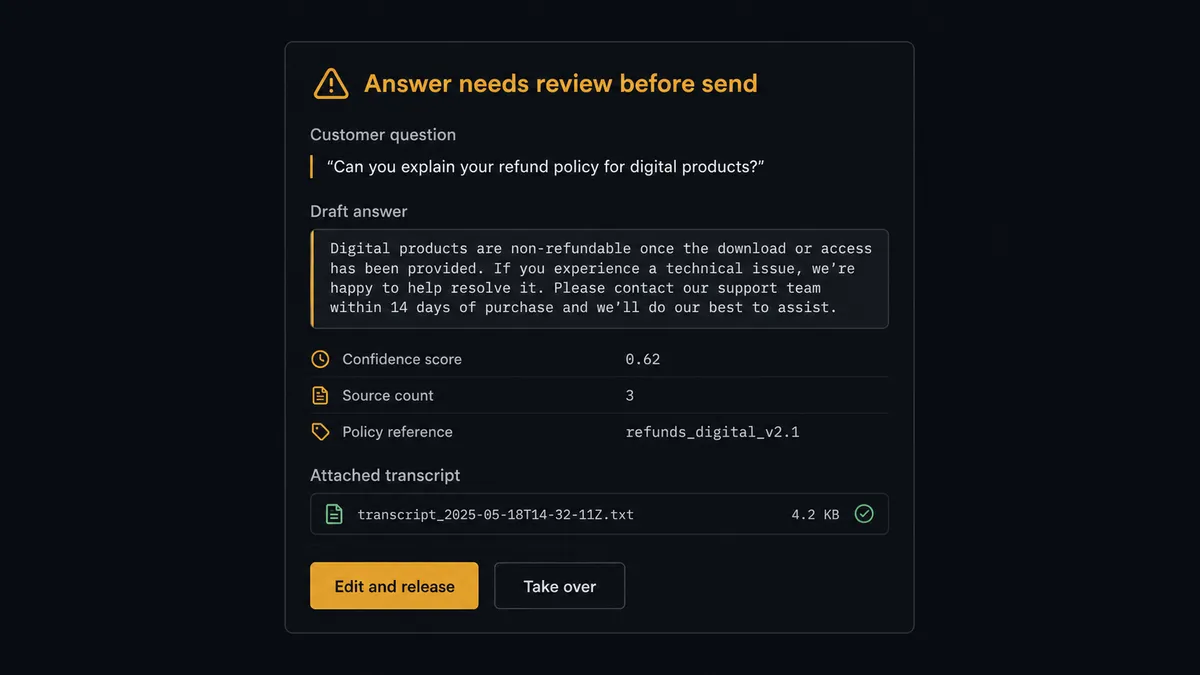
The consequential step is Send Draft Email. An email from your real mailbox, under your domain, to a customer, cannot be recalled, and a wrong answer delivered confidently costs more than a slow one. So the agent reads the chatbot’s reply with List Chat Messages and evaluates it against the question. Answers it judges complete get staged and released under standing policy you define. Answers it judges incomplete, off-target, or high-stakes trigger the human-in-loop flow the agent holds as a callable tool. The workflow pauses and posts to the support channel: “Inbound question from [sender] on [subject]. The assistant’s answer is attached, along with the full transcript. I am not confident it resolves the question. Edit and release, or take over?” The support owner edits the draft and releases it with Send Draft Email. The transcript, the judgment, the edits, and the releasing approver all land in the audit trail.
The loop also closes backward. Questions the assistant misses are written into Botpress Tables with Upsert Table Rows, so the data behind its answers grows from real traffic and the same miss stops repeating. Prospects call the pause a digital andon cord: like Toyota’s quality control pull cord, the workflow stops the line the moment it hits uncertainty, and your team pulls it back into motion.
FlowRunner vs LangChain
A builder evaluating this stack will consider writing it in LangChain, and the case for that is real. LangChain gives you full programmatic control: any chain shape, any memory strategy, any custom evaluation logic you can express in Python or TypeScript, backed by a large open-source ecosystem of integrations and patterns. If the orchestration logic itself is your product, that control is worth owning.
For this pair, the difference is what you have to build versus what you get. FlowRunner ships the orchestration layer as a platform: the visual flow, the polling infrastructure, the human-approval mechanics, the audit trail, and the retry behavior are already there. Here is the honest side-by-side.
| What matters for this pair | FlowRunner | LangChain |
|---|---|---|
| Human-in-the-loop on releasing customer emails | Native. The agent invokes an approval flow as a callable tool and pauses before Send Draft Email | You design and code your own interrupt and approval mechanics, plus the UI a reviewer uses |
| Who runs the flow | An AI agent reads, reasons, and picks actions as tools inside a managed runtime | Your code, which you host, monitor, patch, and keep running |
| Users included | Unlimited users on every tier | A framework, not a platform: user management is yours to build |
| Bring your own AI keys | Yes, BYOK | Yes, by definition; keys live in your configuration |
| Self-hosted option | Yes, cloud-hosted or self-hosted | Runs wherever you deploy it, and the infrastructure is yours to operate |
| Pricing model | Transparent workflow-based tiers | Free framework; the cost is engineering time, hosting, and maintenance |
If you are building a bespoke conversational product where orchestration logic is the differentiator, LangChain is the right substrate. If you want the inbox-to-assistant loop running this week, with approval mechanics and an audit trail you did not have to write, that is where FlowRunner is the better fit.
Before and after
The shift is qualitative: the assistant you already built starts carrying the channel it was blind to.
| Category | Before | After |
|---|---|---|
| Channel coverage | The Botpress assistant answers the widget; the Outlook inbox is answered by hand | Every inbox question runs through the assistant first, on a 15-minute rhythm |
| Answer quality control | Whoever replies fastest decides what the customer hears | An agent judges each generated answer, and uncertain ones wait for a person |
| Failure visibility | Missed questions vanish into sent mail; nobody knows what the assistant fumbles | Every escalation is logged with its transcript, and misses feed Botpress Tables |
| Response rhythm | Questions wait for the next manual triage pass, or overnight | Resolved answers go out continuously; only the hard cases queue for a person |
| Knowledge freshness | The assistant’s data lags whatever changed in the business | Recurring misses are written back with Upsert Table Rows, so answers improve from real traffic |
What you can build
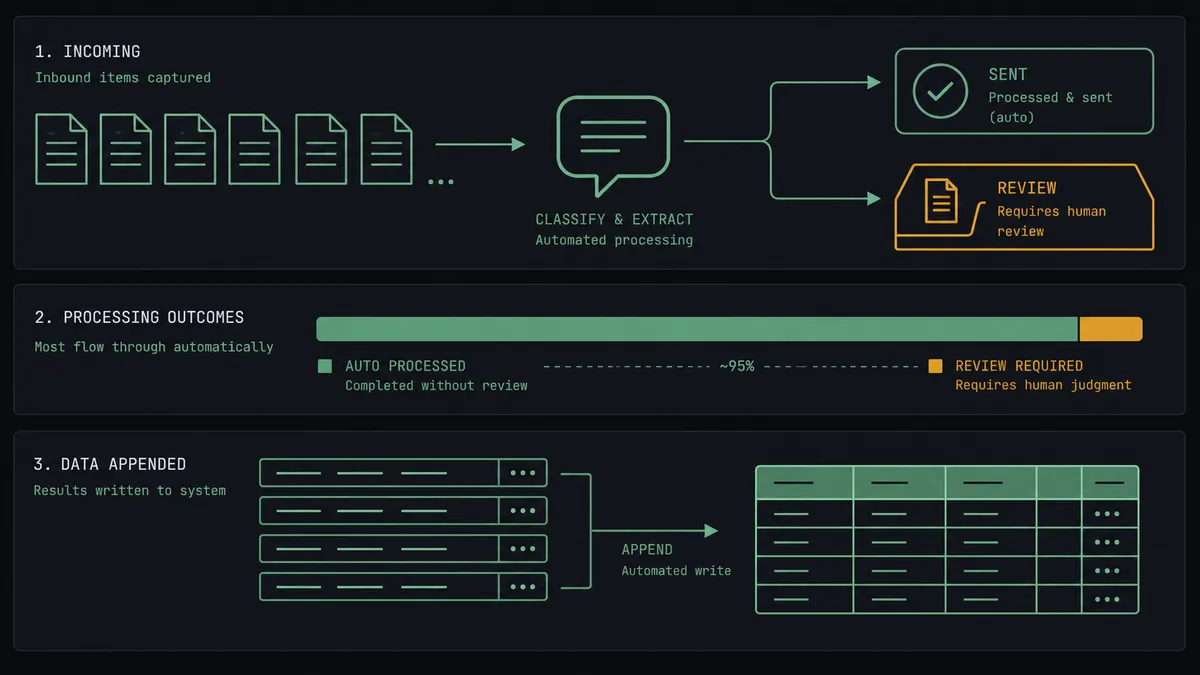
Inbox-first support triage with a human floor. Get Emails polls the shared inbox, each question runs through Send Chat Message and List Chat Messages, resolved answers release under policy, and everything else lands with the support owner as a staged draft. The assistant handles what it can; a person finishes the rest.
The draft-only rollout. For the first weeks, the agent stages every answer with Create Draft Email and releases nothing. The team reviews and sends each one with Send Draft Email, building a track record before any answer goes out unattended. Graduation to auto-release is a policy change, not a rebuild.
The knowledge feedback pipeline. Every escalated question is appended to a misses table with Create Table Rows. Weekly, the agent summarizes patterns with Find Table Rows and posts the top gaps, so improving the assistant becomes routine instead of guesswork.
The follow-up resolver. When a customer replies to an answered thread, the agent pulls the prior exchange with Get Emails, resumes the same Botpress conversation via Get Chat Conversation and Send Chat Message so context carries, and stages the follow-up answer in-thread with Reply to Email.
The specialist router. Questions the agent classifies as legal, billing disputes, or cancellations never touch the chatbot. Forward Email routes them to the named owner immediately with a one-line summary, faster than manual triage ever did.
Getting started
Start on the free plan: 100 executions a month, every integration included, no credit card required, plus 14 days of Professional for new accounts. Both connectors are available on every tier, and every tier includes unlimited users and unlimited workflows, so the whole support team can review drafts without seat math.
Explore the integration details:
- Outlook integration (21 actions covering email, drafts, folders, contacts, and calendar)
- Botpress integration (40 actions covering chat sessions, conversations, Tables, and files)
Start building free at flowrunner.ai or book a demo to see a live Outlook to Botpress workflow, draft release gate and all.
Frequently asked questions
Is it free to connect Outlook and Botpress on FlowRunner?
You can build and run the connection on FlowRunner's free plan, which includes 100 executions a month and every integration with no credit card required, and new accounts also get 14 days of Professional. Both connectors are available on every FlowRunner tier, and every tier includes unlimited users and unlimited workflows.
Can I self-host the Outlook to Botpress workflow?
Yes. FlowRunner offers a cloud-hosted option and a self-hosted option, so the connection can run inside your own environment.
Does the AI agent need my own OpenAI or Claude key?
FlowRunner uses a bring-your-own-keys model, so you connect the AI provider key you already have. You are not locked to one model.
What happens when the Botpress answer does not resolve the question?
The orchestrating agent judges each reply it reads back with List Chat Messages. When the answer is incomplete or off-target, it does not send anything. It stages the best available draft with Create Draft Email, attaches the full chat transcript, and routes the case to the support owner, who edits and releases with Send Draft Email or takes over directly.
Neither Outlook nor Botpress has a trigger, so what starts the workflow?
A schedule. The workflow polls the shared inbox with Get Emails on a short interval, typically every 15 minutes, and processes every message that arrived since the last run. Each question then flows into Botpress via Create Chat User, Create Chat Conversation, and Send Chat Message.
Can the workflow keep the chatbot's knowledge current from email traffic?
Yes. Recurring questions the chatbot misses are the signal. The agent writes them into Botpress Tables with Create Table Rows or Upsert Table Rows, so the data behind the assistant's answers reflects what customers are actually asking, and the same miss stops repeating.