How to Connect Slack with Bettermode (With or Without an AI Agent)
Run your Bettermode community from Slack: unanswered questions surface in your channel, drafted replies and announcements wait for a human before Create Post or Create Comment reaches members, and Delete Post never runs without a named approval.
How do you connect Slack to Bettermode?
You connect Slack to Bettermode by running the community’s operations from your team’s channel: a scheduled workflow calls List Spaces and List Posts to sweep recent activity, posts a digest of unanswered questions into Slack with Send Message To Channel, and publishes what your team approves back to the community with Create Post and Create Comment. FlowRunner is a visual AI-agent orchestration platform where automations run autonomously and pause for human judgment on the steps that carry real consequence. Run as an AI agent, the connection triages the community and drafts every reply on its own, and pauses for a community manager before anything member-facing publishes, because in a community the consequential step is not a database write, it is reaching your members with words carrying your name.
The problem it solves
A Bettermode community rewards presence and punishes absence. A member asks a product question on Tuesday morning; if it sits unanswered until Thursday, the member learns the community is decorative and stops posting. The community manager knows this, which is why they keep the admin panel open in a pinned tab and check it compulsively between meetings. The actual work, noticing what needs a response, finding who should write it, getting the announcement out on time, runs on one person’s vigilance, and it stops the week that person is on vacation.
The edges are reputational. An announcement goes out with a broken link because it was pasted from a doc at 6pm. A well-meaning teammate answers a pricing question wrong in public. A spam post sits on the front of a space for a day because nobody with delete rights was looking, and then someone with delete rights removes the wrong thread, permanently, because Delete Post has no undo. Communities compound trust slowly and lose it in single incidents, which is exactly why member-facing actions deserve a review step that takes seconds, not a process that takes days.
How it works: the connection
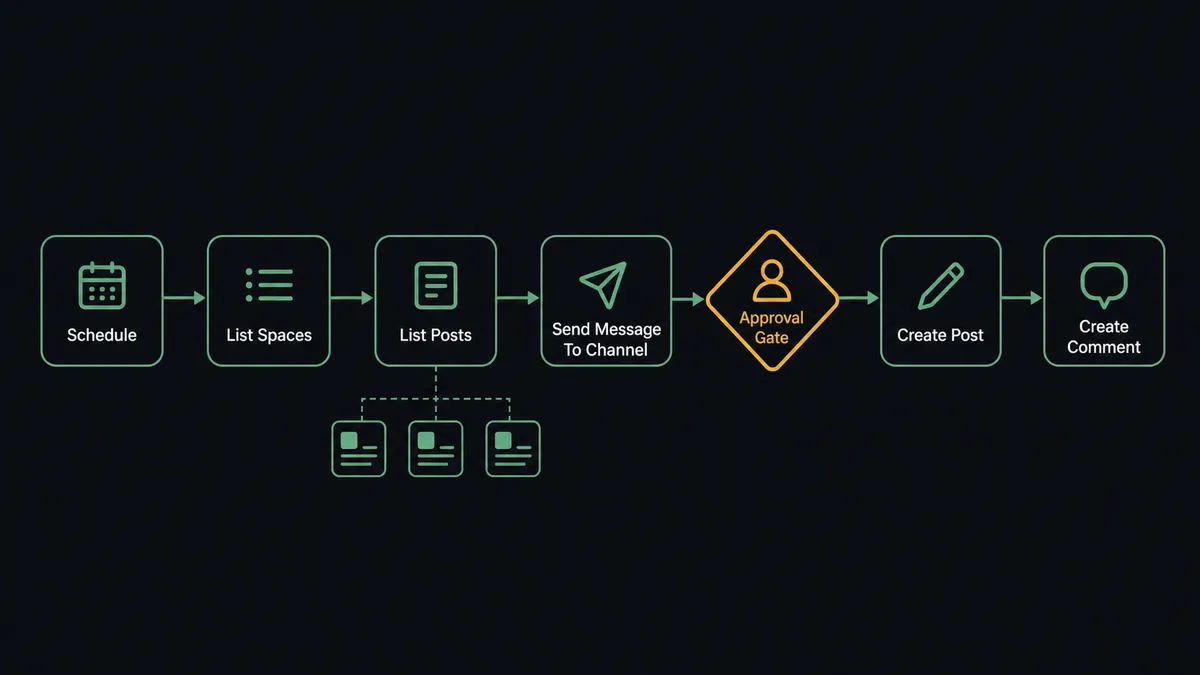
The connection sweeps Bettermode on a schedule and takes direction from Slack. Here is the plain version, grounded in the real connector actions.
- Trigger: A schedule starts the morning sweep; Bettermode has no trigger in the catalog, so the workflow polls on your cadence.
- Read the community: The workflow calls List Spaces, then List Posts per space, pulling recent posts with reply counts and timestamps.
- Find the gaps: It filters for posts with zero replies past your response-time target and pulls full context with Get Post.
- Digest to Slack: It calls Send Message To Channel with the triage: unanswered questions on top, rising threads beneath, each linked.
- Draft direction: On Channel Message picks up drafted announcements from your Slack drafting channel.
- Publish approved content: It calls Create Post into the right space, or Create Comment as a reply on the source post, after your team signs off.
- Close the loop: It calls Add Reaction on member posts your team wants to acknowledge, and List Members when a question should be routed to a specific expert.
That is the “just connect them” answer. The community’s pulse arrives in Slack every morning, and the team’s responses travel back without anyone living in the admin panel.
Can an AI agent run it? (and why a human stays in the loop)
Yes, and the agent changes what the sweep can do. A plain scheduled flow lists posts; an AI agent reads them. It holds the Bettermode actions as tools: List Posts, Get Post, List Members, Create Post, Create Comment, Add Reaction, List Tags, and Run GraphQL Query for anything deeper in the schema. During the sweep it distinguishes a how-do-I question (draft an answer from what it knows), a bug report (route to the product channel with the member’s context), and a frustrated churn signal (flag it to the community manager with history, not a canned reply). For each unanswered question it drafts the reply and attaches it to the digest, ready to approve, edit, or discard.
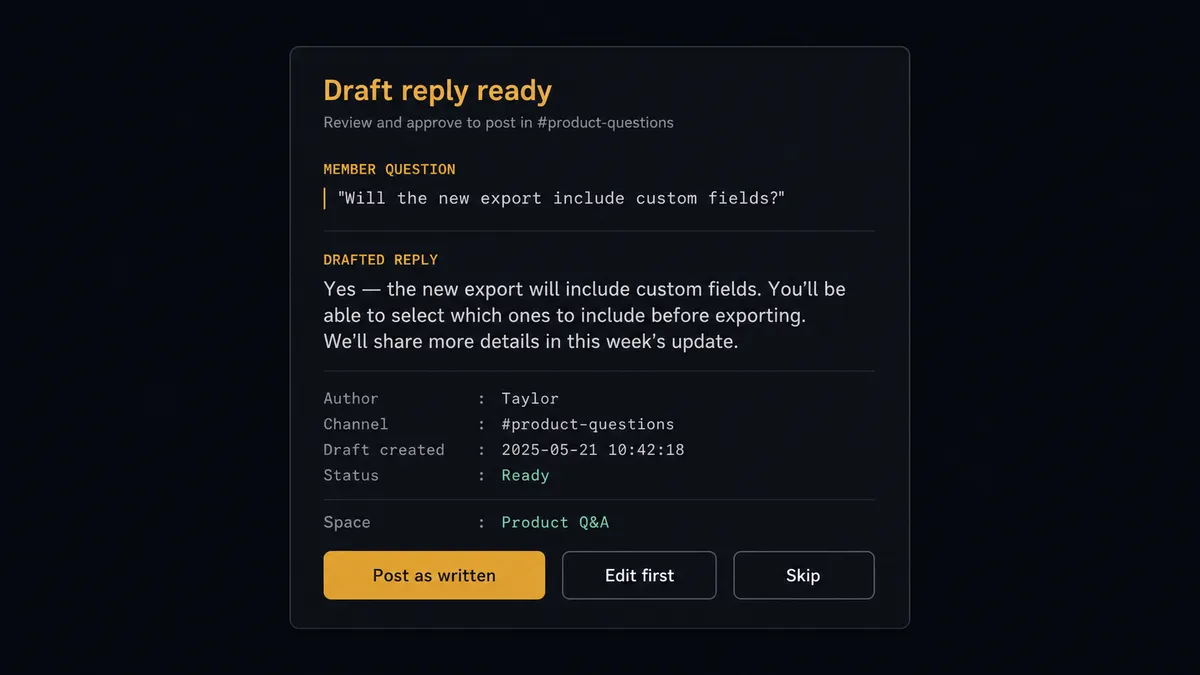
The consequential step is publication. A CRM write can be corrected quietly; a wrong answer posted under your community’s name is public the moment it lands. So the agent never calls Create Post or Create Comment directly. It invokes the human-review flow it holds as a callable tool, and the card in Slack reads: “Draft reply to [member]‘s question in [space]: [draft]. Post as written, edit, or skip?” One click publishes; the approver’s name and timestamp go to the audit trail. Delete Post is gated even harder, because it is permanent and cannot be undone: the agent presents the post, the author, and the reason, and a named community manager makes the call every single time.
This is the digital andon cord pointed at your audience: the line runs at machine speed through reading, triaging, and drafting, and stops at the exact moment words are about to reach members. Your community gets same-morning responses with a human’s judgment on every one of them.
FlowRunner vs n8n
n8n can reach Bettermode: it is fair-code, self-hostable, and its HTTP and GraphQL tooling will happily carry queries to any API a developer points it at, this one included. Technical community teams with engineering support have built real automations on it, and the node-graph model gives them full control over each step.
The distance between the two shows in who can run it and where the judgment lives. This workflow is owned by community and ops people, not engineers, and its core mechanic, a draft that pauses mid-flow for approve-edit-skip and then resumes, is native FlowRunner behavior rather than a pattern someone builds from wait nodes and maintains forever.
| What matters for this pair | FlowRunner | n8n |
|---|---|---|
| Human-in-the-loop on Create Post, Create Comment, Delete Post | Native. The agent drafts, pauses, and publishes on a one-click approval | Buildable with wait nodes and custom wiring; the approval pattern is yours to maintain |
| Who runs the flow | An AI agent reads threads, triages, drafts replies, picks actions as tools | Node graph you design per path; agent nodes exist but the graph stays fixed |
| Users included | Unlimited users on every tier | Cloud plans price by executions; unlimited self-host means running it yourself |
| Bring your own AI keys | Yes, BYOK | Yes, own keys in its AI nodes |
| Self-hosted option | Yes, cloud-hosted or self-hosted | Yes, fair-code self-host |
| Pricing model | Transparent workflow-based tiers | Execution-based cloud pricing; daily sweeps and busy communities add up |
If your community automation is an engineering project and the team wants to own every node, n8n is a workable path. If it is an operations workflow where drafts need judgment before they go public and the people applying that judgment live in Slack, this pairing is the better fit.
Before and after
| Category | Before | After |
|---|---|---|
| Unanswered questions | Found whenever someone remembers to check the admin panel | Surfaced in the morning digest with drafted replies attached |
| Response quality | Whoever answers first, sometimes wrong, in public | Every reply drafted by the agent and approved by a person before it posts |
| Announcements | Pasted into the panel at the end of the day, sometimes with broken links | Drafted in Slack, reviewed, and published through Create Post on schedule |
| Moderation | Spam sits until someone with delete rights looks; deletions are unlogged | Flagged in the digest; Delete Post runs only after a named approval |
| Coverage | The community goes quiet when the manager is out | The sweep runs daily regardless, and any teammate can approve from Slack |
What you can build
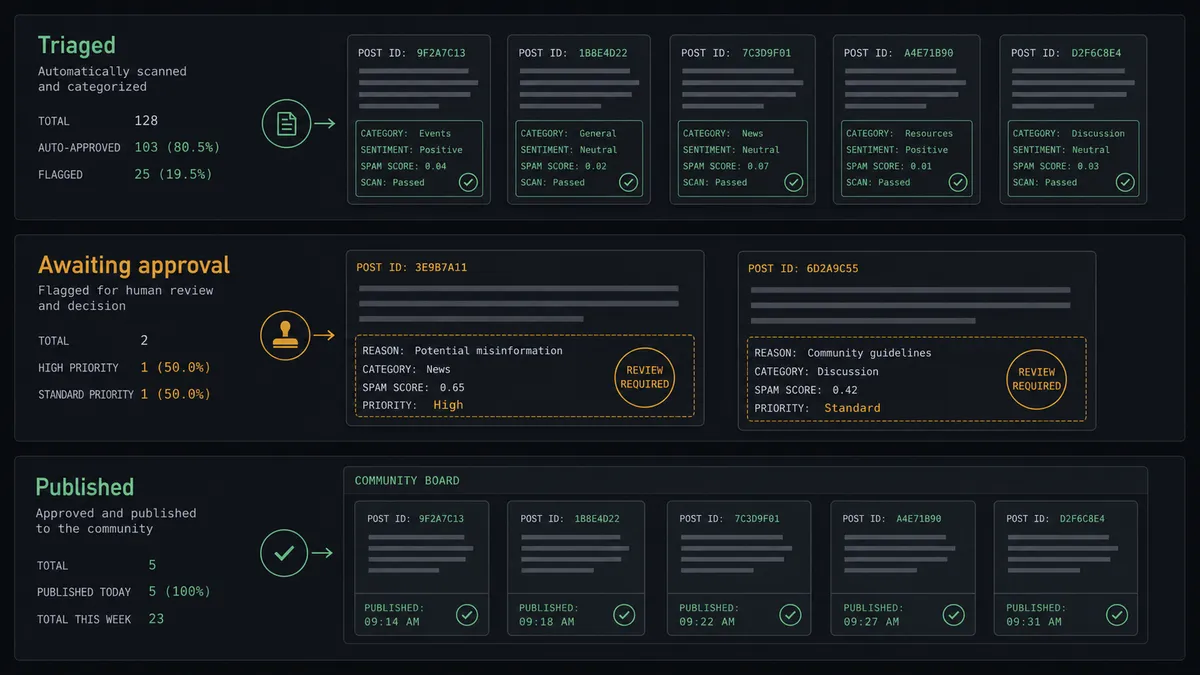
Morning community digest. The scheduled sweep calls List Spaces and List Posts, ranks unanswered questions and rising threads, and lands the triage in Slack before the team’s standup, with drafted replies ready to approve.
Approve-to-answer desk. Each drafted reply carries approve, edit, and skip options. Approved drafts publish through Create Comment on the source post, with the approver recorded. Response time drops without response quality going unowned.
Announcement pipeline. A draft posted in the Slack announcements channel becomes a formatted Create Post proposal targeted at the right space from List Spaces. It publishes when the owner clicks approve, not when someone finds time for the admin panel.
Expert routing. For questions needing a specialist, the agent uses List Members to find the right teammate, sends them a Send Direct Message in Slack with the thread context from Get Post, and tracks that an answer went out.
Gated moderation queue. Suspected spam and off-policy posts appear in the digest with author context. Delete Post executes only after a named community manager approves, and every removal is attributed in the audit trail.
Getting started
Start on the free plan: 100 executions a month, every integration included, no credit card required, plus 14 days of Professional for new accounts. Both connectors are available on every tier, and every tier includes unlimited users and unlimited workflows.
Explore the integration details:
- Slack integration (8 triggers and 16 actions covering messages, reactions, files, and channel management)
- Bettermode integration (14 actions covering posts, comments, members, spaces, and GraphQL)
Start building free at flowrunner.ai or book a demo to see a live Slack to Bettermode workflow, publish gate and all.
Frequently asked questions
Is it free to connect Slack and Bettermode on FlowRunner?
You can build and run the connection on FlowRunner's free plan, which includes 100 executions a month and every integration with no credit card required, and new accounts also get 14 days of Professional. Both connectors are available on every FlowRunner tier, and every tier includes unlimited users and unlimited workflows.
Can I self-host the Slack to Bettermode workflow?
Yes. FlowRunner offers a cloud-hosted option and a self-hosted option, so the connection can run inside your own environment.
Does the AI agent need my own OpenAI or Claude key?
FlowRunner uses a bring-your-own-keys model, so you connect the AI provider key you already have. You are not locked to one model.
Can the agent post to the community without approval?
Not in this design. Anything member-facing, a Create Post announcement or a Create Comment reply, is drafted by the agent and posted to Slack for a one-click approval first. Reading actions like List Posts and List Members run freely; publishing waits for a person.
Which Slack triggers drive the Bettermode workflow?
On Channel Message turns your Slack announcements channel into a drafting queue for the community, On Mention lets teammates ask the agent about community activity, and a schedule drives the recurring sweep that calls List Posts to find unanswered questions. Bettermode has no trigger in the catalog, so Slack and the schedule start every flow.
What happens when someone asks to remove a community post?
Delete Post is permanent and cannot be undone, so the agent treats it as a hard gate. It fetches the post with Get Post, posts the content and author context to Slack, and a named community manager approves before the deletion runs. The decision is captured in the audit trail.