How to Connect HubSpot with Bettermode (With or Without an AI Agent)
Connect your Bettermode community to HubSpot so members become CRM contacts with their activity on the record, with a human moderator approving every irreversible post deletion before it runs.
How do you connect HubSpot to Bettermode?
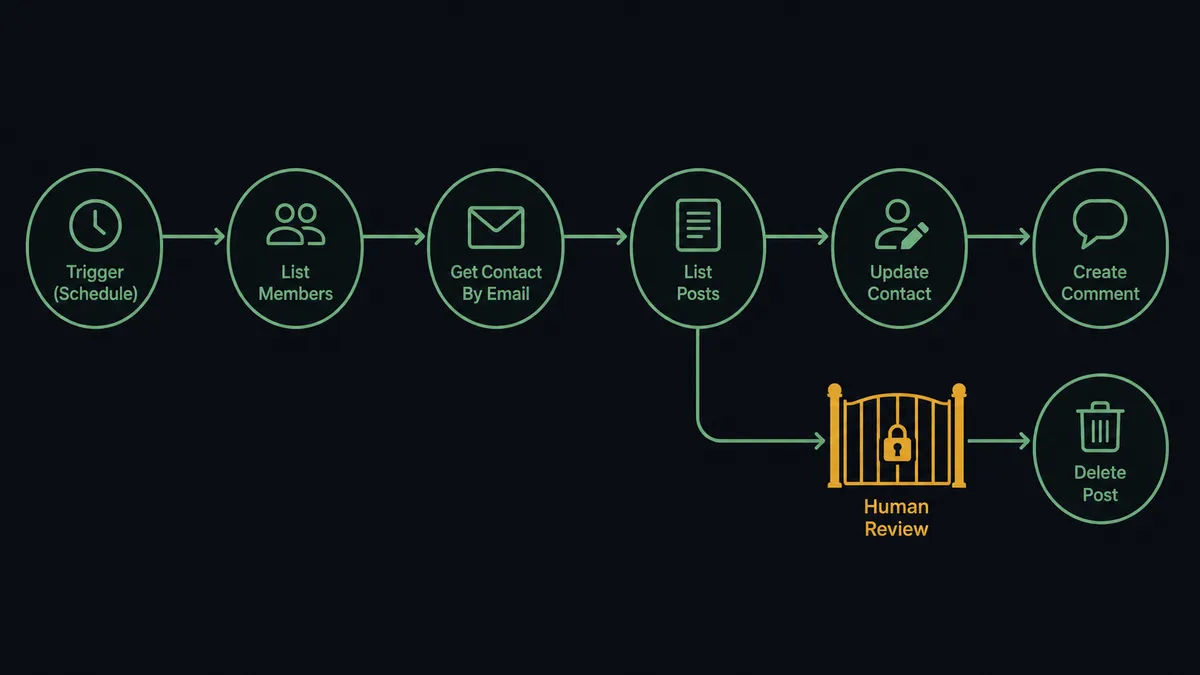
You connect HubSpot to Bettermode with a scheduled workflow: each run calls List Members to pick up new community joiners, matches them to the CRM with Get Contact By Email, adds unknown ones with Create Contact, and keeps their records current with Update Contact and Associate Objects while List Posts and Get Post feed their activity back into HubSpot. FlowRunner is a visual AI-agent orchestration platform where automations run autonomously and pause for human judgment on the steps that carry real consequence. The same connection can run as an AI agent that reads what members actually write, handles routine engagement itself, and pauses for a named human before Delete Post, the one Bettermode action that cannot be undone, removes anything.
The problem it solves
Your community and your CRM currently describe two different worlds. A prospect joins the Bettermode community, asks two sharp questions about pricing, and gets helpful answers from other members. None of that reaches HubSpot. The rep who calls them the next week opens a contact record that says “downloaded whitepaper, 2024” and starts the conversation three steps behind. Meanwhile the community manager exports member lists into spreadsheets to answer basic questions like “how many of our customers are actually in the community?”
Moderation is the other half of the pain. Spam and policy violations show up at community speed, not business-hours speed. Whoever sees the junk first deletes it, and Bettermode’s Delete Post is permanent: when an overworked moderator misreads a frustrated customer’s post as spam and removes it, the post, the thread under it, and a piece of the member’s trust are gone for good. There is no undo, no record of who decided, and no note on the CRM record that it happened.
How it works: the connection
The connection reads from Bettermode and writes to HubSpot. Here is the plain version, grounded in the real connector actions.
- Trigger: On a schedule, the workflow calls List Members in Bettermode to pick up members who joined since the last run.
- Match: Get Contact By Email checks HubSpot for each member. Create Contact adds the ones the CRM has never seen, and Associate Objects links them to their company.
- Read the activity: List Spaces enumerates the community’s spaces, and List Posts pulls fresh posts from each, with Get Post fetching full bodies where needed.
- Write the signal: Update Contact writes each member’s community activity summary onto their HubSpot record, so reps see it where they already work.
- Engage the routine: Create Comment posts answers to recurring questions, and Add Reaction acknowledges member contributions worth celebrating.
- Tag and organize: List Tags keeps the workflow oriented on how each space categorizes its posts, so activity lands in context.
That is the “just connect them” answer. Members become contacts, community intent becomes CRM data, and the community team stops living in export land. Since neither connector exposes an event trigger, the schedule is the heartbeat, and each run sweeps both membership and activity.
Can an AI agent run it? (and why a human stays in the loop)
Yes, and reading is precisely what an agent does that a field-mapping sync cannot. The agent holds the real actions as tools: List Members, List Posts, Get Post, Create Comment, Add Reaction, Delete Post, Run GraphQL Query on the Bettermode side; Get Contact By Email, Create Contact, Update Contact, Associate Objects, Create Deal on the HubSpot side. Each run, it reads new posts the way a good community manager would: this one is a how-to question with a documented answer, this one is a customer comparing us to a competitor, this one is a member celebrating a launch, and this one is crypto spam.
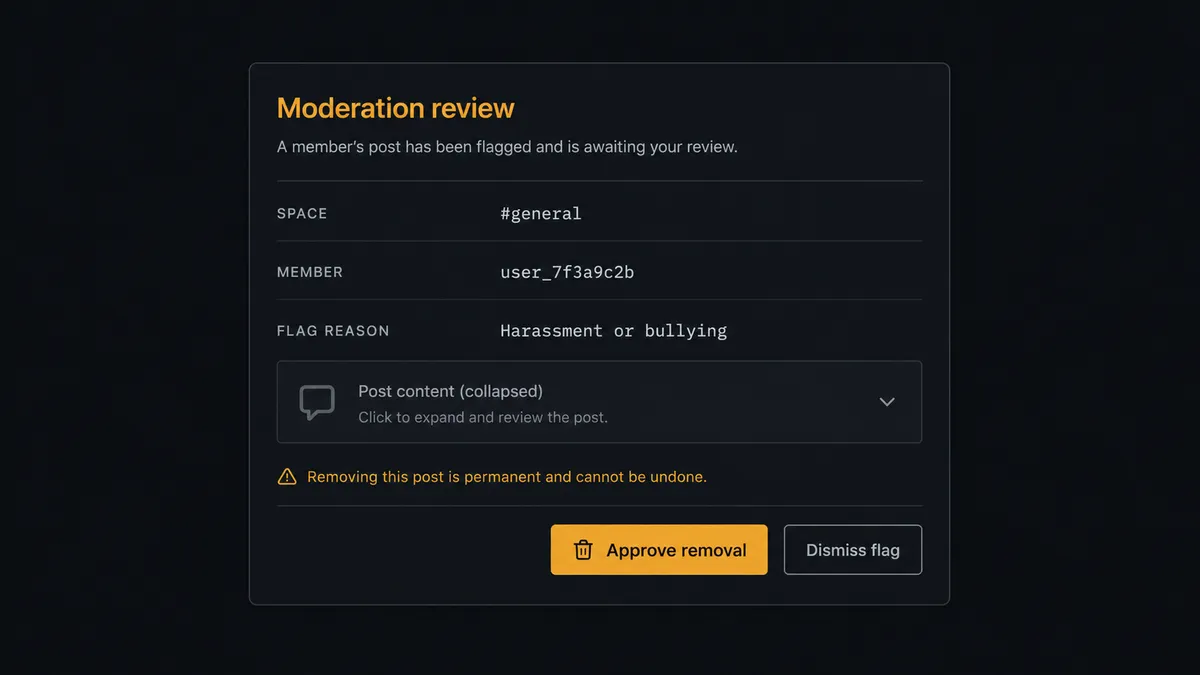
Each classification gets a proportionate response. The how-to question gets a Create Comment with the answer. The celebration gets an Add Reaction. The pricing question becomes an intent note written to HubSpot with Update Contact, where a rep can act on it. The spam gets flagged. And flagged is the operative word, because the consequential step is Delete Post: Bettermode permanently deletes the post, and there is no undo. The agent never fires it alone. It invokes a human-in-loop flow it holds as a callable tool and posts to the moderation channel: “Flagged post in [space] by [member]. Content and author history attached. Reason: [classification]. Approve removal?” A named moderator decides, and only then does Delete Post run, with Update Contact recording the decision on the member’s record.
Prospects call this the digital andon cord: like Toyota’s line-stop cord, the workflow stops the line the moment an action cannot be taken back, and a person clears it. Engagement scales with the agent. Deletion stays a human act with a name attached.
FlowRunner vs n8n
Technical teams will look at n8n for this pair, and there is a real case for it. Its community edition self-hosts at no license cost, its HTTP and GraphQL tooling can drive Bettermode’s API directly, and its HubSpot nodes are mature. A developer who enjoys GraphQL can build this bridge and keep full control of every query.
The difference is that this workflow’s hard parts are judgment, not plumbing. Classifying a member’s post, deciding what deserves a reply versus a flag, and holding an irreversible deletion for review are agent behaviors, not node wiring. Here is the honest side-by-side.
| What matters for this pair | FlowRunner | n8n |
|---|---|---|
| Human-in-the-loop on deleting member posts | Native. The agent invokes a moderation flow as a callable tool and pauses before Delete Post | Wait and approval mechanisms exist, but the builder wires them per workflow; not an agent decision |
| Who runs the flow | An AI agent reads posts, classifies intent, picks actions as tools | A node graph a developer wires and maintains; AI agent nodes exist but the graph stays fixed |
| Users included | Unlimited users on every tier | Cloud plans meter workflows and executions; self-host capacity is yours to manage |
| Bring your own AI keys | Yes, BYOK | Yes, n8n also supports your own model keys |
| Self-hosted option | Yes, cloud-hosted or self-hosted | Yes, self-hosting is a core n8n strength |
| Pricing model | Transparent workflow-based tiers | Execution-based cloud pricing; full cloud compliance features sit on custom-priced Enterprise |
If your team is developers who want a free self-hosted graph and are comfortable owning the classification logic, n8n is a fair choice. If the community is run by a community manager and a marketing ops lead who need member intelligence in the CRM and a named human on every deletion, this pairing on FlowRunner is the better fit.
Before and after
| Category | Before | After |
|---|---|---|
| Member visibility | Community members and CRM contacts are two unlinked lists | List Members feeds Create Contact and Associate Objects on every run |
| Buying signals | Pricing questions in the community never reach the rep | Intent classified from posts and written to the record with Update Contact |
| Routine engagement | Common questions wait for the community manager’s next sweep | Create Comment answers the documented ones, Add Reaction handles the rest |
| Moderation | Whoever sees spam first deletes it, permanently and unaccountably | Flags queue for a named moderator; Delete Post runs only after approval |
| Audit trail | No record of who removed what or why | Every deletion carries the content, reason, moderator, and timestamp |
What you can build
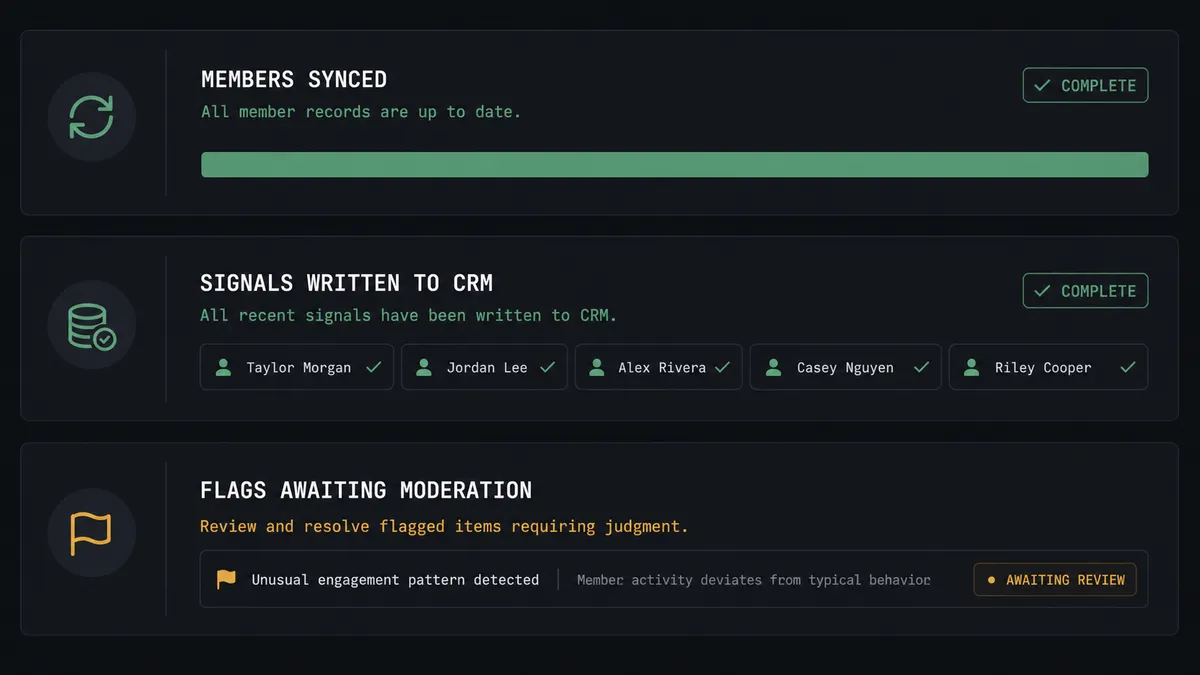
Member to contact, continuously. List Members catches every joiner, Get Contact By Email deduplicates, and Create Contact plus Associate Objects put the member on the CRM map with their company attached.
Community intent for sales. The agent reads posts via List Posts and Get Post, spots evaluation and expansion signals, and writes them onto records with Update Contact, so pipeline conversations start from what the prospect actually said.
Moderation with a named human. Spam and policy flags queue with content and author history attached; a moderator approves, Delete Post executes, and the decision is recorded. Remove Reaction cleans up the agent’s own engagement when a post’s status changes.
Champion detection. Members whose posts consistently help others get flagged as advocate candidates, with Add Reaction acknowledging contributions in the moment and the advocate note landing in HubSpot for the marketing team.
Deep queries without waiting on the roadmap. For anything the dedicated actions do not cover, Run GraphQL Query reaches the rest of Bettermode’s schema, so the workflow grows with your community program instead of capping it.
Getting started
Start on the free plan: 100 executions a month, every integration included, no credit card required, plus 14 days of Professional for new accounts. Both connectors are available on every tier, and every tier includes unlimited users and unlimited workflows, so the community manager, the moderators, and the marketing ops team share one workspace from day one.
Explore the integration details:
- HubSpot integration (21 actions covering contacts, companies, deals, and associations)
- Bettermode integration (14 actions covering members, spaces, posts, reactions, and GraphQL)
Start building free at flowrunner.ai or book a demo to see a live HubSpot to Bettermode workflow, moderation gate and all.
Frequently asked questions
Is it free to connect HubSpot and Bettermode on FlowRunner?
You can build and run the connection on FlowRunner's free plan, which includes 100 executions a month and every integration with no credit card required, and new accounts also get 14 days of Professional. Both connectors are available on every FlowRunner tier, and every tier includes unlimited users and unlimited workflows.
Can I self-host the HubSpot to Bettermode workflow?
Yes. FlowRunner offers a cloud-hosted option and a self-hosted option, so the connection can run inside your own environment.
Does the AI agent need my own OpenAI or Claude key?
FlowRunner uses a bring-your-own-keys model, so you connect the AI provider key you already have. You are not locked to one model.
What happens when the agent flags a post it is unsure about?
Nothing is removed. Delete Post permanently deletes content and cannot be undone, so the agent posts the flagged content, the author's history, and its reasoning to your moderation channel, then waits for a named moderator to approve or dismiss the flag before anything happens.
Which triggers does this connection use?
Neither connector exposes an event trigger, so the workflow runs on a schedule. Each run calls List Members and List Posts in Bettermode to pick up new members and activity, then writes to HubSpot with Get Contact By Email, Create Contact, Update Contact, and Associate Objects.
Can community activity influence how sales works a contact?
Yes, that is the point. The agent reads each member's posts from List Posts and Get Post, classifies intent, and writes activity summaries onto the HubSpot record with Update Contact, so a rep opening the contact sees that this person asked about pricing in the community last week.