How to Connect Salesforce Pro with Bettermode (With or Without an AI Agent)
Connect your Bettermode community to Salesforce so high-intent members become leads with their posts on the record, with a human approving anything published in the company's name before Create Post goes live.
How do you connect Salesforce Pro to Bettermode?
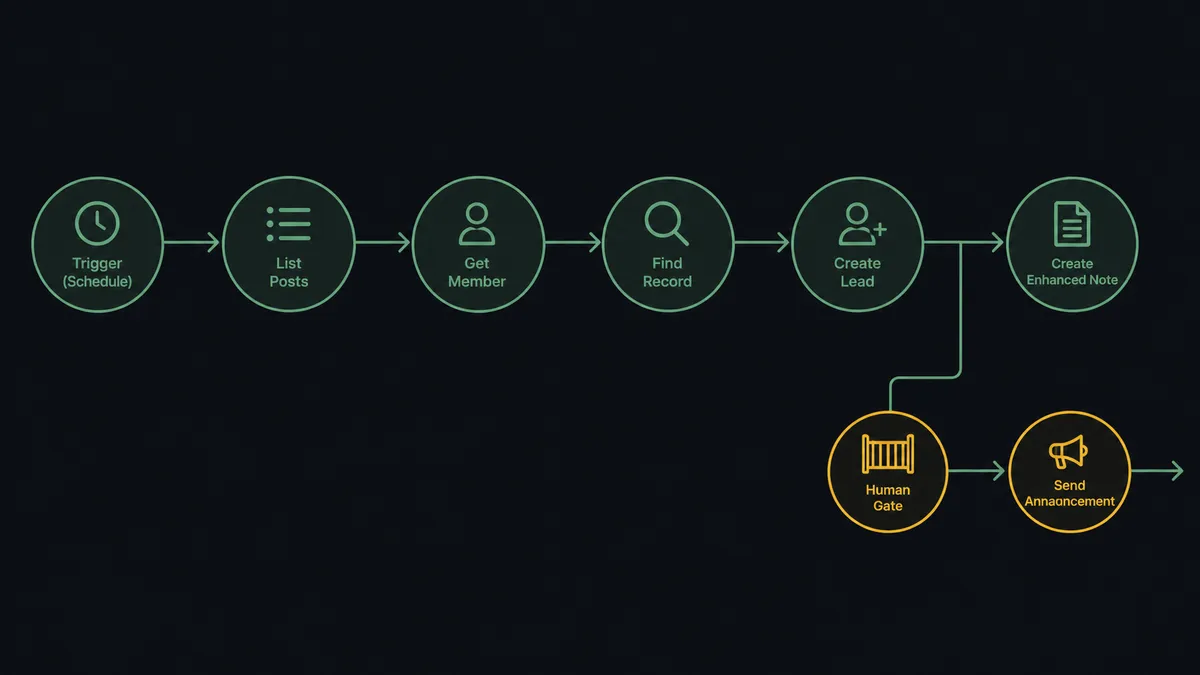
You connect Salesforce to Bettermode with a scheduled workflow: each run calls List Posts to sweep new activity across your community spaces, identifies authors with Get Member, checks them against the CRM with Find Record, and turns high-intent strangers into pipeline with Create Lead, Create Enhanced Note, and Add Lead to Campaign. FlowRunner is a visual AI-agent orchestration platform where automations run autonomously and pause for human judgment on the steps that carry real consequence. The same connection can run as an AI agent that reads every thread, builds the lead with evidence attached, drafts the official reply, and pauses for a named human before Create Post publishes anything in your company’s name.
The problem it solves
Communities generate the best buying signals a revenue team never sees. A member posts “we are consolidating tools next quarter, how does this handle X” in your Bettermode community, gets a helpful answer from another member, and moves on. Salesforce never hears about it. The community manager knows who the interesting members are, but that knowledge lives in their head, and turning it into pipeline means manually cross-checking names against the CRM, creating leads by hand, and pasting post links into records. Nobody does that consistently, so the community stays a cost center on paper while quietly holding your warmest conversations.
The other failure mode is the official voice. When the company does respond in the community, the reply is written fast, in a browser tab, by whoever noticed the thread. Sometimes it contradicts what sales already told that account. Sometimes it promises a roadmap item that does not exist. A community post in the company’s name is marketing copy with no review step, published to the exact audience most likely to screenshot it.
How it works: the connection
The connection reads from Bettermode and writes to Salesforce. Here is the plain version, grounded in the real connector actions.
- Trigger: On a schedule, the workflow calls List Spaces and then List Posts per space to sweep posts added since the last run.
- Read: Get Post pulls each full post body, and Get Member identifies the author with their name, email, and username.
- Match: Find Record checks Salesforce for the author by email, so existing customers and open opportunities are recognized before anything is created.
- Create pipeline: Create Lead adds unknown members whose posts show genuine buying intent, with the community listed as the source.
- Attach the evidence: Create Enhanced Note writes the post content and link onto the lead or matched record, so the signal survives in the rep’s view.
- Route it: Add Lead to Campaign drops community-sourced leads into the follow-up campaign your team already works.
- Engage back: Create Comment and Add Reaction let the workflow respond inside the thread where the conversation actually lives.
That is the “just connect them” answer. Community conversations become CRM signal with receipts attached, on every run. Since neither connector exposes an event trigger, the schedule is the heartbeat, sweeping each space at whatever cadence your community’s pace deserves.
Can an AI agent run it? (and why a human stays in the loop)
Yes, and classification is the heart of it. A keyword filter thinks every mention of “pricing” is a buying signal; an agent reads the thread. Its toolbox is the real actions: List Posts, Get Post, Get Member, Create Post, Create Comment, Add Reaction, Run GraphQL Query on the Bettermode side; Find Record, Create Lead, Create Enhanced Note, Add Lead to Campaign, Update Lead on the Salesforce side. For each thread it reasons about who is speaking and what they mean: a customer venting about a bug is a support signal, a stranger comparing you against the tool they are leaving is pipeline, and a thread full of confusion about your new release is a conversation the company itself should answer.
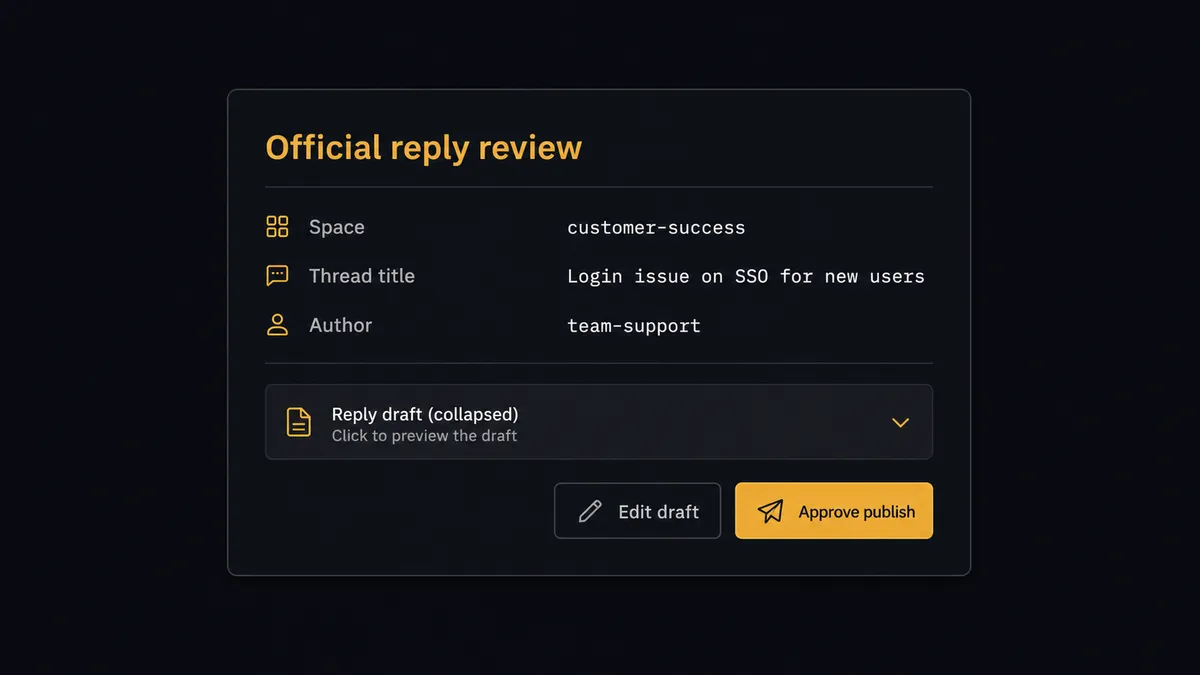
That last category holds the consequential step: Create Post. A post published in the company’s name is public, permanent in screenshots even if edited, and read by your most engaged customers and prospects at once. So the agent drafts, and a person approves. It composes the reply from what the record actually supports, then invokes a human-in-loop flow it holds as a callable tool: “Official reply drafted for thread [title] in [space]. Draft and thread context attached. Approve publishing?” A named approver edits or signs off, and only then does Create Post run, with Add Reaction acknowledging the member who raised the thread and Create Enhanced Note logging the published reply on the relevant Salesforce records.
Prospects call this the digital andon cord: like Toyota’s line-stop cord, the workflow stops the line at the step that speaks publicly for the company, and a person pulls it back into motion. Signal collection runs at machine speed. The company’s voice moves at the speed of judgment.
FlowRunner vs n8n
Developer-heavy teams will consider n8n for this pair, and the case is real. Its community edition self-hosts at no license cost, its GraphQL and HTTP tooling can drive Bettermode’s API precisely, and its Salesforce nodes are well traveled. An engineer who wants to own every query in this bridge can build it in n8n and keep it.
The difference is that the valuable work here is reading and judgment, not data transport. Deciding which member is pipeline, what the company should say publicly, and when to ask a human are agent behaviors. In n8n they become hand-built classification chains and approval steps a developer maintains forever. Here is the honest side-by-side.
| What matters for this pair | FlowRunner | n8n |
|---|---|---|
| Human-in-the-loop on posting as the company | Native. The agent invokes an approval flow as a callable tool and pauses before Create Post | Wait and approval mechanisms exist, but the builder wires them per workflow; not an agent decision |
| Who runs the flow | An AI agent reads threads, classifies intent, picks actions as tools | A node graph a developer wires and maintains; AI agent nodes exist but the graph stays fixed |
| Users included | Unlimited users on every tier | Cloud plans meter workflows and executions; self-host capacity is yours to manage |
| Bring your own AI keys | Yes, BYOK | Yes, n8n also supports your own model keys |
| Self-hosted option | Yes, cloud-hosted or self-hosted | Yes, self-hosting is a core n8n strength |
| Pricing model | Transparent workflow-based tiers | Execution-based cloud pricing; full cloud compliance features sit on custom-priced Enterprise |
If your team is developers who want a free self-hosted graph and are glad to own the classification logic, n8n is a fair choice. If community-to-pipeline is run by marketing and community ops who need leads appearing with evidence and a named approver on every public word, this pairing on FlowRunner is the better fit.
Before and after
| Category | Before | After |
|---|---|---|
| Buying signals | High-intent posts evaporate unless the community manager happens to see them | Every space swept by List Posts on schedule, signals classified and recorded |
| Lead creation | Manual cross-checking and hand-built leads, done inconsistently | Find Record deduplicates, Create Lead adds the genuinely new, evidence attached |
| Rep context | Reps work community-sourced leads blind | Create Enhanced Note puts the actual post on the record they open |
| Official replies | Written in a browser tab, published unreviewed | Drafted by the agent, approved by a named person before Create Post runs |
| Follow-up routing | Interesting members end up in a spreadsheet nobody owns | Add Lead to Campaign drops them into the campaign the team already works |
What you can build
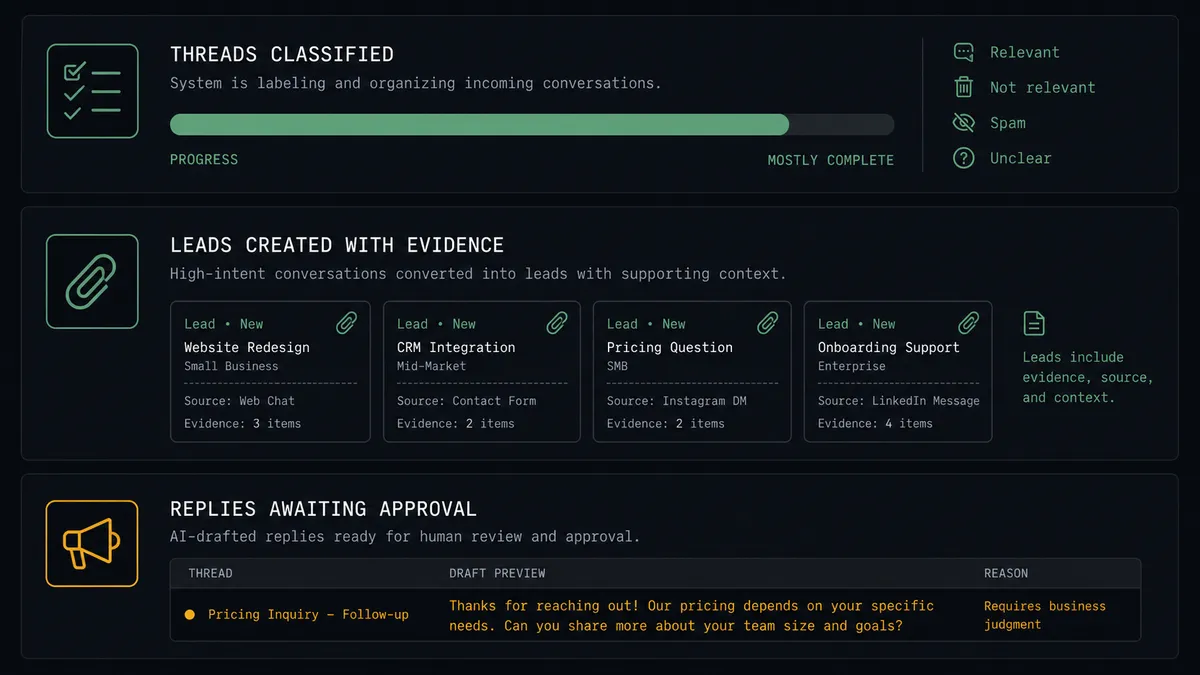
Thread to evidenced lead. List Posts finds the buying-intent thread, Get Member identifies the author, Find Record confirms they are new, and Create Lead plus Create Enhanced Note deliver a lead a rep can actually work, post attached.
Approved official replies. The agent drafts the company’s answer to reply-worthy threads, a named approver signs off, Create Post publishes, and Add Reaction acknowledges the member who started the conversation.
Customer-thread routing. When Find Record matches an author to an existing account, the agent skips lead creation and instead writes the thread onto the account with Create Enhanced Note, flagging open-opportunity accounts to their owner.
Campaign-ready community cohorts. Authors clustered around a topic, everyone asking about a specific capability, flow through Add Lead to Campaign into a targeted campaign, so outreach matches what they were already discussing.
Anything the schema holds. For community data the dedicated actions do not expose, Run GraphQL Query reaches the rest of Bettermode’s API, and API Request (Beta) does the same on the Salesforce side, so the bridge grows instead of hitting a wall.
Getting started
Start on the free plan: 100 executions a month, every integration included, no credit card required, plus 14 days of Professional for new accounts. Both connectors are available on every tier, and every tier includes unlimited users and unlimited workflows, so the community manager, the marketing ops lead, and the reps working the leads share one workspace from day one.
Explore the integration details:
- Salesforce Pro integration (26 actions covering records, leads, campaigns, notes, and email)
- Bettermode integration (14 actions covering members, spaces, posts, reactions, and GraphQL)
Start building free at flowrunner.ai or book a demo to see a live Salesforce to Bettermode workflow, public-reply approval and all.
Frequently asked questions
Is it free to connect Salesforce Pro and Bettermode on FlowRunner?
You can build and run the connection on FlowRunner's free plan, which includes 100 executions a month and every integration with no credit card required, and new accounts also get 14 days of Professional. Both connectors are available on every FlowRunner tier, and every tier includes unlimited users and unlimited workflows.
Can I self-host the Salesforce Pro to Bettermode workflow?
Yes. FlowRunner offers a cloud-hosted option and a self-hosted option, so the connection can run inside your own environment.
Does the AI agent need my own OpenAI or Claude key?
FlowRunner uses a bring-your-own-keys model, so you connect the AI provider key you already have. You are not locked to one model.
What happens when the agent is unsure how to answer a community thread?
It does not publish. The agent posts the thread, its draft reply, and what it is unsure about to your channel, and a person either edits and approves the draft or takes the thread over entirely. Create Post only runs after a named approver signs off.
Which triggers does this connection use?
Neither connector exposes an event trigger, so the workflow runs on a schedule. Each run calls List Posts across your Bettermode spaces to sweep new activity, then works in Salesforce with Find Record, Create Lead, Create Enhanced Note, and Add Lead to Campaign.
How does a community post become a Salesforce lead?
The agent identifies the author with Get Member, checks Salesforce with Find Record, and when the member is unknown and their post shows real buying intent, calls Create Lead with the community context and attaches the post content as evidence with Create Enhanced Note.