How to Connect Slack with Bluesky (With or Without an AI Agent)
Connect Slack drafts and approvals to Bluesky publishing, optionally as an AI agent that formats and schedules posts automatically and pauses for a human before anything public goes out.
How do you connect Slack to Bluesky?
You connect Slack to Bluesky by having Slack’s On Channel Message trigger drive Bluesky’s publishing actions: the workflow reads the draft with Get Message, formats it, and publishes it with Create Post or Create Post with Image, so a message written in your team’s drafts channel becomes a live post without anyone opening Bluesky. FlowRunner is a visual AI-agent orchestration platform where automations run autonomously and pause for human judgment on the steps that carry real consequence. The same connection can run as an AI agent that formats and fact-checks each draft, monitors the account with Get Author Feed and Search Posts, and pauses for a named human before anything public, a post, a reply, a quote, actually ships.
The problem it solves
Today the path from “we should post this” to a live Bluesky post runs through one person’s phone. The launch announcement is written in Slack, edited in a thread, approved with a thumbs-up emoji, and then someone copies it into the Bluesky app, loses the line breaks, retypes the link, and posts a version slightly different from what was approved. Replies to community mentions work the same way: someone notices a question days late, drafts an answer in a DM, and posts it from whichever account they happen to be logged into.
The edges are where it stings. A draft over the 300-character limit gets truncated mid-sentence. The same announcement goes out twice because two people both “handled it”. A well-meaning reply lands in a thread that had already turned hostile, and now the brand is in the screenshot. Public posts are the rare automation output you cannot quietly fix later: deleting a post does not delete the screenshots. That is exactly why teams keep this manual, and exactly why manual keeps failing.
How it works: the connection
The connection listens to Slack and publishes to Bluesky. Here is the plain version, grounded in the real connector actions.
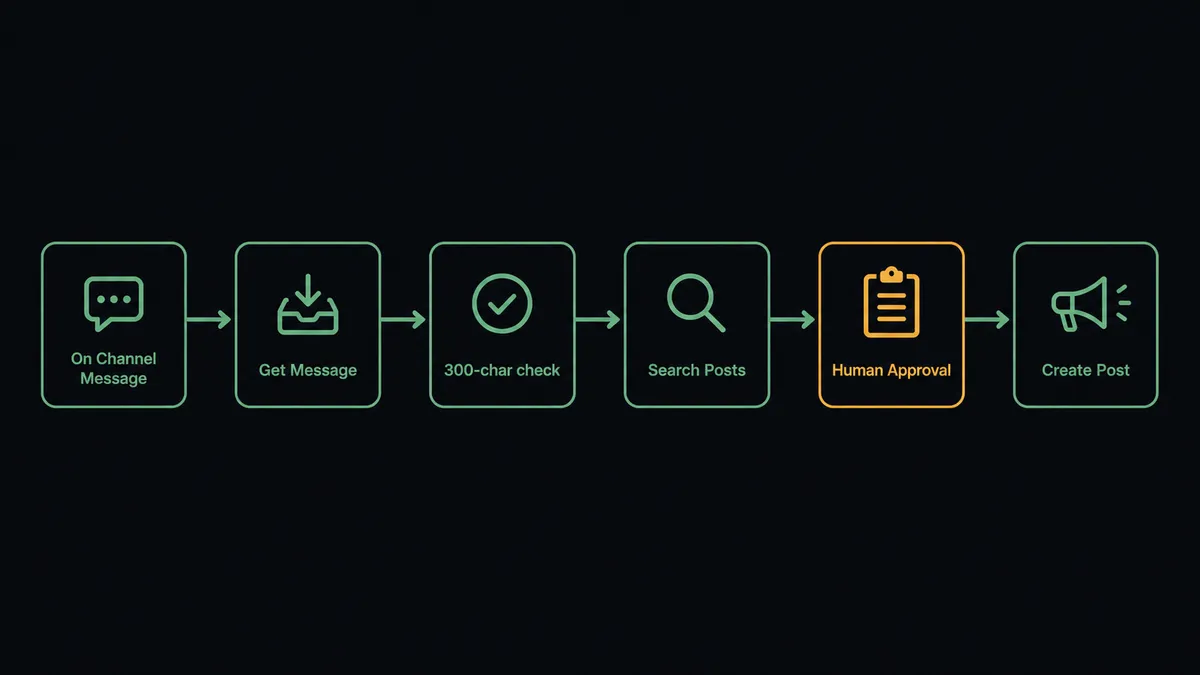
- Trigger: Slack fires On Channel Message when a draft is posted in the drafts channel.
- Read: The workflow calls Get Message to pull the draft text, its author, and any corrections made in the thread.
- Format: It checks the 300-character limit and prepares the post; the Bluesky connector builds link, mention, and hashtag facets automatically.
- Dedupe: It calls Search Posts against your account to confirm the same announcement is not already live.
- Preview: It calls Send Message To Channel to post the exact final text back to Slack as an approval card.
- Publish: On the approval click, captured by On Block Action, it calls Create Post, or Create Post with Image when a visual is attached.
- Close the loop: It calls Update Message In Channel to mark the draft shipped and drop the live post link in the thread.
That is the “just connect them” answer. Drafts become posts, the text that was approved is the text that ships, and the whole trail lives in one Slack thread. The same shape runs in reverse for monitoring: Search Posts and Get Post Thread pull brand mentions and conversations into a Slack digest.
Can an AI agent run it? (and why a human stays in the loop)
Yes, and the agent earns its place before and after the publish click. Before: it reads the draft the way an editor would, trims it under the limit without cutting the point, verifies the link resolves, and checks Search Posts and Get Author Feed so you are not posting the same thing twice or stepping on this morning’s thread. After: it watches the account, pulls replies with Get Post Thread, and drafts responses with the full conversation in front of it. Its toolbox is the real action set: Create Post, Reply to Post, Quote Post, Repost, Like Post, Search Posts.
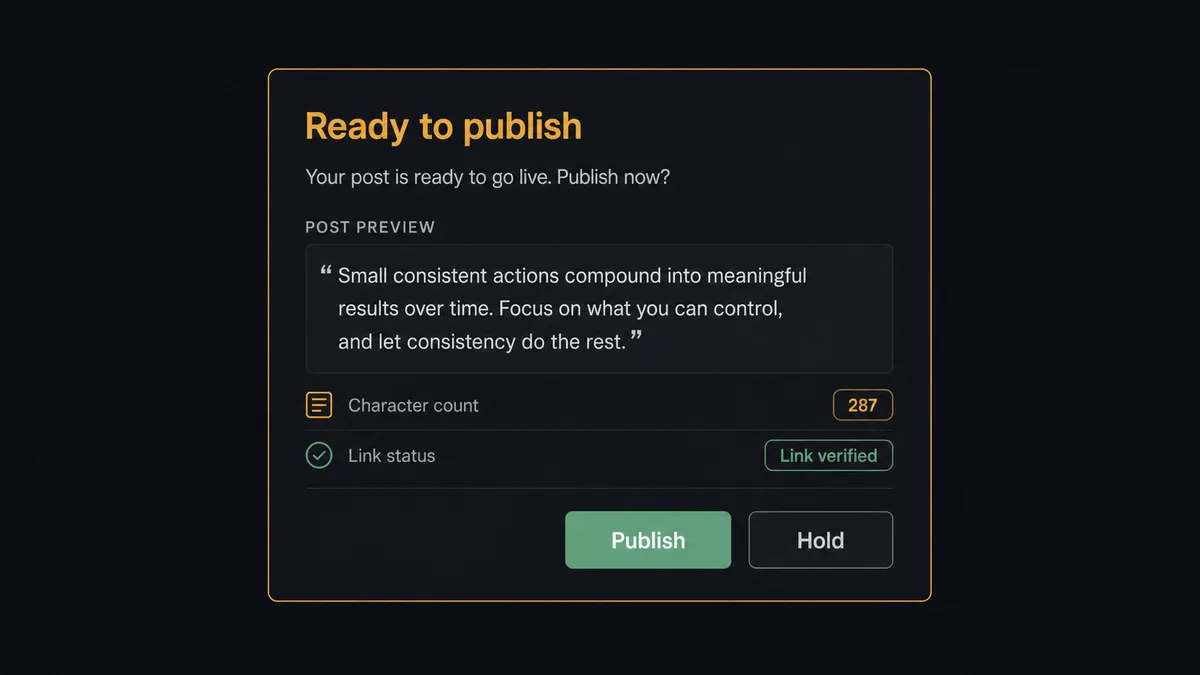
The consequential step is anything public. The agent treats Create Post, Reply to Post, and Quote Post as gated tools: it prepares the exact text, then invokes a human-in-loop flow it holds as a callable tool. The workflow pauses and posts to the channel: “Ready to publish: [final text, 287 characters, link verified]. Replying to a thread with negative sentiment: no. Approve to post?” A named approver clicks once, On Block Action captures it, and only then does the post ship. Low-stakes engagement can run looser if you choose: you can let Like Post run freely and keep the gate on words.
This is the digital andon cord, the framing our own prospects gave us: like the pull cord on a Toyota line, the workflow stops the line the moment the next step is one you cannot take back. A formatting fix is reversible. A post is not. The agent knows which side of that line each action sits on, and it asks.
FlowRunner vs n8n
Developer teams often reach for n8n here, and there is real substance behind that choice. n8n has hundreds of nodes, a large template community, a free self-hosted tier, and the flexibility to script any edge you can imagine around the Bluesky API. If you have engineers who enjoy owning that construction, n8n gives them full control.
The difference is what you have to build versus what is native. Here is the honest side-by-side.
| What matters for this pair | FlowRunner | n8n |
|---|---|---|
| Human-in-the-loop before Create Post | Native. The agent invokes an approval flow as a callable tool and pauses until a named person clicks | Buildable with wait nodes and webhooks you assemble and maintain yourself |
| Who runs the flow | An AI agent reads, reasons, picks actions as tools | Node graph you design per case; AI runs inside nodes you wire |
| Users included | Unlimited users on every tier | Cloud plans meter workflows and executions; self-hosting shifts cost to your infra and time |
| Bring your own AI keys | Yes, BYOK | Yes, also BYOK |
| Self-hosted option | Yes, cloud-hosted or self-hosted | Yes, a genuine n8n strength |
| Pricing model | Transparent workflow-based tiers | Execution-based cloud pricing, or free self-host plus your own ops burden |
If your team is technical, wants total control, and is happy to own the approval plumbing, n8n is a credible choice. If you want an ops or marketing team publishing safely this week, with the approval gate as a built-in rather than a project, this pairing is the better fit.
Before and after
| Category | Before | After |
|---|---|---|
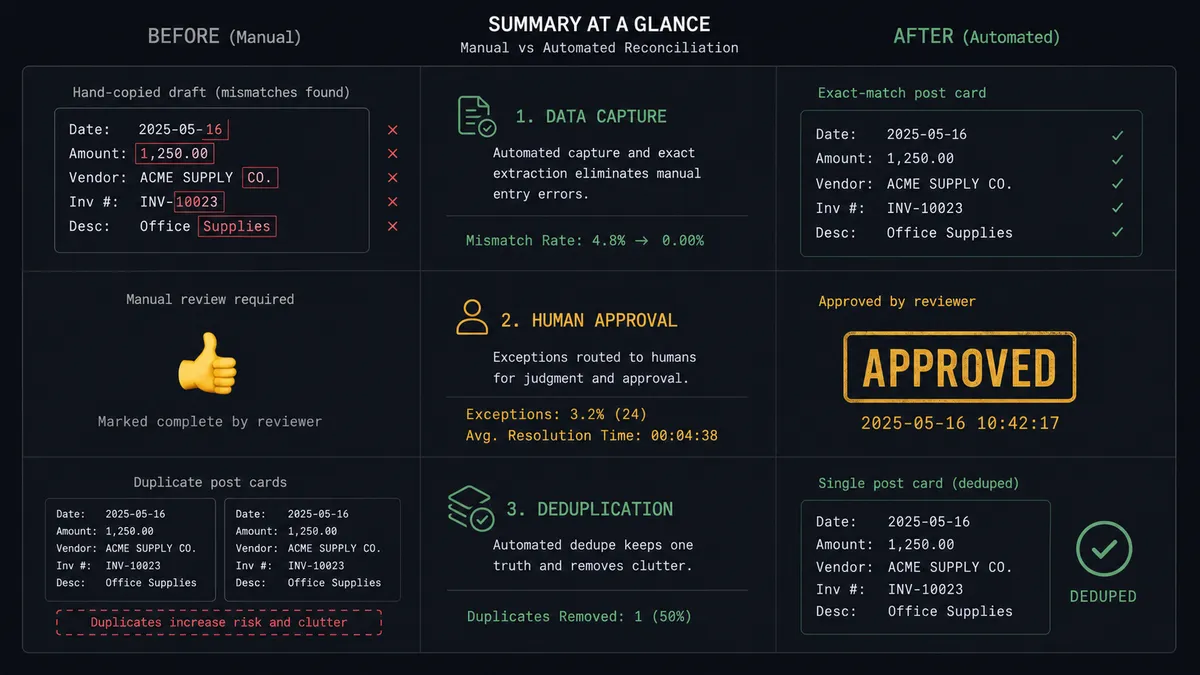
| Publishing | Someone copies the approved draft into the Bluesky app by hand, and the shipped text drifts from the approved text | The text a named approver clicked on is byte for byte the text Create Post publishes |
| Approval | A thumbs-up emoji somewhere in a thread, unfindable a week later | A one-click approval card, with approver and timestamp in the audit trail |
| Duplicates | Two teammates both “handle it” and the announcement posts twice | Search Posts checks the account before every publish |
| Mentions | Community questions surface days late, if at all | Search Posts and Get Post Thread feed a same-day digest into Slack with drafted replies |
| Character limit | Drafts get truncated mid-sentence at publish time | The agent trims to the point under 300 characters and shows the final text before it ships |
What you can build
Draft-to-post pipeline. On Channel Message picks up drafts, the agent formats and verifies, and Create Post ships after one click. The drafts channel becomes the publishing queue, with the full history in threads.
Launch-day thread. The agent publishes the announcement with Create Post with Image, then posts the follow-up details with Reply to Post under it, each step pre-approved as a batch in a single Slack card, so the thread rolls out in order without anyone babysitting it.
Brand-mention digest with drafted replies. On a schedule, the agent runs Search Posts on your brand terms, pulls context with Get Post Thread and Get Profile, and posts a digest to Slack with a suggested reply per mention. Approving one fires Reply to Post.
Amplification queue. The agent watches accounts you care about with Get Author Feed, proposes candidates worth a Repost or Quote Post, and queues them in Slack. Reposts of your own team’s approved content run unattended; quotes with added commentary wait for a person.
Follower hygiene. On demand via On Mention, the agent summarizes Get Followers and List Notifications activity, flags spam accounts, and proposes Mute User actions for a one-click cleanup, keeping the account’s feed usable without handing anyone the password.
Getting started
Start on the free plan: 100 executions a month, every integration included, no credit card required, plus 14 days of Professional for new accounts. Both connectors are available on every tier, and every tier includes unlimited users and unlimited workflows.
Explore the integration details:
- Slack integration (8 triggers and 16 actions covering messages, channels, members, and interactive approvals)
- Bluesky integration (24 actions covering posts, replies, feeds, search, and the social graph)
Start building free at flowrunner.ai or book a demo to see a live Slack to Bluesky workflow, publish approval and all.
Frequently asked questions
Is it free to connect Slack and Bluesky on FlowRunner?
You can build and run the connection on FlowRunner's free plan, which includes 100 executions a month and every integration with no credit card required, and new accounts also get 14 days of Professional. Both connectors are available on every FlowRunner tier, and every tier includes unlimited users and unlimited workflows.
Can I self-host the Slack to Bluesky workflow?
Yes. FlowRunner offers a cloud-hosted option and a self-hosted option, so the connection can run inside your own environment.
Does the AI agent need my own OpenAI or Claude key?
FlowRunner uses a bring-your-own-keys model, so you connect the AI provider key you already have. You are not locked to one model.
What happens when the agent is unsure whether a draft is ready to publish?
It holds the post. The agent flags what it is unsure about, an over-limit draft, a claim it cannot verify, a reply to a heated thread, and posts the draft with its concern to the channel. Nothing reaches Bluesky until a named approver clicks approve.
Which Slack triggers and Bluesky actions does this connection use?
The main path uses Slack's On Channel Message trigger and On Block Action for the approval click, driving Bluesky's Create Post, Create Post with Image, Reply to Post, Quote Post, and Repost actions. Search Posts and Get Author Feed cover monitoring.
Can the agent reply to mentions of our brand on Bluesky?
Yes, with a gate. The agent runs Search Posts on your brand terms, drafts a reply, and posts it to Slack for approval. Reply to Post only fires after a person signs off, because a reply in public carries the same weight as a new post.