How to Connect Slack with Basecamp (With or Without an AI Agent)
Connect Slack conversations to Basecamp to-dos automatically, with an AI agent that files and assigns tracked work on its own and pauses for a named approver before Trash Project removes anything.
How do you connect Slack to Basecamp?
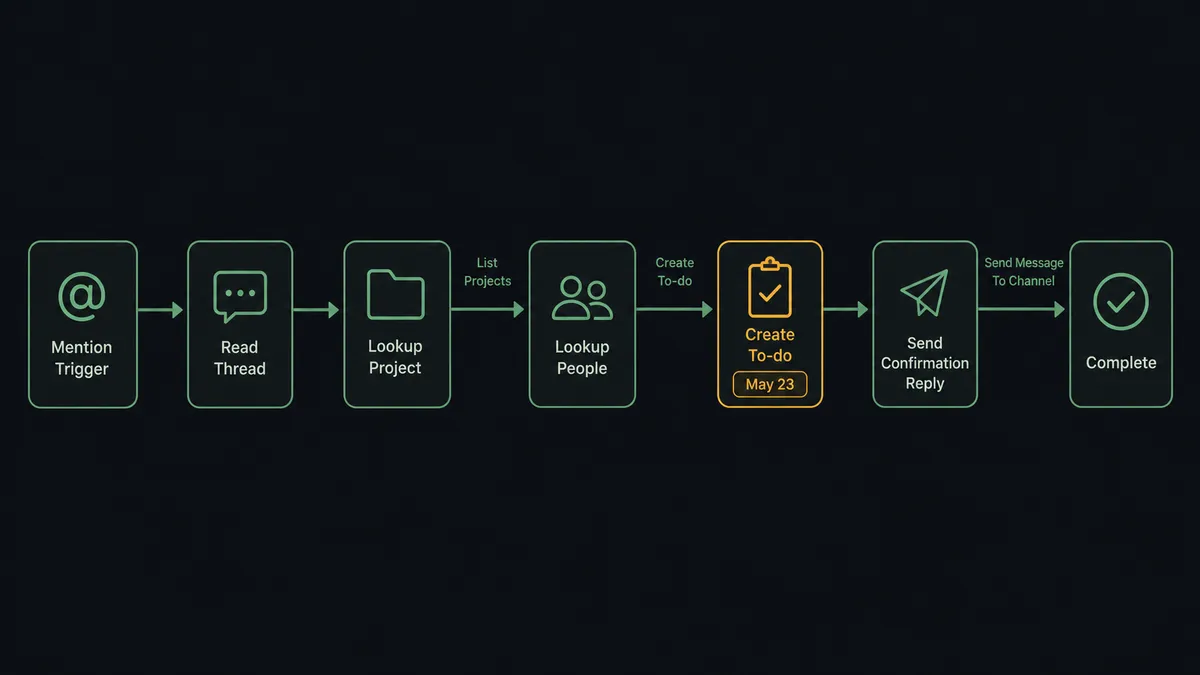
You connect Slack to Basecamp by having Slack’s On Mention trigger drive Basecamp actions: a teammate mentions the agent in a thread, the workflow reads the conversation, resolves the right project with List Projects, finds the destination with List To-do Lists, and files the work with Create To-do, assigned and dated, with the confirmation posted back to the thread. FlowRunner is a visual AI-agent orchestration platform where automations run autonomously and pause for human judgment on the steps that carry real consequence. The same connection can run as an AI agent that turns chatter into tracked work on its own and pauses for a named human before it calls Trash Project, because removal is the one direction this pair moves that is hard to walk back.
The problem it solves
Right now the gap between “we agreed on this in Slack” and “it exists in Basecamp” is a person remembering to make the crossing. A decision gets made in a thread at 4 PM: Dana will update the proposal, revised draft by Thursday. Everyone moves on. Nobody creates the to-do. Thursday arrives, the draft does not, and the postmortem is a scroll through Slack history to establish that yes, this was agreed, and no, it was never tracked.
The edges make it worse. Action items assigned in a thread to someone who was not in the channel. Due dates mentioned in passing that never reach a schedule. And on the cleanup side, the opposite risk: a well-meaning sweep of stale projects that trashes one still carrying live work, where Basecamp’s own rules permanently delete trashed items after 30 days.
How it works: the connection
The connection listens to Slack and writes to Basecamp. Here is the plain version, grounded in the real connector actions.
- Trigger: Slack fires On Mention when a teammate mentions the agent in a thread that contains work to file.
- Read: The workflow calls Get Latest Thread Messages to pull the conversation, so the to-do captures what was actually agreed.
- Resolve the destination: It calls List Projects to find the right project, then List To-do Lists to pick the list inside it. Basecamp’s per-project tools are resolved automatically from the project’s dock, so the project ID is all it needs.
- Resolve the owner: It calls List Project People to match the mentioned teammate to a valid assignee ID.
- File the work: It calls Create To-do with the task as content, the thread context in the description, the assignee, and the due date. Notify emails the assignee so the task does not land silently.
- Confirm: It calls Send Message To Channel to reply in the Slack thread with what was filed, where, and for when.
- Close the loop: When the work is done, Complete To-do marks it finished and the workflow posts the completion back to the thread where it started.
That is the “just connect them” answer. Decisions become dated, assigned to-dos the moment they are made, and the Slack thread and the Basecamp record stay pointed at each other.
Can an AI agent run it? (and why a human stays in the loop)
Yes, and the agent version is what makes the connection feel like a project coordinator instead of a form. The agent holds List Projects, Get Project, List To-do Lists, Create To-do, Update To-do, Complete To-do, Create Message, Create Comment, Create Schedule Entry, and the trash actions as tools, and it reasons about each thread. A rambling conversation becomes one clean to-do, not six fragments. A follow-up message like “actually push that to Monday” becomes an Update To-do call on the existing item rather than a duplicate. A thread that reads like an announcement rather than a task becomes a Create Message post on the project’s message board instead.
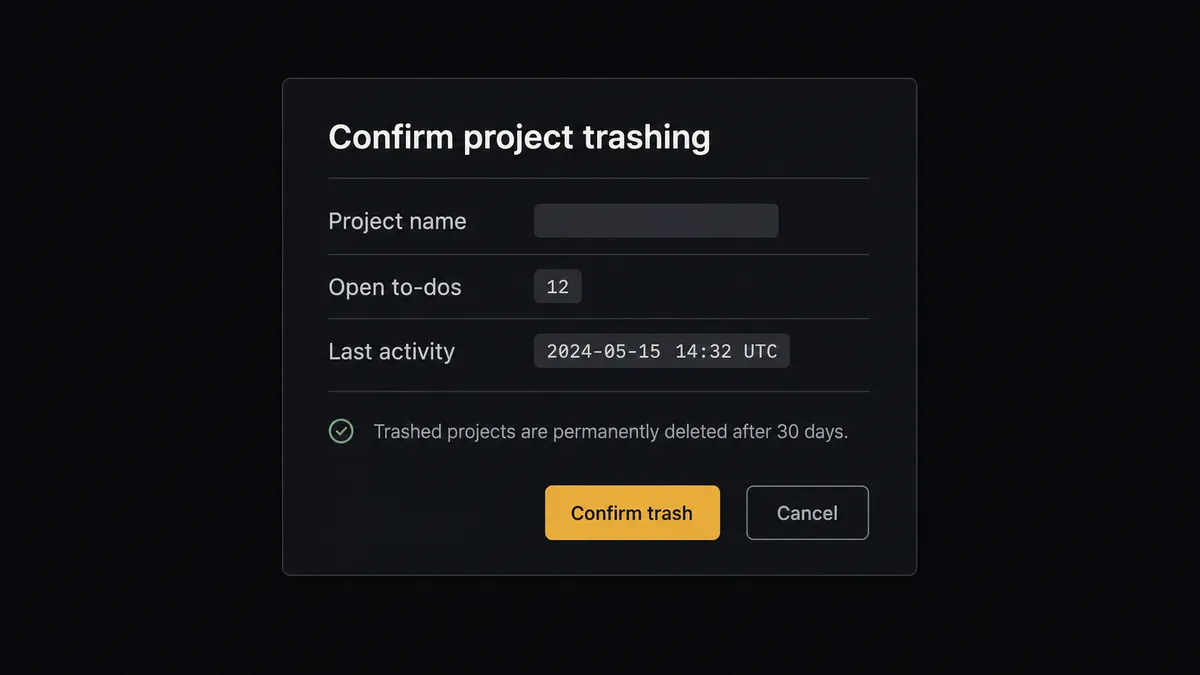
The consequential steps are Trash Project and Trash Recording. Basecamp’s model is forgiving right up until it is not: trashed items disappear from everyone’s view immediately and are permanently deleted after 30 days. So when a cleanup request arrives, the agent does not sweep. It gathers each candidate project’s open to-dos and recent activity with Get Project and List To-dos, invokes the human-in-loop flow it holds as a callable tool, and posts: “Trash project [name]? It has [open items] open to-dos and its last activity was [description]. Trashed projects are permanently deleted after 30 days. Approve?” Only after a named approver signs off does Trash Project run, and the decision, approver, and timestamp land in the audit trail.
This is the digital andon cord, the framing our own prospects gave us: like Toyota’s pull cord on the production line, the workflow stops the line the moment a step would remove something the team cannot easily restore. Filing, assigning, and completing run all day without a human. Removal always has a name attached.
FlowRunner vs n8n
Developer teams sizing up a Slack to Basecamp bridge will weigh n8n, and its strengths there are real. Self-hosting on the Community edition is mature, free, and unmetered on executions, the code runtime is permissive for teams who want to script inside the graph, and the community template library is large.
The difference is who can run it and what happens at the destructive step. In n8n the pause is a Wait node placed by hand where a developer predicted it belongs; in FlowRunner the agent decides mid-reasoning that a step needs a person and invokes the approval as a tool, and the ops team can read and adjust the flow without writing expressions.
| What matters for this pair | FlowRunner | n8n |
|---|---|---|
| Human-in-the-loop on Trash Project | Native. The agent invokes an approval flow as a callable tool and pauses before anything is trashed | Wait-node approvals wired per workflow at a fixed spot, not a decision the agent makes |
| Who runs the flow | An AI agent reads the thread, reasons, picks actions as tools | A node graph you wire by hand; agents via added LangChain nodes |
| Users included | Unlimited users on every tier | Also unlimited on cloud plans |
| Bring your own AI keys | Yes, BYOK | Yes, you connect your own model keys |
| Self-hosted option | Yes, cloud-hosted or self-hosted | Yes, mature free self-hosting on Community |
| Pricing model | Transparent workflow-based tiers, priced per execution | Also per-execution; SSO, RBAC, and audit features sit on custom-priced Enterprise |
If your team is developers who want a free self-hosted graph under full code control, n8n is a genuine fit. If the people who live in this workflow are project and ops people, and you want destructive steps gated by named approvals with audit trails on a $299/mo tier rather than a custom-priced one, this pairing is where FlowRunner is the better fit.
Before and after
| Category | Before | After |
|---|---|---|
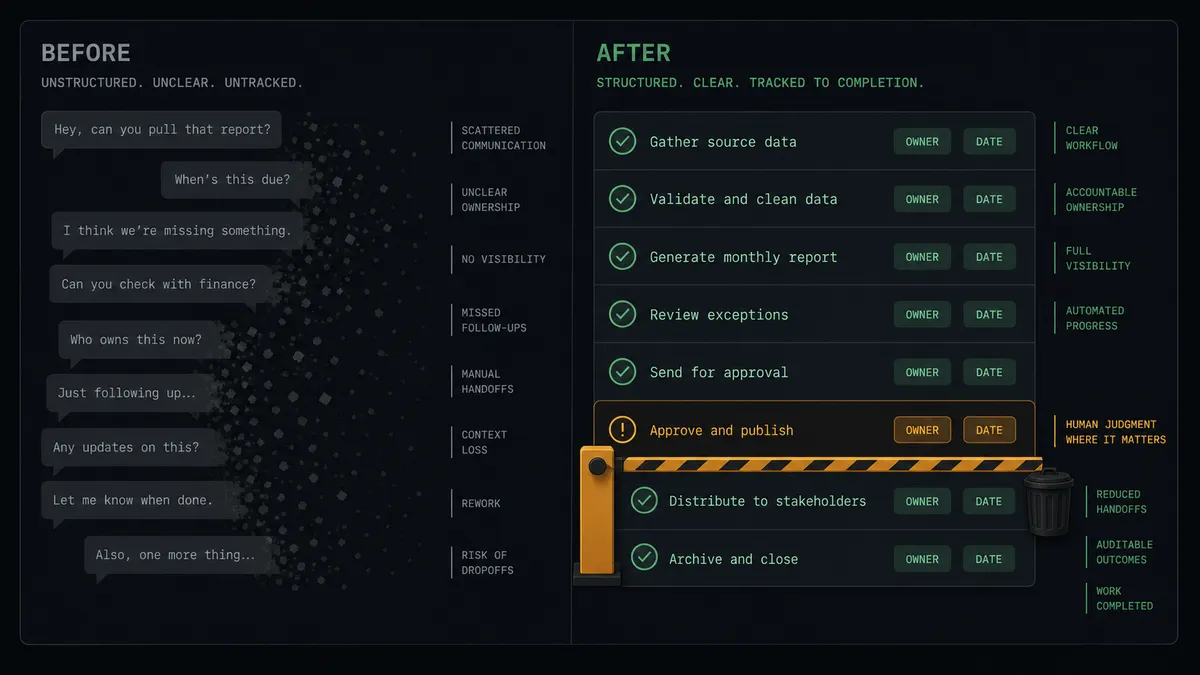
| Action items | Agreed in Slack, tracked nowhere, rediscovered at the deadline | Filed as assigned, dated Basecamp to-dos the moment the thread ends |
| Ownership | ”I thought you had it” because the assignee was never named anywhere | Every to-do carries an assignee resolved from List Project People, with notification |
| Status questions | Someone leaves Slack, opens Basecamp, and reads three lists to answer | The agent answers in-thread from List To-dos with what is open and due |
| Follow-ups | Date changes discussed in chat never reach the tracked task | ”Push it to Monday” becomes an Update To-do call on the existing item |
| Cleanup | Stale-project sweeps occasionally trash live work | Trash Project runs only after a named approver reviews open items and activity |
What you can build
Thread-to-task filing. On Mention fires, the agent reads the thread with Get Latest Thread Messages, resolves the destination with List Projects and List To-do Lists, and files with Create To-do, assigned and due-dated, confirming in-thread.
Emoji capture for meetings-in-chat. A lead adds the capture reaction to a decision message. On Reaction Added fires, and the agent files the to-do and posts a Create Comment on the related Basecamp item linking the discussion.
Daily open-work digest. Each morning the workflow calls List To-dos across active projects and posts one Slack digest of what is due today and overdue, so standups start with facts.
Kickoff scaffolding with approval. A project-shaped request triggers the human gate; on approval the agent calls Create Project, then Create To-do List and Create Schedule Entry to lay in the kickoff structure, and posts the links back to Slack.
Guarded cleanup cycle. A scheduled flow surfaces dormant projects with List Projects, and the agent walks a named approver through each one in Slack, calling Trash Project only for the ones a human confirms.
Common questions
Is it free to connect Slack and Basecamp on FlowRunner? You can build and run the connection on FlowRunner’s free plan, which includes 100 executions a month and every integration with no credit card required, and new accounts also get 14 days of Professional. Both connectors are available on every FlowRunner tier, and every tier includes unlimited users and unlimited workflows.
Can I self-host the Slack to Basecamp workflow? Yes. FlowRunner offers a cloud-hosted option and a self-hosted option, so the connection can run inside your own environment.
Does the AI agent need my own OpenAI or Claude key? FlowRunner uses a bring-your-own-keys model, so you connect the AI provider key you already have. You are not locked to one model.
What happens when the agent cannot tell which Basecamp project a task belongs to? The agent does not guess. It calls List Projects, posts the closest candidates back to the Slack thread, and waits for a person to pick one before it calls Create To-do. The choice is remembered in the workflow’s context, so the same kind of request routes correctly next time.
Which Slack events can trigger a Basecamp action? Slack offers eight triggers: On Channel Message, On Mention, On Reaction Added, On Block Action, On File Shared, On New Member, On Channel Created, and On Message from Query. Basecamp has no triggers in the catalog, so Slack starts every flow in this pair. On Mention and On Reaction Added are the two most teams start with.
What happens if something is trashed by mistake? Two protections stack. First, the agent pauses for a named approver before it calls Trash Project or Trash Recording, so nothing is trashed silently. Second, Basecamp keeps trashed items restorable from the trash in its own UI for 30 days before permanent deletion, so even an approved trashing has a recovery window.
Getting started
Start on the free plan: 100 executions a month, every integration included, no credit card required, plus 14 days of Professional for new accounts. Both connectors are available on every tier, and every tier includes unlimited users and unlimited workflows, so the whole project team works in one place from day one.
Explore the integration details:
- Slack integration (8 triggers and 16 actions covering messages, mentions, reactions, channels, and members)
- Basecamp integration (37 actions across projects, to-dos, messages, schedules, people, and documents)
Start building free at flowrunner.ai or book a demo to see a live Slack to Basecamp workflow, trash approval and all.
Frequently asked questions
Is it free to connect Slack and Basecamp on FlowRunner?
You can build and run the connection on FlowRunner's free plan, which includes 100 executions a month and every integration with no credit card required, and new accounts also get 14 days of Professional. Both connectors are available on every FlowRunner tier, and every tier includes unlimited users and unlimited workflows.
Can I self-host the Slack to Basecamp workflow?
Yes. FlowRunner offers a cloud-hosted option and a self-hosted option, so the connection can run inside your own environment.
Does the AI agent need my own OpenAI or Claude key?
FlowRunner uses a bring-your-own-keys model, so you connect the AI provider key you already have. You are not locked to one model.
What happens when the agent cannot tell which Basecamp project a task belongs to?
The agent does not guess. It calls List Projects, posts the closest candidates back to the Slack thread, and waits for a person to pick one before it calls Create To-do. The choice is remembered in the workflow's context, so the same kind of request routes correctly next time.
Which Slack events can trigger a Basecamp action?
Slack offers eight triggers: On Channel Message, On Mention, On Reaction Added, On Block Action, On File Shared, On New Member, On Channel Created, and On Message from Query. Basecamp has no triggers in the catalog, so Slack starts every flow in this pair. On Mention and On Reaction Added are the two most teams start with.
What happens if something is trashed by mistake?
Two protections stack. First, the agent pauses for a named approver before it calls Trash Project or Trash Recording, so nothing is trashed silently. Second, Basecamp keeps trashed items restorable from the trash in its own UI for 30 days before permanent deletion, so even an approved trashing has a recovery window.