How to Connect Outlook with Basecamp (With or Without an AI Agent)
Turn client emails in a shared Outlook inbox into tracked Basecamp to-dos and comments automatically, with an AI agent that files the work on its own and pauses for a project lead before Reply to Email commits a date or scope to the client.
How do you connect Outlook to Basecamp?
You connect Outlook to Basecamp with a scheduled workflow that calls Get Emails on your shared client inbox, matches each message to the right project with List Projects and Get Project, and files the request as tracked work: Create To-do for new tasks with an assignee and due date, Create Comment for updates to existing threads, Create Campfire Line for a team heads-up. Outlook has no trigger in FlowRunner, so a schedule sweeps the inbox at the cadence you choose. FlowRunner is a visual AI-agent orchestration platform where automations run autonomously and pause for human judgment on the steps that carry real consequence. Run as an AI agent, the same connection files everything on its own and drafts the reply to the client, but it never sends a reply that commits a delivery date or scope until the project lead approves the wording.
The problem it solves
Client work arrives by email and gets done in Basecamp, and the distance between those two places is where requests die. Today an account manager reads the shared inbox, decides which project each message belongs to, forwards it to whoever should act, and retypes the ask into a Basecamp to-do if they have time. Half the requests make the jump; the rest live only in the inbox, where the team that actually does the work never looks.
The edges are what clients remember. A change request arrives while the account manager is in back-to-back meetings, never becomes a to-do, and surfaces three weeks later as “we asked for this on the 4th.” Two teammates answer the same email with different answers. Someone replies “sure, we can have that by Friday” without checking the project plan, and now delivery owns a promise nobody scoped. The inbox is a commitments machine with no record of what was committed.
How it works: the connection
The connection reads from Outlook on a schedule and writes to Basecamp. Here is the plain version, grounded in the real connector actions.
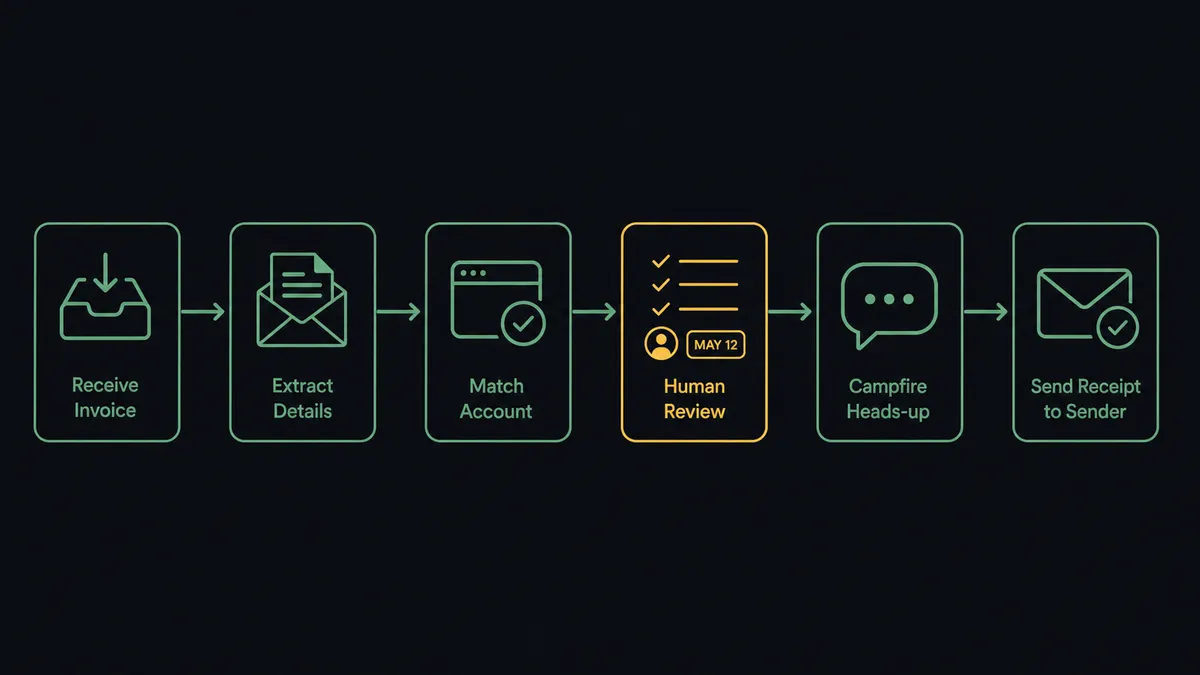
- Trigger: On a schedule, the workflow calls Get Emails on the shared inbox to pull messages received since the last run.
- Read: It calls Get Email for the full message and sender details.
- Locate the project: It calls List Projects and Get Project to match the sender’s account to the right Basecamp project, with the project’s to-do lists and message board resolved automatically from the dock.
- File the work: For a new request it calls Create To-do with the ask as content, the body as description, an assignee from List Project People, and a due date. For an update it calls Create Comment on the matching to-do or message.
- Alert the team: It calls Create Campfire Line so the project team sees the new work in chat without watching the inbox.
- Acknowledge: It calls Reply to Email with a receipt so the client knows the request is tracked.
- Keep the trail: It calls Forward Email when a message needs a specific person’s eyes directly.
That is the “just connect them” answer. Every client email becomes tracked, assigned work in the project where the team already operates, and nothing survives only in the inbox.
Can an AI agent run it? (and why a human stays in the loop)
Yes, and the agent’s job is triage with judgment. It holds both connectors’ actions as tools: Get Emails, Get Email, List Projects, Get Project, Create To-do, Create Comment, Create Campfire Line, Reply to Email, Forward Email. It reads each message the way a good account manager would: is this a new request, a nudge on existing work, a question, or noise? A new ask becomes a to-do with the right assignee. A follow-up lands as Create Comment on the thread it belongs to, not a duplicate task. An unclassifiable message goes to a person with the agent’s best reading attached.
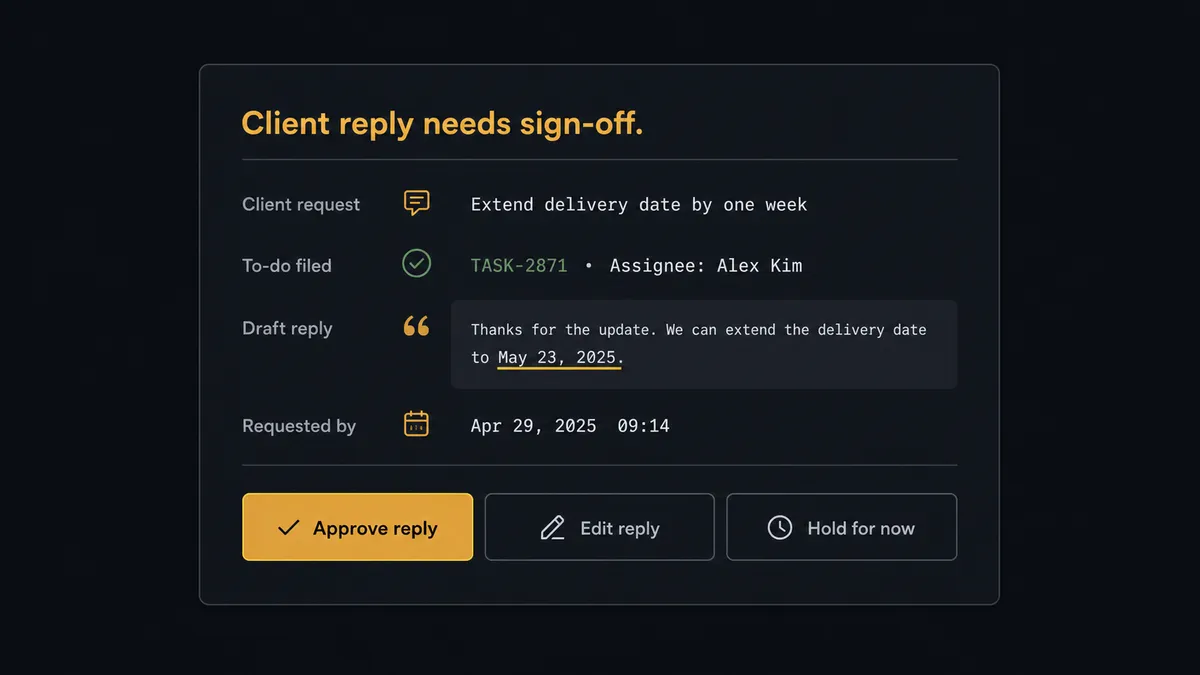
The consequential step is the outbound reply, because an email to a client is a commitment the moment it sends. Filing a to-do is reversible; “yes, Friday works” is not. So the agent splits the two. Internal actions run autonomously. But when the drafted reply contains a date, a price, or a scope statement, the agent invokes a human-in-loop flow it holds as a callable tool. The workflow pauses and posts to the project lead: “Client [name] asked for [request]. Filed as a to-do, assigned. Drafted reply commits delivery Friday. Approve wording, edit, or hold?” The lead approves or rewrites, and only then does Reply to Email send, with the original ask, the sent wording, the approver, and the timestamp in the audit trail.
That is the digital andon cord for client communication: like Toyota’s andon cord, the workflow stops the line the moment a message is about to become a promise. The inbox empties at machine speed; commitments still carry a human signature.
FlowRunner vs n8n
If your team includes a developer who lives in n8n, they can absolutely build an inbox-to-Basecamp pipeline: the node library covers Microsoft mail and project tools, the community has patterns to borrow, and fair-code self-hosting keeps the entry cost low. That developer control is real and worth acknowledging.
The difference is where the intelligence and the safety live. In n8n, classification rules, the project-matching logic, and the reply gate are custom work someone builds and maintains, and an approval is a node positioned in advance, not a tool the agent decides to invoke because a draft happens to contain a commitment. FlowRunner ships that judgment layer as the product, operable by the account team itself.
| What matters for this pair | FlowRunner | n8n |
|---|---|---|
| Human-in-the-loop on client-facing replies | Native. The agent flags commitments and holds Reply to Email for the project lead | Wait and approval nodes exist; commitment detection is logic you build |
| Who runs the flow | An AI agent classifies each email, reasons, and picks actions as tools | Node graph a developer designs and maintains |
| Users included | Unlimited users on every tier | Cloud plans priced with limits; self-host to lift them |
| Bring your own AI keys | Yes, BYOK. Connect the AI provider key you already have | BYOK supported as well |
| Self-hosted option | Yes, cloud-hosted or self-hosted | Yes, fair-code self-hosting is its hallmark |
| Pricing model | Transparent workflow-based tiers, compliance from the $299/mo tier | Execution-based cloud pricing; full compliance features sit at Enterprise |
If you have engineering time to spend on internal tooling, n8n rewards it. If you want the account team running client-email triage with a commitment gate and an audit trail from the first week, that is where FlowRunner is the better fit.
Before and after
| Category | Before | After |
|---|---|---|
| Request capture | Emails become to-dos only when the account manager has time | Every classified request is filed with an assignee before anyone opens the inbox |
| Lost asks | Requests surface weeks later as “we asked for this already” | Nothing lives only in the inbox; the audit trail shows when each ask was filed |
| Team awareness | The delivery team hears about new work secondhand | Create Campfire Line puts each request in the project chat as it lands |
| Unvetted promises | Anyone can reply “sure, by Friday” without checking the plan | Replies with dates or scope hold for the project lead’s approval |
| Client experience | Silence until someone gets around to answering | An acknowledgment goes out at once; commitments follow with sign-off |
What you can build
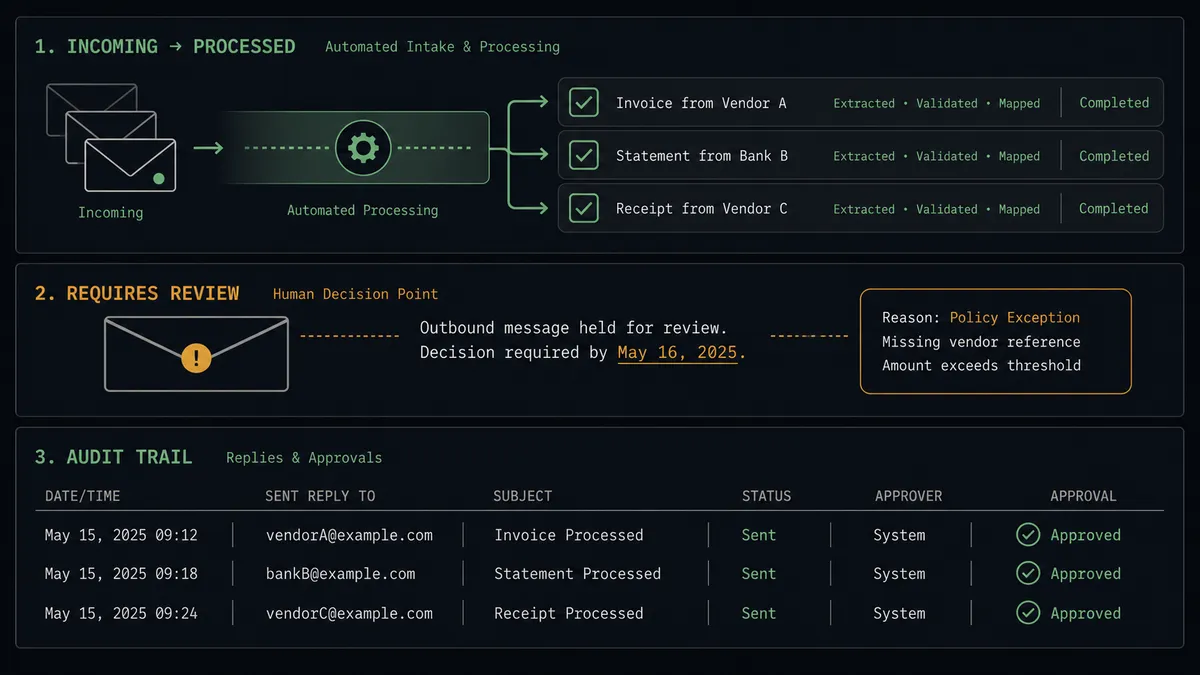
Shared-inbox triage desk. Get Emails sweeps the client inbox, the agent classifies each message, and Create To-do or Create Comment files it in the right project with the right assignee, with Create Campfire Line alerting the team as work lands.
Commitment-gated client replies. The agent drafts every response, sends routine acknowledgments itself, and routes anything containing a date, price, or scope statement through the project lead before Reply to Email runs. Promises get a named approver.
Escalation catcher. When a message reads as frustration or an at-risk account, the agent forwards it to the account owner with Forward Email, posts a heads-up via Create Campfire Line, and files a to-do so the save has an owner and a deadline.
Meeting-to-schedule bridge. When a client proposes a call, the agent checks Get Calendar Events for conflicts, books the slot with Create Calendar Event in Outlook, mirrors it into the project with Create Schedule Entry, and confirms, holding the reply for approval if the time commits key people.
Morning docket. On a schedule, the agent compiles yesterday’s filed requests and pending approvals from List To-dos and posts one Create Message digest to each project’s board, so leads start the day with a single view of what came in and what awaits their sign-off.
Getting started
Start on the free plan: 100 executions a month, every integration included, no credit card required, plus 14 days of Professional for new accounts. Both connectors are available on every tier, and every tier includes unlimited users and unlimited workflows.
Explore the integration details:
- Outlook integration (21 actions covering email, calendar, and contacts)
- Basecamp integration (37 actions covering projects, to-dos, messages, and schedules)
Start building free at flowrunner.ai or book a demo to see a live Outlook to Basecamp workflow, reply approval gate and all.
Frequently asked questions
Is it free to connect Outlook and Basecamp on FlowRunner?
You can build and run the connection on FlowRunner's free plan, which includes 100 executions a month and every integration with no credit card required, and new accounts also get 14 days of Professional. Both connectors are available on every FlowRunner tier, and every tier includes unlimited users and unlimited workflows.
Can I self-host the Outlook to Basecamp workflow?
Yes. FlowRunner offers a cloud-hosted option and a self-hosted option, so the connection can run inside your own environment.
Does the AI agent need my own OpenAI or Claude key?
FlowRunner uses a bring-your-own-keys model, so you connect the AI provider key you already have. You are not locked to one model.
What happens when a client email asks for something the agent cannot classify?
It goes to a person with context attached. The agent posts the email, its best reading of the request, and the candidate project to your channel, and waits. Nothing is filed in the wrong project and no reply goes out; the ambiguous message becomes a thirty-second human decision instead of a mistake.
Outlook has no trigger in FlowRunner, so what starts the workflow?
A schedule. Each run calls Get Emails on the shared inbox to pull messages received since the last check, and Get Email retrieves each message in full for classification. Cadence is yours, from every few minutes to hourly.
Which Basecamp actions does the pair use to file the work?
Create To-do logs new requests with assignees and due dates, with the to-do list resolved from the project dock automatically. Create Comment appends updates to existing to-dos or messages, Create Campfire Line gives the team a chat heads-up, and List Projects and Get Project locate the right client project.