How to Connect ShipBob with Exact Online (With or Without an AI Agent)
Connect ShipBob fulfillment events to Exact Online so shipped orders become sales invoices in the ERP, with an AI agent that verifies what actually shipped and pauses for a human before an invoice bills a customer for it.
How do you connect ShipBob to Exact Online?
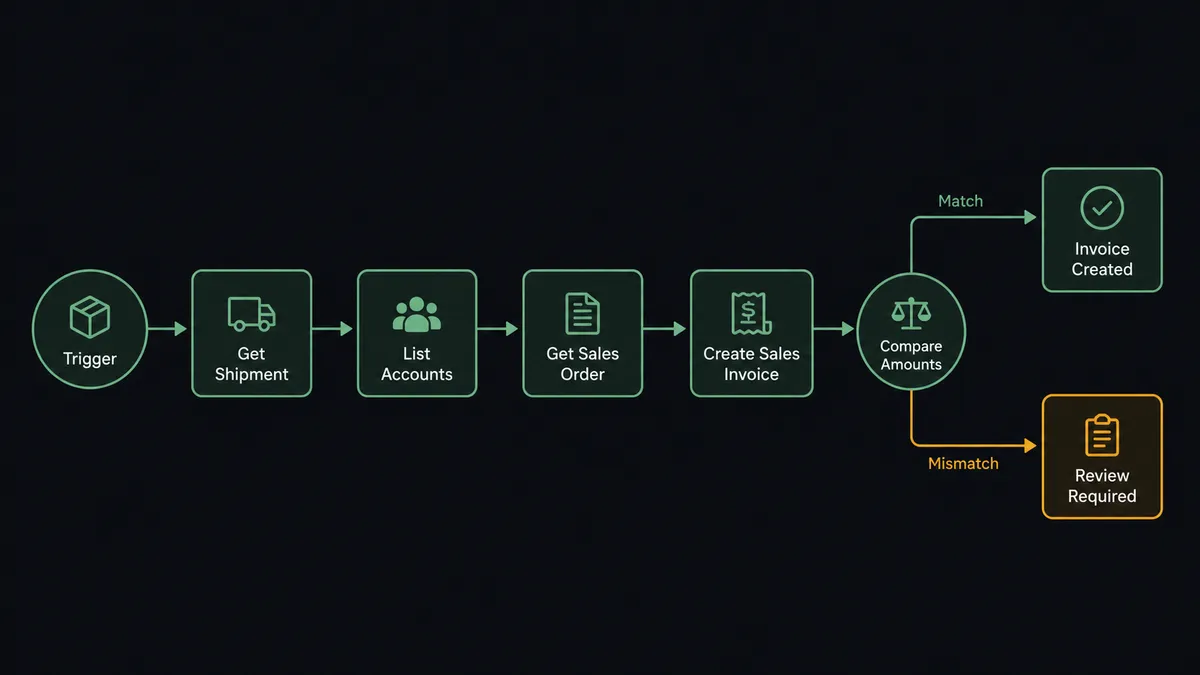
You connect ShipBob to Exact Online by having ShipBob’s On Order Shipped trigger drive Exact Online actions: the workflow pulls the shipment with Get Order and Get Shipment, matches the customer with List Accounts or creates them with Create Account, verifies the shipped SKUs against List Items, and raises the bill with Create Sales Invoice, so what leaves the warehouse becomes a receivable in the ERP the same hour. FlowRunner is a visual AI-agent orchestration platform where automations run autonomously and pause for human judgment on the steps that carry real consequence. Run as an AI agent, the same connection compares what actually shipped against what was ordered, bills the clean shipments on its own, and stops for a named human before Create Sales Invoice bills a customer for a shipment that does not match.
The problem it solves
When fulfillment runs through ShipBob and the books live in Exact Online, invoicing is a nightly translation exercise. Someone pulls the day’s shipments from the 3PL dashboard, matches each to a sales order in the ERP, checks the customer exists in the right administration, and raises the invoice line by line. It lags a day or more behind the warehouse and depends on the discipline of whoever does the matching. Meanwhile revenue recognition waits on data entry, and the month-end close inherits every shipment nobody got to.
The edges are the dangerous part. The 3PL ships short because one SKU ran out, and the invoice bills the full order anyway; now you have a dispute and a credit process. An order splits across two shipments and gets invoiced twice at full value. A first-time channel customer ships before anyone created their account in Exact Online, so the invoice lands against the wrong entity or waits in a fix-later queue. Every one of these is a small reconciliation failure that becomes a customer-facing billing error.
How it works: the connection
The connection listens to ShipBob and writes to Exact Online. Here is the plain version, grounded in the real connector actions.
- Trigger: ShipBob fires On Order Shipped when the 3PL ships an order.
- Read: The workflow calls Get Order and Get Shipment to pull the shipped SKUs, quantities, customer, and tracking reference.
- Resolve the entity: It calls List Divisions to pick the right Exact Online administration, then List Accounts to find the customer, with Create Account filling the gap for first-time buyers.
- Verify the items: It calls List Items to confirm every shipped SKU maps to an ERP item, so no invoice line ever references a product the books do not know.
- Compare against the order: It calls Get Sales Order to read the expected lines beside what actually shipped.
- Raise the invoice: For a clean match, it calls Create Sales Invoice with the shipped lines and the shipment reference.
- Handle the returns: A second branch on On Return Completed pulls the return detail and posts it to finance with the original invoice context from List Sales Invoices, so the credit conversation starts with the facts assembled.
That is the “just connect them” answer. Shipped becomes billed the same day, the invoice reflects the shipment instead of the order form, and finance stops rekeying what the warehouse already knew.
Can an AI agent run it? (and why a human stays in the loop)
Yes, and the agent is what makes bill-on-ship safe instead of merely fast. A field-mapped sync bills whatever the trigger hands it, which works right up until the 3PL ships short, substitutes an item, or splits an order. An AI agent holds Get Order, Get Shipment, List Divisions, List Accounts, Create Account, List Items, Get Sales Order, and Create Sales Invoice as tools, and treats every shipment as a claim to be verified: does what left the warehouse match what the ERP expects to bill?
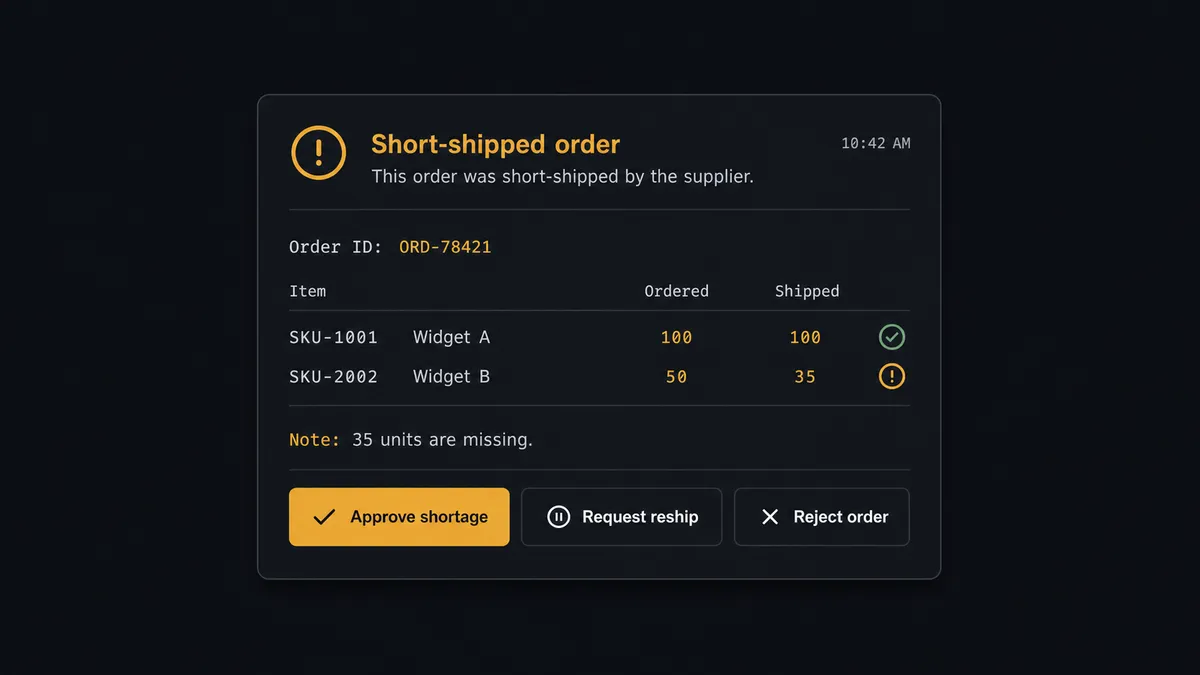
The consequential step is Create Sales Invoice, because an invoice is a legal demand for payment, and it flows straight into the ledger and the customer’s inbox. Billing a short shipment at full value is not a data error, it is a dispute with your customer’s finance team. When the comparison comes back clean, the agent bills without ceremony. When it does not, it invokes a human-in-loop flow it holds as a callable tool. The workflow pauses and posts to your finance channel: “Order [reference] shipped short: one line shows fewer units shipped than ordered. Invoice the shipped quantity now and hold the remainder, bill the full order, or wait for the back-ordered units?” A person picks, with shipped-versus-ordered laid out line by line. Only then does Create Sales Invoice run, and the shipment reference on the invoice ties the decision to its evidence. Deletions are gated the same way: Delete Sales Invoice and Delete Sales Order never fire without a named approval, because unwinding the books deserves a witness.
This is the digital andon cord for the order-to-cash line: like Toyota’s production line pull cord, the workflow stops the line the moment it hits uncertainty. Clean shipments bill themselves. The mismatches, the ones that become credit notes and awkward emails if billed wrong, wait for a named human with the facts assembled.
FlowRunner vs Celigo
Celigo has real standing in 3PL-to-ERP integration. Its platform was built for exactly this class of data flow, its prebuilt integration apps encode years of order-to-cash edge cases, and enterprise IT teams running many integrations get mature monitoring and error management. For high-volume record sync between fulfillment and finance systems under IT ownership, Celigo is a proven option.
The difference is where judgment lives. Celigo executes the mapping you configured; when a shipment disagrees with its order, that is an error record for someone to find in a queue. FlowRunner puts an AI agent inside the flow that investigates the mismatch with both systems’ tools, drafts the billing decision, and brings a person in as a workflow step, before the invoice exists rather than after it bounced.
| What matters for this pair | FlowRunner | Celigo |
|---|---|---|
| Human-in-the-loop before Create Sales Invoice bills a mismatch | Native. The agent invokes an approval flow as a callable tool and waits for a named approver | Error handling and alert queues on failed records, not a pause-for-judgment step |
| Who runs the flow | An AI agent verifies shipments, reasons about mismatches, picks actions as tools | Configured integration flows executed as defined |
| Users included | Unlimited users on every tier | Seat and endpoint licensing scoped by plan |
| Bring your own AI keys | Yes, BYOK. Connect the AI provider key you already have | AI features run inside Celigo’s own platform stack |
| Self-hosted option | Yes, cloud-hosted or self-hosted | Cloud iPaaS |
| Pricing model | Transparent workflow-based tiers | Enterprise iPaaS pricing scoped by endpoints and volume |
If you are consolidating many integrations on one managed platform with an IT team, Celigo is a credible decision. If you want shipments becoming accurate invoices with a human on every billing call that is not clean, this pairing is the sharper tool.
Before and after
| Category | Before | After |
|---|---|---|
| Invoicing lag | Shipments wait for the nightly matching session before anyone bills them | Create Sales Invoice runs within minutes of On Order Shipped firing |
| Short shipments | Billed at full value, discovered by the customer, resolved by credit note | Caught at the comparison step and decided by a person before the invoice exists |
| New customers | Shipments for unknown buyers queue until someone creates the account | List Accounts matches and Create Account fills the gap inline |
| Split orders | Double-billing risk on every multi-shipment order | Each shipment bills its own lines, with the split state visible at the gate |
| Returns | Return paperwork drifts to finance days later, if at all | On Return Completed posts the return with its invoice context the day it lands |
What you can build
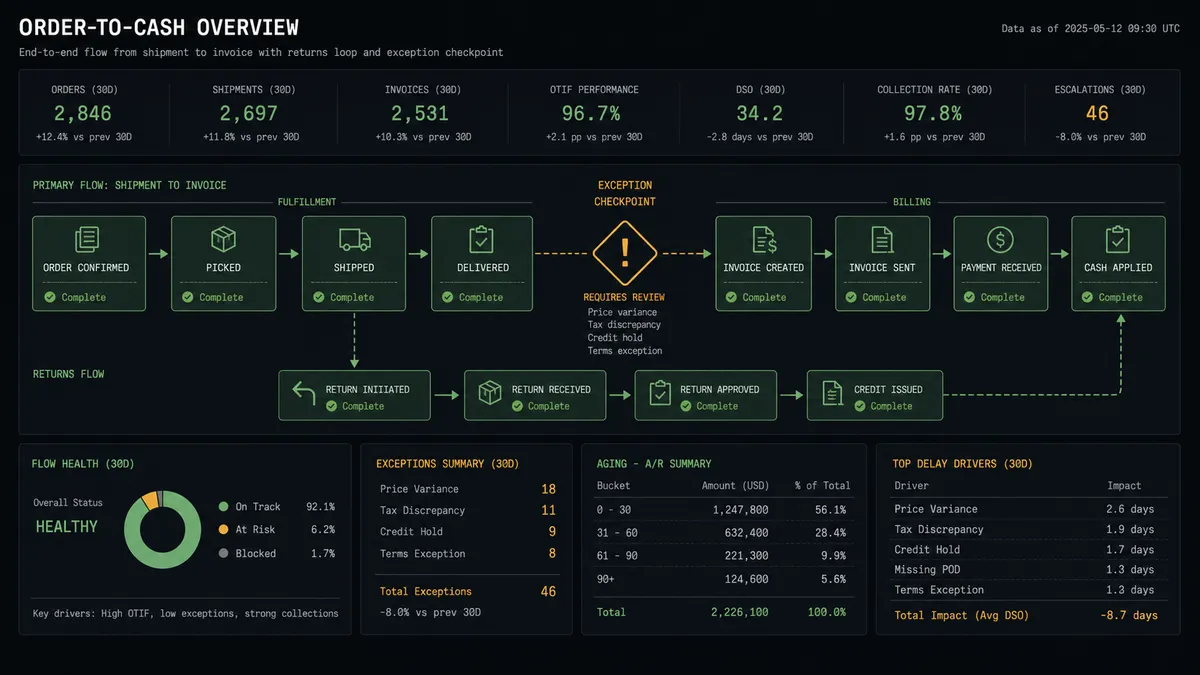
Bill on ship, verified. On Order Shipped fires. The agent pulls the shipment with Get Order and Get Shipment, matches the account, verifies items with List Items, compares against Get Sales Order, and raises Create Sales Invoice, with mismatches held at the gate.
Channel-order capture. For orders that reached the 3PL without touching the ERP, the agent creates the missing commercial trail: Create Account for the buyer and Create Sales Order for the transaction, so channel revenue stops living outside the books.
Short-shipment resolution. When shipped quantities fall short, the agent lays out ordered versus shipped at the approval step, and the chosen path, bill the shipped units or wait, executes with the decision recorded.
Returns into the ledger conversation. On Return Completed fires. The agent finds the original billing with List Sales Invoices and Get Sales Invoice and posts the return with full context to finance, so the credit decision starts from facts instead of a search.
Ledger-side reconciliation digest. On a schedule, the agent walks recent shipments against List Sales Invoices and List Transactions, confirming every shipment has exactly one invoice, and posts the exceptions, unbilled or double-billed, to your finance channel before close.
Getting started
Start on the free plan: 100 executions a month, every integration included, no credit card required, plus 14 days of Professional for new accounts. Both connectors are available on every tier, and every tier includes unlimited users and unlimited workflows.
Explore the integration details:
- ShipBob integration (5 triggers and 20 actions covering fulfillment, inventory, and receiving)
- Exact Online integration (27 actions covering CRM, items, sales, and ledgers)
Start building free at flowrunner.ai or book a demo to see a live ShipBob to Exact Online workflow, mismatch approval and all.
Frequently asked questions
Is it free to connect ShipBob and Exact Online on FlowRunner?
You can build and run the connection on FlowRunner's free plan, which includes 100 executions a month and every integration with no credit card required, and new accounts also get 14 days of Professional. Both connectors are available on every FlowRunner tier, and every tier includes unlimited users and unlimited workflows.
Can I self-host the ShipBob to Exact Online workflow?
Yes. FlowRunner offers a cloud-hosted option and a self-hosted option, so the connection can run inside your own environment.
Does the AI agent need my own OpenAI or Claude key?
FlowRunner uses a bring-your-own-keys model, so you connect the AI provider key you already have. You are not locked to one model.
What happens when the shipment does not match the sales order?
The invoice waits. The agent posts the order reference, the shipped lines from Get Shipment, the expected lines from Get Sales Order, and the exact mismatch to your finance channel, then waits for a person to bill the shipment as-is, hold for the remainder, or correct the order before Create Sales Invoice runs.
Which ShipBob events can start an Exact Online workflow?
ShipBob offers five triggers: On Order Shipped, On Shipment Delivered, On Shipment Exception, On Shipment On Hold, and On Return Completed. On Order Shipped drives the billing flow, and On Return Completed drives the returns path into finance.
Does the workflow handle multiple Exact Online divisions?
Yes. The workflow calls List Divisions to resolve the right administration before writing anything, so companies running more than one Exact Online division route each shipment's records to the entity it belongs to.