How to Connect ShipBob with Cin7 Core (DEAR) (With or Without an AI Agent)
Connect ShipBob fulfillment events to Cin7 Core (DEAR) so shipped orders stay reconciled with the ERP, with an AI agent that spots inventory drift and pauses for a human before a replenishment order commits inbound freight.
How do you connect ShipBob to Cin7 Core (DEAR)?
You connect ShipBob to Cin7 Core (DEAR) by having ShipBob’s On Order Shipped trigger drive Cin7 Core actions: the workflow pulls the shipment with Get Order and Get Shipment, matches it to the ERP sale with List Sales and Get Sale, and records any order that originated outside the ERP with Create Sale, so what the 3PL actually shipped and what the ERP believes happened stay in step. FlowRunner is a visual AI-agent orchestration platform where automations run autonomously and pause for human judgment on the steps that carry real consequence. Run as an AI agent, the same connection also watches inventory in both systems, catches drift between them, and stops for a named human before Create WRO commits an inbound replenishment order to the warehouse.
The problem it solves
When fulfillment lives in ShipBob and the inventory record lives in Cin7 Core, someone on your team is the synchronization layer. They export shipped orders from the 3PL dashboard, cross-check them against sales orders in the ERP, and chase down the ones that do not line up. They eyeball stock levels in two systems that count differently, and they decide when to send more inventory to the fulfillment center from a spreadsheet updated when someone has time.
The failure mode is drift, and drift is silent. A return gets processed in ShipBob but never adjusted in the ERP. A short-shipped order goes out and the ERP still shows the full quantity as sold. Week by week the counts separate, and nobody knows which is true until a stockout or overcommitted sales order forces a physical count. The other failure mode is replenishment timing: by the time a human notices a SKU running low, the inbound lead time means dark shelves before the next receiving order lands.
How it works: the connection
The connection listens to ShipBob and reconciles against Cin7 Core (DEAR). Here is the plain version, grounded in the real connector actions.
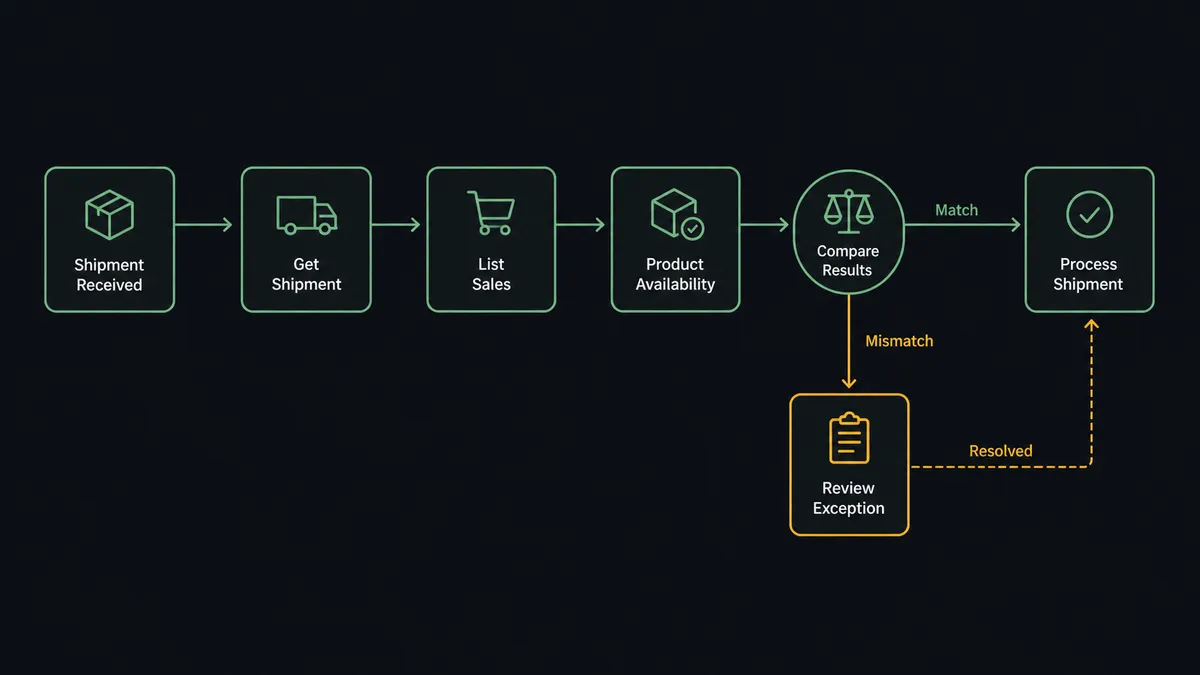
- Trigger: ShipBob fires On Order Shipped when the 3PL ships an order.
- Read: The workflow calls Get Order and Get Shipment to pull the shipped SKUs, quantities, and tracking reference.
- Match the sale: It calls List Sales in Cin7 Core, filtered by the order reference, then Get Sale to compare the shipped lines against the ERP order lines.
- Record the stragglers: For an order that originated outside the ERP, it calls Create Sale so the sale exists in Cin7 Core with the correct customer, location, and lines.
- Compare stock: It calls Get Inventory in ShipBob and Product Availability in Cin7 Core for the shipped SKUs, putting both systems’ counts side by side.
- Handle returns: A second branch on On Return Completed pulls the return details so the ERP gets adjusted instead of silently overstating sellable stock.
- Surface the exceptions: Quantity mismatches, unmatched orders, and count drift get posted to the ops channel with the evidence attached.
That is the “just connect them” answer. Shipped means recorded, returned means adjusted, and the two inventory counts get compared on every event instead of at the next physical count.
Can an AI agent run it? (and why a human stays in the loop)
Yes, and the agent version is what turns reconciliation into stewardship. A fixed sync can copy shipment rows into the ERP. An AI agent holds Get Order, Get Shipment, Get Inventory, List Sales, Get Sale, Create Sale, List Purchases, and Create WRO as tools, and reasons about what each event means. A small mismatch on a low-value SKU gets logged and folded into the daily summary. The same mismatch on your top seller during a promotion gets escalated now, because the agent reads context, not just deltas.
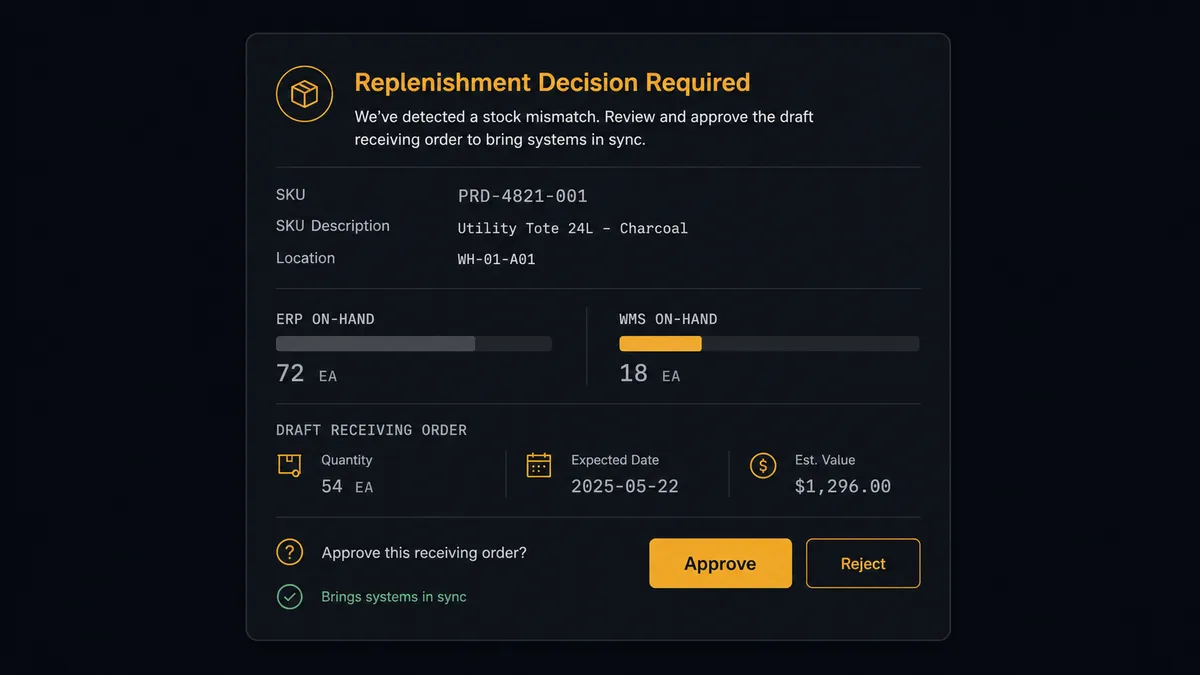
The consequential step is Create WRO. A warehouse receiving order is not a note in a system, it is a commitment: stock pulled from somewhere, freight booked, receiving labor scheduled at the fulfillment center. So the agent never fires it on instinct. When a SKU crosses its reorder point, the agent first calls List Purchases in Cin7 Core to see what is already on order from suppliers, drafts the replenishment with quantities and the fulfillment center destination, and invokes its human-in-loop tool. The workflow pauses and posts to your ops channel: “SKU [code] is below its reorder point at [fulfillment center]. Cin7 Core shows a supplier PO already in flight. Draft WRO attached. Send now, wait for the inbound PO, or adjust quantities?” A person makes the call with both systems’ evidence in one message. Only after approval does Create WRO run, followed by Get WRO Box Labels to prepare the inbound paperwork.
This is the digital andon cord in warehouse terms: like Toyota’s production line pull cord, the workflow stops the line the moment it hits uncertainty. Routine shipment events reconcile themselves. The moments that commit money and freight wait for a named human, and the audit trail records who pulled the cord back.
FlowRunner vs Celigo
Celigo deserves the credit it gets in 3PL-to-ERP conversations. Its integration platform has prebuilt connectivity for exactly this class of problem, and its error management for failed records is mature. For a high-volume, well-mapped sync between a fulfillment provider and an ERP, Celigo is a serious tool.
The difference is what happens when the data does not agree with itself. Celigo executes the mapping you configured; when reality goes sideways, it produces an error for a human to find in a dashboard. FlowRunner puts an AI agent inside the flow that investigates the discrepancy with both systems’ tools, drafts the corrective action, and brings a person in as a step in the workflow rather than a spectator of its logs.
| What matters for this pair | FlowRunner | Celigo |
|---|---|---|
| Human-in-the-loop before Create WRO commits replenishment | Native. The agent invokes an approval flow as a callable tool and waits for a named approver | Flow-level error handling and alerts, not a native pause-for-judgment step |
| Who runs the flow | An AI agent reads events, reasons about drift, picks actions as tools | Configured integration flows executed as defined |
| Users included | Unlimited users on every tier | Seat and endpoint licensing scoped by plan |
| Bring your own AI keys | Yes, BYOK. Connect the AI provider key you already have | AI features run inside Celigo’s own platform stack |
| Self-hosted option | Yes, cloud-hosted or self-hosted | Cloud iPaaS |
| Pricing model | Transparent workflow-based tiers | Enterprise iPaaS pricing scoped by endpoints and volume |
If your organization is standardizing dozens of enterprise integrations under an IT team, Celigo is a credible platform decision. If you are an operations team that wants the 3PL and the ERP to reconcile themselves, with a human on the decisions that commit freight and inventory, this pairing is the better fit.
Before and after
| Category | Before | After |
|---|---|---|
| Shipment reconciliation | Someone exports shipped orders and cross-checks them against ERP sales when they get time | Every On Order Shipped event is matched to its Cin7 Core sale the moment it fires |
| Inventory truth | ShipBob and Cin7 Core counts drift apart until a physical count exposes the gap | Get Inventory and Product Availability are compared on every shipment, and drift surfaces the day it starts |
| Returns | Returns land in ShipBob and the ERP quietly overstates sellable stock | On Return Completed drives the adjustment path so both systems agree on what came back |
| Replenishment | Reorders happen when a human notices a low count, often after the lead-time window has closed | The agent drafts the WRO at the reorder point, with List Purchases context, and a person approves it in one click |
| Accountability | Nobody can say afterward who decided to send more stock or why | Every Create WRO carries the approver’s name, the evidence, and a timestamp |
What you can build
Shipment-to-ERP reconciliation. On Order Shipped fires. The agent pulls the shipment with Get Order and Get Shipment, matches it with List Sales and Get Sale, and posts only the mismatches, so the ERP tracks what actually left the building.
Off-catalog order capture. For orders that reached ShipBob without ever touching the ERP, the agent creates the missing record with Create Sale in Cin7 Core, matching the customer with List Customers first, so channel sales stop leaking out of your revenue reporting.
Gated replenishment. When Get Inventory shows a SKU below its reorder point, the agent checks Product Availability and List Purchases, drafts the receiving order, and holds at the human gate. Approval fires Create WRO and Get WRO Box Labels.
Exception triage with ERP context. On Shipment Exception fires. The agent pulls the order, looks up the customer’s history through Get Sale, and routes high-value or repeat-issue shipments to a person while logging the routine ones.
Returns that close the loop. On Return Completed fires. The agent reads the returned lines, verifies the original sale in Cin7 Core, and posts a same-day summary so the adjustment and follow-up happen while the return is fresh.
Getting started
Start on the free plan: 100 executions a month, every integration included, no credit card required, plus 14 days of Professional for new accounts. Both connectors are available on every tier, and every tier includes unlimited users and unlimited workflows.
Explore the integration details:
- ShipBob integration (5 triggers and 20 actions covering fulfillment, inventory, and receiving)
- Cin7 Core (DEAR) integration (10 actions covering products, stock, sales, and customers)
Start building free at flowrunner.ai or book a demo to see a live ShipBob to Cin7 Core (DEAR) workflow, replenishment approval and all.
Frequently asked questions
Is it free to connect ShipBob and Cin7 Core (DEAR) on FlowRunner?
You can build and run the connection on FlowRunner's free plan, which includes 100 executions a month and every integration with no credit card required, and new accounts also get 14 days of Professional. Both connectors are available on every FlowRunner tier, and every tier includes unlimited users and unlimited workflows.
Can I self-host the ShipBob to Cin7 Core (DEAR) workflow?
Yes. FlowRunner offers a cloud-hosted option and a self-hosted option, so the connection can run inside your own environment.
Does the AI agent need my own OpenAI or Claude key?
FlowRunner uses a bring-your-own-keys model, so you connect the AI provider key you already have. You are not locked to one model.
What happens when ShipBob and Cin7 Core disagree on how much stock is left?
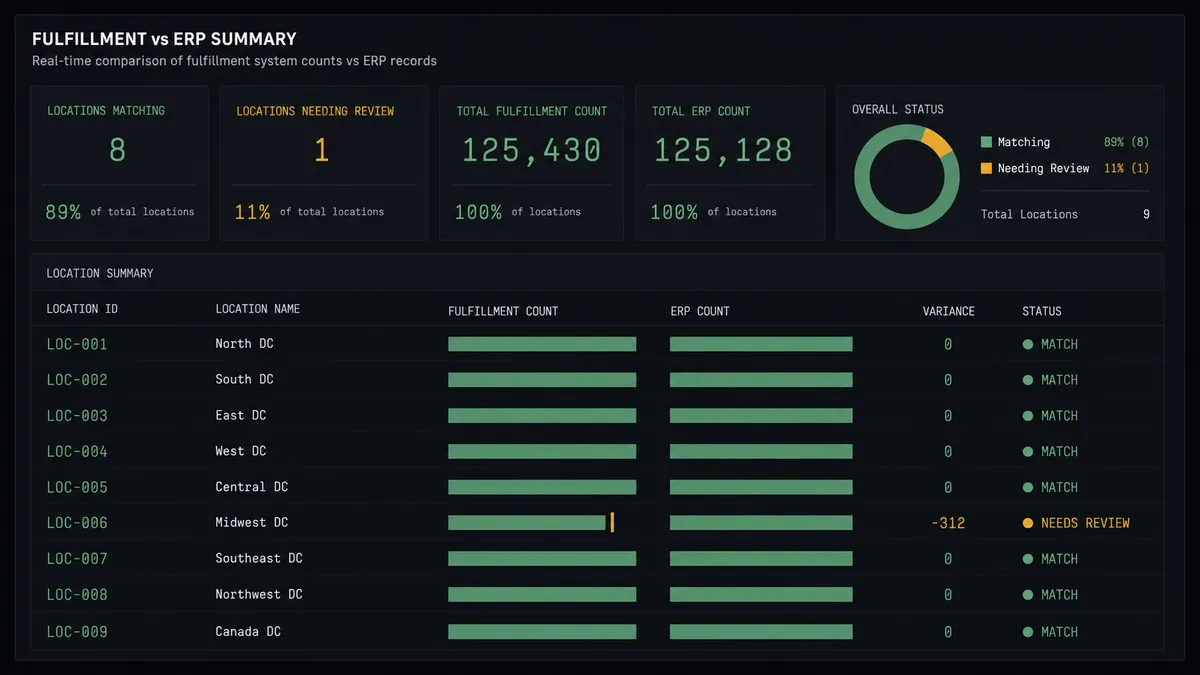
The agent flags the drift instead of picking a side. It posts the SKU, the ShipBob count from Get Inventory, the Cin7 Core count from Product Availability, and the recent shipment history to your ops channel, then waits for a person to decide which system needs the correction before anything downstream uses the number.
Which ShipBob events can start a Cin7 Core (DEAR) workflow?
ShipBob offers five triggers: On Order Shipped, On Shipment Delivered, On Shipment Exception, On Shipment On Hold, and On Return Completed. On Order Shipped drives the reconciliation flow, and On Return Completed drives the returns path.
Does the agent create replenishment orders on its own?
No. The agent drafts the warehouse receiving order, checks List Purchases in Cin7 Core to confirm what is already inbound, and packages the whole picture for a named approver. Create WRO only runs after a person signs off, and the approval is captured in the audit trail.