How to Connect ShipBob with Cin7 Omni (With or Without an AI Agent)
Connect ShipBob fulfillment events to Cin7 Omni order and stock records, with an AI agent that reconciles shipments automatically and pauses for a human before a reshipment spends money or a cancellation kills a live order.
How do you connect ShipBob to Cin7 Omni?
You connect ShipBob to Cin7 Omni by closing the loop between fulfillment and the system of record: ShipBob’s On Order Shipped and On Shipment Exception triggers fire as parcels move, the workflow pulls the details with Get Shipment and Get Order, matches them to the customer order in Cin7 Omni with Get Sales Order, and reconciles quantities against List Stock. FlowRunner is a visual AI-agent orchestration platform where automations run autonomously and pause for human judgment on the steps that carry real consequence. Run the same connection as an AI agent and the loop gains an operator: the agent investigates every exception with real data from both systems and pauses for a named human before it reships at real cost with Create Order or kills a live order with Cancel Order.
The problem it solves
Once fulfillment moves to a 3PL, your system of record and your warehouse floor belong to different companies. Cin7 Omni knows what was sold. ShipBob knows what actually left the building, what got delivered, and what is sitting in an exception queue. Keeping those two pictures aligned is a job someone does with two dashboards: checking which orders shipped, marking off deliveries, and copying tracking problems into a spreadsheet that operations reviews when there is time.
Exceptions are where the money leaks. A shipment fails on a bad address and sits in the exception state for days because nobody was watching the queue. A damaged parcel needs a reshipment decision: ship again at real cost, or refund and cancel? That call needs the order’s value, the customer’s history, and current stock, which means twenty minutes of tab-hopping per incident, so it gets batched to Friday. Returns complete at the warehouse without the system of record hearing about it. Meanwhile new orders wait in Cin7 Omni until someone pushes them to the 3PL, adding a silent day to every promise you made at checkout.
How it works: the connection
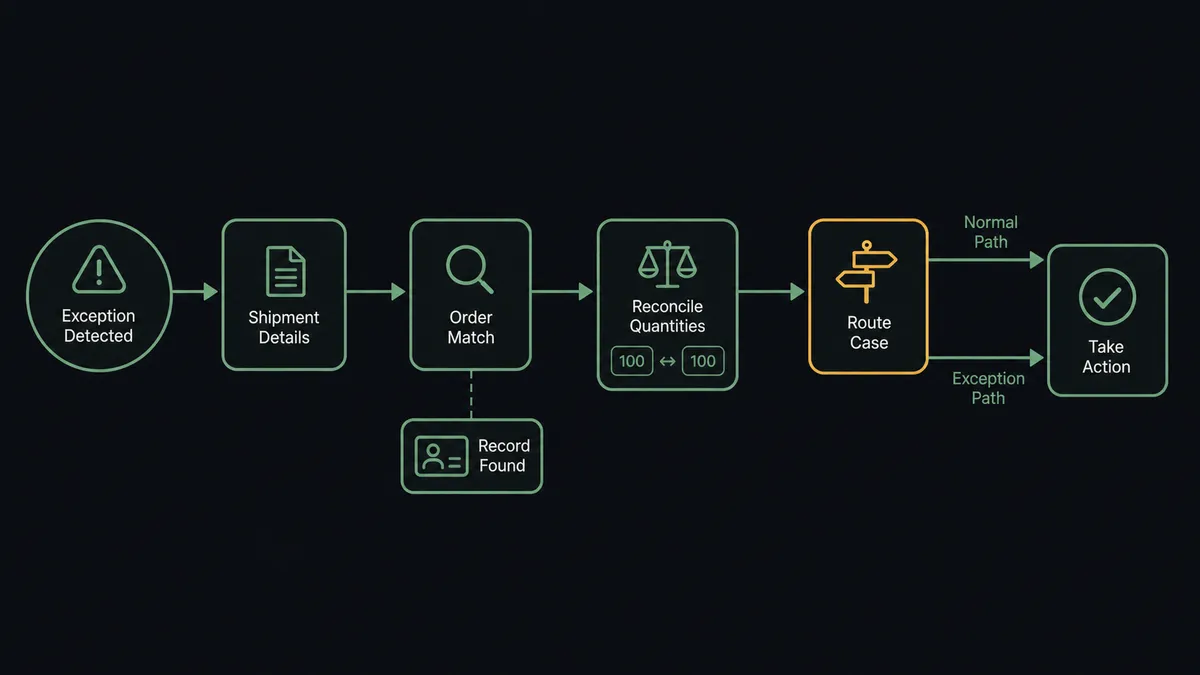
The connection listens to ShipBob and reconciles against Cin7 Omni. Here is the plain version, grounded in the real connector actions.
- Trigger: ShipBob fires On Shipment Exception the moment a shipment hits a problem, and On Order Shipped and On Shipment Delivered as parcels move normally.
- Read: The workflow calls Get Shipment and Get Order to pull the shipment’s status, items, and event history.
- Match the order: It calls Get Sales Order, or List Sales Orders filtered by reference, to find the customer order in Cin7 Omni behind the shipment.
- Reconcile quantities: It compares shipped line items against the order’s lines and checks Get Inventory on the ShipBob side and List Stock on the Cin7 Omni side.
- Route the event: Routine confirmations are logged against the order record. Exceptions, holds from On Shipment On Hold, and completed returns from On Return Completed are packaged with their full context.
- Act: Depending on the decision, the workflow reships with Create Order, cancels with Cancel Order, or files a return with Create Return.
That is the “just connect them” answer. Fulfillment reality flows back to the system of record continuously instead of during Friday reconciliation, and the exception queue becomes a stream of decisions instead of a backlog.
Can an AI agent run it? (and why a human stays in the loop)
Yes, and exceptions are exactly the work agents should take off your team. The agent holds the real actions as tools: Get Shipment, Get Order, Get Orders, Get Inventory, Estimate Fulfillment Cost, Create Order, Cancel Order, Batch Cancel Shipments, and Create Return on the ShipBob side; Get Sales Order, List Sales Orders, List Stock, List Products, and Create Sales Order on the Cin7 Omni side. When On Shipment Exception fires, the agent does the twenty minutes of tab-hopping in seconds: what failed, what was in the box, what the order was worth, whether stock exists to ship again, and what a reshipment costs via Estimate Fulfillment Cost.
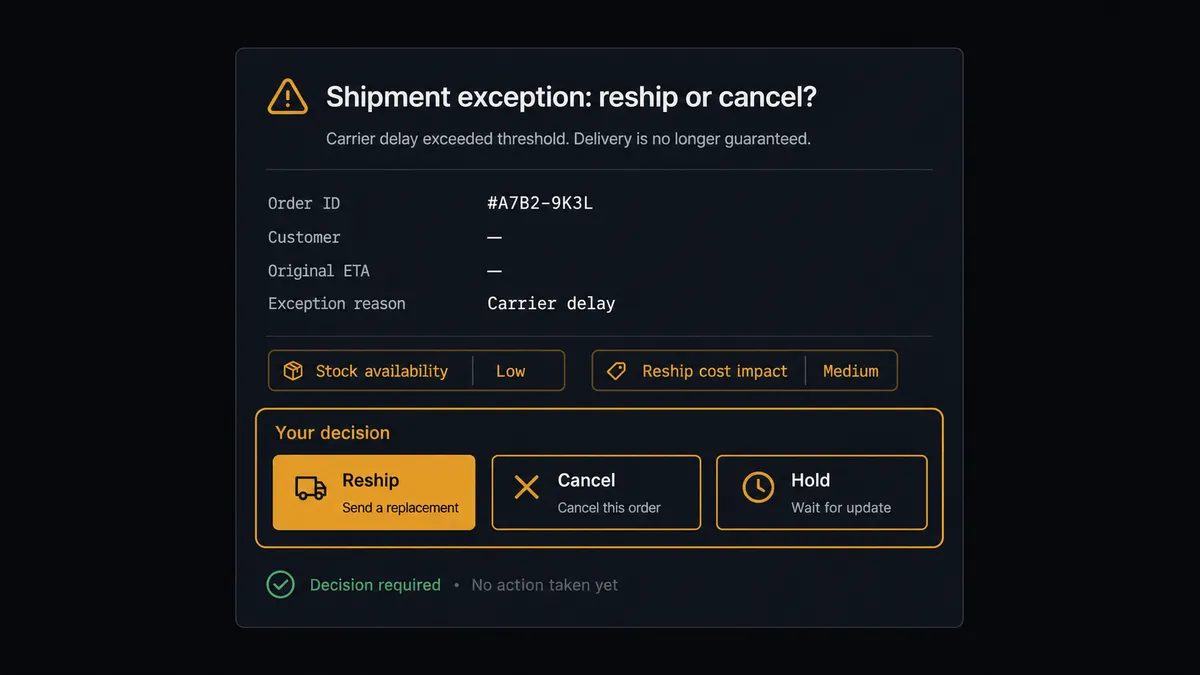
What it does not do is spend your money or break a promise on its own. Reshipping with Create Order commits real goods and real fulfillment fees; Cancel Order ends an order a customer is waiting on. Both sit behind the human gate. The agent invokes a human-in-loop flow it holds as a callable tool and posts the whole picture: “Carrier damage exception on a shipment for an established wholesale account. Stock covers a full reshipment from the default center, and the estimated fulfillment cost is small against the order value. Recommend reship. Approve, cancel the order instead, or hold?” One click executes the path: Create Order for the reshipment, or Cancel Order with the reason logged, and either way the triggering event, the decision, the approver, and the timestamp bind to the order’s history.
Prospects call this the digital andon cord, and fulfillment is where the metaphor is most literal: a line that stops itself the moment something is wrong, and a person who decides how it restarts. The agent watches every parcel; your team only sees the ones that need an owner.
FlowRunner vs Celigo
Celigo is the incumbent answer for connecting an ERP to a fulfillment provider, and its strengths are earned. It is mature iPaaS infrastructure with prebuilt integration apps that encode years of order-and-inventory sync logic, and for continuous, high-volume record synchronization across a whole commerce stack it is proven. If your goal is estate-wide sync, it belongs on the shortlist.
The gap is the exception path. Syncing records is not the same as deciding what to do when a shipment fails, and that decision is this pair’s whole job.
| What matters for this pair | FlowRunner | Celigo |
|---|---|---|
| Human-in-the-loop before a reshipment spends money or a cancellation lands | Native. The agent invokes an approval flow as a callable tool and pauses | Errors and exceptions route to handling queues; per-incident approval is not the core design center |
| Who runs the flow | An AI agent investigates each exception across both systems and recommends a path | Configured flow logic syncing records between endpoints |
| Users included | Unlimited users on every tier | Priced by edition and endpoints, scoped in enterprise terms |
| Bring your own AI keys | Yes, BYOK. Connect the provider key you already have | AI features run inside Celigo’s platform |
| Self-hosted option | Yes, cloud-hosted or self-hosted | Cloud iPaaS |
| Pricing model | Transparent workflow-based tiers starting at $45/mo | Edition-based pricing typically scoped for enterprise budgets |
If you need wall-to-wall record sync across a dozen systems, Celigo is built for that. If you want fulfillment exceptions investigated in seconds and every costly decision made by a named person with full context, that is what this pairing delivers.
Before and after
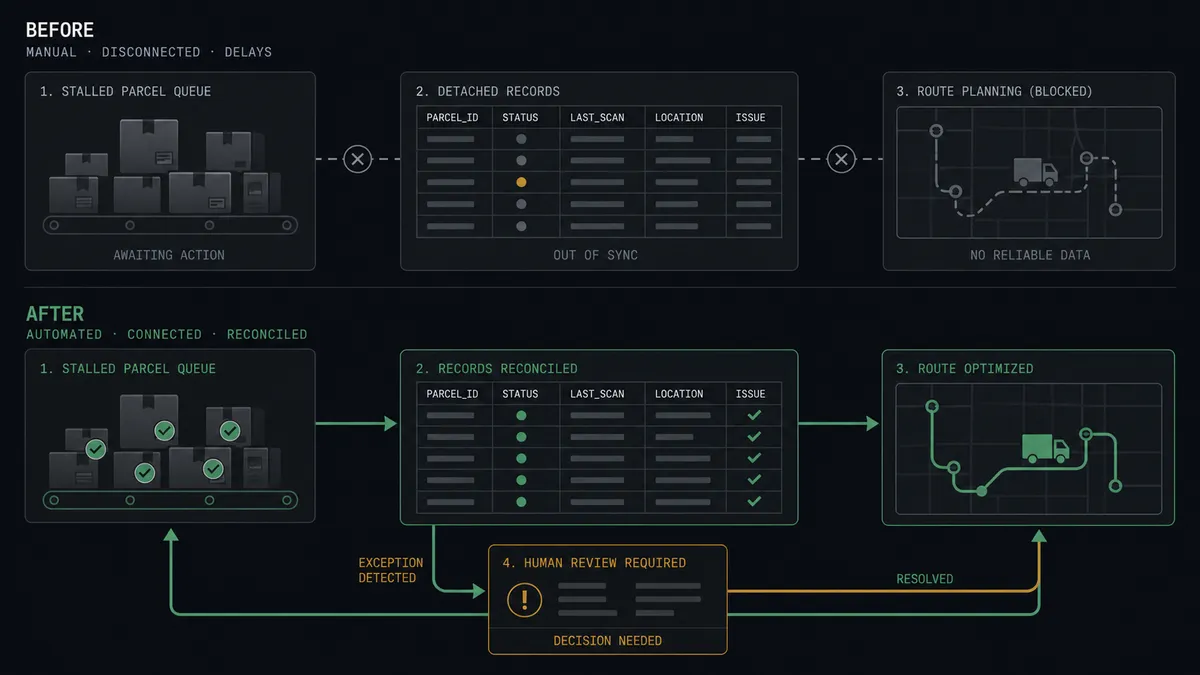
| Category | Before | After |
|---|---|---|
| Exception response | Failed shipments sit in a queue until someone checks the dashboard | On Shipment Exception triggers an investigation the moment it happens |
| Reship decisions | Twenty minutes of tab-hopping per incident, batched to Friday | The agent assembles order, stock, and cost context; a person decides in one click |
| Order dispatch | New Cin7 Omni orders wait for a manual push to the 3PL | A scheduled sweep dispatches them with Create Order, gated when costs look wrong |
| Returns visibility | Completed returns surface at the warehouse but not in the record | On Return Completed reconciles each return against the original order |
| Accountability | Nobody can say who decided to reship or cancel, or why | Every decision carries its triggering event, approver, and timestamp |
What you can build
Exception desk with a human gate. On Shipment Exception fires, the agent investigates with Get Shipment, Get Sales Order, Get Inventory, and Estimate Fulfillment Cost, then a person picks reship, cancel, or hold. Create Order and Cancel Order only run after approval.
Scheduled order dispatch. Every hour the agent calls List Sales Orders in Cin7 Omni for new orders, prices each with Estimate Fulfillment Cost, and dispatches with Create Order. Orders with out-of-band costs or short stock pause for approval instead of shipping blind.
Return reconciliation. On Return Completed fires and the agent matches the return to its original order with Get Sales Order, files the details with Create Return where a new return record is needed, and flags restocking discrepancies between Get Inventory and List Stock.
Hold triage. On Shipment On Hold fires and the agent pulls the reason with Get Shipment, checks whether the cause is an address, stock, or documentation issue, and routes fixable holds to the right owner before they age into cancellations.
Replenishment receiving. When Cin7 Omni purchase orders from List Purchase Orders are headed to the fulfillment center, the agent stages Create WRO so ShipBob expects the delivery, then tracks arrival with Get WROs and Get WRO Boxes until the stock is live.
Getting started
Start on the free plan: 100 executions a month, every integration included, no credit card required, plus 14 days of Professional for new accounts. Both connectors are available on every tier, and every tier includes unlimited users and unlimited workflows.
Explore the integration details:
- ShipBob integration (5 triggers and 20 actions across fulfillment, inventory, and receiving)
- Cin7 Omni integration (10 actions covering products, stock, orders, and contacts)
Start building free at flowrunner.ai or book a demo to see a live ShipBob to Cin7 Omni workflow, reship approval and all.
Frequently asked questions
Is it free to connect ShipBob and Cin7 Omni on FlowRunner?
You can build and run the connection on FlowRunner's free plan, which includes 100 executions a month and every integration with no credit card required, and new accounts also get 14 days of Professional. Both connectors are available on every FlowRunner tier, and every tier includes unlimited users and unlimited workflows.
Can I self-host the ShipBob to Cin7 Omni workflow?
Yes. FlowRunner offers a cloud-hosted option and a self-hosted option, so the connection can run inside your own environment.
Does the AI agent need my own OpenAI or Claude key?
FlowRunner uses a bring-your-own-keys model, so you connect the AI provider key you already have. You are not locked to one model.
What happens when a shipment exception has no obvious fix?
The agent stops and invokes a human-in-loop step. It posts the exception, the shipment details from Get Shipment, the matching Cin7 Omni order from Get Sales Order, and the current inventory position, then waits. A person chooses reship, cancel, or hold, and nothing costly happens until they do.
Which ShipBob events can trigger a Cin7 Omni action?
ShipBob offers five triggers: On Order Shipped, On Shipment Delivered, On Shipment Exception, On Shipment On Hold, and On Return Completed. On Shipment Exception and On Return Completed carry the decisions; On Order Shipped and On Shipment Delivered drive routine reconciliation.
Can the workflow send Cin7 Omni orders to ShipBob for fulfillment?
Yes. On a schedule the workflow calls List Sales Orders in Cin7 Omni for new orders, prices each one with Estimate Fulfillment Cost, and dispatches it to ShipBob with Create Order. Orders whose estimated cost is out of the expected band pause for approval before dispatch.