How to Connect ShipBob with Crisp (With or Without an AI Agent)
Connect ShipBob fulfillment events to Crisp conversations, optionally as an AI agent that keeps customers informed of shipping progress and pauses for a human before Send Message delivers bad news about a shipment exception.
How do you connect ShipBob to Crisp?
You connect ShipBob to Crisp by having ShipBob’s fulfillment triggers drive Crisp actions: when On Order Shipped fires, the workflow pulls the detail with Get Order and Get Shipment, matches the buyer with List People and Get Person, and posts the update with Send Message, so the customer hears about their package in the same chat thread they use to ask about it. FlowRunner is a visual AI-agent orchestration platform where automations run autonomously and pause for human judgment on the steps that carry real consequence. The same connection can run as an AI agent that narrates routine fulfillment on its own, and pauses for a named human before it tells a customer their shipment hit an exception.
The problem it solves
Today your 3PL knows exactly where every package is, and your customer conversation tool knows none of it. The order ships, the carrier scans it across the country, and the only party not systematically informed is the person who paid. So they open your chat widget and ask, and a support teammate goes tab-hunting through the ShipBob dashboard to answer a question the data could have answered proactively. Where-is-my-order is most support teams’ highest-volume ticket, and every single one of them is a symptom of this disconnection.
The exceptions are where it turns expensive. A shipment hits a carrier exception on Tuesday; the customer finds out on Friday, from a tracking page, after wondering for three days why nobody said anything. A package goes on hold and the silence reads as indifference. By the time the customer messages you, they are not asking for information anymore, they are asking for a refund. The damage was never the delay itself. It was who told them first, and how late.
How it works: the connection
The connection listens to ShipBob and writes to Crisp. Here is the plain version, grounded in the real connector actions.
- Trigger: ShipBob fires On Order Shipped when the package leaves the fulfillment center.
- Read: The workflow calls Get Order and Get Shipment to pull the items, carrier, and tracking detail.
- Match: It calls List People and Get Person in Crisp to find the buyer’s chat profile by email.
- Provision: For a first-time buyer, it calls Create Person and Create Conversation so the thread exists.
- Notify: It calls Send Message with the shipped confirmation and tracking, in the thread the customer already uses.
- Update: When On Shipment Delivered fires, it sends the delivery confirmation and stamps the profile with Update Person.
- Close returns: When On Return Completed fires, it messages the customer that their return was received and processed, ending the anxious refund-window silence.
That is the “just connect them” answer. The fulfillment system that already knows becomes the reason your customer never has to ask.
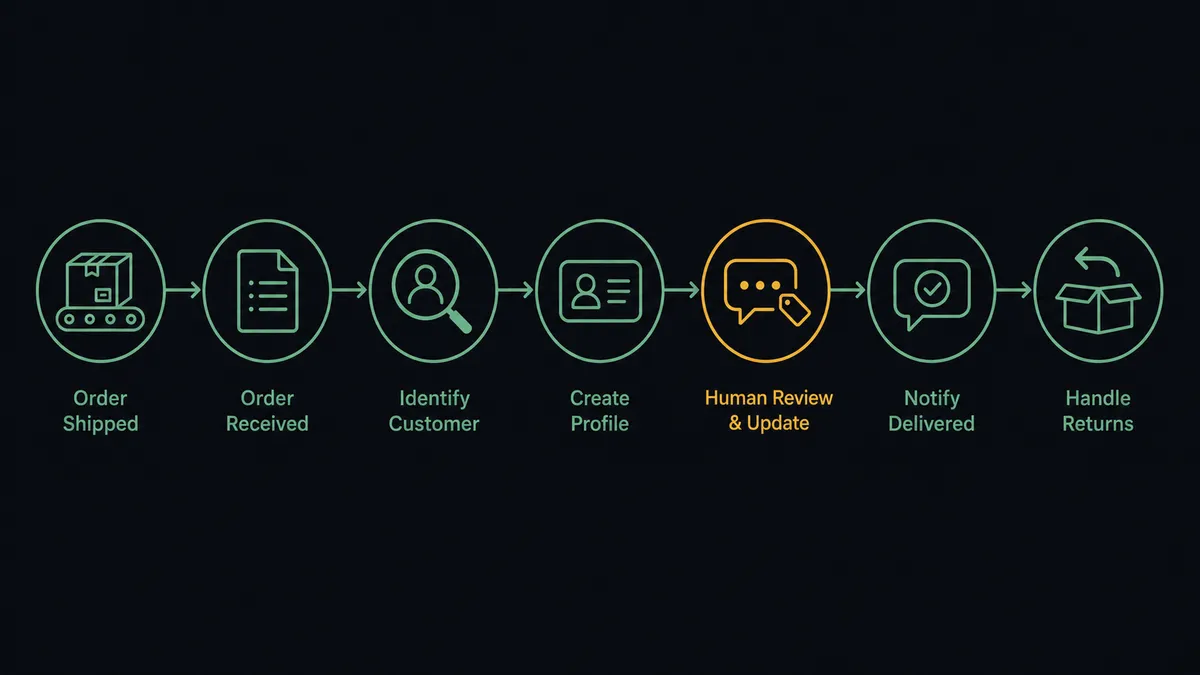
Can an AI agent run it? (and why a human stays in the loop)
Yes, and the agent’s value is knowing that not all shipping news is the same kind of news. Shipped, delivered, return processed: these are routine, and the agent handles them end to end, pulling detail with Get Order, Get Shipment, and Get Products so the message names what is actually in the box instead of an order number. When a customer asks where their order is, the agent answers from live data rather than queueing a ticket. It holds Get Orders, Get Inventory, Update Person, Create Conversation, and Send Message as tools and picks what the moment needs.
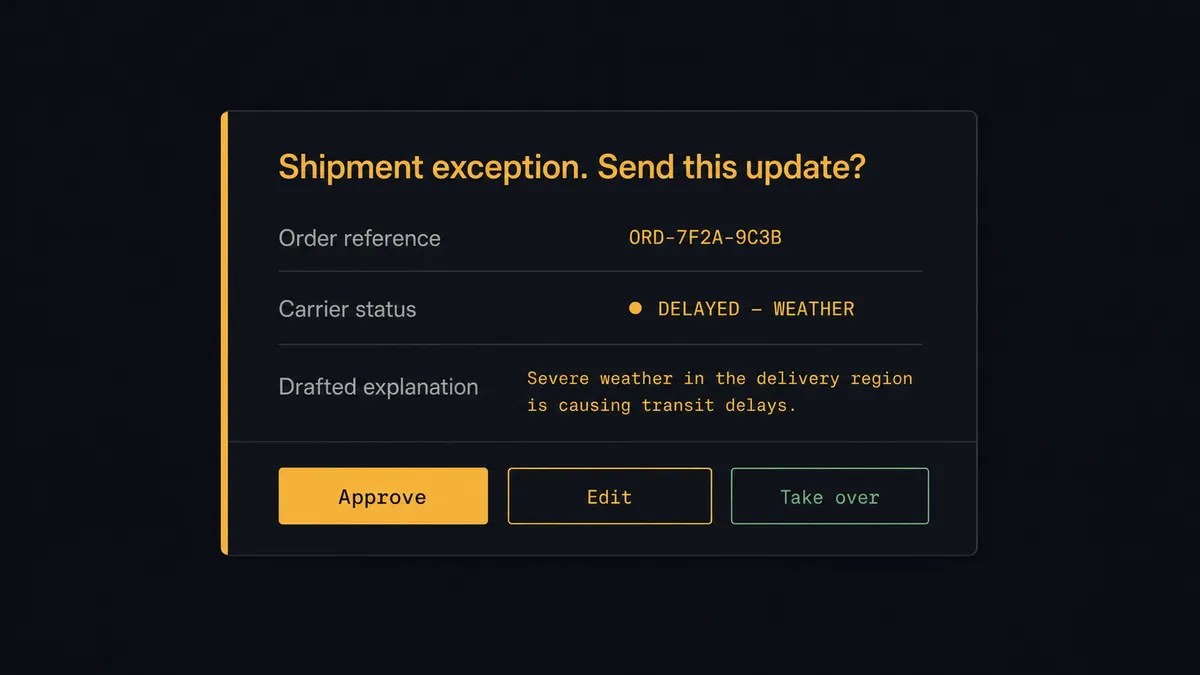
The consequential step is delivering bad news. When On Shipment Exception or On Shipment On Hold fires, the next message into that thread lands on a customer who paid you and does not have their product. Sent poorly, it converts a delay into a refund demand and a public review. So the agent does not send it on reflex. It calls Get Shipment for the real status, drafts an explanation with the honest situation and the concrete next step, and invokes a human-in-loop flow it holds as a callable tool. The workflow pauses and posts to the support lead: “Exception on order [reference] for [customer]: [carrier status]. Drafted message: [draft]. Approve to send, edit, or take the thread.” Only after a person decides does Send Message run, and the approval lands in the audit trail. If the resolution needs a replacement shipment, Create Order stands ready behind its own approval.
Prospects call this pattern a digital andon cord: like Toyota’s quality control pull cord, the workflow stops the line the moment it hits uncertainty, and your team pulls it back into motion. Good news flows automatically. Bad news waits for a human who owns it.
FlowRunner vs Celigo
Operations teams evaluating this connection encounter Celigo, and its strengths are real. Celigo is a mature iPaaS with prebuilt integration apps for e-commerce order-to-cash, and for ERP-grade data sync between commerce systems at enterprise volume, it is a serious, proven platform that IT organizations trust.
The difference is what this pair actually is. ShipBob to Crisp is not a data sync; it is a customer conversation driven by fulfillment events, including the hard ones. FlowRunner is built around native human-in-the-loop and AI-agent orchestration, where an agent narrates the routine and a person approves the message that decides whether a delayed customer stays a customer.
| What matters for this pair | FlowRunner | Celigo |
|---|---|---|
| Human-in-the-loop before exception news reaches a customer | Native. The agent invokes an approval flow as a callable tool and pauses until a person owns the message | Built for system-to-system integration flows, not conversational approval moments |
| Who runs the flow | An AI agent reads each fulfillment event and picks actions as tools | Integration flows configured and maintained by an integration team |
| Users included | Unlimited users on every tier | Enterprise iPaaS licensing, typically owned by IT |
| Bring your own AI keys | Yes, BYOK. Connect the AI provider key you already have | AI capabilities are platform-managed features |
| Self-hosted option | Yes, cloud-hosted or self-hosted | Cloud iPaaS |
| Pricing model | Transparent workflow-based tiers starting at $45/mo | Enterprise contracts sized for integration platform budgets |
If you are syncing order and inventory data between an ERP and a storefront at enterprise scale, Celigo is built for that job. If you want fulfillment events to become customer conversations, with a support lead approving every piece of bad news, that is where FlowRunner is the better fit.
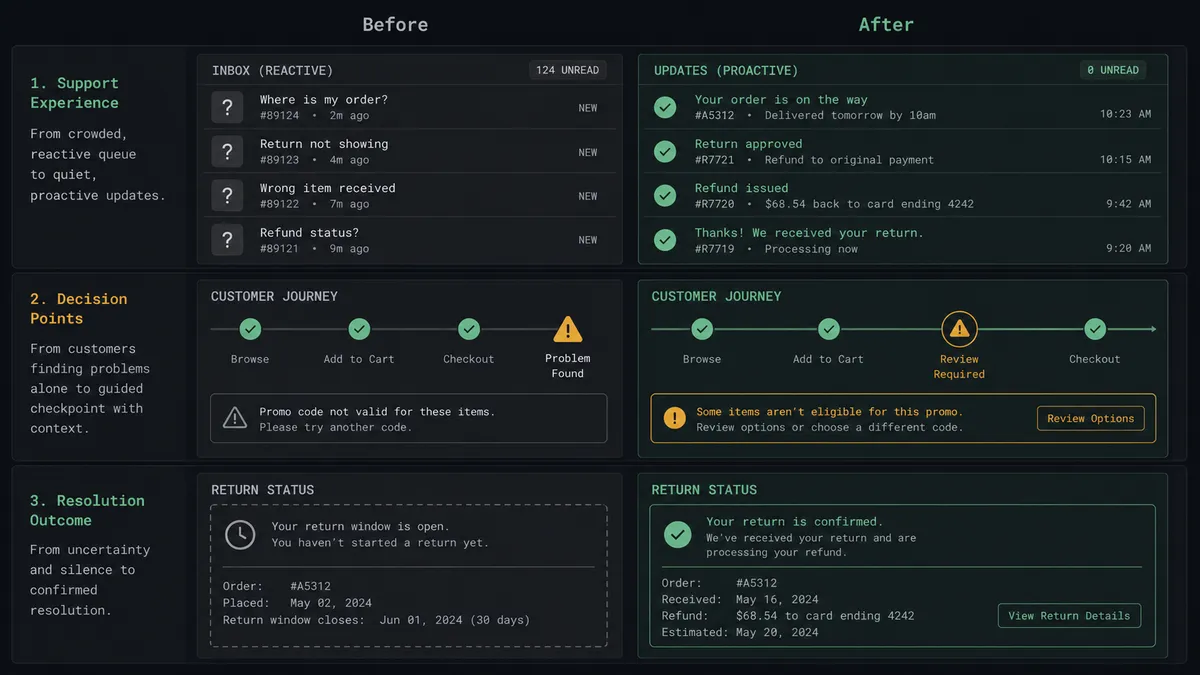
Before and after
| Category | Before | After |
|---|---|---|
| Order status questions | Where-is-my-order dominates the support queue | Shipped and delivered updates land in the thread before the customer asks |
| Exception handling | Customers learn about problems from carrier tracking pages, days late | The support lead approves an honest explanation the same day the exception fires |
| Support context | Teammates tab-hunt the ShipBob dashboard mid-conversation | Update Person stamps live shipment status on the profile they are already looking at |
| Returns | The refund window is an anxious silence | On Return Completed triggers a confirmation the moment the warehouse processes it |
| Accountability | Nobody can say who told the customer what, or when | Every exception message carries an approver, a timestamp, and the order reference |
What you can build
Proactive shipping narration. On Order Shipped fires. The agent calls Get Order and Get Shipment, matches the buyer via List People, and posts the tracking update with Send Message before the customer thinks to ask.
Exception desk with a human owner. On Shipment Exception fires. The agent drafts the honest explanation from Get Shipment and holds it at the approval gate, so every delay message goes out with a support lead’s name behind it.
Live where-is-my-order answers. A customer asks in chat. The agent reads the thread via Get Conversation, calls Get Order for the live status, and answers with real carrier data instead of filing a ticket.
Return reassurance. On Return Completed fires. The agent confirms receipt in the customer’s thread and stamps the profile with Update Person, so any follow-up conversation starts from the processed return, not from scratch.
Hold-to-replacement path. On Shipment On Hold fires. The agent packages the shipment detail and an Estimate Fulfillment Cost read for a replacement, and a person decides in one message whether to wait out the hold or approve Create Order for a reshipment.
Getting started
Start on the free plan: 100 executions a month, every integration included, no credit card required, plus 14 days of Professional for new accounts. Both connectors are available on every tier, and every tier includes unlimited users and unlimited workflows.
Explore the integration details:
- ShipBob integration (5 triggers and 20 actions covering orders, shipments, returns, inventory, and warehouse receiving)
- Crisp integration (9 actions covering conversations, operator messages, and people profiles)
Start building free at flowrunner.ai or book a demo to see a live ShipBob to Crisp workflow, exception approval and all.
Frequently asked questions
Is it free to connect ShipBob and Crisp on FlowRunner?
You can build and run the connection on FlowRunner's free plan, which includes 100 executions a month and every integration with no credit card required, and new accounts also get 14 days of Professional. Both connectors are available on every FlowRunner tier, and every tier includes unlimited users and unlimited workflows.
Can I self-host the ShipBob to Crisp workflow?
Yes. FlowRunner offers a cloud-hosted option and a self-hosted option, so the connection can run inside your own environment.
Does the AI agent need my own OpenAI or Claude key?
FlowRunner uses a bring-your-own-keys model, so you connect the AI provider key you already have. You are not locked to one model.
What happens when a shipment hits an exception?
The agent does not message the customer on its own. It pulls the shipment detail with Get Shipment, drafts an explanation with the honest status and next step, and invokes a human-in-loop step. A person approves or edits the message before Send Message runs, so bad news always arrives with judgment behind it.
Which ShipBob events can trigger a Crisp action?
ShipBob offers five triggers: On Order Shipped, On Shipment Delivered, On Shipment Exception, On Shipment On Hold, and On Return Completed. On Order Shipped and On Shipment Delivered drive the routine updates most stores start with.
Can support see fulfillment status when a customer asks where their order is?
Yes. The agent stamps shipping status onto the customer's profile with Update Person as events fire, and it answers live questions by calling Get Order and Get Shipment, so the where-is-my-order response comes from ShipBob's actual data, not a guess.