How to Connect QuickBooks Online with Crisp (With or Without an AI Agent)
Answer billing questions in Crisp chat with live QuickBooks Online invoice data, run by an AI agent that resolves routine questions itself and pauses for a human before quoting figures on a disputed account or re-issuing an invoice.
How do you connect QuickBooks Online to Crisp?
You connect QuickBooks Online to Crisp by running a scheduled workflow that finds billing questions with List Conversations, reads each thread with List Messages, matches the visitor to an account with Get Person and List Customers, pulls the live picture with Get Customer and List Invoices, and answers in the visitor’s widget with Send Message. FlowRunner is a visual AI-agent orchestration platform where automations run autonomously and pause for human judgment on the steps that carry real consequence. The same connection can run as an AI agent that resolves routine invoice questions on its own and pauses for a named human before it quotes figures into a disputed thread or re-issues an invoice with Send Invoice.
The problem it solves
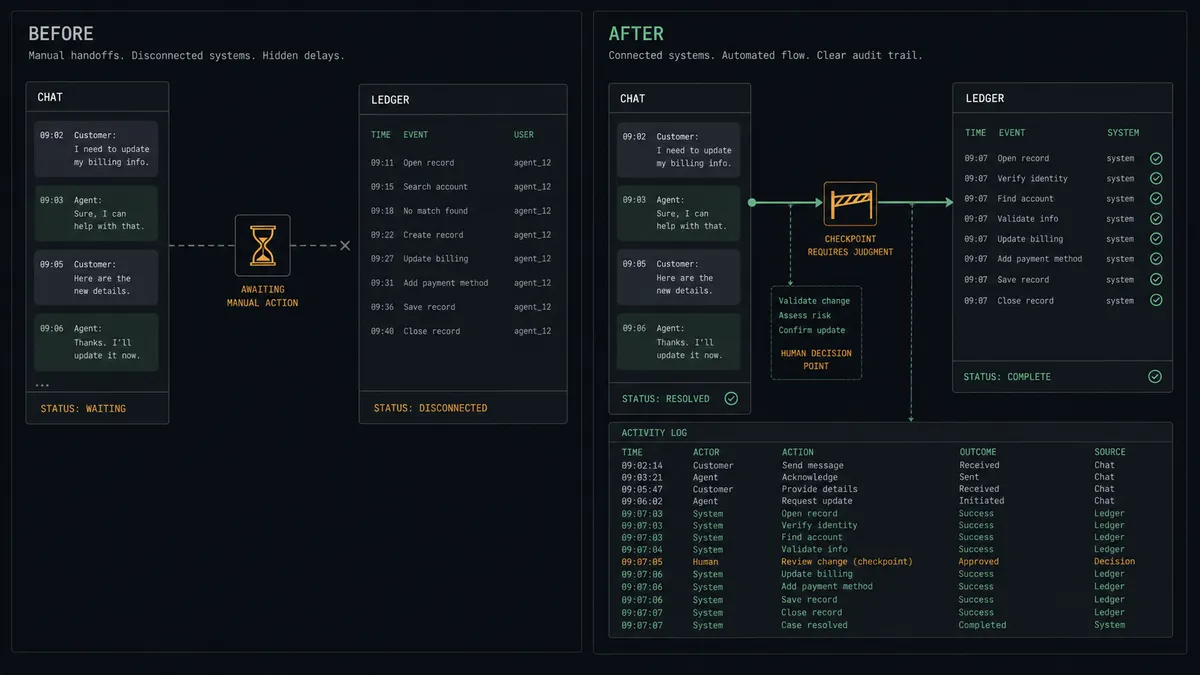
Right now a billing question in chat is a relay race. The visitor asks “what’s the status of my invoice?” in the Crisp widget. The support person answering does not have QuickBooks Online access, so they ping someone in finance. Finance is in a close meeting. The thread goes quiet, the visitor leaves, and the follow-up happens over email a day later, which is exactly the channel the customer opened chat to avoid. Meanwhile the support person copies half-remembered account details between two systems that have never heard of each other.
The edges are where it gets expensive. Support quotes a balance from a stale screenshot and the customer disputes the difference. Two customers share a company name and the wrong account’s invoice status lands in the chat, which is a privacy incident, not a typo. A customer in an active billing dispute gets a cheerful automated answer that contradicts what your finance lead told them yesterday. Chat is a written channel; every number you send is a screenshot the customer keeps.
How it works: the connection
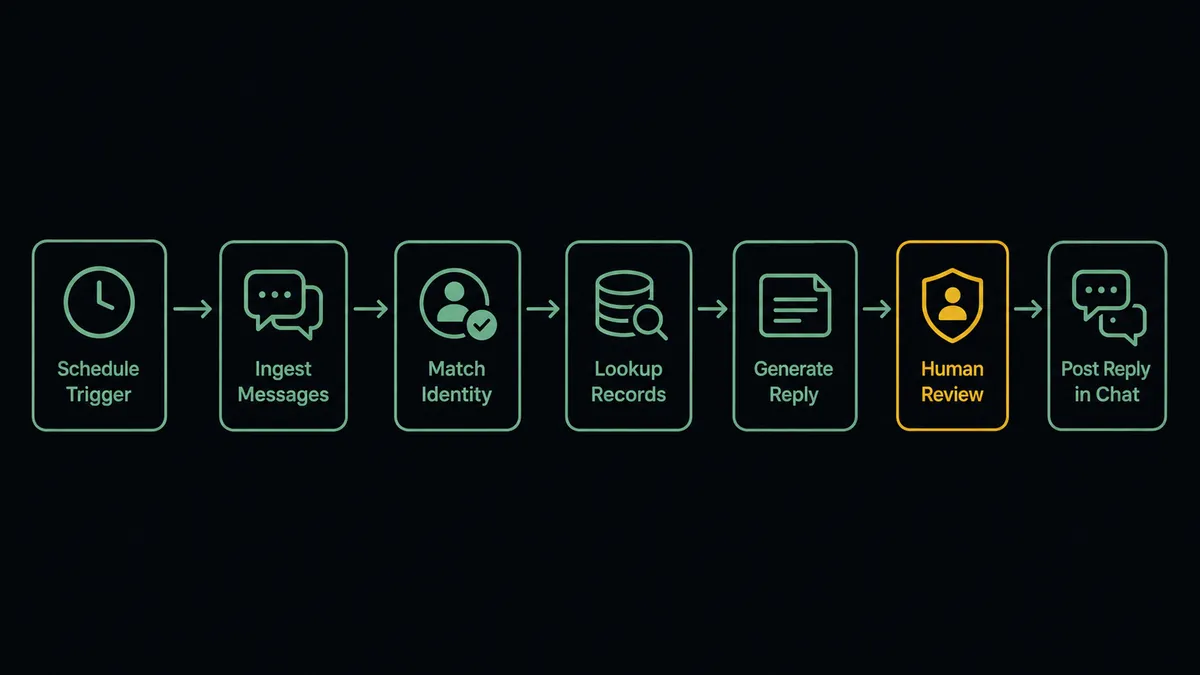
The connection reads Crisp on a schedule and looks up QuickBooks Online before it replies. Here is the plain version, grounded in the real connector actions.
- Trigger: On a short-interval schedule, the workflow calls List Conversations with a search across message content for billing terms, and picks up threads it has not yet handled.
- Read: It calls List Messages to pull the full thread in order, and Get Person to identify the visitor’s email and profile.
- Match the account: It calls List Customers in QuickBooks Online with the visitor’s email to find the account, then Get Customer for the record.
- Pull the facts: It calls List Invoices for the account and Get Invoice for the one in question: status, amount, due date, balance.
- Reply: It calls Send Message to post the answer into the visitor’s widget in real time, quoting the invoice number, status, and amount.
- Re-deliver when asked: When the customer wants a copy, Send Invoice emails it from QuickBooks Online, and a follow-up Send Message confirms it is on the way.
That is the “just connect them” answer. The visitor asks about an invoice and gets the live answer in the same thread, in minutes, without support playing messenger between two systems. Update Person keeps the Crisp profile enriched with the matched company name so the next conversation starts warmer.
Can an AI agent run it? (and why a human stays in the loop)
Yes, and the agent is what makes the answers safe as well as fast. It holds the Crisp and QuickBooks Online actions as tools: List Conversations, List Messages, Get Person, Send Message on one side; List Customers, Get Customer, List Invoices, Get Invoice, Send Invoice on the other. Before it types a word, it reasons about the match. Does the visitor’s email correspond to exactly one customer record? Does the thread read like a status question, a complaint, or a change request? Is there anything in the account’s recent history, a voided invoice, a partial payment, that makes the obvious answer wrong?
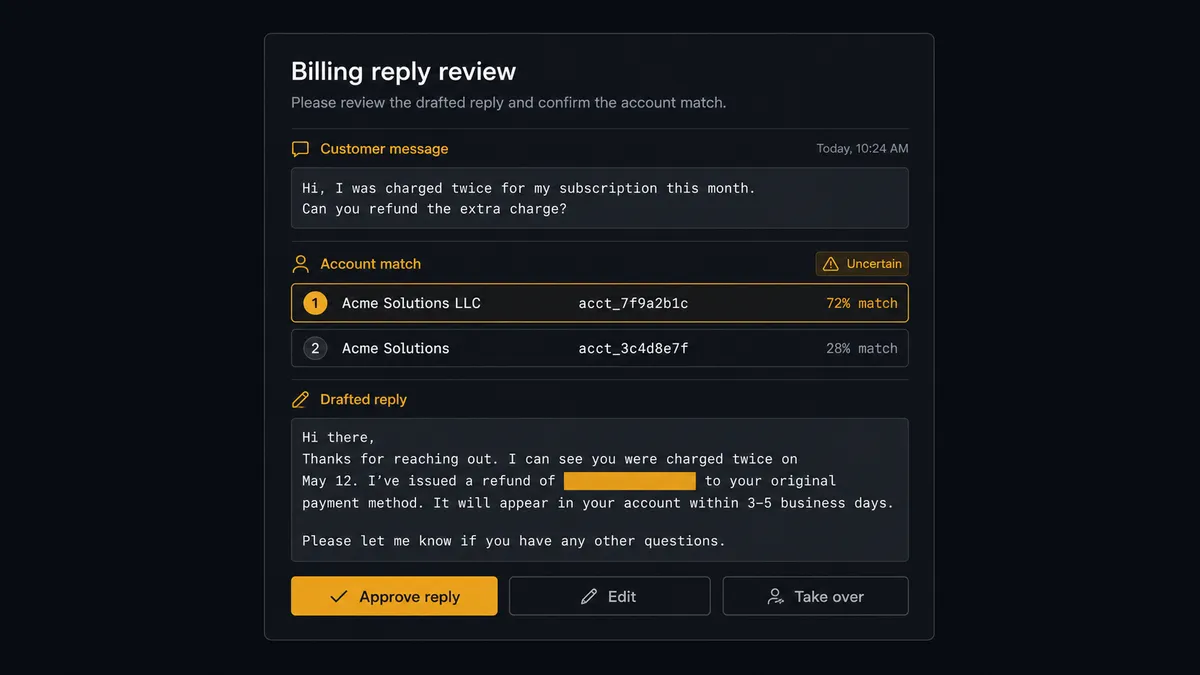
The consequential step is the reply itself, because chat is written and customers keep receipts. When the account match is ambiguous, when the thread shows frustration, or when the account has a dispute in play, the agent does not send. It invokes a human-in-loop flow it holds as a callable tool and posts to your channel: “Billing question in Crisp. Visitor matched to a customer record with medium confidence, two candidate accounts listed. Thread and drafted reply attached. Confirm the account and approve, edit, or take over?” A named approver rules, and only then does Send Message post the reply into the widget. The same gate sits in front of Send Invoice, because re-issuing a document to the wrong account is the kind of mistake that writes its own escalation email.
Prospects call this the digital andon cord: like Toyota’s production line pull cord, the workflow stops the line the moment it hits uncertainty. Routine status questions get answered while the visitor is still in the chat. The thread where a wrong number becomes a permanent screenshot waits for a person.
FlowRunner vs Zapier
Zapier deserves its place on the shortlist for this pairing. It connects both Crisp and QuickBooks Online, its editor is friendly enough that a support lead can wire an alert without engineering, and its template gallery covers plenty of chat-to-notification patterns. For pushing a Crisp conversation event into a team channel or a spreadsheet, it is quick and dependable.
The difference is the direction of the hard part. This workflow does not just move a notification out of chat; it reasons over an accounting record and writes an answer back into a live customer conversation. FlowRunner is built around native human-in-the-loop and AI-agent orchestration for exactly that kind of consequential reply.
| What matters for this pair | FlowRunner | Zapier |
|---|---|---|
| Human-in-the-loop before figures enter a customer chat | Native. The agent invokes an approval flow as a callable tool and pauses before Send Message | Available via added approval steps or paths, not a native agent decision |
| Who runs the flow | An AI agent reads the thread, matches the account, and picks actions as tools | Predefined step sequence you configure per Zap |
| Users included | Unlimited users on every tier | Priced by task volume; seats vary by plan |
| Bring your own AI keys | Yes, BYOK | AI features tied to Zapier’s own AI offering |
| Self-hosted option | Yes, cloud-hosted or self-hosted | Cloud only |
| Pricing model | Transparent workflow-based tiers | Per-task pricing that grows with chat volume |
If you want chat events surfaced to your team, Zapier does it with minimal setup. If you want billing questions answered inside the chat with live ledger data, and a named human in front of every risky reply, this pairing is the better fit.
Before and after
| Category | Before | After |
|---|---|---|
| Response time | Billing questions wait for a finance person to come out of a meeting | Routine status questions get answered in the widget while the visitor is still there |
| Answer accuracy | Support quotes balances from screenshots and memory | Every figure comes from Get Invoice at the moment of reply |
| Account matching | Whoever answers guesses which customer the visitor is | The agent matches by email and escalates ambiguous cases before replying |
| Dispute handling | Automated replies contradict what finance already told the customer | Flagged accounts route to a named approver before anything posts |
| Record of what was said | Chat promises live only in the Crisp history | Quoted figures, approvals, and re-sent invoices land in the audit trail |
What you can build
Live invoice status desk. List Conversations surfaces billing threads, the agent matches the account, and Send Message answers with the invoice number, status, and amount pulled at reply time. Support stops relaying and starts closing threads.
Copy-of-invoice service. When a customer asks for their invoice again, the agent stages Send Invoice against the matched record, a named approver confirms the match, and the confirmation posts back into the thread. No attachments dragged between tabs.
Dispute-aware routing. The agent reads thread tone and account history together. Anything that smells like a dispute skips automation entirely and lands with your finance lead, thread and account context packaged, before a single figure is quoted.
Payment follow-through. After a customer says they have paid, the agent watches List Payments for the account and posts a confirmation into the conversation when the payment lands, closing the loop that usually dies in someone’s inbox.
Profile enrichment loop. For every matched conversation, Update Person writes the company name onto the Crisp profile, so the next agent or human who opens the thread sees who they are talking to from the first message.
Getting started
Start on the free plan: 100 executions a month, every integration included, no credit card required, plus 14 days of Professional for new accounts. Both connectors are available on every tier, and every tier includes unlimited users and unlimited workflows.
Explore the integration details:
- QuickBooks Online integration (56 actions covering customers, invoices, bills, payments, and P&L reports)
- Crisp integration (9 actions covering conversations, messages, and contact profiles)
Start building free at flowrunner.ai or book a demo to see a live QuickBooks Online to Crisp workflow, reply approval and all.
Frequently asked questions
Is it free to connect QuickBooks Online and Crisp on FlowRunner?
You can build and run the connection on FlowRunner's free plan, which includes 100 executions a month and every integration with no credit card required, and new accounts also get 14 days of Professional. Both connectors are available on every FlowRunner tier, and every tier includes unlimited users and unlimited workflows.
Can I self-host the QuickBooks Online to Crisp workflow?
Yes. FlowRunner offers a cloud-hosted option and a self-hosted option, so the connection can run inside your own environment.
Does the AI agent need my own OpenAI or Claude key?
FlowRunner uses a bring-your-own-keys model, so you connect the AI provider key you already have. You are not locked to one model.
What happens when the agent cannot confidently match the visitor to an account?
It does not quote anything. The agent packages the conversation, the candidate customer records, and what made the match ambiguous, then invokes a human-in-loop step and waits for a person to confirm the account before any balance or invoice detail enters the chat.
Which QuickBooks Online and Crisp actions does this workflow use?
On the Crisp side, List Conversations finds billing threads, List Messages reads them, Get Person identifies the contact, and Send Message posts the reply. On the QuickBooks Online side, List Customers and Get Customer match the account, List Invoices and Get Invoice pull status and balances, and Send Invoice re-delivers a copy when approved.
Can the workflow re-send an invoice from inside the chat thread?
Yes, with a gate. When a customer asks for a copy, the agent prepares Send Invoice against the matched record, but a named approver confirms the account match first. Once approved, QuickBooks Online emails the invoice and the agent posts a confirmation into the Crisp conversation with Send Message.