How to Connect DocuSign with Crisp (With or Without an AI Agent)
Connect DocuSign envelope events to Crisp conversations, optionally as an AI agent that keeps signers informed in chat and pauses for a human before Send Message reaches a customer who just declined to sign.
How do you connect DocuSign to Crisp?
You connect DocuSign to Crisp by having DocuSign’s envelope triggers drive Crisp actions: when On Envelope Sent fires, the workflow reads the signer with Get Envelope Recipients, finds or creates their profile with Get Person and Create Person, opens a thread with Create Conversation, and posts with Send Message, so the signature chase happens in the chat channel your customers actually answer instead of a buried email thread. FlowRunner is a visual AI-agent orchestration platform where automations run autonomously and pause for human judgment on the steps that carry real consequence. The same connection can run as an AI agent that handles routine nudges and confirmations on its own, and pauses for a named human before it replies to a signer who just declined.
The problem it solves
Today the signing process and the customer conversation live in different rooms. The contract goes out through DocuSign and then someone watches for status emails. Meanwhile the customer, who has questions about the exact document sitting unsigned in their inbox, opens the chat widget on your site and asks a support teammate who has no idea an envelope exists. The signer is nudged by an automated email they have learned to ignore, while the channel where they actually talk to you stays silent about the one thing blocking the deal.
The edges are where deals die quietly. An envelope sits at “sent” for a week and nobody notices until the forecast review. A signer declines, which is the single loudest buying signal a customer can send, and the response is either nothing or a template email that reads like it was written for someone else. An envelope gets voided and reissued, and the customer signs the wrong one because nobody told them in a channel they read. Signature chasing is a conversation, and it is being run like a batch job.
How it works: the connection
The connection listens to DocuSign and writes to Crisp. Here is the plain version, grounded in the real connector actions.
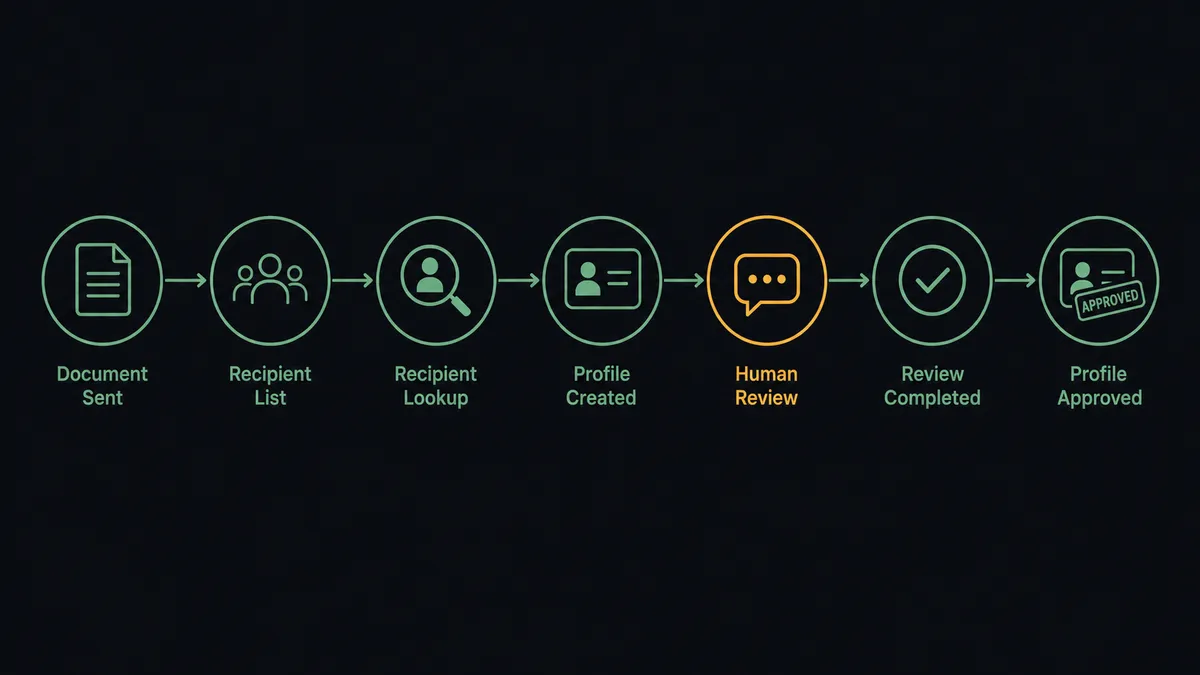
- Trigger: DocuSign fires On Envelope Sent when the contract goes out for signature.
- Read: The workflow calls Get Envelope Recipients to pull the signer names, emails, and signing order.
- Match: It calls List People and Get Person in Crisp to see whether the signer already has a profile.
- Provision: For a new signer, it calls Create Person, then Create Conversation to open the thread.
- Notify: It calls Send Message so the signer hears, in chat, that the document is waiting and what it covers.
- Confirm: When On Envelope Completed fires, it calls Send Message again with the confirmation, closing the loop in the same thread.
- Track: It calls Update Person to stamp the signing status on the profile, so support sees contract state the moment the customer opens chat.
That is the “just connect them” answer. Envelope events become chat messages, and the channel your customer answers is the channel that chases the signature.
Can an AI agent run it? (and why a human stays in the loop)
Yes, and the agent is the difference between a notification pipe and an actual signing concierge. Instead of firing the same message at every event, an AI agent reads the situation. Get Envelope Status, List Envelopes, Get Conversation, List Messages, Send Message, Resend Envelope: these are its tools. A signer who asked a pricing question in chat yesterday gets a nudge that acknowledges it, drawn from List Messages. An envelope stuck at “sent” gets checked against Get Envelope Status, and the agent calls Resend Envelope before it messages the signer that a fresh copy is on the way. A completed envelope gets a confirmation that names the document, not a generic “thanks!”
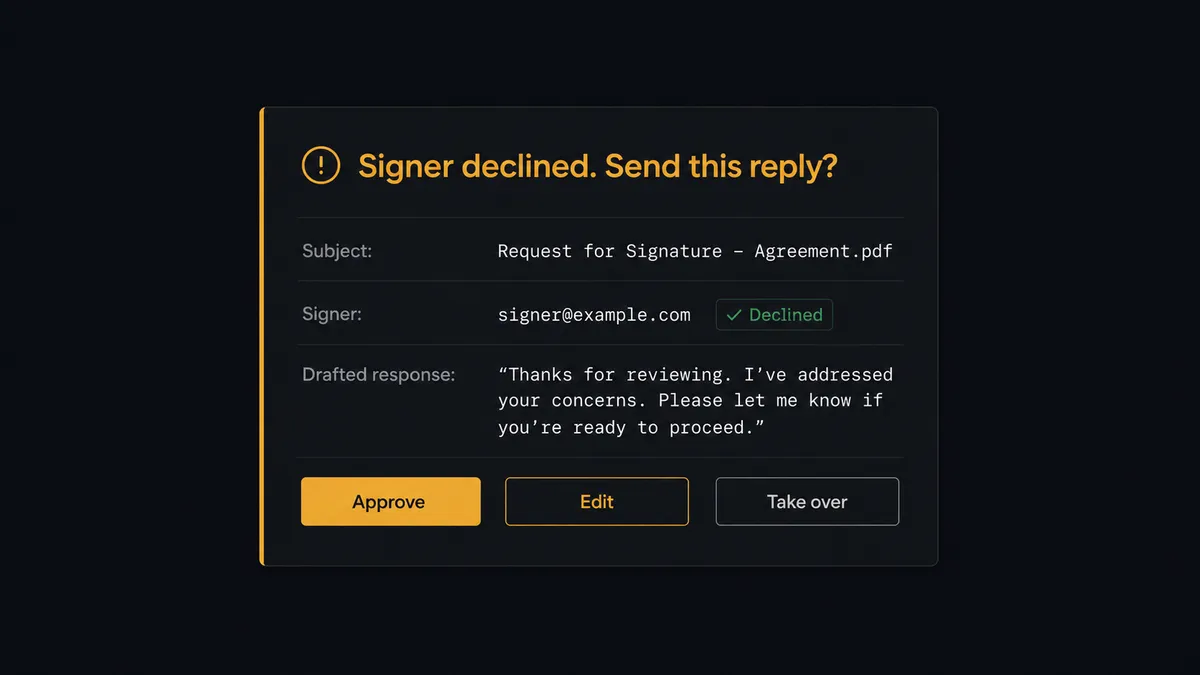
The consequential step is replying to bad news. When On Envelope Declined fires, a customer has just told you no. The next message into that conversation decides whether the deal reopens or the relationship closes, and it should never be automated on reflex. So the agent does not send it. It invokes a human-in-loop flow it holds as a callable tool. The workflow pauses and posts to the account owner: “Envelope [subject] declined by [signer]. Their recent chat history is attached. Drafted reply: [draft]. Approve to send, edit it, or take the conversation yourself.” The same gate covers On Envelope Voided, because explaining a voided contract is a trust conversation, not a status update. Only after a person decides does Send Message run, with the approver and timestamp in the audit trail.
Prospects call this pattern a digital andon cord: like Toyota’s quality control pull cord, the workflow stops the line the moment it hits uncertainty, and your team pulls it back into motion. The routine chase runs itself. The message that decides the deal stays human.
FlowRunner vs Zapier
Most teams wiring DocuSign to a messaging tool look at Zapier first, and fairly. Zapier’s DocuSign integration is mature, the setup is genuinely fast, and its template gallery covers signature-notification patterns well. If you want envelope events forwarded somewhere as notifications, a Zap gets you there quickly.
The difference shows up because this pair talks directly to customers. A notification that fires wrong is noise; a chat message that fires wrong lands in front of a person mid-decision. FlowRunner is built around native human-in-the-loop and AI-agent orchestration, where the agent knows the difference between a routine nudge and a reply that needs an owner.
| What matters for this pair | FlowRunner | Zapier |
|---|---|---|
| Human-in-the-loop before Send Message answers a decline | Native. The agent invokes an approval flow as a callable tool and pauses until the account owner decides | Available via added approval steps you insert manually, not a native agent decision |
| Who runs the flow | An AI agent reads the envelope event and the chat history, then picks actions as tools | Predefined step sequence you configure per Zap |
| Users included | Unlimited users on every tier | Priced by task volume; seats vary by plan |
| Bring your own AI keys | Yes, BYOK. Connect the AI provider key you already have | AI features tied to Zapier’s own AI offering |
| Self-hosted option | Yes, cloud-hosted or self-hosted | Cloud only |
| Pricing model | Transparent workflow-based tiers with clear execution limits | Per-task pricing that is hard to predict as signing volume grows |
If all you need is envelope status pinged into a channel, Zapier will do it. If the signing lifecycle should run as a real conversation with your customer, with a person approving every reply to a decline, that is where FlowRunner is the better fit.
Before and after
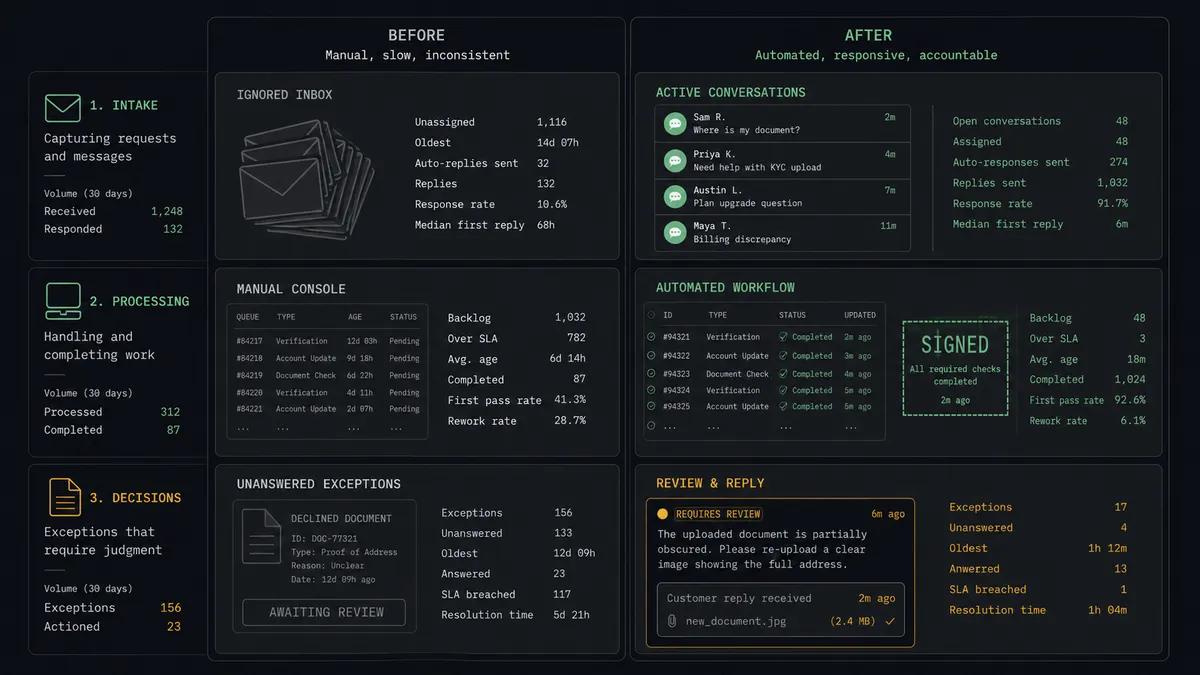
| Category | Before | After |
|---|---|---|
| Signature chasing | Automated reminder emails the signer learned to ignore | Context-aware nudges in the chat channel the customer actually answers |
| Support blindness | Chat teammates have no idea a contract is pending | Update Person stamps signing status on the profile support already sees |
| Stalled envelopes | ”Sent” status sits unnoticed until forecast review | The agent checks Get Envelope Status and acts before the deal goes cold |
| Declines | Silence, or a template email written for nobody | A drafted reply with chat history attached, sent only after the account owner approves |
| Voided contracts | Customers sign superseded documents nobody told them about | The void is explained in the conversation, with a person approving the message |
What you can build
Signing nudge in the right channel. On Envelope Sent fires. The agent calls Get Envelope Recipients, matches the signer via List People, and posts a Send Message that names the document and what happens after signing, in the thread the customer already reads.
Completion confirmation with next steps. On Envelope Completed fires. The agent sends the confirmation into the same conversation and calls Update Person so the profile reflects the executed contract before the customer’s next chat.
Decline war room. On Envelope Declined fires. The agent pulls the thread with Get Conversation and List Messages, drafts a response grounded in what the customer actually said, and holds it at the approval gate for the account owner.
Stalled envelope rescue. On a schedule, the agent calls List Envelopes and Get Envelope Status, spots envelopes sitting unsigned, calls Resend Envelope, and tells the signer in chat that a fresh copy just arrived.
Support with contract context. When a signer opens a chat mid-signing, the agent has already stamped their profile via Update Person, so the teammate answering sees exactly which document is pending and at what stage before typing a word.
Getting started
Start on the free plan: 100 executions a month, every integration included, no credit card required, plus 14 days of Professional for new accounts. Both connectors are available on every tier, and every tier includes unlimited users and unlimited workflows.
Explore the integration details:
- DocuSign integration (4 triggers and 9 actions covering envelopes, recipients, documents, and signing status)
- Crisp integration (9 actions covering conversations, operator messages, and people profiles)
Start building free at flowrunner.ai or book a demo to see a live DocuSign to Crisp workflow, decline-reply approval and all.
Frequently asked questions
Is it free to connect DocuSign and Crisp on FlowRunner?
You can build and run the connection on FlowRunner's free plan, which includes 100 executions a month and every integration with no credit card required, and new accounts also get 14 days of Professional. Both connectors are available on every FlowRunner tier, and every tier includes unlimited users and unlimited workflows.
Can I self-host the DocuSign to Crisp workflow?
Yes. FlowRunner offers a cloud-hosted option and a self-hosted option, so the connection can run inside your own environment.
Does the AI agent need my own OpenAI or Claude key?
FlowRunner uses a bring-your-own-keys model, so you connect the AI provider key you already have. You are not locked to one model.
What happens when a signer declines the envelope?
The agent does not reply on its own. It invokes a human-in-loop step that posts the decline, the signer's history from the conversation, and a drafted response to your team channel, then waits for a person to approve, edit, or take over the conversation before Send Message runs.
Which DocuSign events can trigger a Crisp action?
DocuSign offers four triggers: On Envelope Sent, On Envelope Completed, On Envelope Declined, and On Envelope Voided. On Envelope Sent drives the signing nudge, and On Envelope Completed drives the confirmation message.
Will the agent message customers who never used our chat?
It checks first. The agent calls List People and Get Person to see whether the signer exists in Crisp. If they are new, it calls Create Person so the conversation has a real profile behind it, and the first message explains why they are hearing from you in chat.