How to Connect ShipBob with Bland AI (With or Without an AI Agent)
Connect ShipBob shipment exceptions to Bland AI phone calls, with an AI agent that diagnoses the fulfillment problem, proposes a fix, and pauses for a human before Send Call dials the customer.
How do you connect ShipBob to Bland AI?
You connect ShipBob to Bland AI by having ShipBob’s On Shipment Exception trigger fire when a shipment hits a problem, pulling the full context with Get Shipment and Get Order, and placing a proactive phone call with Bland AI’s Send Call action, so the customer hears about the delay from you, with a fix already proposed, instead of discovering it on a tracking page. FlowRunner is a visual AI-agent orchestration platform where automations run autonomously and pause for human judgment on the steps that carry real consequence. The same connection can run as an AI agent that diagnoses each exception, checks inventory for a resolution, and pauses for a named CX lead before any customer’s phone rings.
The problem it solves
Right now, shipment exceptions surface as angry inbound tickets. A package stalls at a carrier hub, a delivery fails because of a bad apartment number, a shipment goes on hold, and nobody on your team knows until the customer notices the frozen tracking page and writes in, already annoyed. The ops team then reconstructs what happened: open ShipBob, find the order, read the exception, check inventory for a replacement, and finally reach out, days after the problem started. The customer’s first contact with your brand’s problem-handling is silence.
The edges compound it. High-value orders and time-sensitive deliveries, the gift arriving after the birthday, the equipment missing the job site date, get the same treatment as a routine two-day carrier slip. Meanwhile the harmless exceptions, the ones a carrier resolves on its next scan, sometimes do get a panicked manual email, training customers to worry about nothing. Nobody triages, so everything is either ignored or over-handled.
How it works: the connection
The connection listens to ShipBob and dials through Bland AI. Here is the plain version, grounded in the real connector actions.
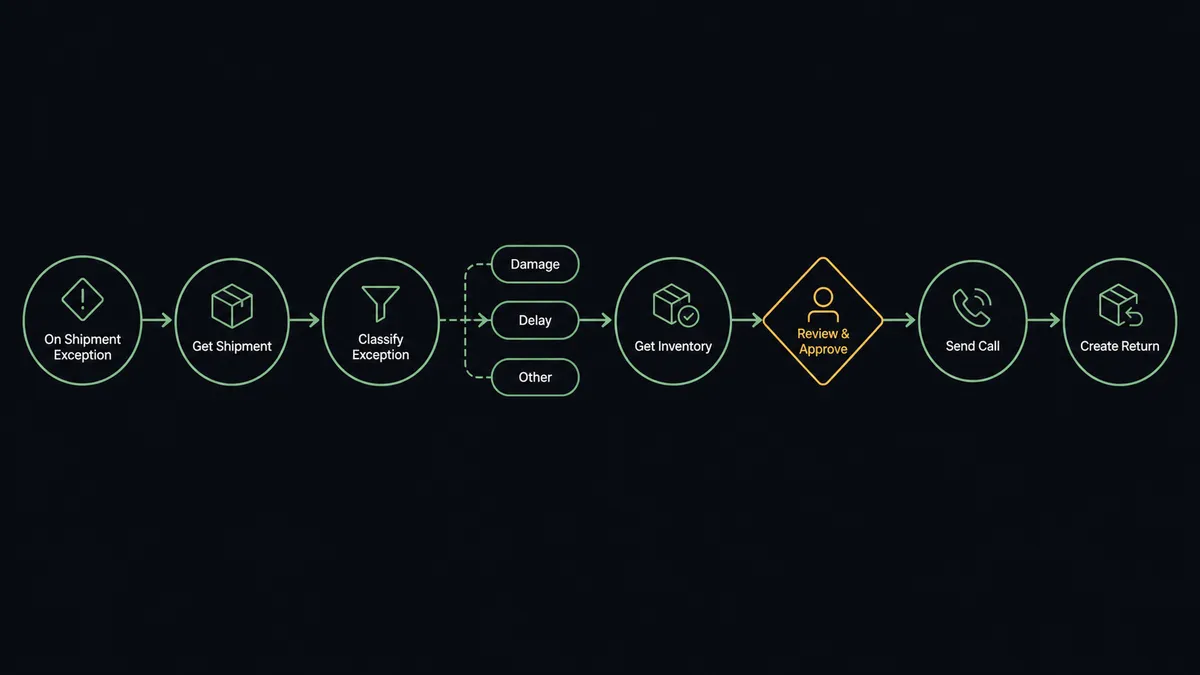
- Trigger: ShipBob fires On Shipment Exception the moment a shipment reports a problem.
- Read: The workflow calls Get Shipment for the status detail and Get Order for the items, recipient, and phone number.
- Classify: It sorts the exception: failed delivery, address issue, damage, carrier delay, or noise likely to self-resolve.
- Check the fix: It calls Get Inventory to confirm a replacement can ship and Estimate Fulfillment Cost to price the reship before promising anything.
- Call: For customer-facing exceptions, it calls Send Call in Bland AI with the order details and the proposed resolution as script variables.
- Resolve: Based on what the customer chooses, it executes the fix: Create Return for a damaged item, or an internal reship task, and logs the conversation with Analyze Call.
That is the “just connect them” answer. Exceptions become proactive outreach with a resolution attached, and On Shipment Delivered closes the loop when the replacement lands.
Can an AI agent run it? (and why a human stays in the loop)
Yes, and triage is exactly the kind of judgment an agent is for. The agent holds the pair’s real actions as tools: Get Order, Get Shipment, Get Inventory, Estimate Fulfillment Cost, Create Return, Cancel Order, Send Call, Analyze Call. For every exception it reasons like your best CX person: is this real or carrier noise, is the order high-value or time-sensitive, can we actually fix it, and what should we offer? A routine delay on a low-urgency order gets watched quietly. A failed delivery on an order the customer paid to expedite gets a call proposal with a reship already priced.
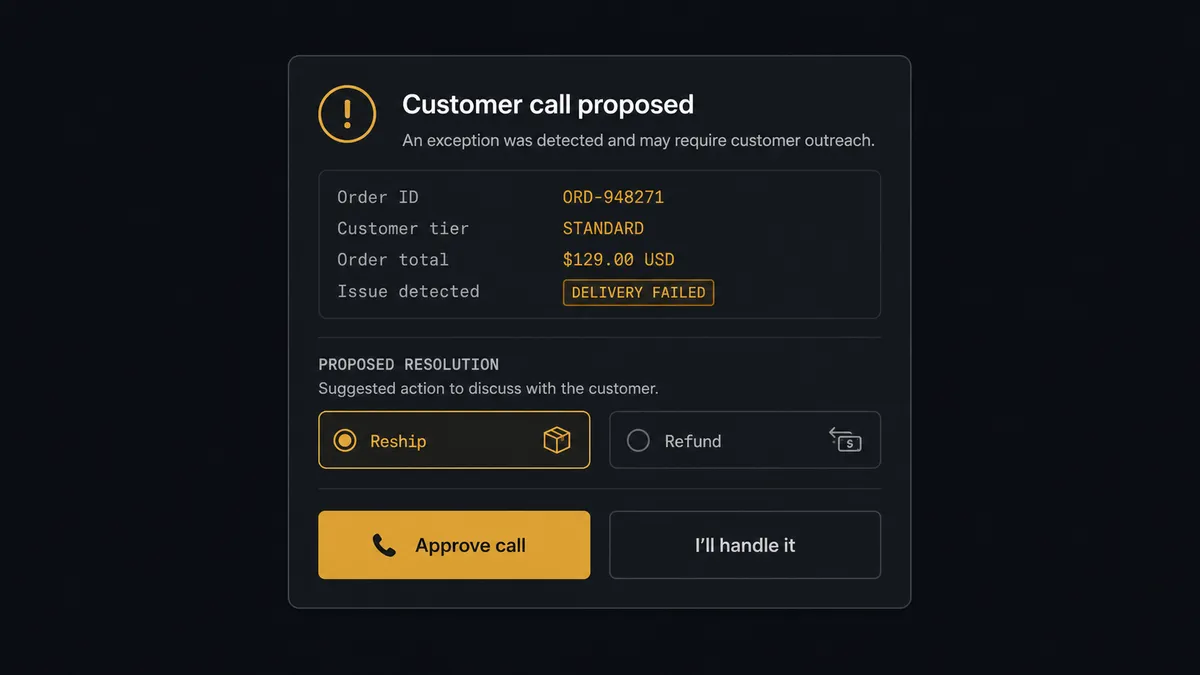
The consequential step is Send Call, because the call reaches a customer who is about to form an opinion of how you handle problems. The agent does not dial on its own authority. It invokes a human-in-loop flow it holds as a callable tool, and the workflow pauses and posts to the CX channel: “Exception on order [number]: failed delivery, [items], customer paid for expedited. Proposed call: apologize, offer reship from the nearest fulfillment center or refund. Approve?” The CX lead approves, edits the offer, or takes the call personally. The same gate guards Cancel Order and Create Return, because both change what the warehouse does next.
When the agent cannot classify an exception, when Get Shipment and Get Order disagree, or when the fix would cost more than the order, it stops the line and hands the case to a person with everything attached. Prospects describe this as a digital andon cord: like Toyota’s assembly line, the workflow halts the moment it hits uncertainty, and a human decides whether it moves again.
FlowRunner vs Celigo
Celigo is a serious platform, and for deep data synchronization it has real standing. Its prebuilt integration apps for connecting fulfillment and commerce systems to ERPs are mature, and if your goal is keeping ShipBob order and inventory data mirrored into NetSuite line by line, Celigo’s managed connectors handle that class of problem well and are trusted by IT teams for it.
But Celigo is a data integration platform operated by integration specialists. This pairing is not a data sync, it is a judgment call followed by a phone call, and that is a different kind of system.
| What matters for this pair | FlowRunner | Celigo |
|---|---|---|
| Human-in-the-loop before Send Call reaches a customer | Native. The agent invokes an approval flow as a callable tool and waits for the CX lead | Flow-level error handling and alerts, not per-decision human approval |
| Who runs the flow | An AI agent reads the exception, reasons, picks actions as tools | Prebuilt or custom data flows configured by an integration team |
| Users included | Unlimited users on every tier | Enterprise iPaaS licensing, typically owned by IT |
| Bring your own AI keys | Yes, BYOK. Connect the AI provider key you already have | AI features are platform-level, not customer-key-driven |
| Self-hosted option | Yes, cloud-hosted or self-hosted | Cloud iPaaS |
| Pricing model | Transparent workflow-based tiers starting at $45/mo | Quote-based enterprise pricing by endpoints and volume |
If you need ShipBob mirrored into an ERP at enterprise scale, Celigo is a credible answer. If you want shipment exceptions triaged by an agent and resolved over the phone with a human approving each customer touch, that is what this pairing does and Celigo does not.
Before and after
| Category | Before | After |
|---|---|---|
| Who finds out first | The customer, from a stalled tracking page | Your workflow, from On Shipment Exception, before the customer looks |
| Triage | Every exception handled ad hoc, or not at all | The agent classifies each one; only real, customer-facing problems become calls |
| The outreach | A templated apology email days later | A phone call with a fix already priced via Get Inventory and Estimate Fulfillment Cost |
| Resolution record | Scattered across tickets, DMs, and the ShipBob dashboard | Every call logged by Analyze Call against the order, with the chosen fix executed in the same flow |
| Accountability | Nobody can say why one customer got a call and another did not | Every call and order change carries a named approver and timestamp |
What you can build
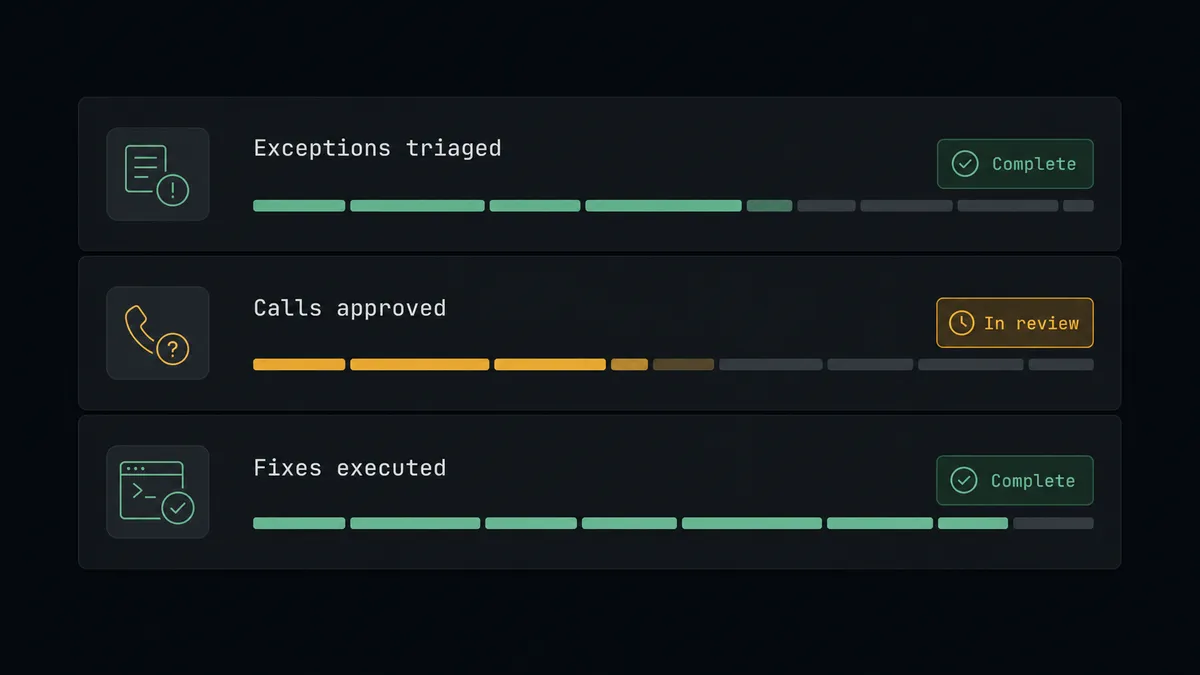
Exception-to-call triage. On Shipment Exception fires. The agent pulls Get Shipment and Get Order, classifies the problem, checks Get Inventory for a reship, and proposes a customer call with the fix in hand. A CX lead approves, Send Call dials, Analyze Call logs the outcome.
Held-shipment escalation. On Shipment On Hold fires. The agent determines why the shipment stopped, and where the hold needs customer input, such as an address confirmation, it proposes a quick verification call instead of letting the order age silently in the queue.
Delivery confirmation for high-value orders. On Shipment Delivered fires for orders above your threshold. The agent proposes a short check-in call confirming everything arrived intact, and routes any damage report straight into Create Return with a person approving the return authorization.
Return check-in follow-up. On Return Completed fires when a return reaches the fulfillment center. The agent proposes a call closing the loop: the return is in, here is what happens next, would you like a replacement? Confirmed replacements are drafted with Create Order and held for approval.
Reship cost guardrail. Before any reship offer is scripted, the agent runs Estimate Fulfillment Cost. When the fix costs more than the order’s value, it skips the automated path entirely and routes the case to a person with the numbers attached.
Common questions
Is it free to connect ShipBob and Bland AI on FlowRunner? You can build and run the connection on FlowRunner’s free plan, which includes 100 executions a month and every integration with no credit card required, and new accounts also get 14 days of Professional. Both connectors are available on every FlowRunner tier, and every tier includes unlimited users and unlimited workflows.
Can I self-host the ShipBob to Bland AI workflow? Yes. FlowRunner offers a cloud-hosted option and a self-hosted option, so the connection can run inside your own environment. Self-hosting is available for teams that need the workflow to run on their own infrastructure.
Does the AI agent need my own OpenAI or Claude key? FlowRunner uses a bring-your-own-keys model, so you connect the AI provider key you already have. You are not locked to one model, and you control which provider runs the agent.
What happens when the agent cannot tell how serious a shipment exception is? It stops and asks. Exceptions the agent cannot classify, such as an ambiguous carrier status or a mismatch between Get Shipment and Get Order data, are routed to a person with the full shipment record attached, and no customer call or order change is proposed until someone decides.
Which triggers and actions does the ShipBob to Bland AI workflow use? ShipBob provides the triggers: On Shipment Exception, On Shipment On Hold, On Order Shipped, On Shipment Delivered, and On Return Completed. The workflow reads context with Get Order, Get Shipment, and Get Inventory, places approved calls with Bland AI’s Send Call, and logs outcomes with Analyze Call. Bland AI has no triggers.
Does every shipment exception trigger a customer phone call? No. Most exceptions resolve themselves within a carrier’s next scan, and calling about those would create anxiety instead of trust. The agent proposes calls only where the exception is real and customer-facing, such as a failed delivery or a held shipment, and a person approves each call before it is placed.
Getting started
Start on the free plan: 100 executions a month, every integration included, no credit card required, plus 14 days of Professional for new accounts. Both connectors are available on every tier, and every tier includes unlimited users and unlimited workflows.
Explore the integration details:
- ShipBob integration (5 triggers and 20 actions covering orders, shipments, inventory, and returns)
- Bland AI integration (11 actions covering outbound calls, call analysis, and recordings)
Start building free at flowrunner.ai or book a demo to see a live ShipBob to Bland AI workflow, exception-call approval and all.
Frequently asked questions
Is it free to connect ShipBob and Bland AI on FlowRunner?
You can build and run the connection on FlowRunner's free plan, which includes 100 executions a month and every integration with no credit card required, and new accounts also get 14 days of Professional. Both connectors are available on every FlowRunner tier, and every tier includes unlimited users and unlimited workflows.
Can I self-host the ShipBob to Bland AI workflow?
Yes. FlowRunner offers a cloud-hosted option and a self-hosted option, so the connection can run inside your own environment. Self-hosting is available for teams that need the workflow to run on their own infrastructure.
Does the AI agent need my own OpenAI or Claude key?
FlowRunner uses a bring-your-own-keys model, so you connect the AI provider key you already have. You are not locked to one model, and you control which provider runs the agent.
What happens when the agent cannot tell how serious a shipment exception is?
It stops and asks. Exceptions the agent cannot classify, such as an ambiguous carrier status or a mismatch between Get Shipment and Get Order data, are routed to a person with the full shipment record attached, and no customer call or order change is proposed until someone decides.
Which triggers and actions does the ShipBob to Bland AI workflow use?
ShipBob provides the triggers: On Shipment Exception, On Shipment On Hold, On Order Shipped, On Shipment Delivered, and On Return Completed. The workflow reads context with Get Order, Get Shipment, and Get Inventory, places approved calls with Bland AI's Send Call, and logs outcomes with Analyze Call. Bland AI has no triggers.
Does every shipment exception trigger a customer phone call?
No. Most exceptions resolve themselves within a carrier's next scan, and calling about those would create anxiety instead of trust. The agent proposes calls only where the exception is real and customer-facing, such as a failed delivery or a held shipment, and a person approves each call before it is placed.