How to Connect ShipBob with Facebook Messenger (With or Without an AI Agent)
Connect ShipBob shipment events to Facebook Messenger so customers get order updates in the thread where they already talk to you, with an AI agent that reads the conversation first and pauses for a human before messaging anyone whose thread is already unhappy.
How do you connect ShipBob to Facebook Messenger?
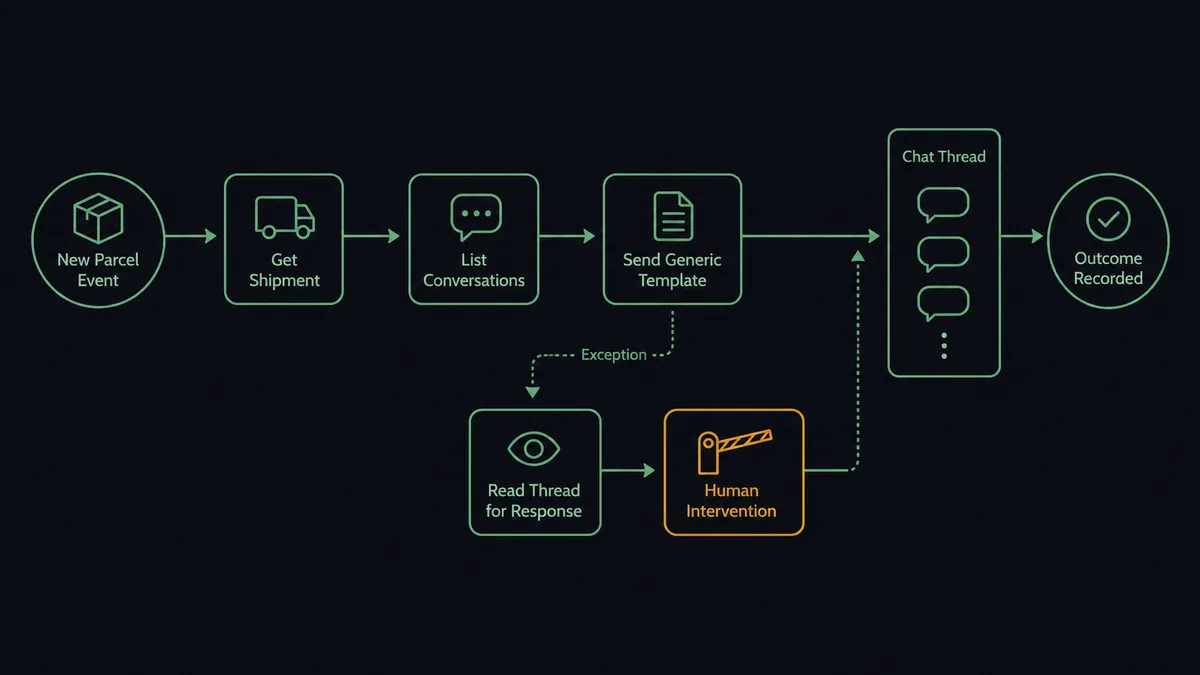
You connect ShipBob to Facebook Messenger by having ShipBob’s shipment triggers drive Messenger actions through your Facebook Page: On Order Shipped fires, the workflow pulls the tracking details with Get Order and Get Shipment, finds the buyer’s thread with List Conversations, and delivers a tracking card with Send Generic Template, with delivered and exception events following their own paths. FlowRunner is a visual AI-agent orchestration platform where automations run autonomously and pause for human judgment on the steps that carry real consequence. Run as an AI agent, the same connection reads the conversation before it speaks, sends routine updates on its own, and stops for a named human before dropping a shipping update into a thread where the customer is already upset.
The problem it solves
If your customers reach you through your Facebook Page, Messenger is where they expect answers, and “where is my order?” is most of the questions. Today someone on your team fields each one by hand: read the thread, find the order in the ShipBob dashboard, copy the tracking status, type a reply. The information exists in one system and the conversation happens in another, and a person shuttles between them all day. Response times stretch, and the customers who do not ask simply wait and wonder.
The sharper failure is tone-deafness at scale. A shipment stalls, the customer has already sent two increasingly irritated messages, and an automated update chirps into the thread as if nothing happened, right below the complaint it ignores. In a channel with visible conversation history, context-blind messaging is worse than silence: the customer can see that nobody read what they wrote. Threads like that end up as public comments and chargebacks, not because the shipping problem was unsolvable but because the conversation handled it badly.
How it works: the connection
The connection listens to ShipBob and speaks through your Page’s Messenger. Here is the plain version, grounded in the real connector actions.
- Trigger: ShipBob fires On Order Shipped when the warehouse ships an order.
- Read: The workflow calls Get Order and Get Shipment to pull the items, carrier, and tracking reference.
- Find the thread: It calls List Conversations on the Page to locate the buyer’s existing Messenger conversation, and Get User Profile to greet them by name.
- Send the update: It calls Send Generic Template with a tracking card, the order reference, status, and a button to the carrier’s tracking page.
- Close the loop: On Shipment Delivered fires a short confirmation through Send Text Message, so the thread ends on an answered note.
- Catch the trouble: On Shipment Exception fires a separate path that reads the thread with Get Conversation Messages before drafting anything.
- Offer choices when it counts: For delays that need a decision, Send Button Template presents options, wait for the reshipment or talk to a person, and Send Quick Replies handles the one-tap follow-ups.
That is the “just connect them” answer. Shipping questions get answered before they are asked, in the thread the customer already has open, and your team stops being a manual bridge between a dashboard and a chat window.
Can an AI agent run it? (and why a human stays in the loop)
Yes, and the difference shows the moment a thread has history. A template automation blasts the same update into every conversation, blind to what sits above it. An AI agent holds Get Order, Get Shipment, List Conversations, Get Conversation Messages, Send Text Message, Send Generic Template, Send Button Template, and Send Quick Replies as tools, and it reads before it writes. A quiet thread gets the tracking card, no ceremony. A thread where the customer asked a question yesterday gets that question acknowledged in the same message as the update, because the agent saw it.
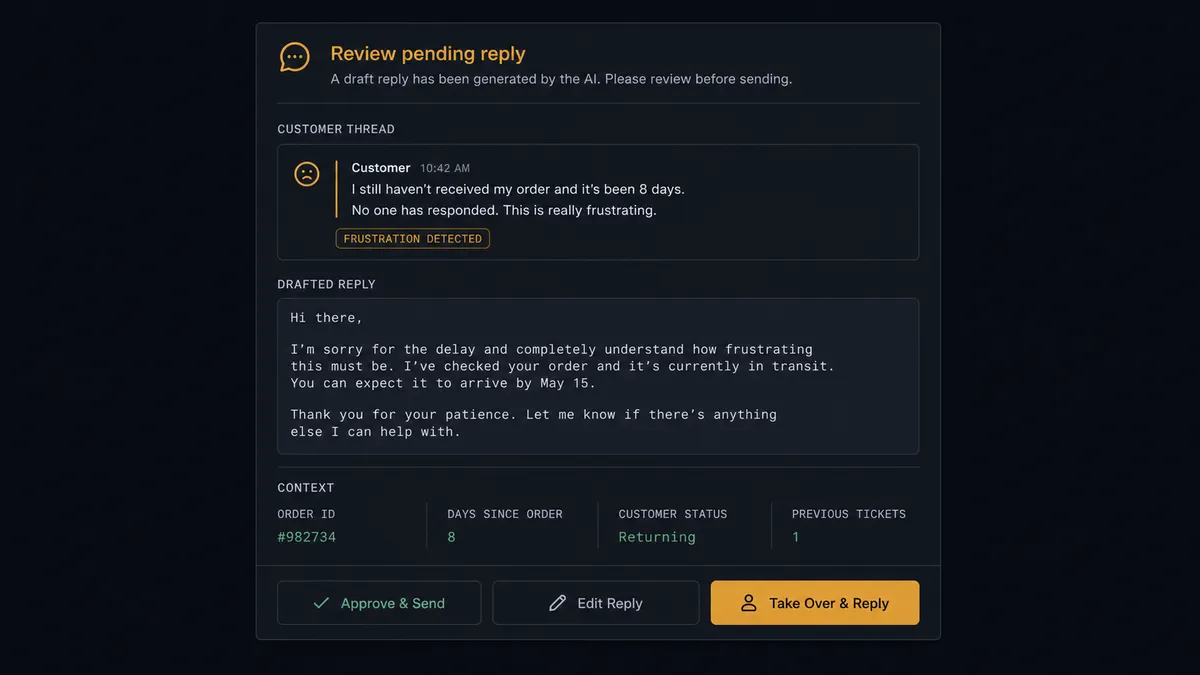
The consequential step is any send into a troubled thread, and the sharpest case is the exception message through Send Button Template. A delay notice that ignores two unread complaints does not inform, it inflames, in a channel where the customer can screenshot the whole exchange. So when Get Conversation Messages shows open frustration or an unanswered question, the agent invokes a human-in-loop flow it holds as a callable tool. The workflow pauses and posts to your support channel: “Shipment exception on order [reference]. The customer’s thread shows two messages since yesterday asking about this order. Draft reply acknowledges the wait and offers reshipment or refund via buttons. Approve, edit, or take over the thread?” A person approves, rewrites, or steps into the conversation directly. Only after that decision does anything land in the thread, with Send Sender Action showing a typing indicator so the reply feels attended, and the log records who made the call.
This is the digital andon cord for conversational support: like Toyota’s production line pull cord, the workflow stops the line the moment it hits uncertainty. Routine updates flow at machine speed into quiet threads. The messages entering a conversation that is already going wrong wait for a named human, every time.
FlowRunner vs Celigo
Celigo has earned its reputation in commerce operations. Its iPaaS moves order and fulfillment data between 3PLs, storefronts, and ERPs at high volume, its prebuilt integration apps are genuinely deep on order-to-cash sync, and IT teams that standardize on it get mature monitoring and error handling. If the job is keeping ShipBob records in step with your commerce stack, Celigo is a proven route.
This pair is a different kind of job. The endpoint is not a system of record, it is a live customer conversation, and the work is reading tone, choosing words, and knowing when a human should speak instead. Celigo synchronizes data between applications; holding a reply because the thread above it is angry is not the shape of an iPaaS flow. FlowRunner runs this as an agent whose judgment about the conversation, and whose escalation to a person, is the workflow.
| What matters for this pair | FlowRunner | Celigo |
|---|---|---|
| Human-in-the-loop before messaging a troubled thread | Native. The agent invokes an approval flow as a callable tool and waits for a named approver | Integration error handling, not a pause-for-judgment step in a conversation |
| Who runs the flow | An AI agent reads the thread, drafts the reply, picks actions as tools | Configured integration flows executed as defined |
| Users included | Unlimited users on every tier | Seat and endpoint licensing scoped by plan |
| Bring your own AI keys | Yes, BYOK. Connect the AI provider key you already have | AI features run inside Celigo’s own platform stack |
| Self-hosted option | Yes, cloud-hosted or self-hosted | Cloud iPaaS |
| Pricing model | Transparent workflow-based tiers | Enterprise iPaaS pricing scoped by endpoints and volume |
If you need fulfillment data synchronized into an ERP under IT governance, Celigo is a strong answer. If you need shipment events becoming context-aware customer conversations with a person on the risky replies, that is what this pairing does.
Before and after
| Category | Before | After |
|---|---|---|
| Where is my order | Each question is answered by hand from the ShipBob dashboard, hours later | The tracking card arrives in the thread before the customer thinks to ask |
| Delivery confirmation | Threads end in silence and reopen with “did it ship?” | On Shipment Delivered closes the loop with a confirmation in the same thread |
| Exceptions | Customers discover delays from a stalled tracking page | On Shipment Exception drafts the update immediately, gated where the thread is hot |
| Thread awareness | Updates ignore what the customer just wrote | Get Conversation Messages is read before every send, and troubled threads go to a person |
| Support workload | A person shuttles between the 3PL dashboard and Messenger all day | Routine updates run themselves; humans handle only the conversations that need them |
What you can build
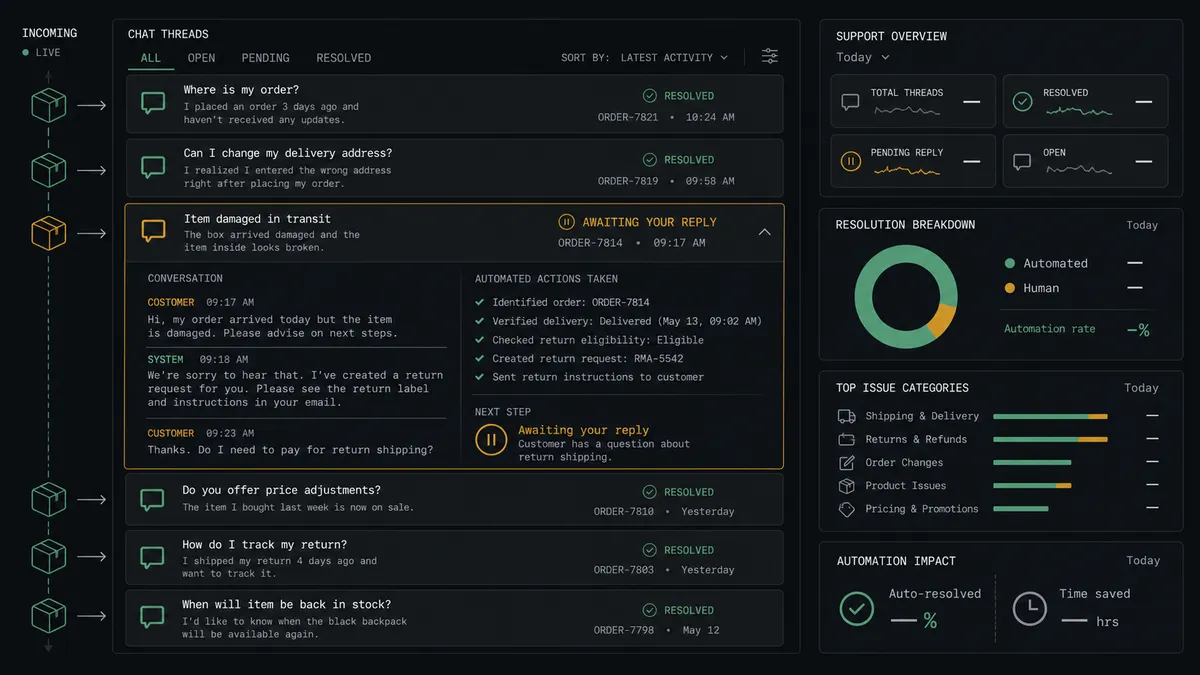
Tracking cards on ship. On Order Shipped fires. The agent pulls tracking with Get Order and Get Shipment, finds the buyer’s thread via List Conversations, and delivers a Send Generic Template card with the status and a tracking button.
Delivered, confirmed, closed. On Shipment Delivered fires a short Send Text Message confirmation, so threads end with an answer instead of trailing off, and repeat “did it arrive?” messages stop appearing.
Exception replies with a gate. On Shipment Exception fires. The agent reads the thread with Get Conversation Messages, drafts a reply that acknowledges what the customer already said, and holds troubled threads at the approval step where a person approves, edits, or takes over.
Choice-driven delay handling. For a stalled shipment, the agent presents options with Send Button Template, wait, reship, or talk to a person, and routes the customer’s one-tap answer from Send Quick Replies into the right follow-up flow.
Return check-in. On Return Completed fires. The agent confirms receipt in the customer’s thread with Send Text Message and posts the return summary to your team, so the refund conversation starts the day the warehouse checks the item in.
Getting started
Start on the free plan: 100 executions a month, every integration included, no credit card required, plus 14 days of Professional for new accounts. Both connectors are available on every tier, and every tier includes unlimited users and unlimited workflows.
Explore the integration details:
- ShipBob integration (5 triggers and 20 actions covering fulfillment, inventory, and receiving)
- Facebook Messenger integration (15 actions covering messages, templates, and Page profile)
Start building free at flowrunner.ai or book a demo to see a live ShipBob to Facebook Messenger workflow, thread-aware approval and all.
Frequently asked questions
Is it free to connect ShipBob and Facebook Messenger on FlowRunner?
You can build and run the connection on FlowRunner's free plan, which includes 100 executions a month and every integration with no credit card required, and new accounts also get 14 days of Professional. Both connectors are available on every FlowRunner tier, and every tier includes unlimited users and unlimited workflows.
Can I self-host the ShipBob to Facebook Messenger workflow?
Yes. FlowRunner offers a cloud-hosted option and a self-hosted option, so the connection can run inside your own environment.
Does the AI agent need my own OpenAI or Claude key?
FlowRunner uses a bring-your-own-keys model, so you connect the AI provider key you already have. You are not locked to one model.
What happens when the agent finds the customer's thread is already unhappy?
The update does not send on autopilot. The agent posts the shipment event, the recent thread history from Get Conversation Messages, and its drafted reply to your support channel, then waits for a person to approve the message, rewrite it, or take over the thread before anything is sent.
Which ShipBob events can trigger a Messenger message?
ShipBob offers five triggers: On Order Shipped, On Shipment Delivered, On Shipment Exception, On Shipment On Hold, and On Return Completed. Shipped and delivered events drive the routine updates, and On Shipment Exception drives the gated path.
What kinds of Messenger messages can the workflow send?
The connector supports Send Text Message for plain updates, Send Generic Template for tracking cards with an image and buttons, Send Button Template for choices like reship or refund, and Send Quick Replies for one-tap responses. The workflow picks the format that fits the moment.