How to Connect Calendly with Bland AI (With or Without an AI Agent)
Connect Calendly no-shows and new bookings to Bland AI phone calls, with an AI agent that drafts the recovery call and a fresh scheduling link, then pauses for a human before Send Call dials the invitee.
How do you connect Calendly to Bland AI?
You connect Calendly to Bland AI by having Calendly’s On Mark Invitee as No-Show trigger fire when someone misses a booked meeting, generating a fresh rebooking link with Create Single-Use Scheduling Link, and placing a recovery call with Bland AI’s Send Call action, so a missed meeting becomes a friendly phone call and a new booking instead of a dead calendar slot. FlowRunner is a visual AI-agent orchestration platform where automations run autonomously and pause for human judgment on the steps that carry real consequence. The same connection can run as an AI agent that judges which no-shows are worth chasing, drafts the call itself, and pauses for a named person before any invitee’s phone rings.
The problem it solves
Today, a no-show just evaporates. The rep waits on the video call for ten minutes, posts “no-show” in the channel, and moves on to the next thing. Someone means to follow up, and the follow-up is an email that lands in the same inbox the invitee was already ignoring. The lead that took real marketing money to book quietly exits the pipeline, not because they chose a competitor, but because rebooking required effort at the exact moment nobody had any.
The edges make it worse. The invitee who genuinely had an emergency gets the same silence as the tire-kicker. The repeat no-show gets a fourth booking link and burns a fourth calendar slot. And when someone does call to reschedule, there is no link ready, so the call ends with “I’ll email you some times” and the loop starts over. Recovery is a phone job with a link in hand, and that combination almost never happens manually.
How it works: the connection
The connection listens to Calendly and dials through Bland AI. Here is the plain version, grounded in the real connector actions.
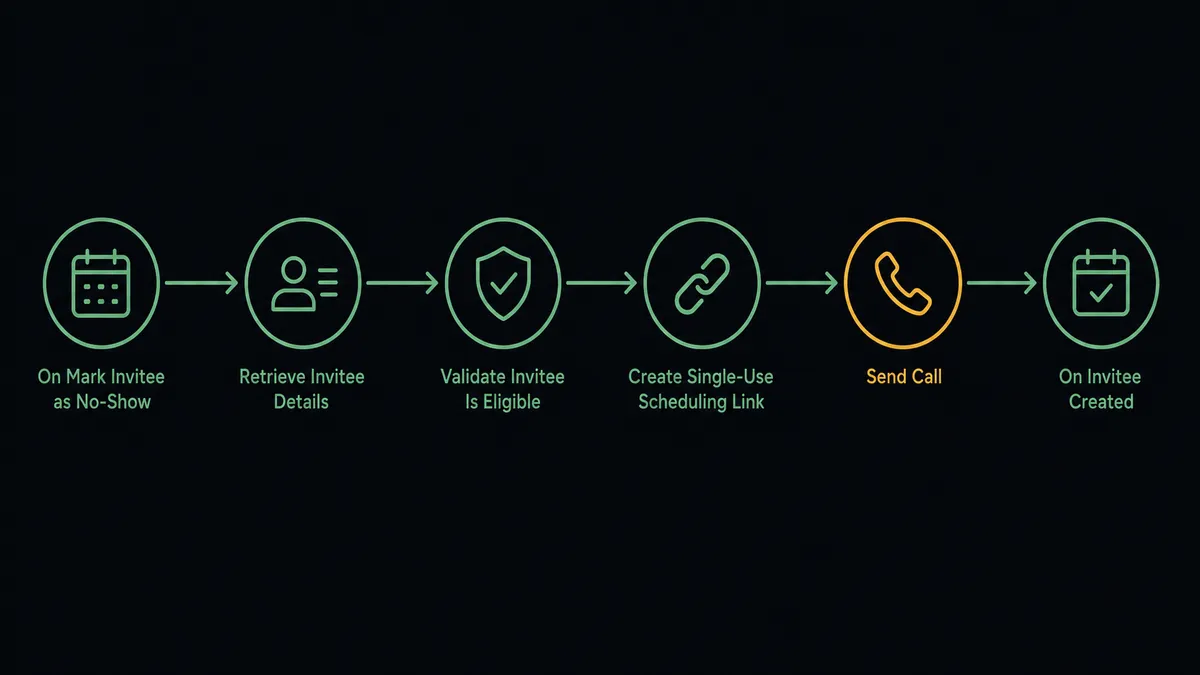
- Trigger: Calendly fires On Mark Invitee as No-Show when the host marks a missed meeting.
- Read: The workflow pulls the invitee’s details, the event type, the original time, and any routing form answers that came with the booking.
- Guard: It checks that On Unmark Invitee as No-Show has not reversed the marking and that the invitee has not already rebooked.
- Prepare: It calls Create Single-Use Scheduling Link so a fresh, one-time booking link is ready before anyone dials.
- Call: It calls Send Call in Bland AI with the invitee’s number and a script that references the missed meeting and offers the reschedule.
- Log: Analyze Call captures whether the invitee agreed to rebook, and On Invitee Created fires when the new booking lands, closing the loop.
That is the “just connect them” answer. Every marked no-show gets a timely, personal-sounding recovery attempt with a rebooking link ready, and the outcome is written down.
Can an AI agent run it? (and why a human stays in the loop)
Yes, and judgment is what separates recovery from harassment. The agent holds the pair’s real actions as tools: Create Single-Use Scheduling Link, Create One-Off Meeting, Cancel Scheduled Event, Send Call, Analyze Call, Stop Call. For each no-show it reasons about context: a first miss on a high-intent demo booked through a routing form gets a warm recovery call within the hour; a third consecutive miss gets flagged to the rep instead of another automated chase; an invitee who already rebooked gets nothing at all, because calling them would undo the goodwill.
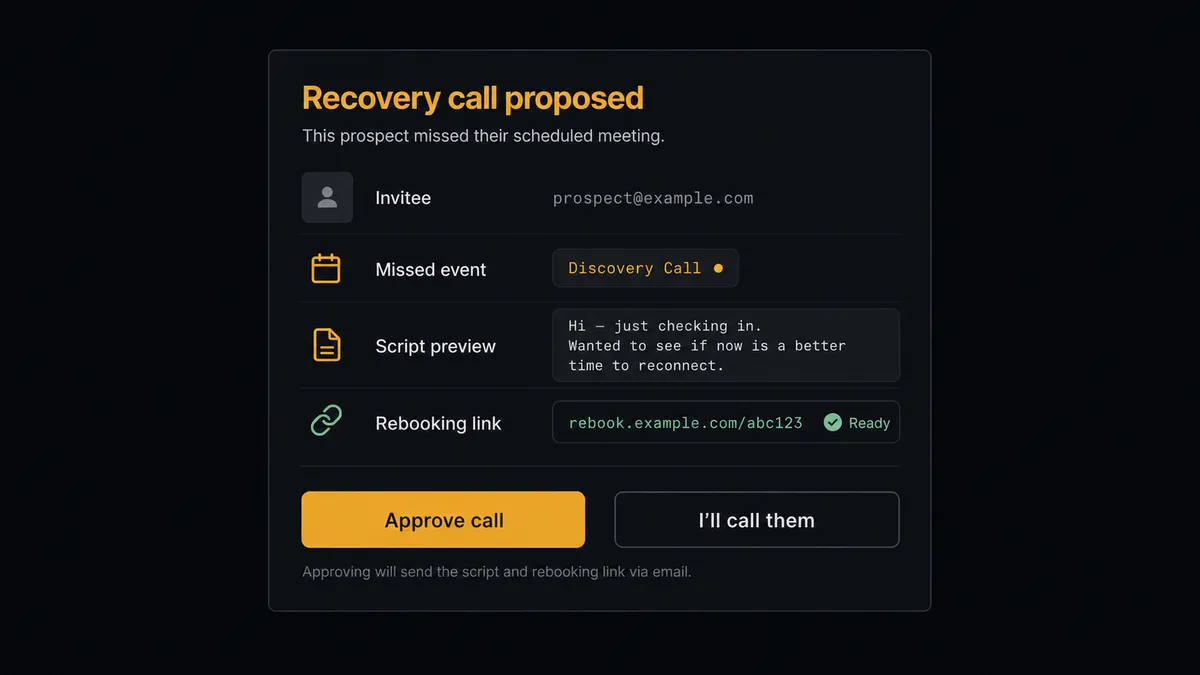
The consequential step is Send Call. The invitee is a prospect with a live opinion of your company, and an automated voice calling at the wrong moment, or about a meeting they already rescheduled, does damage a discount cannot repair. So the agent invokes a human-in-loop flow it holds as a callable tool. The workflow pauses and posts to the sales channel: “Recovery call proposed: [invitee] missed [event type] today. First no-show, routing form shows active evaluation. Script and single-use rebooking link ready. Approve?” The rep clicks approve, or claims the call themselves, and only then does Send Call dial. Approver, timestamp, and outcome all land in the audit trail.
When the agent is not sure, the line stops. An ambiguous case, a possible duplicate booking, a number that looks like a landline switchboard: each goes to a person with the booking history attached rather than into the dialer. Prospects call this the digital andon cord, and it is FlowRunner’s core design: like Toyota’s production line, the workflow halts the moment it hits uncertainty and waits for a human to pull it back into motion.
FlowRunner vs Zapier
Zapier’s Calendly support is genuinely good. The trigger coverage is broad, the template gallery has ready-made “no-show sends an email” and “new invitee updates the CRM” Zaps, and for lightweight scheduling hygiene, tagging contacts, posting bookings to Slack, updating a sheet, it is the fastest path there is. That reputation is earned.
The difference is what happens when the follow-up is a phone call to a live prospect. A Zap fires the same way every time; it does not weigh a first miss against a third, and it does not wait for a rep’s sign-off before dialing. FlowRunner is built around native human-in-the-loop and AI-agent orchestration, where those are the whole point.
| What matters for this pair | FlowRunner | Zapier |
|---|---|---|
| Human-in-the-loop before Send Call dials an invitee | Native. The agent invokes an approval flow as a callable tool and waits | Available via added approval steps, not a native agent decision |
| Who runs the flow | An AI agent weighs each no-show, reasons, picks actions as tools | Predefined step sequence you configure per Zap |
| Users included | Unlimited users on every tier | Priced by task volume; seats vary by plan |
| Bring your own AI keys | Yes, BYOK. Connect the AI provider key you already have | AI features tied to Zapier’s own AI offering |
| Self-hosted option | Yes, cloud-hosted or self-hosted | Cloud only |
| Pricing model | Transparent workflow-based tiers | Per-task pricing that can be hard to predict as volume grows |
If your follow-up is an email or a CRM update, Zapier will do it well. If your follow-up is a voice on the phone with a prospect, judged case by case and approved by a person, that is what this pairing is built for.
Before and after
| Category | Before | After |
|---|---|---|
| No-show follow-up | An email the invitee ignores, sent whenever someone remembers | A recovery call proposed within the hour, with a rebooking link already generated |
| Triage | Every miss treated the same, or not at all | The agent separates first misses, repeat offenders, and already-rebooked invitees |
| Rebooking friction | ”I’ll send you some times” and another email loop | Create Single-Use Scheduling Link puts a one-time link in the invitee’s hands during the call |
| Confirmation calls | Reminders limited to whatever email automation sends | On Invitee Created drives a scheduled confirmation call before high-stakes meetings |
| Accountability | Nobody knows which no-shows were chased or by whom | Every call carries a named approver, a timestamp, and an Analyze Call outcome |
What you can build
No-show recovery with a link in hand. On Mark Invitee as No-Show fires, the agent generates a Create Single-Use Scheduling Link, drafts the script, gets approval, and Send Call offers the reschedule while the missed meeting is still fresh. Analyze Call logs the answer.
Pre-meeting confirmation calls. On Invitee Created fires for a high-stakes event type. The agent schedules a confirmation call ahead of the meeting; invitees who say the time no longer works get a reschedule link on the spot, and Cancel Scheduled Event releases the old slot after a person approves.
Cancellation save attempts. On Invitee Canceled fires. For high-intent event types, the agent proposes a brief call asking whether the invitee wants a different time rather than losing them entirely, with the rep approving each save attempt.
Routing form fast lane. On New Routing Form Submitted fires with answers that mark a hot prospect. The agent proposes an immediate welcome call, and on approval, Send Call reaches them minutes after they submitted, with Create One-Off Meeting available to book a custom slot the moment they say yes.
Repeat no-show circuit breaker. The agent tracks misses per invitee. After a second miss, it stops proposing automated calls for that invitee and instead routes the history to the rep, so calendar slots stop going to people who burn them.
Getting started
Start on the free plan: 100 executions a month, every integration included, no credit card required, plus 14 days of Professional for new accounts. Both connectors are available on every tier, and every tier includes unlimited users and unlimited workflows.
Explore the integration details:
- Calendly integration (5 triggers and 3 actions covering bookings, no-shows, and scheduling links)
- Bland AI integration (11 actions covering outbound calls, call analysis, and recordings)
Start building free at flowrunner.ai or book a demo to see a live Calendly to Bland AI workflow, recovery-call approval and all.
Frequently asked questions
Is it free to connect Calendly and Bland AI on FlowRunner?
You can build and run the connection on FlowRunner's free plan, which includes 100 executions a month and every integration with no credit card required, and new accounts also get 14 days of Professional. Both connectors are available on every FlowRunner tier, and every tier includes unlimited users and unlimited workflows.
Can I self-host the Calendly to Bland AI workflow?
Yes. FlowRunner offers a cloud-hosted option and a self-hosted option, so the connection can run inside your own environment. Self-hosting is available for teams that need the workflow to run on their own infrastructure.
Does the AI agent need my own OpenAI or Claude key?
FlowRunner uses a bring-your-own-keys model, so you connect the AI provider key you already have. You are not locked to one model, and you control which provider runs the agent.
What happens when the agent is unsure whether a no-show deserves a recovery call?
It holds the call and asks. If the invitee already rebooked, was unmarked via On Unmark Invitee as No-Show, or has missed repeatedly, the agent flags the case to a person with the booking history attached instead of dialing, and nothing happens until someone decides.
Which triggers and actions does the Calendly to Bland AI workflow use?
Calendly provides the triggers: On Mark Invitee as No-Show for recovery calls, On Invitee Created for confirmations, On Invitee Canceled, On New Routing Form Submitted, and On Unmark Invitee as No-Show. The workflow generates rebooking links with Create Single-Use Scheduling Link and places approved calls with Bland AI's Send Call. Bland AI has no triggers.
Can the same connection place appointment reminder calls?
Yes. On Invitee Created starts a reminder path: the agent schedules a confirmation call ahead of the meeting, and if the invitee says the time no longer works, the workflow offers a reschedule through a Create Single-Use Scheduling Link and can release the old slot with Cancel Scheduled Event after a person approves.