How to Connect DocuSign with Bland AI (With or Without an AI Agent)
Connect DocuSign envelope events to Bland AI phone outreach, optionally as an AI agent that chases unsigned contracts by email first and pauses for a human before any phone call reaches a signer.
How do you connect DocuSign to Bland AI?
You connect DocuSign to Bland AI by having DocuSign’s On Envelope Sent trigger start a chase sequence: the workflow tracks signatures with Get Envelope Status and Get Envelope Recipients, nudges stalled signers with Resend Envelope, and escalates the unreachable ones to a real phone call with Send Call, placed by an AI voice that confirms receipt and offers to resend. Bland AI has no triggers of its own, so the workflow always starts from the DocuSign side, where the contract events happen. FlowRunner is a visual AI-agent orchestration platform where automations run autonomously and pause for human judgment on the steps that carry real consequence. The same connection runs as an AI agent that manages the whole escalation ladder itself, with one firm rule: no phone call reaches a signer until a named human approves it.
The problem it solves
Right now the gap between “contract sent” and “contract signed” is managed by hope. A deal reaches signature stage, the envelope goes out, and then everyone waits. The deal owner checks DocuSign when they remember to. After a few days someone sends a “just bumping this” email that lands in the same inbox the envelope got lost in. Deals that took months to build stall for weeks at the easiest step, and quarter-end becomes a frantic phone marathon where reps drop real selling to chase signatures.
The phone is what actually works on a stalled envelope, and it is also the easiest thing to get wrong. Call too early and you read as pushy. Call the signer who already signed and you read as disorganized. Have a rep make twenty chase calls on the last day of the quarter and the tone degrades with every dial. Phone outreach on contracts needs judgment about who, when, and what to say, and today that judgment costs your most expensive people their afternoons.
How it works: the connection
The connection listens to DocuSign and escalates through Bland AI. Here is the plain version, grounded in the real connector actions.
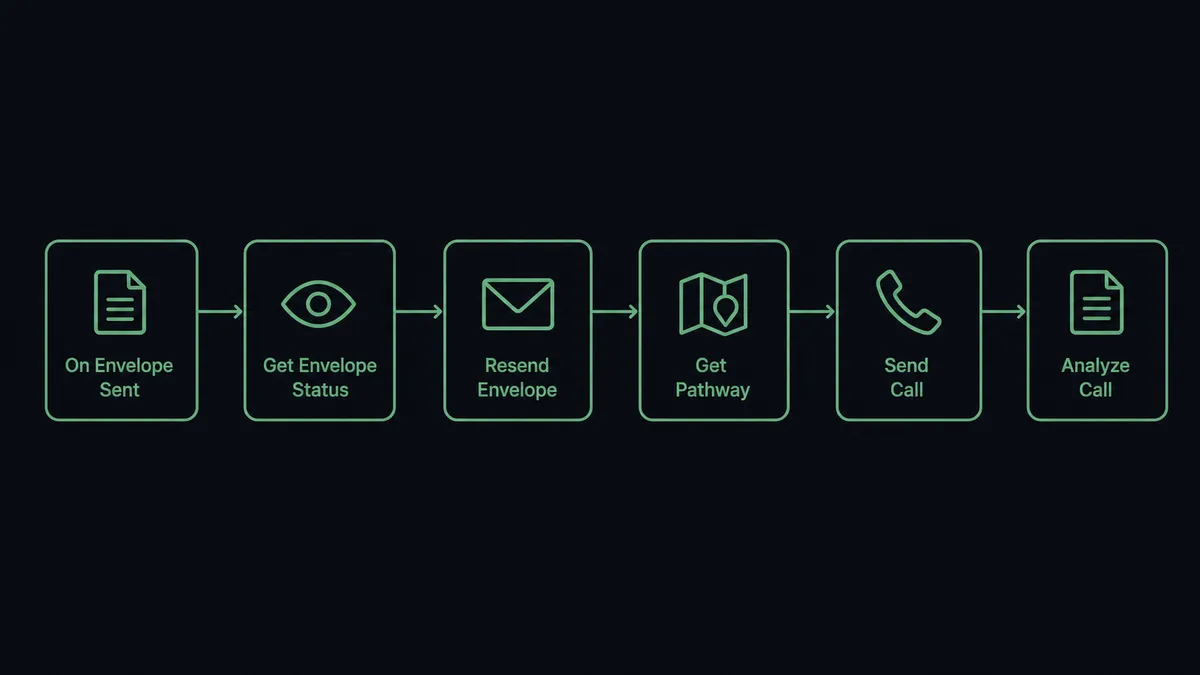
- Trigger: DocuSign fires On Envelope Sent when a contract goes out for signature.
- Track: The workflow calls Get Envelope Status on a schedule and Get Envelope Recipients to see exactly which signer is holding things up.
- Nudge by email: Past your reminder window, it calls Resend Envelope so the pending signer gets a fresh copy at the top of their inbox.
- Prepare the call: If the envelope stays unsigned, it selects a conversation plan with List Pathways and Get Pathway, and drafts the objective: confirm the signer received the contract, answer basic questions, offer a resend.
- Place the call: It calls Send Call, and the AI voice has a short, polite conversation with the signer.
- File the outcome: It calls Get Call Details and Analyze Call to pull the transcript and a structured answer, then acts on it, calling Resend Envelope for a lost contract or routing the envelope to the deal owner when the signer raised a real objection.
That is the “just connect them” answer. On Envelope Completed removes signed contracts from the chase automatically, so nobody ever gets a reminder for something they already signed.
Can an AI agent run it? (and why a human stays in the loop)
Yes, and the escalation ladder is exactly where the agent earns its keep. Instead of a fixed timer that treats every envelope the same, an AI agent reads each stalled contract in context and picks the DocuSign and Bland AI actions it needs as tools. Get Envelope Status, Get Envelope Recipients, Resend Envelope, List Pathways, Send Call, Analyze Call, Stop Call: that is the toolbox, and the agent chooses based on the envelope’s value, the signer’s behavior, and how the previous nudges landed.
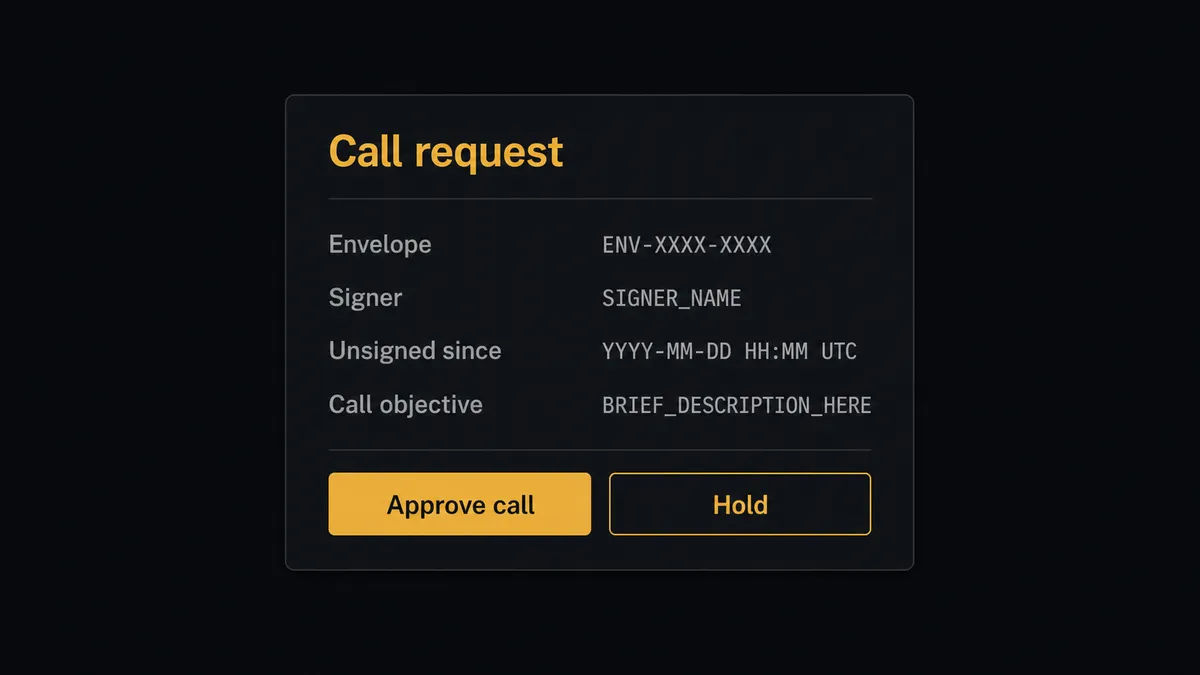
The consequential step is obvious here: Send Call puts an AI voice on the phone with a real person about a real contract. That is a customer touchpoint with your name on it, and the agent never takes it alone. Before any call, it invokes a human-in-loop flow it holds as a callable tool. The workflow pauses and posts to your channel: “Envelope [subject] unsigned since [date]. Signer: [name]. Email nudges sent: [count]. Proposed call objective: confirm receipt and offer resend, pathway [name]. Approve the call?” A person approves, edits the objective, or holds off in one click. Only then does Send Call dial, and afterward Get Call Details and Analyze Call file the transcript and outcome against the envelope, so the whole exchange is on the record.
The gate also protects tone at scale. A person approving calls one by one notices what a timer cannot: this signer is a major account, that one asked for legal review, this envelope should wait until Monday. Prospects call it the digital andon cord: like Toyota’s quality control pull cord, the workflow stops the line the moment it hits uncertainty, and your team pulls it back into motion.
FlowRunner vs Zapier
Most teams automating DocuSign follow-up reach for Zapier first, and for good reason. Zapier connects to both DocuSign and Bland AI, its editor is quick to learn, and its template gallery makes a reminder email sequence a same-day build. For an email-only chase, it is a fast, proven path.
The difference shows up the moment the workflow can dial a phone. FlowRunner is built around native human-in-the-loop and AI-agent orchestration, where the agent runs the escalation ladder and a person owns every call that reaches a signer.
| What matters for this pair | FlowRunner | Zapier |
|---|---|---|
| Human-in-the-loop on placing calls | Native. The agent invokes an approval flow as a callable tool and pauses before Send Call | Available by adding approval steps, not a native agent decision |
| Who runs the flow | An AI agent reads each stalled envelope, reasons, and picks actions as tools | Predefined step sequence you configure per Zap |
| Users included | Unlimited users on every tier | Priced by task volume; seats vary by plan |
| Bring your own AI keys | Yes, BYOK | AI features tied to Zapier’s own AI offering |
| Self-hosted option | Yes, cloud-hosted or self-hosted | Cloud only |
| Pricing model | Transparent workflow-based tiers | Per-task pricing that gets harder to predict as contract volume grows |
If email reminders are as far as you want to escalate, Zapier will handle it well. If you want a phone-call escalation with a named human approving every dial and a transcript filed afterward, this pairing is the better fit.
Before and after
| Category | Before | After |
|---|---|---|
| Signature tracking | Deal owners refresh DocuSign by hand to see who signed | Get Envelope Status and Get Envelope Recipients track every envelope continuously |
| Reminder discipline | ”Just bumping this” emails go out whenever someone remembers | Resend Envelope fires on a consistent window for every stalled envelope |
| Phone escalation | Reps burn afternoons on chase calls, tone degrading by the hour | The agent drafts each call and a person approves it in one click |
| Call records | What was said on a chase call lives in the rep’s memory | Analyze Call and Get Call Details file the transcript and outcome against the envelope |
| Chase hygiene | Signed contracts keep getting reminders by mistake | On Envelope Completed drops signed envelopes from the chase automatically |
What you can build
Stalled contract chase, one gate. On Envelope Sent starts the clock. The agent nudges with Resend Envelope, escalates to a drafted call, and Send Call only dials after a person approves. The transcript comes back through Analyze Call.
Receipt confirmation call. For high-value contracts, the agent proposes a short courtesy call right after sending: confirm the envelope arrived and answer questions. A person approves it, Send Call places it, and the answers are filed against the envelope.
Decline follow-through. On Envelope Declined fires. The agent packages the decline reason with Get Envelope Status, and routes it to the deal owner with the option to approve a clarifying call rather than losing the deal to a misunderstanding.
Quarter-end call queue. The agent scans List Envelopes for everything unsigned, ranks the queue by value and age, and posts the proposed calls in one batch for approval, so the team releases the whole chase in minutes and Stop Call remains available for anything in flight.
Post-signature thank-you routing. On Envelope Completed fires. The agent closes the chase, files the final status, and for flagged strategic accounts proposes a thank-you touch for the account owner instead of a call, keeping the human relationship where it belongs.
Getting started
Start on the free plan: 100 executions a month, every integration included, no credit card required, plus 14 days of Professional for new accounts. Both connectors are available on every tier, and every tier includes unlimited users and unlimited workflows.
Explore the integration details:
- DocuSign integration (4 triggers and 9 actions covering envelopes, recipients, and documents)
- Bland AI integration (11 actions covering calls, pathways, transcripts, and recordings)
Start building free at flowrunner.ai or book a demo to see a live DocuSign to Bland AI workflow, call approval and all.
Frequently asked questions
Is it free to connect DocuSign and Bland AI on FlowRunner?
You can build and run the connection on FlowRunner's free plan, which includes 100 executions a month and every integration with no credit card required, and new accounts also get 14 days of Professional. Both connectors are available on every FlowRunner tier, and every tier includes unlimited users and unlimited workflows.
Can I self-host the DocuSign to Bland AI workflow?
Yes. FlowRunner offers a cloud-hosted option and a self-hosted option, so the connection can run inside your own environment.
Does the AI agent need my own OpenAI or Claude key?
FlowRunner uses a bring-your-own-keys model, so you connect the AI provider key you already have. You are not locked to one model.
Can the workflow place a phone call without anyone approving it?
No. Send Call is held behind the human-in-loop step by design. The agent drafts the call objective and picks the pathway, then posts the signer, envelope, and draft to your channel and waits. The call is only placed after a named approver signs off, and that approval is captured in the audit trail.
Which DocuSign events can start the workflow?
DocuSign offers four triggers: On Envelope Sent, On Envelope Completed, On Envelope Declined, and On Envelope Voided. On Envelope Sent starts the reminder clock, and On Envelope Completed ends it, so signed contracts drop out of the chase automatically. Bland AI has no triggers, so the workflow always starts from the DocuSign side.
What happens after the call ends?
The workflow calls Get Call Details and Analyze Call to pull the transcript and a structured answer to the question the call was placed to resolve, such as whether the signer received the envelope or needs it resent. Based on that answer, the agent calls Resend Envelope or routes the envelope to a person.