How to Connect Salesforce with Tally (With or Without an AI Agent)
Connect Tally form submissions to Salesforce so every response becomes a lead with campaign attribution, with an AI agent that pauses for a human before Convert Lead to Contact makes an irreversible change to the pipeline.
How do you connect Salesforce to Tally?
You connect Salesforce to Tally by having Tally’s On New Submission trigger drive Salesforce’s lead actions: the moment a respondent submits your form, the workflow reads the answers with Get Submission, deduplicates with Find Records by Query, creates the record with Create Lead, and sets attribution with Add Lead to Campaign, so a form response becomes a working lead in your funnel instead of a row waiting for the next CSV import. FlowRunner is a visual AI-agent orchestration platform where automations run autonomously and pause for human judgment on the steps that carry real consequence. Run as an AI agent, the same connection qualifies each submission, builds and enriches leads on its own, and stops for a named person before the one Salesforce action that cannot be undone: Convert Lead to Contact.
The problem it solves
Between your forms and your funnel sits a batch job that runs on human memory. Registrations pile up in Tally. Once or twice a week, someone exports them, trims the columns, dedupes against Salesforce as best they can, and runs an import. Leads enter the funnel days after they raised their hand, campaign attribution gets set to whatever the import template said, and the follow-up cadence starts late on every single one.
The deeper damage comes from the automations that try too hard. Naive form-to-Salesforce sync tools convert leads on signals as thin as a second form fill, and conversion is the one door in Salesforce that locks behind you: the lead record closes permanently, reporting on lead-stage activity stops accruing, and if the conversion was wrong, there is no unconvert. Meanwhile the duplicates problem runs the other way: the same person registers for two webinars and becomes two leads, two cadences, and eventually one annoyed prospect asking why your company emails them twice. Both failures come from the same root: a pipeline change that deserved a decision got executed as a default.
How it works: the connection
The connection listens to Tally and writes to Salesforce. Here is the plain version, grounded in the real connector actions.
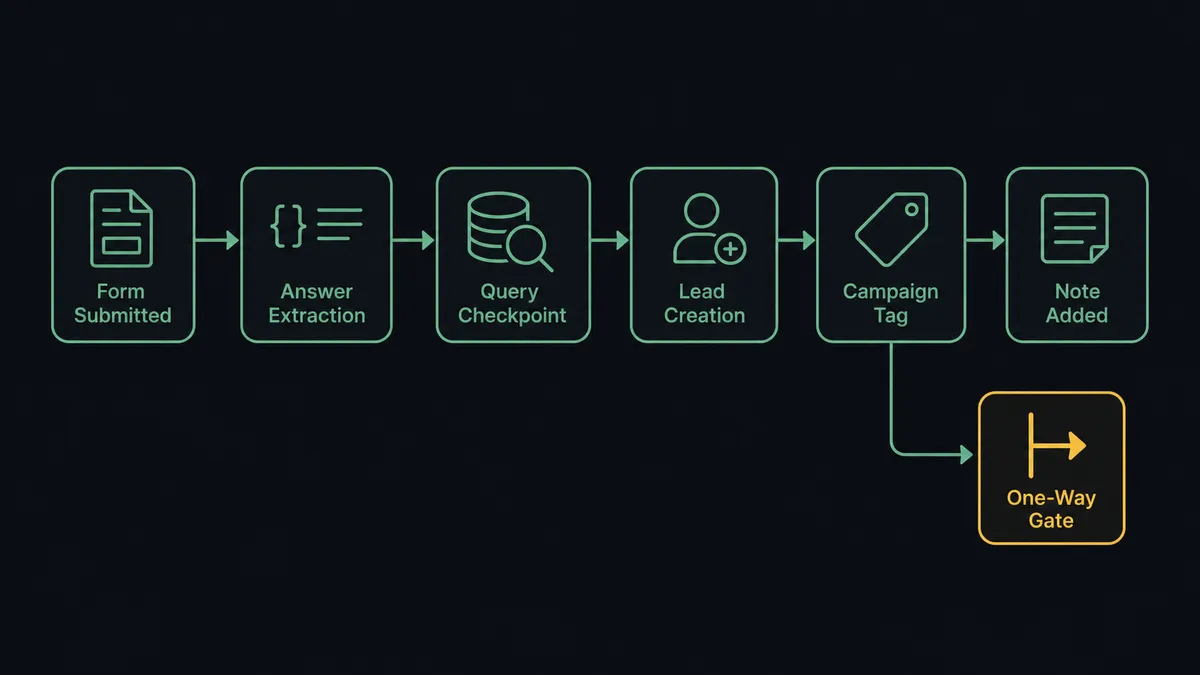
- Trigger: Tally fires On New Submission the moment a respondent completes the form.
- Read: The workflow calls Get Submission to pull the answers, and List Form Questions to interpret the fields.
- Deduplicate: It calls Find Records by Query in Salesforce to check for an existing lead or contact by email.
- Create or enrich: New people get Create Lead with the answers mapped to lead fields; known leads get Update Lead so the new signal lands on the existing record.
- Attribute: It calls Add Lead to Campaign so the form’s campaign membership is set the moment the lead exists, not at import time.
- Document: It calls Create Note on the record with the submission summary, so a rep opening the lead sees what the person actually wrote.
That is the “just connect them” answer. Submissions become attributed leads in real time, duplicates stop breeding, and reps read answers instead of guessing at intent.
Can an AI agent run it? (and why a human stays in the loop)
Yes, and the agent’s job is to be the SDR who never sleeps and never overreaches. It holds the real actions as tools: Get Submission, Find Records by Query, Create Lead, Update Lead, Add Lead to Campaign, Create Note, Convert Lead to Contact, Send Email. Per submission, it reasons: is this a new person or a returning one, what do the answers say about intent, does this belong in the funnel at all. A conference-badge-scan-quality submission becomes a lead with a note. A detailed demo request from a director at a company already in three campaigns becomes a lead with an urgent flag.
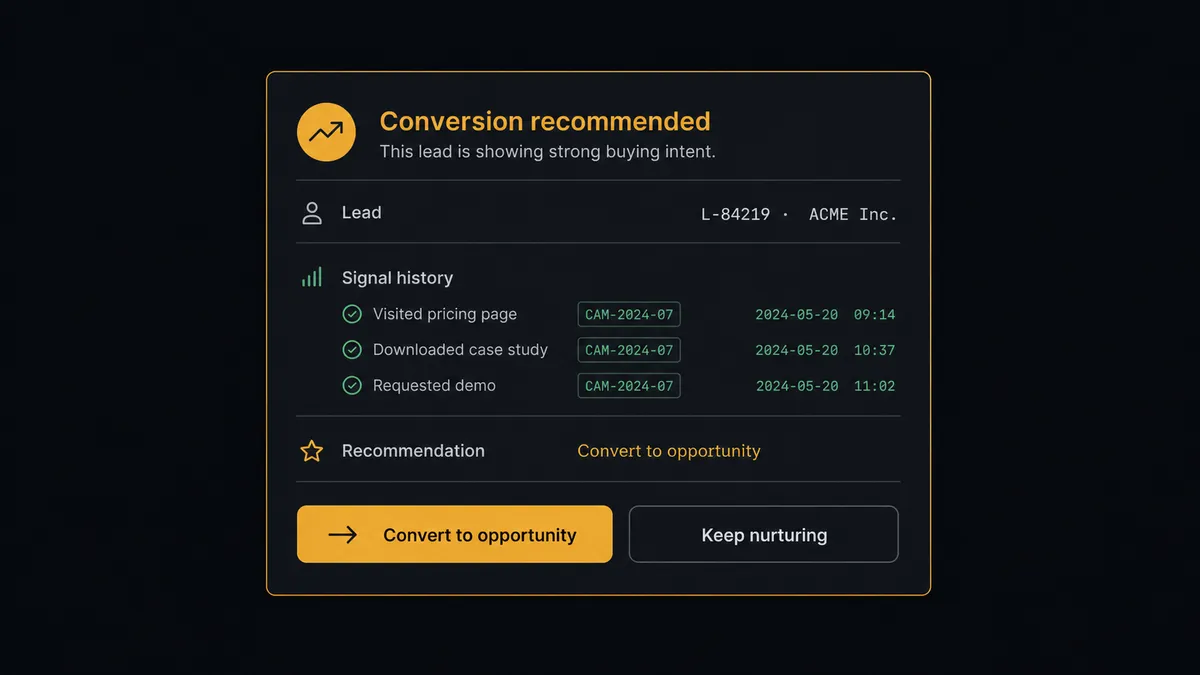
The consequential step is Convert Lead to Contact, because it is irreversible. When a lead accumulates real signals, repeated submissions, a demo request, answers that name a budget and a timeline, the agent does not convert. It invokes a human-in-loop flow it holds as a callable tool. The workflow pauses and posts to your channel: “Lead [name] at [company] has submitted [form] and previously registered for [campaign]. Latest answers indicate an active evaluation. Recommend converting. Convert, or keep nurturing?” A named person decides. Only on approval does the agent call Convert Lead to Contact, then Create Note to record the decision and its context on the new contact. The approver and timestamp land in the audit trail, so pipeline history has an author.
Prospects describe this as a digital andon cord. Like Toyota’s line, where any worker stops production the moment something looks wrong, the workflow stops the line at the one-way door, and a person decides whether to walk through it.
FlowRunner vs Zapier
Zapier has a real claim here: both connectors are mature on its platform, the form-to-lead template is battle-tested, and a marketing ops person can ship it without a developer. If your need ends at “every submission creates a lead,” Zapier does that dependably.
The difference is everything after the lead exists. Qualification, deduplication judgment, and above all the conversion decision are places where a fixed step sequence either overreaches or under-delivers. FlowRunner puts an agent on the judgment and a person on the irreversible step.
| What matters for this pair | FlowRunner | Zapier |
|---|---|---|
| Human-in-the-loop on Convert Lead to Contact | Native. The agent assembles the case and a named person decides | Approval steps exist as add-ons, not a native agent decision |
| Who runs the flow | An AI agent reads each submission and picks actions as tools | Predefined field mapping per Zap |
| Users included | Unlimited users on every tier, so reps and managers can approve | Priced by task volume; seats vary by plan |
| Bring your own AI keys | Yes, BYOK | AI features tied to Zapier’s own AI offering |
| Self-hosted option | Yes, cloud-hosted or self-hosted | Cloud only |
| Pricing model | Transparent workflow-based tiers | Per-task pricing that scales with submission volume |
If you need submissions turned into leads and nothing else, Zapier is a solid pick. If leads should be qualified by what people actually wrote, and conversion should never happen without a name attached, that is what this pairing is for.
Before and after
| Category | Before | After |
|---|---|---|
| Lead entry | Batch CSV imports, days after the submission | Create Lead fires the moment the form is submitted |
| Duplicates | The same person becomes a new lead per form | Find Records by Query routes repeat signals onto one record |
| Campaign attribution | Set by import template, often wrong | Add Lead to Campaign stamps the source at creation |
| Conversion decisions | Made by automation defaults or not at all | A named person converts, with the evidence assembled |
| Rep context | A bare lead record with a source field | Create Note puts the actual answers on the record |
What you can build
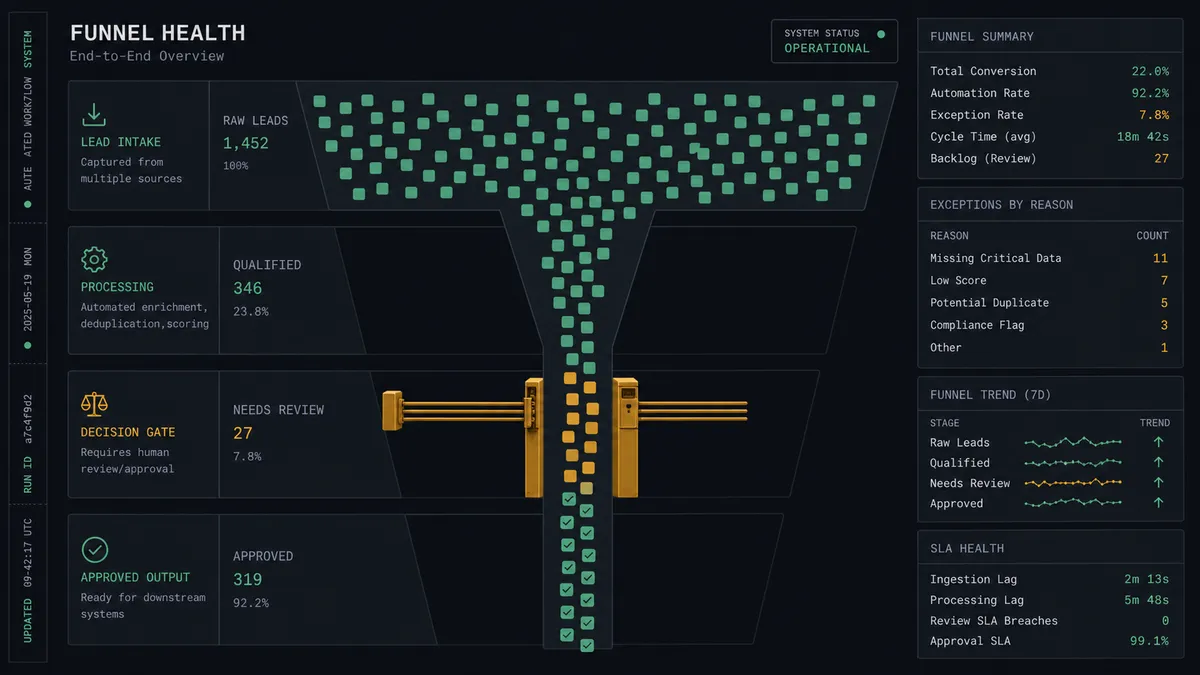
Webinar registration to attributed lead. On New Submission fires, the agent dedupes with Find Records by Query, creates or enriches the lead, and stamps Add Lead to Campaign so the campaign report is accurate from minute one.
Signal accumulation on one record. Repeat submissions from the same email land as Update Lead and Create Note instead of new leads, so a person’s history reads as a story rather than a pile of duplicates.
Gated conversion. When accumulated signals justify it, the agent packages the case and a named person approves Convert Lead to Contact. Wrong-fit conversions stop happening by default.
Post-conversion attribution. For respondents who already converted, the agent calls Add Contact to Campaign instead, so attribution keeps working after the lead record closes.
Instant courtesy reply. For qualified demo requests, the agent drafts a short acknowledgment via Send Email and holds it for approval on named accounts, so speed never comes at the cost of tone on the deals that matter.
Getting started
Start on the free plan: 100 executions a month, every integration included, no credit card required, plus 14 days of Professional for new accounts. Both connectors are available on every tier, and every tier includes unlimited users and unlimited workflows.
Explore the integration details:
- Salesforce integration (26 actions covering leads, contacts, campaigns, records, and notes)
- Tally integration (1 trigger and 15 actions covering forms, submissions, and webhooks)
Start building free at flowrunner.ai or book a demo to see a live Salesforce to Tally workflow, conversion approval and all.
Frequently asked questions
Is it free to connect Salesforce and Tally on FlowRunner?
You can build and run the connection on FlowRunner's free plan, which includes 100 executions a month and every integration with no credit card required, and new accounts also get 14 days of Professional. Both connectors are available on every FlowRunner tier, and every tier includes unlimited users and unlimited workflows.
Can I self-host the Salesforce to Tally workflow?
Yes. FlowRunner offers a cloud-hosted option and a self-hosted option, so the connection can run inside your own environment.
Does the AI agent need my own OpenAI or Claude key?
FlowRunner uses a bring-your-own-keys model, so you connect the AI provider key you already have. You are not locked to one model.
Why does lead conversion need human approval?
Because Convert Lead to Contact cannot be undone in Salesforce. Once a lead converts, it becomes a contact and the lead record is closed for good. The agent gathers the evidence, states its recommendation, and a named person makes the call, so an automation never makes an irreversible pipeline change alone.
Which trigger starts the workflow, since Salesforce is on the receiving end?
Tally's On New Submission trigger starts it. The workflow fires the moment a respondent submits the form, reads the answers with Get Submission, and then runs the Salesforce actions: Find Records by Query for deduplication, Create Lead, and Add Lead to Campaign.
How does campaign attribution work across the two systems?
Each Tally form maps to a Salesforce campaign. When a submission arrives, the workflow calls Add Lead to Campaign for new leads, or Add Contact to Campaign when the respondent already converted, so attribution survives no matter where the person sits in the funnel.