How to Connect Formstack with Salesforce Pro (With or Without an AI Agent)
Connect Formstack to Salesforce Pro so every new submission creates or updates the right CRM record, with an AI agent that pauses for human approval before converting a lead.
How do you connect Formstack to Salesforce Pro?
The On New Submission trigger in Formstack fires when a form receives a new entry, and a FlowRunner workflow uses Get Form to resolve the field-id-to-label mapping before calling Create Lead or Update Record in Salesforce Pro to write the clean data where it belongs. FlowRunner is a visual AI-agent orchestration platform where automations run autonomously and pause for human judgment on the steps that carry real consequence. That same connection can run as an AI agent that reads each submission, reasons about it, and pauses for a human reviewer before converting a lead or writing a record that cannot be undone.
The problem it solves
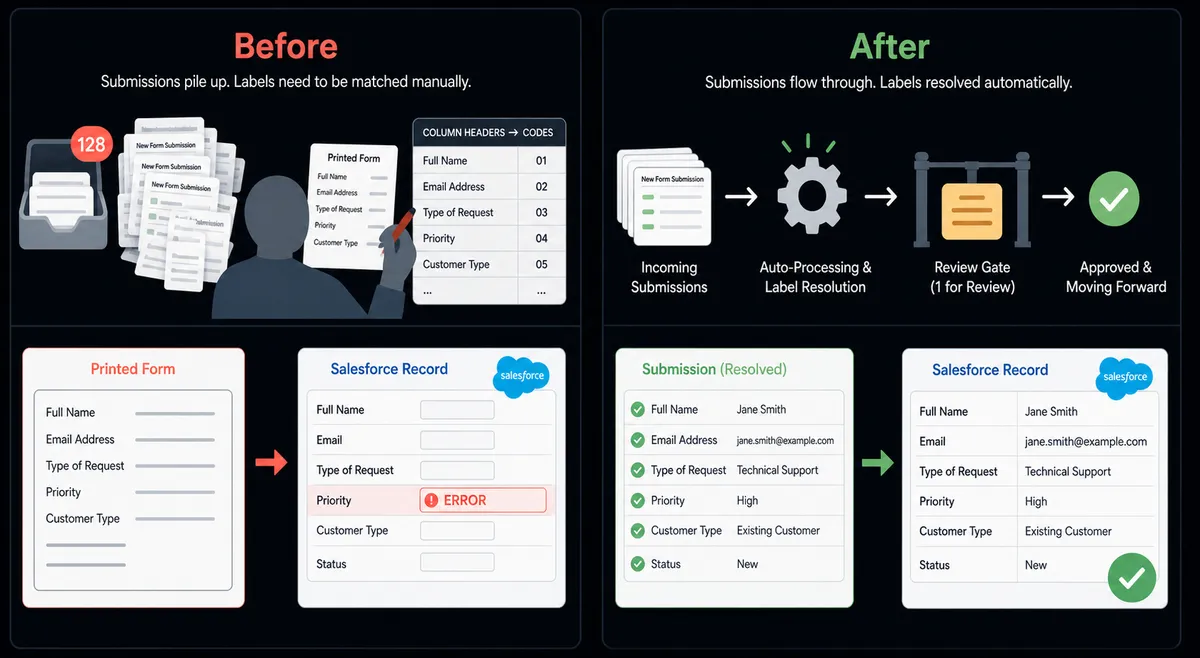
Form submissions arrive with data keyed by numeric field ids. A staff member decoding a submission has to open the form definition, match each id to its label, and then retype the values into Salesforce. For high-volume forms, that sequence runs dozens of times a day. An intake manager, a sales ops coordinator, or a CRM admin manually bridges two systems that should have been connected from the start. The submissions still come in. The backlog just grows.
When routing is manual, exceptions fall through the cracks. A duplicate lead gets created because the person checking did not search first. A sensitive intake submission moves downstream because no one flagged it. A lead that should have gone through manager approval for conversion was converted by a rep who did not know the threshold. The data in Salesforce is only as accurate as the last person who typed carefully.
How it works: the connection
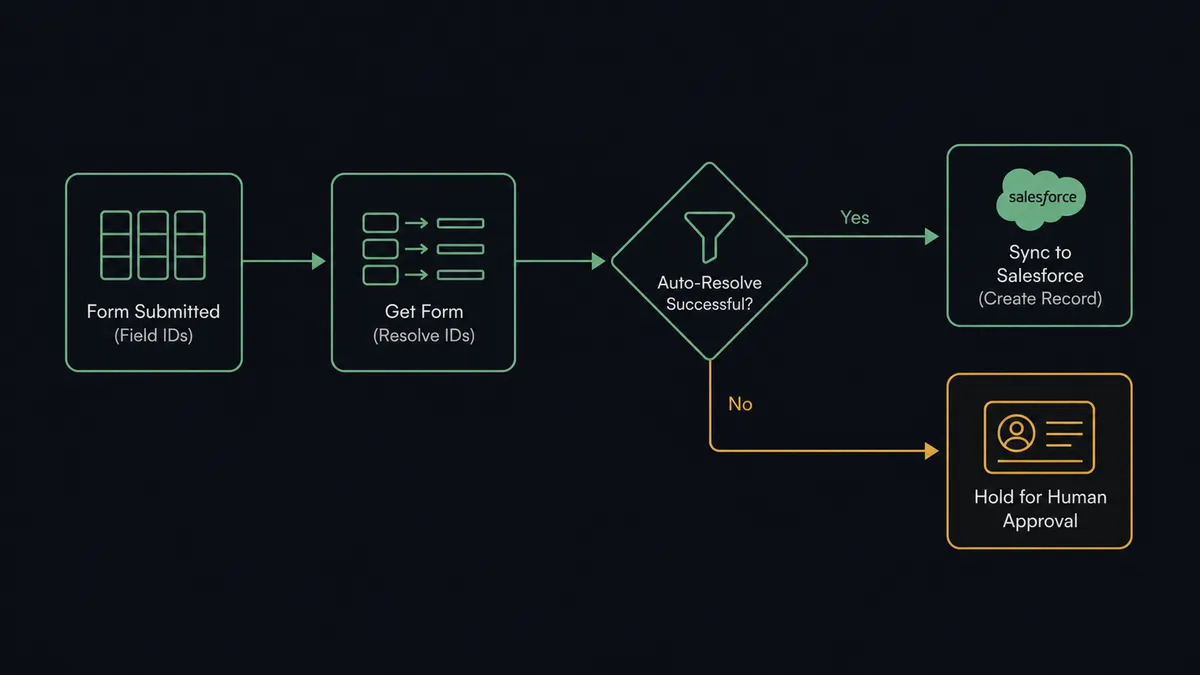
When a new entry arrives on the Formstack form, the On New Submission trigger fires and the workflow starts. The first action the agent runs is Get Form, which returns the full form definition including each field id, label, and type. The agent pairs the raw submission values with those labels so every downstream write uses human-readable field names, not numeric ids.
From there, the agent calls Find Record in Salesforce Pro to check whether the submitter already exists as a lead or contact. If a matching record exists, Update Record applies the new information. If no match is found, Create Lead writes a new lead with the correctly labeled data. The agent then calls Add Lead to Campaign if the submission came through a tracked campaign form, and Create Note to log what happened in the Salesforce activity timeline. Every submission lands in the right place with a complete record of how it got there.
For teams that need to track conversion over time, the agent can also run a Custom SOQL Query against Salesforce to pull campaign attribution data and post the results to a team channel, so revenue ops does not have to build reports manually.
Can an AI agent run it? (and why a human stays in the loop)
A standard Formstack-to-Salesforce connection syncs every submission the same way. An AI agent does something different: it reads the labeled values, reasons about what it found, and decides what to do next based on context.
Consider a vendor intake form. Most submissions are routine: a known company, a standard contact, a normal spend category. The agent creates the lead, maps the fields, and logs the activity without anyone touching it. But when a submission arrives from a company name the agent has not seen before, with a spend category that typically requires pre-approval, the agent does not just write the record and move on.
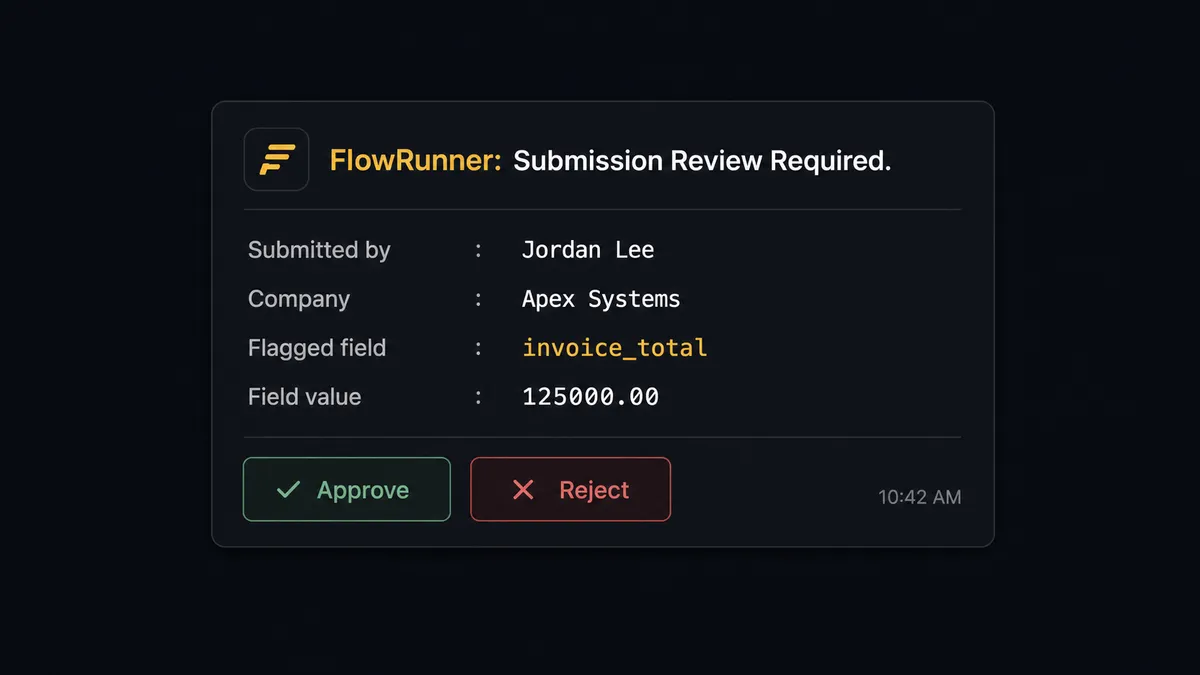
It pauses. It packages what it found: the submitter’s name, the company, the flagged field value, and the reason it is holding. It routes that package to the intake owner through Slack: “New submission on [Form] from [Company]. The field [Category] meets the review condition [reason]. Labeled values: [summary]. Approve to sync, adjust, or reject?” The owner reviews the actual submission data, makes a call, and the agent resumes with that decision as its input. The record in Salesforce reflects what the human authorized, not just what came through the form.
This is the digital andon cord in practice. The agent stops the line when it hits something that carries real consequence. It does not push everything downstream and hope someone catches the exceptions later.
For lead conversion specifically, the Salesforce Pro human-in-loop highlight is clear: Convert Lead to Contact is irreversible. Before the agent calls that action, it routes the conversion request to the sales manager with the lead’s score, the proposed rep assignment, and a one-click confirm or reassign. The decision and the approver are captured in the audit trail. No phantom conversions. No territory disputes after the fact.
FlowRunner vs the tool you’re probably comparing
Most teams reaching for a Formstack-to-Salesforce connection are already using Zapier or have evaluated it. Zapier is a solid point-to-point automation tool. It handles straightforward triggers and actions well, has a large library of pre-built Zaps, and its setup flow is genuinely fast for simple connections.
Where it runs short for this specific integration is in the reasoning layer. Zapier executes a fixed sequence. If a submission triggers a Zap, the Zap runs the same steps every time. There is no agent that reads the submission, evaluates context, and decides whether this one should pause for a human or sync straight through. Conditional branches in Zapier are pre-programmed rules. The agent in FlowRunner is making a judgment call on each submission based on its instructions and the data in front of it.
| Feature | Zapier | FlowRunner |
|---|---|---|
| Formstack trigger | Yes | Yes |
| Salesforce record writes | Yes | Yes |
| Field-id-to-label resolution | Manual mapping | Agent calls Get Form and resolves automatically |
| Human-in-loop step | Not available natively | Native: agent invokes a pause-and-ask flow as a callable tool |
| Agent reasoning on each submission | No | Yes: agent evaluates data and decides routing |
| Unlimited users on every tier | No (seat-based pricing on higher tiers) | Yes |
| BYOK for AI provider | No | Yes |
| Audit trail for human decisions | No | Yes: decision, decider, and timestamp captured |
Before and after
| Category | Before | After |
|---|---|---|
| Field id resolution | Staff open the form definition and manually match numeric ids to labels for each submission | Agent calls Get Form on every submission and resolves labels automatically |
| CRM data entry | Someone retypes each submission into Salesforce, introducing transcription errors | Labeled data written to Salesforce the moment the submission fires |
| Duplicate check | Inconsistent: depends on whether the person entering remembered to search first | Agent calls Find Record before every write; no duplicate leads created without intent |
| Sensitive submissions | Every submission moves downstream; exceptions caught later, if at all | Submissions meeting review conditions pause before any record is written |
| Lead conversion approval | Reps convert leads independently with no required approval step | Every conversion routes to sales manager for one-click confirm before agent executes |
| Activity logging | Manual notes added when the rep remembers | Create Note logs agent actions in the Salesforce timeline on every workflow run |
What you can build
New contact and campaign enrollment from a webinar signup form. On New Submission fires when someone registers. The agent calls Get Form, maps the labeled fields, runs Find Record to check if the contact already exists in Salesforce, and creates or updates the record. It then calls Add Contact to Campaign to enroll the registrant in the follow-up nurture campaign automatically. No manual list imports.
Review-gated spend request intake. A procurement form captures vendor requests with a spend amount field. The agent maps each submission, checks the spend value, and syncs routine requests directly as Salesforce leads. Any submission where the spend field exceeds a contextual threshold, or comes from an unknown vendor name, routes to the procurement lead for review before the record is written.
Lead qualification and conversion pipeline from a demo request form. Demo request submissions arrive through Formstack. The agent maps the submission, creates the lead in Salesforce with Create Lead, enriches it with Find Record lookups against existing accounts, and scores it against firmographic criteria. High-scoring leads are routed to the sales manager for a Convert Lead to Contact approval via Slack. Low-scoring leads are added to a nurture campaign with Add Lead to Campaign.
Deal desk document package triggered by a form. A contract request form arrives. The agent reads the submission fields, finds the related opportunity in Salesforce with Find Record by Query using a Custom SOQL Query, generates the document package, attaches it to the opportunity with Create File, and sends it to the contact with Send Email. The sales rep has the complete package in Salesforce without assembling anything.
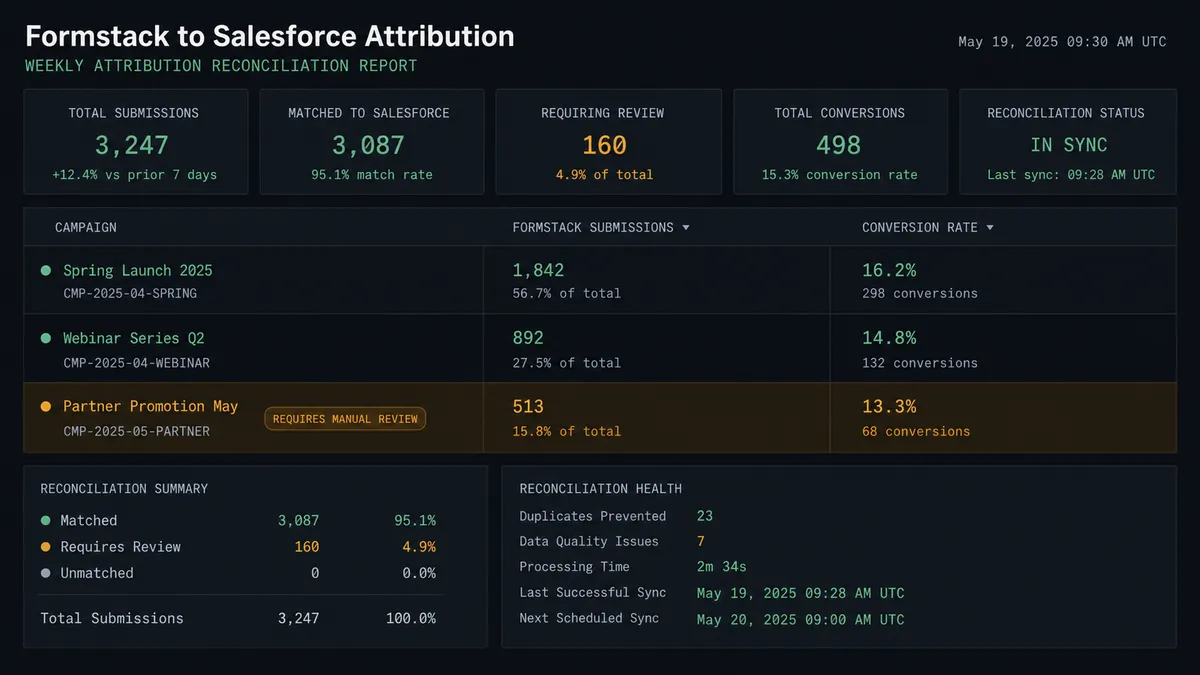
Weekly form-to-attribution reconciliation. Each week, the agent runs a Custom SOQL Query against closed opportunities to identify which campaign each contact was associated with at the time of conversion. It posts the campaign ROI summary to the revenue ops channel and updates attribution fields on the opportunities. Marketing gets accurate data without building reports from spreadsheets.
Common questions
Is it free to connect Formstack and Salesforce Pro on FlowRunner? FlowRunner has a free plan with 100 executions a month, every integration included, and no credit card required, and new accounts get 14 days of Professional on top. No credit card is required to start. Beyond the free plan, Growth is $45 per month.
Can I self-host FlowRunner? Yes. FlowRunner offers a free Community Edition for single-instance self-hosting, and an Enterprise self-hosted tier for organizations that need multi-instance clustering, full compliance features, and SSO.
Does the AI agent need my own OpenAI key? FlowRunner uses a bring-your-own-keys model for AI providers. You supply the key for whichever provider you choose. You are not locked into a single model.
What happens when the agent is not sure about a submission? The agent pauses the workflow and routes the submission to a designated reviewer through their preferred channel: Slack, email, or WhatsApp. The reviewer receives full context, decides, and the agent resumes. Nothing moves downstream until the human acts.
Will the connection replay old Formstack submissions when I first connect? No. The On New Submission trigger records a watermark on its first poll and emits nothing from the existing backlog. Only submissions that arrive after the connection is live will trigger the workflow.
Does FlowRunner support unlimited users across the team? Yes. All FlowRunner tiers include unlimited users and unlimited workflows. There is no per-seat pricing.
Getting started
FlowRunner has a free plan with 100 executions a month, every integration included, and no credit card required, and new accounts get 14 days of Professional on top. Corporate email required to start.
Connect both systems from the Integrations panel: Formstack and Salesforce Pro. Start the workflow with the On New Submission trigger, add the Get Form step to resolve field labels, and map your Salesforce Pro actions from there.
To add the human-in-loop layer, build a separate approval flow and add it to your AI agent as a callable tool. The agent invokes it when context warrants a human judgment. Everything else syncs automatically.
Start at flowrunner.ai or book a walkthrough at calendly.com/flowrunner/intro.
Frequently asked questions
Is it free to connect Formstack and Salesforce Pro on FlowRunner?
FlowRunner has a free plan with 100 executions a month, every integration included, and no credit card required, and new accounts get 14 days of Professional on top. No credit card is required to start. Beyond the free plan, Growth is $45 per month.
Can I self-host FlowRunner?
Yes. FlowRunner offers a free Community Edition for single-instance self-hosting, and an Enterprise self-hosted tier for organizations that need multi-instance clustering, full compliance features, and SSO.
Does the AI agent need my own OpenAI key?
FlowRunner uses a bring-your-own-keys model for AI providers. You supply the key for whichever provider you choose. You are not locked into a single model.
What happens when the agent is not sure about a submission?
The agent pauses the workflow and routes the submission to a designated reviewer through their preferred channel: Slack, email, or WhatsApp. The reviewer receives full context, decides, and the agent resumes. Nothing moves downstream until the human acts.
Will the connection replay old Formstack submissions when I first connect?
No. The On New Submission trigger records a watermark on its first poll and emits nothing from the existing backlog. Only submissions that arrive after the connection is live will trigger the workflow.
Does FlowRunner support unlimited users across the team?
Yes. All FlowRunner tiers include unlimited users and unlimited workflows. There is no per-seat pricing.