How to Connect Salesforce Pro with BigMarker (With or Without an AI Agent)
Connect BigMarker webinar registrants to Salesforce leads and campaigns, optionally as an AI agent that drafts personalized follow-up and pauses for a human before Send Email reaches an attendee.
How do you connect Salesforce Pro to BigMarker?
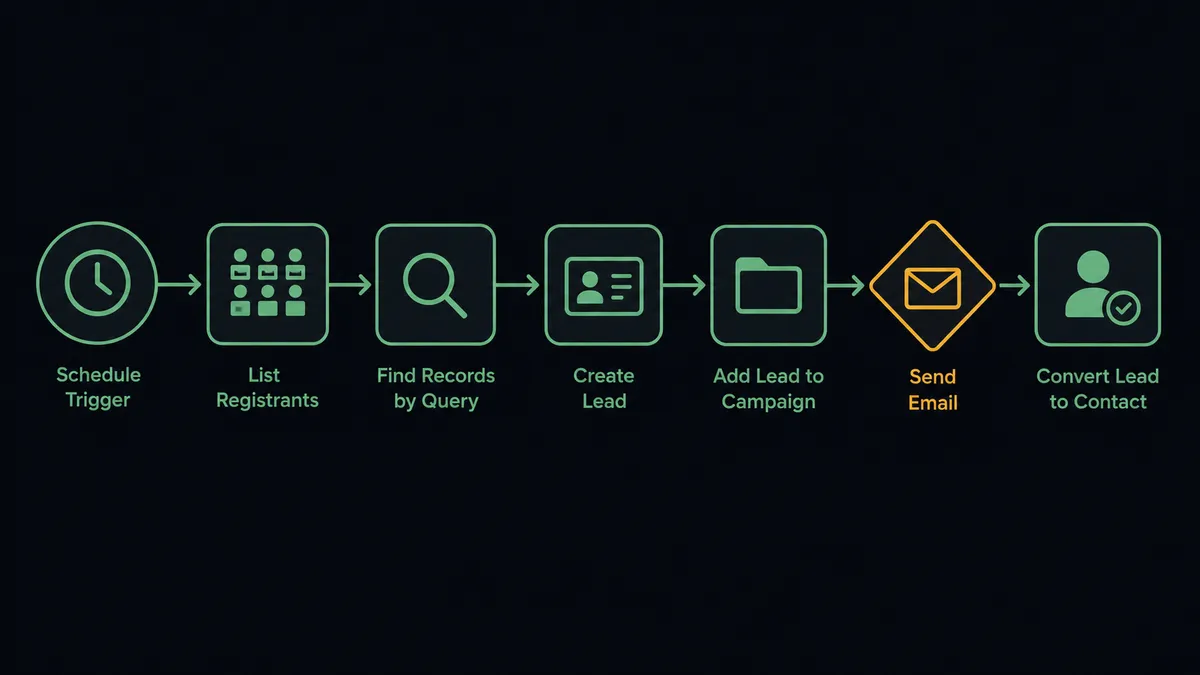
You connect Salesforce Pro to BigMarker with a scheduled workflow, because neither connector publishes webhook triggers for this pair: at the interval you choose, FlowRunner calls List Registrants on the BigMarker conference, checks each name against Salesforce with Find Records by Query, creates new ones with Create Lead, ties them to the webinar campaign with Add Lead to Campaign, and writes attendance back with Update Lead after the event. FlowRunner is a visual AI-agent orchestration platform where automations run autonomously and pause for human judgment on the steps that carry real consequence. When the connection runs as an AI agent, the agent also drafts follow-up per attendee and stops for a named human before Send Email reaches anyone’s inbox.
The problem it solves
The webinar ends and the real work begins, except it does not begin, because the registrant data is trapped in BigMarker. Someone exports the list, opens Salesforce’s import wizard, maps columns, resolves the rows that error out, and manually attaches the imported leads to the campaign. Attendance data comes in a second export with a slightly different format. By the time reps see who actually attended, the prospect has forgotten the webinar existed. The follow-up email that should have landed the next morning lands the next week, generic because nobody had time to personalize it.
The edges compound the delay. A registrant who is already a contact in Salesforce gets imported as a fresh lead, and now two reps own the same person. A registrant’s company field says “self” and someone has to decide whether that is a lead at all. And the follow-up itself carries risk: one templated email sent to an existing customer, addressed as if they were a cold prospect, costs more goodwill than the webinar generated.
How it works: the connection
The connection reads BigMarker on a schedule and writes to Salesforce. Here is the plain version, grounded in the real connector actions.
- Trigger: On a schedule, the workflow calls List Registrants for the target conference, before the event to catch signups and after it to capture attendance.
- Check for a match: Find Records by Query searches Salesforce by email for an existing lead or contact, so nobody gets duplicated.
- Create the lead: For new names, Create Lead builds the record from the registration fields.
- Attach the campaign: Add Lead to Campaign ties each registrant to the webinar’s campaign, and Add Contact to Campaign does the same for registrants who already exist as contacts.
- Record attendance: After the event, Update Lead writes attended or no-show status onto each record.
- Send the follow-up: Send Email delivers the post-webinar note, replay link for no-shows, next step for attendees.
- Promote the qualified: Convert Lead to Contact moves attendees who meet your bar into the account-based pipeline, with Create Note preserving the webinar context on the record.
That is the “just connect them” answer. Registration to campaign membership to attendance to follow-up, with no export wizard in the middle.
Can an AI agent run it? (and why a human stays in the loop)
Yes, and the agent’s value shows in the two places a mapping table falls short: matching and messaging. The agent holds the pair’s actions as tools: List Registrants, Find Records by Query, Create Lead, Add Lead to Campaign, Update Lead, Convert Lead to Contact, Send Email. When Find Records by Query returns an ambiguous match, the same person under two emails, or a lead and a contact with the same name at the same company, the agent reasons about it instead of duplicating by default, and asks when it cannot resolve the conflict itself.
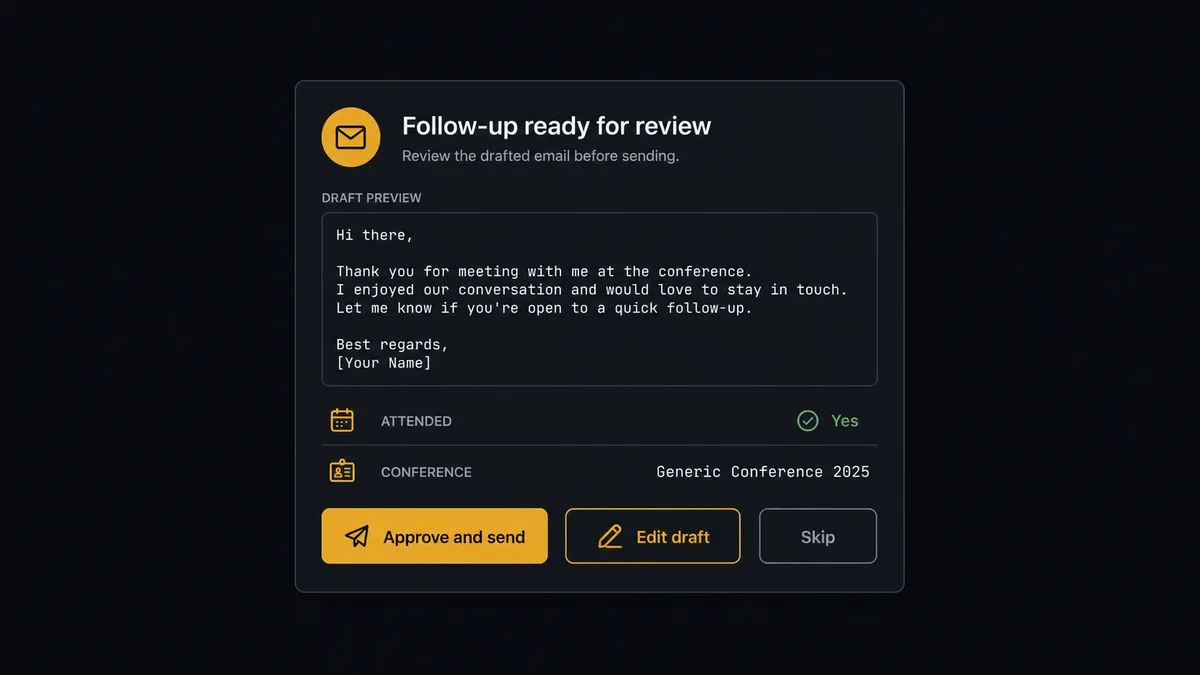
The consequential step is Send Email, because follow-up is your company speaking to a prospect in writing. The agent drafts each message from real context: what the person registered for, whether they attended, what they asked in registration questions. Then it invokes a human-in-loop flow it holds as a callable tool. The workflow pauses and posts: “Follow-up drafted for [attendee], attended [conference name]. Draft attached, context included. Approve, edit, or skip?” Only after a person signs off does Send Email fire. The same gate guards Convert Lead to Contact, because a premature conversion rewrites how the record moves through your pipeline. Approver and timestamp land in the audit trail either way.
This is the digital andon cord applied to pipeline. Like Toyota’s production line pull cord, the workflow stops the line the moment it reaches a step it should not take alone, and the human restores motion with a decision, not with an afternoon of imports.
FlowRunner vs Zapier
Zapier deserves its reputation here. It connects to both of these platforms, its editor is easy to learn, and its template gallery covers common webinar-to-CRM patterns you can stand up without help. For pushing a single registrant into Salesforce as a lead, it is a quick win.
The difference is everything after the push: the matching judgment, the drafted follow-up, and the approval before anything outbound fires. FlowRunner runs this as an AI agent with a native human gate on the send.
| What matters for this pair | FlowRunner | Zapier |
|---|---|---|
| Human-in-the-loop on Send Email | Native. The agent posts each drafted follow-up for approval before it reaches an attendee | Available by inserting approval-style steps, not a native agent decision |
| Who runs the flow | An AI agent matches records, drafts follow-up, picks actions as tools | Predefined step sequence you configure per Zap |
| Users included | Unlimited users on every tier | Priced by task volume; seats vary by plan |
| Bring your own AI keys | Yes, BYOK. Connect the AI provider key you already have | AI features tied to Zapier’s own AI offering |
| Self-hosted option | Yes, cloud-hosted or self-hosted | Cloud only |
| Pricing model | Transparent workflow-based tiers | Per-task pricing, and a webinar’s worth of registrants consumes tasks fast |
If your webinar program is one event a quarter and a simple lead push covers it, Zapier is a reasonable choice. If follow-up quality is the point, and you want matching judgment, per-attendee drafts, and a named approver on every send, this pairing is where FlowRunner is the better fit.
Before and after
| Category | Before | After |
|---|---|---|
| Registrant handling | Export from BigMarker, import wizard, column mapping, error rows | List Registrants flows straight into Create Lead and Add Lead to Campaign on a schedule |
| Duplicate control | Existing contacts get re-imported as fresh leads | Find Records by Query matches first, ambiguous cases go to a person |
| Attendance visibility | A second export, days later, in a different format | Update Lead writes attended or no-show status the same day |
| Follow-up quality | One generic template to the whole list, whenever someone gets to it | The agent drafts per attendee from real context, a person approves each send |
| Accountability | Nobody can say who approved what went out | Every Send Email and Convert Lead to Contact carries a named approver and timestamp |
What you can build
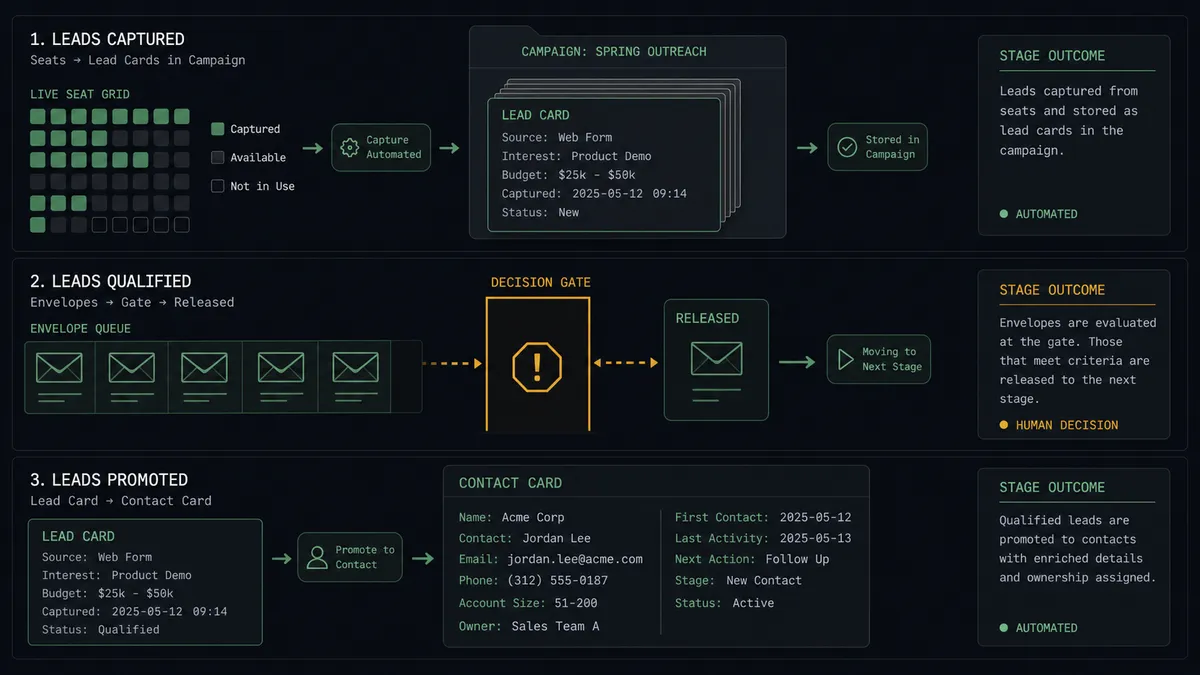
Registration to campaign, continuously. The scheduled run pulls new signups with List Registrants, dedupes with Find Records by Query, and builds campaign membership with Create Lead and Add Lead to Campaign while registration is still open, so the campaign is always current.
Attended and no-show tracks. After the event, the agent splits the list by attendance from List Registrants, drafts a replay note for no-shows and a next-step note for attendees, and routes every draft through the approval gate before Send Email fires.
Hot-attendee fast lane. Attendees whose registration answers signal buying intent get flagged first in the approval queue, and on sign-off the agent runs Convert Lead to Contact and Create Note so the rep opens a record with the webinar context already on it.
Registration-desk agent. Running the other direction, the agent takes qualified Salesforce leads and registers them into the next session with Register Person in BigMarker, through the same human gate, since registration emails the person.
Campaign hygiene sweep. On a weekly schedule, Find Records by Query surfaces campaign members with no attendance and no follow-up recorded, and the agent proposes cleanup actions, Update Lead status changes, for a person to approve in one batch.
Getting started
Start on the free plan: 100 executions a month, every integration included, no credit card required, plus 14 days of Professional for new accounts. Both connectors are available on every tier, and every tier includes unlimited users and unlimited workflows.
Explore the integration details:
- Salesforce Pro integration (26 actions across leads, contacts, campaigns, queries, and email)
- BigMarker integration (8 actions covering conferences, registrants, and channels)
Start building free at flowrunner.ai or book a demo to see a live BigMarker to Salesforce Pro workflow, follow-up approval and all.
Frequently asked questions
Is it free to connect Salesforce Pro and BigMarker on FlowRunner?
You can build and run the connection on FlowRunner's free plan, which includes 100 executions a month and every integration with no credit card required, and new accounts also get 14 days of Professional. Both connectors are available on every FlowRunner tier, and every tier includes unlimited users and unlimited workflows.
Can I self-host the BigMarker to Salesforce workflow?
Yes. FlowRunner offers a cloud-hosted option and a self-hosted option, so the connection can run inside your own environment.
Does the AI agent need my own OpenAI or Claude key?
FlowRunner uses a bring-your-own-keys model, so you connect the AI provider key you already have. You are not locked to one model.
What happens when the agent is unsure whether a registrant is a new lead or an existing contact?
It does not guess. Find Records by Query checks for matches by email first, and when the result is ambiguous, the agent posts both candidate records to your team's channel and waits for a person to pick the match or approve a new lead, so the CRM never grows a duplicate by default.
Neither BigMarker nor Salesforce Pro has a webhook trigger here, so how does the workflow start?
It runs on a schedule. FlowRunner calls List Registrants in BigMarker at the interval you choose, before the event for new signups and after it for attendance, so nothing depends on either vendor pushing events.
Which Salesforce actions does the follow-up use?
Create Lead for new registrants, Add Lead to Campaign to tie them to the webinar campaign, Update Lead for attendance status, Convert Lead to Contact for qualified attendees, and Send Email for the follow-up itself, which only fires after a named approver signs off.