How to Connect Slack with BigMarker (With or Without an AI Agent)
Run BigMarker webinar operations from Slack: registrations, reminders, and attendance digests flow automatically, and an AI agent pauses for the event owner before Update Conference reschedules a webinar that already has registrants.
How do you connect Slack to BigMarker?
You connect Slack to BigMarker by having Slack’s On Channel Message trigger drive BigMarker actions: a request in the events channel like “add [email protected] to Thursday’s session” gets matched to the right webinar with List Conferences, registered with Register Person, and answered in the thread with the person’s unique join URL. FlowRunner is a visual AI-agent orchestration platform where automations run autonomously and pause for human judgment on the steps that carry real consequence. The same connection can run as an AI agent that handles registrations, digests, and event setup on its own, and pauses for the event owner before Update Conference moves the start time of a webinar that already has registrants, because a scheduled event with an audience is a commitment, not a calendar entry.
The problem it solves
Webinar operations are a steady drip of small requests that all land in Slack and all require the BigMarker dashboard. Sales asks to get a prospect into tomorrow’s demo session. Marketing wants to know how registration is pacing for next week’s launch event. Someone needs the join link resent. Each request is trivial, and each one costs the events person a context switch into the dashboard, a lookup, and a paste back into the thread. On launch weeks, the events person becomes a human API between the company and its webinar platform.
The sharp edge is the schedule itself. Rescheduling a webinar looks like editing any other field, but the moment an event has registrants, a time change breaks a promise made to every one of them: calendar holds go stale, and people show up to a session that is not running. The worst version is casual: someone with dashboard access nudges the time to fit a speaker, nobody tells the hundred people already registered, and attendance craters with no record of who moved it or why. The change itself takes five seconds; the consequences belong to an audience that was not consulted.
How it works: the connection
The connection listens to Slack and operates BigMarker. Here is the plain version, grounded in the real connector actions.
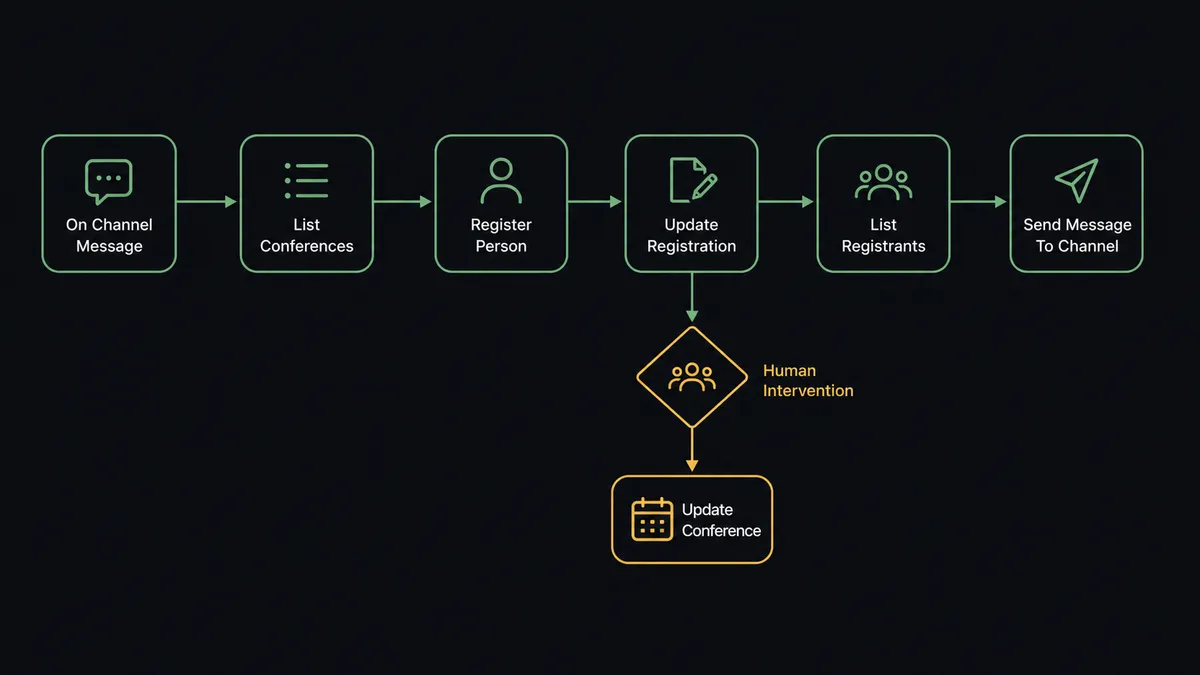
- Trigger: Slack fires On Channel Message when a request lands in the events channel.
- Find the event: The workflow calls List Conferences, filtering by title or lifecycle (future, happening now), to resolve which webinar the request means.
- Register: It calls Register Person with the conference ID, email, first name, and last name, and posts the returned join URL into the thread.
- Keep data current: For changed details it calls Update Registration, which matches by conference ID and email and creates the registration if none exists.
- Report the numbers: On a schedule it calls List Registrants per upcoming event and posts a pacing digest with Send Message To Channel.
- Stand up new events: A structured request drives Create Conference in the right hub from List Channels, with title, start time, duration, and privacy.
- Answer detail questions: On Mention pulls the full picture with Get Conference: purpose, schedule, recording settings, and the registration URL.
That is the “just connect them” answer. The events channel answers its own questions, registrations happen where they are asked for, and the dashboard stops being a bottleneck with one person’s name on it.
Can an AI agent run it? (and why a human stays in the loop)
Yes, and the agent is what absorbs the messiness of real requests. It holds the BigMarker actions as tools: List Conferences, Get Conference, Create Conference, Update Conference, List Registrants, Register Person, Update Registration, List Channels. “Get the Fairview folks into the Thursday demo” is not a field mapping; the agent resolves which conference “Thursday demo” is, extracts three names and emails from the thread, calls Register Person for each, and returns three join URLs. Asked how the launch webinar is pacing, it compares List Registrants counts across days and answers with a trend, not a raw dump.
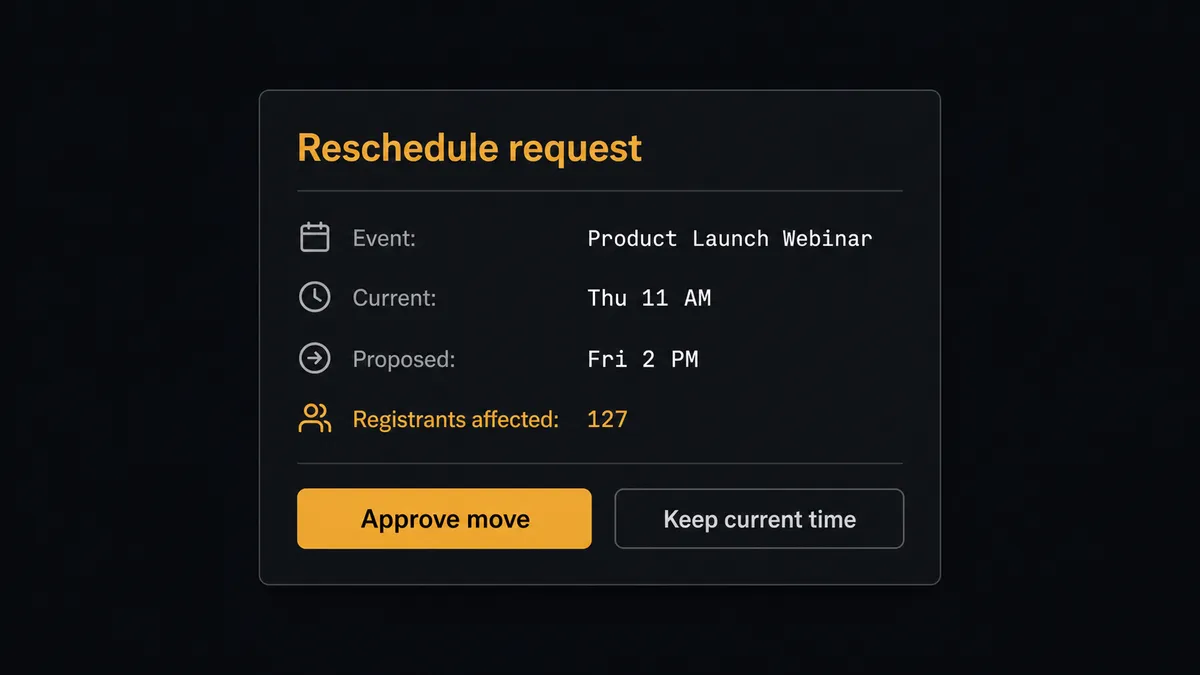
The consequential step is the reschedule. Before any Update Conference that touches a start time, the agent runs an impact check: List Registrants on that conference. Zero registrants, and the change applies immediately; the event is still private to the team. One or more registrants, and the agent stops and invokes the approval flow it holds as a callable tool: “Move [event] from [current time] to [proposed time]? [n] people are registered and will need to be notified. Approve the change, or keep the current time?” The event owner decides with the audience size in front of them, the approver and count land in the audit trail, and the agent follows through, updating the event and posting the notification plan back to the channel. Create Conference for a public event gets a lighter version of the same gate, since a published registration URL starts collecting commitments the moment it exists.
This is the digital andon cord for event operations: the line runs freely through lookups, registrations, and digests, and stops exactly where an audience is affected. Speed on the routine, judgment on the promise.
FlowRunner vs Zapier
Zapier’s case for this pair is straightforward and fair: both connectors live in its library, its templates cover the classic “form submission registers a webinar attendee” path, and marketing teams have run that pattern for years without engineering help. As a way to pipe signups from a form into BigMarker, it is proven.
The difference is that this workflow is conversational and consequence-aware, not form-shaped. Requests arrive as sentences in a channel, the right action depends on reading them, and the riskiest write, a reschedule, needs an impact check and an owner’s decision in the middle of the flow. That pause-and-resume around a human is FlowRunner’s native mechanic.
| What matters for this pair | FlowRunner | Zapier |
|---|---|---|
| Human-in-the-loop on rescheduling events with registrants | Native. The agent checks List Registrants and waits for the owner when people are affected | Available via added approval steps, not an impact-based agent decision |
| Who runs the flow | An AI agent reads requests, reasons, picks conference actions as tools | Predefined step sequence you configure per Zap |
| Users included | Unlimited users on every tier | Priced by task volume; seats vary by plan |
| Bring your own AI keys | Yes, BYOK | AI features tied to Zapier’s own AI offering |
| Self-hosted option | Yes, cloud-hosted or self-hosted | Cloud only |
| Pricing model | Transparent workflow-based tiers | Per-task pricing; launch weeks spike task usage |
If your only need is piping form signups into BigMarker, Zapier will do it. If the events channel should operate the webinar program end to end, with audience-affecting changes held for their owner, this pairing is the better fit.
Before and after
| Category | Before | After |
|---|---|---|
| Registration requests | Queued for the events person to key into the dashboard | Register Person runs from the thread and returns the join URL in seconds |
| Pacing visibility | Someone exports registrant lists when asked | A daily List Registrants digest posts pacing to the channel automatically |
| Event setup | Dashboard session per event, copied settings, occasional typos | Create Conference from a structured request, into the right channel hub |
| Reschedules | A five-second edit that silently strands registrants | Impact-checked, owner-approved, and announced with a notification plan |
| Accountability | No record of who moved what or how many people it touched | Every change logs the approver and the registrant count at decision time |
What you can build
Thread-to-registration desk. On Channel Message parses “add these three to Thursday’s demo,” resolves the event with List Conferences, runs Register Person per attendee, and returns each unique join URL to the thread.
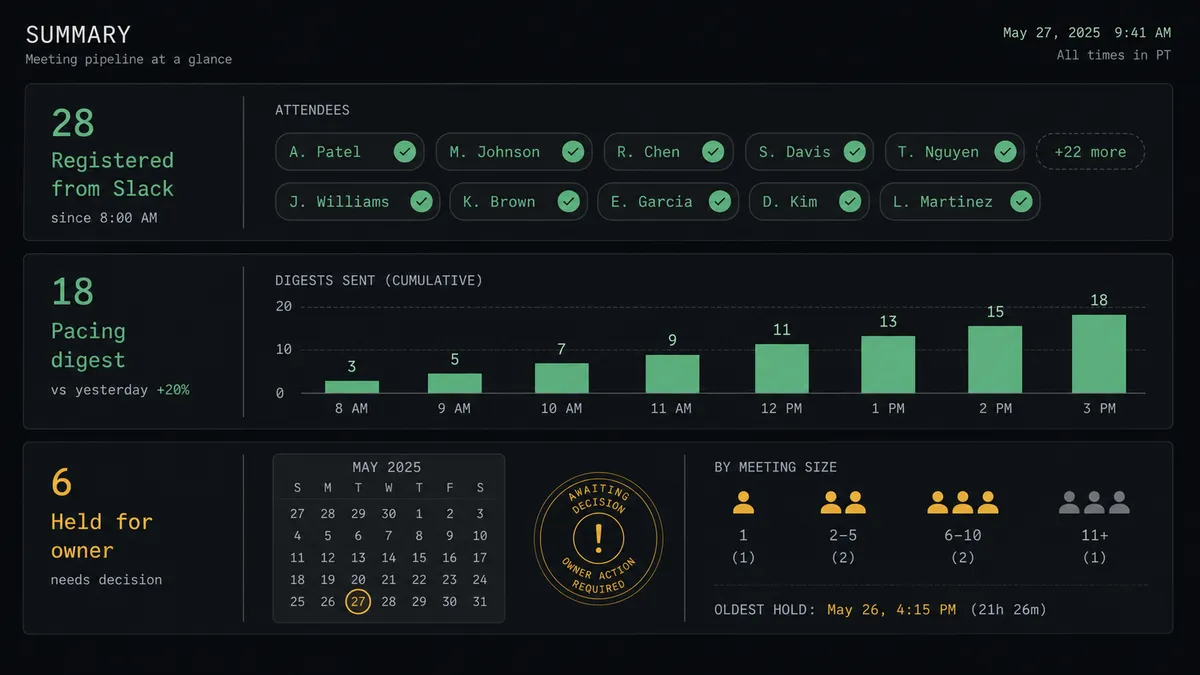
Pacing digest. Each morning the agent calls List Registrants across upcoming events and posts registration pacing to the events channel, flagging any session tracking behind its target date.
Owner-gated reschedules. Any start-time change runs the impact check first. Events with registrants wait for the owner’s approval with the affected count shown; empty events move instantly.
Launch-event standup. A structured request in Slack drives Create Conference in the right hub from List Channels, with title, time, duration, and privacy set, and the registration URL posted back for the marketing team.
Registration data sync. When a prospect’s details change, Update Registration refreshes their custom fields by conference and email, creating the registration if it never existed, so the attendee list matches the CRM before the event starts.
Getting started
Start on the free plan: 100 executions a month, every integration included, no credit card required, plus 14 days of Professional for new accounts. Both connectors are available on every tier, and every tier includes unlimited users and unlimited workflows.
Explore the integration details:
- Slack integration (8 triggers and 16 actions covering messages, reactions, files, and channel management)
- BigMarker integration (8 actions covering conferences, registrants, and channels)
Start building free at flowrunner.ai or book a demo to see a live Slack to BigMarker workflow, reschedule gate and all.
Frequently asked questions
Is it free to connect Slack and BigMarker on FlowRunner?
You can build and run the connection on FlowRunner's free plan, which includes 100 executions a month and every integration with no credit card required, and new accounts also get 14 days of Professional. Both connectors are available on every FlowRunner tier, and every tier includes unlimited users and unlimited workflows.
Can I self-host the Slack to BigMarker workflow?
Yes. FlowRunner offers a cloud-hosted option and a self-hosted option, so the connection can run inside your own environment.
Does the AI agent need my own OpenAI or Claude key?
FlowRunner uses a bring-your-own-keys model, so you connect the AI provider key you already have. You are not locked to one model.
What stops the agent from rescheduling a webinar people already signed up for?
The gate is built on registrant impact. Before any Update Conference that changes a start time, the agent calls List Registrants, counts who is affected, and posts the event, the proposed new time, and the registrant count to Slack. The event owner approves or declines, and the decision is recorded with the count at that moment.
Which Slack triggers and BigMarker actions does this pair use?
On Channel Message and On Mention start the flows, since BigMarker has no trigger in the catalog; scheduled flows handle digests. The agent works with List Conferences, Get Conference, Create Conference, Update Conference, List Registrants, Register Person, Update Registration, and List Channels.
Can the workflow register someone who asks in Slack?
Yes. The agent parses the name and email, calls Register Person with the conference ID, and posts the person's unique join URL back into the thread. If the person was already registered, Update Registration refreshes their details instead of duplicating them.