How to Connect HubSpot with BigMarker (With or Without an AI Agent)
Connect HubSpot contacts to BigMarker webinars, optionally as an AI agent that builds the registrant list and pauses for a human before Register Person sends confirmation emails to a whole segment.
How do you connect HubSpot to BigMarker?
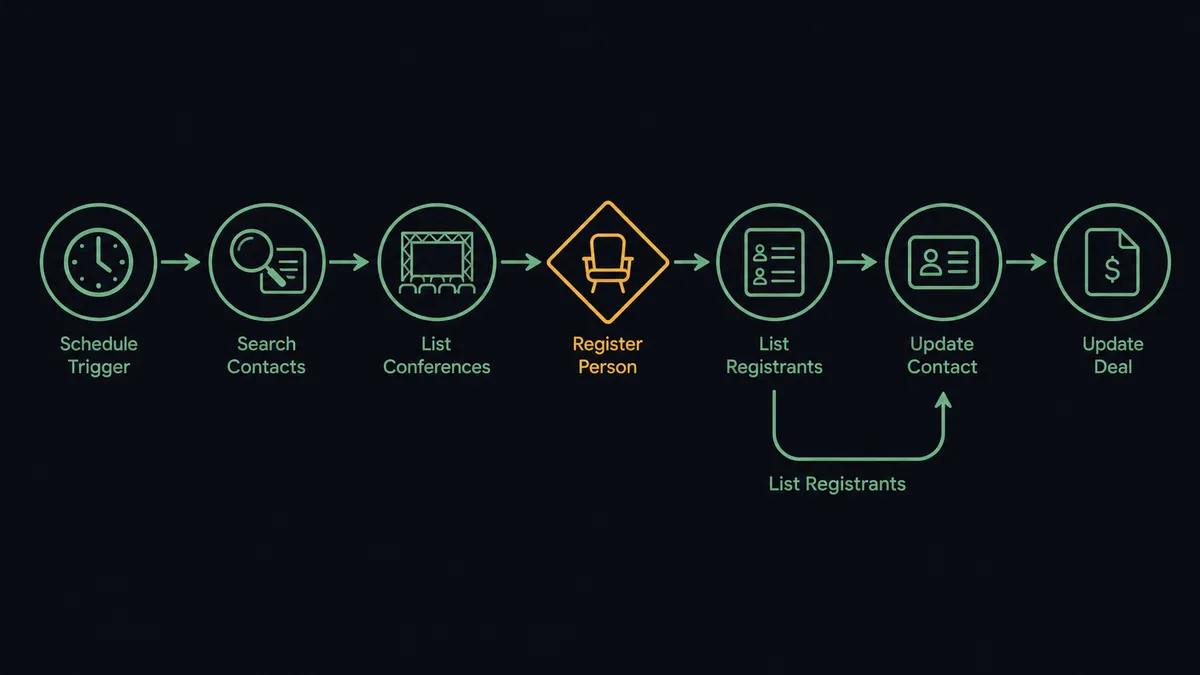
You connect HubSpot to BigMarker with a scheduled workflow, because neither connector publishes webhook triggers for this pair: at the interval you choose, FlowRunner calls Search Contacts in HubSpot to find contacts matching your webinar’s audience criteria, locates the event with List Conferences in BigMarker, and registers each match with Register Person, then pulls attendance back after the event with List Registrants and writes it to the CRM with Update Contact. FlowRunner is a visual AI-agent orchestration platform where automations run autonomously and pause for human judgment on the steps that carry real consequence. When the connection runs as an AI agent, the agent also decides who genuinely belongs in the audience, and it stops for a named human before Register Person sends a confirmation email to anyone.
The problem it solves
Webinar operations is spreadsheet glue. Marketing decides the audience in HubSpot: a list, a lifecycle stage, an industry filter. Then someone exports the contacts to CSV, reshapes the columns to match BigMarker’s import format, uploads, and prays the email column mapped correctly. After the event, the same ritual runs in reverse: export registrants and attendance from BigMarker, import to HubSpot, dedupe the contacts that did not match, and only then can sales start follow-up. By the time the attended-but-no-deal list reaches a rep, the webinar is a week old and cold.
The edges are what make it painful. The export includes a contact who unsubscribed last month, and now they have a confirmation email from you in their inbox. The same contact appears in two lists and gets registered twice. Someone uploads the June audience to the July event. Every one of those mistakes is public, because registration is not an internal database write. It emails a real person with your company’s name on it.
How it works: the connection
The connection reads HubSpot on a schedule, writes registrations to BigMarker, and closes the loop after the event. Here is the plain version, grounded in the real connector actions.
- Trigger: On a schedule, the workflow calls Search Contacts in HubSpot with the webinar’s audience criteria: list membership, lifecycle stage, or property filters.
- Read: Get Contact By ID pulls each match’s name, email, and the properties your registration form needs.
- Find the event: List Conferences locates the target webinar in BigMarker, or Create Conference sets it up from the workflow itself.
- Register: Register Person adds each contact to the conference, which sends BigMarker’s confirmation email with the join link.
- Record it in the CRM: Update Contact stamps the HubSpot record with the registration, so a contact is never registered twice.
- After the event: List Registrants pulls the attendance data back from BigMarker.
- Route the follow-up: Update Contact writes attended or no-show status to each record, and Create Deal opens an opportunity for attendees who match your qualification criteria.
That is the “just connect them” answer. No exports, no column mapping, and the follow-up list exists in HubSpot the same day the webinar ends.
Can an AI agent run it? (and why a human stays in the loop)
Yes, and the agent earns its place at the audience-selection step, the part a filter cannot really do. The agent holds the pair’s actions as tools: Search Contacts, Get Contact By ID, Register Person, Update Registration, List Registrants, Update Contact, Create Deal. It reads each candidate the way a marketer would. A contact who matches the list criteria but attended the same topic last quarter is a judgment call. A contact whose lifecycle stage says customer when the webinar targets prospects is another. The agent sorts the clear fits from the borderline cases instead of treating the filter output as gospel.
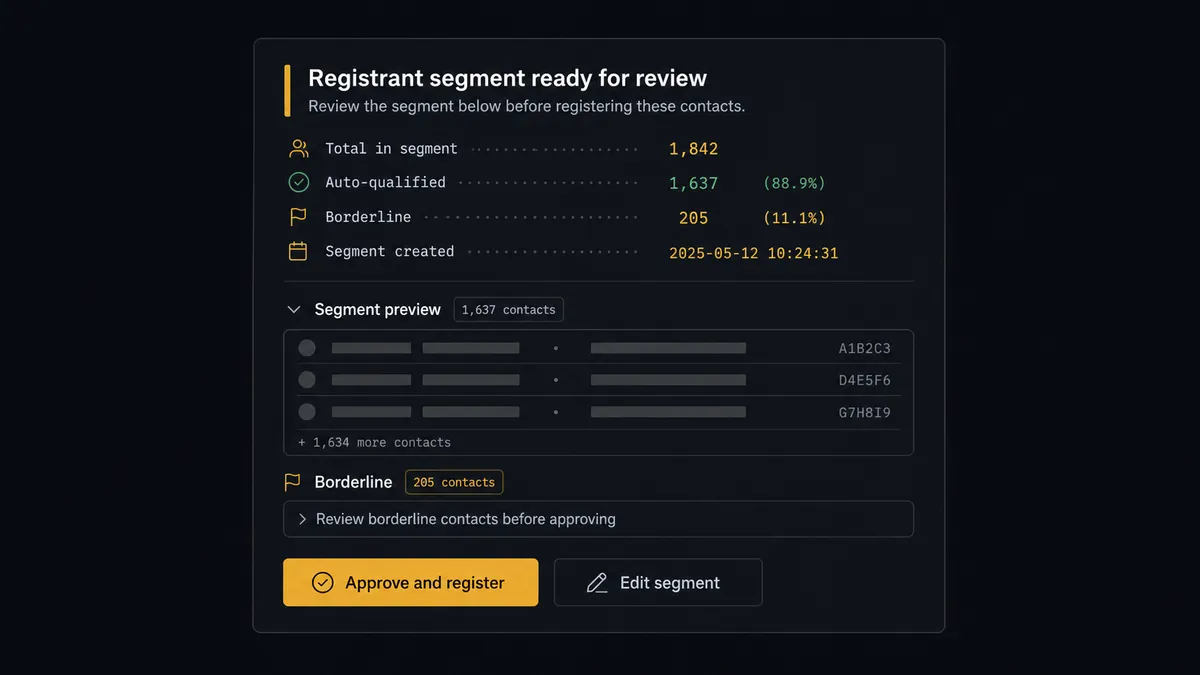
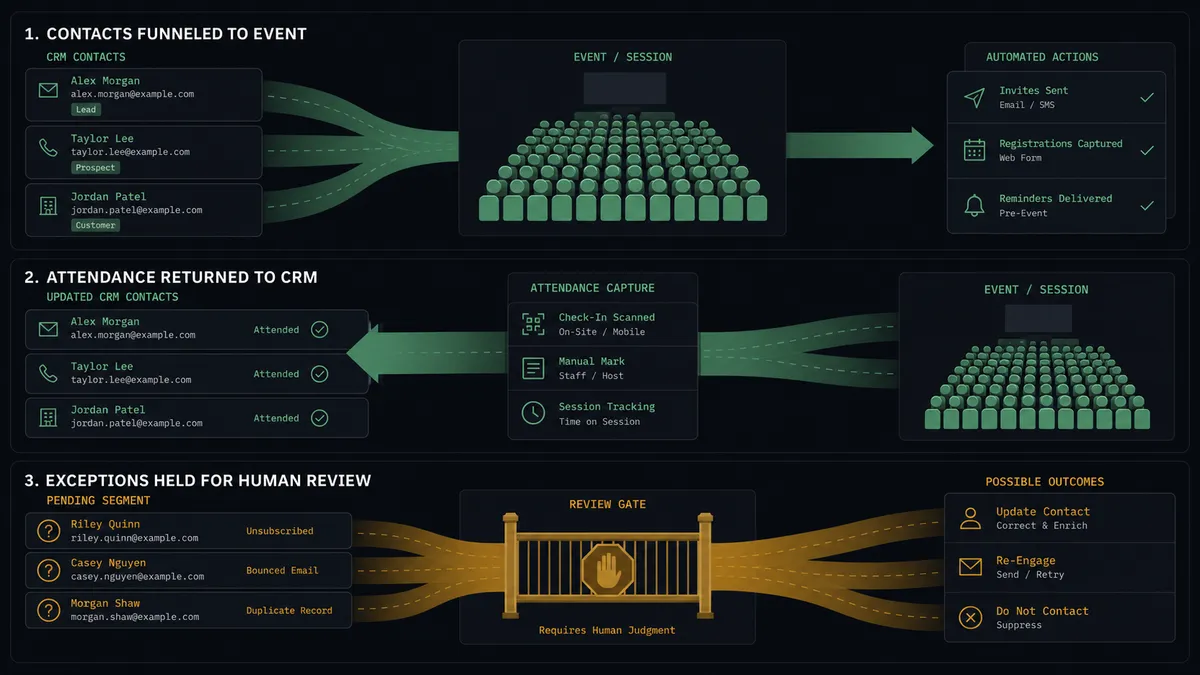
The consequential step is Register Person, because registration is outbound. Every contact in the batch gets BigMarker’s confirmation email the moment the action fires, and there is no unsend. So the agent never registers a segment on its own authority. It assembles the batch, then invokes a human-in-loop flow it holds as a callable tool. The workflow pauses and posts: “Webinar [name]: proposed registrant segment attached, with reasoning per contact. Borderline contacts listed separately. Approve, edit, or hold?” A person reviews the list, prunes or adds, and approves. Only then does Register Person run, and the approver’s name and timestamp land in the audit trail next to the segment that was actually sent.
This is the digital andon cord in marketing ops form. Like Toyota’s production line pull cord, the workflow stops the line at the moment of uncertainty, which here is the moment before your company emails a few hundred inboxes. One person, one review, one click, and the line moves again.
FlowRunner vs Zapier
Zapier is the first tool most marketing teams try for this, with good reason. Its connector catalog is huge, the editor is approachable for a non-developer, and the template gallery covers webinar registration patterns for the major platforms. For a simple “form fill registers a contact” push, it stands up quickly.
The difference is who assembles the audience and what happens before the emails go out. FlowRunner runs this connection as an AI agent with a native human gate in front of the outbound step.
| What matters for this pair | FlowRunner | Zapier |
|---|---|---|
| Human-in-the-loop on Register Person | Native. The agent posts the full segment for approval before anyone gets a confirmation email | Available by inserting approval-style steps, not a native agent decision |
| Who runs the flow | An AI agent scores audience fit, reasons, picks actions as tools | Predefined step sequence you configure per Zap |
| Users included | Unlimited users on every tier | Priced by task volume; seats vary by plan |
| Bring your own AI keys | Yes, BYOK. Connect the AI provider key you already have | AI features tied to Zapier’s own AI offering |
| Self-hosted option | Yes, cloud-hosted or self-hosted | Cloud only |
| Pricing model | Transparent workflow-based tiers | Per-task pricing, and batch registrations consume tasks fast |
If you register one contact at a time off a form fill, Zapier does that well. If you build audiences from CRM criteria, want a person approving the segment before the emails fire, and want attendance flowing back into HubSpot the same day, this pairing is where FlowRunner is the better fit.
Before and after
| Category | Before | After |
|---|---|---|
| Audience building | Export a HubSpot list to CSV, reshape columns, upload to BigMarker | Search Contacts assembles the segment automatically on a schedule |
| Registration accuracy | Unsubscribed or duplicate contacts slip into uploads and get emailed | The agent screens each contact and a named approver reviews the segment before Register Person fires |
| Post-event follow-up | Attendance exported, imported, deduped, then handed to sales days later | List Registrants syncs attendance to HubSpot via Update Contact the same day |
| Lead routing | Someone manually decides which attendees deserve a deal | Create Deal opens opportunities for attendees matching qualification criteria |
| Accountability | Nobody can say who approved a registration batch | Every batch carries a named approver and timestamp in the audit trail |
What you can build
Criteria-driven webinar audience. The scheduled run calls Search Contacts against your list or property filters, the agent screens fit, a person approves the segment, and Register Person fills the webinar without a single CSV.
Same-day attendance sync. After the event, List Registrants pulls who showed up, Update Contact writes attended or no-show status onto each HubSpot record, and sales works the list while the webinar is still fresh.
Attendee-to-pipeline handoff. The agent reads attendance plus CRM context, calls Create Deal for attendees who match your qualification bar, and uses Associate Objects to tie the deal to the right company, so follow-up starts as pipeline, not as a spreadsheet.
No-show recovery track. Registrants who missed the event get flagged via Update Contact for a replay or a second invitation to the next session, registered again through the same approval gate rather than automatically.
Recurring series operations. For a monthly series, Create Conference sets up the next session from the workflow, and Update Registration corrects details when a registrant’s information changes in HubSpot, keeping both systems aligned across the whole series.
Getting started
Start on the free plan: 100 executions a month, every integration included, no credit card required, plus 14 days of Professional for new accounts. Both connectors are available on every tier, and every tier includes unlimited users and unlimited workflows.
Explore the integration details:
- HubSpot integration (21 actions across contacts, companies, deals, and associations)
- BigMarker integration (8 actions covering conferences, registrants, and channels)
Start building free at flowrunner.ai or book a demo to see a live HubSpot to BigMarker workflow, segment approval and all.
Frequently asked questions
Is it free to connect HubSpot and BigMarker on FlowRunner?
You can build and run the connection on FlowRunner's free plan, which includes 100 executions a month and every integration with no credit card required, and new accounts also get 14 days of Professional. Both connectors are available on every FlowRunner tier, and every tier includes unlimited users and unlimited workflows.
Can I self-host the HubSpot to BigMarker workflow?
Yes. FlowRunner offers a cloud-hosted option and a self-hosted option, so the connection can run inside your own environment.
Does the AI agent need my own OpenAI or Claude key?
FlowRunner uses a bring-your-own-keys model, so you connect the AI provider key you already have. You are not locked to one model.
What happens when the agent is unsure whether a contact belongs in the webinar audience?
It leaves the contact out of the batch and lists them separately in the approval message with its reasoning. The approver adds or excludes them with one click before Register Person runs, so a borderline contact never gets an unwanted confirmation email by default.
Neither HubSpot nor BigMarker has a webhook trigger here, so how does the workflow start?
It runs on a schedule. FlowRunner calls Search Contacts in HubSpot at the interval you choose to find contacts matching your webinar criteria, and calls List Registrants in BigMarker after the event to pull attendance back. Nothing depends on either vendor pushing events.
How does registration data get back into HubSpot?
After the webinar, the workflow calls List Registrants in BigMarker, then Update Contact on each matching HubSpot record and Create Deal for attendees who fit your qualification criteria, so follow-up starts from the CRM, not from an exported spreadsheet.