How to Connect Mailchimp Marketing with Bettermode (With or Without an AI Agent)
Sync Bettermode community members into your Mailchimp Marketing audience and recap campaigns back to the community, with an AI agent that pauses for a human before Send Campaign reaches the whole list.
How do you connect Mailchimp Marketing to Bettermode?
You connect Mailchimp Marketing to Bettermode with a scheduled workflow: List Members reads new and active members out of your Bettermode community, Search Member checks whether each one already exists in your Mailchimp Marketing audience, and Add Or Update List Member plus Add Member Tag bring them in with a tag that marks where they came from. FlowRunner is a visual AI-agent orchestration platform where automations run autonomously and pause for human judgment on the steps that carry real consequence. Run the same connection as an AI agent and it does more than sync rows: it reads campaign results with Get Campaign Report, drafts the community recap with Create Post, prepares the next segment send, and pauses for a named human before Send Campaign puts anything in front of the full audience.
The problem it solves
Today the bridge between your community and your email program is a person with two browser tabs. Someone exports active members from Bettermode, eyeballs the list against the Mailchimp Marketing audience, pastes in the new names, and hopes the tags are right. When a campaign goes out, the same person writes a forum post summarizing it for members who never open email, then answers the replies. Community and audience drift apart within a week, and every segment built on the “community” tag is built on stale data.
The edges are where it hurts. A member joins the community, buys through an email link, and gets counted in neither place. A campaign recap gets posted to the wrong space and the announcements channel goes quiet for a month. Someone leaves the community and keeps receiving “for members” emails, then flags one as spam. A well-meaning teammate sends a campaign to the whole audience instead of the community segment, and the unsubscribe report tells the story for weeks. None of this is a tooling gap. It is a coordination gap, and coordination is exactly what a person doing it by hand at 4 PM on a Friday gets wrong.
How it works: the connection
The connection reads from Bettermode and writes to Mailchimp Marketing, then closes the loop in the other direction. Here is the plain version, grounded in the real connector actions.
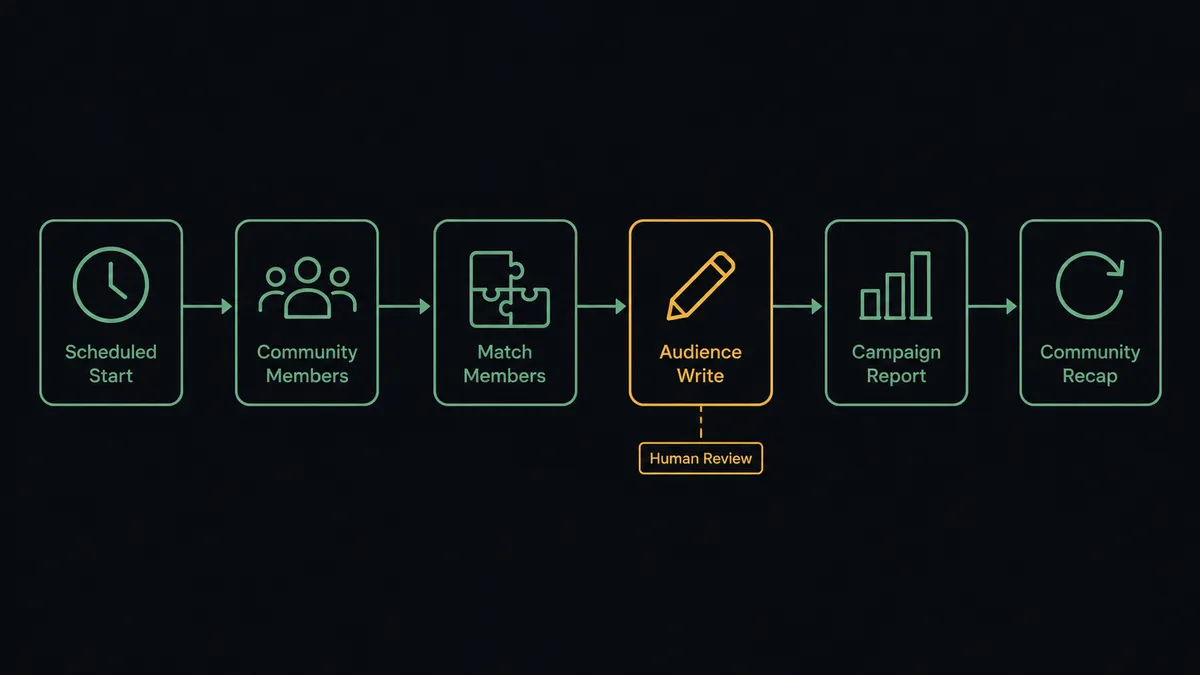
- Trigger: On a schedule, typically each morning, the workflow starts a sync run.
- Read: It calls List Members in Bettermode to pull new and recently active members, and Get Member for the full profile of each.
- Match: It calls Search Member in Mailchimp Marketing to check whether each community member already exists in the audience.
- Write: For new people it calls Add Or Update List Member, then Add Member Tag to mark them community-sourced so segments stay honest.
- Report: It calls Get Campaign Report and Get Clicks Report on the most recent send to pull opens, clicks, and unsubscribes.
- Recap: It calls List Spaces to resolve the announcements space, then Create Post to publish a member-facing summary of what went out and why it matters.
That is the “just connect them” answer. The community feeds the audience, the audience’s results feed the community, and nobody exports a CSV on Friday afternoon.
Can an AI agent run it? (and why a human stays in the loop)
Yes, and this is where the connection stops being a sync and starts being a program you can hand off. An AI agent holds the connector actions as tools: List Members, Search Member, Add Or Update List Member, Add Member Tag, Get Campaign Report, Create Post, Send Campaign. Instead of running the same steps in the same order, it reads what is in front of it. A member who joined three spaces this week gets tagged differently than one who lurked once. A campaign whose click report shows one link doing all the work gets a recap that leads with that link.
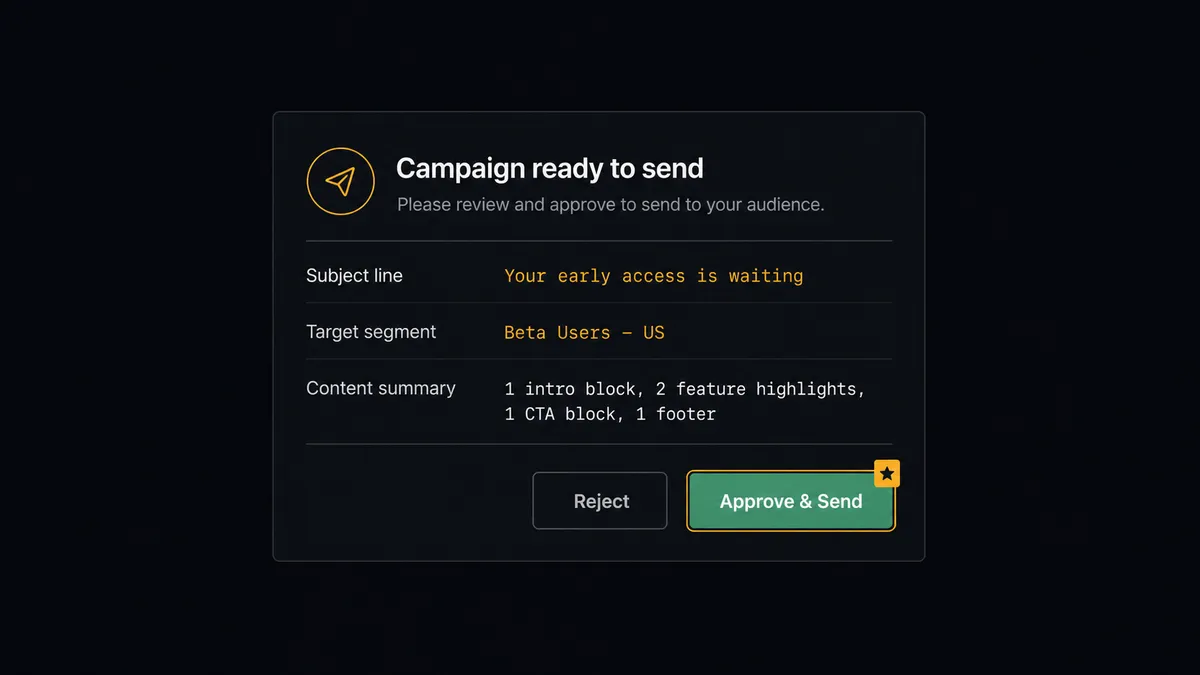
The consequential step is Send Campaign. An email to your full audience is not reversible; you cannot unsend it, and the unsubscribes it causes do not come back. So the agent never fires it alone. When the next community campaign is drafted, the agent packages the subject line, the target segment, the audience count from Get Lists Info, and a content summary, then invokes a human-in-loop flow it holds as a callable tool. The workflow pauses and posts to your marketing channel: “Campaign drafted for the community segment. Subject: [subject]. Segment: community-tagged members. Summary: [summary]. Approve to send?” The marketing lead clicks once. Only then does the agent call Send Campaign, and the approval lands in the audit trail with a name and a timestamp. The same gate sits in front of Unsubscribe Or Delete List Member, because deleting a member’s history is just as permanent as sending the wrong email.
Prospects call this pattern a digital andon cord, and the metaphor is exact: like Toyota’s production line pull cord, the workflow stops the line the moment it hits uncertainty, and a person, not a retry loop, pulls it back into motion.
FlowRunner vs n8n
Technical teams connecting Mailchimp Marketing to Bettermode often reach for n8n, and for real reasons. n8n has a very large node library, a strong self-hosting story under its fair-code license, and full code-level flexibility: if your team writes JavaScript, an n8n workflow can be bent into nearly any shape, including a Bettermode GraphQL call. Credit where it is due.
The difference is who runs the flow and what happens at the consequential step. FlowRunner is built around AI agents that pick actions as tools and around native human-in-the-loop, so the pause before Send Campaign is a first-class platform feature rather than something you engineer with webhooks and wait nodes.
| What matters for this pair | FlowRunner | n8n |
|---|---|---|
| Human-in-the-loop before Send Campaign | Native. The agent invokes an approval flow as a callable tool and pauses until a named person decides | Buildable with wait nodes and custom webhooks; you design and maintain the approval logic yourself |
| Who runs the flow | An AI agent reads members and reports, reasons, picks actions as tools | A node graph you wire and debug, with LangChain agent nodes available as add-ons |
| Users included | Unlimited users on every tier | Seat and plan limits vary; collaboration features tied to higher plans |
| Bring your own AI keys | Yes, BYOK | Yes, n8n supports your own model keys too |
| Self-hosted option | Yes, cloud-hosted or self-hosted | Yes, self-hosting is a core n8n strength |
| Pricing model | Transparent workflow-based tiers with clear execution limits | Execution-based pricing that teams often find hard to predict |
If your team is developers who want a code-first canvas and are happy owning the approval plumbing, n8n is a fine choice. If you want an ops or marketing team to run a community-to-email program where an agent does the routine work and a person signs off before anything reaches the whole audience, this pairing is the better fit.
Before and after
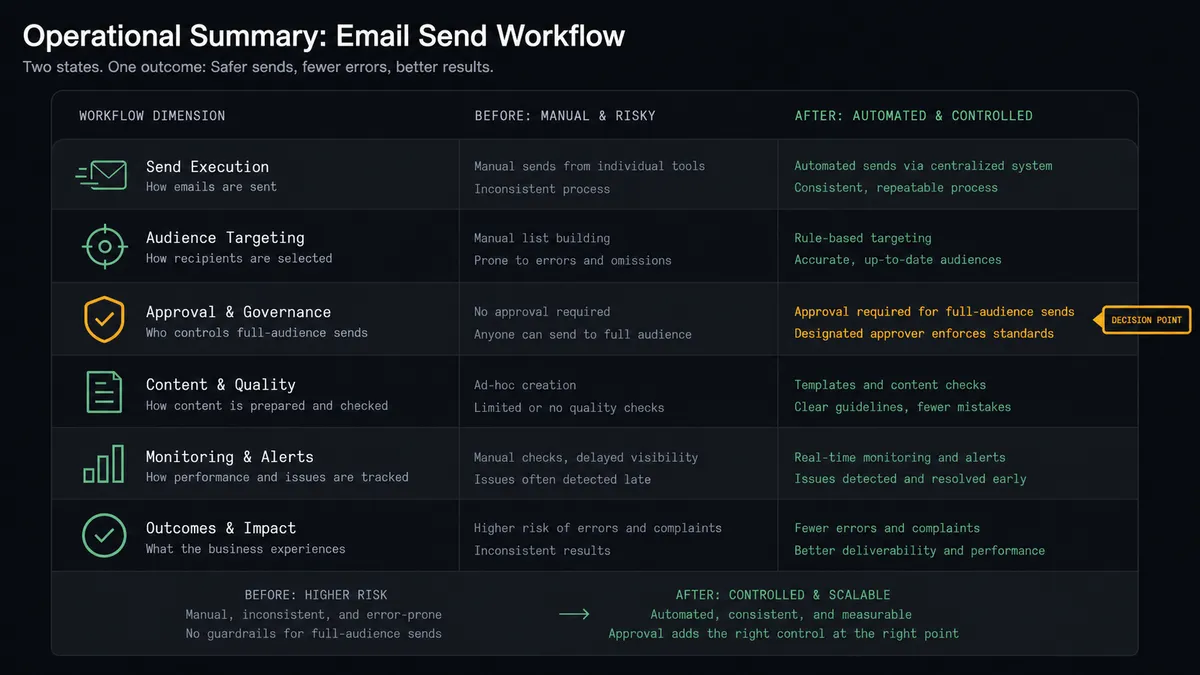
| Category | Before | After |
|---|---|---|
| Member sync | Someone exports Bettermode members and pastes them into the audience when they remember | List Members and Add Or Update List Member keep the audience current every morning |
| Segment quality | The “community” tag is whatever the last manual import left behind | Add Member Tag marks every community-sourced member the day they join |
| Campaign recaps | The community hears about campaigns only when a manager writes a post by hand | Get Campaign Report feeds a drafted recap and Create Post publishes it after review |
| Full-audience sends | Anyone with a login can send to everyone, and mistakes surface in the unsubscribe report | Send Campaign fires only after a named approver signs off, with the decision in the audit trail |
| Member removals | Departed members keep getting member emails until someone notices a spam complaint | The agent flags departures and Unsubscribe Or Delete List Member runs only with approval |
What you can build
Community-to-audience sync, hands off. On the morning schedule, the agent calls List Members, matches each person with Search Member, writes newcomers with Add Or Update List Member, and tags them with Add Member Tag. The audience stays current without a single export.
Campaign recap for members. After a send, the agent pulls Get Campaign Report and Get Clicks Report, drafts a summary that leads with the content members clicked, resolves the right space with List Spaces, and publishes with Create Post once the community manager approves.
Segment send with a named approver. The agent assembles the community segment, drafts the campaign, and invokes the approval tool. Send Campaign fires only after sign-off, and the audit trail shows who approved it and when.
Engagement loop-back. The agent reads active discussion threads with List Posts and Get Post, spots members driving conversation, and applies Add Member Note and Add Member Tag in Mailchimp Marketing so your most engaged members land in their own segment.
Clean-exit handling. When a member leaves the community, the agent packages their history and asks a human before calling Unsubscribe Or Delete List Member, so removals are deliberate, documented, and never a surprise.
Getting started
Start on the free plan: 100 executions a month, every integration included, no credit card required, plus 14 days of Professional for new accounts. Both connectors are available on every tier, and every tier includes unlimited users and unlimited workflows, so the community manager and the email marketer work in the same workspace from day one.
Explore the integration details:
- Mailchimp Marketing integration (20 actions covering audiences, campaigns, tags, and reports)
- Bettermode integration (14 actions covering members, spaces, posts, and reactions)
Start building free at flowrunner.ai or book a demo to see a live Mailchimp Marketing to Bettermode workflow, campaign approval and all.
Frequently asked questions
Is it free to connect Mailchimp Marketing and Bettermode on FlowRunner?
You can build and run the connection on FlowRunner's free plan, which includes 100 executions a month and every integration with no credit card required, and new accounts also get 14 days of Professional. Both connectors are available on every FlowRunner tier, and every tier includes unlimited users and unlimited workflows.
Can I self-host the Mailchimp Marketing to Bettermode workflow?
Yes. FlowRunner offers a cloud-hosted option and a self-hosted option, so the connection can run inside your own environment.
Does the AI agent need my own OpenAI or Claude key?
FlowRunner uses a bring-your-own-keys model, so you connect the AI provider key you already have. You are not locked to one model.
What happens when the agent is unsure whether a campaign should go out?
The agent stops and invokes a human-in-loop step. It posts the subject line, the target segment, and the campaign content summary to the channel your team already uses, then waits for an approve or reject decision before it calls Send Campaign.
Which actions does this connection use, since neither service has a trigger?
The workflow runs on a schedule. It reads the community with List Members and Get Member in Bettermode, syncs the audience with Search Member, Add Or Update List Member, and Add Member Tag in Mailchimp Marketing, and closes the loop with Get Campaign Report and Create Post.
Does a member who leaves the community get removed from the email list automatically?
Only with sign-off. Removal is destructive, so the agent packages the member's email history and engagement before it calls Unsubscribe Or Delete List Member, and a named approver confirms the removal first.