How to Connect Salesforce Pro with beehiiv (With or Without an AI Agent)
Connect Salesforce campaigns to your beehiiv newsletter so campaign members become attributed subscribers, with a human approving every journey enrollment before a sequence of emails starts landing in customer inboxes.
How do you connect Salesforce Pro to beehiiv?
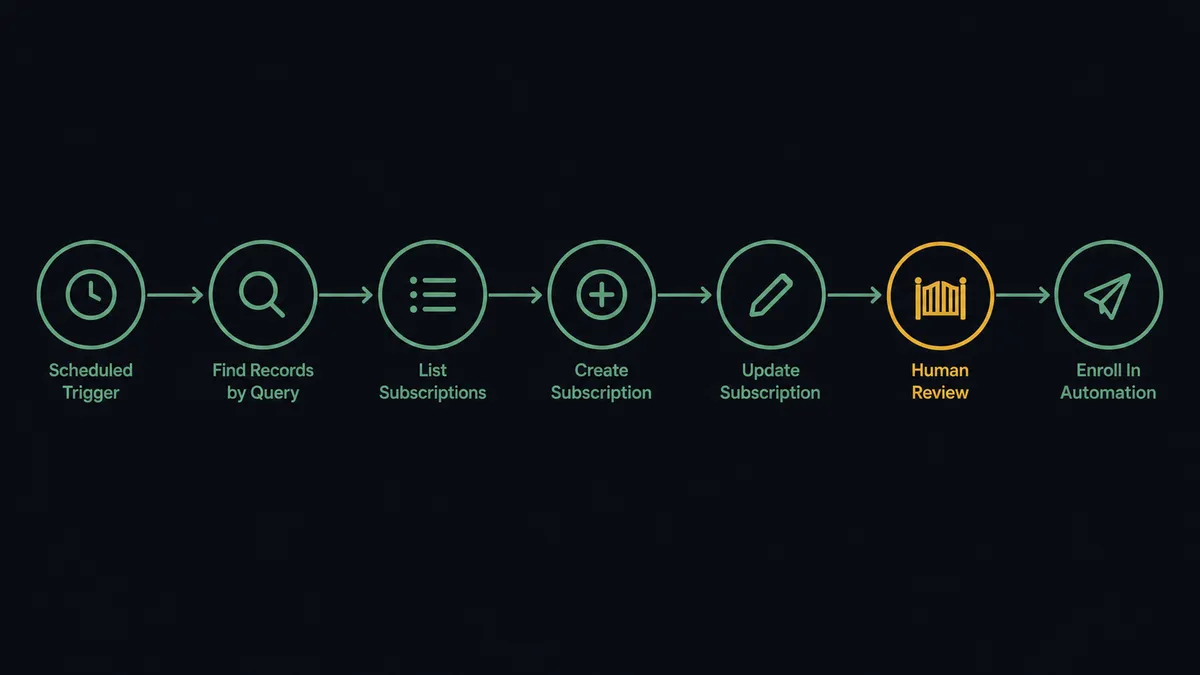
You connect Salesforce to beehiiv with a scheduled workflow: each run calls Find Records by Query to pull new members of the campaign you are sourcing from, matches them against your publication with List Subscriptions, adds new readers with Create Subscription carrying UTM attribution from the campaign, and keeps them current with Update Subscription. FlowRunner is a visual AI-agent orchestration platform where automations run autonomously and pause for human judgment on the steps that carry real consequence. The same connection can run as an AI agent that assembles the audience continuously and pauses for a named human before Enroll In Automation starts an email journey that cannot be called back.
The problem it solves
Today the path from a Salesforce campaign to a newsletter audience is an export nobody enjoys. Marketing runs a webinar or a launch campaign, the contacts land in Salesforce, and then someone builds a report, exports the members, reshapes the CSV, and imports it into beehiiv. Attribution dies in transit: a month later nobody can say which campaign a subscriber came from, so nobody can say which campaigns actually grow the audience that converts.
The edges are where trust and deliverability get burned. The same contact gets imported twice and greeted twice. A customer three years into their contract gets enrolled in the prospect nurture journey because the export mixed lists. Someone kicks off an onboarding sequence to a stale segment, and the first three unsubscribes are from your best accounts. Sequences are the sharpest tool in email marketing precisely because they keep sending after you stop looking, which is also what makes a wrong enrollment expensive.
How it works: the connection
The connection reads from Salesforce and writes to beehiiv. Here is the plain version, grounded in the real connector actions.
- Trigger: On a schedule, the workflow calls Find Records by Query in Salesforce to pull contacts added to the source campaign since the last run.
- Match: List Subscriptions checks the publication for each contact by exact email match.
- Create: Create Subscription adds unmatched contacts as readers, recording UTM attribution mapped from the campaign name and source.
- Update: Update Subscription refreshes tier and custom fields for readers whose Salesforce record changed.
- Enroll: Enroll In Automation starts qualified readers on a journey, using an automation with an active “Add by API” trigger found via List Automations.
- Close the loop: Get Subscription reads each subscriber’s status, Update Contact writes it onto the Salesforce record, and Add Contact to Campaign places engaged readers into the follow-up campaign.
That is the “just connect them” answer. Campaign members become attributed subscribers, journeys start on time, and engagement flows back to where sales can see it. Since neither connector exposes an event trigger, the schedule is the heartbeat, and every run reconciles what the last one missed.
Can an AI agent run it? (and why a human stays in the loop)
Yes, and the agent is the difference between a pipeline and a program you would trust with your sender reputation. Its toolbox is the real actions: Find Records by Query, Find Record, Update Contact, Add Contact to Campaign, Create Enhanced Note on the Salesforce side; List Subscriptions, Create Subscription, Update Subscription, List Automations, Enroll In Automation on the beehiiv side. For each contact it reasons about who this person is: a fresh webinar registrant who should be welcomed, an existing customer whose fields need a refresh, or a record so ambiguous it deserves a question, not an action.
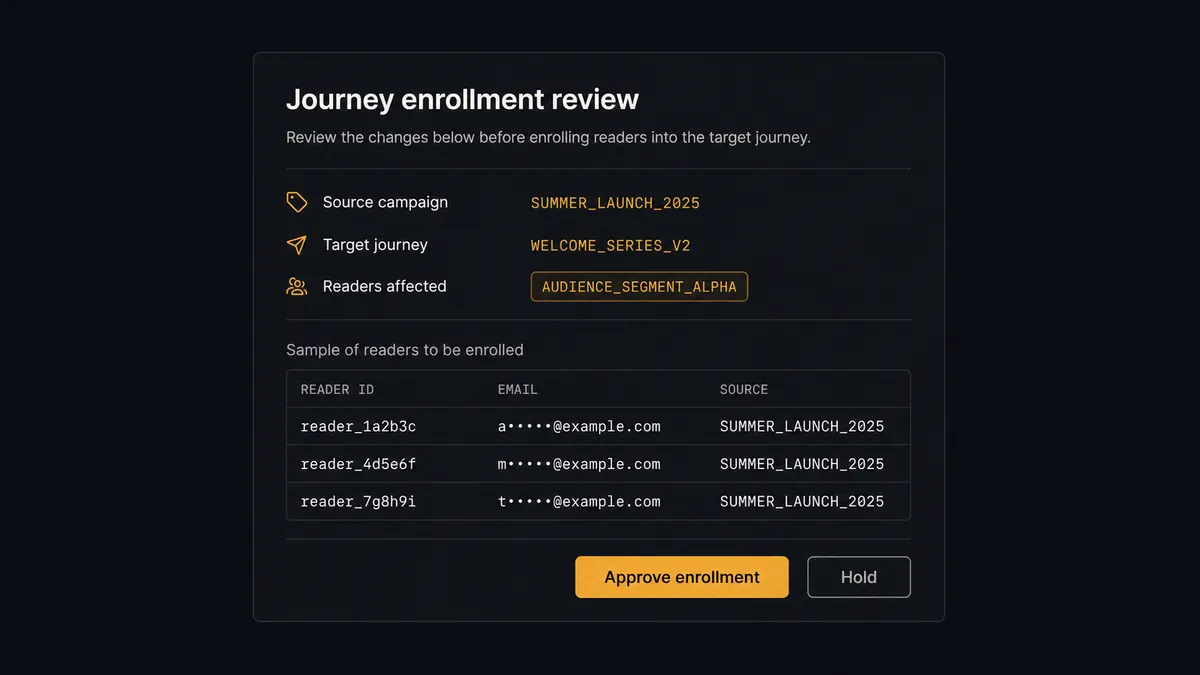
The consequential step is Enroll In Automation. An enrollment is not one email, it is a commitment: the journey keeps sending on its own schedule long after the workflow run ends, and a sent sequence cannot be unsent. So the agent assembles, and a person releases. Before any enrollment, it invokes a human-in-loop flow it holds as a callable tool and posts to your marketing channel: “Journey enrollment ready: [count summary] readers from campaign [name] into journey [journey]. Sample records and exclusions attached. Approve start?” A named approver reviews the set, trims it if needed, and signs off. Only then does Enroll In Automation run, and Create Enhanced Note writes the enrollment, the journey, and the approver onto each Salesforce record.
Prospects call this pattern the digital andon cord: like Toyota’s line-stop cord, the workflow stops the line at the step that reaches customers and keeps reaching them, and a person pulls it back into motion. List building runs at machine speed. Sequences start at the speed of judgment.
FlowRunner vs Zapier
Marketing teams reaching for this pair usually reach for Zapier first, and honestly, it earns that reflex. The connector library is vast, the editor is friendly to non-technical users, and its gallery has prebuilt Salesforce and beehiiv Zaps that stand up a simple member-to-subscriber push in an afternoon. If that push is the whole job, Zapier does it.
The difference shows up when the audience needs judgment and the volume needs predictable pricing. Every campaign member checked on every scheduled run is a task on Zapier’s meter, and a misconfigured Zap enrolls a segment into a sequence with nobody asking first. Here is the honest side-by-side.
| What matters for this pair | FlowRunner | Zapier |
|---|---|---|
| Human-in-the-loop on journey enrollment | Native. The agent invokes an approval flow as a callable tool and pauses before Enroll In Automation | Available via added approval steps you wire into the Zap, not a native agent decision |
| Who runs the flow | An AI agent reads each contact, reasons, picks create, update, or escalate | Predefined step sequence you configure per Zap |
| Users included | Unlimited users on every tier | Priced by task volume; seats vary by plan |
| Bring your own AI keys | Yes, BYOK | AI features tied to Zapier’s own AI offering |
| Self-hosted option | Yes, cloud-hosted or self-hosted | Cloud only |
| Pricing model | Transparent workflow-based tiers | Per-task pricing that grows with every member checked |
If you need one simple push at modest volume, Zapier is a fine start. If you want campaigns feeding an attributed audience continuously, a person releasing every sequence, and pricing that does not climb with your list, this pairing on FlowRunner is the better fit.
Before and after
| Category | Before | After |
|---|---|---|
| Audience building | Campaign exports reshaped in spreadsheets and imported by hand | Members reconciled into the publication on every scheduled run |
| Attribution | Subscriber origin lost at import | Create Subscription records the sourcing campaign as UTM attribution |
| Journey starts | Sequences kicked off from mixed exports, wrong inclusions and all | Enrollment sets assembled by the agent and released by a named approver |
| Duplicates | The same contact welcomed twice by two imports | List Subscriptions matches by email before anything is created |
| Sales visibility | Reps have no idea who reads what | Engagement written back via Update Contact and Add Contact to Campaign |
What you can build
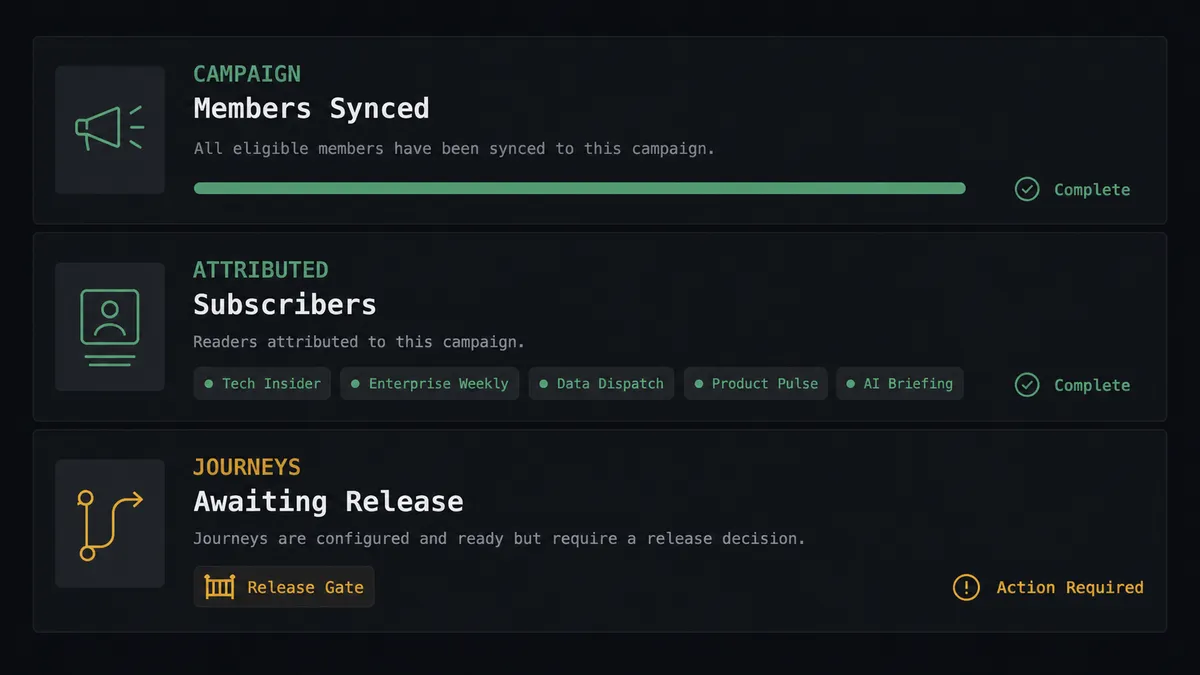
Campaign to attributed audience. Find Records by Query pulls each new campaign member, List Subscriptions checks for them, and Create Subscription adds the missing ones with the campaign carried as UTM attribution. Six months later you still know which campaigns built the list.
Approved nurture starts. The agent assembles enrollment sets per journey, a named approver releases them, and Enroll In Automation starts the sequence with the decision logged on every record via Create Enhanced Note.
Customer versus prospect separation. Before any enrollment, the agent checks the record with Find Record, keeps existing customers out of prospect journeys, and routes ambiguous records to a person instead of a sequence.
Engagement-driven campaigns. The agent reads subscriber engagement through Get Subscription with stats expanded, then calls Add Contact to Campaign to move consistent readers into a warm follow-up campaign sales actually works.
Lead capture to newsletter. New leads from any source flow through Convert Lead to Contact when they qualify, then into Create Subscription, so the newsletter grows from the same pipeline the CRM already governs, with Add Lead to Campaign keeping pre-conversion records organized.
Getting started
Start on the free plan: 100 executions a month, every integration included, no credit card required, plus 14 days of Professional for new accounts. Both connectors are available on every tier, and every tier includes unlimited users and unlimited workflows, so the campaign owner, the newsletter operator, and the approver who releases journeys share one workspace from day one.
Explore the integration details:
- Salesforce Pro integration (26 actions covering records, leads, campaigns, notes, and email)
- beehiiv integration (12 actions covering subscribers, tiers, automations, posts, and segments)
Start building free at flowrunner.ai or book a demo to see a live Salesforce to beehiiv workflow, journey release gate and all.
Frequently asked questions
Is it free to connect Salesforce Pro and beehiiv on FlowRunner?
You can build and run the connection on FlowRunner's free plan, which includes 100 executions a month and every integration with no credit card required, and new accounts also get 14 days of Professional. Both connectors are available on every FlowRunner tier, and every tier includes unlimited users and unlimited workflows.
Can I self-host the Salesforce Pro to beehiiv workflow?
Yes. FlowRunner offers a cloud-hosted option and a self-hosted option, so the connection can run inside your own environment.
Does the AI agent need my own OpenAI or Claude key?
FlowRunner uses a bring-your-own-keys model, so you connect the AI provider key you already have. You are not locked to one model.
What happens when the agent is unsure whether a reader belongs in a journey?
It holds the enrollment. The agent posts the reader's campaign source, subscription status, and the journey it proposes to your channel, then waits for a named approver. Enroll In Automation only runs after sign-off, because once a sequence starts sending, there is no unsend.
Which triggers does this connection use?
Neither connector exposes an event trigger, so the workflow runs on a schedule. Each run calls Find Records by Query in Salesforce to pull new campaign members, matches them with List Subscriptions, and applies Create Subscription, Update Subscription, or Enroll In Automation as needed.
Can newsletter engagement flow back into Salesforce?
Yes. The agent reads subscriber status and stats with Get Subscription, writes them onto the record with Update Contact and Create Enhanced Note, and adds engaged readers to follow-up campaigns with Add Contact to Campaign, so sales works from real reading behavior.