How to Connect HubSpot with beehiiv (With or Without an AI Agent)
Connect HubSpot contacts to your beehiiv newsletter so the CRM and the audience stay in step, with a human approving every permanent subscriber deletion before it runs.
How do you connect HubSpot to beehiiv?
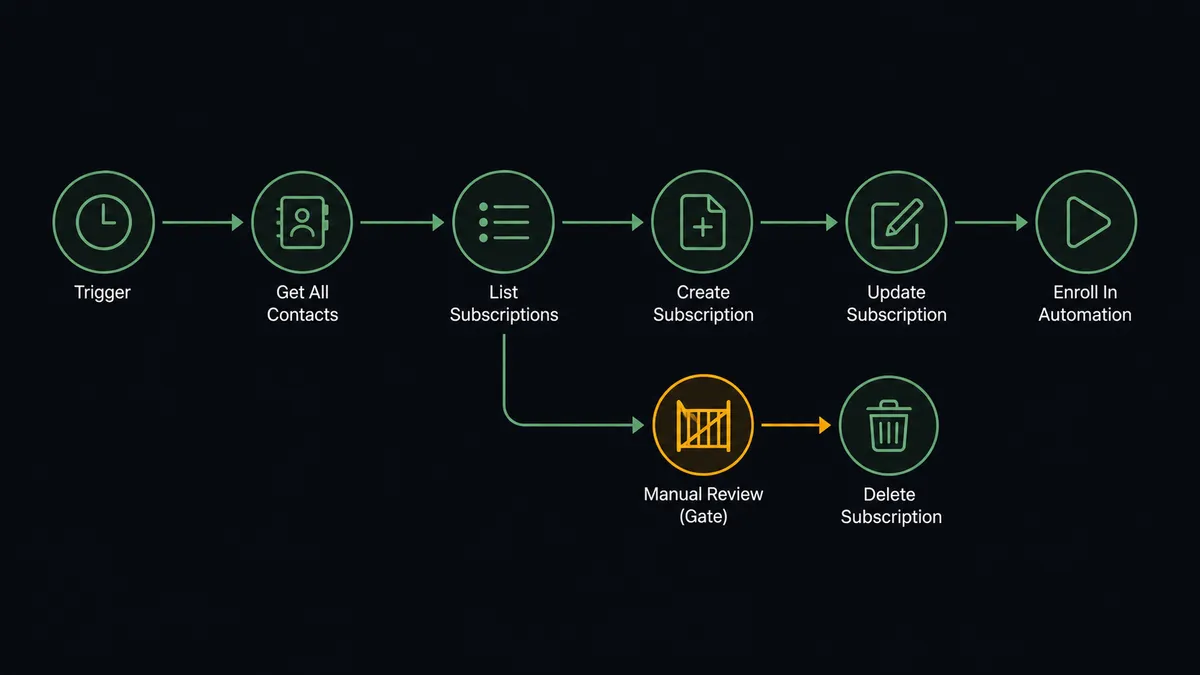
You connect HubSpot to beehiiv with a scheduled workflow: each run calls Get All Contacts to pick up new and changed CRM contacts, matches them against your publication with List Subscriptions, adds new readers with Create Subscription, and keeps tiers and custom fields current with Update Subscription. FlowRunner is a visual AI-agent orchestration platform where automations run autonomously and pause for human judgment on the steps that carry real consequence. The same connection can run as an AI agent that grooms the audience continuously and pauses for a named human before Delete Subscription, the one beehiiv action that cannot be undone, removes any reader.
The problem it solves
Right now your CRM and your newsletter audience are two lists that drift apart daily. New customers sign in HubSpot but never make it onto the newsletter that would onboard them. Prospects who filled a form last quarter sit in beehiiv with no hint of what happened to them since. Someone on the marketing team periodically exports a CSV from HubSpot, massages the columns, imports it into beehiiv, and hopes the two systems now agree. They do not, and by next week they agree even less.
The edges are where the real damage happens. A churned customer keeps receiving the paid-tier newsletter for months. A subscriber who unsubscribed gets re-imported by the next CSV pass, which is exactly the compliance mistake email platforms punish. And the cleanup itself is dangerous: a bulk delete meant to remove stale rows takes out a long-tenured paying reader, and beehiiv’s Delete Subscription is explicit that removal is permanent. The reader, their history, and their attribution are gone, and no undo exists.
How it works: the connection
The connection reads from HubSpot and writes to beehiiv. Here is the plain version, grounded in the real connector actions.
- Trigger: On a schedule, the workflow calls Get All Contacts in HubSpot and compares against the last run to find new and changed contacts.
- Match: List Subscriptions checks the publication for each contact by exact email match.
- Create: Create Subscription adds unmatched contacts as readers, recording UTM attribution, the referring site, and custom field values carried from the CRM.
- Update: Update Subscription adjusts the tier and custom fields when a contact’s lifecycle stage or plan changes in HubSpot.
- Enroll: Enroll In Automation drops qualifying readers into a welcome or onboarding journey, using an automation with an active “Add by API” trigger from List Automations.
- Reconcile back: Get Subscription pulls each reader’s status, and Update Contact writes it onto the HubSpot record so sales sees who actually reads.
That is the “just connect them” answer. The CSV ritual disappears, attribution survives the trip, and both systems describe the same audience. Since neither connector exposes an event trigger, the schedule is the heartbeat, and each run closes whatever gap the day opened.
Can an AI agent run it? (and why a human stays in the loop)
Yes, and the agent is what turns a mirror into a steward. A plain sync copies rows; the agent reads each contact and decides what the audience change actually is. Its toolbox is the real actions: Get All Contacts, Get Contact By Email, Search Contacts, Update Contact on the HubSpot side; List Subscriptions, Create Subscription, Update Subscription, Enroll In Automation, Delete Subscription on the beehiiv side. A new customer gets created and enrolled in onboarding. A plan upgrade becomes a tier change through Update Subscription. A contact whose emails hard-bounce becomes a removal candidate, not a removal.
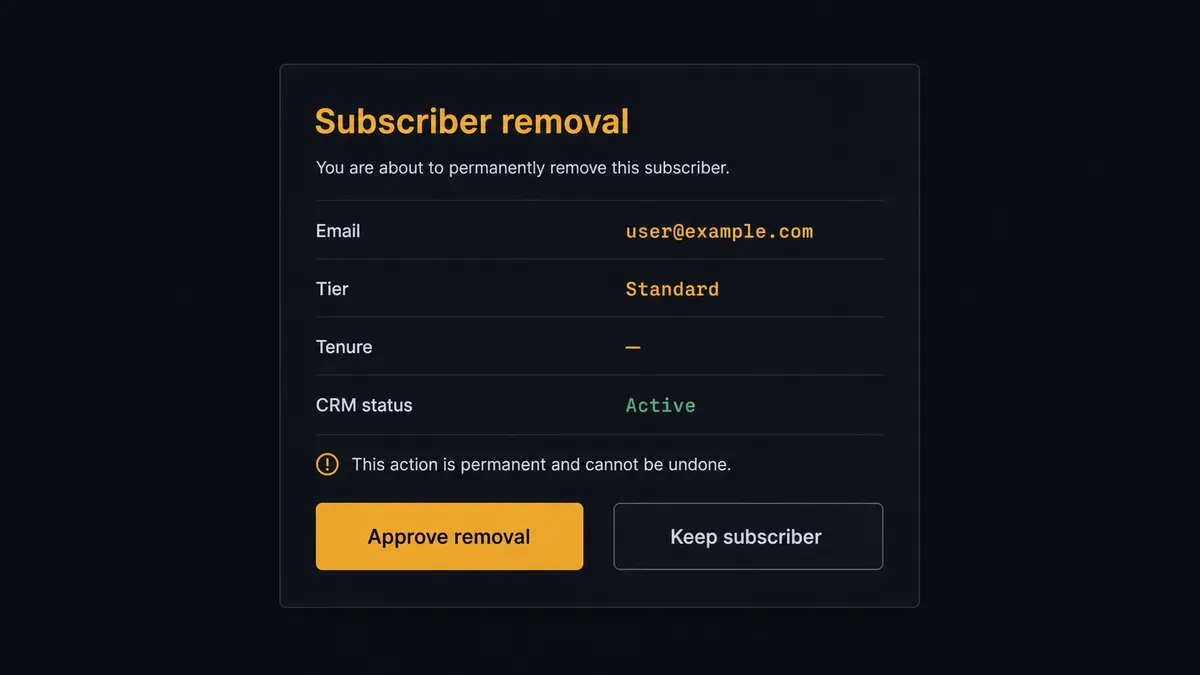
The consequential step is Delete Subscription, and the connector’s own definition says why: it permanently deletes the subscriber and their data, and it cannot be undone. So the agent never fires it alone. When its review pass flags a reader, churned in the CRM, invalid address, duplicate record, it invokes a human-in-loop flow it holds as a callable tool and posts to your marketing channel: “Removal candidate: [email], tier [tier], subscribed [tenure], CRM status [status]. Deletion is permanent. Approve removal?” A named approver confirms, Delete Subscription runs, and Update Contact writes the removal and the approver back onto the HubSpot record. Wrong flags cost a click; without the gate, a wrong deletion costs a reader forever.
Prospects call this the digital andon cord: like Toyota’s line-stop cord, the workflow stops itself the moment an action cannot be taken back, and a person clears it. Growth runs at machine speed. Deletion runs at the speed of judgment.
FlowRunner vs Zapier
Most marketing teams connecting HubSpot to beehiiv will try Zapier first, and the instinct is sound. Zapier’s connector library is enormous, its editor is genuinely easy for a non-technical marketer, and its template gallery has ready-made HubSpot and beehiiv Zaps you can switch on in an afternoon. For a one-way “new contact becomes subscriber” push, it works.
The difference appears when the sync needs judgment, and when volume meets the bill. Every contact checked on every scheduled run is a task in Zapier’s per-task pricing, and the risky operations, deletions, tier downgrades, run exactly as configured with no one asking twice. Here is the honest side-by-side.
| What matters for this pair | FlowRunner | Zapier |
|---|---|---|
| Human-in-the-loop on permanent deletions | Native. The agent invokes an approval flow as a callable tool and pauses before Delete Subscription | Available via added approval steps you wire into the Zap, not a native agent decision |
| Who runs the flow | An AI agent reads each contact, reasons, picks create, update, or escalate | Predefined step sequence you configure per Zap |
| Users included | Unlimited users on every tier | Priced by task volume; seats vary by plan |
| Bring your own AI keys | Yes, BYOK | AI features tied to Zapier’s own AI offering |
| Self-hosted option | Yes, cloud-hosted or self-hosted | Cloud only |
| Pricing model | Transparent workflow-based tiers | Per-task pricing that grows with every contact checked |
If you need a simple one-way push and your volume is small, Zapier is a fine start. If you want the CRM and the audience continuously reconciled, with a person on every irreversible removal and predictable pricing as the list grows, this pairing on FlowRunner is the better fit.
Before and after
| Category | Before | After |
|---|---|---|
| List sync | CSV exports and imports whenever someone remembers | Contacts reconciled against the publication on every scheduled run |
| Attribution | Source data lost in the export-import shuffle | Create Subscription records UTM attribution and referring site at creation |
| Tier accuracy | Churned customers keep premium access for months | Update Subscription adjusts tiers when the CRM status changes |
| Deletions | Bulk cleanups that occasionally take out real readers permanently | Each removal reviewed by a named approver before Delete Subscription runs |
| Sales visibility | Sales has no idea which prospects read the newsletter | Subscriber status written back to HubSpot with Update Contact |
What you can build
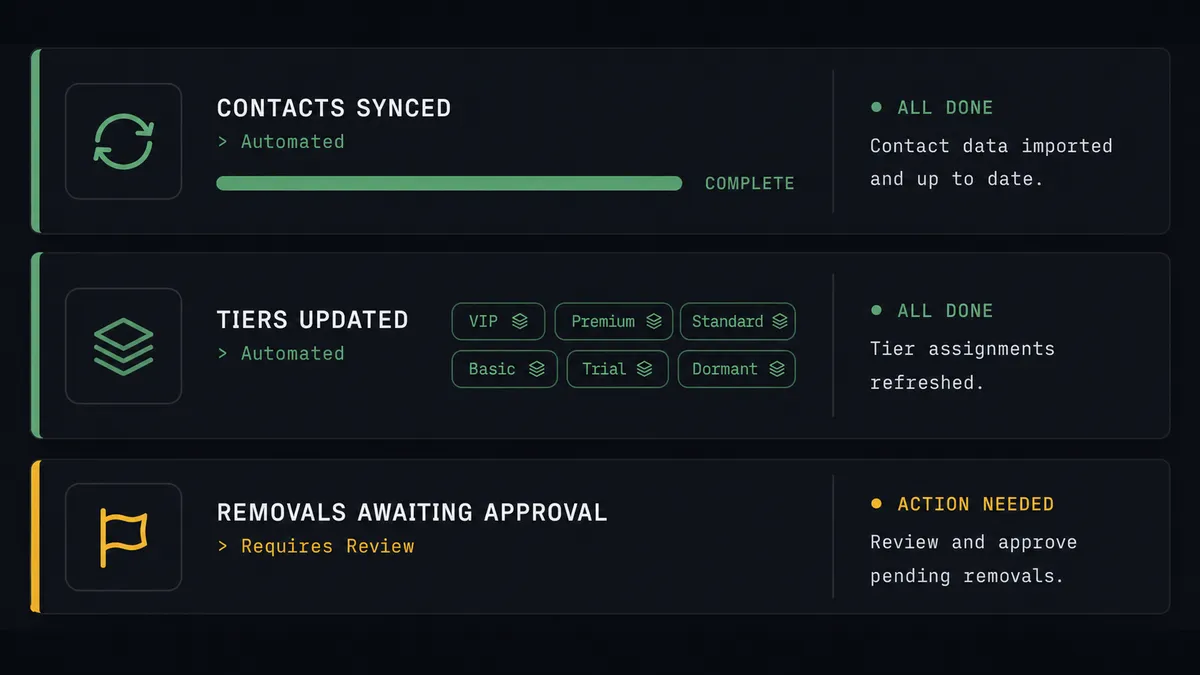
CRM to audience, continuously. Get All Contacts feeds each run, List Subscriptions matches by email, and Create Subscription adds new readers with attribution and custom fields intact. The CSV ritual is retired.
Onboarding journeys from lifecycle stage. When a contact becomes a customer, the agent calls Enroll In Automation to drop them into the onboarding sequence, using the automation id from List Automations. New customers hear from you without a marketer touching a list.
Paid-tier stewardship. Plan changes in HubSpot flow through Update Subscription so premium readers gain and lose access on time, and any downgrade of a long-tenured reader is surfaced to a person first.
Reader intelligence for sales. The agent pulls engagement context with Get Subscription and stats expansion, then writes newsletter status onto contacts with Update Contact, so reps open calls knowing whether the prospect reads every issue or none.
Audience audit with a safety net. A weekly pass walks List Subscriptions against Search Contacts to find readers with no CRM record and contacts wrongly missing from the list, queuing every fix, and routing anything destructive through the approval gate.
Getting started
Start on the free plan: 100 executions a month, every integration included, no credit card required, plus 14 days of Professional for new accounts. Both connectors are available on every tier, and every tier includes unlimited users and unlimited workflows, so the marketer who owns the newsletter and the ops lead who approves removals share one workspace from day one.
Explore the integration details:
- HubSpot integration (21 actions covering contacts, companies, deals, and associations)
- beehiiv integration (12 actions covering subscribers, tiers, automations, posts, and segments)
Start building free at flowrunner.ai or book a demo to see a live HubSpot to beehiiv workflow, deletion approval and all.
Frequently asked questions
Is it free to connect HubSpot and beehiiv on FlowRunner?
You can build and run the connection on FlowRunner's free plan, which includes 100 executions a month and every integration with no credit card required, and new accounts also get 14 days of Professional. Both connectors are available on every FlowRunner tier, and every tier includes unlimited users and unlimited workflows.
Can I self-host the HubSpot to beehiiv workflow?
Yes. FlowRunner offers a cloud-hosted option and a self-hosted option, so the connection can run inside your own environment.
Does the AI agent need my own OpenAI or Claude key?
FlowRunner uses a bring-your-own-keys model, so you connect the AI provider key you already have. You are not locked to one model.
What happens when the agent is unsure whether a subscriber should be removed?
It never deletes on its own. Delete Subscription permanently removes the reader and their data, so the agent invokes a human-in-loop step, posts the subscriber's tier, tenure, and CRM status to your channel, and waits for a named approver to confirm before anything is removed.
Which triggers does this connection use?
Neither connector exposes an event trigger, so the workflow runs on a schedule. Each run calls Get All Contacts in HubSpot to pick up new and changed contacts, matches them against the publication with List Subscriptions, and applies Create Subscription or Update Subscription as needed.
Can the sync carry attribution and CRM fields into beehiiv?
Yes. Create Subscription records UTM attribution and the referring site, and both Create Subscription and Update Subscription set custom field values, so lifecycle stage or plan data from HubSpot can ride along. The custom fields must already exist on the publication.