How to Connect Salesforce Pro with AssemblyAI (With or Without an AI Agent)
Transcribe call recordings with AssemblyAI and file them against the right Salesforce lead or contact, with an agent that logs notes automatically and pauses for a human before the irreversible Convert Lead to Contact step.
How do you connect Salesforce Pro to AssemblyAI?
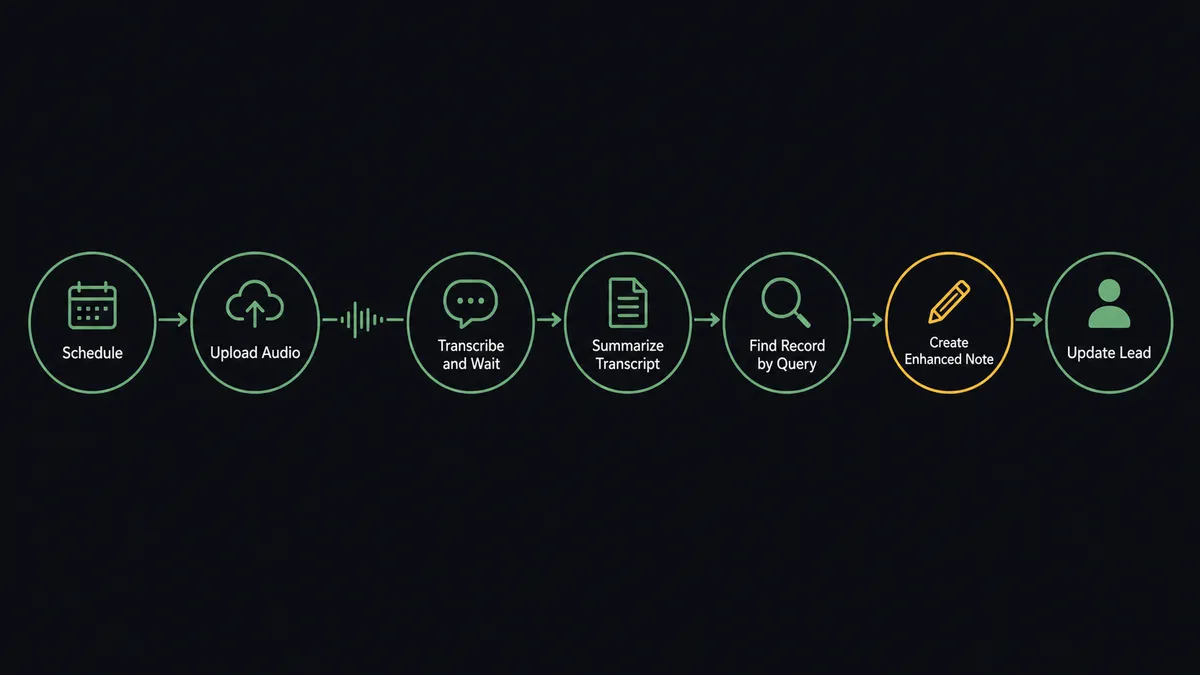
You connect Salesforce Pro to AssemblyAI with a scheduled FlowRunner workflow: it picks up each new call recording, calls Upload Audio and Transcribe and Wait to produce a speaker-labeled transcript, matches the caller to a lead or contact with Find Record by Query, then files the call with Create Enhanced Note and attaches the full transcript using Add File to Record. Neither connector exposes a trigger, so a schedule is the honest entry point. FlowRunner is a visual AI-agent orchestration platform where automations run autonomously and pause for human judgment on the steps that carry real consequence. Run as an agent, the connection goes further: it reads each call, updates lead status on its own, and stops for a rep before Convert Lead to Contact, because that step cannot be taken back.
The problem it solves
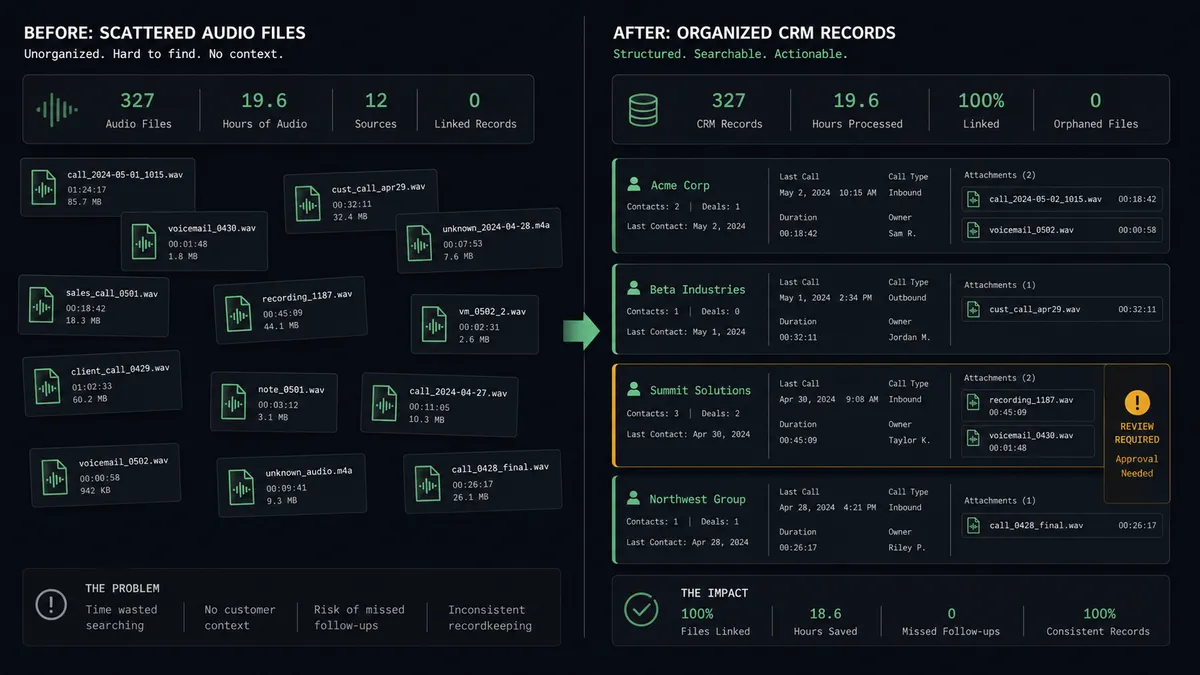
Without this connection, call intelligence dies in a storage bucket. Reps record discovery calls, the files accumulate, and Salesforce holds whatever fragments a rep typed from memory between meetings. Lead status fields go stale, notes say “good call, follow up,” and the actual substance of the conversation, the budget number, the named decision maker, the security objection, exists only in audio nobody will replay. A builder asked to fix this usually starts writing a transcription script, then discovers the hard part was never transcription.
The hard part is what happens after the text exists. Matching a caller to the right record when the org has three “J. Chen” leads. Deciding whether a call moved a lead from working to qualified. And above all, conversion: Convert Lead to Contact restructures the record permanently, and there is no API call that undoes it. A pipeline that converts leads on a model’s guess creates orphaned accounts and duplicate contacts that an admin spends weekends untangling. The transcription was the easy 80 percent; the judgment calls are the part that breaks.
How it works: the connection
Here is the deterministic version, grounded in the real connector actions.
- Trigger: On a schedule, the workflow checks the recordings location and picks up each file it has not yet processed.
- Upload: It calls Upload Audio to push the recording to AssemblyAI.
- Transcribe: It calls Transcribe and Wait with speaker labels enabled, blocking until the transcript is ready.
- Summarize: It calls Summarize Transcript for a short account of the call.
- Match: It calls Find Record by Query with the caller’s email or phone to locate the lead or contact.
- File: It calls Create Enhanced Note with the summary and Add File to Record to attach the complete transcript.
- Update: It calls Update Lead to stamp the last-call date and outcome on the record.
That is the plain answer to “connect Salesforce to AssemblyAI.” Every recorded call becomes a note, an attachment, and a fresh status on the record the sales team already works from.
Can an AI agent run it? (and why a human stays in the loop)
Yes. The agent holds both connectors’ actions as tools: Upload Audio, Transcribe and Wait, Summarize Transcript, Ask Questions About Transcript, and Word Search on the AssemblyAI side; Find Record by Query, Create Enhanced Note, Add File to Record, Update Lead, Convert Lead to Contact, Add Contact to Campaign, and Send Email on the Salesforce side. It does not run a fixed sequence. It reads the transcript, decides what kind of call it was, and picks the actions that fit. A voicemail gets logged and nothing else. A call where the buyer named a budget and a timeline gets a status change and a drafted follow-up.
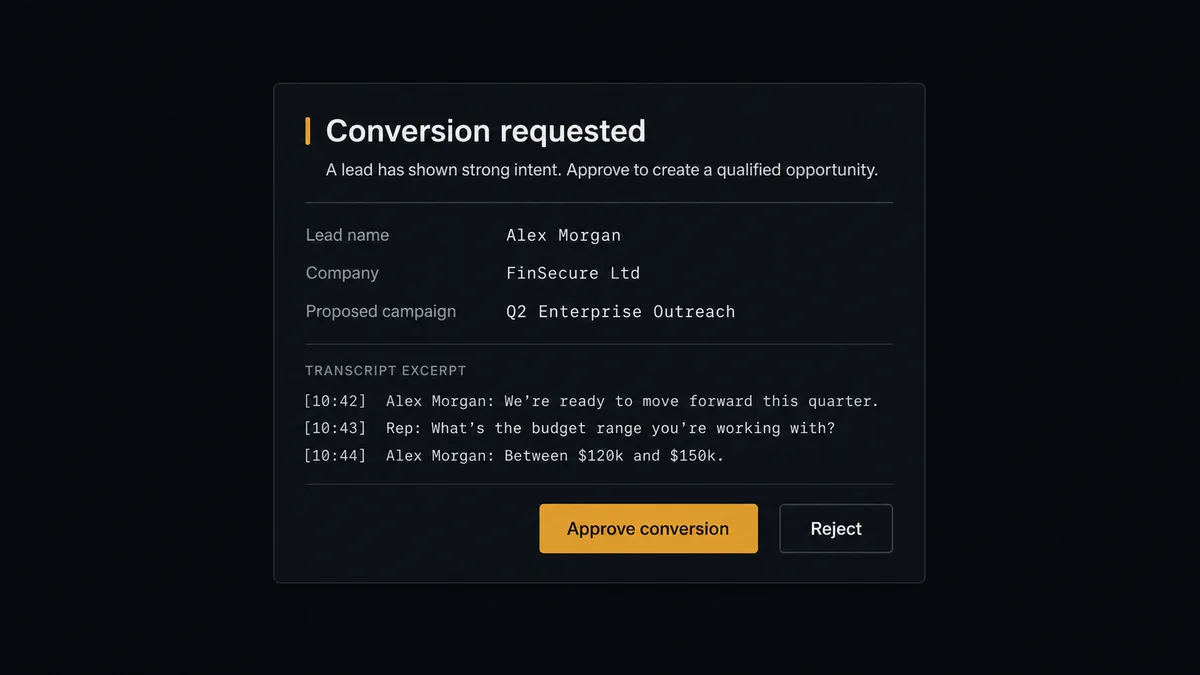
The consequential step is Convert Lead to Contact. Conversion in Salesforce is permanent: the lead becomes a contact, an account gets created or linked, and no API call reverses it. So the agent treats conversion as a proposal, never an act. When its reading of a call says the lead is qualified, it invokes a human-review flow it holds as a callable tool and the workflow pauses. The rep sees: “Lead [name] at [company]. Proposed: convert to contact and add to [campaign]. Evidence: [transcript excerpt with the budget and timeline]. Approve?” Only an approval releases Convert Lead to Contact, followed by Add Contact to Campaign. The approver’s name and timestamp land in the audit trail next to the excerpt the agent cited. Send Email gets the same gate, because a drafted follow-up that reaches a customer is a consequence, not a log entry.
This is the digital andon cord in practice: like Toyota’s line, the workflow stops itself the moment the next step is irreversible or uncertain, and a person restarts it with one decision.
FlowRunner vs LangChain
A builder evaluating this pair has almost certainly considered writing it in LangChain, and the case for that is real. LangChain and LangGraph offer full code-level control of the agent loop, an enormous open ecosystem of patterns, and zero license cost. If you are embedding call intelligence inside your own product, a library you can shape line by line is a legitimate choice.
What the library does not hand you is the production system around it: Salesforce OAuth refresh, AssemblyAI job polling, retries, the approval channel, the resume-after-approval state machine, and the audit log your admin will ask for the first time a conversion goes wrong.
| What matters for this pair | FlowRunner | LangChain |
|---|---|---|
| Human-in-the-loop on Convert Lead to Contact | Native. The agent invokes an approval flow as a callable tool and waits for a named rep | LangGraph has interrupt primitives; the delivery channel, approval UI, resume state, and audit record are custom code you own |
| Who runs the flow | An AI agent reads, reasons, and picks actions as tools in a visual flow the whole team can inspect | A service your engineers write, deploy, monitor, and patch |
| Users included | Unlimited users on every tier | A library, not a product; visibility for non-engineers is another thing you build |
| Bring your own AI keys | Yes, BYOK | Yes, your keys in your own code |
| Self-hosted option | Yes, cloud-hosted or self-hosted | Self-hosted by definition, with the operational burden that implies |
| Pricing model | Transparent workflow-based tiers | Free library; total cost is engineering time, hosting, and maintenance |
If bespoke agent behavior inside your application is the goal and you have the team to own it, build on LangChain. If the goal is a production call-to-CRM pipeline your revenue team trusts, with the conversion gate and audit trail working on day one, this pairing is the faster, safer route.
Before and after
| Category | Before | After |
|---|---|---|
| Call records | Substance lives in audio files; Salesforce holds whatever a rep typed from memory | Every call becomes a Create Enhanced Note summary with the full transcript attached |
| Lead status | Status fields lag days behind the last real conversation | Update Lead stamps outcome and last-call date the same day the call happened |
| Conversion decisions | Leads convert on gut feel, sometimes by the wrong person, with no record of why | Conversion runs only after a rep approves the agent’s evidence, captured in the audit trail |
| Record matching | Ambiguous callers get notes filed on the wrong lead | Find Record by Query matches by email and phone, and the agent asks when two records fit |
| Post-call answers | ”Did they mention budget?” means replaying the recording | Ask Questions About Transcript answers from the stored text in seconds |
What you can build
Call filing, hands off. The scheduled flow transcribes each recording with Transcribe and Wait, matches the caller with Find Record by Query, and files summary plus transcript via Create Enhanced Note and Add File to Record. The org’s call history builds itself.
Gated lead conversion. The agent reads a qualification call, proposes conversion with the supporting excerpt, and a rep approves before Convert Lead to Contact and Add Contact to Campaign run. Permanent changes get a named approver every time.
Approved follow-up drafts. After a call, the agent drafts a recap referencing what was actually said and holds it at the human gate. The rep edits or approves, then Send Email delivers it from Salesforce with the thread on the record.
Objection intelligence. Across the week’s transcripts, the agent runs Word Search for competitor names and pricing terms, then posts a digest linking each mention to its Salesforce record so sales leadership sees patterns, not anecdotes.
Campaign backfill from real conversations. When a transcript shows interest in a specific product line, the agent proposes Add Lead to Campaign for the matching nurture campaign, batching its suggestions for a marketer to approve in one pass.
Getting started
Start on the free plan: 100 executions a month, every integration included, no credit card required, plus 14 days of Professional for new accounts. Both connectors are available on every tier, and every tier includes unlimited users and unlimited workflows.
Explore the integration details:
- Salesforce Pro integration (26 actions covering leads, contacts, campaigns, notes, files, and SOQL queries)
- AssemblyAI integration (13 actions covering transcription, summaries, and transcript Q&A)
Start building free at flowrunner.ai or book a demo to see a live Salesforce Pro to AssemblyAI workflow, conversion approval and all.
Frequently asked questions
Is it free to connect Salesforce Pro and AssemblyAI on FlowRunner?
You can build and run the connection on FlowRunner's free plan, which includes 100 executions a month and every integration with no credit card required, and new accounts also get 14 days of Professional. Both connectors are available on every FlowRunner tier, and every tier includes unlimited users and unlimited workflows.
Can I self-host the Salesforce Pro to AssemblyAI workflow?
Yes. FlowRunner offers a cloud-hosted option and a self-hosted option, so the connection can run inside your own environment.
Does the AI agent need my own OpenAI or Claude key?
FlowRunner uses a bring-your-own-keys model, so you connect the AI provider key you already have. You are not locked to one model, and AssemblyAI runs on your own AssemblyAI API key.
What happens when the agent thinks a lead is ready to convert but is not certain?
It never converts on its own. Convert Lead to Contact is irreversible from the API, so the agent always packages the transcript evidence and its qualification reasoning into a human-review step. A rep approves or rejects, and only an approval lets the conversion run.
Which triggers and actions does this pair use?
Neither connector exposes a trigger, so the workflow runs on a schedule. It calls Upload Audio, Transcribe and Wait, and Summarize Transcript in AssemblyAI, then Find Record by Query, Create Enhanced Note, Add File to Record, Update Lead, and Convert Lead to Contact in Salesforce.
Can the full transcript live in Salesforce, not just a summary?
Yes. The workflow writes the summary with Create Enhanced Note and attaches the complete speaker-labeled transcript to the same record with Add File to Record, so anyone opening the lead can read the whole conversation.