How to Connect Slack with AssemblyAI (With or Without an AI Agent)
Drop a recording in Slack and get a transcript, summary, and searchable text back from AssemblyAI, with an AI agent that pauses for a human before an unredacted or sensitive transcript reaches a shared channel.
How do you connect Slack to AssemblyAI?
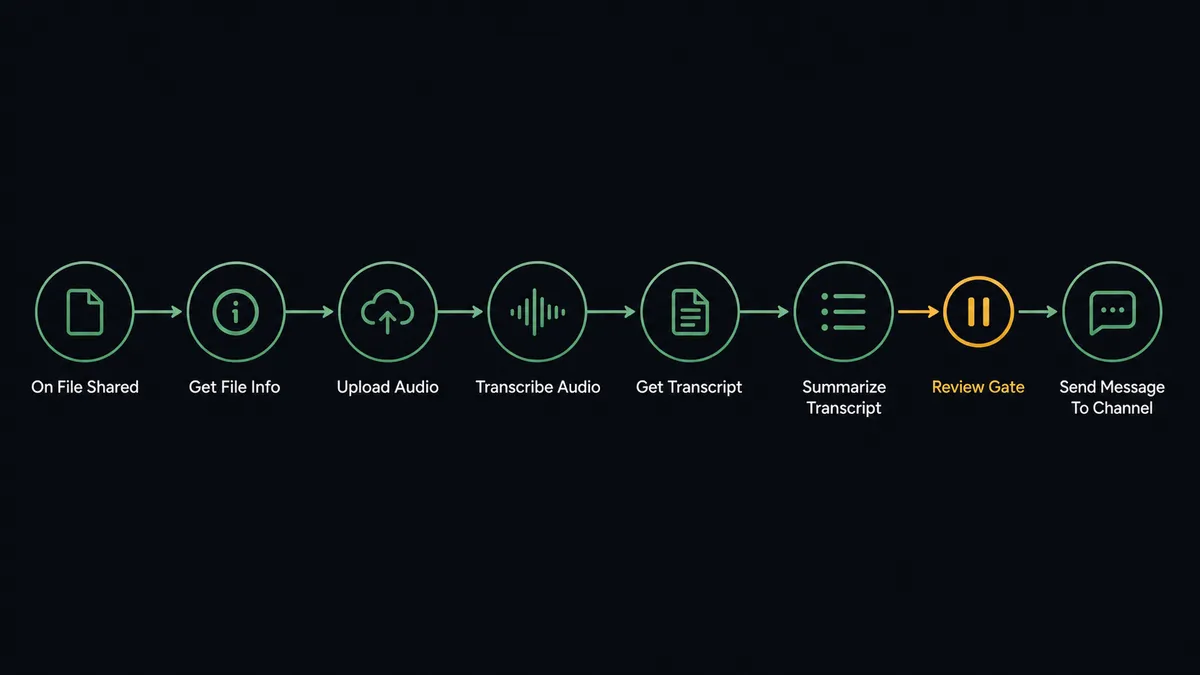
You connect Slack to AssemblyAI by having Slack’s On File Shared trigger drive AssemblyAI actions: when a recording lands in a channel, the workflow grabs it with Get File Info, stages it with Upload Audio, runs Transcribe Audio with speaker labels and PII redaction, then posts the Summarize Transcript output and full text back to the thread with Send Message To Channel. FlowRunner is a visual AI-agent orchestration platform where automations run autonomously and pause for human judgment on the steps that carry real consequence. The same connection can run as an AI agent that chooses transcription settings per file, answers follow-up questions against the transcript, and pauses for a human reviewer before anything that could contain unredacted personal data reaches a shared channel.
The problem it solves
Recordings pile up faster than anyone listens to them. A sales call lands in the deal channel, a user-research session in the product channel, an incident bridge in the ops channel. Whoever needs the content has two options: block an hour to listen, or ping the person who was there and get a lossy summary from memory. Builders end up writing one-off scripts that shuttle files to a transcription API and paste walls of text back, and those scripts break quietly, have no idea who said what, and treat a customer support call and an all-hands exactly the same.
The failure that actually hurts is not a missed transcription, it is a leaked one. Call recordings contain card numbers read aloud, health details, salary conversations, candidate information. A naive integration posts all of it into a channel with forty members and a searchable history, and now the easy transcript is a data-handling incident. The gap is not speech-to-text quality. It is judgment about what should be posted where, and nobody wants to be the person manually screening every transcript.
How it works: the connection
The connection listens to Slack and drives AssemblyAI. Here is the plain version, grounded in the real connector actions.
- Trigger: Slack fires On File Shared when an audio or video file is posted in a watched channel.
- Read: The workflow calls Get File Info to confirm the media type and fetch the file.
- Stage: It calls Upload Audio to hand AssemblyAI the media.
- Transcribe: It calls Transcribe Audio with speaker labels and PII redaction enabled, or Transcribe and Wait for short clips where a synchronous result is simpler.
- Retrieve: It calls Get Transcript when the job completes, with Get Paragraphs for readable structure and Get Subtitles when SRT or VTT captions are wanted.
- Condense: It calls Summarize Transcript so the thread gets the short version on top of the full text.
- Post: It calls Send Message To Channel to deliver the summary in-thread, with the structured transcript attached below it.
That is the “just connect them” answer. A recording dropped in the channel comes back as labeled, redacted, summarized text in the same thread, and Word Search means “where did they mention pricing?” is a lookup instead of a re-listen.
Can an AI agent run it? (and why a human stays in the loop)
Yes, and the agent is the difference between a transcription pipe and a teammate. It reads the context before touching the file: a two-minute voice memo gets Transcribe and Wait and a quick in-thread reply, a ninety-minute research session gets Transcribe Audio with speaker labels, sentiment, and chapters, then Get Paragraphs for structure. It holds the AssemblyAI actions as tools, and after the fact it keeps working: mention it with a question and it runs Ask Questions About Transcript or Run LLM Task against the stored text, or Word Search to jump to the exact moment a term was said.
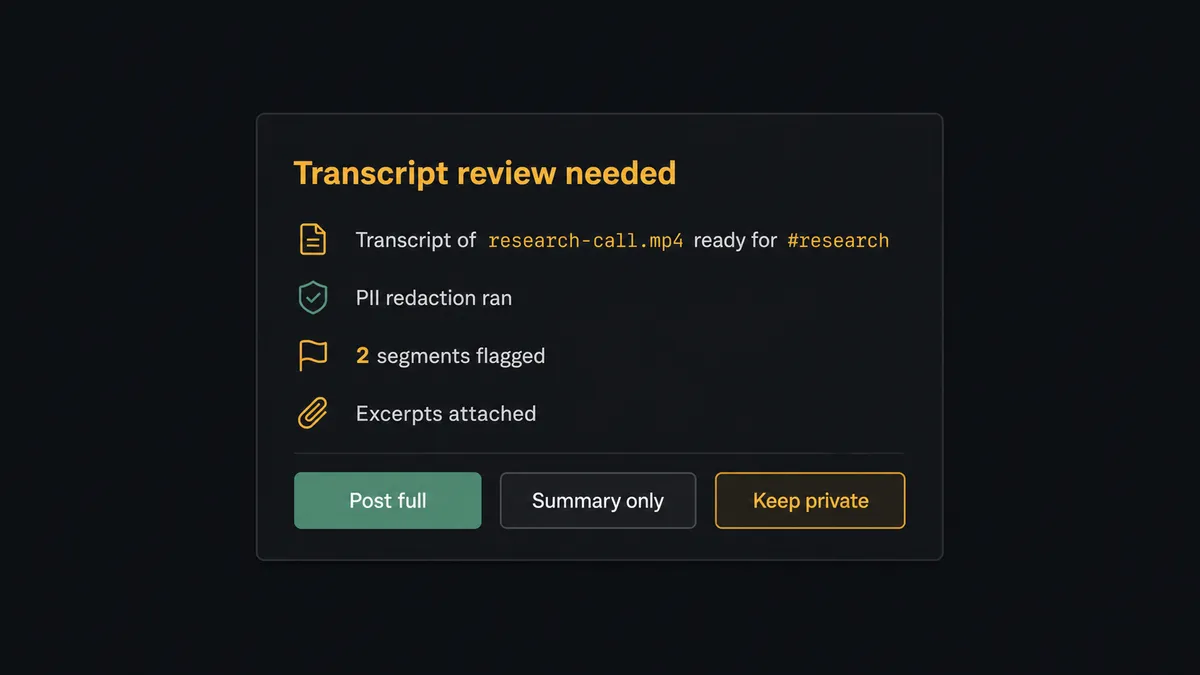
The consequential step is the post. Send Message To Channel is publication: once a transcript hits a shared channel it is in the searchable history of everyone in the room. So the agent scans the redacted output before posting, and when something looks wrong, a digit string that resembles a card number, a health detail in a hiring call, content that reads far more sensitive than the channel it is headed for, it does not post. It invokes a human-in-loop flow it holds as a callable tool and routes the flagged excerpt to a reviewer by Send Direct Message: “Transcript of [file] ready for #research. PII redaction ran, but two segments look sensitive. Excerpts attached. Post to channel, post summary only, or keep private?” The reviewer decides, and only then does the transcript reach the channel. The decision, the reviewer, and the redaction settings used are all on the audit trail. Delete Transcript is behind the same gate, so purging a recording’s text is also a recorded human choice.
Prospects call this pattern a digital andon cord. Like Toyota’s production line pull cord, the workflow stops the line the moment it hits uncertainty about what it is about to publish, a person clears it in seconds, and every clean transcript before and after flows through untouched.
FlowRunner vs LangChain
If you are a developer, LangChain is a legitimate way to build this. It is a powerful open-source framework, the ecosystem is huge, and with LangGraph you get real control over stateful agent loops, including interrupts you can wire into a human review step. If you want to own every line of the orchestration logic in Python or TypeScript, it will not stop you.
The difference is everything around the framework: the Slack event plumbing, the hosting, the review UX, and who on the team can see and change the workflow. Here is the honest side-by-side.
| What matters for this pair | FlowRunner | LangChain |
|---|---|---|
| Human-in-the-loop before the transcript posts | Native. The agent routes flagged excerpts to a reviewer and waits, no code | Possible via LangGraph interrupts; you build the pause, the review surface, and the resume logic yourself |
| Who runs the flow | An AI agent with Slack and AssemblyAI actions as ready-made tools | Code you write, wrapping both APIs as tools and maintaining them through changes |
| Users included | Unlimited users on every tier; the flow is visible to the whole team | A codebase; teammates read source or wait for you |
| Bring your own AI keys | Yes, BYOK | Yes, keys are yours by definition |
| Self-hosted option | Yes, cloud-hosted or self-hosted | You host everything yourself, always: workers, queues, retries, monitoring |
| Pricing model | Transparent workflow-based tiers with clear execution limits | Framework is free; the real cost is the infrastructure and engineering time around it |
If this pipeline is core product surface and you want it in your own repo with full control, LangChain is a genuinely good choice. If it is internal tooling that should exist by Friday, survive without a maintainer, and give reviewers a one-click gate, this pairing on FlowRunner is the better fit.
Before and after
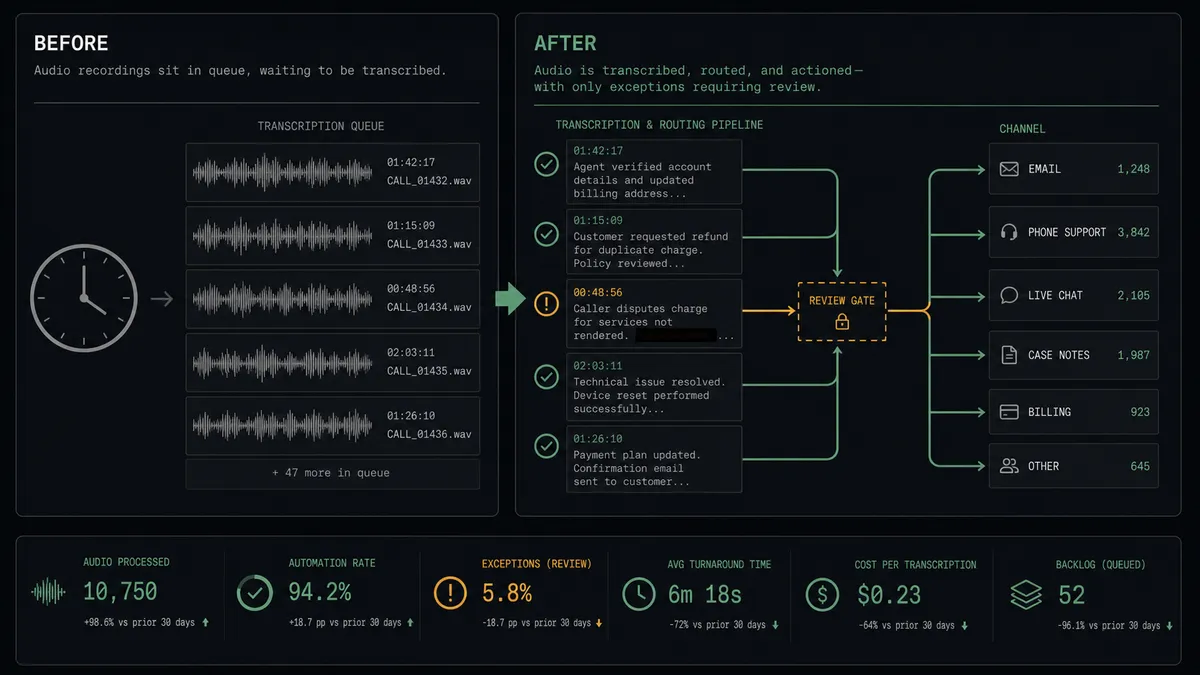
| Category | Before | After |
|---|---|---|
| Turnaround | Recordings sit unwatched until someone blocks an hour to listen | Transcribe Audio runs on drop, and the summary is in the thread when the meeting ends |
| Who said what | Notes from memory, attribution fuzzy | Speaker labels on the transcript, structured by Get Paragraphs |
| Sensitive content | A naive integration posts card numbers and health details into searchable channel history | PII redaction runs on every job, and flagged segments wait for a reviewer before posting |
| Finding a moment | Scrub the recording by ear to find one quote | Word Search jumps to the timestamp where the term was said |
| Follow-up questions | Re-listen or ping whoever was on the call | Ask Questions About Transcript answers in-thread from the stored text |
What you can build
Drop-to-transcript channel. On File Shared fires, the agent runs Upload Audio and Transcribe Audio with speaker labels and PII redaction, then posts the Summarize Transcript result in-thread with the full text attached. The channel becomes self-documenting.
Ask-the-recording thread. Anyone mentions the workflow under a finished transcript with a question. On Mention fires and the agent answers with Ask Questions About Transcript, quoting the relevant passage instead of the whole wall of text.
Research repository feed. Every user-research session dropped in the channel gets chapters and sentiment from Transcribe Audio, and the agent posts a structured digest: key moments, sentiment shifts, and Get Subtitles captions for the highlight reel.
Compliance-safe support review. Support call recordings run with strict redaction. The agent clears routine transcripts automatically and routes anything flagged to the team lead by Send Direct Message before the text reaches the shared QA channel.
Retention janitor. On a schedule the agent calls List Transcripts, finds transcripts past your retention window, and asks the owner before Delete Transcript runs, so cleanup is real but never silent.
Getting started
Start on the free plan: 100 executions a month, every integration included, no credit card required, plus 14 days of Professional for new accounts. Both connectors are available on every tier, and every tier includes unlimited users and unlimited workflows.
Explore the integration details:
- Slack integration (8 triggers and 16 actions covering messages, channels, members, and files)
- AssemblyAI integration (13 actions covering transcription, redaction, subtitles, and transcript Q&A)
Start building free at flowrunner.ai or book a demo to see a live Slack to AssemblyAI workflow, transcript review gate and all.
Frequently asked questions
Is it free to connect Slack and AssemblyAI on FlowRunner?
You can build and run the connection on FlowRunner's free plan, which includes 100 executions a month and every integration with no credit card required, and new accounts also get 14 days of Professional. Both connectors are available on every FlowRunner tier, and every tier includes unlimited users and unlimited workflows.
Can I self-host the Slack to AssemblyAI workflow?
Yes. FlowRunner offers a cloud-hosted option and a self-hosted option, so the connection can run inside your own environment.
Does the AI agent need my own OpenAI or Claude key?
FlowRunner uses a bring-your-own-keys model, so you connect the AI provider key you already have. You are not locked to one model, and your AssemblyAI key works the same way.
What happens if the transcript contains PII the redaction might have missed?
The agent holds it. Transcription runs with PII redaction enabled, and when the agent spots patterns that look like leaked identifiers or sensitive content in the output, it pauses and sends the flagged excerpt to a reviewer in a direct message. The transcript reaches the shared channel only after a person clears it.
Which Slack trigger starts the transcription?
On File Shared fires when an audio or video file lands in the channel, and the workflow picks it up with Get File Info before calling Transcribe Audio. On Mention works for follow-ups, so anyone can ask questions about a finished transcript in-thread.
Can I ask questions about a recording after it is transcribed?
Yes. Mention the workflow with a question and the agent calls Ask Questions About Transcript or Run LLM Task against the stored transcript, then replies in the thread. Word Search also lets it jump straight to where a specific term was said.