How to Connect HubSpot with AssemblyAI (With or Without an AI Agent)
Turn call recordings into speaker-labeled transcripts with AssemblyAI and log them against the right HubSpot contact and deal, with an agent that pauses for a rep before it changes a deal stage based on what it heard.
How do you connect HubSpot to AssemblyAI?
You connect HubSpot to AssemblyAI by running a scheduled FlowRunner workflow that picks up each new call recording, sends it through Upload Audio and Transcribe and Wait to get a speaker-labeled transcript, then matches the caller to a CRM record with Search Contacts or Get Contact By Email and logs the summary with Update Contact. Neither connector exposes a trigger, so the schedule is the honest starting point: the workflow checks for new recordings on whatever cadence you set. FlowRunner is a visual AI-agent orchestration platform where automations run autonomously and pause for human judgment on the steps that carry real consequence. Run as an agent, the same connection stops being a transcription pipe: the agent reads each call, decides what it means for the deal, and pauses for a rep before Update Deal changes anything based on that interpretation.
The problem it solves
Today the transcript pipeline ends in a folder. Sales and success calls get recorded, the recordings pile up in cloud storage, and the CRM knows nothing about any of it. A rep who wants the record updated has to listen back, type a summary into HubSpot, and remember to move the deal. Most do not. So the deal record says “Demo scheduled” while the actual call ended with the buyer asking for a security review and a two-week delay. Anyone forecasting from HubSpot is forecasting from fiction.
The edges are worse than the happy path. The caller used a personal email, so nobody can tell which contact the recording belongs to. Two contacts at the same company have nearly identical names. A call covered two open deals and the summary lands on the wrong one. And when a manager asks “did pricing come up on the Acme call,” the answer requires someone to scrub through the audio. These are exactly the failures that make teams quietly abandon call logging, and they are all matching and judgment problems, not transcription problems.
How it works: the connection
The connection turns audio into structured CRM history. Here is the plain version, grounded in the real connector actions.
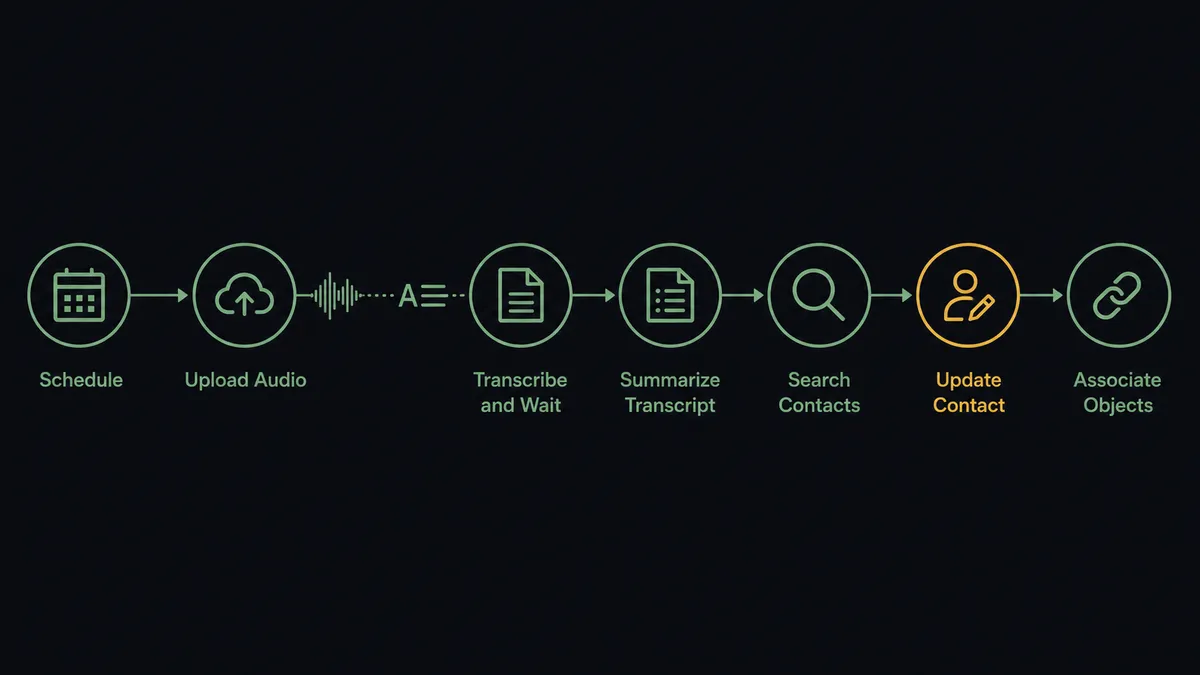
- Trigger: On a schedule, the workflow checks for new call recordings and picks up each one it has not processed.
- Upload: It calls Upload Audio to push the file to AssemblyAI and get a private URL back.
- Transcribe: It calls Transcribe and Wait with speaker labels enabled, so the transcript separates the rep from the buyer.
- Summarize: It calls Summarize Transcript to produce a short, readable account of the call.
- Match: It calls Search Contacts in HubSpot using the caller’s email or phone, then Get Contact By Email to confirm the exact record.
- Log: It calls Update Contact to write the summary, call date, and outcome onto the contact’s properties.
- Link: It calls Get Deal By ID and Associate Objects so the call history sits on the deal, not just the person.
That is the “just connect them” answer. Every recorded call becomes a transcript, a summary, and a CRM entry on the right record, without a rep typing a word.
Can an AI agent run it? (and why a human stays in the loop)
Yes, and this is where the pair stops being a pipe and starts being useful. The agent holds the AssemblyAI and HubSpot actions as tools: Upload Audio, Transcribe and Wait, Summarize Transcript, Ask Questions About Transcript, Word Search on one side; Search Contacts, Get Contact By Email, Update Contact, Update Deal, Create Deal, Associate Objects on the other. Instead of running the same steps in the same order every time, it reads the transcript and decides what the call actually was. A discovery call gets summarized and logged. A call where the buyer named a budget and a signing date is a different event, and the agent treats it differently.
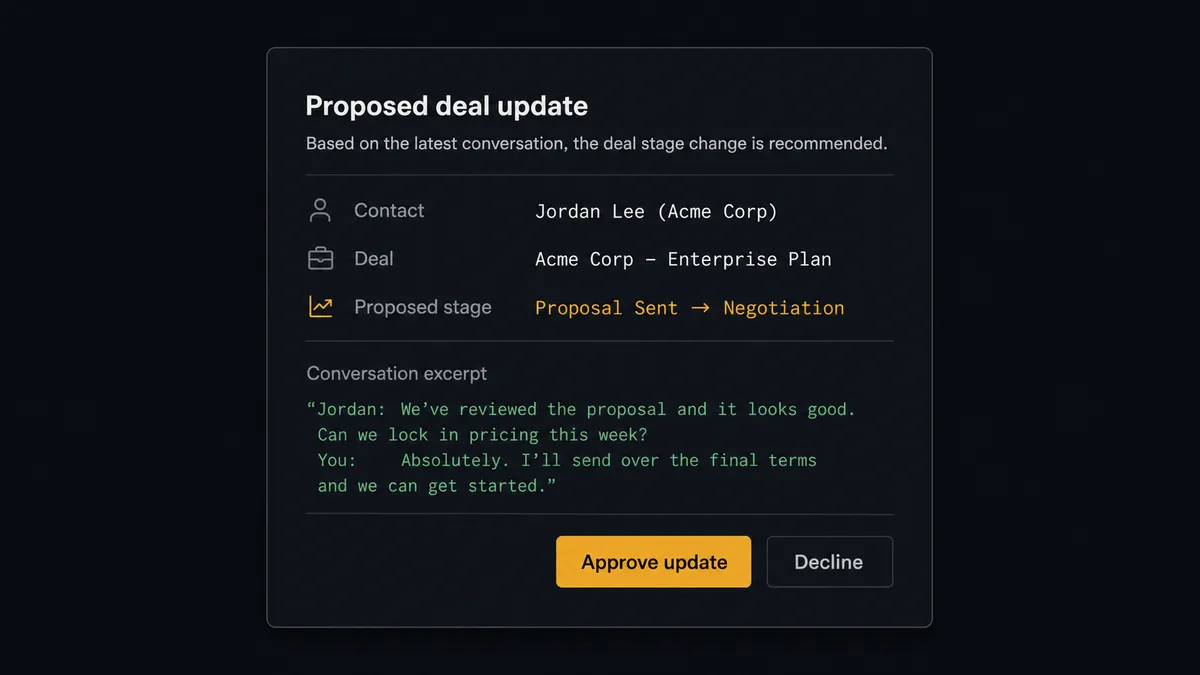
The consequential step is Update Deal. A transcript is an interpretation problem: “we are ready to move” from an economic buyer and from an intern are not the same sentence. When the agent concludes a call justifies moving a deal stage or changing an amount, it does not act on its own reading. It invokes a human-review flow it holds as a callable tool, and the workflow pauses. The rep gets a message: “Call with [contact] on deal [name]. Proposed change: stage to Contract Sent. Evidence: [transcript excerpt]. Approve?” One click and the agent calls Update Deal, with the approver and timestamp in the audit trail. The same gate protects Create Deal when the agent believes a call surfaced a brand new opportunity.
Matching gets the same discipline. When Search Contacts returns two plausible records, the agent does not guess and pollute the CRM. It posts both candidates and waits. Prospects call this the digital andon cord: like Toyota’s production line, the workflow stops the line the moment it hits uncertainty, and a person pulls it back into motion with one decision instead of an hour of cleanup.
FlowRunner vs LangChain
If your instinct as a builder is to wire this up with LangChain, that instinct is well founded. LangChain and LangGraph give you code-level control over exactly how the agent reasons, the largest open ecosystem of agent patterns and integrations, and a free open-source foundation you can bend into any shape. For bespoke agent logic embedded deep inside your own product, that flexibility is real and FlowRunner does not pretend otherwise.
The difference is everything around the reasoning loop. With LangChain you also own the AssemblyAI polling logic, the HubSpot OAuth token refresh, the retry semantics, the approval delivery, and the audit log, and you operate all of it in production.
| What matters for this pair | FlowRunner | LangChain |
|---|---|---|
| Human-in-the-loop on Update Deal | Native. The agent invokes an approval flow as a callable tool and pauses until a rep decides | LangGraph provides interrupt primitives; the Slack or email delivery, context packaging, resume state, and approval UI are yours to build |
| Who runs the flow | An AI agent reads, reasons, picks actions as tools, in a visual flow anyone on the team can inspect | Your Python or TypeScript service, written, deployed, and monitored by your engineers |
| Users included | Unlimited users on every tier | A library, not a product; every non-engineer who needs visibility needs tooling you write |
| Bring your own AI keys | Yes, BYOK | Yes, your keys in your own code |
| Self-hosted option | Yes, cloud-hosted or self-hosted | Self-hosted by definition; you carry the infrastructure either way |
| Pricing model | Transparent workflow-based tiers | Free library; the real cost is engineering time, hosting, and ongoing maintenance |
If this pipeline is a feature of your product and you have engineers to own it, LangChain is genuinely the better fit. If it is an internal workflow your revenue team depends on, and you want the approval gate, audit trail, and monitoring on day one instead of quarter three, that is FlowRunner.
Before and after
| Category | Before | After |
|---|---|---|
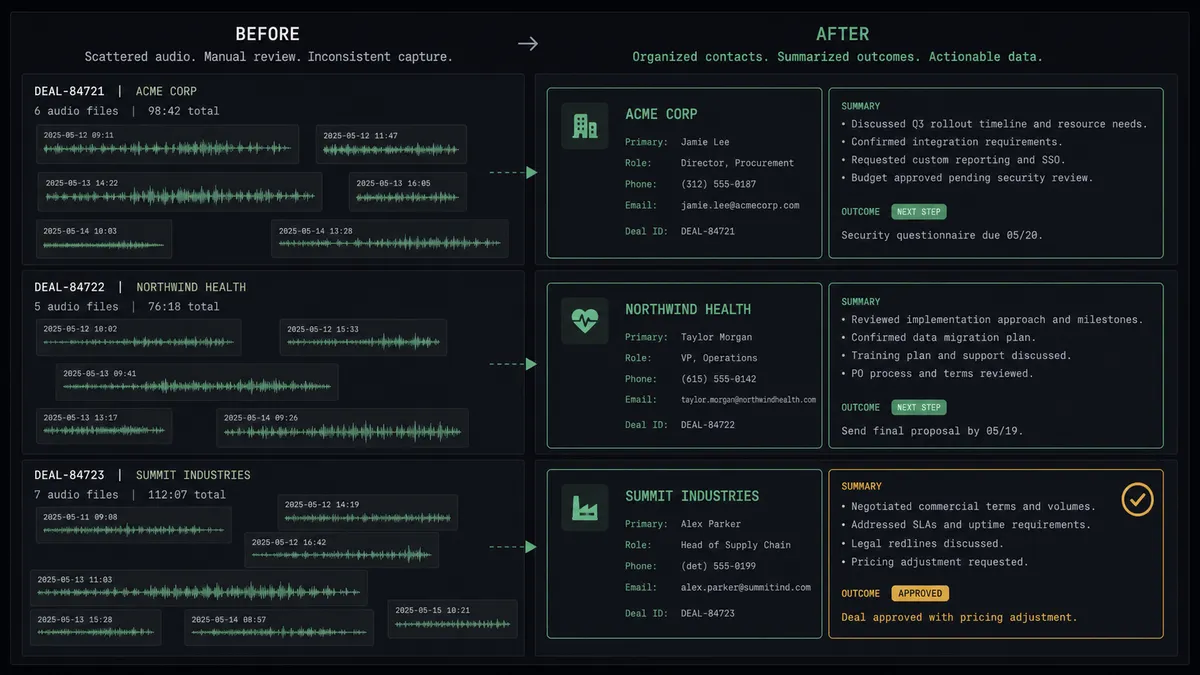
| Call logging | Reps summarize calls from memory, hours or days later, if at all | Every recording becomes a transcript and summary on the right contact automatically |
| Deal accuracy | Stages move when a rep remembers, so the pipeline lags reality | Proposed stage changes arrive with transcript evidence and move on approval |
| Contact matching | Ambiguous callers get logged to the wrong record or not at all | The agent matches by email and phone, and asks a person when two records both fit |
| Answering “what was said” | Someone scrubs through audio to check whether pricing came up | Ask Questions About Transcript and Word Search answer from the stored transcript |
| Audit trail | No record of who decided a call justified a deal change | Every Update Deal carries the approver, timestamp, and the excerpt that justified it |
What you can build
Call to CRM history, hands off. The scheduled workflow picks up each recording, runs Upload Audio and Transcribe and Wait, then Summarize Transcript, and writes the outcome to the matched contact with Update Contact. Every call is on the record by the next morning.
Deal movement with named approval. The agent reads a transcript, concludes the buyer committed to a pilot, and invokes the approval tool. The rep confirms, Update Deal moves the stage, and Associate Objects ties the call to the deal. No stage moves on an unverified interpretation.
New opportunity detection. When a support call surfaces an expansion signal, the agent drafts the opportunity, pauses for a person, and on approval calls Create Deal and Associate Objects so the signal becomes pipeline instead of a forgotten remark.
Competitor and pricing sweeps. Across the week’s transcripts, the agent runs Word Search for competitor names and Ask Questions About Transcript for pricing discussions, then posts a digest of which deals had pricing pressure to the sales channel.
Coaching queue. The agent runs Get Sentences on flagged calls to pull the exact exchanges where an objection landed, and files them with the contact context so a sales manager reviews minutes, not hours, of audio.
Getting started
Start on the free plan: 100 executions a month, every integration included, no credit card required, plus 14 days of Professional for new accounts. Both connectors are available on every tier, and every tier includes unlimited users and unlimited workflows.
Explore the integration details:
- HubSpot integration (21 actions covering contacts, companies, deals, and associations)
- AssemblyAI integration (13 actions covering transcription, summaries, and transcript Q&A)
Start building free at flowrunner.ai or book a demo to see a live HubSpot to AssemblyAI workflow, deal-change approval and all.
Frequently asked questions
Is it free to connect HubSpot and AssemblyAI on FlowRunner?
You can build and run the connection on FlowRunner's free plan, which includes 100 executions a month and every integration with no credit card required, and new accounts also get 14 days of Professional. Both connectors are available on every FlowRunner tier, and every tier includes unlimited users and unlimited workflows.
Can I self-host the HubSpot to AssemblyAI workflow?
Yes. FlowRunner offers a cloud-hosted option and a self-hosted option, so the connection can run inside your own environment.
Does the AI agent need my own OpenAI or Claude key?
FlowRunner uses a bring-your-own-keys model, so you connect the AI provider key you already have. You are not locked to one model, and AssemblyAI runs on your own AssemblyAI API key the same way.
What happens when the agent cannot match a call to a HubSpot contact?
It stops and asks. When Search Contacts and Get Contact By Email return no match or more than one plausible match, the agent posts the caller details and candidate records to your team's channel and waits for a person to pick the right record before anything is written to HubSpot.
Which triggers and actions does this pair use?
Neither connector exposes a trigger, so the workflow runs on a schedule and picks up new recordings as they land. It then calls Upload Audio, Transcribe and Wait, and Summarize Transcript in AssemblyAI, and Search Contacts, Get Contact By Email, Update Contact, and Update Deal in HubSpot.
Can I query a call after it has been logged?
Yes. The agent holds Ask Questions About Transcript and Word Search as tools, so you can ask what pricing was quoted or whether a competitor came up, and get an answer grounded in the stored transcript rather than a rep's memory.