How to Connect Outlook with AssemblyAI (With or Without an AI Agent)
Transcribe and summarize audio arriving in Outlook with AssemblyAI automatically, with an AI agent that processes recordings on its own and pauses for a human before a generated summary is emailed outside the org.
How do you connect Outlook to AssemblyAI?
You connect Outlook to AssemblyAI by polling the recordings inbox with Get Emails on a schedule and running every audio attachment through the transcription pipeline: the workflow pulls the file with Get Email, sends it through Upload Audio and Transcribe and Wait, generates a digest with Summarize Transcript, and replies on the original thread with Reply to Email. FlowRunner is a visual AI-agent orchestration platform where automations run autonomously and pause for human judgment on the steps that carry real consequence. Run the same connection as an AI agent and it processes recordings end to end on its own, and pauses for a named reviewer before any machine-written summary is emailed to someone outside your org.
The problem it solves
Audio accumulates in inboxes because email is where recordings get handed off: voicemail-to-email drops, client call recordings, user interviews, dictated field notes. Every one of those files is opaque. You cannot search it, skim it, or quote it. Whoever needs the content plays the file at double speed, scrubbing for the minute that matters, taking notes by hand. A builder who wants this automated faces a stack of plumbing: watch a mailbox, extract attachments, call a transcription API, poll for completion, format results, thread the reply. None of it is hard; all of it is maintenance.
The risk arrives at the last step. A transcript summary is a machine’s interpretation of a conversation, and interpretation fails quietly: a mangled name, a sarcastic remark rendered as a commitment, a number transcribed wrong. Inside the team, those errors are caught and shrugged off. Sent to a client as “here’s a summary of our call,” the same error becomes the written record of what your company thinks was agreed. Full automation ships that error at machine speed. No automation leaves the audio pile unread. The missing piece is a pipeline that runs itself and still knows which sends deserve a human’s eyes.
How it works: the connection
The connection reads Outlook and runs AssemblyAI. Here is the plain version, grounded in the real connector actions.
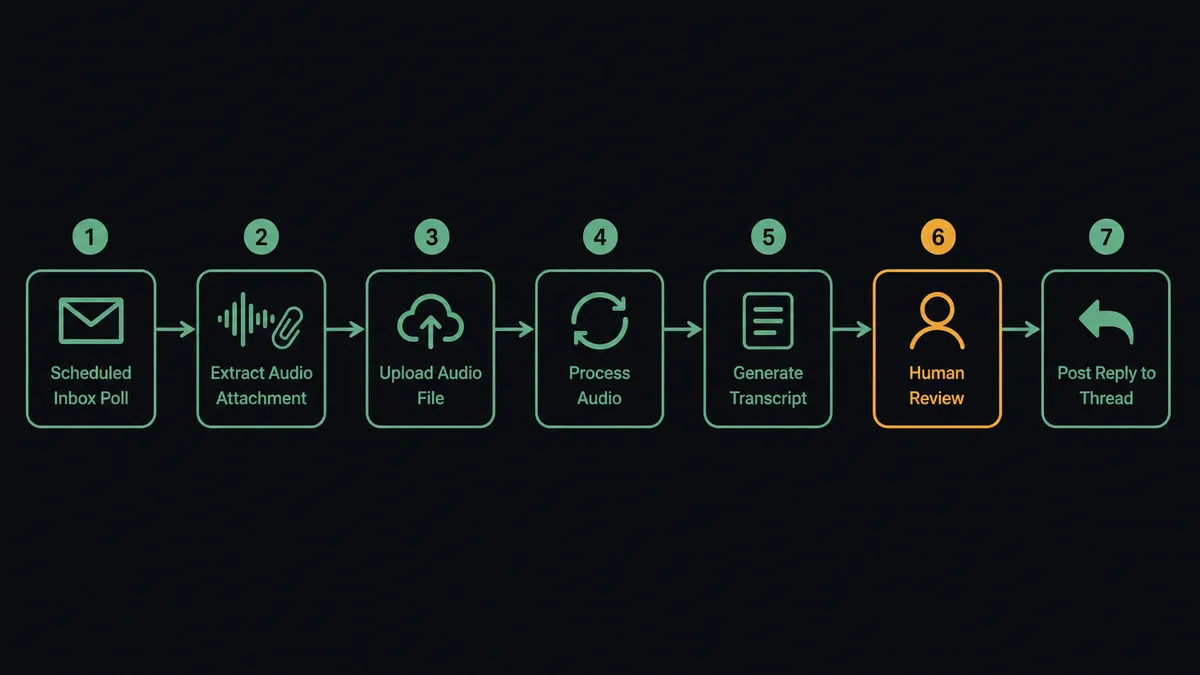
- Trigger: On a schedule, the workflow calls Get Emails on the recordings inbox and picks up messages with audio attachments.
- Read: Get Email pulls the message, its audio file, and the thread context.
- Transcribe: Upload Audio stages the file, and Transcribe and Wait holds the workflow until the transcript is ready.
- Structure: Get Paragraphs returns clean, readable text; Get Sentences gives finer granularity when timing matters.
- Summarize: Summarize Transcript produces the digest with the decisions and commitments surfaced.
- Deliver: Reply to Email posts the summary and transcript back on the original thread, where the audio arrived.
- File: Forward Email routes the result to the team folder or stakeholder who owns the follow-up.
That is the “just connect them” answer. Audio lands in the inbox, and searchable text with a summary comes back on the same thread, with no polling code, retry logic, or mailbox watcher for anyone to maintain.
Can an AI agent run it? (and why a human stays in the loop)
Yes, and the agent replaces the branching logic you would otherwise write by hand. It holds the pipeline as tools: Get Emails, Get Email, Upload Audio, Transcribe and Wait, Summarize Transcript, Get Paragraphs, Ask Questions About Transcript, Word Search, Run LLM Task, Reply to Email, Forward Email, Send Email. For each recording it reasons about what the audio is and what treatment fits. A voicemail becomes a two-line gist with a callback flag. A user interview gets the full structured transcript plus a themed summary via Run LLM Task. A recorded client call gets decisions and commitments extracted, and a follow-up drafted. You describe the behaviors; the agent picks the path, instead of you maintaining an if-tree that grows with every new audio source.
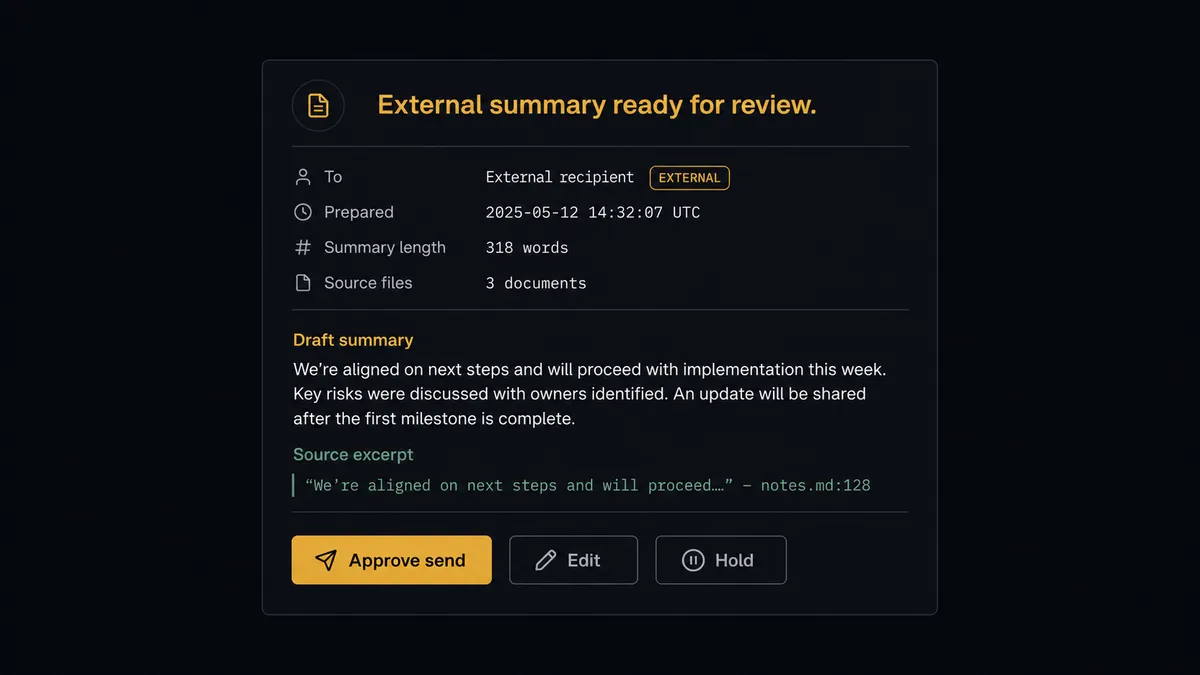
The consequential step is the external send. Reply to Email addressed inside your org is a productivity win with a cheap failure mode. The same action addressed outside the org is your company putting words in writing about what was said on a call. So the agent checks recipients before sending. Internal digests ship automatically. The moment any recipient is outside your domain, the agent stops and invokes a human-in-loop flow it holds as a callable tool. The workflow pauses and posts to the reviewer: “Summary ready for external send to [recipient]. Draft below. Source excerpts from the transcript attached. Approve, edit, or hold?” The reviewer sees the claim and the evidence side by side, because the agent pairs each summary point with the transcript passage it came from via Get Sentences. Only after approval does Reply to Email fire, and the reviewer, timestamp, and transcript reference land in the audit trail.
Prospects call this the digital andon cord: like Toyota’s production line pull cord, the workflow stops the line where a generated artifact becomes an outbound commitment, and a person clears it to ship.
FlowRunner vs LangChain
If you are a builder, LangChain is the honest comparison, and its strengths are real. It gives you full code-level control over exactly this kind of pipeline, a huge ecosystem of loaders and integrations, and no platform between you and the logic. For teams building a bespoke product feature around transcription, LangChain (or a plain script against both APIs) is a legitimate foundation.
The difference is everything around the logic. LangChain is a framework: the mailbox poller, the retry handling, the approval UX, the audit log, and the hosting are all yours to build and operate. FlowRunner is the operating layer where those come built in. Here is the honest side-by-side.
| What matters for this pair | FlowRunner | LangChain |
|---|---|---|
| Human-in-the-loop on external sends | Native. The agent invokes an approval flow as a callable tool, with the draft and source excerpts packaged for review | A pattern you design and build yourself: interrupt handling, review UI, and resume logic are your code |
| Who runs the flow | An AI agent with actions as tools, visible and editable on a canvas | Your Python or TypeScript, your orchestration, your debugging |
| Users included | Unlimited users on every tier; ops teammates can read and adjust the flow | A codebase; access is whatever your team builds around it |
| Bring your own AI keys | Yes, BYOK | Yes, keys are yours by definition |
| Self-hosted option | Yes, cloud-hosted or self-hosted | You host everything, always; that is the model |
| Pricing model | Transparent workflow-based tiers with clear execution limits | Free framework; the cost is the infrastructure and the engineering time it runs on |
If transcription intelligence is a core product feature you will invest engineering in for years, LangChain gives you control FlowRunner does not try to match. If it is an operational capability your team needs running this week, with review gates and an audit trail nobody has to build, this pairing on FlowRunner is the better fit.
Before and after
| Category | Before | After |
|---|---|---|
| Audio in the inbox | Recordings sit unplayed; content is invisible to search | Every attachment comes back as a transcript and digest on its own thread |
| Processing effort | Someone plays files at double speed and takes notes by hand | Upload Audio and Transcribe and Wait run unattended on every arrival |
| Finding the moment | Scrubbing a timeline hunting for one exchange | Word Search and Ask Questions About Transcript answer from the transcript directly |
| External summaries | Either nobody sends them, or drafts ship unreviewed | External sends pause for a named reviewer with source excerpts beside the draft |
| Maintenance | A builder owns a mailbox watcher, polling loop, and formatting code | The pipeline is a visual flow anyone on the team can read and adjust |
What you can build
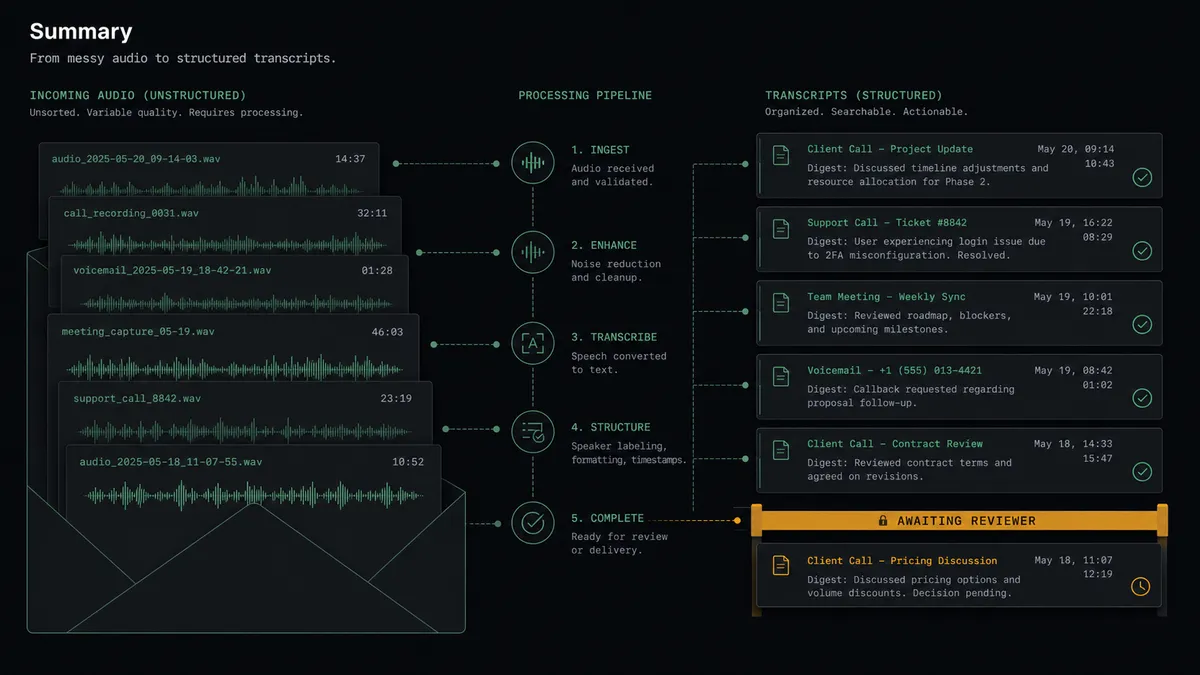
Inbox transcription service, hands off. The schedule fires Get Emails, the agent qualifies each audio attachment, runs Upload Audio and Transcribe and Wait, and replies on-thread with the digest from Summarize Transcript. The audio backlog stops existing.
External-send gate. A summary is addressed to a client. The agent pairs each claim with its transcript excerpt, invokes the human-in-loop tool, and only fires Reply to Email after a named reviewer approves. What leaves the org is always human-cleared.
Voicemail triage. Voicemail drops become two-line gists with urgency flags. The agent forwards genuine escalations with Forward Email immediately and batches the rest into a morning digest sent with Send Email.
Interview evidence base. Research recordings get full structured text via Get Paragraphs, themes via Run LLM Task, and stay queryable afterward: reply to any digest with a question and the agent answers it with Ask Questions About Transcript, grounded in that recording.
Compliance-aware retention. On your retention schedule, the agent lists processed recordings with List Transcripts and queues Delete Transcript behind the same approval pattern, so transcript data is purged deliberately, with a named decision on record.
Getting started
Start on the free plan: 100 executions a month, every integration included, no credit card required, plus 14 days of Professional for new accounts. Both connectors are available on every tier, and every tier includes unlimited users and unlimited workflows.
Explore the integration details:
- Outlook integration (21 actions covering email, calendar events, and contacts)
- AssemblyAI integration (13 actions covering transcription, summaries, subtitles, and transcript Q&A)
Start building free at flowrunner.ai or book a demo to see a live Outlook to AssemblyAI workflow, external-send review and all.
Frequently asked questions
Is it free to connect Outlook and AssemblyAI on FlowRunner?
You can build and run the connection on FlowRunner's free plan, which includes 100 executions a month and every integration with no credit card required, and new accounts also get 14 days of Professional. Both connectors are available on every FlowRunner tier, and every tier includes unlimited users and unlimited workflows.
Can I self-host the Outlook to AssemblyAI workflow?
Yes. FlowRunner offers a cloud-hosted option and a self-hosted option, so the connection can run inside your own environment.
Does the AI agent need my own OpenAI or Claude key?
FlowRunner uses a bring-your-own-keys model, so you connect the AI provider key you already have. You are not locked to one model.
What happens before a generated summary leaves the org?
The agent checks the recipients. A digest going to your own team ships automatically. The moment any recipient is outside your domain, the agent holds the draft, posts the summary next to the transcript excerpts it came from, and waits for a named reviewer to approve before Reply to Email or Send Email runs.
Which actions turn an email attachment into a transcript?
The workflow polls Get Emails on a schedule, pulls the audio from qualifying messages, sends it through Upload Audio and Transcribe and Wait, then uses Summarize Transcript for the digest and Get Paragraphs when the full structured text is needed.
Can I ask questions about a recording instead of reading the whole transcript?
Yes. The agent holds Ask Questions About Transcript and Word Search as tools, so you can reply to a digest with a question like who committed to the deadline, and get an answer grounded in that specific transcript.