Sync Razorpay Payments to QuickBooks Online Automatically
Connect Razorpay and QuickBooks Online so every captured payment posts as a paid invoice automatically, and an AI agent holds refunds for a named approver before money moves.
How do you connect Razorpay to QuickBooks Online?
FlowRunner checks Razorpay’s List Payments on a schedule for newly captured payments, pulls the full record with Get Payment, matches or creates the buyer using Get Customer and Create Customer in QuickBooks Online, then posts the invoice and payment with Create Invoice and Create Payment so the invoice shows paid within minutes of capture. FlowRunner is a visual AI-agent orchestration platform where automations run autonomously and pause for human judgment on the steps that carry real consequence. The same connection can run as a straight sync or as an AI agent that reasons about each payment and pauses for a named approver before a refund reverses money that is already booked in both systems.
The problem it solves
Right now, the AP or billing person closes out Razorpay payments by hand. They pull a settlement report, cross-reference payment IDs against open invoices in QuickBooks Online, and mark each one paid one at a time. Payment links that sit unpaid get chased when someone remembers to check, not on a schedule. When a refund comes in, it gets typed into an email thread or a spreadsheet with no consistent record of who signed off, and the corresponding QuickBooks invoice often stays open or paid on the books long after Razorpay has already sent the money back.
The exceptions are what actually eat the day. A payment settles for a slightly different amount than the order. A refund request comes in on a payment that was already partially refunded. A bank deposit does not tie out to the payments it should contain. None of these are common, but each one currently means someone stops what they are doing, opens both systems, and reconstructs what happened by hand. That is time the billing manager does not get back, and it is exactly the kind of thing that falls through the cracks during a busy week.
How it works: the connection
The flow starts on a schedule rather than a webhook. Razorpay does not expose triggers in the action library, so FlowRunner calls List Payments at the interval you set and pulls anything captured since the last check. For each new payment, Get Payment loads the full record: amount, method, order ID, and customer contact.
From there the agent works the QuickBooks Online side. Get Customer checks for an existing record using the contact details from Razorpay; if none exists, Create Customer sets one up. Create Invoice builds the invoice from the order, and Create Payment records the payment against it and marks it paid. A summary posts to the accounting Slack channel with the amount and invoice number, the same pattern QuickBooks Online’s own Stripe sync scenario uses, applied here to Razorpay instead.
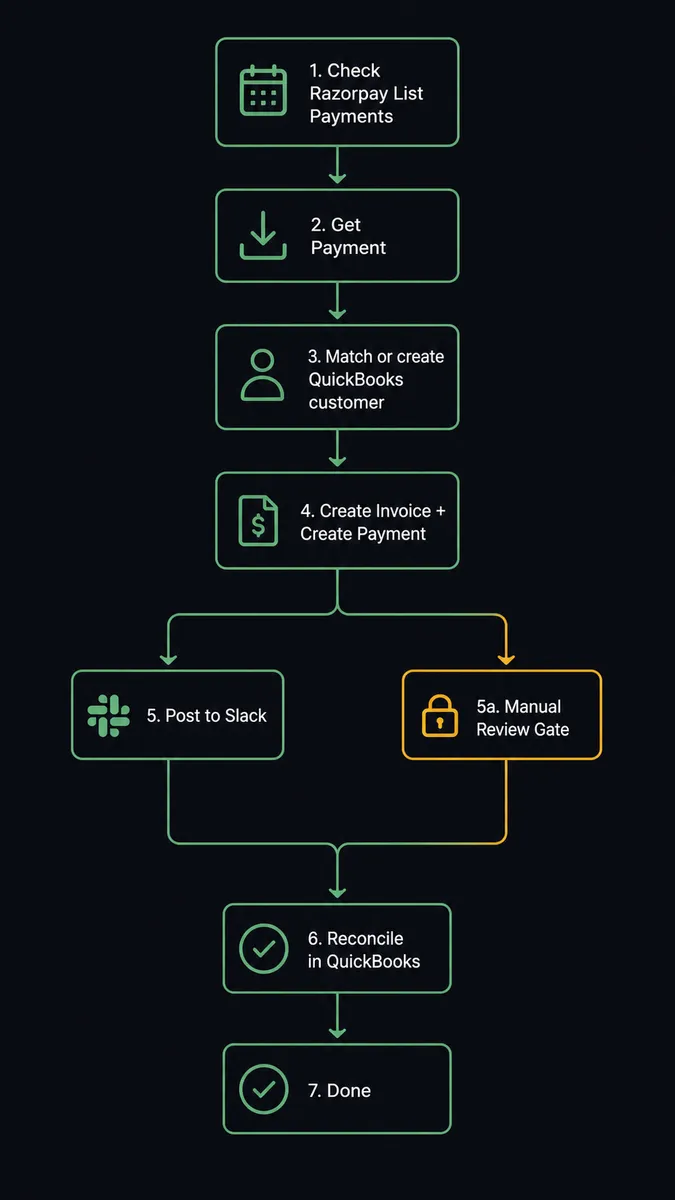
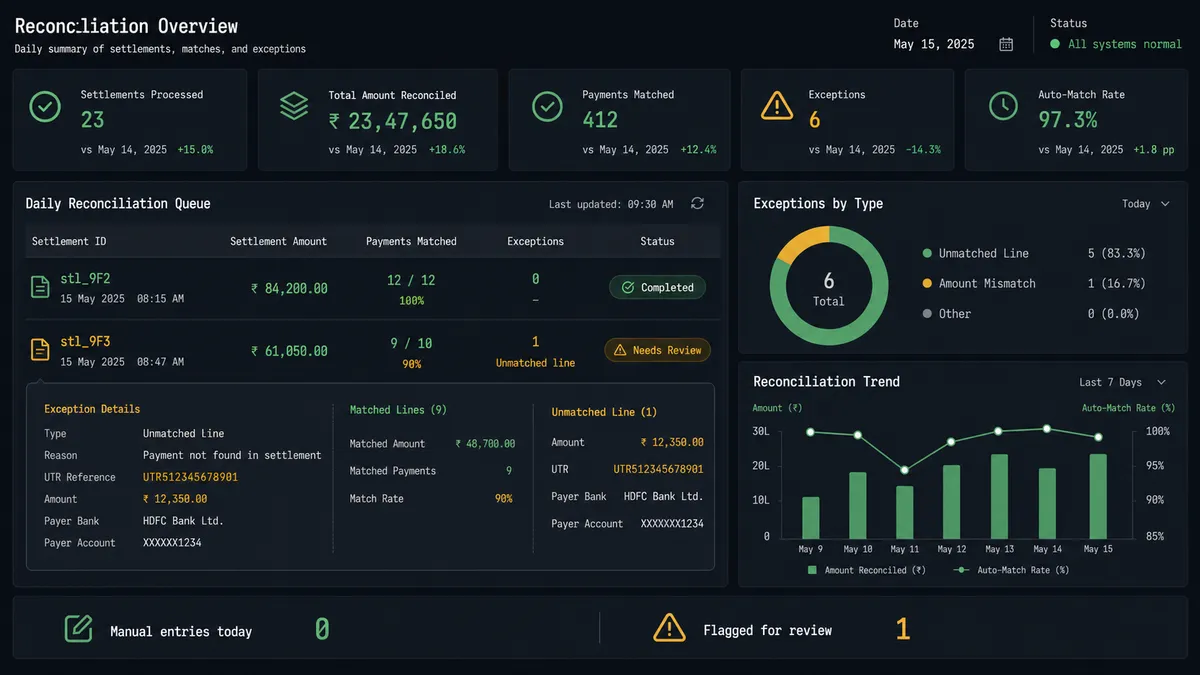
Settlement reconciliation runs the same way, on its own schedule. Get Combined Settlement Recon pulls each day’s settlement broken into its component payments, refunds, and fees, and the agent appends the lines to the finance workbook. A settlement that does not tie out gets flagged with the UTR reference from Get Settlement, so whoever investigates starts with the bank trace already in hand instead of starting from zero.
Can an AI agent run it? (and why a human stays in the loop)
A plain sync tool can move a captured payment into a paid invoice. It cannot decide what to do when a customer asks for money back. That decision touches two systems at once: Create Refund pulls funds out of Razorpay with no way to reverse it through the API, and the matching QuickBooks invoice has to be voided or credited so the books still tell the truth. That is the step where the agent stops being a script and starts being a decision-maker.
When a refund request comes in, the agent first calls List Payment Refunds on the payment so it never proposes a refund that has already partly happened. Then it packages the context: the payment ID, the amount, how long ago it was captured, whether any prior refund exists, and the linked QuickBooks invoice number. It posts that to the finance channel with a real choice, not a rubber stamp: approve the full refund at normal speed, approve an instant refund at the extra fee, or decline. The speed question matters because instant settlement costs real money, and that is a call a person should make, not a default. Only after a named approver responds does the agent call Create Refund with the approved amount and speed, then void the matching invoice in QuickBooks Online so both systems agree.
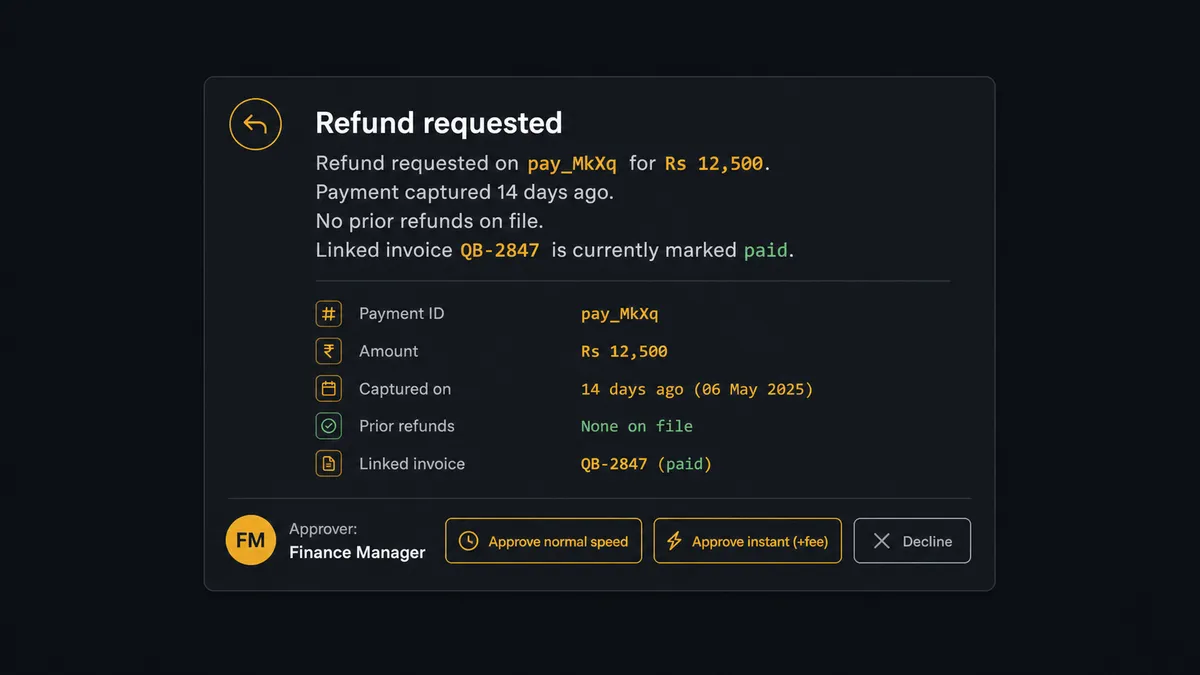
This is not a threshold rule like “refunds over $500 need approval.” It is the agent reading the specific payment in front of it and deciding, on its own judgment, that money leaving the account is exactly the kind of step that needs a person. Prospects who have seen this pattern before call it a digital andon cord: the agent pulls the cord and stops the line the moment it hits a decision with real consequence, then hands control back once a human weighs in.
FlowRunner vs Zapier
Zapier is a genuinely fast way to wire Razorpay to QuickBooks Online for a simple case, and its app catalog and multi-step Zap builder are familiar to almost any ops team without a technical background. Where it runs out of road is the refund and reconciliation logic above: getting a human into that decision means bolting on a manual review step or custom code, not something the platform does natively.
| Capability | Zapier | FlowRunner |
|---|---|---|
| Human approval before a refund or void | Manual review step or custom code add-on | Native: the agent calls a human-in-loop flow as a tool before Create Refund runs |
| Users included | Priced per user on higher plans | Unlimited users on every tier |
| AI provider for the agent | Zapier’s own AI credits | Bring your own key (Claude or OpenAI) |
| Deployment | Cloud only | Cloud or self-hosted on Enterprise |
| Pricing structure | Per-task pricing | Transparent workflow-based tiers with clear execution limits |
Before and after
| Metric | Before | After |
|---|---|---|
| Payment-to-invoice matching | Payment links and invoices tracked in inboxes and spreadsheets, followed up when someone remembers | Every captured payment matched to an invoice and marked paid inside the flow |
| Refund authorization | Money returned with no consistent record of who approved it | Refunds move only after a named approver responds to the specific amount and speed |
| Duplicate refund risk | Checked manually, if at all, against scattered records | Checked automatically against List Payment Refunds before any refund is proposed |
| Settlement reconciliation | Bank deposits matched to payments in a month-end scramble | Each settlement broken into component payments, refunds, and fees daily |
| Bookkeeper hands-on time | Every payment entered into QuickBooks Online by hand | Zero manual entry for routine captures; time spent only on flagged exceptions |
What you can build
Payment-to-paid-invoice sync. Every Razorpay payment captured through orders, payment links, or QR codes becomes a matched QuickBooks Online invoice marked paid, with no bookkeeper touching either system for the routine case.
Refund with two-system sign-off. A refund request checks prior refunds, packages the payment and invoice context, and waits for a named approver before Create Refund and Void Invoice run together, so Razorpay and QuickBooks Online never drift apart.
Daily settlement reconciliation. Get Combined Settlement Recon feeds a finance workbook automatically, with unmatched lines flagged by UTR reference so the person investigating starts with the trace already done.
Subscription revenue tracking. As Create Subscription and Create Subscription Add-on generate recurring charges in Razorpay, the agent keeps QuickBooks Online’s revenue records current without a person re-entering each cycle.
Weekly P&L digest built on clean revenue data. With Razorpay settlements reconciled daily, the Monday Get Profit and Loss pull to the finance channel reflects revenue that has already been checked against the bank, not just what QuickBooks shows on paper.
Common questions
Is it free to connect Razorpay and QuickBooks Online on FlowRunner? FlowRunner has a free plan with 100 executions a month, every integration included, and no credit card required, and new accounts get 14 days of Professional on top. No credit card is required to start.
Does the connection need a Razorpay webhook to work? No. Razorpay does not expose triggers in FlowRunner’s action library, so the flow runs on a scheduled check against List Payments instead of waiting on a webhook. QuickBooks Online works the same way, checked on a schedule rather than a native trigger.
Can I self-host this flow instead of running it in FlowRunner’s cloud? Yes, on the Enterprise tier. Self-hosted Enterprise gives you the same Razorpay and QuickBooks Online actions running on your own infrastructure with full audit retention.
Does the agent need my own OpenAI key? FlowRunner uses a bring-your-own-key model for AI providers, so the agent reasoning over each captured payment runs on your own Claude or OpenAI key rather than a shared pool.
What happens when the agent isn’t sure whether to issue a refund? It stops. The agent posts the payment amount, age, and refund speed options to a Slack channel and waits for a named approver before Create Refund runs, and the decision is logged with a timestamp.
How does the flow avoid issuing a duplicate refund? Before proposing any refund, the agent calls List Payment Refunds against the payment to check what has already been returned, so the amount it puts in front of the approver already accounts for prior refunds.
Getting started
FlowRunner has a free plan with 100 executions a month, every integration included, and no credit card required, and new accounts get 14 days of Professional on top. Review the full action lists on the Razorpay integration page and the QuickBooks Online integration page, then start building at flowrunner.ai or book a walkthrough at calendly.com/flowrunner/intro.
Frequently asked questions
Is it free to connect Razorpay and QuickBooks Online on FlowRunner?
FlowRunner has a free plan with 100 executions a month, every integration included, and no credit card required, and new accounts get 14 days of Professional on top. No credit card is required to start.
Does the connection need a Razorpay webhook to work?
No. Razorpay does not expose triggers in FlowRunner's action library, so the flow runs on a scheduled check against List Payments instead of waiting on a webhook. QuickBooks Online works the same way, checked on a schedule rather than a native trigger.
Can I self-host this flow instead of running it in FlowRunner's cloud?
Yes, on the Enterprise tier. Self-hosted Enterprise gives you the same Razorpay and QuickBooks Online actions running on your own infrastructure with full audit retention.
Does the agent need my own OpenAI key?
FlowRunner uses a bring-your-own-key model for AI providers, so the agent reasoning over each captured payment runs on your own Claude or OpenAI key rather than a shared pool.
What happens when the agent isn't sure whether to issue a refund?
It stops. The agent posts the payment amount, age, and refund speed options to a Slack channel and waits for a named approver before Create Refund runs, and the decision is logged with a timestamp.
How does the flow avoid issuing a duplicate refund?
Before proposing any refund, the agent calls List Payment Refunds against the payment to check what has already been returned, so the amount it puts in front of the approver already accounts for prior refunds.