How to Connect Paddle with QuickBooks Online (With or Without an AI Agent)
Connect Paddle billing events to QuickBooks Online automatically so every subscription, transaction, and refund lands in your books without manual entry, optionally as an AI agent that pauses for human approval before money moves.
How do you connect Paddle to QuickBooks Online?
When a Paddle transaction is created or a subscription changes, a FlowRunner agent calls Get Transaction or List Subscriptions in Paddle, then calls Create Invoice, Create Bill, or Create Payment in QuickBooks Online to record it. FlowRunner is a visual AI-agent orchestration platform where automations run autonomously and pause for human judgment on the steps that carry real consequence. The same connection that syncs routine payments can also run as an AI agent that reads each transaction, decides whether it fits the normal pattern, and routes anything unusual to your finance team before the entry posts.
The problem: Paddle data and your books are always out of sync
Your billing team works in Paddle. Your accounting team works in QuickBooks Online. Every payment, subscription change, refund, and credit that happens in one system needs a matching entry in the other. Right now, that work lands on someone’s plate.
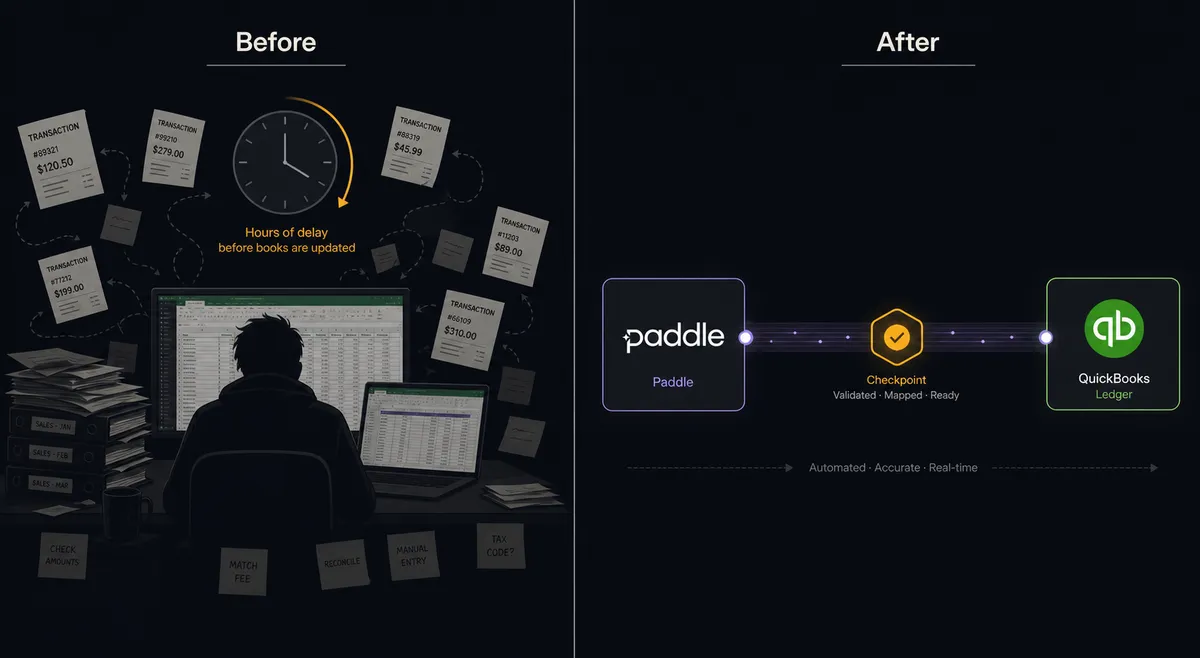
An AP clerk checks Paddle transactions at the end of the week, exports what they can, and keys the rest into QuickBooks by hand. Subscriptions that pause, cancel, or upgrade generate billing events that nobody tracks consistently. When a refund goes out through Paddle, it sits in a spreadsheet until someone creates the adjustment in QuickBooks and reconciles the difference. The books are always a few days behind, exceptions fall through the cracks, and month-end close takes longer than it should because the data between systems was never quite current.
The larger the billing volume, the worse this gets. At 50 transactions a week it is manageable. At 500 it becomes a full-time job. And every manual entry is a reconciliation risk.
How it works: the connection
FlowRunner connects Paddle and QuickBooks Online through a flow that runs the moment a billing event happens. Because Paddle’s integration is action-based rather than trigger-based, you start the flow from an upstream event: a webhook from your product backend when a transaction completes, a scheduled sweep that checks for new past-due subscriptions, or a CRM action when a deal closes.
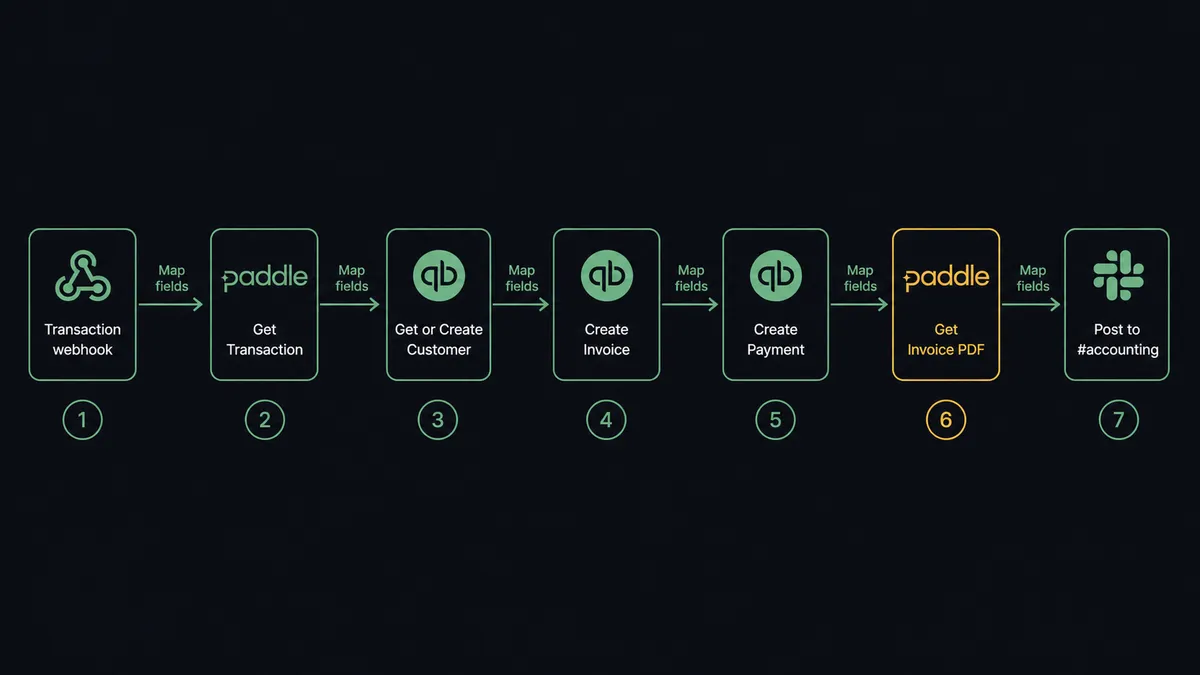
Once the flow fires, the agent has 29 Paddle actions and 56 QuickBooks Online actions as its tools. Here is the path for a standard payment sync:
- The product backend sends a webhook when a Paddle transaction completes.
- The agent calls Get Transaction in Paddle to fetch the full record: customer ID, amount, line items, invoice PDF URL.
- The agent calls Get Customer in QuickBooks Online to find the matching customer record. If none exists, it calls Create Customer first.
- The agent calls Create Invoice in QuickBooks Online with the transaction line items and the correct account mapping.
- The agent calls Create Payment in QuickBooks Online to mark the invoice paid.
- The agent fetches the invoice PDF from Paddle with Get Transaction Invoice PDF and attaches it for reference.
- The agent posts a summary to the accounting Slack channel: transaction ID, amount, customer, and the QuickBooks invoice number.
The same pattern applies to subscription lifecycle events. When a subscription goes past due, the agent calls List Subscriptions filtered to the past-due status, surfaces the accounts in QuickBooks with List Invoices to find open AR, and starts a dunning sequence. When a subscription is cancelled, the agent can void the open invoice in QuickBooks and record the final state.
Can an AI agent run it? (And why a human stays in the loop)
A standard integration tool syncs data on a fixed mapping. An AI agent reads the data and decides what to do. That distinction matters most when the situation does not fit the template.
The moment that carries real consequence in Paddle is the adjustment. A Create Adjustment call in Paddle issues a refund or applies a credit against a billed transaction. Done wrong, it returns money to the wrong customer, against the wrong transaction, for the wrong amount. An agent should never create one on its own.
Here is how the agent handles a refund request. A customer writes in saying their last invoice was double-billed. The support ticket triggers the flow. The agent calls Get Transaction in Paddle and pulls the billing record. It calls List Adjustments to check whether a refund has already been issued against this transaction. It calls Get Customer Credit Balances to see whether a credit exists that should have applied instead. Then it evaluates what it found.
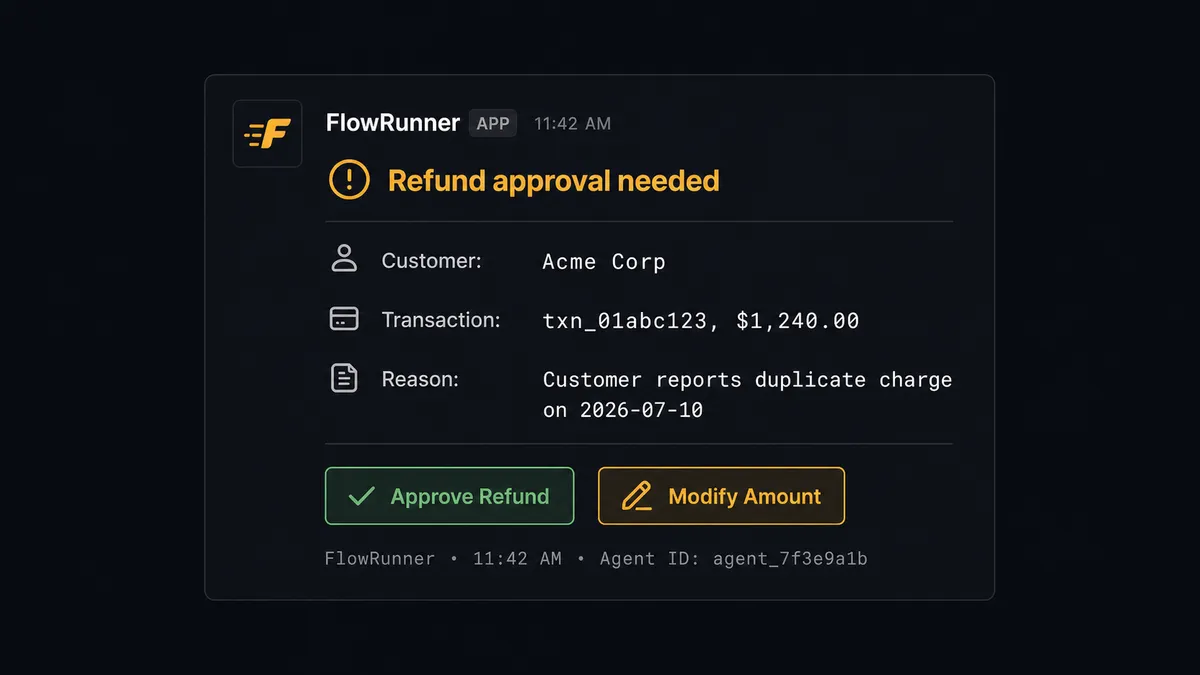
If the transaction is clean and the refund amount matches the invoice line item, the agent has the information it needs to act. But it does not act. It invokes the human-in-loop flow as a callable tool. It sends the finance team a Slack message with the full context: the customer name, the transaction ID, the original amount, the proposed refund amount, and a one-line summary of why the request appears valid. The options are Approve or Modify. A finance manager responds in seconds. The agent calls Create Adjustment with exactly the amount that was approved, creates the corresponding record in QuickBooks, and captures the approver and timestamp in the audit trail.
This is not a rule. The threshold is not “$500 or more gets reviewed.” The agent might escalate a $90 refund from a customer it has never seen before and auto-prepare a $3,000 credit for a customer with three years of clean billing history, because the context told it something was off. Prospects call this a digital andon cord. The agent stops the line when it hits uncertainty.
FlowRunner vs Zapier
If you are already using Zapier for Paddle-to-QuickBooks syncs, here is an honest comparison. Zapier is reliable, has a broad integration library, and its visual interface is easy to learn. For simple one-trigger-one-action syncs it gets the job done.
The gaps appear when the sync needs judgment.
| Capability | Zapier | FlowRunner |
|---|---|---|
| Human approval before refunds post | Not available | Native: agent pauses and routes to Slack, email, or WhatsApp |
| AI agent reads transaction and decides the action | Not available | Built in: agent picks tools based on the data it evaluates |
| Unlimited users on every plan | No (user caps on lower tiers) | Yes: every tier, no seat limits |
| BYOK for AI provider | Not available | Yes: connect Claude, OpenAI, or another provider |
| Audit trail with approver identity and timestamp | Not available | Captured on every human-gate decision |
| Self-host option | No | Yes: Community Edition free; Enterprise self-hosted available |
Zapier is a good fit for teams that want straightforward syncs and will never need to route exceptions to a human mid-flow. FlowRunner is for teams where the billing data sometimes needs a second look before it lands in the books.
Before and after
| Category | Before | After |
|---|---|---|
| Payment recording | Bookkeeper keys Paddle transactions into QuickBooks by hand at week’s end | Agent creates the QuickBooks invoice and payment within seconds of the Paddle transaction |
| Refund approval | Refunds issued informally with no record of who approved them or when | Every refund routes to finance for Slack approval; approver and timestamp written to audit trail |
| Subscription changes | Past-due subscriptions discovered during manual weekly sweep | Agent calls List Subscriptions daily, surfaces past-due accounts automatically |
| AR visibility | Invoice status open until someone runs reconciliation | Invoice marked paid in QuickBooks the moment Paddle confirms the charge |
| Month-end close | Finance team spends days reconciling Paddle and QuickBooks records | Entries post in real time; close is a review, not a data-entry sprint |
What you can build
Subscription billing to invoice sync. When a product webhook fires on a new Paddle subscription, the agent calls Create Customer in QuickBooks Online if the customer does not exist, then Create Invoice with the subscription line items and Create Payment to mark it paid. New subscribers hit the books without anyone touching QuickBooks.
Refund and credit workflow with finance approval. A support ticket triggers the flow. The agent calls Get Transaction in Paddle and List Adjustments to check for prior refunds. If the refund is valid, it pauses for finance approval via Slack before calling Create Adjustment in Paddle and Void Payment or Create Bill in QuickBooks to balance the entry.
Past-due dunning and AR aging. A daily scheduled flow calls List Subscriptions in Paddle filtered to past-due status, cross-references open invoices with List Invoices in QuickBooks, and starts a dunning sequence over email. Accounts that respond get their subscription resumed with Resume Subscription. Accounts that do not surface to the AR team with full context.
Promotion and discount tracking. Marketing creates a discount in Paddle with Create Discount. The agent records the discount terms in QuickBooks as a memo item and monitors redemption by calling List Transactions filtered to the discount code. Finance sees promotion impact in the books without a separate tracking spreadsheet.
Common questions
Is it free to connect Paddle and QuickBooks Online on FlowRunner? FlowRunner has a free plan with 100 executions a month, every integration included, and no credit card required, and new accounts get 14 days of Professional on top. After that, Growth is $45 per month and includes unlimited users and workflows.
Can I self-host this integration? Yes. FlowRunner offers a self-hosted Community Edition at no cost, and an Enterprise self-hosted tier for teams that need clustering and full compliance features.
Does the agent need my own OpenAI or AI provider key? FlowRunner uses a BYOK model. You connect your own key from Claude, OpenAI, or another supported provider. The platform orchestrates the agent; you keep control of the AI credentials.
What happens when the agent is not sure what to do? The agent invokes a human-in-loop flow as a callable tool. It pauses the workflow, sends full context to the right person over Slack, email, or WhatsApp, and resumes once the human responds. The decision and the approver are written to the audit trail.
Does FlowRunner replace my bookkeeper? No. The agent handles routine entries so your bookkeeper can focus on exceptions and review. Refunds, credits, and high-value bills still route to a human before they post.
What if Paddle has no triggers? Paddle’s integration is action-based. You trigger the flow from another system event, a webhook from your product, a scheduled run, or an upstream CRM action, and the agent calls Paddle actions as tools inside that flow.
Getting started
FlowRunner has a free plan with 100 executions a month, every integration included, and no credit card required, and new accounts get 14 days of Professional on top. Any real email address works; disposable domains are not accepted.
Connect both integrations and build your first flow:
Start your trial at flowrunner.ai or book a 20-minute intro at calendly.com/flowrunner/intro if you want a walkthrough of the Paddle and QuickBooks setup with human-in-loop configured for your approval thresholds.
Frequently asked questions
Is it free to connect Paddle and QuickBooks Online on FlowRunner?
FlowRunner has a free plan with 100 executions a month, every integration included, and no credit card required, and new accounts get 14 days of Professional on top. After that, Growth is $45 per month and includes unlimited users and workflows.
Can I self-host this integration?
Yes. FlowRunner offers a self-hosted Community Edition at no cost, and an Enterprise self-hosted tier for teams that need clustering and full compliance features.
Does the agent need my own OpenAI or AI provider key?
FlowRunner uses a BYOK model. You connect your own key from Claude, OpenAI, or another supported provider. The platform orchestrates the agent; you keep control of the AI credentials.
What happens when the agent is not sure what to do?
The agent invokes a human-in-loop flow as a callable tool. It pauses the workflow, sends full context to the right person over Slack, email, or WhatsApp, and resumes once the human responds. The decision and the approver are written to the audit trail.
Does FlowRunner replace my bookkeeper?
No. The agent handles routine entries so your bookkeeper can focus on exceptions and review. Refunds, credits, and high-value bills still route to a human before they post.
What if Paddle has no triggers?
Paddle's integration is action-based. You trigger the flow from another system event, a webhook from your product, a scheduled run, or an upstream CRM action, and the agent calls Paddle actions as tools inside that flow.