How to Connect QuickBooks Online with Braintree (With or Without an AI Agent)
Connect Braintree transactions to QuickBooks Online payments for automatic reconciliation, optionally as an AI agent that books settled charges on its own and pauses for a human before Refund Transaction moves money back out.
How do you connect QuickBooks Online to Braintree?
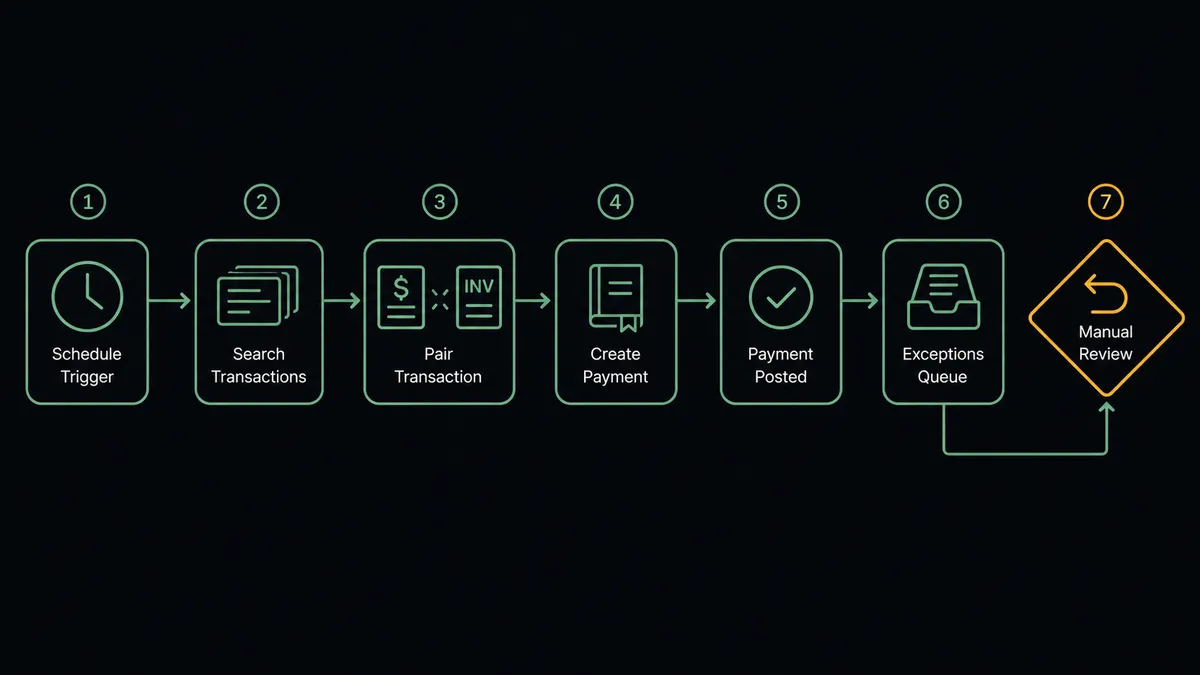
You connect QuickBooks Online to Braintree with a scheduled workflow, because neither connector publishes webhook triggers: at the interval you choose, FlowRunner calls Search Transactions in Braintree to pull charges settled since the last run, reads each with Get Transaction, matches the payer in QuickBooks Online with Get Customer, and records the money with Create Payment against the invoice found via List Invoices. FlowRunner is a visual AI-agent orchestration platform where automations run autonomously and pause for human judgment on the steps that carry real consequence. When the connection runs as an AI agent, the agent also notices what does not reconcile, doubled charges, amount mismatches, orphan payments, and it stops for a named human before Refund Transaction or Void Transaction moves any money back out.
The problem it solves
If you take payments through Braintree and keep books in QuickBooks Online, someone on your team performs the monthly ritual: export the settlement report, line it up against open invoices, and tick off matches row by row. Most rows match. The job is really about the ones that do not, and finding them means eyeballing hundreds of rows that did. It eats a day or two every close, it happens weeks after the transactions themselves, and until it happens, the books show open invoices for money that already settled.
The mismatches are the expensive part. A customer double-clicked checkout and was charged twice; nobody notices until the chargeback arrives, which costs a fee and a dispute instead of a gracious refund. A settled amount differs from the invoice because of a partial payment nobody recorded. A payment arrives with no matching invoice at all, and it sits unapplied while the customer’s account shows past due. Each one is small; together they are why close takes so long and why the AR aging report cannot be fully trusted between reconciliations.
How it works: the connection
The connection reads Braintree on a schedule and writes to QuickBooks Online. Here is the plain version, grounded in the real connector actions.
- Trigger: On a schedule, the workflow calls Search Transactions in Braintree, filtered to charges settled since the last run.
- Read: Get Transaction pulls each charge’s amount, settlement status, and customer details.
- Match the invoice: List Invoices finds the open QuickBooks Online invoice with the matching amount and customer.
- Match the payer: Get Customer confirms the customer record, and Create Customer fills the gap for a first-time payer.
- Record the payment: Create Payment books the settled charge against the matched invoice, with the Braintree transaction ID in the reference, so the invoice closes and the trail is bidirectional.
- Capture the stragglers: For authorizations sitting uncaptured past your window, Capture Transaction completes them so revenue is not stranded in authorization limbo.
- Flag the misfits: Anything that does not match cleanly, wrong amount, no invoice, possible duplicate, lands on an exceptions list instead of being force-booked.
That is the “just connect them” answer. The matching rows book themselves continuously, and reconciliation shrinks from a spreadsheet marathon to reviewing a short exceptions list.
Can an AI agent run it? (and why a human stays in the loop)
Yes, and the agent’s contribution is exactly the part the export-and-tick ritual does worst: judgment about the rows that do not match. The agent holds both connectors’ actions as tools: Search Transactions, Get Transaction, Capture Transaction, Refund Transaction, Void Transaction, and on the books side Get Customer, Create Payment, Void Payment, Delete Payment, List Invoices. Clean matches get booked without ceremony. For the exceptions, the agent reasons like a careful bookkeeper: two identical amounts from the same customer minutes apart reads as a duplicate; an amount short by a consistent percentage reads as a partial payment; a payment with no invoice reads as a prepayment to hold, not an error to delete.
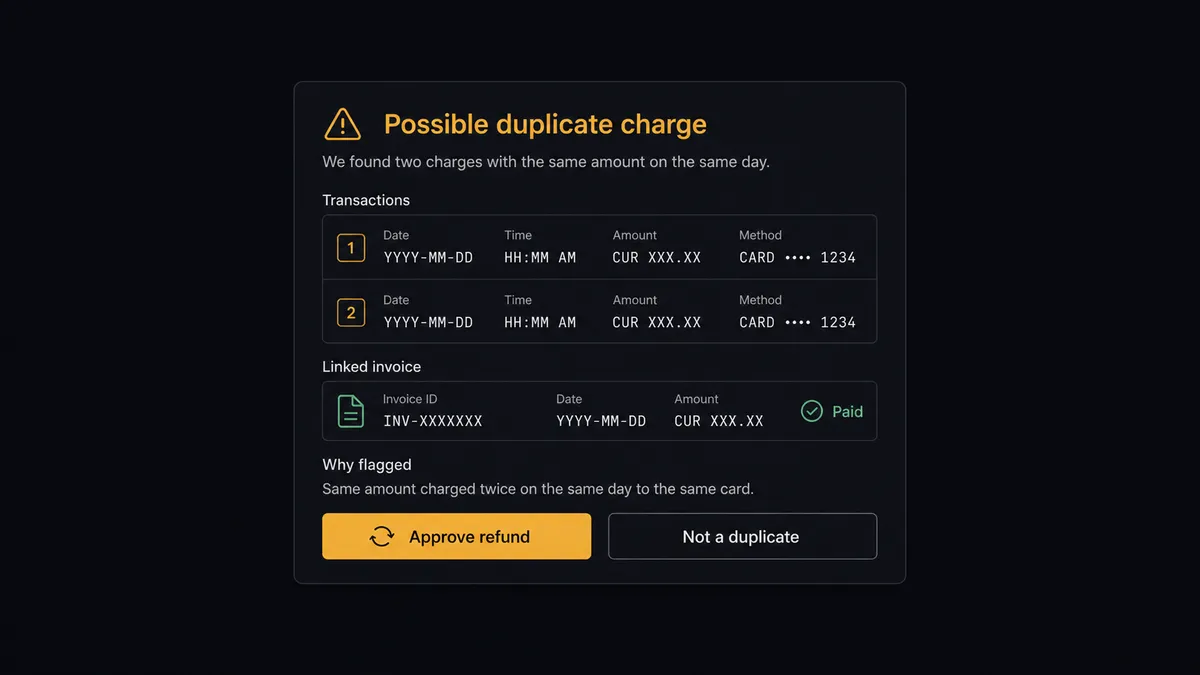
The consequential steps are Refund Transaction and Void Transaction, because they move money out of the business, and the paired books corrections, Void Payment and Delete Payment, because they rewrite the record. The agent proposes; it never disposes. For a suspected duplicate, it invokes a human-in-loop flow it holds as a callable tool, pauses the workflow, and posts: “Two Braintree charges for [customer] with the same amount, minutes apart. One matched invoice. Refund the second charge?” The approver sees both transactions, the invoice, and the agent’s reasoning, and decides in one click. Only then does Refund Transaction run, with the books corrected in the same workflow and the approver’s name and timestamp in the audit trail beside both entries.
Prospects call this pattern a digital andon cord. Like Toyota’s production line pull cord, the workflow stops the line the moment money would move in reverse, and one person restores motion with a decision backed by the full picture, not a hunch at month-end.
FlowRunner vs Zapier
Zapier connects both services and has real strengths: the largest connector catalog in the category, an editor anyone can learn, and templates that will move a transaction record from one system to another with minimal setup. For notifications or simple record-copying between Braintree and your other tools, it is quick and dependable.
The difference is that reconciliation is not record-copying; it is matching plus judgment plus a money-moving decision at the end. FlowRunner runs the connection as an AI agent with a native human gate on the reversal actions.
| What matters for this pair | FlowRunner | Zapier |
|---|---|---|
| Human-in-the-loop on Refund Transaction and Void Transaction | Native. The agent posts the case with both records and its reasoning before any reversal | Available by inserting approval-style steps, not a native agent decision |
| Who runs the flow | An AI agent matches, classifies exceptions, picks actions as tools | Predefined step sequence you configure per Zap |
| Users included | Unlimited users on every tier | Priced by task volume; seats vary by plan |
| Bring your own AI keys | Yes, BYOK. Connect the AI provider key you already have | AI features tied to Zapier’s own AI offering |
| Self-hosted option | Yes, cloud-hosted or self-hosted | Cloud only |
| Pricing model | Transparent workflow-based tiers | Per-task pricing, and per-transaction reconciliation steps consume tasks fast |
If you need a settled charge to post a Slack message or append a row somewhere, Zapier does that well. If you want continuous reconciliation with a short exceptions list and a named approver on every refund, this pairing is where FlowRunner is the better fit.
Before and after
| Category | Before | After |
|---|---|---|
| Reconciliation | Export the settlement report and tick rows against invoices at month-end | Clean matches book themselves via Create Payment on every scheduled run |
| Duplicate charges | Discovered when the chargeback arrives, with a fee attached | Flagged by the agent the day they settle, refunded only after approval |
| Unapplied payments | Sit unmatched while the customer’s account shows past due | Held as flagged prepayments with the context attached for a quick decision |
| Stranded authorizations | Expire uncaptured and become support tickets | Capture Transaction completes them inside the capture window |
| Accountability | Refunds issued from the gateway console with no books-side record of who or why | Every reversal carries a named approver and timestamp, books corrected in the same workflow |
What you can build
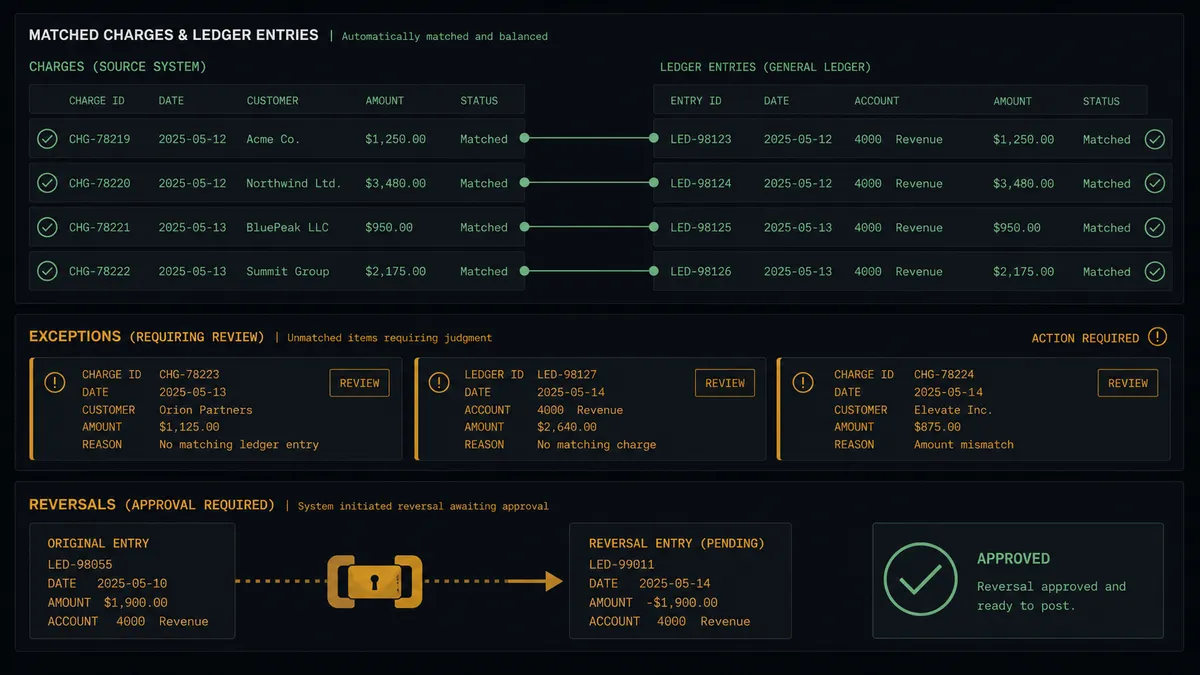
Continuous settlement booking. The scheduled run pulls settled charges with Search Transactions, matches invoices via List Invoices, and records money with Create Payment, so the books track the gateway by the day instead of by the month.
Duplicate-charge guard. The agent compares each new charge against recent history from Search Transactions, flags same-amount same-customer pairs, and routes the refund decision through the human gate before the customer ever notices, let alone disputes.
Authorization sweeper. A daily pass finds authorizations aging toward expiry and runs Capture Transaction on the ones tied to fulfilled orders, with anything ambiguous escalated instead of captured blind.
Prepayment handler. Payments with no matching invoice become flagged cases: the agent proposes either creating the invoice with Create Invoice or holding the credit, and a person picks, so unapplied cash never just accumulates.
Refund-with-books-correction. When support grants a refund, the workflow runs Refund Transaction after approval and immediately corrects QuickBooks Online, voiding or adjusting the payment record, so the gateway and the ledger never tell different stories.
Getting started
Start on the free plan: 100 executions a month, every integration included, no credit card required, plus 14 days of Professional for new accounts. Both connectors are available on every tier, and every tier includes unlimited users and unlimited workflows.
Explore the integration details:
- QuickBooks Online integration (56 actions covering customers, invoices, payments, bills, and P&L reporting)
- Braintree integration (8 actions covering charges, captures, refunds, and transaction search)
Start building free at flowrunner.ai or book a demo to see a live QuickBooks Online to Braintree workflow, refund approval and all.
Frequently asked questions
Is it free to connect QuickBooks Online and Braintree on FlowRunner?
You can build and run the connection on FlowRunner's free plan, which includes 100 executions a month and every integration with no credit card required, and new accounts also get 14 days of Professional. Both connectors are available on every FlowRunner tier, and every tier includes unlimited users and unlimited workflows.
Can I self-host the QuickBooks Online to Braintree workflow?
Yes. FlowRunner offers a cloud-hosted option and a self-hosted option, so the connection can run inside your own environment.
Does the AI agent need my own OpenAI or Claude key?
FlowRunner uses a bring-your-own-keys model, so you connect the AI provider key you already have. You are not locked to one model.
What happens when the agent spots what looks like a duplicate charge?
It does not refund on its own. It packages both transactions from Get Transaction, the matched invoice from QuickBooks Online, and its reasoning, then posts the case to your team's channel. Only after a named person approves does Refund Transaction run, and the reversal is recorded in the books in the same workflow.
Neither QuickBooks Online nor Braintree has a webhook trigger, so how does the workflow start?
It runs on a schedule. FlowRunner calls Search Transactions in Braintree at the interval you choose to pull charges settled since the last run, and List Invoices and List Payments in QuickBooks Online to match them. Nothing depends on either vendor pushing events.
Which Braintree actions can the workflow take on a transaction?
Get Transaction and Search Transactions for reading, Capture Transaction for authorizations awaiting capture, and Refund Transaction and Void Transaction for reversals. The two reversal actions always sit behind the human approval step, and Charge Payment Method is available for workflows that also originate charges.