How to Connect Parseur with Clarifai (With or Without an AI Agent)
Connect Parseur document extraction to Clarifai computer vision so inbound documents and their images are parsed, classified, and indexed together, with an AI agent that pauses for a human before low-confidence predictions become labeled training data.
How do you connect Parseur to Clarifai?
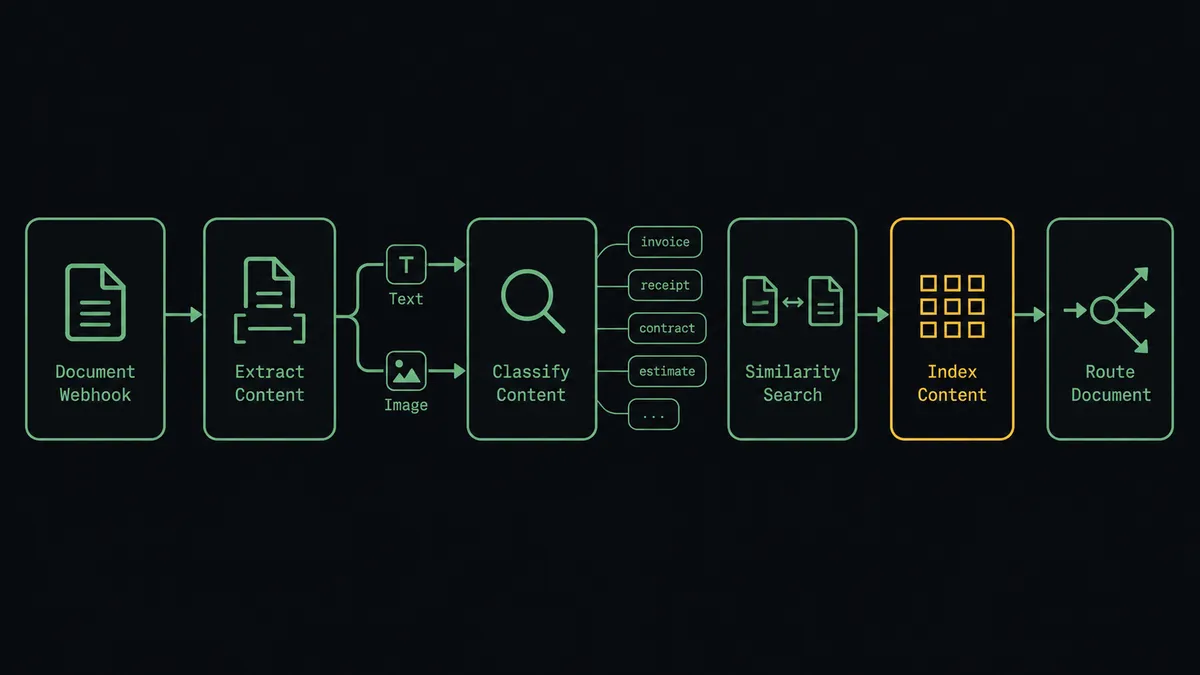
You connect Parseur to Clarifai by giving your document pipeline eyes: Parseur’s On Document Processed (Realtime) trigger fires when an inbound document is extracted, the workflow pulls the fields and the attached image with Get Parsed Data, classifies the image with Predict With Model, checks for visually similar prior submissions with Search Inputs, and indexes the result with Add Input. FlowRunner is a visual AI-agent orchestration platform where automations run autonomously and pause for human judgment on the steps that carry real consequence. Run the same connection as an AI agent and the pipeline gains a curator: the agent reads prediction confidence and similarity hits together, and pauses for a named human before an uncertain image enters the app as labeled training data.
The problem it solves
Plenty of inbound documents are really two payloads in one envelope: the structured part and the pictures. An insurance claim arrives with damage photos. A delivery confirmation carries a proof-of-delivery image. A marketplace seller submits a product form with pack shots. Parseur handles the text beautifully, but then a person opens each image, decides what it shows, checks whether they have seen it before, and files it. The text pipeline runs in seconds; the image step runs at the speed of whoever is behind on it.
The deeper problem is what happens to the images afterward. If you are building or tuning a vision model on this stream, every incoming image is potential training data, and the labels are only as good as the tired reviewer applying them at volume. One mislabeled batch quietly degrades the model for everything that follows, and there is no record of who labeled what to trace the damage back through. Duplicates make it worse: the same photo resubmitted with a new claim sails through because nobody can hold last month’s images in their head. The pipeline needs both speed and a defensible training set, and manual review gives you neither at once.
How it works: the connection
The connection listens to Parseur and drives Clarifai. Here is the plain version, grounded in the real connector actions.
- Trigger: Parseur fires On Document Processed (Realtime) the moment a document with an image attachment is extracted.
- Read: The workflow calls Get Parsed Data to retrieve the structured fields and the attached image, passed onward as a URL, base64 string, or FlowRunner file.
- Classify: It calls Predict With Model against your model, or a public one such as general-image-recognition, and receives concepts with confidence scores. Multi-step pipelines use Predict With Workflow to chain detect, crop, and classify.
- Check for duplicates: It calls Search Inputs with the image as a visual reference and reviews the ranked similarity hits against prior submissions.
- Index: It calls Add Input to store the image in the app with concept labels and the parsed document’s reference fields as context.
- Route: The classification result and the parsed fields travel together to whatever comes next, with the document and its verdict finally in one place.
That is the “just connect them” answer. Documents come in, text and images get processed in the same motion, and the app becomes a searchable, labeled archive of everything received. List Inputs and Get Input let you audit what is stored, and List Models and List Concepts keep the pipeline discoverable rather than hardcoded.
Can an AI agent run it? (and why a human stays in the loop)
Yes, and the agent is what makes the pipeline trustworthy rather than merely fast. It holds the real actions as tools: Get Parsed Data, List Documents, and Reprocess Document on the Parseur side; Predict With Model, Predict With Workflow, Search Inputs, Add Input, Get Input, List Inputs, List Models, and List Concepts on the Clarifai side. For each document it reasons across both payloads at once. Does the classification agree with what the parsed text claims? A form that says roof damage paired with an image the model reads as a vehicle interior is a contradiction worth stopping for, even when both scores are high. Is this image nearly identical to one received weeks ago on a different reference number?
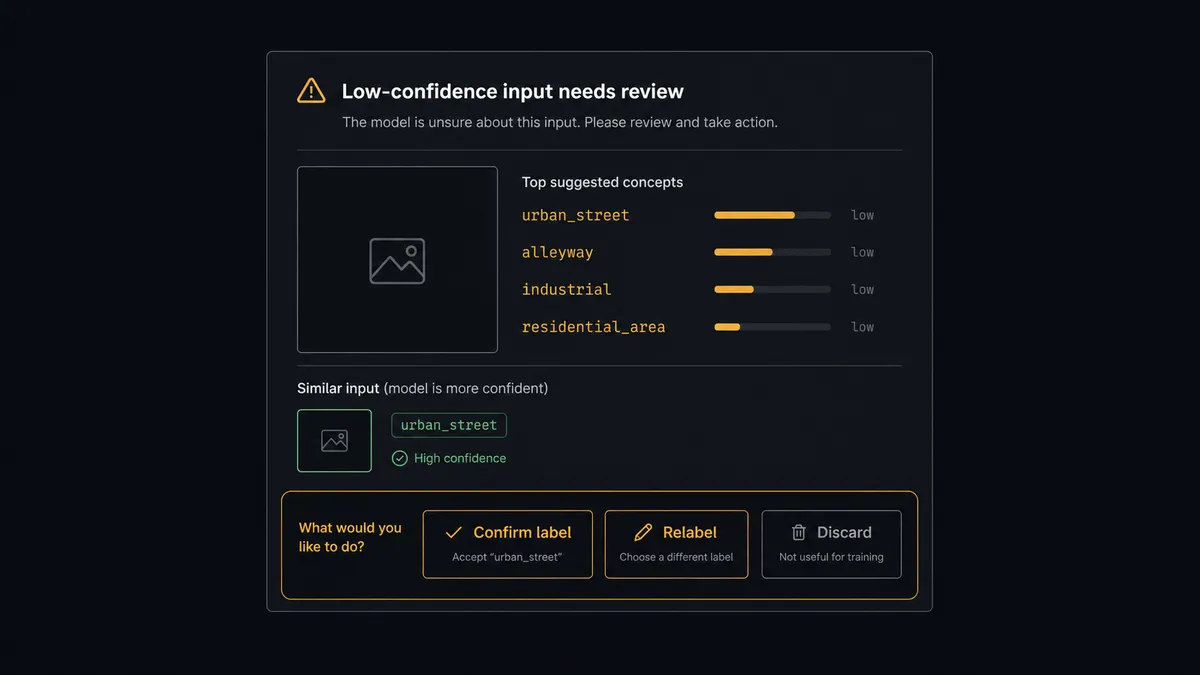
The consequential step is Add Input with concept labels, because that is the moment an assumption becomes training data. A wrong label does not fail loudly; it degrades every later prediction a little, which is the worst kind of failure to debug. So the agent applies a simple rule: confident, consistent, novel images index automatically, and everything else goes through the gate. It invokes a human-in-loop flow it holds as a callable tool and posts: “Image from the parsed claim scores low against the damage-type concepts and is visually close to an input indexed earlier under a different reference. Confirm the label, relabel, or discard before this enters the training set?” A person answers with the image and the evidence in front of them, and only then does Add Input run. Delete Input, which permanently removes an indexed input, sits behind the same gate, and every gated decision records its reviewer and timestamp, giving the training set a provenance trail.
This is the digital andon cord applied to data quality: the line stops the moment an input would lower the standard, a person makes the call, and the model’s training set stays defensible. Builders keep the throughput; the model keeps its integrity.
FlowRunner vs LangChain
For this pipeline, LangChain is the natural comparison for a builder, and it holds up. It offers code-level control, document loaders and multimodal chains that reach beyond what any two managed services expose, and with LangGraph you can wire interrupt-based review anywhere you decide. If this pipeline is a component of a larger ML product your team engineers and operates, building it in code is defensible.
The trade is everything around the pipeline: the review surface, the audit trail, the retry logic, the deploy. FlowRunner ships those as the platform.
| What matters for this pair | FlowRunner | LangChain |
|---|---|---|
| Human-in-the-loop before Add Input labels training data | Native. The agent invokes an approval flow as a callable tool, over Slack, email, or WhatsApp, with an audit trail | Interrupt patterns available in LangGraph; the review UI, channels, and persistence are yours to build |
| Who runs the flow | An AI agent weighs confidence and similarity per input, inside a visual workflow anyone can inspect | Your code, maintained by whoever wrote it |
| Users included | Unlimited users on every tier; the reviewer needs no repo access | Whoever can run the codebase |
| Bring your own AI keys | Yes, BYOK | Yes, keys in your own code |
| Self-hosted option | Yes, cloud-hosted or self-hosted, no runtime to operate | Runs wherever you deploy it; you operate the runtime |
| Pricing model | Transparent workflow-based tiers | Open-source library is free; infrastructure and engineering time are the real cost |
If you are engineering a product where this pipeline is core IP, LangChain gives you the control you want. If you want the parse-classify-review-index loop running this week with a defensible training set and a reviewer working from Slack, this pairing is the shorter path.
Before and after
| Category | Before | After |
|---|---|---|
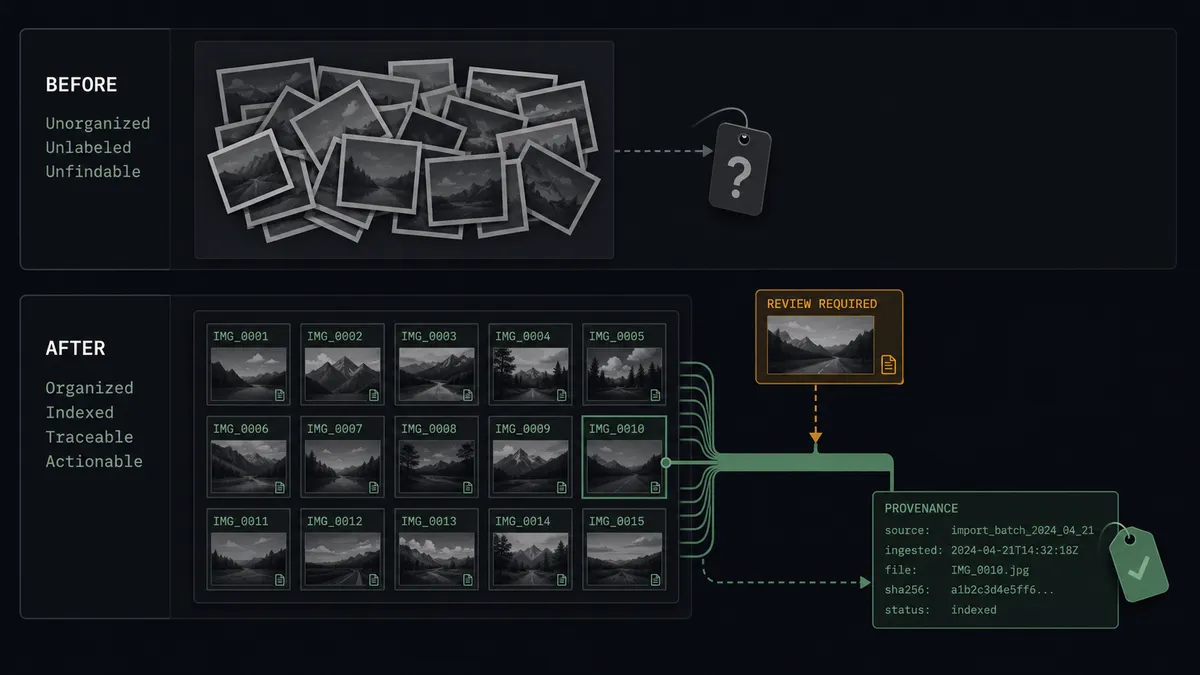
| Image triage | A person opens every attachment and decides what it shows | Predict With Model classifies each image the moment the document parses |
| Duplicate detection | Resubmitted photos pass unnoticed because no one remembers last month’s images | Search Inputs checks every new image against the indexed history |
| Training set quality | Labels reflect whoever was reviewing, at whatever pace, with no record | Low-confidence inputs are reviewed by name before Add Input writes them |
| Cross-checking | Nobody compares what the form says against what the photo shows | The agent flags text-image contradictions as escalations |
| Traceability | A bad label found later cannot be traced to a decision | Every indexed input carries its reviewer, timestamp, and document reference |
What you can build
Claims intake with vision cross-check. On Document Processed (Realtime) fires per claim. The agent parses fields with Get Parsed Data, classifies damage photos with Predict With Model, flags text-image contradictions, and routes clean claims forward while a person reviews the rest.
Duplicate submission catcher. Before any image is indexed, the agent runs Search Inputs and holds near-identical matches for review with both images side by side, so the same photo cannot ride two different reference numbers through your process.
Supervised training-set builder. Every reviewed image enters the app through Add Input with confirmed concept labels, growing a training set where every label has a named reviewer, ready for the next model iteration.
Proof-of-delivery verification. Parsed delivery confirmations carry POD photos; the agent checks each with Predict With Workflow through a detect-then-classify chain and escalates images that do not show what a delivery should, before disputes age.
Model routing by document type. The agent uses parsed fields to pick the right model per document category via List Models, so invoices, claims, and product submissions each hit the classifier built for them instead of one general-purpose default.
Getting started
Start on the free plan: 100 executions a month, every integration included, no credit card required, plus 14 days of Professional for new accounts. Both connectors are available on every tier, and every tier includes unlimited users and unlimited workflows.
Explore the integration details:
- Parseur integration (2 triggers and 6 actions for document extraction pipelines)
- Clarifai integration (10 actions covering predictions, inputs, search, and models)
Start building free at flowrunner.ai or book a demo to see a live Parseur to Clarifai workflow, label review and all.
Frequently asked questions
Is it free to connect Parseur and Clarifai on FlowRunner?
You can build and run the connection on FlowRunner's free plan, which includes 100 executions a month and every integration with no credit card required, and new accounts also get 14 days of Professional. Both connectors are available on every FlowRunner tier, and every tier includes unlimited users and unlimited workflows.
Can I self-host the Parseur to Clarifai workflow?
Yes. FlowRunner offers a cloud-hosted option and a self-hosted option, so the connection can run inside your own environment.
Does the AI agent need my own OpenAI or Claude key?
FlowRunner uses a bring-your-own-keys model, so you connect the AI provider key you already have. You are not locked to one model.
What happens when a prediction comes back with low confidence?
The agent stops and invokes a human-in-loop step. It posts the image, the parsed document context, the model's top concepts with their scores, and any similar prior inputs from Search Inputs, then waits for a person to confirm the label, correct it, or discard the input before Add Input writes anything into the app.
Which Parseur events can trigger a Clarifai action?
Parseur offers two triggers: On Document Processed (Realtime), an instant webhook that fires the moment a document is processed, and On Document Processed (Polling), which periodically checks a mailbox for newly processed documents. Realtime is the natural fit for classification pipelines.
Can the workflow detect duplicate submissions?
Yes. Before indexing a new image the agent calls Search Inputs with the image as a visual reference and reviews the ranked similarity hits. A near-identical match against an earlier input is flagged to a person with both images side by side, which is how resubmitted photos get caught before they are processed twice.