How to Connect Parseur with Chatbase (With or Without an AI Agent)
Connect Parseur document extraction to Chatbase so your chatbot's knowledge stays current with your documents, with an AI agent that assembles the retraining text and pauses for a human before Update Chatbot Data replaces what a live chatbot knows.
How do you connect Parseur to Chatbase?
You connect Parseur to Chatbase by turning document changes into chatbot knowledge: Parseur’s On Document Processed (Realtime) trigger fires when an updated document is extracted, the workflow pulls the content with Get Parsed Data, finds the right chatbot with List Chatbots, and retrains it with Update Chatbot Data. FlowRunner is a visual AI-agent orchestration platform where automations run autonomously and pause for human judgment on the steps that carry real consequence. Run the same connection as an AI agent and the pipeline gains a working brain: the agent classifies each parsed document, assembles the replacement knowledge text, diffs it against what the chatbot currently holds, and pauses for a named human before a retrain changes what a customer-facing chatbot says.
The problem it solves
A Chatbase chatbot is only as current as the last time someone retrained it. The knowledge came from documents: product guides, policy PDFs, pricing sheets, FAQ exports. Those documents keep changing, but the retraining is a manual chore, so it happens when someone remembers. The support team updates the returns policy on a Tuesday; the chatbot keeps quoting the old one for three weeks. Whoever owns the chatbot ends up copying text out of PDFs into a training box, which is exactly the kind of work that gets deferred until a customer pastes a wrong answer into a complaint.
The failure mode is quiet and public at the same time. Update Chatbot Data replaces the chatbot’s raw-text knowledge and retrains it, so a careless update does not just add stale content, it can drop entire topics the chatbot used to answer well. Nobody reviews what the new knowledge blob actually contains versus the old one. There is no diff, no approver, and no record of who changed what the chatbot believes. When an answer goes wrong in front of a customer, the postmortem is archaeology.
How it works: the connection
The connection listens to Parseur and writes to Chatbase. Here is the plain version, grounded in the real connector actions.
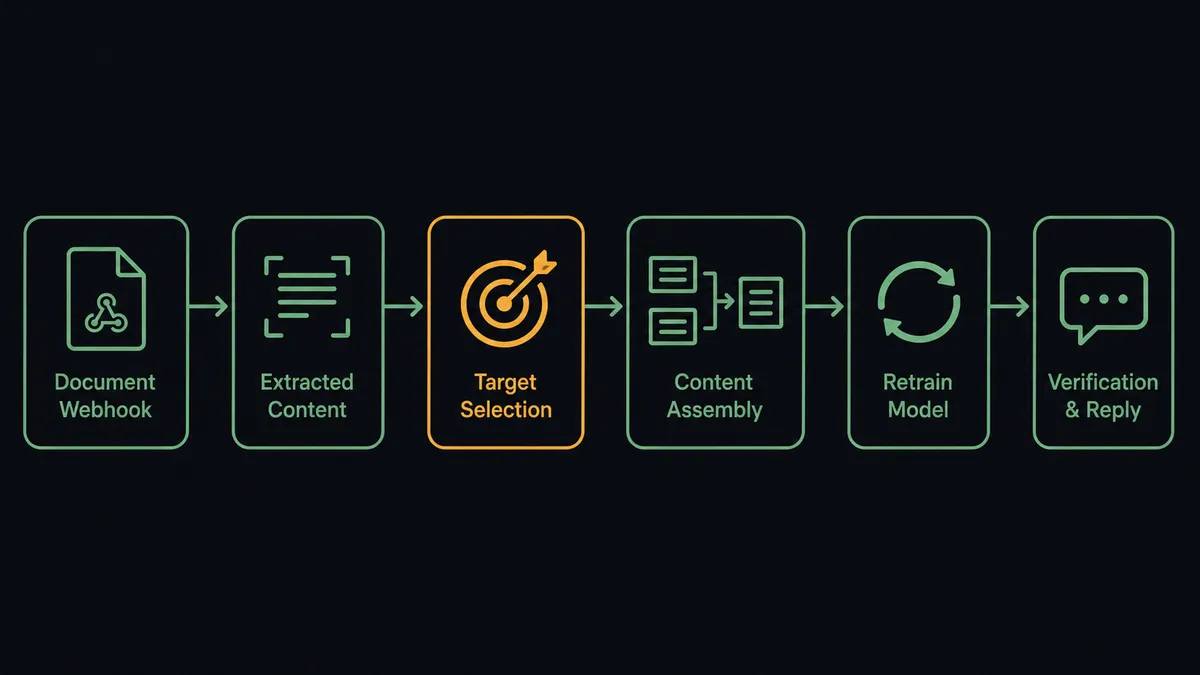
- Trigger: Parseur fires On Document Processed (Realtime) the moment an updated document lands in the watched mailbox and is extracted.
- Read: The workflow calls Get Parsed Data to retrieve the structured content: sections, headings, and answer text.
- Find the target: It calls List Chatbots to resolve the chatbot ID for the knowledge area the document belongs to.
- Assemble: It merges the new content into the full knowledge text that the chatbot should hold going forward.
- Retrain: It calls Update Chatbot Data with the chatbot’s name and the replacement source text. Chatbase retrains asynchronously.
- Verify: Once training completes, it calls Send Chat Message with a handful of known questions and checks the grounded replies reflect the update.
That is the “just connect them” answer. Documents change, the chatbot follows, and the verification step catches a bad retrain before customers do. The reverse direction is just as useful: Get Leads pulls the contacts the chatbot captured and Get Conversations exports transcripts for review, so the knowledge loop closes with real usage data.
Can an AI agent run it? (and why a human stays in the loop)
Yes, and this is where builders usually discover the deterministic version is not enough. A pipeline that shovels every parsed document into Update Chatbot Data will eventually shovel in the wrong one: a draft, a duplicate, an internal memo that was never meant for a customer-facing chatbot. The agent holds the real actions as tools, Get Parsed Data, List Documents, and Reprocess Document on the Parseur side, List Chatbots, Update Chatbot Data, Update Chatbot Settings, Send Chat Message, Get Conversations, and Get Leads on the Chatbase side, and it reasons about each document before touching any of them. Is this content new or already present? Does it contradict something the chatbot currently says? Does it belong to this chatbot at all?
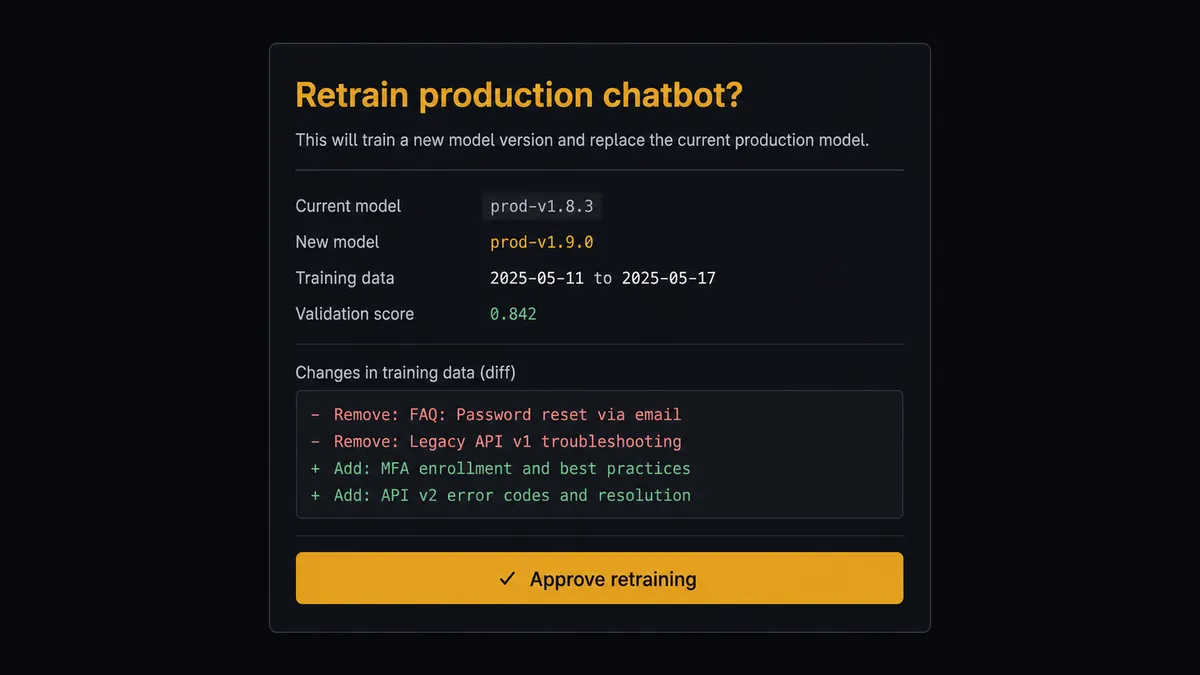
The consequential step is the retrain itself. Update Chatbot Data replaces the chatbot’s raw-text knowledge wholesale and retrains it, and the previous knowledge is gone once the new text lands. So the agent never fires it silently against a live chatbot. It assembles the full replacement text, produces a diff against the current version, and invokes a human-in-loop flow it holds as a callable tool: “Parsed update to the returns policy changes two sections and removes one about international shipping. This retrains the production support chatbot. Review the diff and approve?” A person reviews, approves, and only then does the retrain run. The agent follows up with Send Chat Message to smoke-test the new answers, and if a reply comes back wrong, it flags the result instead of declaring victory. Delete Chatbot, which permanently removes a chatbot with all its sources, conversations, and leads, sits behind the same gate without exception.
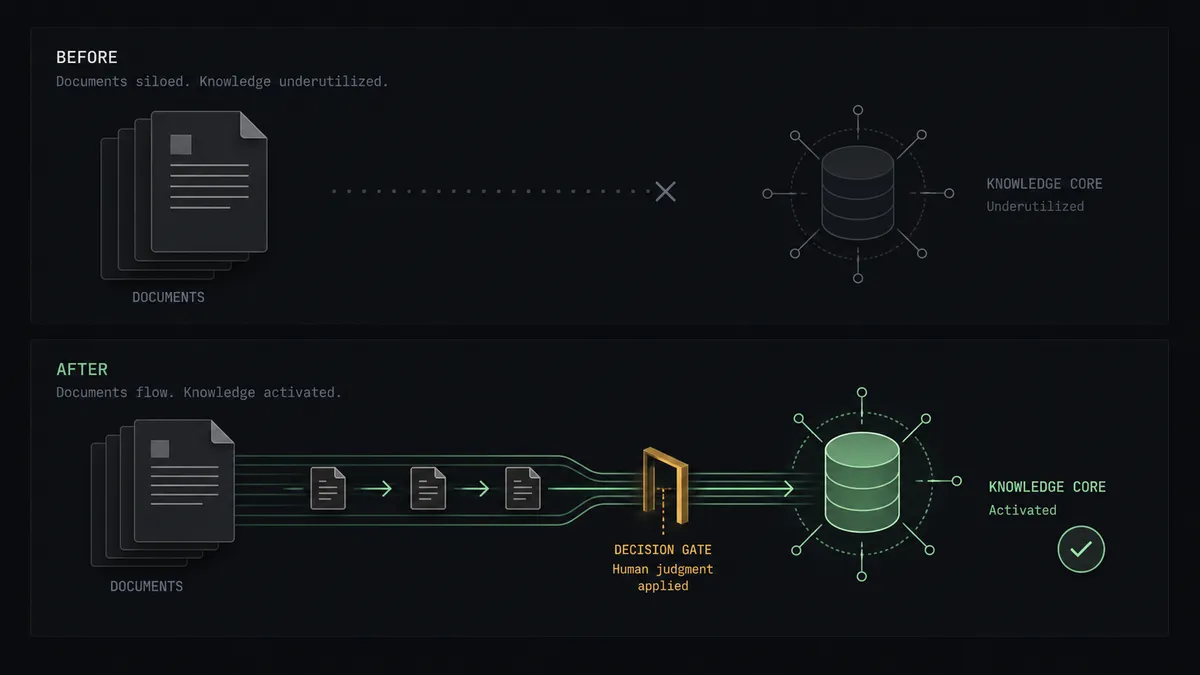
This is FlowRunner’s digital andon cord in practice: the line runs autonomously until the moment of consequence, then stops for the person who owns the outcome. Builders keep the automation; the chatbot’s public voice keeps an editor.
FlowRunner vs LangChain
If you are a developer, LangChain is the honest comparison, and it is a strong one. It gives you code-level control over every step of a pipeline like this, a massive ecosystem of loaders and integrations, and LangGraph provides interrupt patterns for human review if you build them. For a team that wants to own every line of the orchestration and has the engineers to maintain it, it is a legitimate choice.
The trade is that you are now maintaining infrastructure. FlowRunner gives you the same pipeline as a visual workflow with the review gate as a native, multi-channel building block.
| What matters for this pair | FlowRunner | LangChain |
|---|---|---|
| Human-in-the-loop before Update Chatbot Data retrains | Native. The agent invokes an approval flow as a callable tool, over Slack, email, or WhatsApp, with an audit trail | Interrupt patterns available in LangGraph; you build the review UI, channels, and persistence |
| Who runs the flow | An AI agent reads each document and picks actions as tools, visually inspectable | Your code, with behavior spread across chains you maintain |
| Users included | Unlimited users on every tier; non-developers can read and run the flow | Whoever can read the codebase |
| Bring your own AI keys | Yes, BYOK | Yes, keys in your own code |
| Self-hosted option | Yes, cloud-hosted or self-hosted, no runtime to build | Runs wherever you deploy it; you operate the runtime |
| Pricing model | Transparent workflow-based tiers | Open-source library is free; hosting, observability, and engineering time are the real cost |
If this pipeline is one of many in a product your engineers are building, LangChain fits. If you want the retrain loop running this week, reviewable by the support lead who owns the chatbot’s answers, this pairing is the faster and safer route.
Before and after
| Category | Before | After |
|---|---|---|
| Knowledge freshness | The chatbot answers from whatever was pasted in at the last manual retrain | On Document Processed (Realtime) feeds every document change into the retraining queue |
| Retrain safety | Update Chatbot Data replaces knowledge with no diff and no reviewer | Every retrain ships with a diff and a named approver before it goes live |
| Verification | Someone eventually notices a wrong answer, usually a customer | Send Chat Message smoke-tests known questions right after each retrain |
| Content triage | Drafts and internal memos are one careless upload away from production | The agent classifies each document and escalates anything ambiguous |
| Accountability | Nobody can say who changed what the chatbot believes, or when | Approver, timestamp, and diff live in the audit trail for every knowledge change |
What you can build
Docs-to-chatbot retraining loop. On Document Processed (Realtime) fires on each updated guide. The agent assembles the replacement knowledge, a person approves the diff, Update Chatbot Data retrains, and Send Chat Message verifies the answers. The chatbot tracks the documentation instead of trailing it.
Parsed FAQ seeding for new chatbots. Point a Parseur mailbox at exported support macros and FAQ documents, then let the agent build the source text and call Create Chatbot to stand up a new grounded chatbot per product line, each seeded from real material rather than pasted fragments.
Lead relay from conversations. On a schedule, the agent calls Get Leads for each chatbot from List Chatbots and forwards new contacts into your downstream systems, so the chatbot’s lead-collection form feeds the pipeline instead of a CSV nobody exports.
Transcript-driven gap finding. The agent pulls recent threads with Get Conversations, looks for questions the chatbot answered poorly, and files them as candidate additions for the next retrain, with the human review gate deciding what actually ships.
Persona and behavior updates with review. When tone or escalation guidance changes, the agent stages the new base instructions through Update Chatbot Settings behind the same approval flow, so the chatbot’s voice never changes without a named person signing off.
Getting started
Start on the free plan: 100 executions a month, every integration included, no credit card required, plus 14 days of Professional for new accounts. Both connectors are available on every tier, and every tier includes unlimited users and unlimited workflows.
Explore the integration details:
- Parseur integration (2 triggers and 6 actions for document extraction pipelines)
- Chatbase integration (8 actions covering chat, training, conversations, and leads)
Start building free at flowrunner.ai or book a demo to see a live Parseur to Chatbase workflow, retrain approval and all.
Frequently asked questions
Is it free to connect Parseur and Chatbase on FlowRunner?
You can build and run the connection on FlowRunner's free plan, which includes 100 executions a month and every integration with no credit card required, and new accounts also get 14 days of Professional. Both connectors are available on every FlowRunner tier, and every tier includes unlimited users and unlimited workflows.
Can I self-host the Parseur to Chatbase workflow?
Yes. FlowRunner offers a cloud-hosted option and a self-hosted option, so the connection can run inside your own environment.
Does the AI agent need my own OpenAI or Claude key?
FlowRunner uses a bring-your-own-keys model, so you connect the AI provider key you already have. You are not locked to one model.
What happens when the agent is unsure whether parsed content belongs in the chatbot's knowledge?
The agent stops and invokes a human-in-loop step. It posts the parsed content, where it came from, and how it would change the assembled knowledge, then waits for a person to include it, exclude it, or edit it before any retrain runs. Uncertain content never reaches a live chatbot silently.
Which Parseur events can trigger a Chatbase action?
Parseur offers two triggers: On Document Processed (Realtime), an instant webhook that fires the moment a document is processed, and On Document Processed (Polling), which periodically checks a mailbox for newly processed documents. Realtime is the natural fit for keeping chatbot knowledge current.
Does retraining replace the chatbot's existing knowledge?
Yes. Update Chatbot Data replaces the chatbot's raw-text training knowledge and retrains it, which is exactly why the workflow gates it behind a named approver. The agent assembles the full replacement text, shows what changed, and only calls Update Chatbot Data after sign-off. Retraining then runs asynchronously on Chatbase.