How to Connect Parseur with Botpress (With or Without an AI Agent)
Connect Parseur's parsed documents to Botpress tables so your chat assistant answers from live data, with an AI agent that diffs every update and pauses for a human before Upsert Table Rows changes what the assistant tells customers.
How do you connect Parseur to Botpress?
You connect Parseur to Botpress by having Parseur’s On Document Processed (Realtime) trigger fire when a document is parsed, pulling the structured fields with Get Parsed Data, and writing them into the tables your assistant answers from with Upsert Table Rows, so the price sheet a vendor emailed at 9 AM is what your Botpress assistant quotes by lunchtime. FlowRunner is a visual AI-agent orchestration platform where automations run autonomously and pause for human judgment on the steps that carry real consequence. The same connection can run as an AI agent that validates every parsed row, diffs it against the live table with Find Table Rows, and pauses for a human before anything changes what a customer-facing assistant says.
The problem it solves
If you build on Botpress, you already know the failure mode: the assistant is smart, the tables behind it are stale. The data your assistant answers from, price lists, coverage terms, product specs, availability windows, arrives as email attachments and PDFs from vendors and internal teams. Someone has to open each one, extract the rows, and paste them into the table editor. That someone is you, so it happens in batches, late, between real work. The assistant confidently serves last month’s numbers because the update is sitting in an inbox.
The edges are what make manual updating genuinely dangerous rather than just tedious. A vendor reformats their price sheet and half the columns shift. A parse grabs a subtotal as a unit price. A revised policy document silently drops three rows that were load-bearing for a whole intent. Paste any of those into a production table and the assistant does not error, it answers wrong, politely and at scale, to every customer who asks.
How it works: the connection
The connection listens to Parseur and writes to Botpress. Here is the plain version, grounded in the real connector actions.
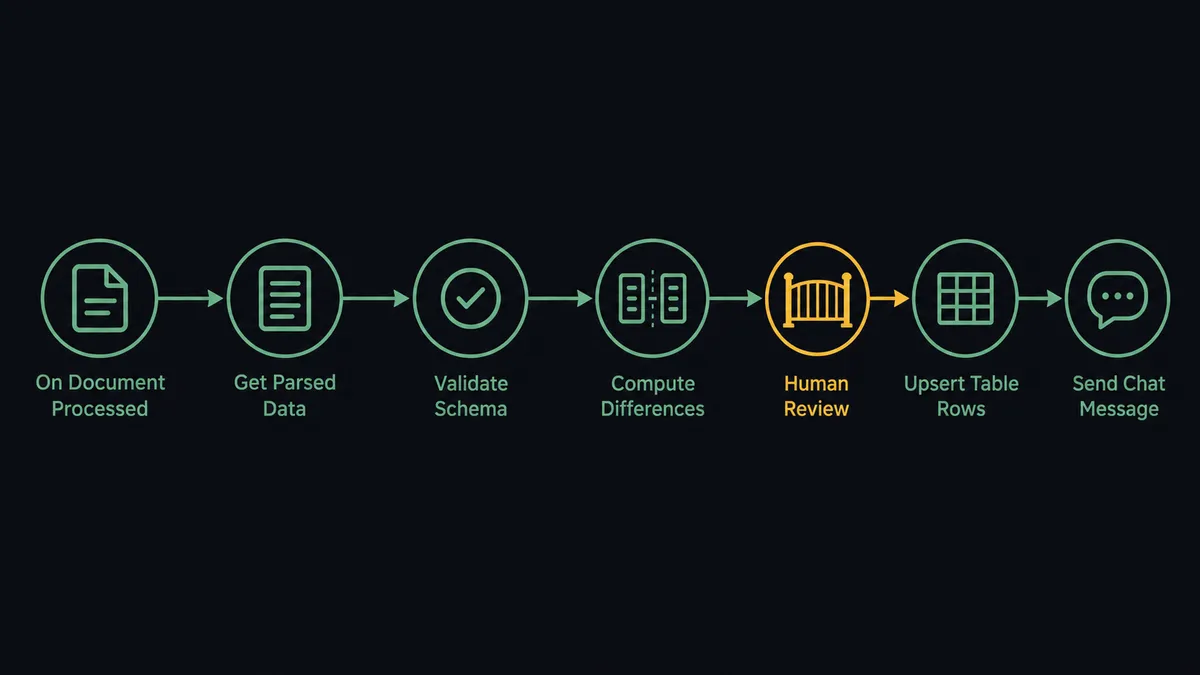
- Trigger: Parseur fires On Document Processed (Realtime) when a document matching your mailbox template is parsed.
- Read: The workflow calls Get Parsed Data to pull the structured rows: identifiers, prices, terms, dates.
- Validate: It checks each row against the target table’s schema, types, required fields, and value ranges.
- Diff: It calls Find Table Rows to fetch the current live data and computes what the update adds, changes, and removes.
- Write: It applies the change with Upsert Table Rows keyed on the identifier, or Create Table Rows for append-only datasets.
- Announce: It calls Send Chat Message to post the update summary into your ops conversation, and attaches the source document to the workspace with Upload File.
That is the “just connect them” answer. Documents in, current tables out, and the assistant answers from data that matches what the vendor actually sent this morning.
Can an AI agent run it? (and why a human stays in the loop)
Yes, and this is where the pipeline earns its keep. The agent holds the pair’s real actions as tools: Get Parsed Data, Reprocess Document, Find Table Rows, Upsert Table Rows, Create Table Rows, Delete Table Rows, Upload File, Send Chat Message. For each parsed document it reasons about the change itself, not just the format: is this a routine weekly price refresh with deltas in a normal range, or did a fifth of the catalog just move by double digits? Did the vendor’s new layout shift columns, so the parse is structurally valid but semantically wrong? A plain sync cannot ask those questions; it writes whatever arrived.
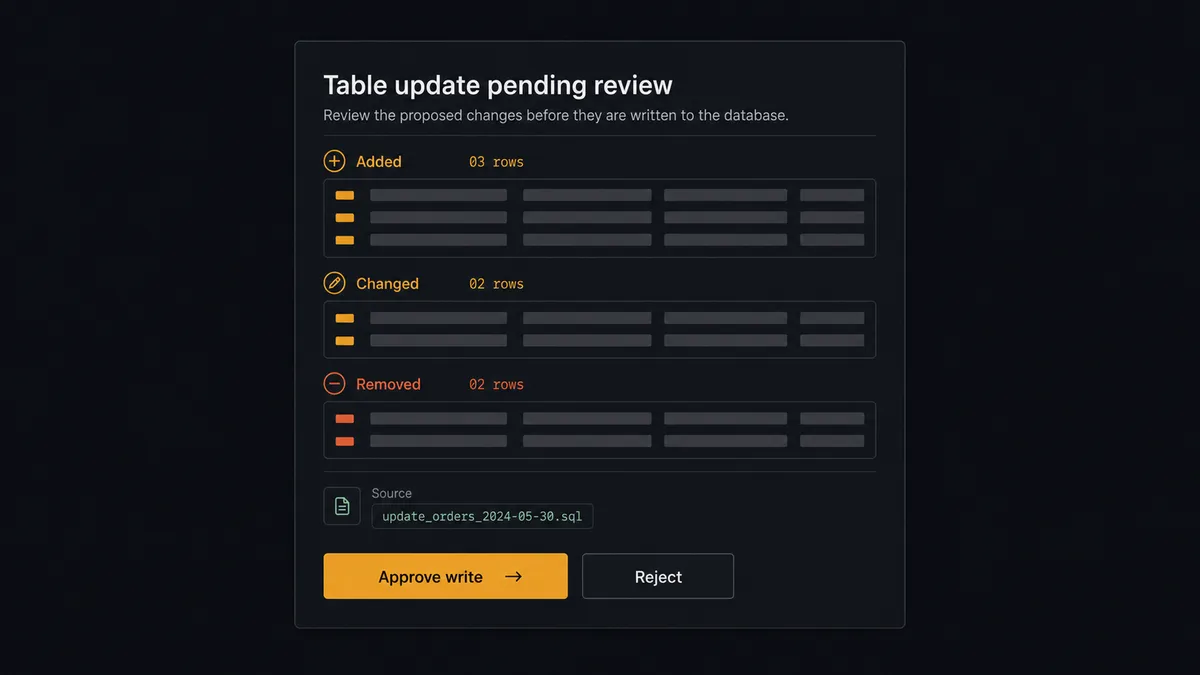
The consequential step is Upsert Table Rows against the production table, because that write changes what a live assistant tells real customers in the very next conversation. There is no deploy step, no code review, no staging environment between the table and the customer unless you build one. So the agent builds one: before writing, it invokes a human-in-loop flow it holds as a callable tool. The workflow pauses and posts the diff: “Price table update from today’s vendor sheet: rows added, rows changed, rows removed, largest change flagged. Source document attached. Approve the write?” A person scans the diff, and only then does Upsert Table Rows run. Delete Table Rows, the truly unrecoverable one, sits behind the same gate every time.
When validation fails, the agent tries Reprocess Document once, and if the rows still look wrong it stops the line entirely and routes the document to a person. Prospects call this the digital andon cord: like Toyota’s production line, the workflow halts the moment it hits uncertainty, because shipping a defective row to a customer-facing assistant is shipping a defect at conversation speed.
FlowRunner vs LangChain
If you want full programmatic control over an ingestion pipeline, LangChain is a legitimate way to get it. The ecosystem is huge, the document-loader and transformation abstractions are flexible, and a developer who lives in Python or TypeScript can wire Parseur webhooks to the Botpress API with exactly the custom logic they want. For teams whose product is the pipeline itself, that control is the point.
The cost is that you own everything around the logic: the webhook receiver, retries, schema validation, the diff view, the approval UI, deployment, and monitoring. FlowRunner is built around native human-in-the-loop and AI-agent orchestration, so the parts LangChain leaves as an exercise arrive built.
| What matters for this pair | FlowRunner | LangChain |
|---|---|---|
| Human-in-the-loop before the production table changes | Native. The agent invokes an approval flow as a callable tool and waits | You design and build the interrupt, the UI, and the resume logic yourself |
| Who runs the flow | An AI agent reads the diff, reasons, picks actions as tools, visually orchestrated | Whatever chain or graph you write and host |
| Users included | Unlimited users on every tier; ops can see and approve without reading code | Developers only; non-coders interact with whatever UI you build |
| Bring your own AI keys | Yes, BYOK. Connect the AI provider key you already have | Yes, keys are yours by construction |
| Self-hosted option | Yes, cloud-hosted or self-hosted | Self-hosted by definition; you run the infrastructure |
| Pricing model | Transparent workflow-based tiers | Free framework; you pay in infrastructure and engineering time |
If the ingestion pipeline is your product and you want every line under your control, LangChain is the honest choice. If the pipeline is plumbing between two tools you already run, and you want the diff review and audit trail on day one without maintaining a service, this pairing is the faster and safer build.
Before and after
| Category | Before | After |
|---|---|---|
| Table freshness | Tables updated in batches when someone finds time | Every parsed document proposes an update the same day it arrives |
| Data entry | Rows copied from PDFs into the table editor by hand | Get Parsed Data extracts rows; nothing is retyped |
| Bad data reaching customers | A wrong paste is discovered when a customer quotes the assistant back at you | Schema validation plus a human-reviewed diff before Upsert Table Rows runs |
| Change visibility | Table edits leave no trail of what changed or why | Every write has a diff, a source document via Upload File, and a Send Chat Message deployment note |
| Deletions | Rows disappear with no record | Delete Table Rows runs only behind the approval gate, with the removal logged |
What you can build
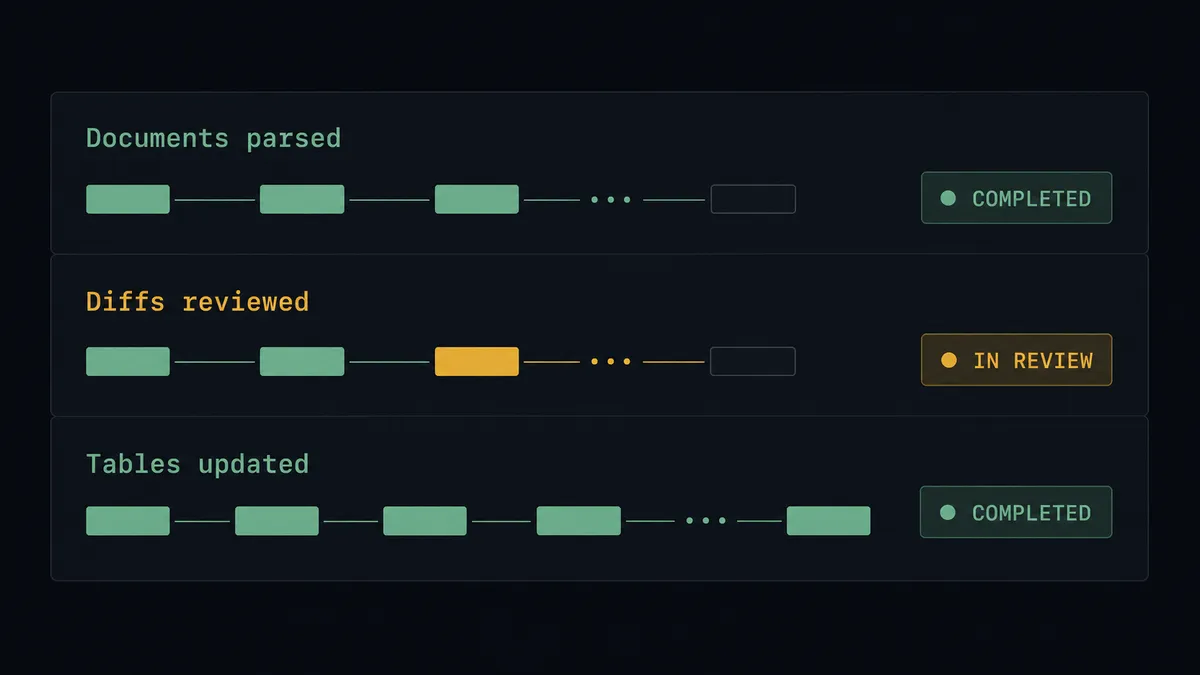
Vendor price sheet to live pricing table. On Document Processed (Realtime) fires on the weekly sheet. The agent validates rows, diffs against Find Table Rows, gets the diff approved, and Upsert Table Rows refreshes the pricing your assistant quotes.
Policy document to coverage answers. Revised policy PDFs land in a Parseur mailbox. The agent extracts the changed clauses, shows a person exactly which answers will change, and updates the table plus the source archive via Upload File after sign-off.
Catalog onboarding for a new dataset. A new vendor’s first document arrives. The agent proposes a Create Table with the inferred schema and seeds it with Create Table Rows, all held for review, so new datasets start clean instead of being crammed into the wrong table.
Stale-row retirement. When a parsed document omits identifiers that exist in the live table, the agent lists the orphans and proposes Delete Table Rows for them, behind the gate, so discontinued products stop being offered by the assistant without rows vanishing silently.
Ops visibility loop. After every approved write, the agent posts the change summary with Send Chat Message into the team’s Botpress conversation, so the people who own the assistant see its knowledge change in real time.
Getting started
Start on the free plan: 100 executions a month, every integration included, no credit card required, plus 14 days of Professional for new accounts. Both connectors are available on every tier, and every tier includes unlimited users and unlimited workflows.
Explore the integration details:
- Parseur integration (2 triggers and 6 actions covering mailboxes, extraction, and reprocessing)
- Botpress integration (40 actions covering tables, conversations, users, and files)
Start building free at flowrunner.ai or book a demo to see a live Parseur to Botpress workflow, diff review and all.
Frequently asked questions
Is it free to connect Parseur and Botpress on FlowRunner?
You can build and run the connection on FlowRunner's free plan, which includes 100 executions a month and every integration with no credit card required, and new accounts also get 14 days of Professional. Both connectors are available on every FlowRunner tier, and every tier includes unlimited users and unlimited workflows.
Can I self-host the Parseur to Botpress workflow?
Yes. FlowRunner offers a cloud-hosted option and a self-hosted option, so the connection can run inside your own environment. Self-hosting is available for teams that need the workflow to run on their own infrastructure.
Does the AI agent need my own OpenAI or Claude key?
FlowRunner uses a bring-your-own-keys model, so you connect the AI provider key you already have. You are not locked to one model, and you control which provider runs the agent.
What happens when parsed rows do not match the Botpress table schema?
Nothing gets written. The agent validates every parsed row against the table schema first, tries Reprocess Document when extraction looks off, and routes persistent mismatches to a person with the source document and the failing rows side by side. The production table is never the place where a bad parse gets discovered.
Which triggers and actions does the Parseur to Botpress workflow use?
Parseur's On Document Processed (Realtime) trigger starts the flow, and Get Parsed Data pulls the structured fields. On the Botpress side, the workflow reads current data with Find Table Rows, writes approved changes with Upsert Table Rows or Create Table Rows, and posts a deployment note with Send Chat Message. Botpress has no triggers in the catalog, so Parseur always initiates.
How does the data actually reach my Botpress assistant?
Through Botpress tables. The workflow maintains the tables your assistant queries at answer time, using Create Table for new datasets, Upsert Table Rows for updates, and Delete Table Rows for retirements. Supporting documents can also be attached to the workspace with Upload File.