How to Connect Parseur with AssemblyAI (With or Without an AI Agent)
Connect Parseur-parsed emails to AssemblyAI transcription so recordings that arrive in a mailbox become searchable transcripts and summaries, optionally as an AI agent that pauses for a human before Delete Transcript and Delete Document purge anything for good.
How do you connect Parseur to AssemblyAI?
You connect Parseur to AssemblyAI by having Parseur’s On Document Processed (Realtime) trigger drive AssemblyAI actions: when a recording arrives by email, the workflow calls Get Parsed Data to pull the audio attachment and its metadata, then Upload Audio and Transcribe and Wait to produce the transcript, and Summarize Transcript to make it readable in one glance. FlowRunner is a visual AI-agent orchestration platform where automations run autonomously and pause for human judgment on the steps that carry real consequence. The same connection can run as an AI agent that transcribes, summarizes, and answers questions over every recording on its own, and pauses for a human before Delete Transcript or Delete Document destroy anything permanently.
The problem it solves
Recordings pile up in mailboxes because that is where systems send them: call platform exports, voicemail forwards, dispute-line recordings, interview audio from field teams. As a builder, you know the pipeline shape by heart: watch a mailbox, pull the attachment, push it to a transcription API, poll for completion, store the text, run extraction. You also know what that means in practice: a webhook receiver, retry logic, state tracking for jobs that finish out of order, and a cron job you will be babysitting in six months. The pipeline is not hard. Owning it forever is.
The sharp edge is at the end of the lifecycle, not the start. Recordings of customer calls are records, sometimes legally sensitive ones, and every team eventually writes the retention script: delete everything older than the window. Then one quarter the sweep runs and takes with it the only recording of the call a customer is now disputing. Transcription mistakes are recoverable; you re-run the job. Deletion is not. The step everyone automates most casually is the only one in the whole pipeline that cannot be undone.
How it works: the connection
The connection listens to Parseur and writes to AssemblyAI. Here is the plain version, grounded in the real connector actions.
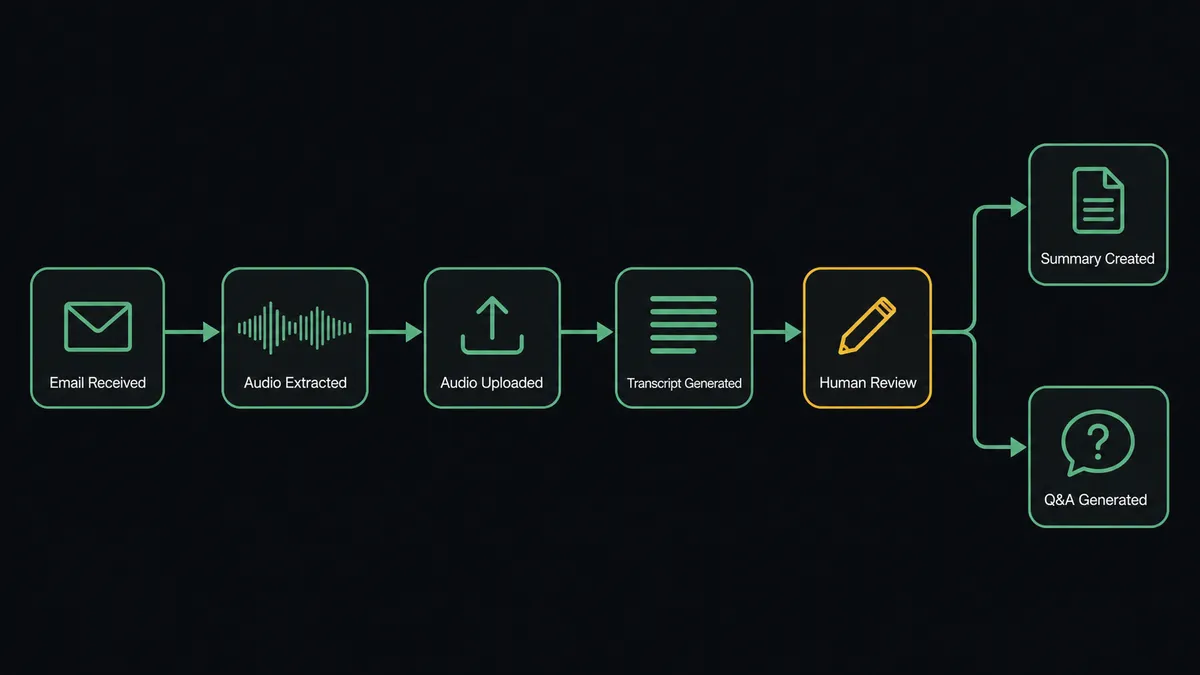
- Trigger: Parseur fires On Document Processed (Realtime) when a recording email lands in the mailbox and gets parsed.
- Read: The workflow calls Get Parsed Data to pull the audio attachment plus the metadata Parseur extracted: caller, date, case or deal reference.
- Upload: It calls Upload Audio to move the recording into AssemblyAI.
- Transcribe: It calls Transcribe and Wait, which runs the job and returns the completed transcript in a single step, no polling loop to write.
- Distill: It calls Summarize Transcript for the short version and Get Paragraphs when downstream steps need clean, structured text.
- Interrogate: It calls Ask Questions About Transcript with your standing questions, was a cancellation requested, was a price quoted, was a commitment made, and routes the answers wherever they need to go.
That is the “just connect them” answer. A mailbox full of opaque audio becomes a searchable base of transcripts, summaries, and extracted answers, and the polling-and-retry plumbing you would normally write is the platform’s job, not yours.
Can an AI agent run it? (and why a human stays in the loop)
Yes, and this is where the pair outgrows the pipeline you would have scripted. The agent holds the actions as tools: Get Parsed Data, List Documents, Reprocess Document, Delete Document on the Parseur side; Upload Audio, Transcribe and Wait, Get Transcript, Summarize Transcript, Ask Questions About Transcript, Word Search, Run LLM Task, Delete Transcript on the AssemblyAI side. A scripted pipeline treats every file identically. The agent reads context: a voicemail gets a summary and a callback flag, a dispute-line recording gets the full question battery plus Word Search for the phrases legal cares about, a file whose transcript comes back thin or garbled gets flagged instead of flowing downstream as if it were clean.
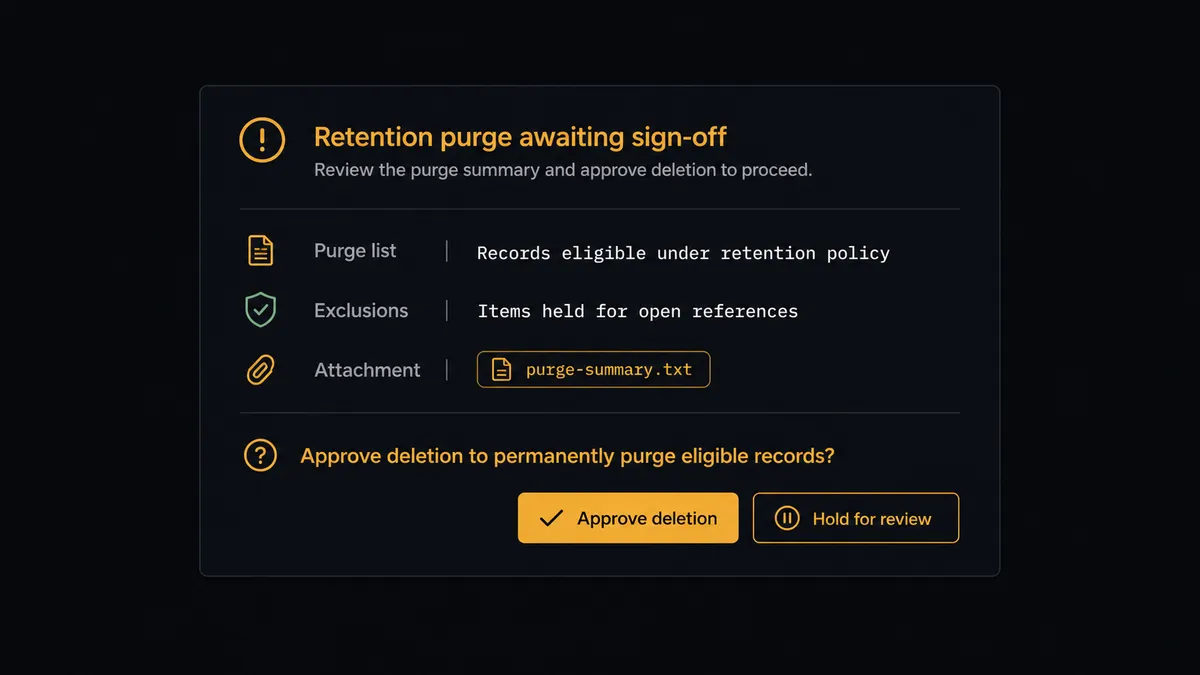
The consequential step is the purge. Delete Transcript and Delete Document are the only irreversible actions in this workflow, and what they destroy is evidence. So the agent automates everything about retention except the destruction itself. On schedule it sweeps List Documents and List Transcripts against your retention window, builds the purge list, and checks it for holds: references that match open disputes, transcripts whose questions returned answers someone flagged. Then it invokes a human-in-loop flow it holds as a callable tool. The workflow pauses and posts to the data owner: “Retention sweep: [count] recordings and transcripts past the window, [count] excluded for open references. Purge list attached. Approve deletion?” Only after a named approval do Delete Document and Delete Transcript run, and the audit trail records exactly what was destroyed, by whom, and when.
Prospects call this a digital andon cord: like Toyota’s production line pull cord, the workflow stops the line before the one step that cannot be taken back. Transcription and extraction run at machine speed. Destruction waits for a signature.
FlowRunner vs LangChain
Builders evaluating this pair will ask the fair question: why not LangChain? And the honest answer starts with what LangChain does well. It gives you code-level control over every step, an enormous ecosystem of integrations and patterns, and with LangGraph, real support for interrupts and human feedback inside a graph you design. It is free, open source, and it runs wherever your code runs. For a team building a bespoke agent product, that control is the point.
But this workflow is not a product, it is plumbing with one dangerous step, and the comparison changes shape.
| What matters for this pair | FlowRunner | LangChain |
|---|---|---|
| Human-in-the-loop before Delete Transcript and Delete Document | Native. The agent invokes an approval flow as a callable tool, across Slack, email, or WhatsApp, with the audit trail built in | LangGraph interrupts support pauses in code; the approval channels, UI, timeout handling, and audit trail are yours to build |
| Who runs the flow | An AI agent assembled visually, with connector actions as tools; ops can read and modify it | An agent you write and maintain in Python or TypeScript; only developers can touch it |
| Users included | Unlimited users on every tier | It is a framework, not a workspace; each collaborator needs the codebase |
| Bring your own AI keys | Yes, BYOK | Yes, inherently your keys |
| Self-hosted option | Yes, cloud-hosted or self-hosted | Yes, it runs in your infrastructure |
| Pricing model | Transparent workflow-based tiers | Free framework; the cost is engineering time, hosting, and the observability stack around it |
If you are building a differentiated agent product where the orchestration is your IP, write it in LangChain. If you are wiring recordings to transcripts with a gated purge, and you would rather the retries, state, approval channels, and audit trail be platform features instead of your backlog, this pairing on FlowRunner is the better fit.
Before and after
| Category | Before | After |
|---|---|---|
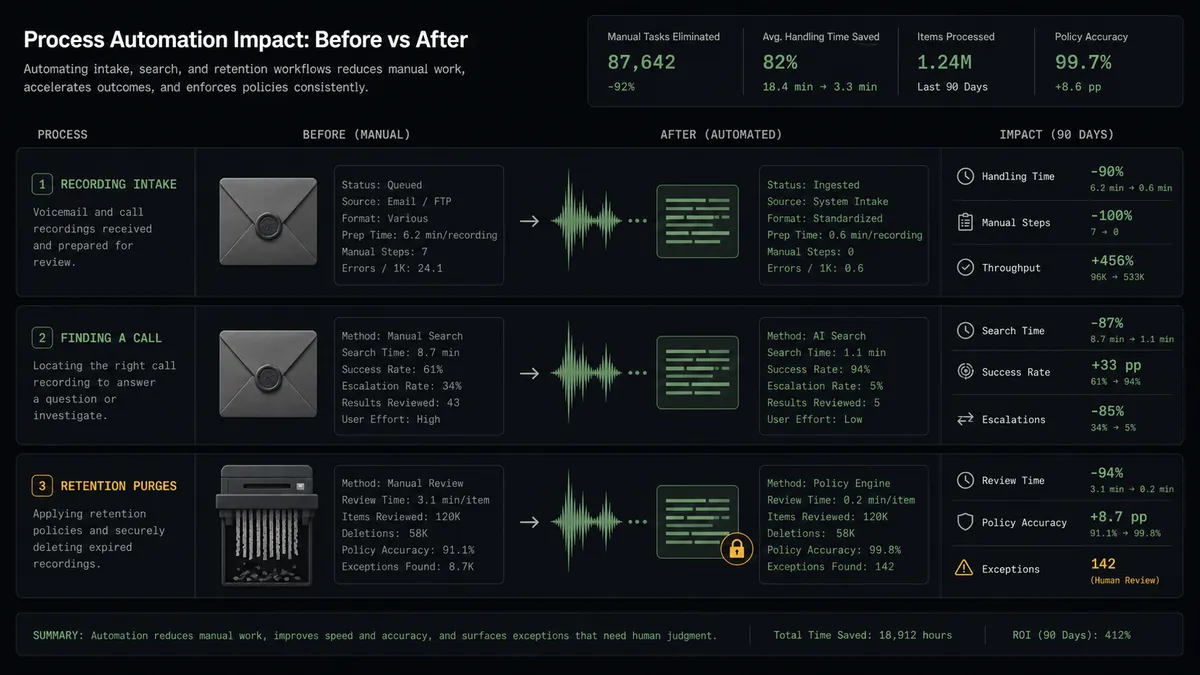
| Recording intake | Audio files sit unopened in a mailbox until someone needs one | Every recording is transcribed and summarized within minutes of arriving |
| Finding a call | Someone scrubs through audio files hunting for one conversation | Word Search and standing questions make every call queryable as text |
| Pipeline upkeep | A scripted watcher with polling, retries, and state you maintain | Transcribe and Wait and platform orchestration replace the glue code |
| Quality failures | Garbled transcripts flow downstream unnoticed | The agent flags thin or unreliable output for a human decision |
| Retention purges | A cron job deletes on schedule, holds and disputes unseen | The purge list is screened for open references and approved by name |
What you can build
Mailbox-to-transcript pipeline. On Document Processed (Realtime) fires, Get Parsed Data hands the audio to Upload Audio and Transcribe and Wait, and the transcript lands tagged with the parsed metadata. Zero polling code.
Standing-question extraction. The agent runs Ask Questions About Transcript on every call with your fixed battery, cancellation requested, commitment made, price quoted, and routes the answers to the systems that act on them.
Dispute-ready evidence base. Dispute-line recordings get the full treatment: Get Sentences for precise quotes, Word Search for the phrases legal tracks, and Summarize Transcript for the case file, all linked back to the source document in Parseur.
Voicemail triage. Short recordings are summarized and classified by Run LLM Task, urgent ones alert the right owner immediately, and routine ones land in a daily digest instead of an inbox.
Gated retention sweep. The agent builds the purge list from List Documents and List Transcripts, screens it against open references, and executes Delete Document and Delete Transcript only after the data owner signs off.
Getting started
Start on the free plan: 100 executions a month, every integration included, no credit card required, plus 14 days of Professional for new accounts. Both connectors are available on every tier, and every tier includes unlimited users and unlimited workflows, so the builder who wires it and the data owner who signs the purges work in the same workspace.
Explore the integration details:
- Parseur integration (2 triggers and 6 actions covering mailboxes, parsing, and document lifecycle)
- AssemblyAI integration (13 actions covering transcription, summaries, search, and transcript Q&A)
Start building free at flowrunner.ai or book a demo to see a live Parseur to AssemblyAI workflow, purge approval and all.
Frequently asked questions
Is it free to connect Parseur and AssemblyAI on FlowRunner?
You can build and run the connection on FlowRunner's free plan, which includes 100 executions a month and every integration with no credit card required, and new accounts also get 14 days of Professional. Both connectors are available on every FlowRunner tier, and every tier includes unlimited users and unlimited workflows.
Can I self-host the Parseur to AssemblyAI workflow?
Yes. FlowRunner offers a cloud-hosted option and a self-hosted option, so the connection can run inside your own environment.
Does the AI agent need my own OpenAI or Claude key?
FlowRunner uses a bring-your-own-keys model, so you connect the AI provider key you already have. You are not locked to one model, and your AssemblyAI key follows the same principle: your account, your usage, your data agreement.
What happens when a transcript comes back garbled or the answers look unreliable?
The agent stops and invokes a human-in-loop step. It posts the source document, the transcript quality signals, and the doubtful answers to your channel, then waits for a decision: re-run the transcription, reprocess the source with Reprocess Document, or accept with a flag. Nothing unreliable flows downstream silently.
Which Parseur events can trigger an AssemblyAI action?
Parseur offers two triggers: On Document Processed (Realtime) and On Document Processed (Polling). Realtime fires the moment a recording email is parsed, which starts the Upload Audio and Transcribe and Wait sequence immediately.
Can the workflow delete old recordings and transcripts automatically?
It can find them automatically: the agent sweeps List Documents and List Transcripts against your retention window. But Delete Document and Delete Transcript are gated behind a human-in-loop step, so the purge list is reviewed and approved by a named person before anything is destroyed.