How to Connect Outlook with Chatbase (With or Without an AI Agent)
Connect an Outlook support inbox to a Chatbase agent that drafts answers from your knowledge base, with a human approving every reply before Reply to Email sends it under your domain.
How do you connect Outlook to Chatbase?
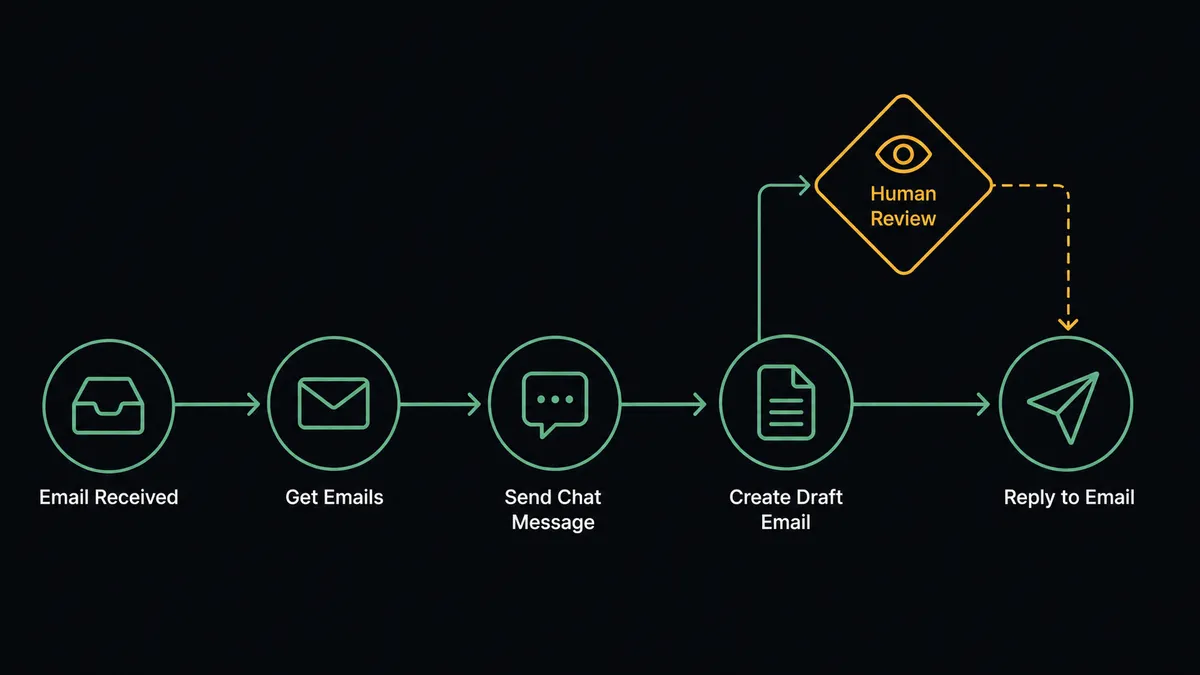
You connect Outlook to Chatbase by polling the shared inbox with Get Emails on a schedule, passing each new customer question to your trained Chatbase agent with Send Chat Message, and staging the returned answer in the thread with Create Draft Email, so a question that lands at 2am has a grounded reply waiting when your team opens the inbox. FlowRunner is a visual AI-agent orchestration platform where automations run autonomously and pause for human judgment on the steps that carry real consequence. Run as an AI agent, the same connection reads each thread, decides whether the Chatbase answer is good enough to send, and pauses for a named human before Reply to Email puts machine-written words in front of a customer.
The problem it solves
Today the shared support inbox is a queue that only drains when a person is sitting in front of it. A customer emails a question that your documentation answers perfectly. It sits until someone opens Outlook, reads it, searches the docs or their own memory, writes the same answer they wrote last Tuesday, and sends it. Meanwhile the Chatbase agent on your website answers that exact question in seconds, but only for visitors who think to open the widget. Email, where the majority of real customer questions actually arrive, never touches the knowledge base you already trained.
The edges are worse than the queue. A pricing question gets a stale answer because the person replying had not seen the new tier sheet. A frustrated customer gets a chirpy templated response that misses the point. A sales-qualified inquiry sits behind fourteen password resets. And when someone finally wires a language model straight into the inbox, the first hallucinated refund promise sent under your domain teaches everyone why raw automation on outbound email is a trust problem, not a throughput problem.
How it works: the connection
The connection listens to Outlook on a schedule and writes back through drafts and replies. Here is the plain version, grounded in the real connector actions.
- Trigger: On a schedule, the workflow calls Get Emails against the shared support folder and collects everything new since the last run.
- Read: For each message, Get Email pulls the full thread: sender, subject, body, and prior replies.
- Ask: Send Chat Message passes the question and thread context to your Chatbase agent, which answers from the trained knowledge base.
- Stage: Create Draft Email places the proposed answer inside the original thread, addressed and formatted, but unsent.
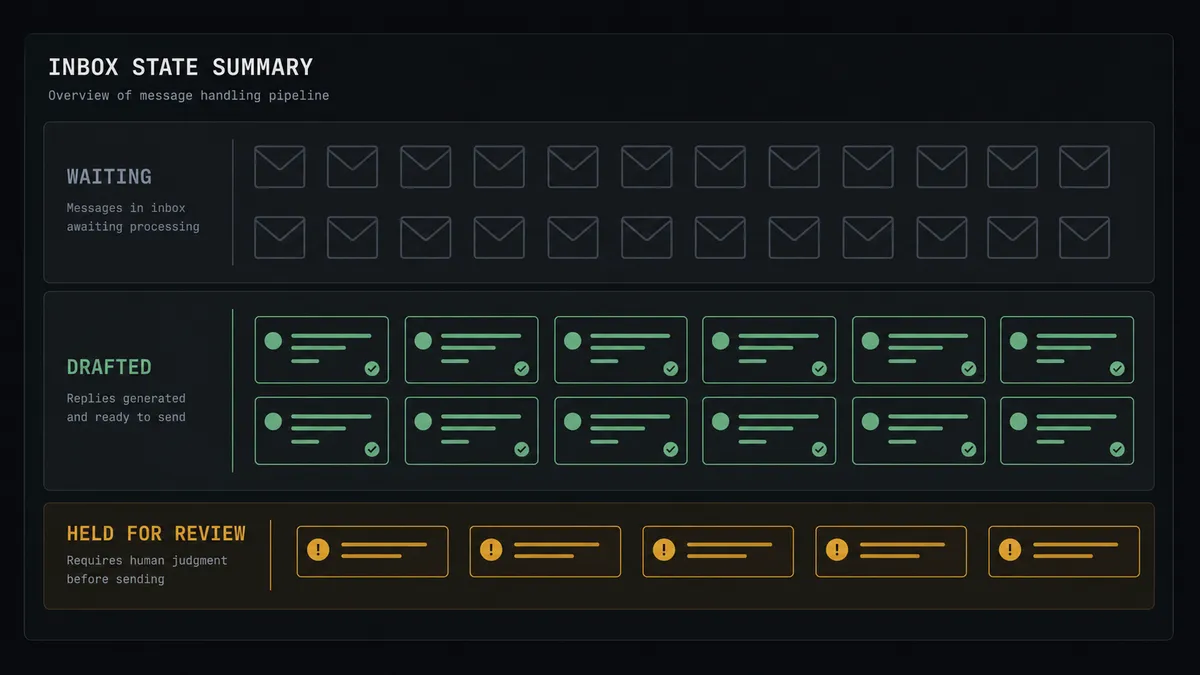
- Route: Threads the assistant handled cleanly go to a review queue; anything it flagged goes to a person with the draft attached as a head start.
- Send: A reviewer approves, and Reply to Email delivers the answer from your address. Forward Email hands sales inquiries to the right owner instead.
That is the “just connect them” answer. Every inbound question gets a grounded draft in minutes, and your team’s job shifts from writing answers to approving them. A second flow runs the other direction: Get Conversations and Get Leads pull widget sessions and captured leads out of Chatbase, and Send Email follows up with the visitors who left a question half-answered.
Can an AI agent run it? (and why a human stays in the loop)
Yes, and this is where the connection stops being a relay and starts being a teammate. Instead of piping every email through the same fixed sequence, an AI agent reads each thread and picks its tools: Get Email, Send Chat Message, Create Draft Email, Forward Email, Reply to Email. A password reset with a textbook answer moves fast. A thread where the customer is angry, or where the Chatbase answer cites nothing from the knowledge base, gets treated differently, because the agent is reasoning about the answer, not just transporting it.
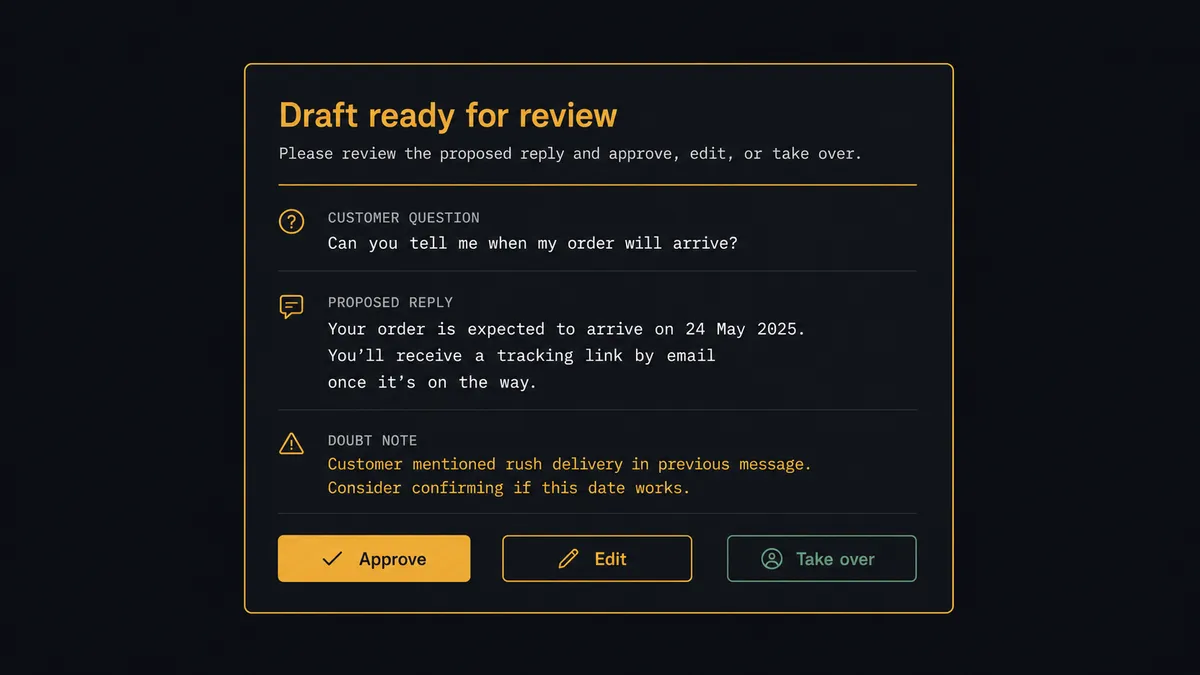
The consequential step is outbound email under your domain. Before Reply to Email fires, the agent checks its own work: is the answer grounded in the trained corpus, does it match the question actually asked, does it promise anything with money or policy attached? When any of that is in doubt, it invokes a human-in-loop flow it holds as a callable tool. The workflow pauses and posts to your team’s channel: “Draft ready for [customer], subject [subject]. The assistant’s answer references the old pricing page. Approve, edit, or take over?” Only after a named person signs off does the reply send, and the reviewer and timestamp land in the audit trail next to the draft.
The same gate protects the knowledge base itself. When a flow compiles resolved threads into fresh training text and reaches Update Chatbot Data, a person reviews what is being added before it becomes what the assistant tells every future customer. Prospects call this pattern a digital andon cord: like Toyota’s production line, the workflow stops the line the moment it hits uncertainty, and a human pulls it back into motion.
FlowRunner vs LangChain
Builders comparing this stack to LangChain are asking a fair question, and LangChain deserves a straight answer. It is a genuinely capable framework with a large ecosystem, and if you want full programmatic control over retrieval, memory, and agent behavior in Python or TypeScript, it will express patterns no visual tool matches. For teams shipping a custom LLM product, it is often the right substrate.
The difference is everything around the agent. With LangChain you own the hosting, the retry logic, the queue between Outlook and your code, the approval UI, and the audit log, and you build and maintain all of it before the first customer reply goes out. FlowRunner is the orchestration layer where those pieces are native.
| What matters for this pair | FlowRunner | LangChain |
|---|---|---|
| Human-in-the-loop on Reply to Email | Native. The agent invokes an approval flow as a callable tool and pauses before sending | A pattern you design and build yourself, including the UI and state handling |
| Who runs the flow | An AI agent reads, reasons, picks actions as tools in a hosted runtime | Your code, on infrastructure you provision and operate |
| Users included | Unlimited users on every tier | A framework, not a product; team access is whatever you build |
| Bring your own AI keys | Yes, BYOK | Yes, keys live in your code and environment |
| Self-hosted option | Yes, cloud-hosted or self-hosted | Self-hosted by definition, with the ops burden that implies |
| Pricing model | Transparent workflow-based tiers | Free framework; the cost is engineering time and infrastructure |
If you are building a bespoke AI product and want every abstraction under your fingers, LangChain is the better fit. If you want the inbox-to-answer loop running this week, with approvals, audit trails, and no glue code to babysit, that is FlowRunner.
Before and after
| Category | Before | After |
|---|---|---|
| First response | Questions wait until a person opens the inbox and writes from scratch | A grounded draft is staged in the thread minutes after the email arrives |
| Answer quality | Depends on who is on shift and what they remember | Every draft comes from the same trained knowledge base, then a human polishes it |
| Channel coverage | The Chatbase agent only helps visitors who open the website widget | Email questions get the same knowledge base answers as the widget |
| Risky replies | Whoever hits send decides alone, with no record of the judgment call | Doubtful drafts pause for a named reviewer, and the approval is logged |
| Knowledge upkeep | Docs drift while resolved threads pile up unread | Resolved threads feed Update Chatbot Data behind the same approval gate |
What you can build
Inbox answering with approval. Get Emails polls the support folder, Send Chat Message produces a grounded answer, Create Draft Email stages it, and Reply to Email sends only after a reviewer approves. The team approves answers instead of writing them.
Widget-to-email follow-up. Get Conversations pulls Chatbase sessions where a visitor asked something the assistant handled poorly, and the agent drafts a personal follow-up with Send Email so the thread ends with a human-quality answer instead of a shrug.
Lead capture handoff. Get Leads pulls contacts captured by the Chatbase agent, Create Contact adds them to Outlook, and Send Email opens a tailored thread with the owner CCed, so a widget conversation becomes a sales conversation without a copy-paste step.
Escalation triage. The agent classifies each inbound thread and forwards the ones that read as legal, billing disputes, or churn risk with Forward Email, attaching the Chatbase draft as context but never sending it, because some threads deserve a human from the first word.
Knowledge refresh with a gate. A weekly flow compiles resolved threads and updated policy text, a person reviews the additions, and Update Chatbot Data retrains the assistant, so the answers improve on a cadence you control.
Getting started
Start on the free plan: 100 executions a month, every integration included, no credit card required, plus 14 days of Professional for new accounts. Both connectors are available on every tier, and every tier includes unlimited users and unlimited workflows.
Explore the integration details:
- Outlook integration (21 actions covering email, drafts, contacts, and calendar)
- Chatbase integration (8 actions covering chat, training data, conversations, and leads)
Start building free at flowrunner.ai or book a demo to see a live Outlook to Chatbase workflow, reply approval and all.
Frequently asked questions
Is it free to connect Outlook and Chatbase on FlowRunner?
You can build and run the connection on FlowRunner's free plan, which includes 100 executions a month and every integration with no credit card required, and new accounts also get 14 days of Professional. Both connectors are available on every FlowRunner tier, and every tier includes unlimited users and unlimited workflows.
Can I self-host the Outlook to Chatbase workflow?
Yes. FlowRunner offers a cloud-hosted option and a self-hosted option, so the connection can run inside your own environment.
Does the AI agent need my own OpenAI or Claude key?
FlowRunner uses a bring-your-own-keys model, so you connect the AI provider key you already have. You are not locked to one model.
What happens when the Chatbase answer looks wrong or ungrounded?
The agent does not send it. It stages the answer with Create Draft Email and invokes a human-in-loop step that posts the customer's question, the proposed reply, and the reason for doubt to your team's channel. A person edits or approves before Reply to Email fires, or takes the thread over entirely.
Which Outlook events start the workflow if Outlook has no triggers?
The Outlook connector is action-based, so the workflow runs on a schedule. Every few minutes it calls Get Emails against the shared inbox folder, picks up the messages it has not yet processed, and hands each one to the Chatbase agent with Send Chat Message.
Can the same connection keep the Chatbase agent's knowledge current?
Yes. A second flow can compile resolved threads and updated policy text, then call Update Chatbot Data to refresh the training corpus. Because retraining changes what the assistant tells every future customer, that step sits behind the same human approval gate.