How to Connect Parseur with Bland AI (With or Without an AI Agent)
Connect Parseur's parsed emails and documents to Bland AI phone calls, with an AI agent that drafts the callback from the extracted fields and pauses for a human before Send Call dials the person who wrote in.
How do you connect Parseur to Bland AI?
You connect Parseur to Bland AI by having Parseur’s On Document Processed (Realtime) trigger fire when an inquiry email is parsed, pulling the extracted fields with Get Parsed Data, and placing a callback with Bland AI’s Send Call action, so an email sitting in an inbox becomes a returned phone call while the sender is still at their desk. FlowRunner is a visual AI-agent orchestration platform where automations run autonomously and pause for human judgment on the steps that carry real consequence. The same connection can run as an AI agent that reads each parsed inquiry, drafts the callback script itself, and pauses for a named person before Send Call dials someone who never expected a synthetic voice.
The problem it solves
Today, the path from “inquiry email arrives” to “someone calls them back” runs through a human bottleneck. A quote request or booking inquiry lands in a shared inbox. Someone reads it, copies the phone number into a task, and the callback happens when the team surfaces from whatever else is burning. By then the sender has emailed two competitors, and the first one to pick up the phone usually wins the work. Speed-to-contact is the whole game for inbound inquiries, and inboxes are where speed goes to die.
The edges are where it gets expensive. A phone number typed with a digit missing gets copied faithfully into the CRM and dialed into a void. An inquiry with the actual request buried in a forwarded thread gets a callback where your team opens with “so, what can we help with?” and sounds like they never read the email. And the inquiries that arrive Friday at 6 PM wait until Monday, which in practice means they wait forever.
How it works: the connection
The connection listens to Parseur and dials through Bland AI. Here is the plain version, grounded in the real connector actions.
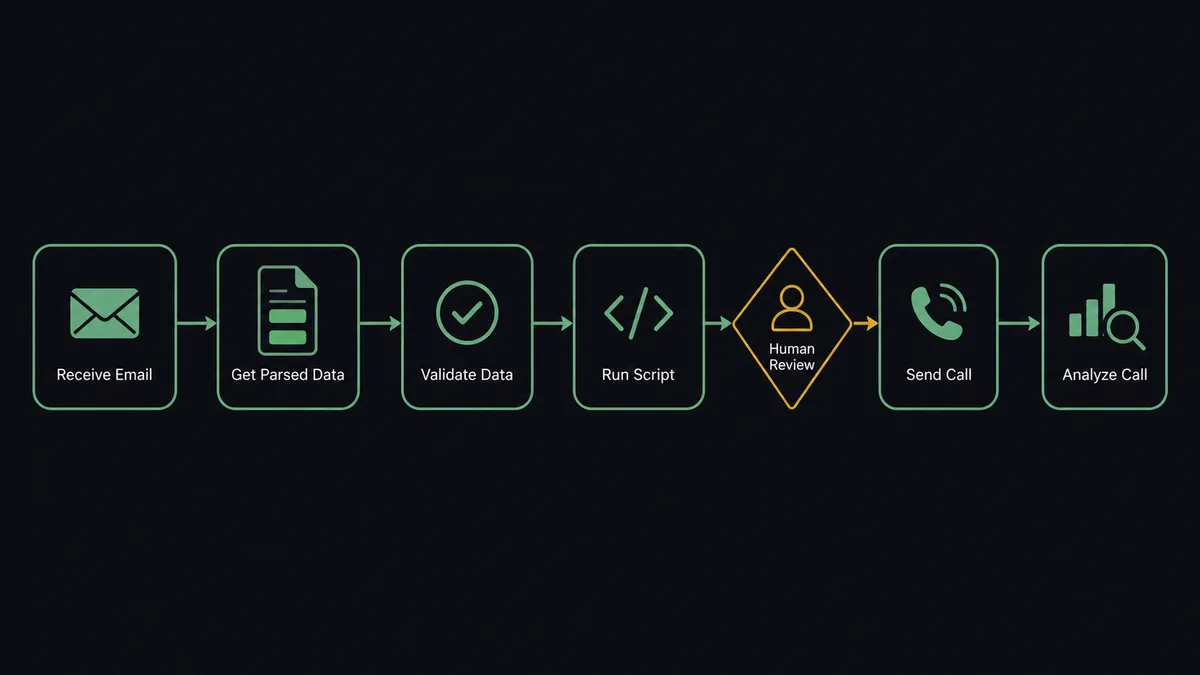
- Trigger: Parseur fires On Document Processed (Realtime) the moment an inquiry email matches your mailbox template.
- Read: The workflow calls Get Parsed Data to pull the structured fields: sender name, phone number, requested service, and timing.
- Validate: It checks the phone number format and the presence of every required field.
- Repair: If a field came back empty, it calls Reprocess Document to re-run the extraction before giving up on the record.
- Call: It calls Send Call in Bland AI, passing the number and the request details as variables the voice pathway speaks from.
- Log: When the call ends, it calls Analyze Call to capture the outcome and links it to the source document in Parseur via List Documents.
That is the “just connect them” answer. Every parsed inquiry becomes a callback with the caller’s own request in the script, minutes after the email arrived, at any hour you allow calls to go out.
Can an AI agent run it? (and why a human stays in the loop)
Yes, and the agent version is the difference between a mail-merge phone call and a considered one. The agent holds the pair’s real actions as tools: Get Parsed Data, Reprocess Document, List Documents, Send Call, Analyze Call, Stop Call. For each parsed inquiry it reads the extracted fields the way a coordinator would: is this a hot request with a stated deadline, a routine question, or a vendor pitch pretending to be an inquiry? It drafts a callback script grounded in what the sender actually wrote, not a generic greeting.
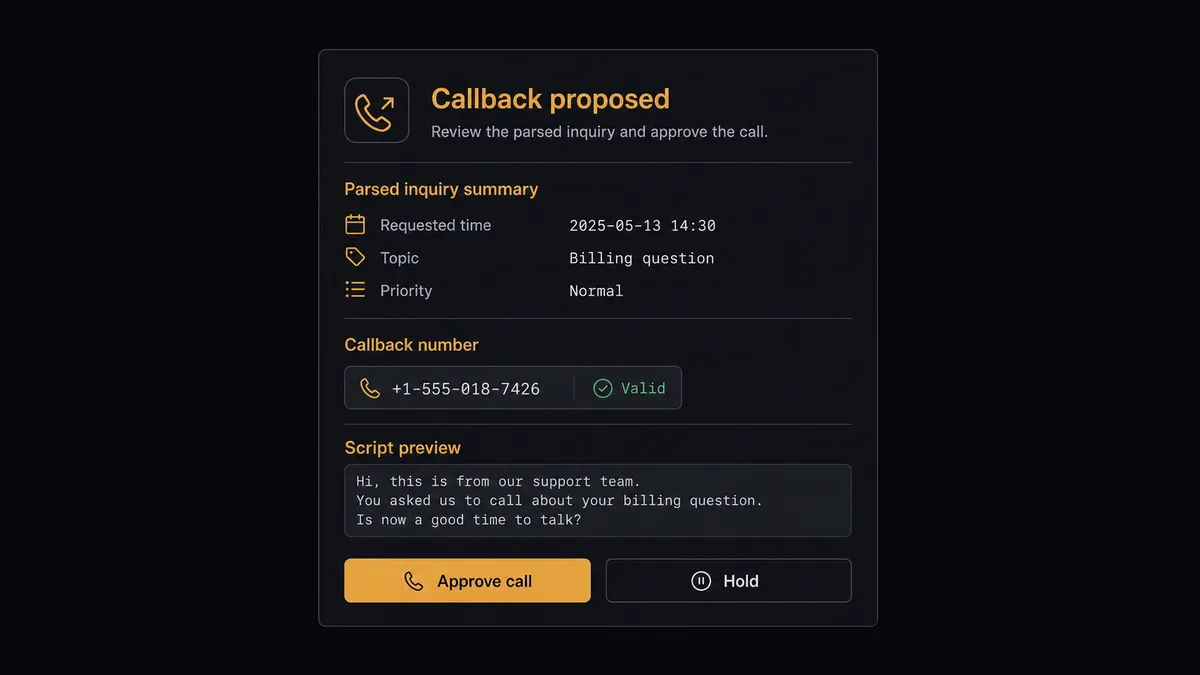
The consequential step is Send Call. A phone call reaches a real person who wrote you an email and did not expect an automated voice back. Done well, it is impressive responsiveness. Done wrong, on a bad number or with a garbled understanding of the request, it burns the lead. So before dialing, the agent invokes a human-in-loop flow it holds as a callable tool. The workflow pauses and posts to the ops channel: “Callback proposed: [name] asked about [request], number extracted from today’s inquiry, script attached. Approve the call?” One click and Send Call dials. The approval, the approver, and the timestamp all land in the audit trail next to the source document.
When the agent is uncertain, it refuses to guess. A phone number that fails validation, an extraction where Reprocess Document still returns an empty field, a message whose intent it cannot classify: each stops the line and goes to a person with the original document attached. Prospects call this the digital andon cord, and it is the core of how FlowRunner thinks: like Toyota’s line workers, the workflow pulls the cord the moment it hits uncertainty rather than shipping a defect at speed.
FlowRunner vs Zapier
Zapier is the default way most teams first wire Parseur to anything, and that is earned. Parseur’s own documentation walks through Zapier setups, the connector library is enormous, and a simple “parsed document creates a row or sends a Slack message” Zap takes minutes. For moving parsed fields into a spreadsheet or CRM, Zapier is quick and dependable.
Placing outbound phone calls to your inbound leads is a different weight class of automation. FlowRunner is built around native human-in-the-loop and AI-agent orchestration, where an agent judges each inquiry and a person approves before anyone’s phone rings.
| What matters for this pair | FlowRunner | Zapier |
|---|---|---|
| Human-in-the-loop before Send Call dials a lead | Native. The agent invokes an approval flow as a callable tool and waits | Available via added approval steps, not a native agent decision |
| Who runs the flow | An AI agent reads the parsed inquiry, reasons, picks actions as tools | Predefined step sequence you configure per Zap |
| Users included | Unlimited users on every tier | Priced by task volume; seats vary by plan |
| Bring your own AI keys | Yes, BYOK. Connect the AI provider key you already have | AI features tied to Zapier’s own AI offering |
| Self-hosted option | Yes, cloud-hosted or self-hosted | Cloud only |
| Pricing model | Transparent workflow-based tiers | Per-task pricing that can be hard to predict as volume grows |
If you only need parsed fields dropped into a sheet, Zapier does the job. If you want each inquiry judged, scripted, approved by a person, and returned as a phone call with a logged outcome, that is what this pairing is for.
Before and after
| Category | Before | After |
|---|---|---|
| Response speed | Callbacks happen when someone works through the shared inbox | The callback is proposed minutes after the email is parsed |
| Data entry | Phone numbers and request details copied by hand from emails | Get Parsed Data extracts the fields; nothing is retyped |
| Bad numbers | A mistyped digit gets dialed or logged without anyone noticing | Validation plus Reprocess Document catches broken extractions before a call is proposed |
| Context on the call | The caller opens cold and asks the sender to repeat their request | The script quotes the sender’s own request back to them |
| After-hours inquiries | Friday evening emails wait until Monday | Inquiries are parsed and queued around the clock, called back inside your approved calling window |
What you can build
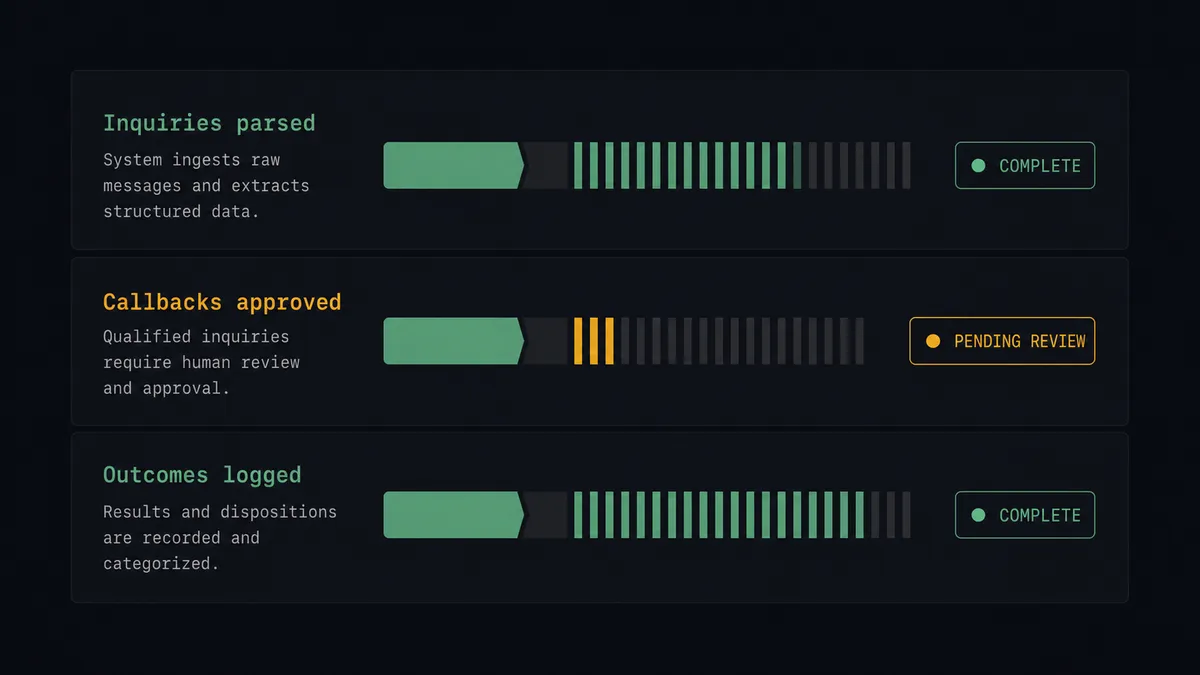
Speed-to-lead callback. On Document Processed (Realtime) fires on a quote request. The agent validates the fields with Get Parsed Data, drafts a script referencing the exact service requested, gets approval, and Send Call returns the inquiry while the sender is still thinking about it.
Booking confirmation calls. Reservation and appointment request emails are parsed, and the agent proposes a confirmation call that restates the date and party details. Analyze Call captures whether the caller confirmed, changed, or cancelled, and logs it against the source document.
Order problem outreach. Supplier order confirmations flow into a Parseur mailbox. When a parsed confirmation shows a substitution or a changed date, the agent proposes a call to the buyer explaining the change, with the discrepancy quoted in the script.
Extraction quality patrol. The agent watches for documents whose fields fail validation, runs Reprocess Document, and routes stubborn failures to a person with List Documents context. Bad templates get caught in hours instead of surfacing as a month of silent data loss.
Missed-call recovery. When Analyze Call reports no answer, the agent schedules one retry inside the calling window and, if that fails too, closes the loop by flagging the inquiry for a human follow-up email instead of dialing forever.
Getting started
Start on the free plan: 100 executions a month, every integration included, no credit card required, plus 14 days of Professional for new accounts. Both connectors are available on every tier, and every tier includes unlimited users and unlimited workflows.
Explore the integration details:
- Parseur integration (2 triggers and 6 actions covering mailboxes, extraction, and reprocessing)
- Bland AI integration (11 actions covering outbound calls, call analysis, and recordings)
Start building free at flowrunner.ai or book a demo to see a live Parseur to Bland AI workflow, callback approval and all.
Frequently asked questions
Is it free to connect Parseur and Bland AI on FlowRunner?
You can build and run the connection on FlowRunner's free plan, which includes 100 executions a month and every integration with no credit card required, and new accounts also get 14 days of Professional. Both connectors are available on every FlowRunner tier, and every tier includes unlimited users and unlimited workflows.
Can I self-host the Parseur to Bland AI workflow?
Yes. FlowRunner offers a cloud-hosted option and a self-hosted option, so the connection can run inside your own environment. Self-hosting is available for teams that need the workflow to run on their own infrastructure.
Does the AI agent need my own OpenAI or Claude key?
FlowRunner uses a bring-your-own-keys model, so you connect the AI provider key you already have. You are not locked to one model, and you control which provider runs the agent.
What happens when the parsed data looks wrong or incomplete?
The agent does not dial. It calls Reprocess Document to re-run the extraction, and if a required field like the phone number still fails validation, it routes the original document to a person with the parsed fields side by side, so a human corrects the record before any call is proposed.
Which triggers and actions does the Parseur to Bland AI workflow use?
Parseur's On Document Processed (Realtime) trigger fires the moment an emailed inquiry is parsed. The workflow pulls fields with Get Parsed Data, places approved callbacks with Bland AI's Send Call, and logs outcomes with Analyze Call. Bland AI has no triggers, so Parseur always starts the flow.
What kinds of documents work for callback automation?
Anything that lands in a Parseur mailbox with a phone number in it: web form notification emails, quote requests, booking inquiries, service requests, and order confirmations. You define the template once and every matching email becomes structured data the agent can act on.