How to Connect Google Forms with Bland AI (With or Without an AI Agent)
Connect Google Forms responses to Bland AI phone calls, optionally as an AI agent that drafts a callback per respondent and pauses for a human before Send Call dials anyone who submitted the form.
How do you connect Google Forms to Bland AI?
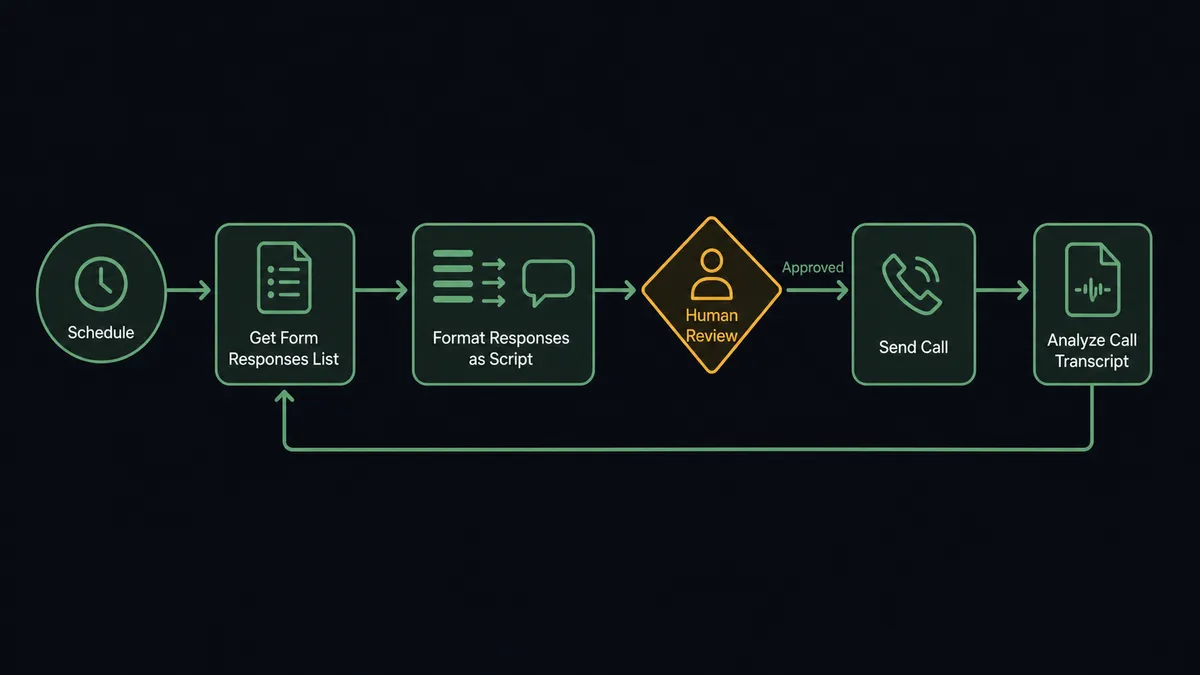
You connect Google Forms to Bland AI with a scheduled workflow, because Google Forms publishes no webhook triggers: at the interval you choose, FlowRunner calls Get Form Responses List to pull new submissions, reads each one with Get Form Response by ID, and places a callback with Send Call, scripted from the respondent’s own answers, then captures the conversation with Get Call Details and Analyze Call. FlowRunner is a visual AI-agent orchestration platform where automations run autonomously and pause for human judgment on the steps that carry real consequence. When the connection runs as an AI agent, the agent also decides which submissions deserve a human voice instead of a voice agent, and it stops for a named human before Send Call dials anyone.
The problem it solves
Every form promises a follow-up. The service request says “we’ll call you,” the appointment form says “we’ll confirm,” the interest form says “someone will reach out.” Then the responses pile up in a sheet, and the callback queue becomes a side job for whoever is least busy. Each call requires reading the submission, finding the phone number, and remembering what the person actually asked for, so calls happen in batches, late, and the caller opens with “so, what was this regarding?” The respondent, who told you exactly what it was regarding when they filled out the form, hears an organization that does not read its own forms.
The edges hurt in both directions. Call too slowly and the service request has already gone to a competitor who picked up the phone the same afternoon. Call the wrong submission with the wrong tone and it is worse than not calling: a complaint answered by a cheerful scheduling script, a cancellation request greeted with an upsell. And when several people share the callback sheet, nobody knows who called whom, so respondents get two calls or none.
How it works: the connection
The connection reads Google Forms on a schedule and speaks through Bland AI. Here is the plain version, grounded in the real connector actions.
- Trigger: On a schedule, the workflow calls Get Form Responses List and collects every response that arrived since the last run.
- Read: Get Form Response by ID pulls each respondent’s full answer set, including their phone number and what they asked for.
- Build the call: The workflow drafts a call objective from the answers themselves: the service selected, the problem described, the time window requested.
- Shape the conversation: List Voices selects how the call sounds, and List Pathways attaches a structured conversation flow for calls that must gather specific details.
- Place the call: Send Call dials the respondent, references their submission, confirms or gathers what is needed, and offers next steps.
- Capture the outcome: Get Call Details and Analyze Call pull the transcript and structured answers, such as a confirmed time or an updated preference, with Get Call Recording kept for review.
- Close the loop: The outcome is written back beside the original response, and unanswered calls are queued for one retry instead of vanishing.
That is the “just connect them” answer. The form’s promise of a follow-up becomes an actual same-day conversation that starts from what the respondent already told you.
Can an AI agent run it? (and why a human stays in the loop)
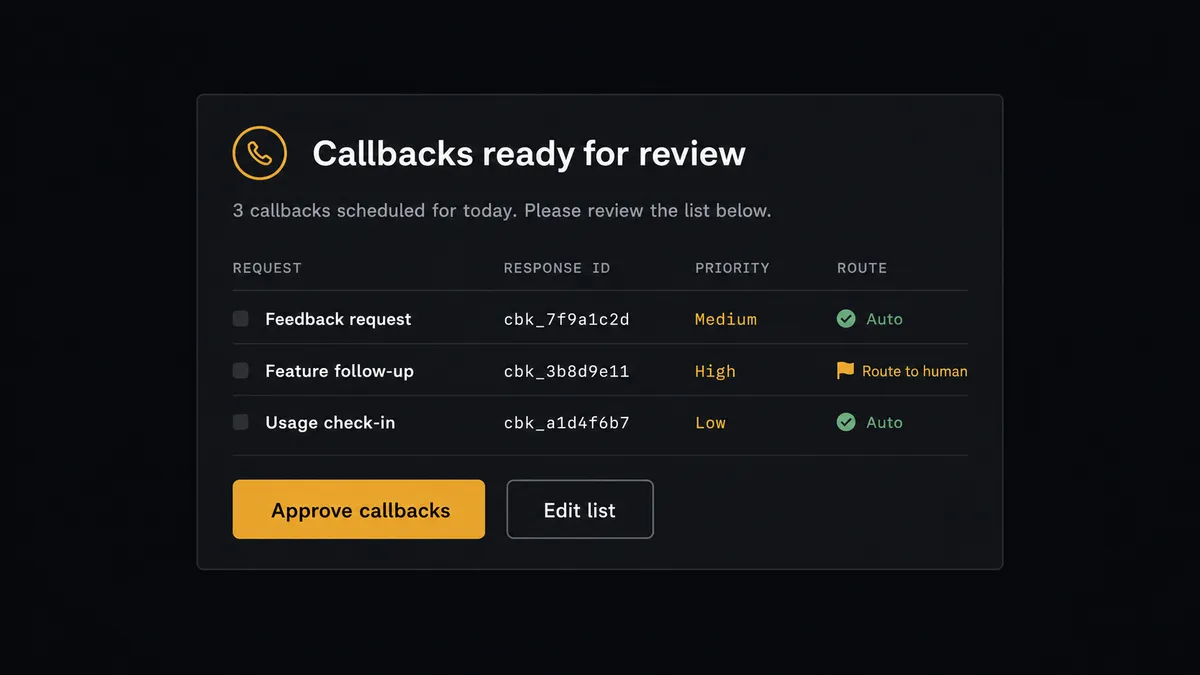
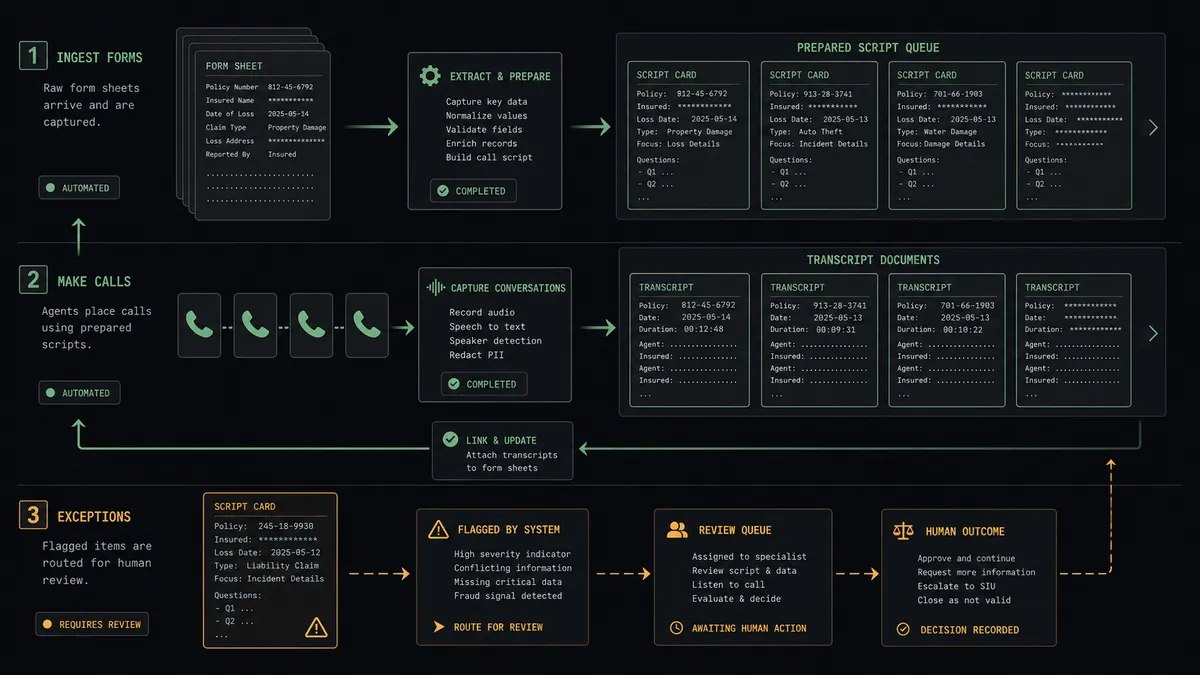
Yes, and the agent’s first job is reading, not dialing. The agent holds the pair’s actions as tools: Get Form Responses List, Get Form Response by ID, Send Call, Get Call Details, Analyze Call, Stop Call. It reads each submission the way a good office manager reads the inbox. A routine appointment request becomes a prepared confirmation call. An incomplete submission with a suspicious phone number gets parked rather than dialed. And a complaint, a cancellation, or anything with sensitive personal detail gets routed to a person with the full response attached, because some conversations should not open with a synthesized voice, no matter how good it is.
The consequential step is Send Call, because dialing a stranger who gave you their number is an act of trust spending. The respondent handed over their phone number for a specific purpose, and the call has to honor that purpose in tone and content. So the agent never dials on its own authority. It assembles the callback list, each entry with the respondent’s request and the exact script the voice agent will follow, and invokes a human-in-loop flow it holds as a callable tool. The workflow pauses and posts: “Callback list ready: respondents, what each asked for, and each call’s script attached. Sensitive submissions flagged separately for a human caller. Approve, prune, or hold?” A person reviews and approves. Only then does Send Call fire, and each call’s approver, transcript, and structured outcome land in the audit trail. A call going wrong mid-flight can be ended with Stop Call.
Prospects call this pattern a digital andon cord. Like Toyota’s production line pull cord, the workflow stops the line before the moment a real person picks up a real phone, and your team releases it deliberately, with the scripts in front of them.
FlowRunner vs Zapier
Zapier connects both of these services and deserves its reputation for making the simple case simple: a clean editor, a massive connector catalog, and templates that wire a form to an action in minutes. If you want every submission to trigger the same call with the same script, Zapier can do that with little setup.
The difference is that “every submission, same script” is exactly the failure mode this workflow exists to avoid. FlowRunner runs the connection as an AI agent that reads before it dials, with a native human gate in front of every call.
| What matters for this pair | FlowRunner | Zapier |
|---|---|---|
| Human-in-the-loop on Send Call | Native. The agent posts the callback list with scripts for approval before dialing | Available by inserting approval-style steps, not a native agent decision |
| Who runs the flow | An AI agent classifies each response, drafts each script, picks actions as tools | Predefined step sequence you configure per Zap |
| Users included | Unlimited users on every tier | Priced by task volume; seats vary by plan |
| Bring your own AI keys | Yes, BYOK. Connect the AI provider key you already have | AI features tied to Zapier’s own AI offering |
| Self-hosted option | Yes, cloud-hosted or self-hosted | Cloud only |
| Pricing model | Transparent workflow-based tiers | Per-task pricing that scales with every submission and call step |
If your form volume is tiny and one fixed script fits every caller, Zapier is a reasonable pick. If respondents wrote you different things and deserve different calls, with a person approving what gets said in your company’s voice, this pairing is where FlowRunner is the better fit.
Before and after
| Category | Before | After |
|---|---|---|
| Callback speed | Responses sit in the sheet until someone works the queue | Prepared calls go out the same day, after one approval |
| Call context | Callers open with “what was this regarding?” | Each script is drafted from the respondent’s own answers |
| Sensitive submissions | Complaints get the same cheerful callback as bookings | The agent routes them to a human voice with full context attached |
| Coverage | Shared sheets produce double calls and missed calls | One list, one approver, every outcome written back beside the response |
| Records | Whoever called maybe left a note | Transcript and structured answers captured via Analyze Call, recording kept for review |
What you can build
Same-day service callbacks. The scheduled run pulls new requests with Get Form Responses List, drafts a call per respondent referencing what they asked for, and dials with Send Call after approval, writing outcomes back via Analyze Call.
Appointment confirmation loop. For booking forms, the voice agent confirms the requested slot, offers alternatives when the slot conflicts, and Analyze Call extracts the confirmed time as a structured answer your calendar workflow consumes next.
Lead qualification by phone. For interest forms, the agent calls with a short qualification pathway from List Pathways, and the extracted answers, budget range, timeline, decision role, land beside the original response ready for the CRM.
Complaint triage with a human voice. Submissions classified as complaints skip the voice agent entirely and route to a person with the full response and suggested talking points, so the most delicate calls get the most human treatment.
No-answer recovery. Calls that go unanswered queue one retry at a different hour, and after that the workflow marks the response for an email follow-up instead of dialing forever, keeping persistence polite.
Getting started
Start on the free plan: 100 executions a month, every integration included, no credit card required, plus 14 days of Professional for new accounts. Both connectors are available on every tier, and every tier includes unlimited users and unlimited workflows.
Explore the integration details:
- Google Forms integration (9 actions covering forms, responses, and field management)
- Bland AI integration (11 actions covering calls, pathways, voices, and analysis)
Start building free at flowrunner.ai or book a demo to see a live Google Forms to Bland AI workflow, callback approval and all.
Frequently asked questions
Is it free to connect Google Forms and Bland AI on FlowRunner?
You can build and run the connection on FlowRunner's free plan, which includes 100 executions a month and every integration with no credit card required, and new accounts also get 14 days of Professional. Both connectors are available on every FlowRunner tier, and every tier includes unlimited users and unlimited workflows.
Can I self-host the Google Forms to Bland AI workflow?
Yes. FlowRunner offers a cloud-hosted option and a self-hosted option, so the connection can run inside your own environment.
Does the AI agent need my own OpenAI or Claude key?
FlowRunner uses a bring-your-own-keys model, so you connect the AI provider key you already have. You are not locked to one model.
What happens when a form response is a complaint or contains sensitive details?
The agent does not dial it. Submissions it classifies as complaints, cancellations, or sensitive matters are routed to a person with the full response attached, because those conversations deserve a human voice. The approver sees them flagged separately from the routine callback list.
Google Forms has no webhook trigger, so how does the workflow start?
It runs on a schedule. FlowRunner calls Get Form Responses List at the interval you choose and processes every response that arrived since the last run, with Get Form Response by ID pulling the full answer set. Nothing depends on Google pushing events.
What does the workflow capture after each callback?
Get Call Details and Analyze Call pull the transcript and structured answers, such as a confirmed appointment time or a stated preference, and Get Call Recording stays available for review. The outcome is written back beside the original form response, so submission and conversation live together.