How to Connect Parseur with Attio (With or Without an AI Agent)
Connect Parseur's parsed documents to Attio records so inbound emails and PDFs become CRM data automatically, with an AI agent that pauses for a human before a shaky parse overwrites an existing record.
How do you connect Parseur to Attio?
You connect Parseur to Attio by having Parseur’s On Document Processed (Realtime) trigger drive Attio actions: the workflow calls Get Parsed Data for the extracted fields, Query Records to check for an existing match, and Assert Record (Upsert) to create or update the person and company in your CRM. FlowRunner is a visual AI-agent orchestration platform where automations run autonomously and pause for human judgment on the steps that carry real consequence. When the same connection runs as an AI agent, the agent judges each parse before it writes, and it stops for a named human before uncertain data changes a record your team already relies on.
The problem it solves
The leads and orders you care about arrive as documents: inquiry emails, filled-in PDFs, order confirmations, forwarded signup notifications from a portal that has no API. Today someone reads each one and retypes the useful parts into Attio. It is slow, it gets deprioritized the moment the week gets busy, and the backlog becomes a stack of unentered opportunities. Parseur solves the extraction half. The remaining half, getting extracted fields into the CRM correctly, is usually a copy-paste job or a brittle sync nobody trusts.
The failure mode of the naive sync is confident garbage. A parsing template drifts after a sender changes their email format, and suddenly phone numbers land in the company field. A parsed “reply-to” overwrites the real contact email on a record with an active deal. Because the pipeline never doubts itself, bad fields flow in at machine speed and a human discovers them weeks later, one embarrassing bounce at a time.
How it works: the connection
The connection listens to Parseur and writes to Attio. Here is the plain version, grounded in the real connector actions.
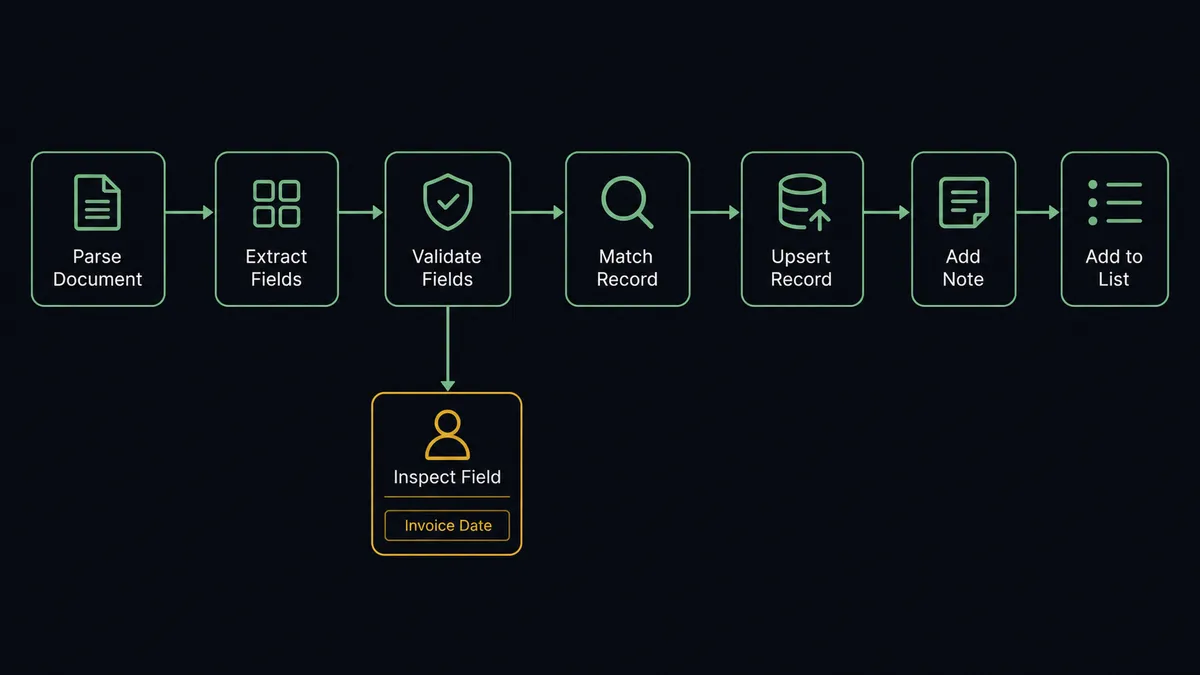
- Trigger: Parseur fires On Document Processed (Realtime) the moment a document finishes parsing.
- Read: The workflow calls Get Parsed Data to pull the extracted fields.
- Validate: It checks that the fields it needs, typically a name plus an email or domain, are present and well formed.
- Match: It calls Query Records in Attio to see whether the person or company already exists.
- Write: It calls Assert Record (Upsert) so a new inquiry becomes a new record and a repeat sender converges on the existing one.
- Trace: It calls Create Note with the source document reference, so every CRM value points back to the document that produced it.
- Route: For pipeline-bound inquiries, it calls Add List Entry to drop the record into the right collection for follow-up.
That is the “just connect them” answer. Documents in, records out, and the retyping queue disappears. On Document Processed (Polling) runs the same flow on a schedule if you prefer batch pickup.
Can an AI agent run it? (and why a human stays in the loop)
Yes, and judgment about parse quality is the whole reason to. A field mapping treats every extraction as equally true. An AI agent reads the parsed fields the way a careful assistant would: does this look like an email address, does the company name match the sender domain, does this document even belong in this mailbox? It holds Get Parsed Data, Reprocess Document, Query Records, Assert Record (Upsert), Update Record, and Create Note as tools, and it chooses per document.
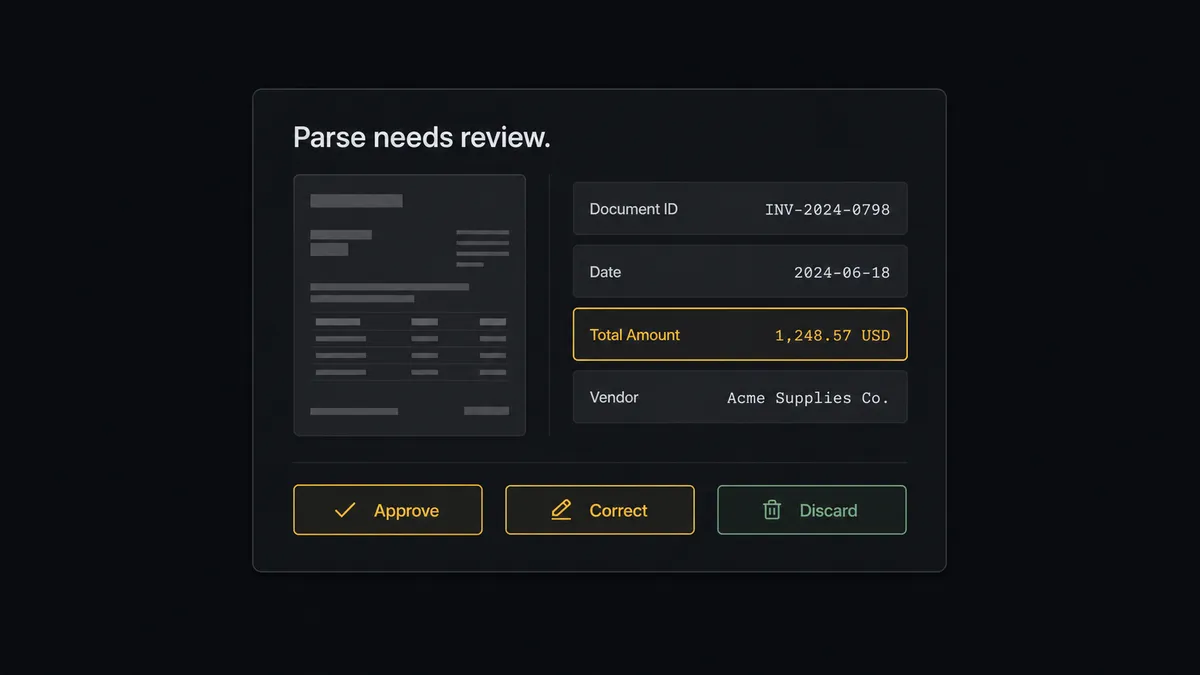
The consequential step is writing uncertain data onto an existing record. Creating a fresh record from a shaky parse is recoverable; overwriting the verified email on an account with an open deal is how deals go quiet. So before Update Record applies fields the agent doubts, it invokes a human-in-loop flow it holds as a callable tool. The workflow pauses and posts to the ops channel: “Document [name] parsed with a company field that does not match the sender domain. Proposed change to the [company] record attached, source document linked. Approve, correct, or discard?” A named approver decides in one click, and if the template itself misfired, the agent calls Reprocess Document instead of forcing bad data through. The decision, the approver, and the timestamp land in the audit trail.
Clean parses never wait. A well-formed inquiry from a new sender becomes a record and a list entry with no human involved. The gate exists only where the cost of being wrong is real. Prospects call this the digital andon cord: like Toyota’s cord on the line, the workflow stops itself the moment quality is in doubt, and a person clears it with the evidence in front of them.
FlowRunner vs Zapier
Zapier is a fair default for this pair, and its strengths are real: Parseur ships first-class Zapier guidance, the connector library is vast, and a “parsed document to CRM record” Zap is a well-worn template you can stand up in minutes. For a trusted template with stable senders, that push works.
The difference is what happens to the parses that should not be trusted. FlowRunner is built around native human-in-the-loop and AI-agent orchestration, where the agent doubts on your behalf before the CRM absorbs an error.
| What matters for this pair | FlowRunner | Zapier |
|---|---|---|
| Human-in-the-loop before uncertain data updates a record | Native. The agent invokes an approval flow as a callable tool with the source document attached | Available via added approval steps or paths, not a native agent decision |
| Who runs the flow | An AI agent judges each parse, reasons, picks actions as tools | Predefined step sequence you configure per Zap |
| Users included | Unlimited users on every tier | Priced by task volume; seats vary by plan |
| Bring your own AI keys | Yes, BYOK | AI features tied to Zapier’s own AI offering |
| Self-hosted option | Yes, cloud-hosted or self-hosted | Cloud only |
| Pricing model | Transparent workflow-based tiers | Per-task pricing; document volume becomes task volume |
If your documents are uniform and your templates never drift, Zapier moves the data fine. If inbound formats vary and a wrong field on the wrong record costs you a live deal, the judged-parse path is the better fit.
Before and after
Here is what changes operationally when the connection is live.
| Category | Before | After |
|---|---|---|
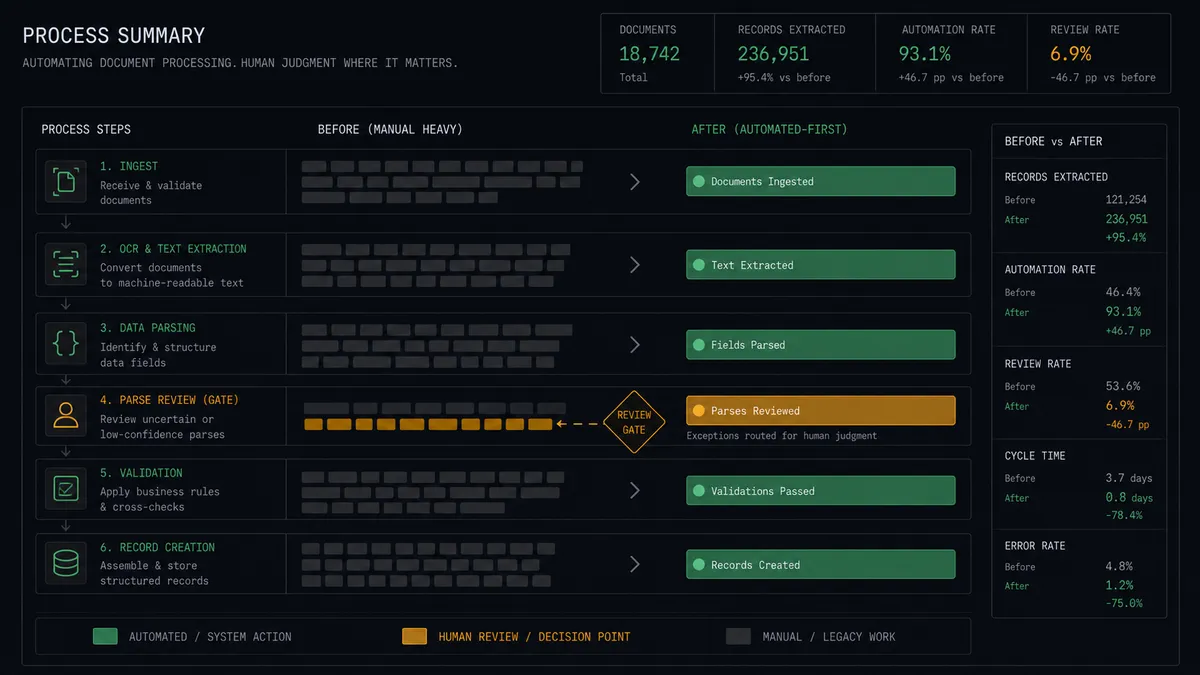
| Data entry | Someone reads each document and retypes fields into Attio | Get Parsed Data flows into Assert Record (Upsert) without a keyboard involved |
| Lead latency | Inquiries wait in the mailbox until the entry backlog clears | Records and list entries exist moments after the document parses |
| Bad parses | Template drift writes garbage into the CRM at machine speed | Uncertain fields pause for a named approver with the source document attached |
| Duplicates | Repeat senders become second and third copies of the same company | Upserts keyed on email or domain converge on one record |
| Traceability | Nobody knows which document a CRM value came from | Create Note links every change to its source document |
What you can build
Inquiry mailbox to pipeline. On Document Processed (Realtime) fires on your inquiries mailbox. The agent validates the parse, writes the person and company with Assert Record (Upsert), and drops the record into the new-leads collection with Add List Entry.
Order confirmations onto accounts. Forwarded order emails parse into structured fields, and the agent logs each order against the matching Attio company with Create Note, so account owners see purchase activity without asking anyone.
Guarded record enrichment. Documents that carry updated contact details, a new phone number or billing address, propose an Update Record that only applies straight through when the parse is clean, and routes to an approver when it is not.
Template drift alarm. When several consecutive documents from one sender fail validation, the agent creates a task for the mailbox owner and holds the batch, offering Reprocess Document once the template is fixed instead of writing a run of bad records.
Event and webinar intake. Registration notification emails parse into attendee fields, and the agent upserts each person, tags the source with Create Note, and builds the follow-up list in Attio with Add List Entry before the event ends.
Common questions
Is it free to connect Parseur and Attio on FlowRunner? You can build and run the connection on FlowRunner’s free plan, which includes 100 executions a month and every integration with no credit card required, and new accounts also get 14 days of Professional. Both connectors are available on every FlowRunner tier, and every tier includes unlimited users and unlimited workflows.
Can I self-host the Parseur to Attio workflow? Yes. FlowRunner offers a cloud-hosted option and a self-hosted option, so the connection can run inside your own environment.
Does the AI agent need my own OpenAI or Claude key? FlowRunner uses a bring-your-own-keys model, so you connect the AI provider key you already have. You are not locked to one model.
What happens when a parse looks wrong or incomplete? The agent does not write it. It posts the extracted fields next to the source document to your team’s channel and waits for a person to correct, approve, or discard them. If the template itself misfired, the approver can have the agent call Reprocess Document instead.
Which Parseur events can trigger an Attio update? Parseur offers two triggers: On Document Processed (Realtime) and On Document Processed (Polling). Realtime fires the moment a document finishes parsing; polling checks on a schedule for environments that prefer batch pickup.
Can it update existing Attio records or only create new ones? Both. Assert Record (Upsert) creates the record when none exists and updates it when one does. Updates to existing records are the guarded path: the agent only applies them straight through when the parse is clean, and routes anything uncertain to a named approver first.
Getting started
Start on the free plan: 100 executions a month, every integration included, no credit card required, plus 14 days of Professional for new accounts. Both connectors are available on every tier, and every tier includes unlimited users and unlimited workflows, so the person who owns the mailbox and the team that owns the pipeline share one workflow from day one.
Explore the integration details:
- Parseur integration (2 triggers and 6 actions for document extraction pipelines)
- Attio integration (26 actions across records, lists, notes, and tasks)
Start building free at flowrunner.ai or book a demo to see a live Parseur to Attio workflow, parse-review gate and all.
Frequently asked questions
Is it free to connect Parseur and Attio on FlowRunner?
You can build and run the connection on FlowRunner's free plan, which includes 100 executions a month and every integration with no credit card required, and new accounts also get 14 days of Professional. Both connectors are available on every FlowRunner tier, and every tier includes unlimited users and unlimited workflows.
Can I self-host the Parseur to Attio workflow?
Yes. FlowRunner offers a cloud-hosted option and a self-hosted option, so the connection can run inside your own environment.
Does the AI agent need my own OpenAI or Claude key?
FlowRunner uses a bring-your-own-keys model, so you connect the AI provider key you already have. You are not locked to one model.
What happens when a parse looks wrong or incomplete?
The agent does not write it. It posts the extracted fields next to the source document to your team's channel and waits for a person to correct, approve, or discard them. If the template itself misfired, the approver can have the agent call Reprocess Document instead.
Which Parseur events can trigger an Attio update?
Parseur offers two triggers: On Document Processed (Realtime) and On Document Processed (Polling). Realtime fires the moment a document finishes parsing; polling checks on a schedule for environments that prefer batch pickup.
Can it update existing Attio records or only create new ones?
Both. Assert Record (Upsert) creates the record when none exists and updates it when one does. Updates to existing records are the guarded path: the agent only applies them straight through when the parse is clean, and routes anything uncertain to a named approver first.