How to Connect Parseur with Bigin by Zoho (With or Without an AI Agent)
Connect Parseur document extraction to Bigin, optionally as an AI agent that turns parsed inquiries into contacts and deals and pauses for a human before overwriting an existing CRM record.
How do you connect Parseur to Bigin by Zoho?
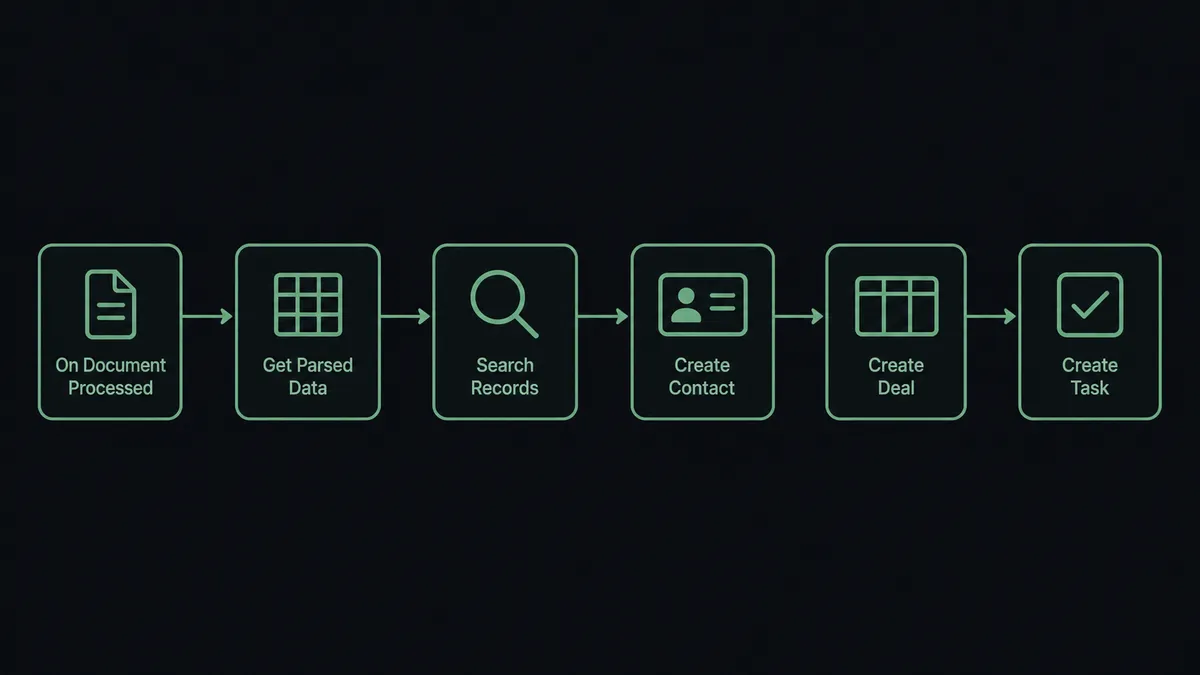
You connect Parseur to Bigin by having Parseur’s On Document Processed (Realtime) trigger drive Bigin actions: the workflow pulls the extracted fields with Get Parsed Data, checks for the sender with Search Records, and builds the record with Create Contact, Create Deal, and Add Note, so an inquiry email or PDF becomes a working pipeline entry without anyone retyping it. Bigin has no triggers of its own, so the workflow always starts from the Parseur side, which fits how the work actually arrives: as documents. FlowRunner is a visual AI-agent orchestration platform where automations run autonomously and pause for human judgment on the steps that carry real consequence. The same connection can run as an AI agent that judges each extraction, builds clean records on its own, and pauses for a named human before it overwrites anything Bigin already knows.
The problem it solves
Right now the path from an inbound inquiry to a CRM record runs through someone’s eyeballs. A quote request lands as a PDF attachment. A lead form forwards as an email. A distributor sends an order inquiry in their own format. Someone opens each one, squints at it, and retypes the name, company, and request into Bigin. When the week gets busy, the retyping waits, and the pipeline runs a day or two behind the inbox. Follow-up speed, the one thing that reliably wins inbound deals, is capped by data entry.
The edges are where real damage happens. Half the inquiries come from people already in the CRM, and a careless import creates a duplicate contact with a second, competing deal. Worse, a well-meaning sync overwrites a maintained record with whatever the document happened to say: an old phone number, a misspelled name, a personal email replacing the corporate one. Extraction is also not perfect. A template shift at the sender’s end and suddenly the amount field holds a date. Records built from that go into the pipeline looking real, and nobody notices until a call goes badly.
How it works: the connection
The connection listens to Parseur and writes to Bigin. Here is the plain version, grounded in the real connector actions.
- Trigger: Parseur fires On Document Processed (Realtime) the moment an inbound document finishes parsing.
- Read: The workflow calls Get Parsed Data to pull the extracted fields: sender, company, what they are asking for, and any amounts.
- Check for the sender: It calls Search Records in Bigin to see whether the contact or company already exists in the pipeline.
- Create the record: For a new sender, it calls Create Contact and Create Company, then Create Deal for the inquiry itself.
- Attach the context: It calls Add Note on the deal with the parsed excerpt and a reference to the source document, so whoever picks it up can read what was actually asked.
- Assign the follow-up: It calls Create Task so the inquiry lands on a named owner’s list with a due date, not in a shared inbox.
That is the “just connect them” answer. Documents become deals, senders become contacts, and the pipeline keeps pace with the inbox. When a document parses badly, the workflow calls Reprocess Document for another pass instead of pushing garbage into the CRM.
Can an AI agent run it? (and why a human stays in the loop)
Yes, and this is where the connection earns its keep. Instead of a fixed mapping that shoves every parsed field into the same slots, an AI agent reads each extraction and picks the Parseur and Bigin actions it needs as tools. Get Parsed Data, Reprocess Document, Search Records, Create Contact, Create Deal, Update Contact, Add Note: that is the toolbox, and the agent chooses based on what the document actually contains and what Bigin already holds.
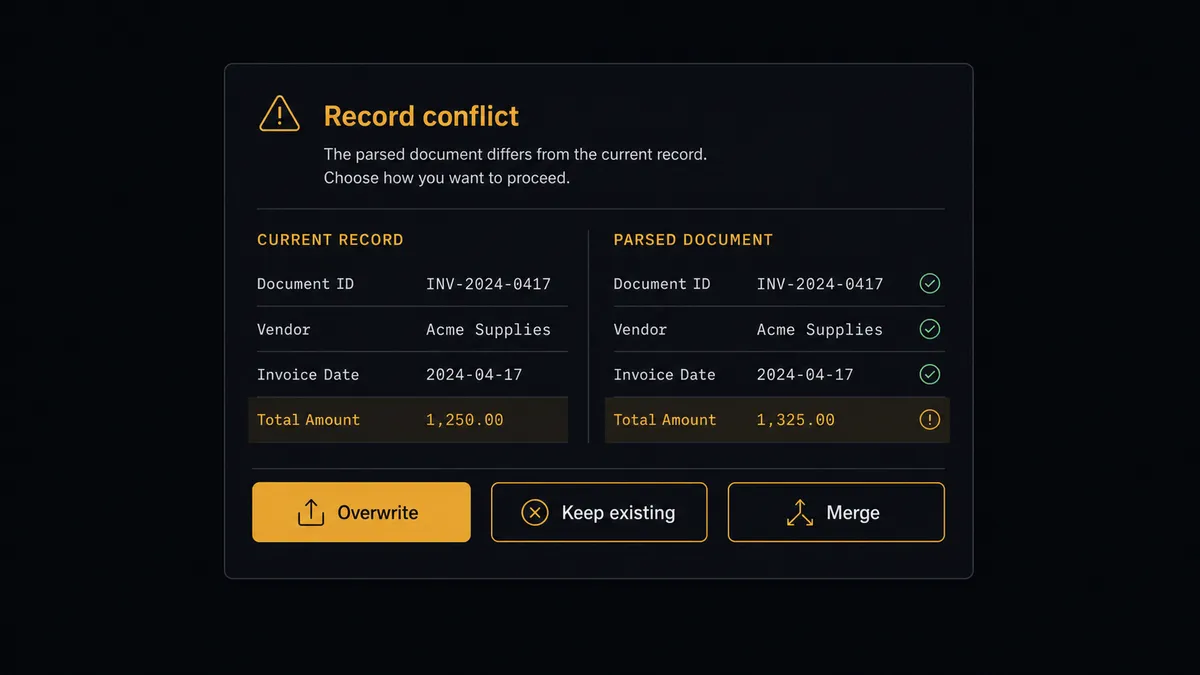
The consequential step is overwriting a record your team maintains. When a parsed document matches an existing contact but the fields disagree, the agent does not just fire Update Contact. It assembles the conflict: the current Bigin values, the parsed values, and where the document came from. Then it invokes a human-in-loop flow it holds as a callable tool. The workflow pauses and posts to your channel: “Inbound document for [contact] conflicts with the existing record. Current email: [value]. Parsed email: [value]. Overwrite, keep existing, or merge?” A person decides in one click. Only then does Update Contact or Update Deal run, and the note on the record captures who approved the change and when.
The same judgment applies upstream. When required fields come back empty or malformed, the agent calls Reprocess Document for a second pass, and if the extraction still looks wrong it routes the document to a person rather than manufacturing a plausible-looking deal from bad data. Prospects call this the digital andon cord: like Toyota’s quality control pull cord, the workflow stops the line the moment it hits uncertainty, and your team pulls it back into motion.
FlowRunner vs Zapier
Most teams wiring Parseur into a CRM reach for Zapier first, and for good reason. Zapier connects to both Parseur and Bigin, its editor is quick to learn, and its template gallery covers document-to-CRM patterns you can clone in minutes. For a straight “parsed document creates a contact” push, it is a fast, proven path.
The difference shows up at data quality and record safety. FlowRunner is built around native human-in-the-loop and AI-agent orchestration, where the agent judges each extraction and decides when a person needs to look before CRM data changes.
| What matters for this pair | FlowRunner | Zapier |
|---|---|---|
| Human-in-the-loop on record overwrites | Native. The agent invokes an approval flow as a callable tool and pauses before Update Contact or Update Deal | Available by adding approval steps, not a native agent decision |
| Who runs the flow | An AI agent reads each extraction, reasons, and picks actions as tools | Predefined step sequence you configure per Zap |
| Users included | Unlimited users on every tier | Priced by task volume; seats vary by plan |
| Bring your own AI keys | Yes, BYOK | AI features tied to Zapier’s own AI offering |
| Self-hosted option | Yes, cloud-hosted or self-hosted | Cloud only |
| Pricing model | Transparent workflow-based tiers | Per-task pricing that gets harder to predict as document volume grows |
If your documents are uniform and your CRM is empty enough that duplicates do not matter yet, Zapier will do the job. If inquiries arrive messy and your Bigin records are worth protecting, this pairing is the better fit.
Before and after
| Category | Before | After |
|---|---|---|
| Inquiry intake | Someone retypes each emailed inquiry or PDF into Bigin by hand | Get Parsed Data and Create Deal build the record the moment parsing finishes |
| Response speed | Follow-up waits until data entry catches up with the inbox | Create Task puts the inquiry on a named owner’s list within seconds |
| Duplicate records | Reimported senders pile up as second and third contacts | Search Records checks for the sender before anything is created |
| Record integrity | Syncs silently overwrite maintained fields with whatever the document said | Conflicts pause for a named approver before Update Contact runs |
| Bad extractions | Malformed parses enter the pipeline looking like real deals | The agent calls Reprocess Document or routes the document to a person |
What you can build
Inquiry to deal, hands off. On Document Processed (Realtime) fires. The agent pulls fields with Get Parsed Data, checks the sender with Search Records, and builds the record with Create Contact, Create Deal, and Add Note. The pipeline keeps pace with the inbox.
Overwrite with named approval. A parsed document conflicts with an existing Bigin record. The agent posts both versions to your channel through the human-in-loop tool, and Update Contact only runs after a person picks overwrite, keep, or merge.
Quote request triage. The agent reads each parsed request, sizes it from the stated quantities or budget, creates the deal in the matching pipeline stage, and calls Create Task with a due date tuned to how hot the request reads.
Bad-parse quarantine. When required fields come back empty, the agent calls Reprocess Document for a second pass. If the extraction still fails, it routes the document to a person with List Documents context instead of creating a hollow record.
Existing-account signal. When Search Records finds the sender already has an open deal, the agent skips creation and instead calls Add Note and Update Task on the existing deal, so the account owner sees the new inquiry in context rather than a duplicate appearing in the pipeline.
Getting started
Start on the free plan: 100 executions a month, every integration included, no credit card required, plus 14 days of Professional for new accounts. Both connectors are available on every tier, and every tier includes unlimited users and unlimited workflows.
Explore the integration details:
- Parseur integration (2 triggers and 6 actions covering parsing, reprocessing, and mailboxes)
- Bigin by Zoho integration (17 actions covering contacts, companies, deals, and tasks)
Start building free at flowrunner.ai or book a demo to see a live Parseur to Bigin workflow, conflict approval and all.
Frequently asked questions
Is it free to connect Parseur and Bigin on FlowRunner?
You can build and run the connection on FlowRunner's free plan, which includes 100 executions a month and every integration with no credit card required, and new accounts also get 14 days of Professional. Both connectors are available on every FlowRunner tier, and every tier includes unlimited users and unlimited workflows.
Can I self-host the Parseur to Bigin workflow?
Yes. FlowRunner offers a cloud-hosted option and a self-hosted option, so the connection can run inside your own environment.
Does the AI agent need my own OpenAI or Claude key?
FlowRunner uses a bring-your-own-keys model, so you connect the AI provider key you already have. You are not locked to one model.
What happens when the parsed data conflicts with what Bigin already has?
The agent stops and invokes a human-in-loop step. It posts both versions side by side, the parsed fields from the document and the current Bigin record, then waits for a person to approve the overwrite, keep the existing values, or merge them by hand before Update Contact or Update Deal runs.
Which Parseur trigger should start the workflow?
Parseur offers two triggers: On Document Processed (Realtime) and On Document Processed (Polling). Realtime fires the moment a document finishes parsing and is the right choice for inbound inquiries. Polling checks on a schedule and suits batch document loads. Bigin has no triggers, so the workflow always starts from the Parseur side.
Can the workflow handle documents Parseur parsed badly?
Yes. The agent inspects the parsed fields from Get Parsed Data, and when required fields are missing or malformed it calls Reprocess Document for another pass or routes the document to a person instead of creating a broken record in Bigin.