How to Connect Google Forms with Attio (With or Without an AI Agent)
Turn Google Forms submissions into clean Attio records and pipeline entries, with an agent that classifies each response and pauses for a human before Delete Record removes a suspected duplicate.
How do you connect Google Forms to Attio?
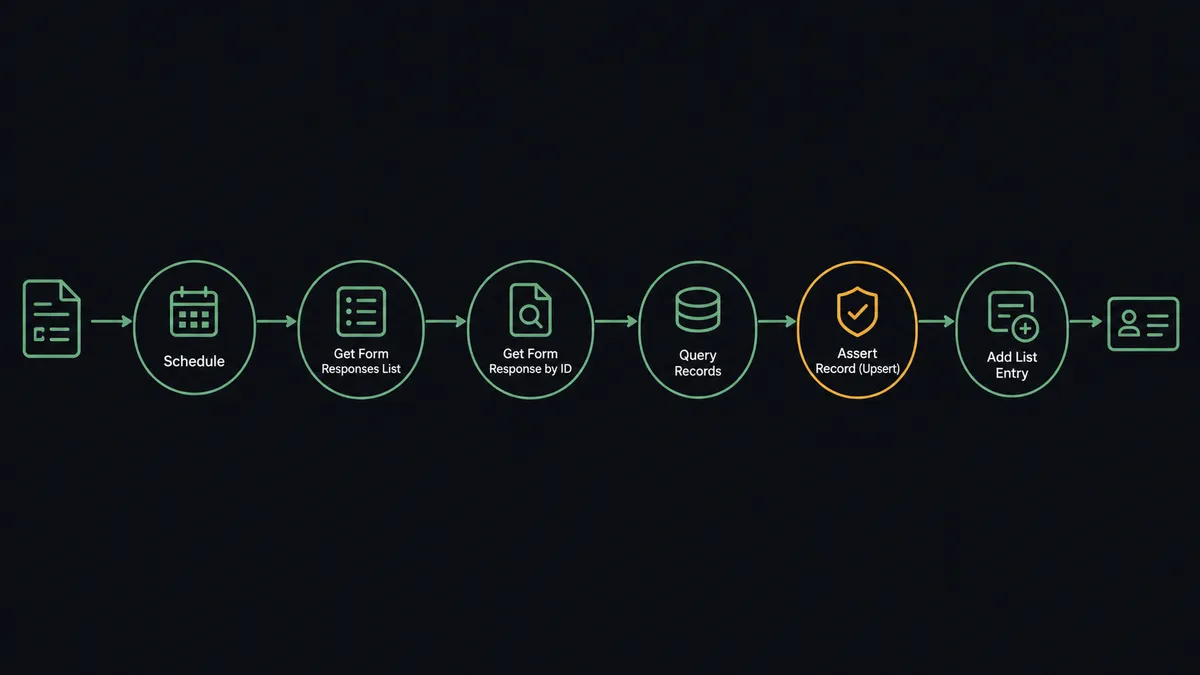
You connect Google Forms to Attio with a scheduled FlowRunner workflow: Get Form Responses List pulls each new submission, Get Form Response by ID reads the answers, Query Records checks whether the person or company already exists in Attio, and Assert Record (Upsert) writes the record, with Add List Entry placing it in the right list and Create Task assigning follow-up. Neither connector exposes a trigger, so a polling schedule is the honest starting point. FlowRunner is a visual AI-agent orchestration platform where automations run autonomously and pause for human judgment on the steps that carry real consequence. Run as an agent, the connection also reads what the submitter actually wrote, classifies the intent, and stops for a person before Delete Record ever removes a suspected duplicate.
The problem it solves
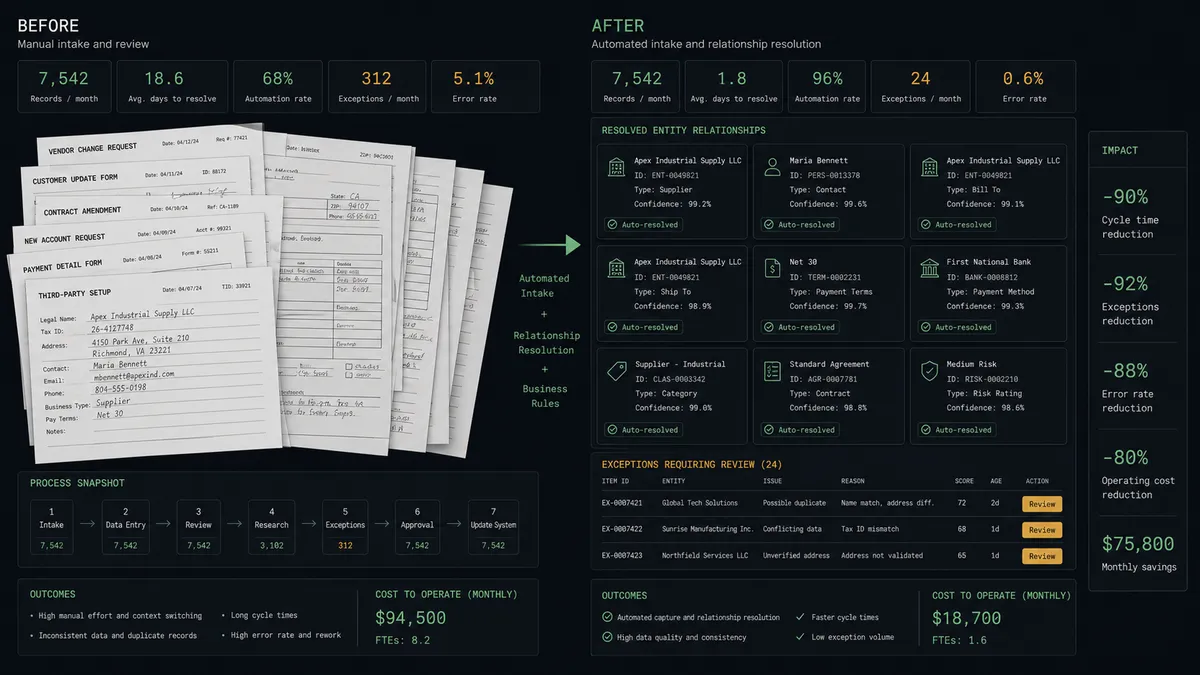
Today someone owns the form inbox, and that ownership is a chore. Demo requests, event registrations, and partner applications land in a Google Forms response sheet, and an ops coordinator copies them into Attio between meetings. Submissions from Friday afternoon get entered Monday. The prospect who asked for a demo has already booked with a competitor by the time the record exists. Response time is the one variable inbound teams fully control, and manual entry gives it away.
The edges are dirtier than the delay. The same person submits twice with a work email and a personal one. A submitter’s company already exists in Attio under its legal name, so a second record appears under the brand name and two account owners start working the same company without knowing it. Cleaning that up means deleting records, and deleting the wrong one erases notes, tasks, and history that cannot be recovered. Duplicate handling is precisely where naive automation does damage, because it either creates the mess or deletes its way into a worse one.
How it works: the connection
Here is the deterministic version, grounded in the real connector actions.
- Trigger: On a schedule, the workflow calls Get Form Responses List to pull submissions it has not yet processed.
- Read: For each one, it calls Get Form Response by ID to get the complete set of answers.
- Check: It calls Query Records in Attio to look for an existing person or company by email and domain.
- Upsert: It calls Assert Record (Upsert) to create the record or refresh the existing one, never blindly creating a twin.
- Preserve: It calls Create Note to store the raw submission on the record, so nothing the prospect wrote is lost in field mapping.
- Route: It calls Add List Entry to place the account in the inbound list, and Create Task to assign follow-up to the owner.
That is the plain answer. Submissions become records in minutes, the pipeline list stays current, and nobody copies rows out of a response sheet again.
Can an AI agent run it? (and why a human stays in the loop)
Yes, and the agent version is what makes one form serve a whole company. The agent holds the actions as tools: Get Form Responses List, Get Form Response by ID, and Get Form Details on the Google Forms side; Query Records, Assert Record (Upsert), Add List Entry, Create Note, Create Task, and Delete Record on the Attio side. It reads the free-text answers a field mapping ignores. “We are evaluating options for our Berlin office” and “I can’t log in” are both form submissions, but one belongs in the sales list and the other needs a support task. The agent classifies each response and routes it, instead of dumping everything into one list for a person to re-sort.
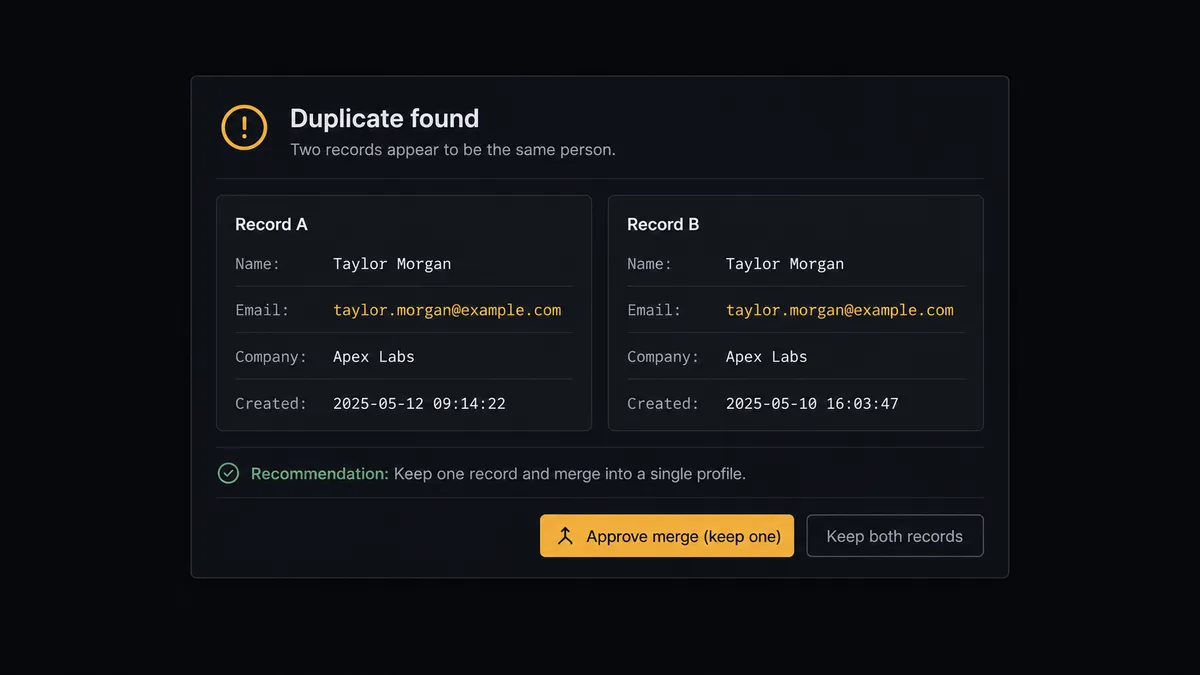
The consequential step is Delete Record. When the agent finds that a new submission almost certainly duplicates an existing account, the tempting move is automatic cleanup, and that is exactly the move that destroys data. Deletion in Attio is permanent, and the wrong merge erases notes, tasks, and relationship history. So the agent treats deduplication as a proposal. It invokes a human-review flow it holds as a callable tool, and the workflow pauses: “New record [name, email, company] looks like a duplicate of [existing record], which has an open deal and task history. Recommend: keep the existing record, update it with the new submission, delete the new one. Approve?” A person decides, and only then does Delete Record run, with the approver and timestamp in the audit trail. Contested pipeline placements get the same gate: when a submission comes from an account mid-deal, the owner decides whether it enters the list again.
This is the digital andon cord for inbound: the line stops the moment an action would be irreversible, and a person restarts it with one decision.
FlowRunner vs Zapier
Zapier is the default reflex for connecting Google Forms to a CRM, and the reflex is earned. Its connector library is enormous, its form-to-CRM templates are plentiful, and a one-way Zap that turns each new response into a record takes minutes to configure. For a low-volume form where duplicates are rare, that is a fine tool.
The difference is what happens to the messy submissions, which is where operations time actually goes.
| What matters for this pair | FlowRunner | Zapier |
|---|---|---|
| Human-in-the-loop on Delete Record | Native. The agent invokes an approval flow as a callable tool and pauses before any permanent deletion | Available by adding approval steps to a Zap, not a native agent decision |
| Who runs the flow | An AI agent reads the answers, classifies intent, and picks actions as tools | A predefined step sequence you configure per Zap |
| Users included | Unlimited users on every tier | Priced by task volume; seats vary by plan |
| Bring your own AI keys | Yes, BYOK | AI features tied to Zapier’s own AI offering |
| Self-hosted option | Yes, cloud-hosted or self-hosted | Cloud only |
| Pricing model | Transparent workflow-based tiers | Per-task pricing that scales with every form submission |
If your form feeds one list and duplicates are rare, Zapier will serve you well. If one form feeds several teams and a bad merge costs real relationship history, the agent with a human gate is the better fit.
Before and after
| Category | Before | After |
|---|---|---|
| Entry speed | Submissions sit in the response sheet until someone copies them over | Records appear in Attio minutes after the form is submitted |
| Routing | Every submission lands in one pile and gets re-sorted by hand | The agent classifies intent and routes to the right list and owner |
| Duplicates | Twin records accumulate, or someone deletes the wrong one | Suspected duplicates go to a person before Delete Record ever runs |
| Context | Free-text answers get truncated or lost in field mapping | Create Note preserves the full raw submission on the record |
| Accountability | Nobody can say who merged what or why | Every deletion and placement carries an approver and a timestamp |
What you can build
Inbound demo pipeline. The scheduled flow pulls new responses, the agent classifies demo requests, Assert Record (Upsert) writes the person and company, Add List Entry places them in the sales list, and Create Task assigns the owner while the interest is hours old, not days.
Gated deduplication. The agent flags a new submission matching an existing account, posts both records for review, and runs Delete Record only after approval. Cleanup happens continuously without ever gambling with history.
Partner application triage. Applications from a partner form get classified by fit based on the free-text answers, logged with Create Note, and placed in the partner list, with weak-fit applications routed to a person instead of silently dropped.
Event follow-up lists. After a webinar registration form closes, the agent upserts every registrant, adds attendees to a dedicated Attio list with Add List Entry, and creates follow-up tasks for the owners of accounts already in pipeline.
Customer request routing. When an existing customer submits the form, the agent recognizes the account via Query Records, skips the sales list entirely, and creates a task with Create Task against the customer’s record so success sees it, not sales.
Common questions
Is it free to connect Google Forms and Attio on FlowRunner? You can build and run the connection on FlowRunner’s free plan, which includes 100 executions a month and every integration with no credit card required, and new accounts also get 14 days of Professional. Both connectors are available on every FlowRunner tier, and every tier includes unlimited users and unlimited workflows.
Can I self-host the Google Forms to Attio workflow? Yes. FlowRunner offers a cloud-hosted option and a self-hosted option, so the connection can run inside your own environment.
Does the AI agent need my own OpenAI or Claude key? FlowRunner uses a bring-your-own-keys model, so you connect the AI provider key you already have. You are not locked to one model.
What happens when a submission looks like a duplicate of an existing Attio record? The agent never merges or deletes on its own. It posts both records side by side to your team’s channel with its reasoning, and a person decides whether to keep both, update the existing record, or approve Delete Record on the duplicate. Deletion is permanent, so it always waits.
Which triggers and actions does this pair use? Neither connector exposes a trigger, so the workflow runs on a schedule. It calls Get Form Responses List and Get Form Response by ID in Google Forms, and Query Records, Assert Record (Upsert), Create Note, Create Task, Add List Entry, and Delete Record in Attio.
Can one form feed different Attio lists? Yes. The agent reads the answers, classifies the submission as a demo request, partner inquiry, or customer request, and calls Add List Entry against the matching list, so one form serves several teams without manual sorting.
Getting started
Start on the free plan: 100 executions a month, every integration included, no credit card required, plus 14 days of Professional for new accounts. Both connectors are available on every tier, and every tier includes unlimited users and unlimited workflows.
Explore the integration details:
- Google Forms integration (9 actions covering responses, form details, and form management)
- Attio integration (26 actions covering records, lists, notes, tasks, and comments)
Start building free at flowrunner.ai or book a demo to see a live Google Forms to Attio workflow, duplicate gate and all.
Frequently asked questions
Is it free to connect Google Forms and Attio on FlowRunner?
You can build and run the connection on FlowRunner's free plan, which includes 100 executions a month and every integration with no credit card required, and new accounts also get 14 days of Professional. Both connectors are available on every FlowRunner tier, and every tier includes unlimited users and unlimited workflows.
Can I self-host the Google Forms to Attio workflow?
Yes. FlowRunner offers a cloud-hosted option and a self-hosted option, so the connection can run inside your own environment.
Does the AI agent need my own OpenAI or Claude key?
FlowRunner uses a bring-your-own-keys model, so you connect the AI provider key you already have. You are not locked to one model.
What happens when a submission looks like a duplicate of an existing Attio record?
The agent never merges or deletes on its own. It posts both records side by side to your team's channel with its reasoning, and a person decides whether to keep both, update the existing record, or approve Delete Record on the duplicate. Deletion is permanent, so it always waits.
Which triggers and actions does this pair use?
Neither connector exposes a trigger, so the workflow runs on a schedule. It calls Get Form Responses List and Get Form Response by ID in Google Forms, and Query Records, Assert Record (Upsert), Create Note, Create Task, Add List Entry, and Delete Record in Attio.
Can one form feed different Attio lists?
Yes. The agent reads the answers, classifies the submission as a demo request, partner inquiry, or customer request, and calls Add List Entry against the matching list, so one form serves several teams without manual sorting.