How to Connect Parseur with Capsule CRM (With or Without an AI Agent)
Connect Parseur document extraction to Capsule CRM so inbound emails and PDFs become people, organisations, and opportunities, with an AI agent that pauses for a human before it overwrites an existing record on an uncertain match.
How do you connect Parseur to Capsule CRM?
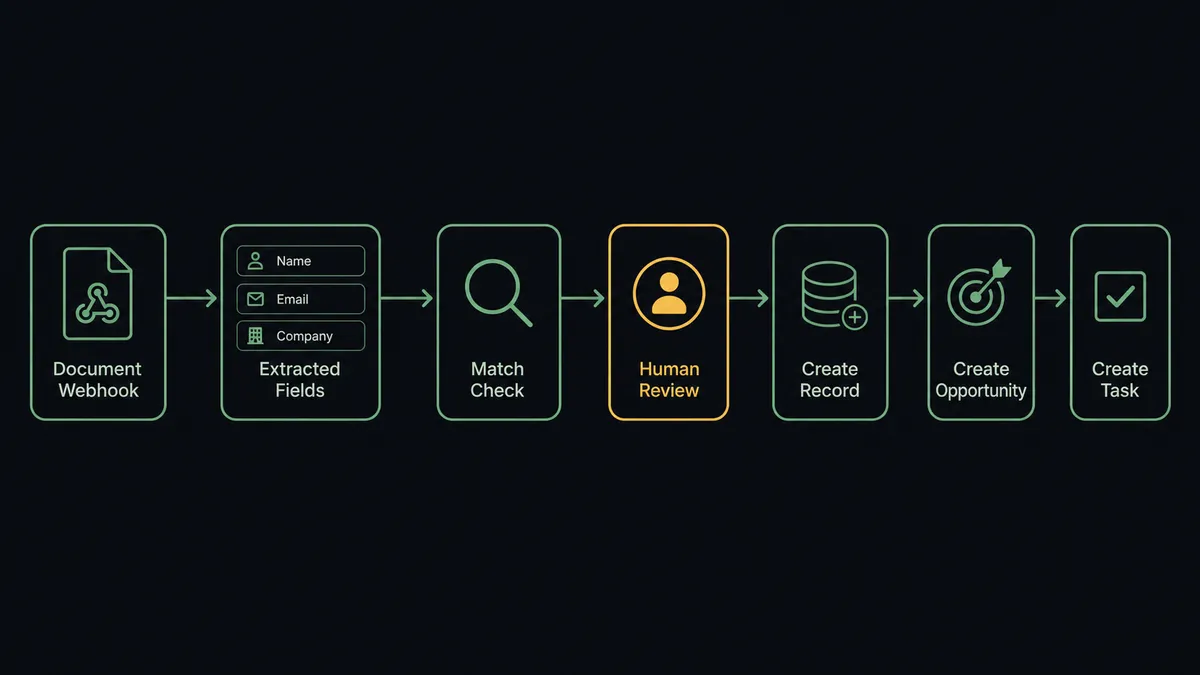
You connect Parseur to Capsule CRM by turning inbound documents into pipeline records: Parseur’s On Document Processed (Realtime) trigger fires the instant an email or PDF is extracted, the workflow pulls the structured fields with Get Parsed Data, checks for an existing match with Search Parties, writes the record with Create Person or Create Organisation, opens the deal with Create Opportunity, and queues follow-up with Create Task. FlowRunner is a visual AI-agent orchestration platform where automations run autonomously and pause for human judgment on the steps that carry real consequence. Run the same connection as an AI agent and it also weighs what it read: clean extractions flow straight into the CRM, while a shaky field or an ambiguous match pauses for a named human before anything is written over an existing record.
The problem it solves
Inquiries do not arrive as tidy form submissions. They arrive as emails from a shared inbox, PDF order forms, broker sheets, and forwarded referrals. Today a person reads each one, decides whether the sender already exists in Capsule CRM, retypes the name, company, email, and phone into a new record, opens an opportunity, and sets themselves a reminder to follow up. On a busy week the retyping falls behind, and the pipeline shows what got entered, not what actually came in.
The edges are worse than the volume. The same company arrives twice with slightly different names and becomes two records with split history. A typo in a retyped email address means the follow-up sequence goes nowhere. An inquiry that mentioned a five-figure project gets entered with an empty value field because the person doing data entry was moving fast. And when a parsed field is wrong, whoever pasted it in has no idea, because nothing ever compared the extraction against the record it landed on. Data entry is not the real job; judgment about ambiguous matches is, and it gets no time because the retyping eats it all.
How it works: the connection
The connection listens to Parseur and writes to Capsule CRM. Here is the plain version, grounded in the real connector actions.
- Trigger: Parseur fires On Document Processed (Realtime) the moment it finishes extracting an inbound email or PDF.
- Read: The workflow calls Get Parsed Data to retrieve the structured fields: contact name, company, email, phone, and the inquiry details.
- Check for a match: It calls Search Parties in Capsule CRM with the email and company name to see if this sender already exists.
- Write the record: If no match exists, it calls Create Person for an individual or Create Organisation for a company, attaching tags at creation.
- Open the deal: It calls Create Opportunity linked to the party, with the inquiry summary in the description and a milestone at the top of your pipeline.
- Queue the follow-up: It calls Create Task assigned to the right owner with a due date, so the inquiry gets a human response while it is warm.
That is the “just connect them” answer. Documents in, records out, no retyping. If a document parses badly, Reprocess Document re-runs the extraction with your updated template and the workflow picks it up again.
Can an AI agent run it? (and why a human stays in the loop)
Yes, and the agent earns its keep exactly where the deterministic version is blind. A fixed pipeline treats every extraction as equally trustworthy. The agent does not. It holds the real actions as tools: Get Parsed Data, List Documents, and Reprocess Document on the Parseur side; Search Parties, Get Party, Create Person, Create Organisation, Create Opportunity, Update Party, and Create Task on the Capsule CRM side. For each document it asks the questions your best coordinator would ask. Does the email domain match the company name? Is this sender already in the CRM under a slightly different name? Did the extraction actually capture a phone number, or did it grab a fax line from the footer?
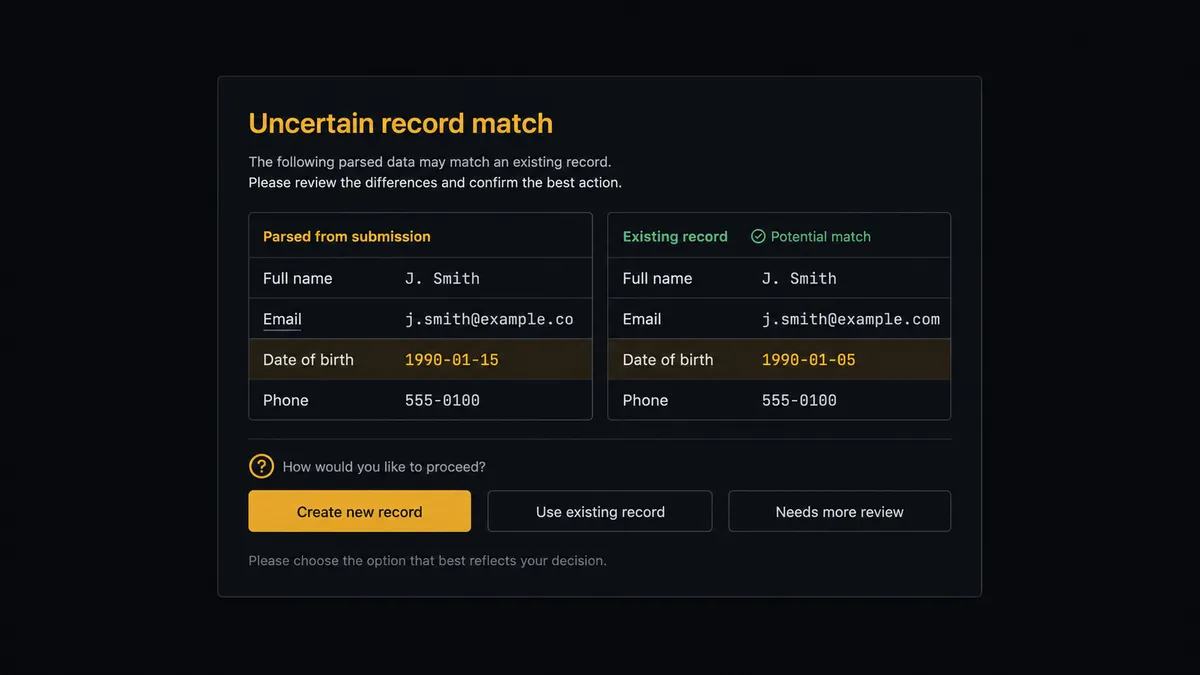
The consequential step is Update Party on a fuzzy match. Writing a brand-new record is cheap to undo; overwriting an existing customer’s contact fields with data extracted from the wrong document is not, because the old values are gone and the mistake is invisible until an email bounces or a call reaches a stranger. So when the parsed fields conflict with an existing record, the agent stops. It invokes a human-in-loop flow it holds as a callable tool and posts to your channel: “Inbound document matches existing party Meridian Supply at 82 percent confidence, but the extracted phone and contact name differ from the record. Update the record, keep it unchanged, or create a separate entry?” A person clicks once. Only then does Update Party run, and the approver’s name and timestamp land in the audit trail next to the change.
Prospects describe this as a digital andon cord: the line runs at full speed until the agent hits uncertainty, then it stops the line and pulls a person in. Volume stays automated. Judgment stays human.
FlowRunner vs Zapier
Zapier is the obvious first stop for Parseur to CRM wiring, and it deserves the reputation. Parseur itself documents Zapier as an export path, the connector library is enormous, and a straightforward “parsed document creates a contact” Zap takes minutes to build. For clean, well-templated documents flowing one way, it works.
The difference is what happens when the document is not clean. FlowRunner puts an agent between extraction and CRM write, and that agent pauses for a person on the writes that damage data.
| What matters for this pair | FlowRunner | Zapier |
|---|---|---|
| Human-in-the-loop before Update Party overwrites a record | Native. The agent invokes an approval flow as a callable tool and pauses | Available via added approval steps, not a native agent decision |
| Who runs the flow | An AI agent weighs extraction confidence and match ambiguity per document | Predefined step sequence runs the same way on every document |
| Users included | Unlimited users on every tier | Priced by task volume; seats vary by plan |
| Bring your own AI keys | Yes, BYOK. Connect the provider key you already have | AI features tied to Zapier’s own AI offering |
| Self-hosted option | Yes, cloud-hosted or self-hosted | Cloud only |
| Pricing model | Transparent workflow-based tiers with clear execution limits | Per-task pricing that scales with every parsed document |
If your documents are uniform and your CRM is clean, Zapier handles the happy path well. If your inbox is messy, your CRM has history worth protecting, and you want a named human on every overwrite, this pairing is built for that.
Before and after
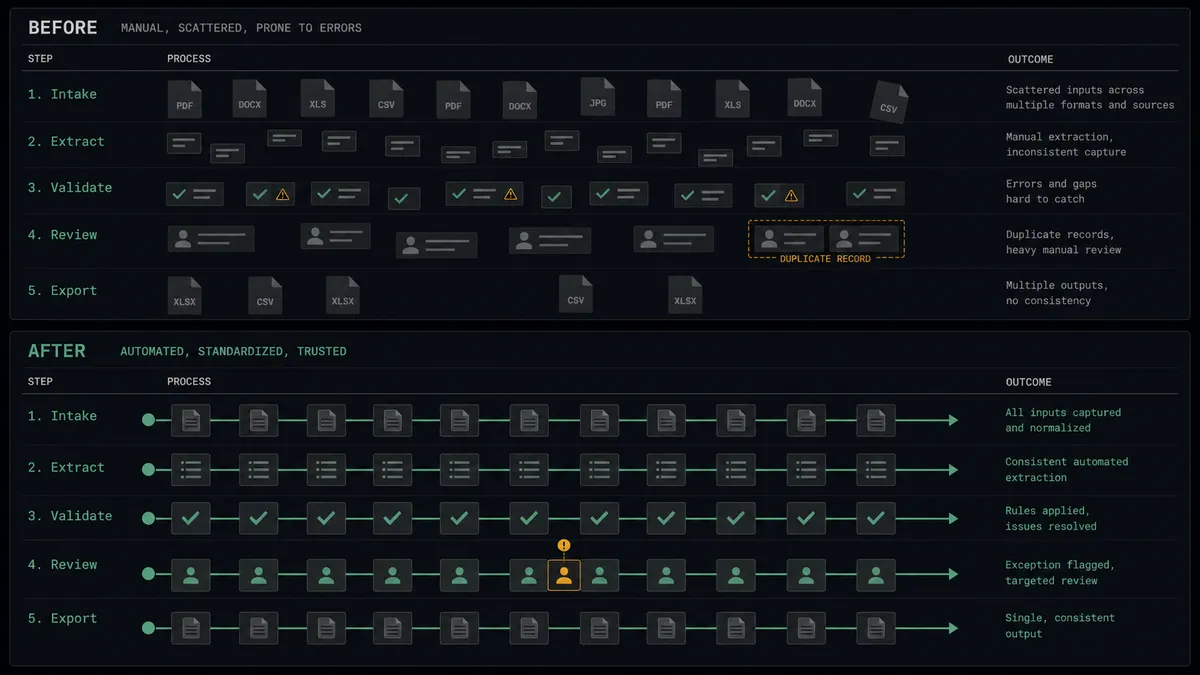
| Category | Before | After |
|---|---|---|
| Data entry | Someone retypes every emailed inquiry and PDF into Capsule CRM by hand | Parsed fields flow into Create Person, Create Organisation, and Create Opportunity automatically |
| Response speed | Inquiries wait in the shared inbox until the entry backlog clears | Create Task queues the owner minutes after the document arrives |
| Duplicates | Slightly different company names quietly become separate records | Search Parties runs on every document and ambiguous matches go to a person |
| Record integrity | Bad extractions overwrite good data and nobody notices until an email bounces | Update Party waits for side-by-side review whenever incoming fields conflict |
| Pipeline truth | The pipeline reflects whatever got typed in, days behind reality | Every processed document is in the pipeline the day it arrives, with an audit trail |
What you can build
Inbox to pipeline, hands off. On Document Processed (Realtime) fires on each inbound inquiry. The agent calls Get Parsed Data, checks Search Parties, writes Create Person or Create Organisation, opens Create Opportunity, and queues Create Task. New business enters the pipeline the day it arrives.
Referral sheet intake. Partners send referrals as PDF sheets to a dedicated Parseur mailbox created with Create Mailbox. The agent parses each sheet, links the referred contact to the partner organisation, and opens an opportunity tagged to the referral source.
Overwrite protection on updates. When an inbound document carries new details for an existing customer, the agent compares fields against Get Party and routes conflicts to a reviewer before Update Party runs. Clean confirmations pass through without a stop.
Case intake from documents. Support or claim documents parse into Create Case linked to the right party, with the document reference in the description and a Create Task for the assigned owner, so service work is tracked next to sales history.
Backlog sweep. On a schedule, the agent calls List Documents on the mailbox, finds anything processed but never delivered downstream, replays it through Get Parsed Data, and reconciles the pipeline so no inquiry dies in the gap between systems.
Getting started
Start on the free plan: 100 executions a month, every integration included, no credit card required, plus 14 days of Professional for new accounts. Both connectors are available on every tier, and every tier includes unlimited users and unlimited workflows.
Explore the integration details:
- Parseur integration (2 triggers and 6 actions for document extraction pipelines)
- Capsule CRM integration (31 actions covering parties, opportunities, cases, and tasks)
Start building free at flowrunner.ai or book a demo to see a live Parseur to Capsule CRM workflow, overwrite approval and all.
Frequently asked questions
Is it free to connect Parseur and Capsule CRM on FlowRunner?
You can build and run the connection on FlowRunner's free plan, which includes 100 executions a month and every integration with no credit card required, and new accounts also get 14 days of Professional. Both connectors are available on every FlowRunner tier, and every tier includes unlimited users and unlimited workflows.
Can I self-host the Parseur to Capsule CRM workflow?
Yes. FlowRunner offers a cloud-hosted option and a self-hosted option, so the connection can run inside your own environment.
Does the AI agent need my own OpenAI or Claude key?
FlowRunner uses a bring-your-own-keys model, so you connect the AI provider key you already have. You are not locked to one model.
What happens when the agent is not confident in an extracted field or a record match?
The agent stops and invokes a human-in-loop step. It posts the parsed fields from Get Parsed Data next to the closest Capsule CRM candidates from Search Parties, states what it is unsure about, and waits for a person to pick the right record, correct the field, or approve creating a new entry before anything is written.
Which Parseur events can trigger a Capsule CRM action?
Parseur offers two triggers: On Document Processed (Realtime), an instant webhook that fires the moment a document is processed, and On Document Processed (Polling), which periodically checks a mailbox for newly processed documents. Realtime is the one most teams use for lead intake.
Does the workflow overwrite existing Capsule CRM records?
Only with sign-off. When a parsed document matches an existing party but the details differ, the agent pauses before Update Party runs. A named approver sees the current record and the incoming fields side by side and decides whether to update, keep, or create a separate record. The decision lands in the audit trail.