How to Connect Parseur with AfterShip (With or Without an AI Agent)
Connect Parseur-extracted carrier emails to AfterShip trackings, optionally as an AI agent that registers clean shipments automatically and pauses for a human before an ambiguous tracking number starts sending updates to a customer.
How do you connect Parseur to AfterShip?
You connect Parseur to AfterShip by having Parseur’s On Document Processed (Realtime) trigger drive AfterShip actions: the workflow calls Get Parsed Data to pull the tracking number and order reference from a carrier confirmation email, resolves the carrier with Detect Courier, and registers the shipment with Create Tracking, so an email in the shipping mailbox becomes a live tracking without anyone copying numbers. FlowRunner is a visual AI-agent orchestration platform where automations run autonomously and pause for human judgment on the steps that carry real consequence. The same connection can run as an AI agent that reads each parse, registers the clean ones on its own, and pauses for a human before an ambiguous tracking number starts sending checkpoint updates to a real customer.
The problem it solves
Without this connection, someone on the ops team is the parser. Carrier and supplier confirmation emails pile into a shared shipping inbox in a dozen formats. A person opens each one, finds the tracking number in the body or an attached PDF, works out which carrier it belongs to, and keys it into AfterShip so the customer starts getting updates. Do that across every drop-ship supplier and every 3PL, every day, and the inbox becomes a queue that is always hours behind the actual shipments.
The edges are where it hurts. A supplier changes their email template and the tracking number lands in the wrong field. A tracking number matches two carrier patterns and the wrong one gets picked, so the customer’s tracking page shows nothing for days. A transposed digit creates a tracking that follows a stranger’s parcel. Each of these is customer-facing the moment it happens, because AfterShip is not an internal database: it is the engine behind the tracking page and the delivery notifications your customer actually sees. Copy-paste errors do not stay internal here.
How it works: the connection
The connection listens to Parseur and writes to AfterShip. Here is the plain version, grounded in the real connector actions.
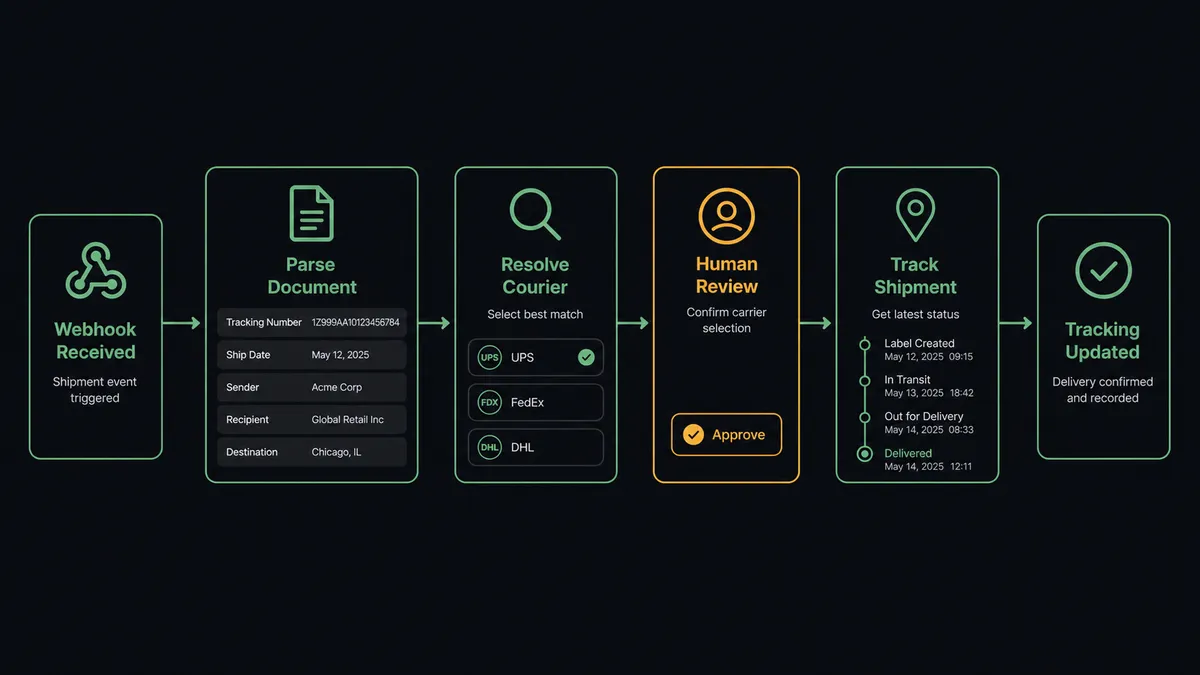
- Trigger: Parseur fires On Document Processed (Realtime) when a carrier confirmation email lands in the shipping mailbox and gets parsed.
- Read: The workflow calls Get Parsed Data to pull the tracking number, order reference, customer, and destination from the parsed fields.
- Resolve the carrier: It calls Detect Courier in AfterShip, which matches the tracking number against carrier patterns and returns the candidates.
- Check for duplicates: It calls Get Tracking to confirm the shipment is not already registered, so a re-sent confirmation email does not create a double.
- Register the shipment: It calls Create Tracking with the number, the resolved courier, and the order reference, and checkpoint updates start flowing.
- Keep it current: Later corrections run through Update Tracking, and Get Last Checkpoint gives any downstream flow the shipment’s latest status on demand.
That is the “just connect them” answer. Confirmation emails become live trackings, the customer’s tracking page fills in, and nobody retypes a 20-character string across two browser tabs.
Can an AI agent run it? (and why a human stays in the loop)
Yes, and the difference shows up on exactly the emails a dumb pipe gets wrong. An AI agent reads each parse and holds the AfterShip actions as tools: Detect Courier, Get Tracking, Create Tracking, Update Tracking, Delete Tracking. For a clean parse with one confident courier match, it registers the tracking and moves on. But it also notices what a pass-through mapping cannot: a tracking number whose format does not fit the claimed carrier, a supplier email where the parsed field contains an order number instead of a tracking number, a Detect Courier result with three plausible candidates.
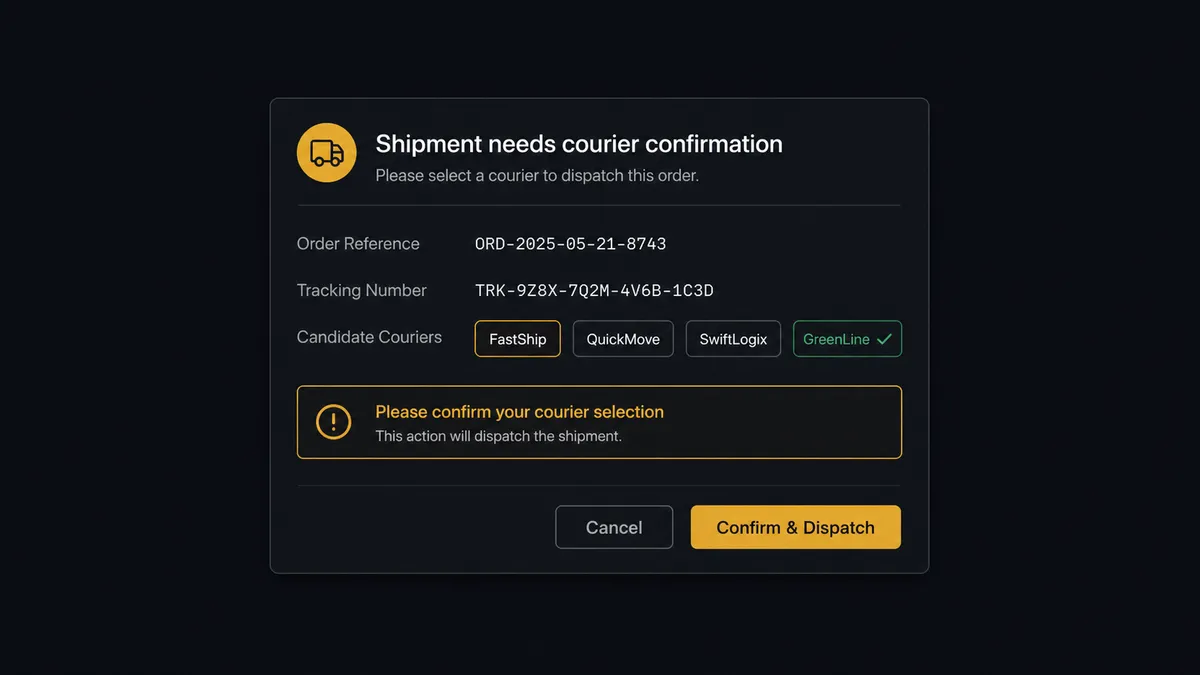
The consequential step is Create Tracking itself, because a tracking record is not passive data. The moment it exists, AfterShip starts evaluating checkpoints and sending customer notifications against it. Register the wrong number and your customer gets updates about someone else’s parcel. So when the agent is not confident, it invokes a human-in-loop flow it holds as a callable tool. The workflow pauses and posts to the ops channel: “Parsed shipment for order [reference]: tracking number [number], Detect Courier returned [candidates]. The number format does not match the supplier’s usual carrier. Pick a courier or flag for reprocess?” On an answer, the agent either calls Create Tracking with the confirmed courier or calls Reprocess Document in Parseur to re-run the extraction. Delete Tracking, the one destructive action in the set, never runs without the same named approval.
Prospects describe this as a digital andon cord: like Toyota’s production line pull cord, the workflow stops the line the moment it hits uncertainty. The clean ninety-some percent of emails flow straight through. The strange ones wait for a person, and each decision lands in the audit trail with an approver and a timestamp.
FlowRunner vs Zapier
Most teams wiring email parsing to shipment tracking will try Zapier first, and fairly: Zapier connects to both Parseur and AfterShip, its template gallery covers this exact email-to-tracking pattern, and a working Zap takes minutes to stand up. For a low-volume store where every supplier email parses cleanly, that is a legitimate answer.
The gap appears on the emails that do not parse cleanly, and on the bill as volume grows.
| What matters for this pair | FlowRunner | Zapier |
|---|---|---|
| Human-in-the-loop before Create Tracking on ambiguous parses | Native. The agent invokes an approval flow as a callable tool and pauses mid-run | Available via added approval steps, not a decision the flow makes from parse quality |
| Who runs the flow | An AI agent reads each parse, reasons about courier and format, picks actions as tools | A fixed field mapping that treats every email the same |
| Users included | Unlimited users on every tier | Priced by task volume; seat limits vary by plan |
| Bring your own AI keys | Yes, BYOK | AI features tied to Zapier’s own AI offering |
| Self-hosted option | Yes, cloud-hosted or self-hosted | Cloud only |
| Pricing model | Transparent workflow-based tiers | Per-task pricing; every parsed email consumes tasks as volume grows |
If you ship a handful of parcels a week from one reliable supplier, Zapier will carry this pair fine. If your suppliers are many, your email formats drift, and a wrong tracking number in front of a customer is a real cost, the agent-with-a-gate version on FlowRunner is the better fit.
Before and after
| Category | Before | After |
|---|---|---|
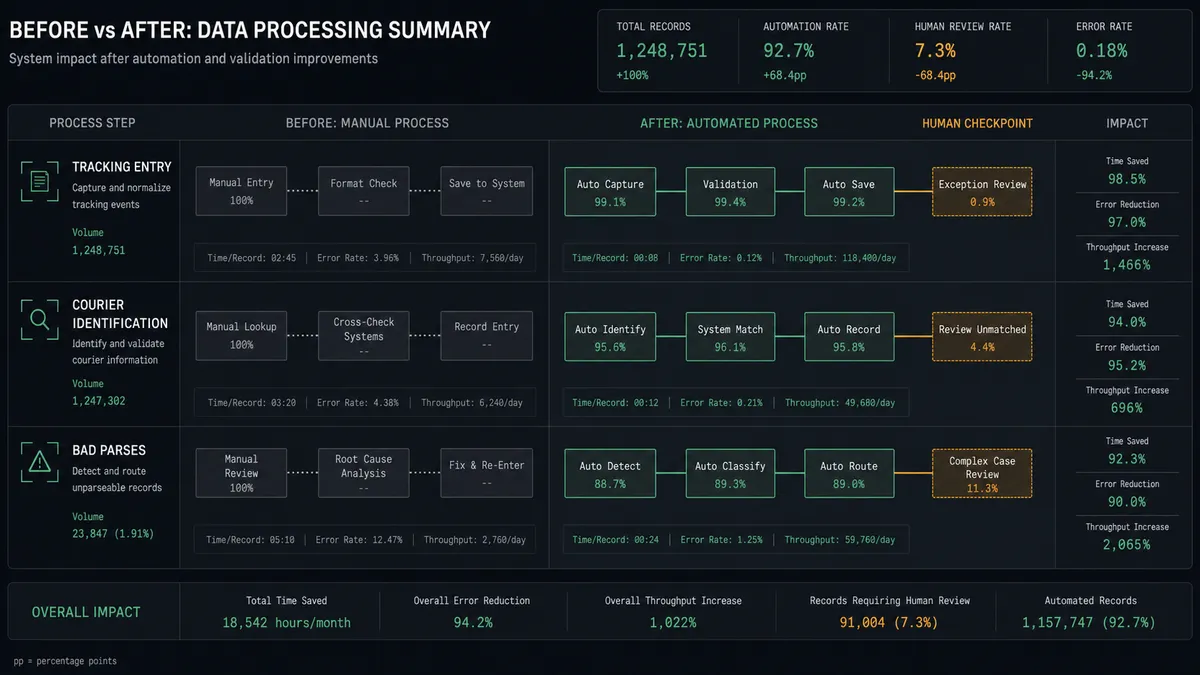
| Tracking entry | Someone copies tracking numbers from emails into AfterShip by hand | Parsed emails become trackings within moments of arriving |
| Courier identification | A person eyeballs the number format and guesses the carrier | Detect Courier resolves it, and ambiguous matches go to a human |
| Bad parses | Wrong numbers surface only when a customer complains about a dead tracking page | The agent flags implausible fields before a tracking ever exists |
| Duplicates | Re-sent confirmation emails quietly create double trackings | Get Tracking checks first, so each shipment registers once |
| Accountability | Nobody knows who keyed which tracking or fixed which mistake | Every escalated tracking carries an approver and a timestamp |
What you can build
Supplier email to live tracking. On Document Processed (Realtime) fires, Get Parsed Data pulls the fields, Detect Courier resolves the carrier, and Create Tracking registers the shipment. The shipping inbox stops being a manual queue.
Ambiguity gate before the customer sees anything. When the courier match is uncertain or a field looks wrong, the agent packages the raw document and candidates, waits for a human pick, then creates the tracking. Wrong-parcel notifications stop at the gate.
Exception digest from checkpoints. On a schedule, the agent calls List Trackings and Get Last Checkpoint, pulls out shipments stalled past your threshold, and posts a single digest to ops so someone chases the carrier before the customer emails you.
Self-healing parser. When a supplier changes their template and fields come through empty, the agent calls Reprocess Document after the mailbox rules are fixed, then registers the corrected parse, so a template change does not mean lost shipments.
Clean-slate correction with approval. For a tracking created against the wrong number, the agent drafts the fix as Delete Tracking plus a fresh Create Tracking, presents both to a named approver, and executes only on sign-off. Destructive actions never run on autopilot.
Getting started
Start on the free plan: 100 executions a month, every integration included, no credit card required, plus 14 days of Professional for new accounts. Both connectors are available on every tier, and every tier includes unlimited users and unlimited workflows, so the ops person who approves ambiguous parses does not cost you a seat.
Explore the integration details:
- Parseur integration (2 triggers and 6 actions covering mailboxes, parsing, and document reprocessing)
- AfterShip integration (9 actions covering trackings, checkpoints, and courier detection)
Start building free at flowrunner.ai or book a demo to see a live Parseur to AfterShip workflow, courier-confirmation gate and all.
Frequently asked questions
Is it free to connect Parseur and AfterShip on FlowRunner?
You can build and run the connection on FlowRunner's free plan, which includes 100 executions a month and every integration with no credit card required, and new accounts also get 14 days of Professional. Both connectors are available on every FlowRunner tier, and every tier includes unlimited users and unlimited workflows.
Can I self-host the Parseur to AfterShip workflow?
Yes. FlowRunner offers a cloud-hosted option and a self-hosted option, so the connection can run inside your own environment.
Does the AI agent need my own OpenAI or Claude key?
FlowRunner uses a bring-your-own-keys model, so you connect the AI provider key you already have. You are not locked to one model.
What happens when the agent cannot identify the courier from a parsed email?
The agent stops and invokes a human-in-loop step. It posts the raw document, the extracted tracking number, and the candidate couriers returned by Detect Courier to your ops channel, then waits for a selection before Create Tracking runs in AfterShip.
Which Parseur events can trigger an AfterShip action?
Parseur offers two triggers: On Document Processed (Realtime) and On Document Processed (Polling). Realtime is the one most teams use here, so a carrier email becomes a tracking within moments of arriving in the mailbox.
Can the workflow fix a tracking that was created against the wrong courier?
Yes. The agent uses Update Tracking to correct fields on an existing tracking, and where the record is unsalvageable it drafts a Delete Tracking plus a fresh Create Tracking. Delete Tracking is destructive, so it always waits for a named approval first.