How to Connect NetSuite with AfterShip (With or Without an AI Agent)
Put every shipped NetSuite sales order under AfterShip tracking automatically, with an AI agent that watches for stalled shipments and pauses for a human before a replacement order ships product twice.
How do you connect NetSuite to AfterShip?
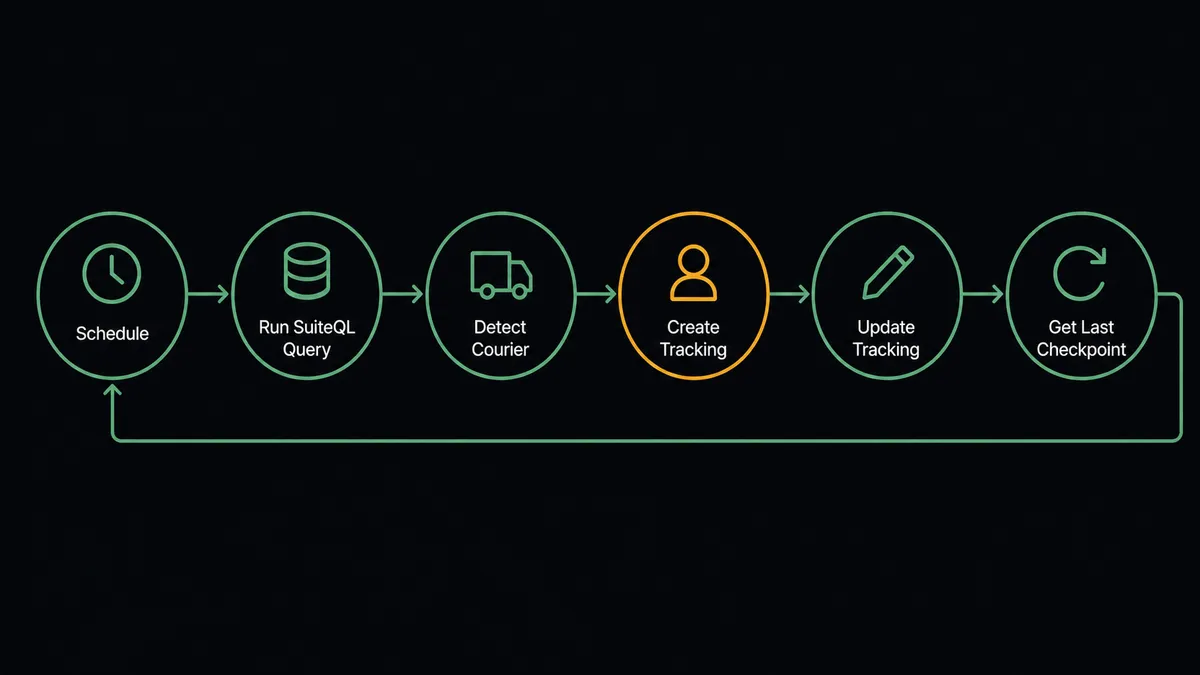
You connect NetSuite to AfterShip with a scheduled workflow, because NetSuite exposes no push trigger here: on an interval, the workflow runs Run SuiteQL Query to find sales orders that gained a tracking number, identifies each carrier with Detect Courier, registers the shipment with Create Tracking, and attaches the order and customer with Update Tracking so every checkpoint stays traceable to the order behind it. FlowRunner is a visual AI-agent orchestration platform where automations run autonomously and pause for human judgment on the steps that carry real consequence. The same connection can run as an AI agent that watches Get Last Checkpoint across every open shipment and pauses for a named person before Create Sales Order ships a replacement for a package that went dark.
The problem it solves
Once an order leaves the warehouse, your ERP goes quiet. NetSuite knows the sales order shipped and holds a tracking number as a text field, and that is where its knowledge ends. Whether the package is moving, stuck in a sort facility, or sitting at a failed delivery is invisible until a customer emails “where is my order?” Then someone in operations copies the tracking number out of NetSuite, pastes it into a carrier site, interprets the checkpoint history, and writes back. Support tickets drive your visibility into your own shipments, which means the customer always knows about the problem before you do.
The expensive edge is the reship decision. A package stalls, the customer escalates, and someone under pressure creates a replacement order to make it right. Half the time the original arrives two days later and you have shipped the product twice, eaten the freight twice, and started a return conversation nobody enjoys. The other failure is slower: the truly lost package where nobody decides anything for a week because no one owns the exception, and a good customer quietly concludes you cannot deliver.
How it works: the connection
The connection polls NetSuite and drives AfterShip. Here is the plain version, grounded in the real connector actions.
- Trigger: On a schedule, the workflow calls Run SuiteQL Query to find sales orders that gained a tracking number since the last cycle.
- Read: It calls Get Sales Order for the order details and Get Customer for who is waiting on it.
- Identify: It calls Detect Courier so the tracking number is matched to the right carrier without manual selection.
- Register: It calls Create Tracking in AfterShip, putting the shipment under active monitoring.
- Annotate: It calls Update Tracking to attach the order number, customer name, and destination, so checkpoints stay traceable to the order.
- Monitor: On each cycle it calls Get Tracking and Get Last Checkpoint across open shipments, flagging anything without recent movement.
That is the “just connect them” answer. Every shipped order is under watch from the moment its tracking number exists, and “where is order 4471?” is answered from the tracking record instead of a carrier-site scavenger hunt.
Can an AI agent run it? (and why a human stays in the loop)
Yes, and the agent is the difference between tracking data and an operations analyst who never sleeps. A fixed sync can create trackings; it cannot decide what a silent shipment means. The agent holds both sides as tools, Run SuiteQL Query, Get Sales Order, Get Customer, and Create Sales Order in NetSuite, Get Tracking, Get Last Checkpoint, and Update Tracking in AfterShip, and reads each exception in context. Three quiet days on ground freight to a rural address is normal; three quiet days on two-day air to a repeat customer with a big order is not. The agent weighs days stalled, order value, destination, and the customer’s history before deciding whether anything needs a person at all.
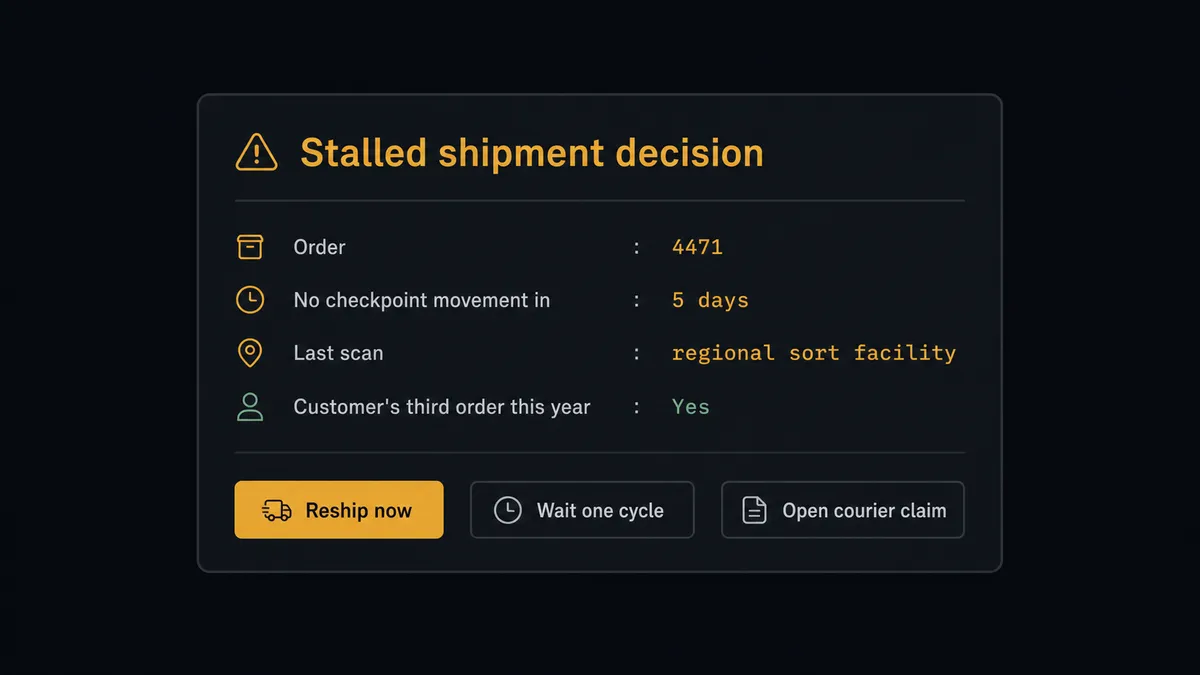
The consequential step is the reship. Create Sales Order for a replacement is real cost twice over: product, freight, and the awkward recovery if the original shows up. So the agent never reships on its own. When a shipment crosses the line from slow to stuck, it builds the decision package and invokes a human-in-loop flow it holds as a callable tool. The workflow pauses and the approver gets everything in one message: “Order 4471 for [customer], value $[amount], no checkpoint movement in [days] days, last scan [location]. Customer’s third order this year. Reship now, wait one more cycle, or open a courier claim?” One click decides it. Only on approval does Create Sales Order run, and the replacement carries the tracking history, the approver, and the timestamp against the original order.
The same judgment keeps noise down: routine slow shipments get a note, not an escalation, and delivered packages close their loop silently. Prospects call this pattern a digital andon cord. Like Toyota’s production line pull cord, the workflow stops the line only at the moment of consequence, a person pulls the decision, and thousands of normal shipments flow through without touching anyone’s day.
FlowRunner vs Zapier
Zapier is a reasonable first thought here, and its strengths are real: a massive connector library, a deep template gallery, and a fast path to a simple one-way push. If your goal is “when a tracking number appears, create an AfterShip tracking,” a Zap can do that quickly.
The difference is the monitoring loop and the judgment at the exception. This pair is not one event to one action; it is a continuous cycle of polling NetSuite, watching checkpoints, and deciding which of a hundred quiet shipments actually needs a human. Here is the honest side-by-side.
| What matters for this pair | FlowRunner | Zapier |
|---|---|---|
| Human-in-the-loop on the reship decision | Native. The agent packages the tracking timeline and pauses before Create Sales Order | Available via added approval steps you wire per Zap, not a contextual judgment |
| Who runs the flow | An AI agent polls, monitors checkpoints, weighs each exception, picks actions as tools | Predefined step sequences you configure per Zap |
| Users included | Unlimited users on every tier | Priced by task volume; seats vary by plan |
| Bring your own AI keys | Yes, BYOK | AI features tied to Zapier’s own AI offering |
| Self-hosted option | Yes, cloud-hosted or self-hosted | Cloud only |
| Pricing model | Transparent workflow-based tiers with clear execution limits | Per-task pricing, and a polling loop across every open shipment multiplies tasks quickly |
If you need a light one-way push into AfterShip, Zapier will get you there fast. If you want every shipment monitored to the last checkpoint and a named approver between a stalled package and a duplicate shipment, this pairing on FlowRunner is the better fit.
Before and after
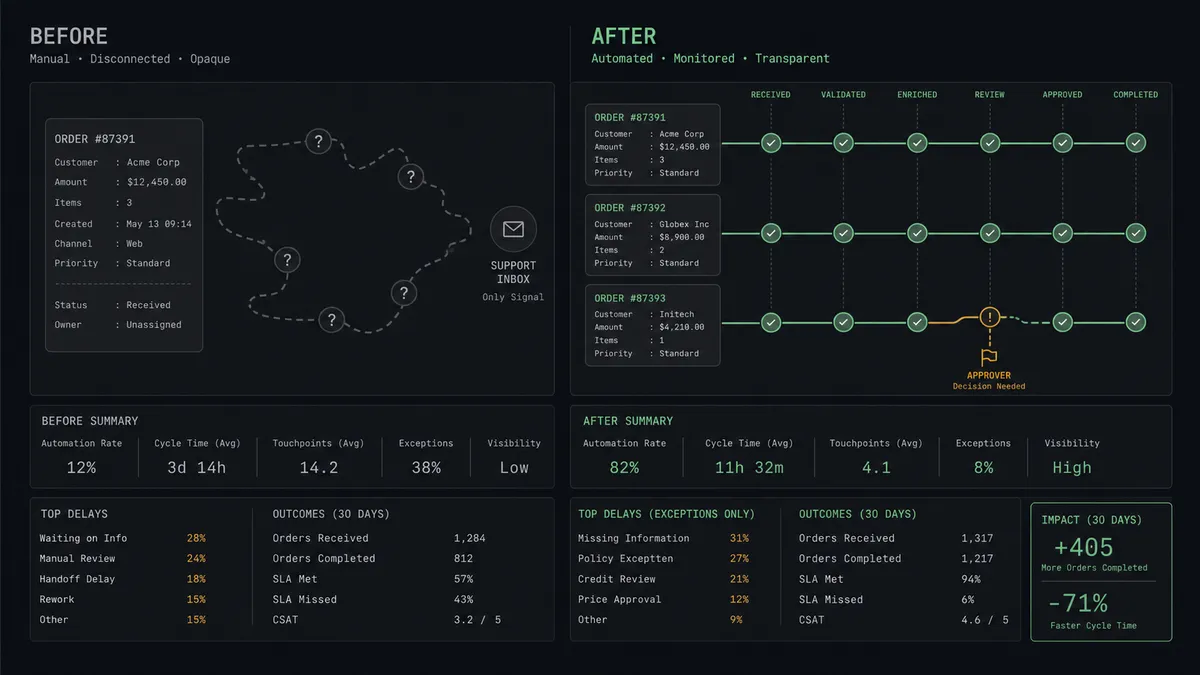
| Category | Before | After |
|---|---|---|
| Shipment visibility | NetSuite holds a tracking number as dead text; status lives on carrier sites | Every shipped order is registered with Create Tracking and watched via Get Last Checkpoint |
| Finding out about problems | The customer’s “where is my order?” email is the alerting system | The agent flags stalled shipments before the customer notices |
| The reship call | Made under pressure from a support thread, sometimes duplicating product | Made from a decision package with timeline and history, executed only after named approval |
| Answering status questions | Copy the number, paste into a carrier site, interpret, write back | Answered from the tracking record, already tied to the order and customer |
| The exception record | Scattered across inboxes and memory | Every escalation, decision, and replacement order carries approver and timestamp |
What you can build
Ship-to-tracking autopilot. The scheduled Run SuiteQL Query finds newly shipped orders, Detect Courier matches the carrier, and Create Tracking plus Update Tracking put every package under watch with order and customer attached. Coverage becomes total instead of ad hoc.
Stalled-shipment escalation. The agent sweeps Get Last Checkpoint each cycle, and anything quiet past your threshold becomes a decision package with the timeline and Get Customer context, held for a person before Create Sales Order can reship.
Delivery-confirmed billing. For teams that invoice on delivery, the agent waits for the delivered checkpoint from Get Tracking, then calls Create Invoice against the sales order in NetSuite, so billing follows reality instead of assumptions.
Proactive delay notices. When a checkpoint shows an exception, the agent drafts a customer update with the order details and new estimate, routes it for a one-click approval, and logs the concession decision with the order.
Courier scorecard. On a monthly schedule the agent pulls List Trackings, breaks down delivered-on-time versus stalled by carrier from checkpoint data, and files the summary so freight negotiations start from your own numbers.
Getting started
Start on the free plan: 100 executions a month, every integration included, no credit card required, plus 14 days of Professional for new accounts. Both connectors are available on every tier, and every tier includes unlimited users and unlimited workflows.
Explore the integration details:
- NetSuite integration (27 actions covering customers, vendors, invoices, sales orders, and SuiteQL)
- AfterShip integration (9 actions covering trackings, checkpoints, and courier detection)
Start building free at flowrunner.ai or book a demo to see a live NetSuite to AfterShip workflow, reship approval and all.
Frequently asked questions
Is it free to connect NetSuite and AfterShip on FlowRunner?
You can build and run the connection on FlowRunner's free plan, which includes 100 executions a month and every integration with no credit card required, and new accounts also get 14 days of Professional. Both connectors are available on every FlowRunner tier, and every tier includes unlimited users and unlimited workflows.
Can I self-host the NetSuite to AfterShip workflow?
Yes. FlowRunner offers a cloud-hosted option and a self-hosted option, so the connection can run inside your own environment.
Does the AI agent need my own OpenAI or Claude key?
FlowRunner uses a bring-your-own-keys model, so you connect the AI provider key you already have. You are not locked to one model.
What happens when a shipment stops moving?
The agent notices before the customer calls. When Get Last Checkpoint shows no movement past your threshold, it assembles the order value, the customer's history from Get Customer, and the full tracking timeline, then asks a person: reship, wait, or contact the courier. Nothing ships twice without a named approver.
How does the workflow start if NetSuite has no event trigger?
On a schedule. The workflow runs a SuiteQL query on an interval to find newly shipped sales orders with tracking numbers, then creates the AfterShip trackings for anything new. In practice a fulfillment gets tracking coverage within minutes of the number appearing in NetSuite.
Which AfterShip actions does the connection use?
Detect Courier identifies the carrier from the tracking number, Create Tracking registers the shipment, Get Tracking and Get Last Checkpoint monitor movement, and Update Tracking keeps order metadata like customer name and order number on the tracking record.