How to Connect PayPal with QuickBooks Online (With or Without an AI Agent)
Connect PayPal and QuickBooks Online so every payment, invoice, and payout syncs to your books automatically, with an AI agent that pauses for human review on the transactions that carry real financial weight.
How do you connect PayPal to QuickBooks Online?
You connect PayPal and QuickBooks Online by building a FlowRunner workflow that fires when a PayPal payment is captured, calls QuickBooks Get Invoice to find the matching record, and calls QuickBooks Create Payment to post the transaction. FlowRunner is a visual AI-agent orchestration platform where automations run autonomously and pause for human judgment on the steps that carry real consequence. That same connection runs as an AI agent: the agent reads each transaction, decides whether it is routine or needs a human, and routes the exceptions to your finance team before anything posts to your books.
The problem it solves
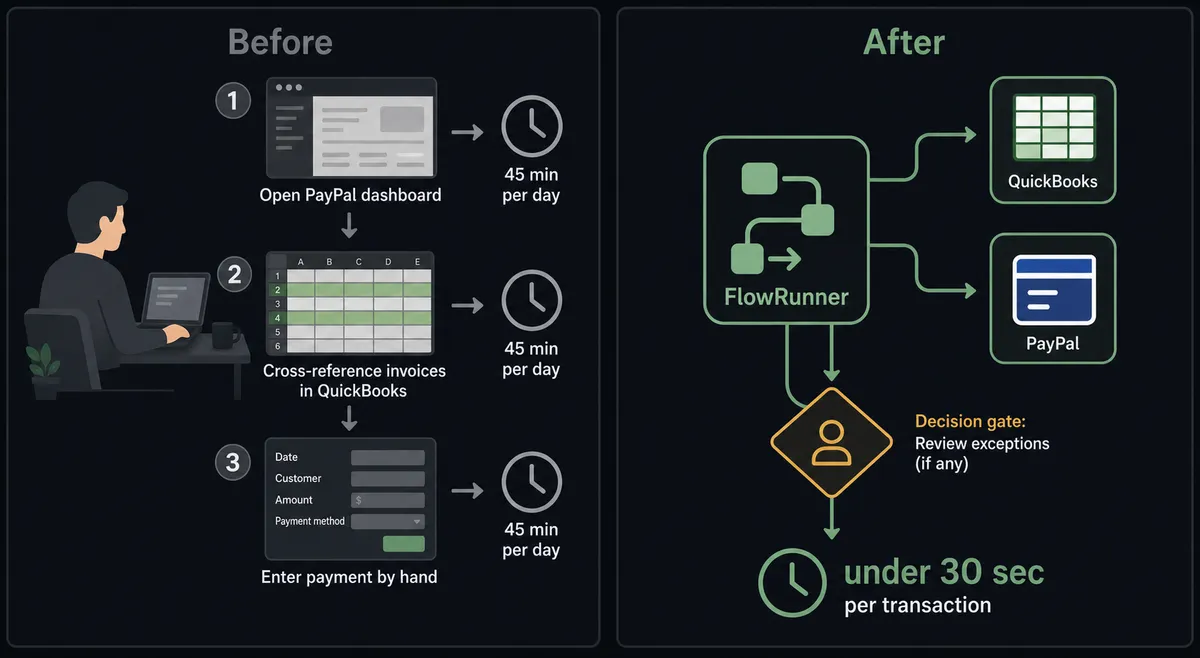
Finance teams running PayPal alongside QuickBooks Online face the same daily grind. Someone opens PayPal, finds the day’s captured payments, cross-references them against open invoices in QuickBooks, and enters each one by hand. When the volumes are low this is tedious. When the volumes grow it becomes a reconciliation risk. Payments fall through the cracks when the person doing data entry is out sick or swamped with closes. Invoices stay open past their due date because nobody ran the sweep that week.
Batch payout day is its own problem. Assembling contractor and affiliate payouts from a spreadsheet, verifying the totals, entering each recipient into PayPal, and getting a second set of eyes on the amount before releasing funds is a half-day job done manually. One wrong amount or one missed recipient is expensive to unwind after funds leave your account. The AP clerk doing the work knows this, which is why the job takes as long as it does.
How it works: the connection
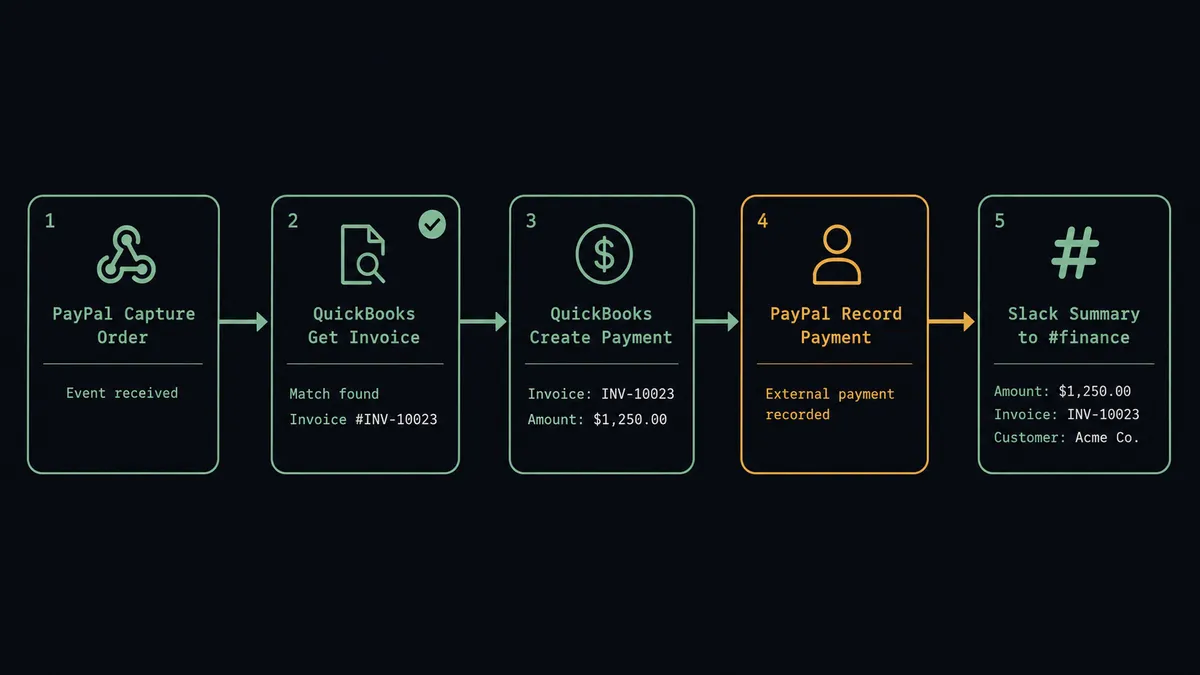
The most common connection handles payment recording. When a buyer completes a PayPal Checkout order, the agent calls PayPal Get Order to confirm the capture status and pull the amount and payer details. It calls QuickBooks Get Customer to find the matching customer record, then QuickBooks Get Invoice to locate the open invoice. With the match confirmed, it calls QuickBooks Create Payment to mark the invoice paid and PayPal Record Payment to close the PayPal side. The agent posts a one-line summary to your finance Slack channel: payment amount, invoice number, customer name.
For outbound billing, the flow runs the other way. The agent pulls an open invoice from QuickBooks using Get Invoice, reads the line items and recipient, calls PayPal Generate Invoice Number, creates the PayPal invoice with Create Draft Invoice, and delivers it with Send Invoice. The billing cycle that used to mean re-keying line items from QuickBooks into PayPal becomes a step the agent completes on its own.
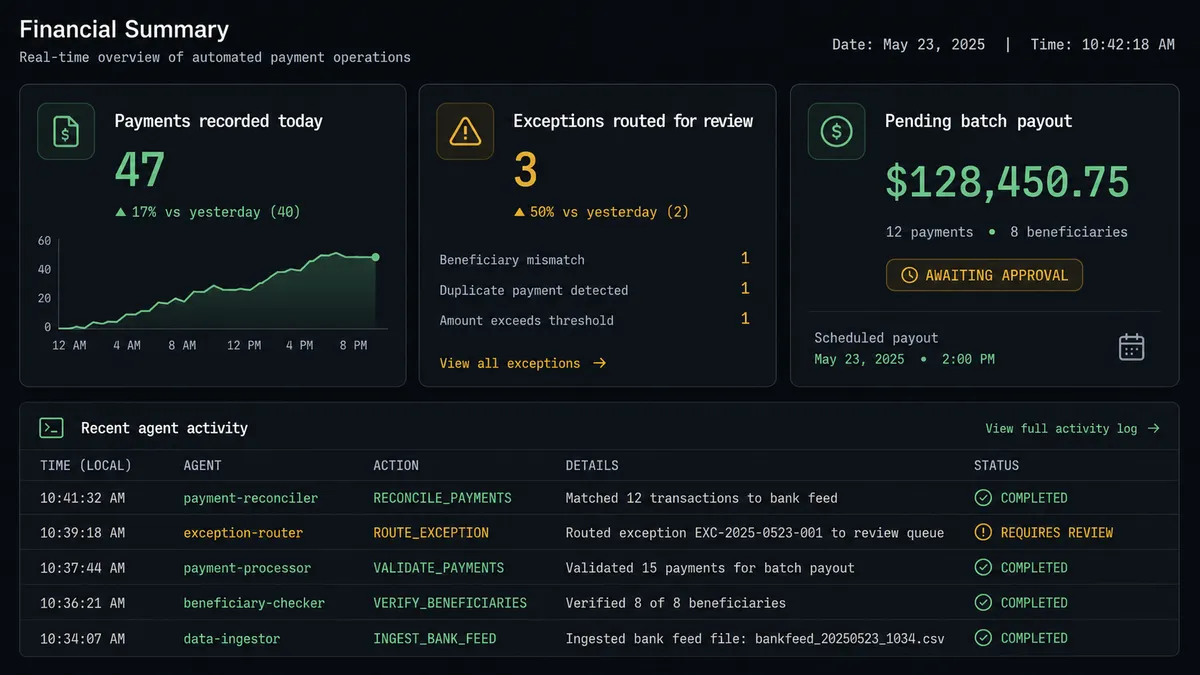
For payout runs, the agent reads your recipient list, builds the batch, calls PayPal Create Batch Payout, and holds it for a human before releasing. After the human confirms, the agent sends the batch and calls PayPal Get Payout Batch to confirm delivery status for each recipient.
Can an AI agent run it? (and why a human stays in the loop)
A straight sync connects the systems. An AI agent runs them with judgment.
The difference shows up in the exceptions. A sync tool records every captured PayPal payment in QuickBooks regardless of whether it matches an open invoice, whether the amount fits the vendor’s history, or whether the vendor is new to your books. It does not distinguish between a $400 recurring charge from a supplier you have paid for three years and a $40,000 first-time charge from a vendor your team has never seen. Both post automatically.
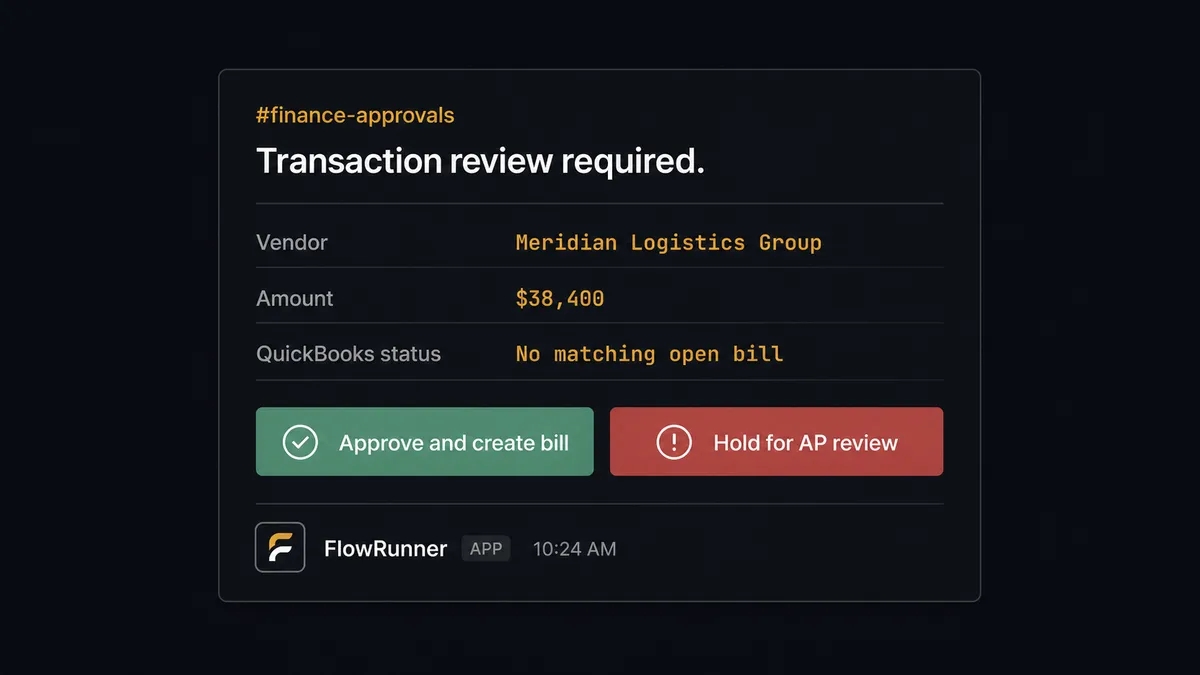
The agent’s instructions tell it what routine looks like: known vendors, amounts consistent with prior payments, PayPal captures that match open QuickBooks invoices within a reasonable tolerance. When the data fits that pattern, the agent posts the payment and moves on. When it does not, the agent invokes the human-in-loop flow as a callable tool.
Here is what that looks like in practice. A $38,400 PayPal capture arrives from a vendor that has never appeared in your QuickBooks records. The agent runs PayPal Get Captured Payment, pulls the amount and payer, then runs QuickBooks Get Vendor and finds no match. Rather than creating a new vendor and bill automatically, the agent decides the risk of being wrong is too high. It packages the transaction details: vendor name, amount, capture ID, and the fact that no matching record exists in QuickBooks. It sends that package to the AP manager through Slack with Approve and Reject options. The AP manager reviews and clicks Approve. The agent calls QuickBooks Create Vendor, then QuickBooks Create Bill, then routes the bill for payment approval. The approver’s identity and the timestamp are written to the audit trail.
This is not a hardcoded threshold. The agent might auto-process a $15,000 payment from a vendor with a year of clean history and flag a $3,000 charge from a vendor it has never seen. The context is what matters, and the agent evaluates the context. This is the digital andon cord: the agent stops the line when the cost of being wrong is too high to automate.
FlowRunner vs Zapier
Zapier is the most common tool non-technical teams reach for when they want to sync PayPal and QuickBooks Online. It is genuinely good at exactly that: trigger fires, action runs, data moves. For simple, predictable connections it is fast to set up and it works.
The differences matter at the point where simple connections become financial workflows.
| Zapier | FlowRunner | |
|---|---|---|
| Human-in-loop | Not available. Zaps run to completion or fail. No native pause-and-ask. | Native. The agent invokes a human-in-loop subflow as a callable tool and resumes after the decision. |
| Agent reasoning | Not available. Steps execute in fixed order. No conditional logic beyond filters. | The AI agent reads each transaction, evaluates context, and decides which actions to call and in which order. |
| Audit trail | Zap run history shows execution logs. No approver identity or decision record. | Every agent action, human decision, approver identity, and timestamp are captured in the audit trail. |
| Unlimited users | Zapier bills per seat at higher tiers. | All FlowRunner tiers include unlimited users and unlimited workflows. |
| BYOK AI | Zapier’s AI features use Zapier’s own AI. You cannot bring your own model. | Full BYOK. Bring your own keys from any AI provider. |
| Self-hosting | Not available. | Community Edition is free for self-hosted deployments. Enterprise adds multi-instance clustering. |
Zapier’s strength is speed for simple connections. FlowRunner’s case is for finance workflows where the agent needs to reason about what it finds, not just move data from A to B.
Before and after
| Category | Before | After |
|---|---|---|
| Payment recording | Bookkeeper logs each PayPal capture in QuickBooks by hand, usually in batches at end of day | Payment recorded in QuickBooks within seconds of PayPal capture confirmation |
| Invoice reconciliation | Invoices stay open until someone runs the manual reconciliation sweep | Invoice marked paid automatically when the matching PayPal payment is captured and confirmed |
| Exception handling | All transactions post the same way. Unusual amounts and unknown vendors go undetected until month-end close | Agent flags mismatches and first-time vendors before posting. Finance team sees only the exceptions that need a human |
| Batch payout risk | Contractor payouts assembled by hand from a spreadsheet. No automated second check before money leaves | Agent prepares the full batch and holds it for human confirmation. Finance manager sees total and recipient count before release |
| Outbound billing | PayPal invoices built by re-keying line items from QuickBooks | Agent reads QuickBooks invoice, generates PayPal invoice number, creates and sends in one flow |
| Audit trail | Payment entry timestamps exist. Approver identity for exceptions is not captured | Every transaction, human decision, approver identity, and timestamp recorded in the audit trail |
What you can build
Payment sync with exception routing. The agent captures a PayPal payment, calls QuickBooks Get Invoice to find the match, records it with Create Payment, and flags any transaction where the amounts differ or the vendor is new to your books. Routine payments post in seconds. Exceptions route to finance before anything touches QuickBooks.
Automated outbound billing. When a project milestone closes in your project system, the agent calls QuickBooks Get Invoice to pull the line items, generates a PayPal invoice number with Generate Invoice Number, creates the invoice with Create Draft Invoice, and delivers it with Send Invoice. Billing that used to mean switching between two systems becomes a background step.
Batch payout with a release gate. The agent assembles your contractor and affiliate payout list, calls PayPal Create Batch Payout, and routes the batch total and recipient count to the finance manager through Slack before releasing. After confirmation, the agent sends the batch and calls Get Payout Batch to confirm per-recipient delivery status.
Subscription and AR sweep. On a daily schedule, the agent calls PayPal List Invoices to sweep for overdue invoices, cross-references QuickBooks List Invoices to confirm AR status, and routes overdue items to the billing manager with the customer details and the outstanding amount.
Refund processing under a review gate. When a return or dispute is approved in your order management system, the agent calls PayPal Refund Captured Payment and QuickBooks Void Payment. Both actions are routed through a human approval step before execution. The approver sees the original charge, the refund amount, and the reason before confirming.
Common questions
Is it free to connect PayPal and QuickBooks Online on FlowRunner?
FlowRunner has a free plan with 100 executions a month, every integration included, and no credit card required, and new accounts get 14 days of Professional on top. After the trial, the Growth plan starts at $45 per month and includes unlimited users and workflows.
Can I self-host FlowRunner?
Yes. FlowRunner offers a free Community Edition for self-hosted single-instance deployments and an Enterprise self-hosted tier with multi-instance clustering and a full compliance suite.
Does the AI agent need my own OpenAI key?
FlowRunner uses a BYOK model, meaning you bring your own keys from whichever AI provider you prefer. You are not locked into one model or vendor.
What happens when the agent is not sure about a transaction?
The agent invokes a human-in-loop flow as a callable tool. It pauses execution, packages the transaction details and its reasoning, sends a message to the right person through Slack, email, or another channel, and waits for a response before continuing. The decision and approver identity are captured in the audit trail.
Does this connection work for batch payouts, not just single payments?
Yes. The agent can assemble a full PayPal batch payout from your recipient list and hold it behind a human release gate before funds move. The finance team sees the total and recipient count, confirms, and the agent releases the batch.
What if a PayPal invoice amount does not match the QuickBooks record?
The agent detects the discrepancy during its check step and escalates to your AP team with both figures and the source documents. It does not post a mismatched amount to your books automatically.
Getting started
FlowRunner has a free plan with 100 executions a month, every integration included, and no credit card required, and new accounts get 14 days of Professional on top. Corporate email required to start.
Connect both integrations from the FlowRunner integrations panel:
Start your workflow at flowrunner.ai. If you want to walk through the setup or discuss a specific use case first, book a 30-minute intro at calendly.com/flowrunner/intro.
Frequently asked questions
Is it free to connect PayPal and QuickBooks Online on FlowRunner?
FlowRunner has a free plan with 100 executions a month, every integration included, and no credit card required, and new accounts get 14 days of Professional on top. After the trial, the Growth plan starts at $45 per month and includes unlimited users and workflows.
Can I self-host FlowRunner?
Yes. FlowRunner offers a free Community Edition for self-hosted single-instance deployments and an Enterprise self-hosted tier with multi-instance clustering and a full compliance suite.
Does the AI agent need my own OpenAI key?
FlowRunner uses a BYOK model, meaning you bring your own keys from whichever AI provider you prefer. You are not locked into one model or vendor.
What happens when the agent is not sure about a transaction?
The agent invokes a human-in-loop flow as a callable tool. It pauses execution, packages the transaction details and its reasoning, sends a message to the right person through Slack, email, or another channel, and waits for a response before continuing. The decision and approver identity are captured in the audit trail.
Does this connection work for batch payouts, not just single payments?
Yes. The agent can assemble a full PayPal batch payout from your recipient list and hold it behind a human release gate before funds move. The finance team sees the total and recipient count, confirms, and the agent releases the batch.
What if a PayPal invoice amount does not match the QuickBooks record?
The agent detects the discrepancy during its check step and escalates to your AP team with both figures and the source documents. It does not post a mismatched amount to your books automatically.