Mollie + QuickBooks Online: Every Payout Posted, Refunds Gated
Connect Mollie and QuickBooks Online so settlements post to your books automatically, with an AI agent that pauses for human approval before a refund or mandate revocation goes through.
How do you connect Mollie to QuickBooks Online?
You connect Mollie and QuickBooks Online by building a FlowRunner workflow that calls Mollie List Settlement Payments to break a payout into its individual payments, refunds, and chargebacks, then calls QuickBooks Create Payment to post each matched line to the right invoice. FlowRunner is a visual AI-agent orchestration platform where automations run autonomously and pause for human judgment on the steps that carry real consequence. That same connection runs as an AI agent: the agent reads each settlement and refund request, decides whether it is routine or needs a human, and routes the exceptions to your finance team before anything posts to your books or leaves your account.
The problem it solves
Finance teams running Mollie alongside QuickBooks Online hit the same wall every payout cycle. A settlement lands in the bank account as one lump sum. Someone, usually a billing manager or a bookkeeper, opens Mollie’s dashboard, pulls the list of payments inside that payout, and manually matches each one against an open QuickBooks invoice in a spreadsheet. Mollie’s own fees get deducted from the same deposit, so the spreadsheet also has to reconcile those against the fee invoices before the numbers tie out. This is the kind of work that eats a full day at month end and never quite gets caught up when volumes climb.
Refunds carry a sharper risk. A support agent flags a refund request, someone logs into the Mollie dashboard, finds the payment, and issues the refund by hand, with no consistent check against the customer’s history or whether a chargeback is already open on the same payment. Chargebacks themselves often surface late, when the settlement arrives short and someone has to go digging to figure out why. None of this is a data problem exactly. It is exceptions falling through the cracks because nobody has time to check every payment against every rule before it happens.
How it works: the connection
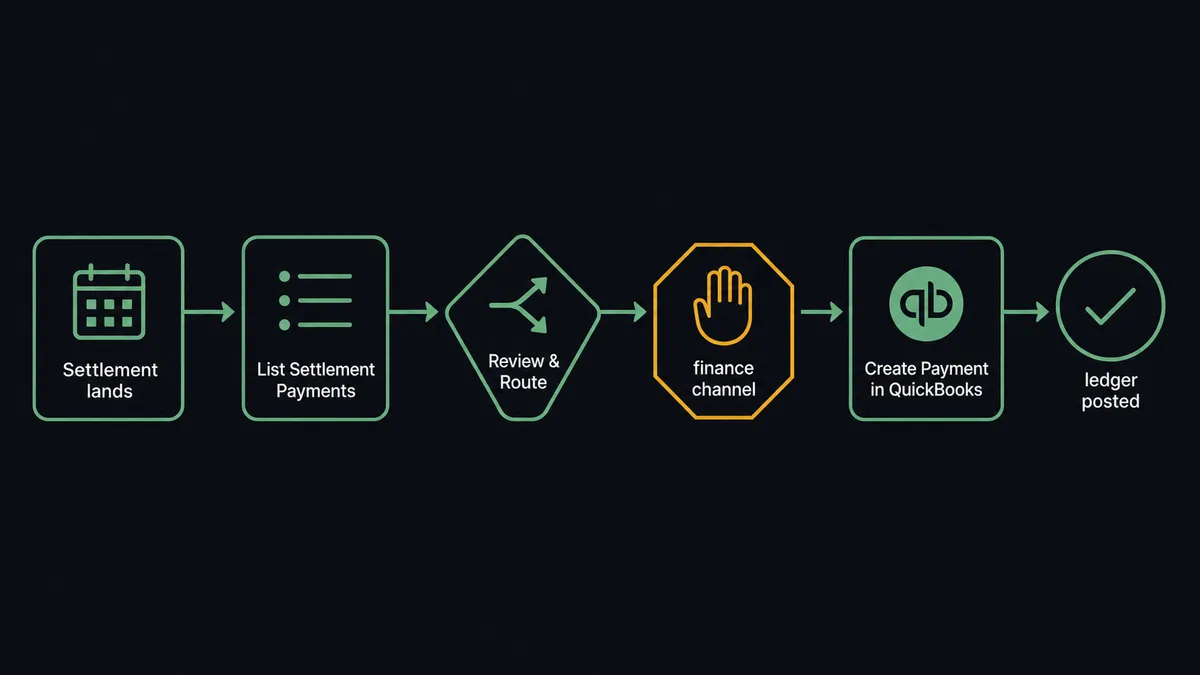
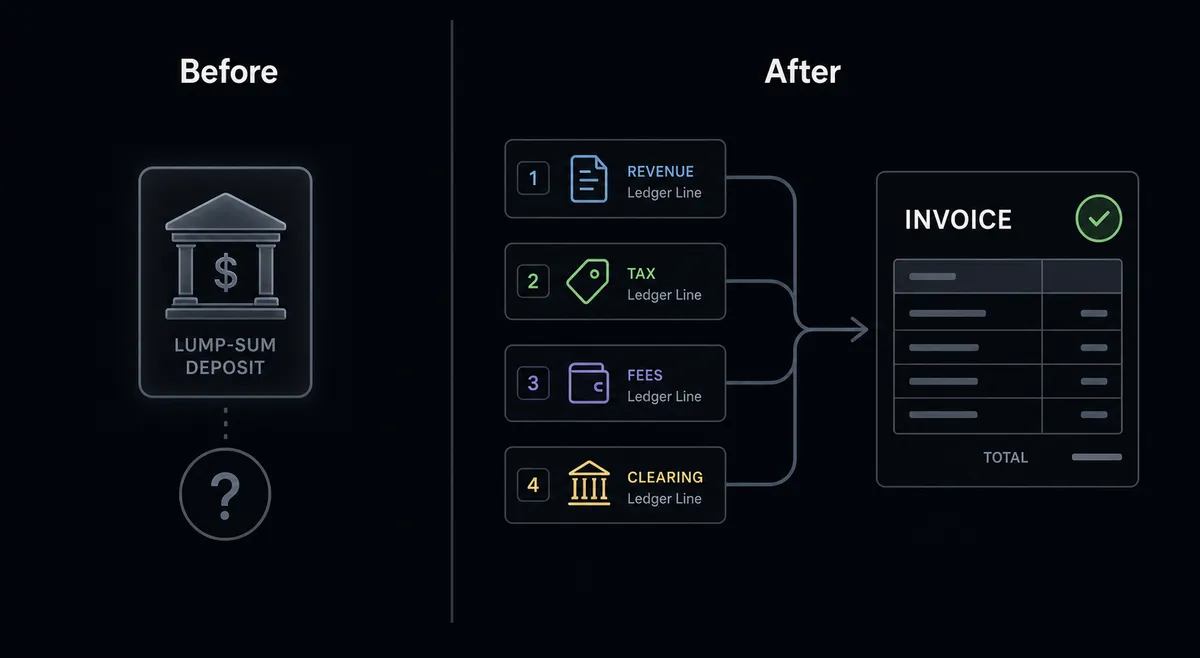
The core connection handles settlement reconciliation. When a payout appears in Mollie List Settlements, the agent calls List Settlement Payments to break it into the individual payments, refunds, and chargebacks it contains. For each payment line, it calls QuickBooks Get Invoice or Get Customer to find the matching record, then QuickBooks Create Payment to mark the invoice paid. Mollie’s Get Balance Report and List Balance Transactions cover the money still in flight between settlements, and List Invoices matches Mollie’s own fee deductions against the deposit total, so the lump sum in the bank account resolves into ledger lines that already tie out.
Refunds run the other direction. When support flags a refund request, the agent calls Mollie Get Payment to confirm the payment is paid, pull the remaining refundable amount, and check for any open chargeback on the same payment. Below the approval threshold and with no dispute open, the agent calls Create Refund and the case closes on its own. Payment link invoicing works the same way: the agent calls Create Payment Link, watches List Payment Link Payments for completion, and reconciles paid links against the originating QuickBooks invoice automatically.
Can an AI agent run it? (and why a human stays in the loop)
A straight sync connects the systems. An AI agent runs them with judgment.
The difference shows up at the point where a decision carries weight instead of just moving data. A sync tool refunds a payment or posts a settlement line the same way every time, regardless of whether the customer has an open dispute, whether the refund amount is out of pattern, or whether the account it is touching still has an active subscription attached. Mollie is explicit that some of its actions cannot be undone: Revoke Mandate cancels a customer’s authorization to be charged, fails any pending subscription payment, and cancels every subscription using that mandate. There is no reversing it. Getting the customer’s consent back means getting them through checkout again.
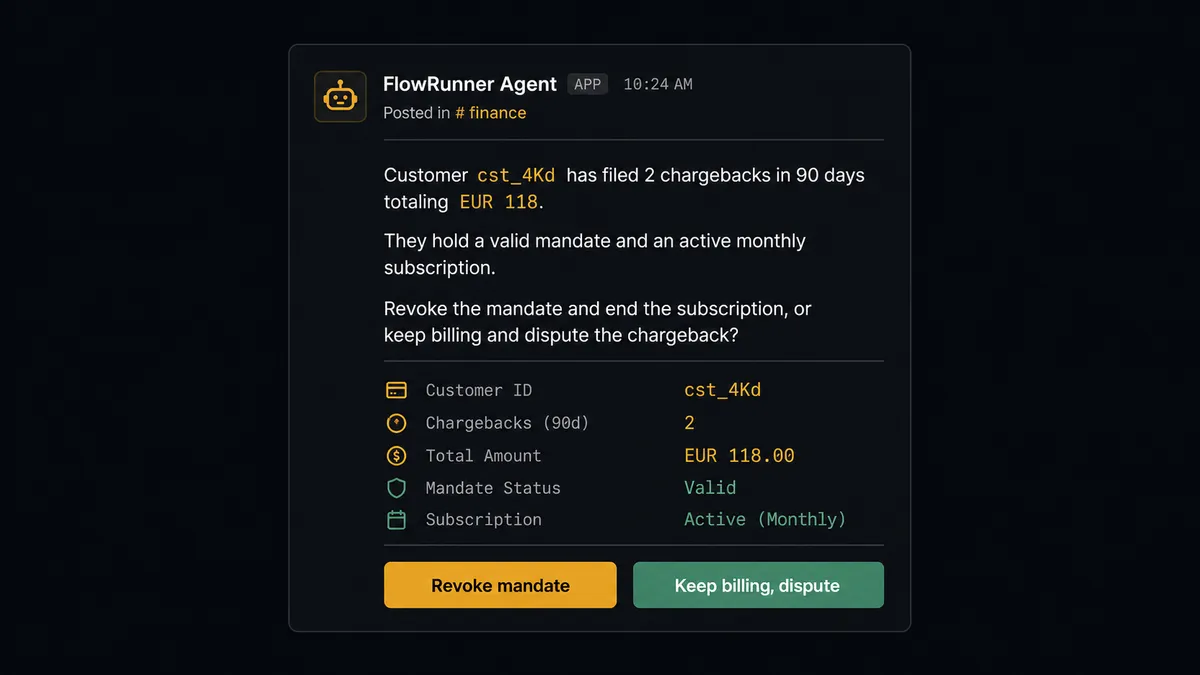
Here is what that looks like in practice. The chargeback watch finds a second dispute filed by the same customer within 90 days. The agent does not revoke the mandate on its own. It runs Mollie Get Chargeback on both disputes, pulls the customer’s payment and subscription history with List Customer Payments and Get Subscription, and packages the case: two chargebacks totaling EUR 118, a valid mandate, an active subscription still billing. It sends that package to the billing owner with two options: revoke the mandate and end the subscription, or keep billing and dispute the chargebacks. One option protects revenue; the other stops the bleeding immediately. That trade-off belongs to a person. The agent’s job is making the decision take thirty seconds instead of an afternoon of lookups across two systems.
This is not a hardcoded threshold. The agent might auto-approve a EUR 40 refund for a returning customer with years of clean history and escalate a EUR 200 refund from a first-time buyer whose payment shows a chargeback flag. The context is what matters, and the agent evaluates the context. This is the digital andon cord: the agent stops the line when the cost of being wrong is too high to automate.
FlowRunner vs n8n
n8n is the tool technical teams reach for to build workflows like this. It is genuinely capable: a large node library, real branching logic, and enough flexibility to model most of what a settlement reconciliation flow needs, if someone on the team can build and maintain it in a technical editor.
The differences matter once the workflow has to make a judgment call, not just execute a fixed path.
| n8n | FlowRunner | |
|---|---|---|
| Human-in-loop | No native pause-and-resume tool. Approval gates are typically built as manual webhook workarounds. | Native. The agent invokes a human-in-loop subflow as a callable tool and resumes after the decision. |
| Agent reasoning | LangChain agent nodes exist, but human oversight sits outside the agent, not built into the same reasoning loop. | The AI agent reads each payment or settlement line, evaluates context, and decides which actions to call and when to pause. |
| Audit trail | Execution history is available; full audit retention with approver identity requires the custom-priced Enterprise tier. | Every agent action, human decision, approver identity, and timestamp captured in the audit trail from the Professional tier ($299/mo). |
| Setup and maintenance | Built and maintained in a technical workflow editor. Usually requires a developer on the team. | Built visually. Finance and ops teams can build and adjust the flow without engineering support. |
| Unlimited users | n8n’s cloud Pro tier scales by workflow executions, not seats, but full compliance features sit behind custom Enterprise pricing. | All FlowRunner tiers include unlimited users and unlimited workflows, with compliance built in starting at Professional. |
n8n’s strength is flexibility for teams with engineering resources to build and maintain the workflow. FlowRunner’s case is for finance teams who need the agent to reason about refunds and chargebacks and who want that judgment call, and the record of it, built in from day one.
Before and after
| Category | Before | After |
|---|---|---|
| Refund processing | Someone logs into the Mollie dashboard, finds the payment, and refunds it by hand | Every refund is verified against payment status and chargeback history, thresholded, approved, and logged |
| Chargeback visibility | Disputes surface when the settlement arrives short, not when they open | New chargebacks are pulled daily, tied to their payments, and routed for response |
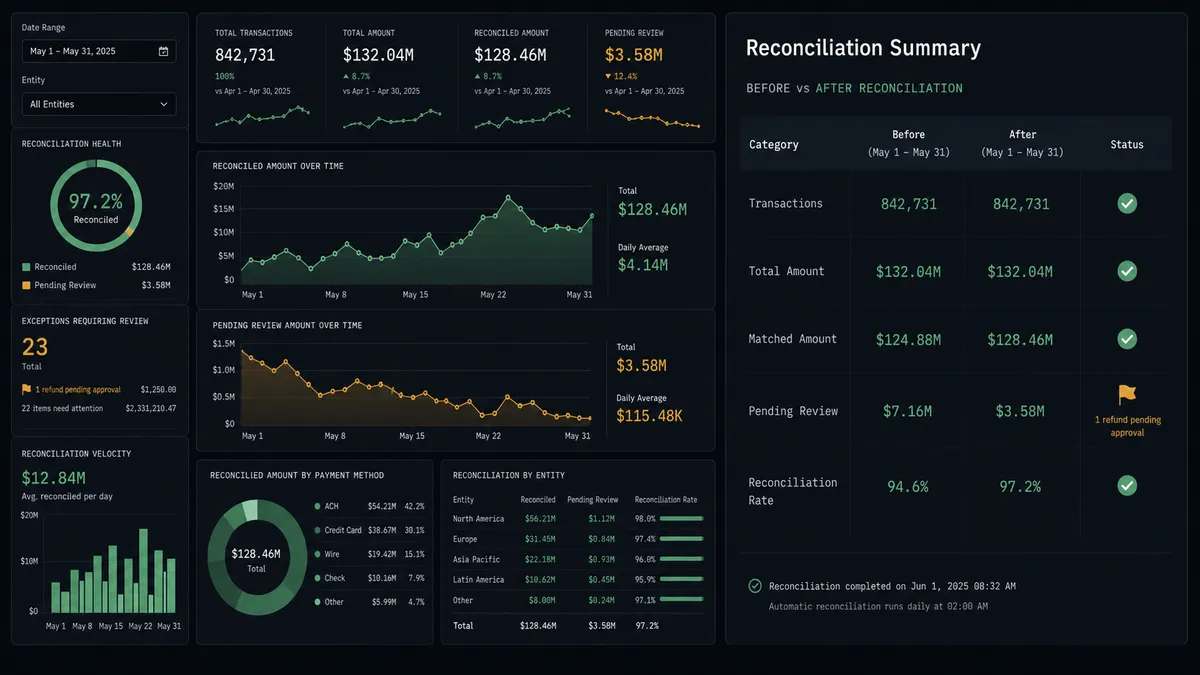
| Settlement reconciliation | Payouts matched to payments in a spreadsheet at month end | Each payout is broken into its payments and posted to the QuickBooks ledger automatically |
| Fee reconciliation | Mollie’s fee deductions checked manually against the deposit total | Fee invoices matched to balance deductions as part of the same reconciliation run |
| Mandate and subscription risk | Revocations and cancellations made ad hoc, with no consistent second check | Repeat chargebacks and cancellations route to a billing owner with full history before anything irreversible happens |
What you can build
Settlement-to-ledger reconciliation. On a schedule, the agent calls Mollie List Settlements and List Settlement Payments, matches each line to an open QuickBooks invoice with Get Invoice, and posts it with Create Payment. Month-end close becomes a review of the exceptions the agent already flagged, not a spreadsheet exercise.
Refunds with a built-in audit trail. A refund request arrives from support. The agent calls Mollie Get Payment to confirm status and check for open chargebacks, issues the refund automatically under threshold, and routes anything above it to finance with the customer’s full payment history attached.
Payment link invoicing. When an invoice is issued in QuickBooks, the agent calls Mollie Create Payment Link with the amount and reference, emails the customer the link, and watches List Payment Link Payments for completion. Paid links reconcile against the QuickBooks invoice automatically; unpaid links past due trigger a reminder.
Chargeback and mandate risk review. The agent watches List All Chargebacks daily. A repeat dispute from the same customer triggers a case package, sent to the billing owner, before Revoke Mandate or Cancel Subscription ever runs.
Fee-aware payout accounting. The agent cross-references Mollie List Invoices against balance deductions from Get Balance Report, so QuickBooks reflects the net deposit correctly instead of the gross payment total.
Common questions
Is it free to connect Mollie and QuickBooks Online on FlowRunner?
FlowRunner has a free plan with 100 executions a month, every integration included, and no credit card required, and new accounts get 14 days of Professional on top. After the trial, the Growth plan starts at $45 per month and includes unlimited users and workflows.
Can I self-host FlowRunner?
Yes. FlowRunner offers a free Community Edition for self-hosted single-instance deployments and an Enterprise self-hosted tier with multi-instance clustering and a full compliance suite.
Does the AI agent need my own OpenAI key?
FlowRunner uses a BYOK model, meaning you bring your own keys from whichever AI provider you prefer. You are not locked into one model or vendor.
What happens when the agent is not sure about a refund or a chargeback?
The agent invokes a human-in-loop flow as a callable tool. It pauses execution, packages the payment history and its reasoning, sends a message to the right person through Slack, email, or another channel, and waits for a response before continuing. The decision and approver identity are captured in the audit trail.
Does this connection handle Mollie settlements, not just single payments?
Yes. The agent calls Mollie List Settlement Payments to break a payout into its individual payments, refunds, and chargebacks, then posts the breakdown to QuickBooks so a lump-sum deposit resolves into matched ledger lines automatically.
What if a Mollie refund amount looks unusual?
The agent compares the refund against the customer’s payment history and the auto-approve threshold during its check step. Above threshold or against a customer with an open chargeback, it escalates to finance instead of issuing the refund.
Getting started
FlowRunner has a free plan with 100 executions a month, every integration included, and no credit card required, and new accounts get 14 days of Professional on top. Corporate email required to start.
Connect both integrations from the FlowRunner integrations panel:
Start your workflow at flowrunner.ai. If you want to walk through the setup or discuss a specific use case first, book a 30-minute intro at calendly.com/flowrunner/intro.
Frequently asked questions
Is it free to connect Mollie and QuickBooks Online on FlowRunner?
FlowRunner has a free plan with 100 executions a month, every integration included, and no credit card required, and new accounts get 14 days of Professional on top. After the trial, the Growth plan starts at $45 per month and includes unlimited users and workflows.
Can I self-host FlowRunner?
Yes. FlowRunner offers a free Community Edition for self-hosted single-instance deployments and an Enterprise self-hosted tier with multi-instance clustering and a full compliance suite.
Does the AI agent need my own OpenAI key?
FlowRunner uses a BYOK model, meaning you bring your own keys from whichever AI provider you prefer. You are not locked into one model or vendor.
What happens when the agent is not sure about a refund or a chargeback?
The agent invokes a human-in-loop flow as a callable tool. It pauses execution, packages the payment history and its reasoning, sends a message to the right person through Slack, email, or another channel, and waits for a response before continuing. The decision and approver identity are captured in the audit trail.
Does this connection handle Mollie settlements, not just single payments?
Yes. The agent calls Mollie List Settlement Payments to break a payout into its individual payments, refunds, and chargebacks, then posts the breakdown to QuickBooks so a lump-sum deposit resolves into matched ledger lines automatically.
What if a Mollie refund amount looks unusual?
The agent compares the refund against the customer's payment history and the auto-approve threshold during its check step. Above threshold or against a customer with an open chargeback, it escalates to finance instead of issuing the refund.