How to Connect Outlook with Caspio (With or Without an AI Agent)
Turn emails in a shared Outlook inbox into structured Caspio records, with an AI agent that extracts the fields, validates them against the live schema, and pauses for a person before it overwrites an existing production record or replies to the sender.
How do you connect Outlook to Caspio?
Neither service exposes a trigger, so you connect Outlook to Caspio with a polling workflow: Get Emails reads the intake inbox every 15 minutes, each message’s fields are extracted and validated against the live schema from Describe Table, and Insert Table Record writes each new entry into the table your Caspio app runs on. FlowRunner is a visual AI-agent orchestration platform where automations run autonomously and pause for human judgment on the steps that carry real consequence. Run as an AI agent, the same connection reads the unstructured email a human would have read, checks for an existing record with Query Table Records, and pauses for a person before it overwrites production data or replies to the sender.
The problem it solves
Every Caspio app has an unofficial second interface: the inbox. The app has clean DataPages for structured entry, but suppliers, applicants, field staff, and partners send email instead. So a person reads each message, opens the app, and rekeys what the email said into the form: name, reference number, dates, amounts, details. The table’s data quality is capped by the transcription accuracy of whoever was on inbox duty, and its freshness is capped by how often anyone gets to the pile.
The failure modes compound quietly. An email updates a case that already has a record, and the person on duty creates a duplicate instead, splitting the history in two. A correction email overwrites good data with a misreading. Senders who get no acknowledgment email again, generating a second message that becomes a second record. The database that your reports, DataPages, and downstream decisions rest on is fed by the least controlled process in the operation, and nobody can say afterward which email produced which row.
How it works: the connection
The connection reads from Outlook and writes to Caspio. Here is the plain version, grounded in the real connector actions.
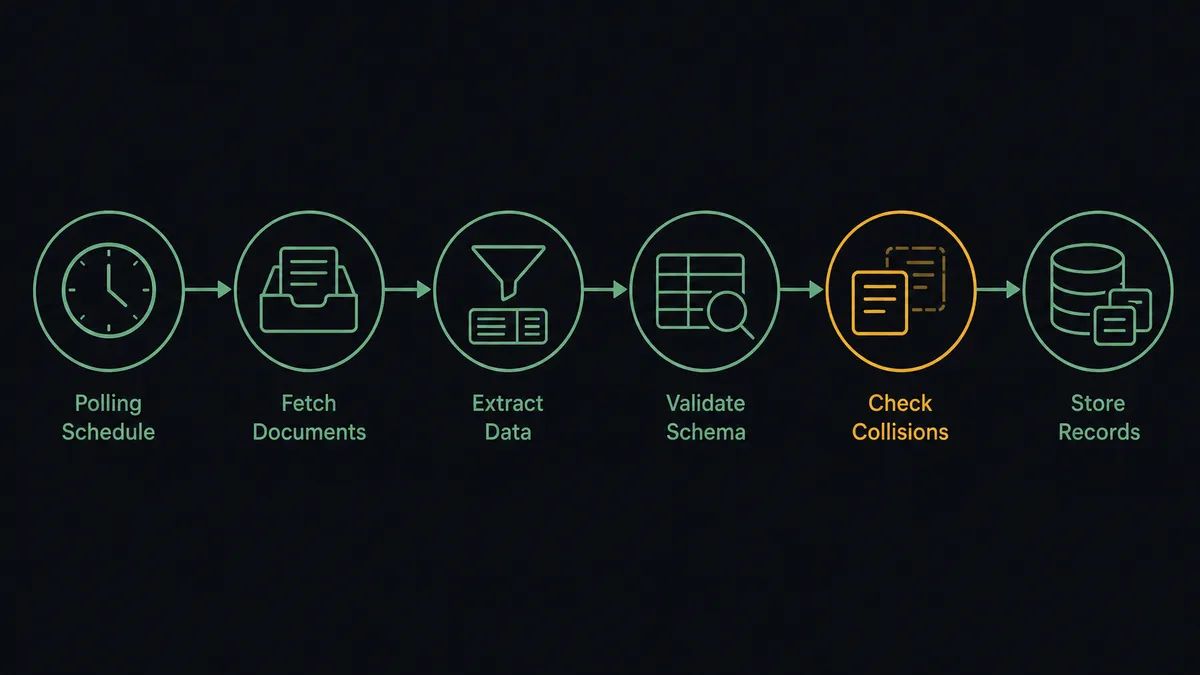
- Trigger: On a schedule, Get Emails polls the intake inbox every 15 minutes for new messages.
- Read: The workflow pulls each message with Get Email and classifies it: a new submission, a follow-up to an existing case, or something else entirely.
- Extract: It extracts the structured fields from the unstructured body: sender identity, reference numbers, dates, and the details the table needs.
- Validate: It checks the extraction against the live schema from Describe Table, so typed fields get typed values and required fields are actually present.
- Check for collisions: It calls Query Table Records for the sender and reference, so an email about an existing case never blindly becomes a second record.
- Write: Clean new entries go in with Insert Table Record; follow-ups on existing records are staged as proposed updates.
- Acknowledge: It stages a receipt confirmation with Create Draft Email in the original thread, released with Send Draft Email, and files the processed message out of the active queue.
That is the “just connect them” answer. The inbox becomes a real intake channel: structured, validated, deduplicated, and acknowledged, on a 15-minute rhythm.
Can an AI agent run it? (and why a human stays in the loop)
Yes, and extraction is precisely where reasoning beats templates. A parser built on fixed rules breaks the first time a supplier reorders their sentences. An AI agent reads the email the way the person on inbox duty did, and it holds the real actions as tools: Get Emails, Get Email, Reply to Email, Forward Email, Create Draft Email, Send Draft Email on the mail side; List Tables, Describe Table, Query Table Records, Insert Table Record, Update Table Records on the database side. It maps what the sender meant onto the fields the schema actually defines, asks the sender for what is missing instead of inserting a hollow row, and forwards the messages that were never intake at all to the right person with Forward Email.
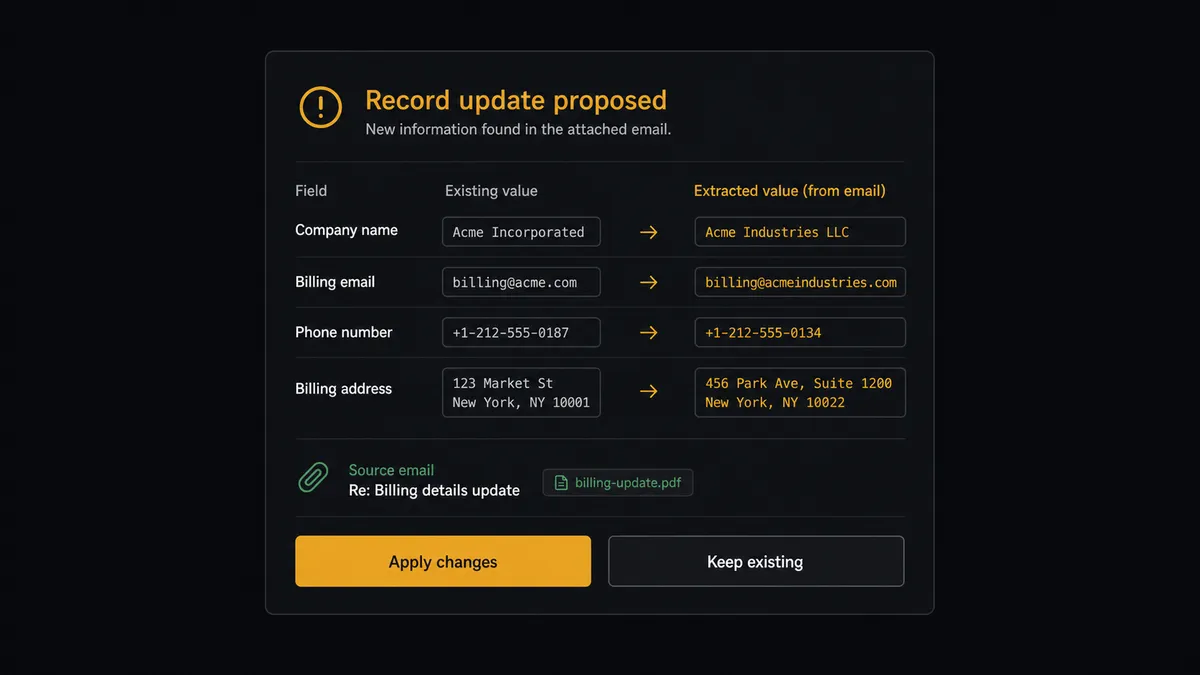
Two steps carry consequence. The first is Update Table Records on an existing row: production data your app, reports, and downstream flows already depend on, where an overwrite destroys the previous value. When Query Table Records finds a collision, the agent builds a field-by-field diff, existing value beside extracted value, source email attached, and invokes a human-in-loop flow it holds as a callable tool. The workflow pauses and posts to the intake channel: “Follow-up received for record [reference]. Proposed changes: [field diff]. Source email attached. Apply, apply partially, or keep the existing record?” Only the approved fields change, and the approver’s name, the diff, and the timestamp land in the audit trail beside the source message.
The second is the outbound reply. An email from the real mailbox to an applicant or supplier speaks for the organization, so beyond routine receipt confirmations, replies stage as drafts a person releases with Send Draft Email. Prospects call the pattern a digital andon cord: like Toyota’s quality control pull cord, the workflow stops the line the moment it hits uncertainty, and your team pulls it back into motion.
FlowRunner vs Fivetran
Builders mapping their data stack will know Fivetran as the benchmark for managed pipelines, and the reputation is earned. Its connectors land source data in a warehouse with automated schema handling and near-zero maintenance, which is why it is the default answer for getting operational data into analytics.
But this pair is not a pipeline problem. The source here is unstructured email, which is not a Fivetran source, and the destination is a live operational table, not an analytics warehouse. FlowRunner is built around native human-in-the-loop and AI-agent orchestration: an agent doing extraction and judgment, with a person on the writes that change history. Here is the honest side-by-side.
| What matters for this pair | FlowRunner | Fivetran |
|---|---|---|
| Human-in-the-loop on overwriting production records | Native. The agent invokes an approval flow as a callable tool and pauses before Update Table Records changes an existing row | Outside the product’s scope: it replicates defined sources to destinations, with no review step in between |
| Who runs the flow | An AI agent extracts fields from unstructured email, validates, and picks actions as tools | Managed connectors replicating structured sources on a sync schedule |
| Users included | Unlimited users on every tier | Seat and usage terms set by plan |
| Bring your own AI keys | Yes, BYOK | No agent layer, so no model keys to bring |
| Self-hosted option | Yes, cloud-hosted or self-hosted | Delivered as a managed cloud service |
| Pricing model | Transparent workflow-based tiers with clear execution limits | Consumption pricing on monthly active rows, which moves with your data |
If you need your Caspio tables replicated into a warehouse for BI, Fivetran is the right tool for that job. If the job is turning an inbox into validated production records with a person on every overwrite, that is where FlowRunner is the better fit.
Before and after
The shift is qualitative: the least controlled process feeding your database becomes the most audited one.
| Category | Before | After |
|---|---|---|
| Intake speed | Emails wait for whoever is on inbox duty, sometimes days | Every message is read and processed within the 15-minute polling cycle |
| Data entry | Fields rekeyed by hand, accuracy capped by transcription | Extractions validated against the live schema before Insert Table Record runs |
| Duplicates | Follow-up emails become second records that split the history | Query Table Records catches collisions and routes them as proposed updates |
| Overwrites | A correction email silently replaces good data | Every change to an existing record is a field-by-field diff a person approves |
| Sender experience | No acknowledgment, so senders email again | Receipt confirmations go out in-thread, and clarifying questions replace silent guesswork |
What you can build
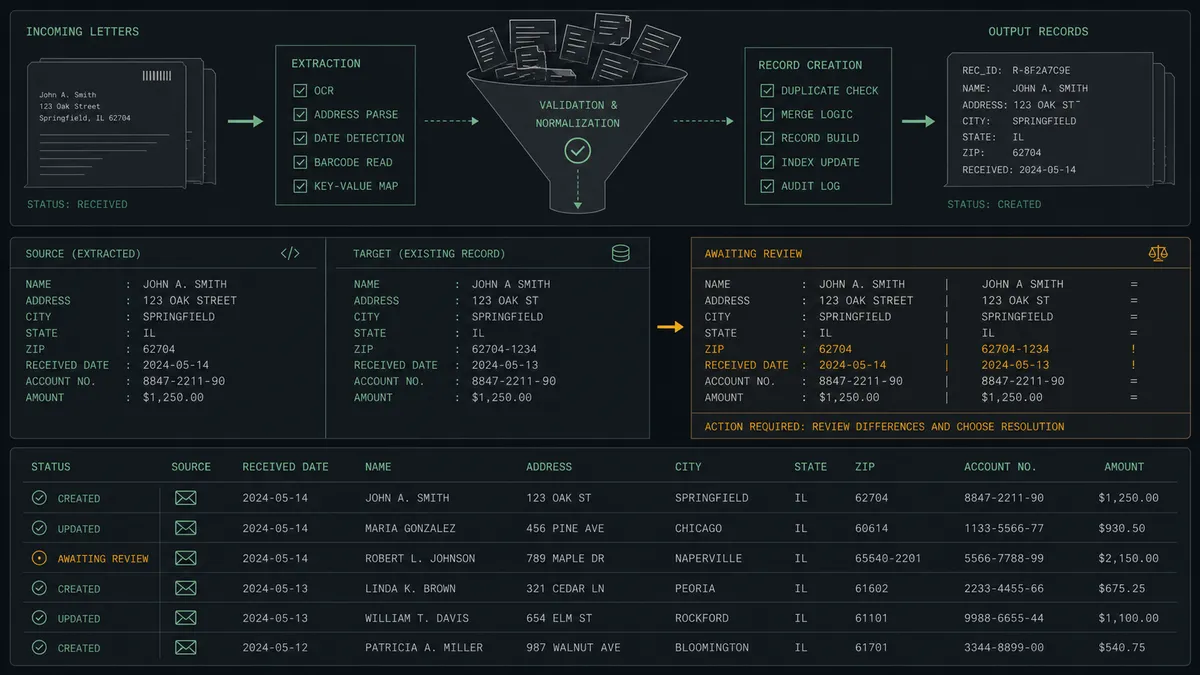
The intake digitizer. Get Emails polls the submissions inbox, the agent extracts and validates each message against Describe Table, and Insert Table Record writes clean rows with the source email referenced. The table grows from email without anyone rekeying.
The case-update channel. Follow-up emails about existing cases are matched with Query Table Records, diffed field by field, and applied with Update Table Records only after the owner approves, so corrections land without overwrites ever running on faith.
The completeness chaser. Submissions missing required fields trigger a clarifying reply drafted with Create Draft Email, sent in-thread after release. The agent holds the partial extraction and completes the record when the answer arrives, instead of inserting hollow rows that someone has to chase later.
The morning intake digest. Each morning the agent summarizes the prior day from the table via Query Table Records, new records, pending diffs, unanswered clarifications, and sends it to the intake owner with Send Email, so the state of the channel is one email, not an inbox archaeology session.
The misdirected-mail router. Messages that are not intake, invoices, complaints, general questions, are classified and forwarded to the right owner with Forward Email, with a one-line summary on top, so the intake inbox stays an intake inbox.
Getting started
Start on the free plan: 100 executions a month, every integration included, no credit card required, plus 14 days of Professional for new accounts. Both connectors are available on every tier, and every tier includes unlimited users and unlimited workflows, so the builder who maintains the app and the team who owns the inbox share one flow.
Explore the integration details:
- Outlook integration (21 actions covering email, drafts, folders, contacts, and calendar)
- Caspio integration (8 actions covering tables, views, queries, and bulk record operations)
Start building free at flowrunner.ai or book a demo to see a live Outlook to Caspio workflow, record-diff approval and all.
Frequently asked questions
Is it free to connect Outlook and Caspio on FlowRunner?
You can build and run the connection on FlowRunner's free plan, which includes 100 executions a month and every integration with no credit card required, and new accounts also get 14 days of Professional. Both connectors are available on every FlowRunner tier, and every tier includes unlimited users and unlimited workflows.
Can I self-host the Outlook to Caspio workflow?
Yes. FlowRunner offers a cloud-hosted option and a self-hosted option, so the connection can run inside your own environment.
Does the AI agent need my own OpenAI or Claude key?
FlowRunner uses a bring-your-own-keys model, so you connect the AI provider key you already have. You are not locked to one model.
What happens when an email matches a record that already exists in Caspio?
Nothing is overwritten. The agent finds the collision with Query Table Records, builds a field-by-field comparison of the existing record and the extracted values, and routes it to the owner. Update Table Records only runs on the fields a person approves.
Neither Outlook nor Caspio has a trigger, so what starts the workflow?
A schedule. The workflow polls the intake inbox with Get Emails every 15 minutes, extracts structured fields from each new message, validates them against the schema from Describe Table, and writes new entries with Insert Table Record.
How does the workflow handle emails it cannot extract cleanly?
It asks instead of guessing. When required fields are missing or ambiguous, the agent stages a clarifying reply with Create Draft Email for the sender, or routes the message to the intake owner with its partial extraction attached. No record enters the table below the confidence bar.